
Concierge
Updated
Use Concierge to build, debug, analyze, and test agent workflows in a project-scoped workspace.
Concierge is a project-scoped workspace for exploring, configuring, and troubleshooting your agents using natural language, without navigating each page individually. Use it to build and refine agent workflows, investigate issues, review your project setup, or test changes before deployment.
Open Concierge
- In Agora Console, select your project from the project dropdown at the top of the page.
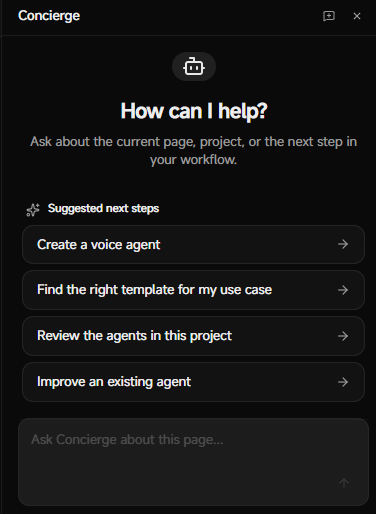
- From the page header, select Concierge. An AI Chat panel appears.
- Start a new thread, or continue an existing thread. Each thread maintains its own conversation history.
Build and optimize
Use concierge for the following tasks:
- Build: Create or refine your agent setup.
- Debug: Investigate errors, misconfigurations, or unexpected behavior.
- Analyze: Inspect project state, resources, or workflow design.
- Test: Validate behavior before you deploy changes.
You can also start a conversation with a custom prompt, for example:
Help me configure an agent for appointment reminders.
Why is my agent not using HubSpot during test calls?
Review this project and tell me which integrations are attached to my agent.
Help me prepare an outbound campaign with CSV variables.
For better results:
- State your goal, agent name, and expected outcome.
- Name the exact resource, such as a campaign or integration name.
- Use short, iterative requests instead of one large prompt when debugging.
- Re-run your request in Test mode after making changes.
Upload files
Concierge supports workflows that involve uploaded files, such as knowledge base documents and campaign CSVs. When Concierge needs a file, it prompts you to upload it, then continues the workflow.
Troubleshoot
If you don't get the desired results, check the following:
| Issue | Solution |
|---|---|
| Concierge cannot complete the task | Check that the required project resources exist. |
| Results are too broad | Include the exact agent, campaign, or integration name. |
| A file-based workflow stalls | Confirm the upload finished, then retry your instruction. |