# Fastboard quickstart (/en/realtime-media/whiteboard/build/set-up-and-build-your-first-app/get-started-uikit/android)
> For AI agents: see the complete documentation index at [llms.txt](/llms.txt).
The Fastboard SDK is the latest generation of the Whiteboard SDK launched by Agora to help developers quickly build whiteboard applications. The Fastboard SDK simplifies the APIs of the Whiteboard SDK and adds UI implementations. These improvements enable you to join a room with just a few lines of code and instantly experience real-time interactive collaboration using a variety of rich editing tools. In addition, the Fastboard SDK integrates [window-manager](https://github.com/netless-io/window-manager) and extensions from [netless-app](https://github.com/netless-io/netless-app), which allows developers to easily extend the functionality of their whiteboard applications and enrich their users' collaboration experience.
This page explains how to quickly join a whiteboard room and experience the interactive whiteboard features using the Fastboard SDK.
## Understand the tech [#understand-the-tech]
The following figure shows the workflow to join a whiteboard room:
Interactive Whiteboard room joining workflow
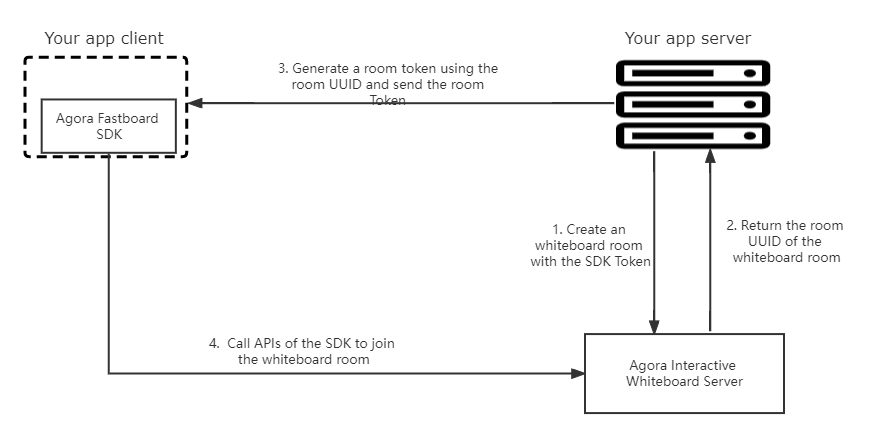
When an app client requests to join a whiteboard room, the app client and your app server interact with the Interactive Whiteboard server in the following steps:
1. The app server sends a request with the SDK token to the Interactive Whiteboard server to create a whiteboard room.
2. The Interactive Whiteboard server returns the room UUID to the app server when a room is created successfully.
3. The app server generates a room token using the returned room UUID and sends the room token and UUID to the app client.
4. The app client calls `createFastRoom` and `join` of the Fastboard SDK to create a `FastRoom` instance and join the interactive whiteboard room.
## Prerequisites [#prerequisites]
* Android Studio
* Android API level 19 or higher
* A valid [Agora account](../manage-agora-account.md#sign-up-and-log-in)
* An Agora project with the Interactive Whiteboard enabled. Get the app identifier and SDK token from Agora Console. See [Enable and configure Interactive Whiteboard](./enable-whiteboard.md).
## Project setup [#project-setup]
Before an app client can join an interactive whiteboard room, your app server needs to call the Agora RESTful APIs to create a room, get the room UUID, generate a room token, and pass the room UUID and room token to the app client.
### Create a whiteboard room [#create-a-whiteboard-room]
Call [/v5/rooms (POST)](../../reference/rest-api/room-management.md#create-a-room-post) on your app server to create a room.
```json
var request = require("request");
var options = {
"method": "POST",
"url": "https://api.netless.link/v5/rooms",
"headers": {
"token": "Your SDK Token",
"Content-Type": "application/json",
"region": "us-sv"
},
body: JSON.stringify({
"isRecord": false
})
};
request(options, function (error, response) {
if (error) throw new Error(error);
console.log(response.body);
});
```
```json
{
"uuid": "4a50xxxxxx796b",
"teamUUID": "RMmLxxxxxx15aw",
"appUUID": "i54xxxxxx1AQ",
"isBan": false,
"createdAt": "2021-01-18T06:56:29.432Z",
"limit": 0
}
```
### Generate a room token [#generate-a-room-token]
After creating a room and getting the `uuid` of the room, your app server needs to generate a room token and send it to the app client.
* Use code. See [Generate a token from your app server](../authenticate-users/generate-token-app-server.mdx). Recommended.
* Call the Interactive Whiteboard RESTful API. See [Generate a room token (POST)](../authenticate-users/generate-token-rest.md#generate-a-room-token-post).
```javascript
var request = require('request');
var options = {
"method": "POST",
"url": "https://api.netless.link/v5/tokens/rooms/",
"headers": {
"token": "Your SDK Token",
"Content-Type": "application/json",
"region": "us-sv"
},
body: JSON.stringify({"lifespan":3600000,"role":"admin"})
};
request(options, function (error, response) {
if (error) throw new Error(error);
console.log(response.body);
});
```
```text
"NETLESSROOM_YWs9XXXXXXXXXXXZWNhNjk"
```
### Create an Android project [#create-an-android-project]
1. In Android Studio, create a Phone and Tablet Android project with an Empty Activity.
2. In `/Gradle Scripts/build.gradle(Module: .app)`, add the following line to `dependencies`:
```text
dependencies {
implementation 'com.github.netless-io:fastboard-android:1.2.0'
}
```
You can find the latest SDK version number in the [Release notes](../../reference/release-notes).
### Create the user interface [#create-the-user-interface]
In `/app/res/layout/activity_main.xml`, replace the content with the following:
```xml
```
### Join the whiteboard room [#join-the-whiteboard-room]
In `/app/java/com.example./MainActivity`, add the following lines:
```java
package com.example.fastboardquickstart
import android.content.pm.ActivityInfo
import androidx.appcompat.app.AppCompatActivity
import android.os.Bundle
import io.agora.board.fast.FastboardView
import io.agora.board.fast.model.FastRegion
import io.agora.board.fast.model.FastRoomOptions
class MainActivity : AppCompatActivity() {
override fun onCreate(savedInstanceState: Bundle?) {
super.onCreate(savedInstanceState)
setContentView(R.layout.activity_main)
supportActionBar?.hide()
requestedOrientation = ActivityInfo.SCREEN_ORIENTATION_LANDSCAPE
setupFastboard()
}
private fun setupFastboard() {
val fastboardView = findViewById(R.id.fastboard_view)
val fastboard = fastboardView.fastboard
val roomOptions = FastRoomOptions(
"The App Identifier of your whiteboard project",
"The room UUID",
"The room Token",
"The unique identifier of a user",
FastRegion.US_SV
)
val fastRoom = fastboard.createFastRoom(roomOptions)
fastRoom.join()
}
}
```
## Reference [#reference]
Build the project in Android Studio, and run it on a simulator or a physical mobile device. If the project runs successfully, you can see the whiteboard page and use the toolbar to write and draw on the whiteboard.