# Whiteboard SDK quickstart (/en/realtime-media/whiteboard/build/set-up-and-build-your-first-app/get-started-sdk/ios)
> For AI agents: see the complete documentation index at [llms.txt](/llms.txt).
Interactive Whiteboard rooms enable users to present ideas, share multi-media content, and collaborate on projects on a shared whiteboard from multiple devices simultaneously.
This article describes how to create a basic project and use the Whiteboard SDK to implement basic whiteboard features.
## Understand the tech [#understand-the-tech-1]
The following figure shows the workflow to join an Interactive Whiteboard room.
Interactive Whiteboard room joining workflow
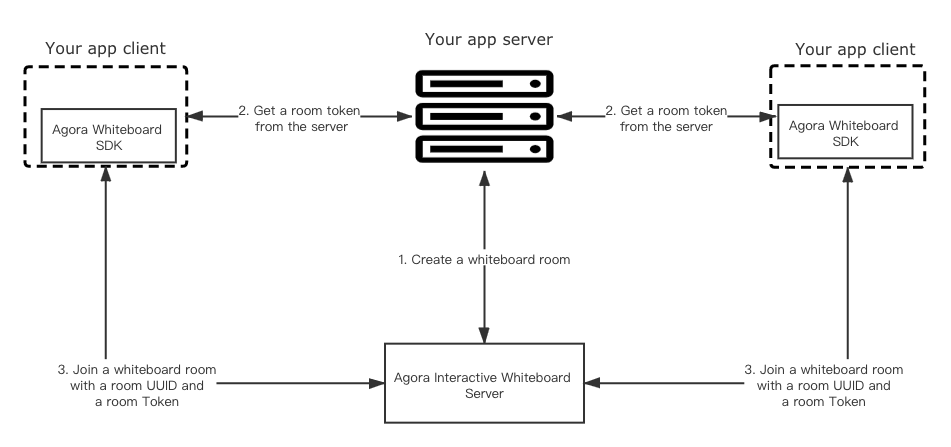
When an app client requests to join an Interactive Whiteboard room, the app client and your app server interact with the Interactive Whiteboard server in the following steps:
1. The app server sends a request with the SDK token to the Interactive Whiteboard server to create a whiteboard room.
2. The Interactive Whiteboard server returns the room UUID to the app server when a room is created successfully.
3. The app server generates a room token using the returned room UUID and sends the room token and UUID to the app client.
4. The app client initializes a Whiteboard SDK instance with the App Identifier received from the Agora Console.
5. The app client calls a method to join the Interactive Whiteboard room using the room UUID and room token.
## Prerequisites [#prerequisites-1]
* Xcode 12.0 or later
* iOS 9.0 or later
* The [latest version](https://cocoapods.org/) of CocoaPods
* A valid [Agora account](../manage-agora-account.md#sign-up-and-log-in)
* An Agora project with the Interactive Whiteboard enabled. Get the app identifier and SDK token from the Agora Console. See [Enable and configure Interactive Whiteboard](./enable-whiteboard.md)
## Project setup [#project-setup-1]
### Create a project in Xcode [#create-a-project-in-xcode]
* Set Product Name to `Whiteboard`.
* Set Organization Identifier to `agora`.
* Select `Swift` for Language.
* Select `Storyboard` for User Interface.
To use the Objective-C SDK in your Swift app, create a bridging header and add:
```objc
#import
```
### Get Whiteboard SDK [#get-whiteboard-sdk-1]
```text
pod init
```
```ruby
platform :ios, '10.0'
target 'Whiteboard' do
pod 'Whiteboard'
end
```
```text
pod install
```
### Create a room [#create-a-room-1]
Call the Interactive Whiteboard RESTful API on your app server to create a room. See [Create a room (POST)](../../reference/rest-api/room-management.md#create-a-room-post).
```javascript
var request = require("request");
var options = {
"method": "POST",
"url": "https://api.netless.link/v5/rooms",
"headers": {
"token": "Your SDK Token",
"Content-Type": "application/json",
"region": "us-sv"
},
body: JSON.stringify({
"isRecord": false
})
};
request(options, function (error, response) {
if (error) throw new Error(error);
console.log(response.body);
});
```
### Generate a Room Token [#generate-a-room-token-1]
After creating a room and getting the `uuid` of the room, you need to generate a Room Token on your app server and send it to the app client.
* Use code. See [Generate a Token from your app server](../authenticate-users/generate-token-app-server.mdx). Recommended.
* Call the Interactive Whiteboard RESTful API. See [Generate a Room Token (POST)](../authenticate-users/generate-token-rest.md#generate-a-room-token-post).
```javascript
var request = require('request');
var options = {
"method": "POST",
"url": "https://api.netless.link/v5/tokens/rooms/",
"headers": {
"token": "Your SDK Token",
"Content-Type": "application/json",
"region": "us-sv"
},
body: JSON.stringify({"lifespan":3600000,"role":"admin"})
};
request(options, function (error, response) {
if (error) throw new Error(error);
console.log(response.body);
});
```
### Join the whiteboard room [#join-the-whiteboard-room]
```swift
import UIKit
class ViewController: UIViewController {
var config: WKWebViewConfiguration?
var boardView: WhiteBoardView?
var roomConfig: WhiteRoomConfig?
var memberState: WhiteMemberState?
var room: WhiteRoom?
var sdk: WhiteSDK?
var sdkConfig: WhiteSdkConfiguration?
var commonDelegate: WhiteCommonCallbackDelegate?
var roomCallbackDelegate: WhiteRoomCallbackDelegate?
func setupViews() {
self.config = WKWebViewConfiguration()
self.boardView = WhiteBoardView(frame: CGRect(x: 0, y: 0, width: self.view.bounds.width, height: self.view.bounds.height), configuration: self.config!)
self.view.addSubview(self.boardView!)
}
func initSDK() {
self.sdkConfig = WhiteSdkConfiguration(app: "Your App Indentifier")
sdkConfig.region = WhiteRegionUS
self.sdk = WhiteSDK(whiteBoardView: self.boardView!, config: self.sdkConfig!, commonCallbackDelegate: self.commonDelegate)
}
func joinRoom() {
self.roomConfig = WhiteRoomConfig(uuid: "Your uuid", roomToken:"Your room token", uid: "user uid")
self.memberState = WhiteMemberState()
self.memberState?.currentApplianceName = WhiteApplianceNameKey.AppliancePencil
self.memberState?.strokeColor = [255,0,0]
self.sdk!.joinRoom(with: self.roomConfig!, callbacks: roomCallbackDelegate, completionHandler: { (success, room, error) in
if success {
self.room = room
self.room!.setMemberState(self.memberState!)
}
})
}
}
```
## Reference [#reference-1]
Build the project in Xcode, and run it on a simulator or a physical mobile device.