# Quickstart (/en/realtime-media/voice/quickstart/javascript)
> For AI agents: see the complete documentation index at [llms.txt](/llms.txt).
This JavaScript quickstart shows you how to create a basic Voice Calling app using the Agora Voice SDK.
## Understand the tech [#understand-the-tech-8]
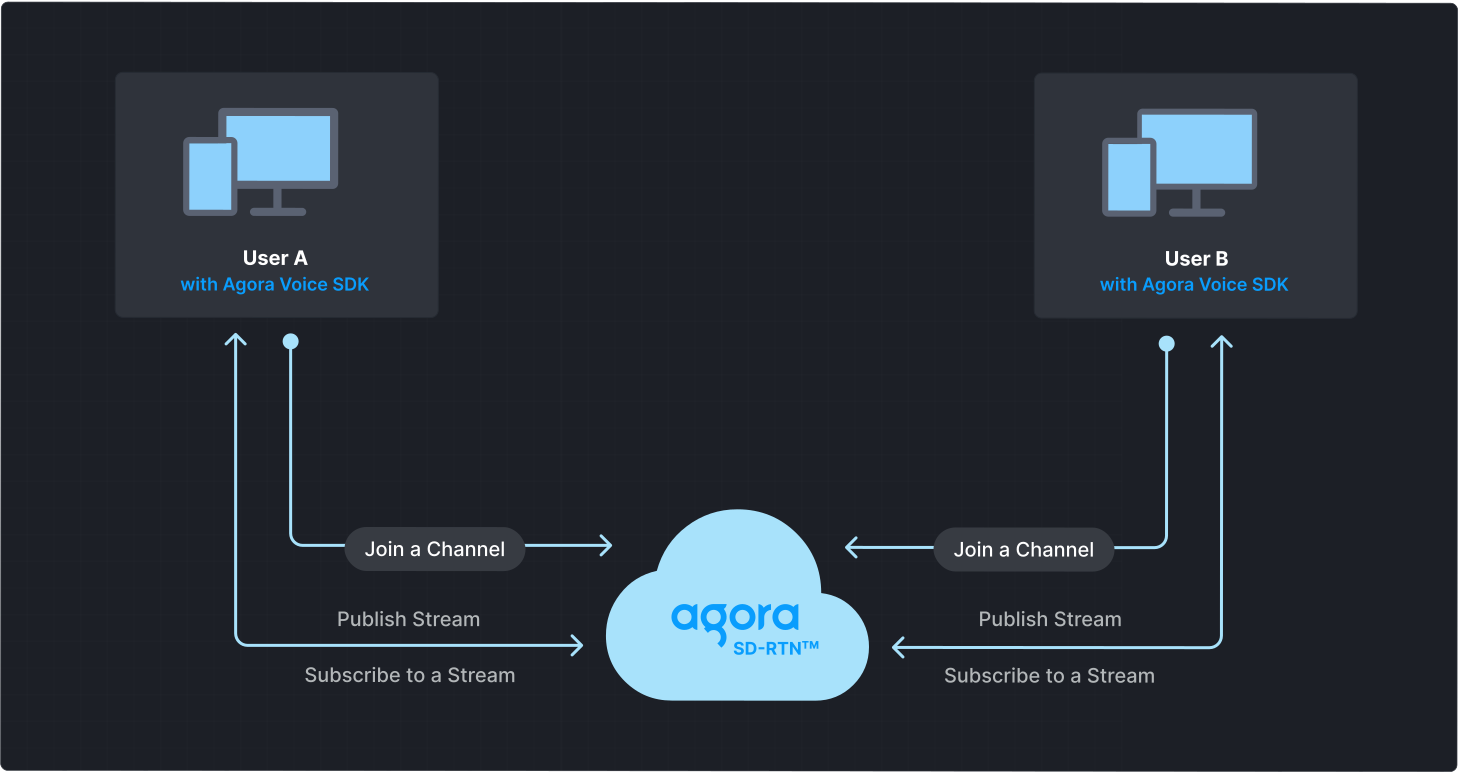
To start a Voice Calling session, implement the following steps in your app:
* **Initialize the Agora Engine**: Before calling other APIs, create and initialize an Agora Engine instance.
* **Join a channel**: Call methods to create and join a channel.
* **Send and receive audio**: All users can publish streams to the channel and subscribe to audio streams published by other users in the channel.
React SDK and Web SDK relationship
The React SDK is built on Web SDK 4.x and includes its APIs. For example, `useLocalMicrophoneTrack` calls the Web SDK `createMicrophoneAudioTrack` method.
Use the React SDK for basic real-time audio and video features. For advanced or complex scenarios, use the Web SDK. When a feature requires the Web SDK, the React SDK documentation links to the relevant Web SDK API pages.
## Prerequisites [#prerequisites-8]
* A [supported browser](reference/supported-platforms.md).
* A JavaScript package manager such as [npm](https://www.npmjs.com/package/npm).
* A microphone
* A valid Agora account and project. Please refer to [Agora account management](manage-agora-account.md) for details.
## Set up your project [#set-up-your-project-8]
This section shows you how to set up your ReactJS project and install the Agora Voice SDK.
### Create a project [#create-a-project-1]
To create a new ReactJS project with the necessary dependencies:
1. Ensure that you have installed [Node.js LTS](https://nodejs.org/en) and `npm`.
2. Open a terminal and execute:
```bash
npm create vite@latest agora-sdk-quickstart -- --template react-ts
```
This creates a new project folder named `agora-sdk-quickstart`. Open the folder in your preferred IDE.
### Install the SDK [#install-the-sdk-8]
Use one of the following methods to install the project dependencies:
NPM
CDN
Navigate to the project folder and run the following command to install the Voice SDK:
```bash
npm i agora-rtc-react
```
To integrate React JS dependencies and the Agora SDK using CDN, add the following code to your HTML file:
```html
```
## Implement Voice Calling [#implement-voice-calling-8]
This section guides you through the implementation of basic real-time audio interaction in your app.
This guide includes [complete sample code](#complete-sample-code) that demonstrates implementing basic real-time interaction. To understand the core API calls in the sample code, review the following implementation steps.
### Import Agora hooks and components [#import-agora-hooks-and-components]
To use Voice SDK in your component, include the following imports:
```tsx
import {
LocalUser, // Plays the microphone audio track
RemoteUser, // Plays the remote user audio
useIsConnected, // Returns whether the SDK is connected to Agora's server
useJoin, // Automatically join and leave a channel on mount and unmount
useLocalMicrophoneTrack, // Create a local microphone audio track
usePublish, // Publish the local track
useRemoteUsers, // Retrieve the list of remote users
} from "agora-rtc-react";
import { useState } from "react";
import AgoraRTC, { AgoraRTCProvider } from "agora-rtc-react";
```
### Initialize the client [#initialize-the-client]
Use the `createClient` method provided by the SDK to create a client object for the `` component. Wrap the `` component with `` to enable state management and access operation-related hooks.
For Voice Calling, set the `mode` property of `ClientConfig` to `"rtc"`.
```tsx
const client = AgoraRTC.createClient({ mode: "rtc", codec: "vp8" });
return(
);
}
```
### Join a channel [#join-a-channel-8]
To join a channel, use the `useJoin` hook. You can specify the following `joinOptions`:
* **App ID**: [`appid`](manage-agora-account.md) identifies the project you created in Agora Console.
* **Channel name**: The name of the `channel` to join. Clients that pass the same channel name join the same channel. If a channel with the specified name does not exist, it is created when the first user joins.
* **Authentication token**: A `token` is a dynamic key that authenticates a user when the client joins a channel. In a production environment, you obtain a token from a [token server](build/set-up-token-authentication/deploy-token-server.mdx) in your security infrastructure. For the purpose of this guide [Generate a temporary token](manage-agora-account.md).
* **User ID**: `uid` is a 32-bit signed integer that identifies a user in the channel. You can specify a unique user ID for each user yourself. If you do not set a user ID or set it to `0` when joining a channel, the SDK generates a random number for the user ID and returns the value.
Add the following to `Basics`:
```tsx
const [appId, setAppId] = useState("<-- Insert App ID -->");
const [channel, setChannel] = useState("<-- Insert Channel Name -->");
const [token, setToken] = useState("<-- Insert Token -->");
const [calling, setCalling] = useState(false);
useJoin({appid: appId, channel: channel, token: token ? token : null}, calling);
```
### Play remote audio [#play-remote-audio]
To subscribe to remote users in a channel and play their audio tracks, use the `useRemoteUsers` hook along with the `RemoteUser` component. Follow these steps to implement the logic:
1. **Retrieve the list of remote users**
Use the `useRemoteUsers` hook to fetch a list of remote users in the channel:
```tsx
const remoteUsers = useRemoteUsers();
```
2. **Play remote audio tracks**
Loop through the `remoteUsers` list and render the `RemoteUser` component for each user to subscribe and play audio streams:
```tsx
{remoteUsers.map((user) => (
))}
```
### Leave the channel [#leave-the-channel-3]
To leave a channel, destroy the component, close the browser window, or refresh the browser tab. The `useJoin` hook automatically handles the destruction of the React component.
### Complete sample code [#complete-sample-code-8]
A complete code sample demonstrating the basic process of real-time interaction is provided for your reference. To use the complete sample, add the following to your `src/App.tsx` file.
```tsx
import {
LocalUser,
RemoteUser,
useIsConnected,
useJoin,
useLocalMicrophoneTrack,
usePublish,
useRemoteUsers,
} from "agora-rtc-react";
import { useState } from "react";
import AgoraRTC, { AgoraRTCProvider } from "agora-rtc-react";
const client = AgoraRTC.createClient({ mode: "rtc", codec: "vp8" });
return(
);
}
const Basics = () => {
const [calling, setCalling] = useState(false);
const isConnected = useIsConnected(); // Store the user's connection status
const [appId, setAppId] = useState("<-- Insert App ID -->");
const [channel, setChannel] = useState("<-- Insert Channel Name -->");
const [token, setToken] = useState("<-- Insert Token -->");
const [micOn, setMic] = useState(true);
const { localMicrophoneTrack } = useLocalMicrophoneTrack(micOn);
useJoin({appid: appId, channel: channel, token: token ? token : null}, calling);
usePublish([localMicrophoneTrack]);
const remoteUsers = useRemoteUsers();
return (
<>
)}
);
};
export default AgoraVoiceCalling;
```
## Test the sample code [#test-the-sample-code-8]
To run the demo code:
1. Navigate to the project directory and install the dependencies:
```bash
cd agora-sdk-quickstart
npm install
```
2. Start the development server by executing the following command:
```bash
npm run dev
```
3. Open the project in your browser
Launch your browser and navigate to the `localhost` address shown in your terminal.
4. Fill in the app ID and the temporary token you obtained from Agora Console. Use the same channel name you used to generate the token.
5. Click the **Join Channel** button.
6. Ask a friend to run the same demo in their browser and join the channel using the same app ID, channel name, and temporary token as yours. After successfully joining the channel, you can talk to each other.
7. Click the microphone button at the bottom to switch the microphone on or off.
8. Click the hang-up button to end the call.
## Reference [#reference-8]
This section contains content that completes the information on this page, or points you to documentation that explains other aspects to this product.
* If a firewall is deployed in your network environment, refer to [Connect with Cloud Proxy](build/manage-connection-and-quality/cloud-proxy.mdx) to use Agora services normally.
### Next steps [#next-steps-8]
After implementing the quickstart sample, read the following documents to learn more:
* To ensure communication security in a test or production environment, best practice is to obtain and use a token from an authentication server. For details, see [Secure authentication with tokens](build/set-up-token-authentication/use-tokens.mdx).
### Sample project [#sample-project-8]
Agora provides an open source [sample project on GitHub](https://github.com/AgoraIO-Extensions/agora-rtc-react) for your reference. The project demonstrates the use of each component and hook provided by the React SDK, as well as some advanced functions.
### API reference [#api-reference-8]
* [`LocalUser`](https://api-ref.agora.io/en/video-sdk/reactjs/2.x/functions/LocalUser.html)
* [`RemoteUser`](https://api-ref.agora.io/en/video-sdk/reactjs/2.x/functions/RemoteUser.html)
* [`useIsConnected()`](https://api-ref.agora.io/en/video-sdk/reactjs/2.x/functions/useIsConnected.html)
* [`useJoin()`](https://api-ref.agora.io/en/video-sdk/reactjs/2.x/functions/useJoin.html)
* [`useLocalMicrophoneTrack()`](https://api-ref.agora.io/en/video-sdk/reactjs/2.x/functions/useLocalMicrophoneTrack.html)
* [`usePublish()`](https://api-ref.agora.io/en/video-sdk/reactjs/2.x/functions/usePublish.html)
* [`useRemoteUsers()`](https://api-ref.agora.io/en/video-sdk/reactjs/2.x/functions/useRemoteUsers.html)
### See also [#see-also-8]
* [Error codes](reference/error-codes.mdx)