# Secure channel encryption (/en/realtime-media/voice/build/secure-and-protect-channels/media-stream-encryption)
> For AI agents: see the complete documentation index at [llms.txt](/llms.txt).
Media stream encryption encrypts audio and video streams with a unique [key](https://en.wikipedia.org/wiki/Public_key_certificate) and [salt](https://en.wikipedia.org/wiki/Salt_\(cryptography\)) controlled by your app server. Encryption ensures that only authorized users in a channel can see and hear each other.
<_PlatformTabsGroup groupMode="structured" canonicalPlatform="web" platforms="["android","ios","macos","web","windows","electron","flutter","react-native","unity"]" showTabs="true">
<_PlatformPanel platform="android">
<_PlatformProcessedMarker groupMode="structured" canonicalPlatform="web" platform="android" />
This article describes how to integrate Agora built-in media stream encryption into your app.
## Understand the tech [#understand-the-tech]
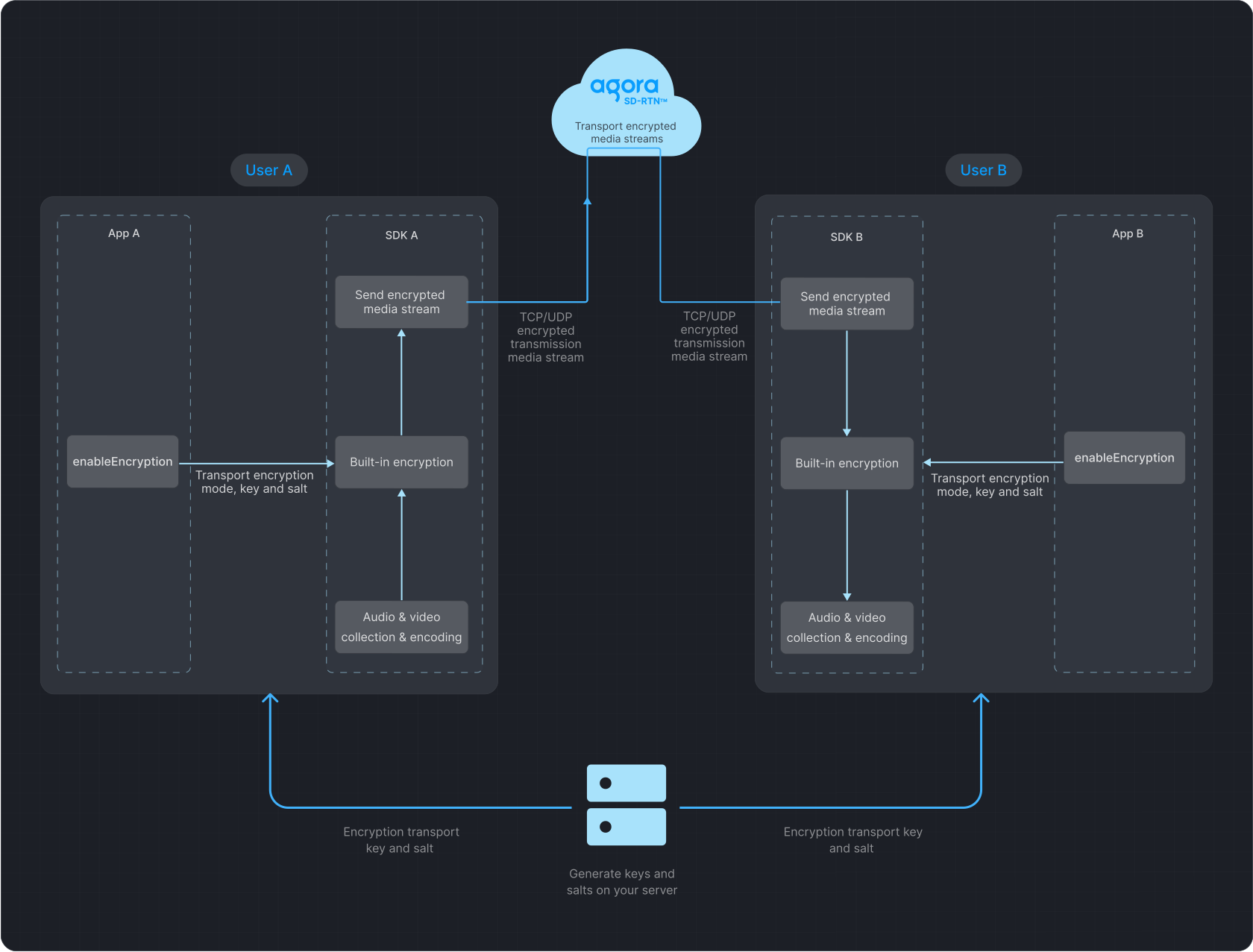
The following figure illustrates data transfer with media stream encryption enabled.
**Data transfer process**
## Prerequisites [#prerequisites]
Ensure that you have implemented the [SDK quickstart](../index.mdx) in your project.
## Implement media stream encryption [#implement-media-stream-encryption]
To add built-in media stream encryption to your app, refer to the following steps.
1. Generate a key and salt on your server.
To generate a random 32-byte hexadecimal key on your server as a string, run:
```bash
openssl rand -hex 32
```
To generate a random Base64-encoded, 32-byte salt on your server, run:
```bash
openssl rand -base64 32
```
2. Implement client-side logic.
All users in a channel must use the same encryption mode, key, and salt. Discrepancies may lead to unexpected behavior, such as black screens or audio loss.
To ensure security, use a new key and salt each time you enable media stream encryption.
Obtain the string key and Base64-encoded salt from your server, convert the salt from Base64 to `uint8_t`, and call `enableEncryption` before joining a channel. Set the encryption mode to `AES_128_GCM2` or `AES_256_GCM2` and pass the key and salt to the SDK.
Java
Kotlin
```java tabGroup="encryption-android"
// Noise-free sample values must come from your server.
String encryptionKey = getEncryptionKeyFromServer();
byte[] encryptionKdfSalt = getEncryptionSaltFromServer();
EncryptionConfig config = new EncryptionConfig();
config.encryptionMode = EncryptionConfig.EncryptionMode.AES_128_GCM2;
config.encryptionKey = encryptionKey;
config.encryptionKdfSalt = encryptionKdfSalt;
int result = rtcEngine.enableEncryption(true, config);
```
```kotlin tabGroup="encryption-android"
// Noise-free sample values must come from your server.
val encryptionKey = getEncryptionKeyFromServer()
val encryptionKdfSalt = getEncryptionSaltFromServer()
val config = EncryptionConfig().apply {
encryptionMode = EncryptionConfig.EncryptionMode.AES_128_GCM2
this.encryptionKey = encryptionKey
this.encryptionKdfSalt = encryptionKdfSalt
}
val result = rtcEngine.enableEncryption(true, config)
```
## Reference [#reference]
### Sample project [#sample-project]
* [ChannelEncryption](https://github.com/AgoraIO/API-Examples/blob/main/Android/APIExample/app/src/main/java/io/agora/api/example/examples/advanced/ChannelEncryption.java)
### API reference [#api-reference]
* [`enableEncryption`](https://api-ref.agora.io/en/video-sdk/android/4.x/API/class_irtcengine.html#api_irtcengine_enableencryption)
* [`EncryptionConfig`](https://api-ref.agora.io/en/video-sdk/android/4.x/API/class_encryptionconfig.html)
<_PlatformProcessedMarker close="true" />
<_PlatformPanel platform="ios">
<_PlatformProcessedMarker groupMode="structured" canonicalPlatform="web" platform="ios" />
This article describes how to integrate Agora built-in media stream encryption into your app.
## Understand the tech [#understand-the-tech-1]
The following figure illustrates data transfer with media stream encryption enabled.
**Data transfer process**

## Prerequisites [#prerequisites-1]
Ensure that you have implemented the [SDK quickstart](../index.mdx) in your project.
## Implement media stream encryption [#implement-media-stream-encryption-1]
To add built-in media stream encryption to your app, refer to the following steps.
1. Generate a key and salt on your server.
To generate a random 32-byte hexadecimal key on your server as a string, run:
```bash
openssl rand -hex 32
```
To generate a random Base64-encoded, 32-byte salt on your server, run:
```bash
openssl rand -base64 32
```
2. Implement client-side logic.
All users in a channel must use the same encryption mode, key, and salt. Discrepancies may lead to unexpected behavior, such as black screens or audio loss.
To ensure security, use a new key and salt each time you enable media stream encryption.
Manually add the encryption library to your project or integrate it with CocoaPods, then call `enableEncryption` before joining a channel. Set the encryption mode to `AgoraEncryptionModeAES128GCM2` or `AgoraEncryptionModeAES256GCM2` and pass the key and salt to the SDK.
```swift
import AgoraRtcCryptoLoader
func getEncryptionSaltFromServer() -> Data {
let base64Salt = "EncryptionKdfSaltInBase64Strings"
return Data(base64Encoded: base64Salt)!
}
let config = AgoraEncryptionConfig()
config.encryptionMode = .AES128GCM2
config.encryptionKdfSalt = getEncryptionSaltFromServer()
config.encryptionKey = getEncryptionKeyFromServer()
let result = agoraKit.enableEncryption(true, encryptionConfig: config)
if result != 0 {
print("enableEncryption failed: \\(result)")
}
```
## Reference [#reference-1]
### Sample project [#sample-project-1]
* [StreamEncryption for iOS](https://github.com/AgoraIO/API-Examples/tree/main/iOS/APIExample/APIExample/Examples/Advanced/StreamEncryption)
* [StreamEncryption for macOS](https://github.com/AgoraIO/API-Examples/tree/main/macOS/APIExample/Examples/Advanced/StreamEncryption)
### API reference [#api-reference-1]
* [`enableEncryption`](https://api-ref.agora.io/en/video-sdk/ios/4.x/documentation/agorartckit/agorartcenginekit/enableencryption\(_\:encryptionconfig:\))
* [`AgoraEncryptionConfig`](https://api-ref.agora.io/en/video-sdk/ios/4.x/documentation/agorartckit/agoraencryptionconfig)
<_PlatformProcessedMarker close="true" />
<_PlatformPanel platform="macos">
<_PlatformProcessedMarker groupMode="structured" canonicalPlatform="web" platform="macos" />
This article describes how to integrate Agora built-in media stream encryption into your app.
## Understand the tech [#understand-the-tech-2]
The following figure illustrates data transfer with media stream encryption enabled.
**Data transfer process**

## Prerequisites [#prerequisites-2]
Ensure that you have implemented the [SDK quickstart](../index.mdx) in your project.
## Implement media stream encryption [#implement-media-stream-encryption-2]
To add built-in media stream encryption to your app, refer to the following steps.
1. Generate a key and salt on your server.
To generate a random 32-byte hexadecimal key on your server as a string, run:
```bash
openssl rand -hex 32
```
To generate a random Base64-encoded, 32-byte salt on your server, run:
```bash
openssl rand -base64 32
```
2. Implement client-side logic.
All users in a channel must use the same encryption mode, key, and salt. Discrepancies may lead to unexpected behavior, such as black screens or audio loss.
To ensure security, use a new key and salt each time you enable media stream encryption.
Manually add the encryption library to your project or integrate it with CocoaPods, then call `enableEncryption` before joining a channel. Set the encryption mode to `AgoraEncryptionModeAES128GCM2` or `AgoraEncryptionModeAES256GCM2` and pass the key and salt to the SDK.
```swift
import AgoraRtcCryptoLoader
func getEncryptionSaltFromServer() -> Data {
let base64Salt = "EncryptionKdfSaltInBase64Strings"
return Data(base64Encoded: base64Salt)!
}
let config = AgoraEncryptionConfig()
config.encryptionMode = .AES128GCM2
config.encryptionKdfSalt = getEncryptionSaltFromServer()
config.encryptionKey = getEncryptionKeyFromServer()
let result = agoraKit.enableEncryption(true, encryptionConfig: config)
if result != 0 {
print("enableEncryption failed: \\(result)")
}
```
## Reference [#reference-2]
### Sample project [#sample-project-2]
* [StreamEncryption for iOS](https://github.com/AgoraIO/API-Examples/tree/main/iOS/APIExample/APIExample/Examples/Advanced/StreamEncryption)
* [StreamEncryption for macOS](https://github.com/AgoraIO/API-Examples/tree/main/macOS/APIExample/Examples/Advanced/StreamEncryption)
### API reference [#api-reference-2]
* [`enableEncryption`](https://api-ref.agora.io/en/video-sdk/ios/4.x/documentation/agorartckit/agorartcenginekit/enableencryption\(_\:encryptionconfig:\))
* [`AgoraEncryptionConfig`](https://api-ref.agora.io/en/video-sdk/ios/4.x/documentation/agorartckit/agoraencryptionconfig)
<_PlatformProcessedMarker close="true" />
<_PlatformPanel platform="web">
<_PlatformProcessedMarker groupMode="structured" canonicalPlatform="web" platform="web" />
This article describes how to integrate Agora built-in media stream encryption into your app.
## Understand the tech [#understand-the-tech-3]
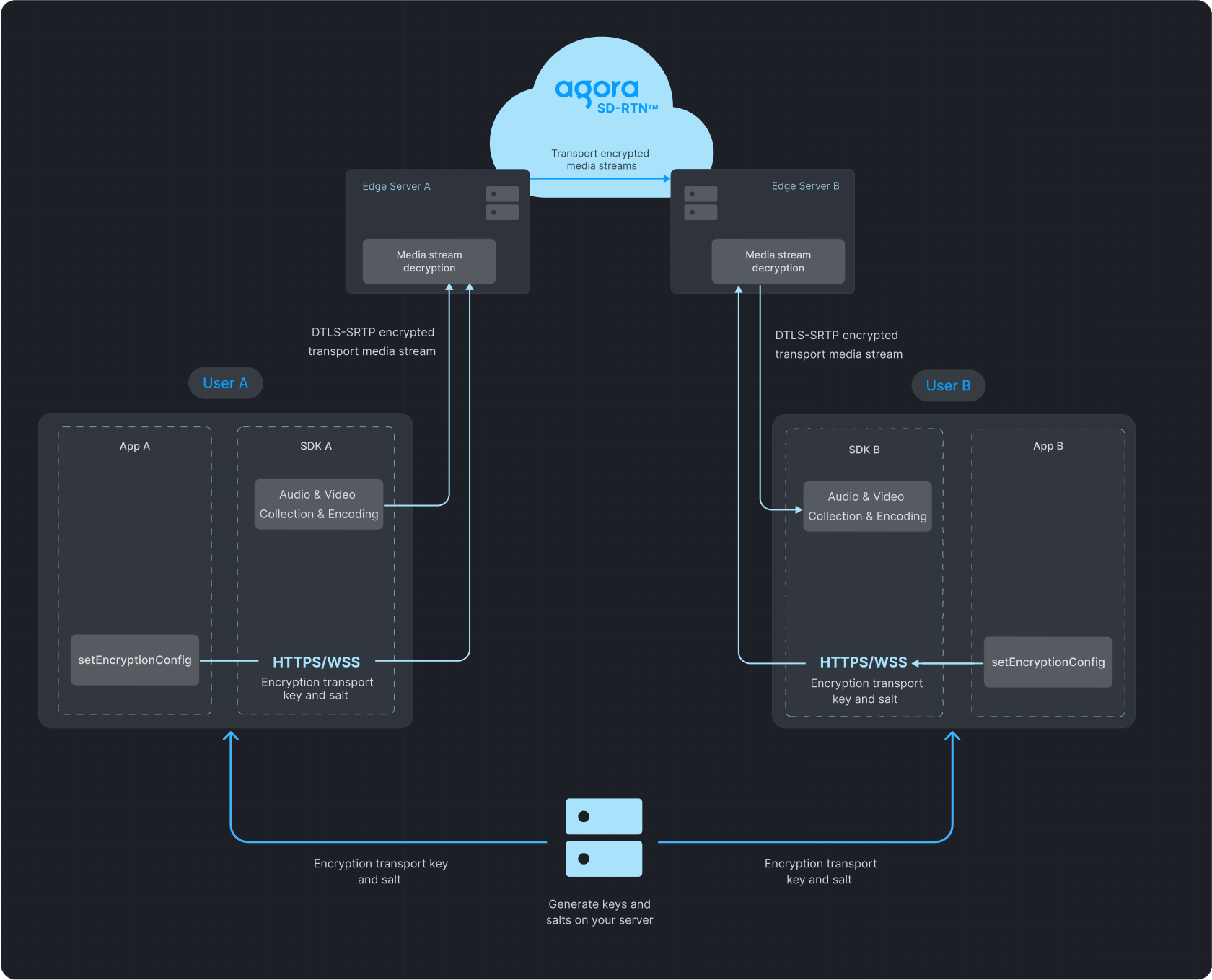
The following figure illustrates data transfer with media stream encryption enabled.
**Data transfer process**
## Prerequisites [#prerequisites-3]
Ensure that you have implemented the [SDK quickstart](../index.mdx) in your project.
## Implement media stream encryption [#implement-media-stream-encryption-3]
Voice SDK for Web supports the following encryption modes:
* `"aes-128-xts"`: 128-bit AES encryption, XTS mode.
* `"aes-256-xts"`: 256-bit AES encryption, XTS mode.
* `"aes-128-gcm"`: 128-bit AES encryption, GCM mode.
* `"aes-256-gcm"`: 256-bit AES encryption, GCM mode.
* `"aes-128-ecb"`: 128-bit AES encryption, ECB mode.
* `"sm4-128-ecb"`: 128-bit SM4 encryption, ECB mode.
Available only in Web SDK v4.5.0 and higher:
* `"aes-128-gcm2"`: 128-bit AES encryption, GCM mode, salted.
* `"aes-256-gcm2"`: 256-bit AES encryption, GCM mode, salted.
For maximum security, set the encryption mode to `"aes-128-gcm2"` or `"aes-256-gcm2"` and specify an encryption key and salt. If you choose another encryption mode, you only need to specify the encryption key.
1. Generate a key and salt on your server.
```bash
openssl rand -hex 32
```
```bash
openssl rand -base64 32
```
2. Before joining a channel, call `AgoraRTCClient.setEncryptionConfig` to select the encryption mode and specify the encryption key and salt.
```typescript
function base64ToUint8Array(base64Str: string): Uint8Array {
const raw = window.atob(base64Str);
const result = new Uint8Array(new ArrayBuffer(raw.length));
for (let i = 0; i < raw.length; i += 1) {
result[i] = raw.charCodeAt(i);
}
return result;
}
function hexToAscii(hexValue: string) {
let result = '';
for (let i = 0; i < hexValue.length; i += 2) {
result += String.fromCharCode(parseInt(hexValue.slice(i, i + 2), 16));
}
return result;
}
const [secretFromServer, saltFromServer] = await getSecretAndSaltFromServer();
const secret = hexToAscii(secretFromServer);
const salt = base64ToUint8Array(saltFromServer);
client.setEncryptionConfig('aes-256-gcm2', secret, salt);
```
All users in a channel must use the same encryption mode, key, and salt. Discrepancies may lead to unexpected behavior, such as black screens or audio loss.
To ensure security, use a new key and salt each time you enable media stream encryption.
## Reference [#reference-3]
### Development considerations [#development-considerations]
The media stream encryption feature is supported in both communication and live broadcasting use cases. However, Agora does not support pushing encrypted media streams to CDN.
### API reference [#api-reference-3]
* [`setEncryptionConfig`](https://api-ref.agora.io/en/video-sdk/web/4.x/interfaces/iagorartcclient.html#setencryptionconfig)
* [`EncryptionMode`](https://api-ref.agora.io/en/video-sdk/web/4.x/globals.html#encryptionmode)
<_PlatformProcessedMarker close="true" />
<_PlatformPanel platform="windows">
<_PlatformProcessedMarker groupMode="structured" canonicalPlatform="web" platform="windows" />
This article describes how to integrate Agora built-in media stream encryption into your app.
## Understand the tech [#understand-the-tech-4]
The following figure illustrates data transfer with media stream encryption enabled.
**Data transfer process**

## Prerequisites [#prerequisites-4]
Ensure that you have implemented the [SDK quickstart](../index.mdx) in your project.
## Implement media stream encryption [#implement-media-stream-encryption-4]
To add built-in media stream encryption to your app, refer to the following steps.
1. Generate a key and salt on your server.
To generate a random 32-byte hexadecimal key on your server as a string, run:
```bash
openssl rand -hex 32
```
To generate a random Base64-encoded, 32-byte salt on your server, run:
```bash
openssl rand -base64 32
```
2. Implement client-side logic.
All users in a channel must use the same encryption mode, key, and salt. Discrepancies may lead to unexpected behavior, such as black screens or audio loss.
To ensure security, use a new key and salt each time you enable media stream encryption.
Obtain the string key and Base64-encoded salt from your server, convert the salt from Base64 to `uint8_t`, and call `enableEncryption` before joining a channel. Set the encryption mode to `AES_128_GCM2` or `AES_256_GCM2` and pass the key and salt to the SDK.
```cpp
int enableEncryption() {
std::string secret = getEncryptionKeyFromServer();
std::vector kdfSalt = getEncryptionSaltFromServer();
agora::rtc::EncryptionConfig config;
config.encryptionMode = AES_128_GCM2;
config.encryptionKey = secret.c_str();
memcpy(config.encryptionKdfSalt, kdfSalt.data(), sizeof(config.encryptionKdfSalt));
return rtcEngine->enableEncryption(true, config);
}
```
## Reference [#reference-4]
### Sample project [#sample-project-3]
* [AgoraMediaEncryption](https://github.com/AgoraIO/API-Examples/tree/main/windows/APIExample/APIExample/Advanced/MediaEncrypt)
### API reference [#api-reference-4]
* [`enableEncryption`](https://api-ref.agora.io/en/video-sdk/windows/4.x/API/class_irtcengine.html#api_irtcengine_enableencryption)
* [`EncryptionConfig`](https://api-ref.agora.io/en/video-sdk/windows/4.x/API/class_encryptionconfig.html)
<_PlatformProcessedMarker close="true" />
<_PlatformPanel platform="electron">
<_PlatformProcessedMarker groupMode="structured" canonicalPlatform="web" platform="electron" />
This article describes how to integrate Agora built-in media stream encryption into your app.
## Understand the tech [#understand-the-tech-5]
The following figure illustrates data transfer with media stream encryption enabled.
**Data transfer process**

## Prerequisites [#prerequisites-5]
Ensure that you have implemented the [SDK quickstart](../index.mdx) in your project.
## Implement media stream encryption [#implement-media-stream-encryption-5]
To add built-in media stream encryption to your app, refer to the following steps.
1. Generate a key and salt on your server.
To generate a random 32-byte hexadecimal key on your server as a string, run:
```bash
openssl rand -hex 32
```
To generate a random Base64-encoded, 32-byte salt on your server, run:
```bash
openssl rand -base64 32
```
2. Implement client-side logic.
All users in a channel must use the same encryption mode, key, and salt. Discrepancies may lead to unexpected behavior, such as black screens or audio loss.
To ensure security, use a new key and salt each time you enable media stream encryption.
Obtain the string key and Base64-encoded salt from your server, convert the salt to a 32-byte array, and call `enableEncryption` before joining a channel. Set the encryption mode to `Aes128Gcm2` or `Aes256Gcm2` and pass the key and salt to the SDK.
```typescript
const encryptionMode = EncryptionMode.Aes128Gcm2;
const encryptionKey = await getEncryptionKeyFromServer();
const encryptionKdfSalt = await getEncryptionSaltBytesFromServer();
if (!encryptionKey) {
throw new Error('encryptionKey is invalid');
}
rtcEngine.enableEncryption(true, {
encryptionMode,
encryptionKey,
encryptionKdfSalt,
});
```
## Reference [#reference-5]
### Sample projects [#sample-projects]
* [Electron encryption example](https://github.com/AgoraIO-Extensions/Electron-SDK/blob/main/example/src/renderer/examples/advanced/Encryption/Encryption.tsx)
* [React Native encryption example](https://github.com/AgoraIO-Extensions/react-native-agora/blob/main/example/src/examples/advanced/Encryption/Encryption.tsx)
### API reference [#api-reference-5]
* [`enableEncryption`](https://api-ref.agora.io/en/video-sdk/electron/4.x/API/class_irtcengine.html#api_irtcengine_enableencryption)
* [`EncryptionConfig`](https://api-ref.agora.io/en/video-sdk/electron/4.x/API/class_encryptionconfig.html)
<_PlatformProcessedMarker close="true" />
<_PlatformPanel platform="flutter">
<_PlatformProcessedMarker groupMode="structured" canonicalPlatform="web" platform="flutter" />
This article describes how to integrate Agora built-in media stream encryption into your app.
## Understand the tech [#understand-the-tech-6]
The following figure illustrates data transfer with media stream encryption enabled.
**Data transfer process**

## Prerequisites [#prerequisites-6]
Ensure that you have implemented the [SDK quickstart](../index.mdx) in your project.
## Implement media stream encryption [#implement-media-stream-encryption-6]
To add built-in media stream encryption to your app, refer to the following steps.
1. Generate a key and salt on your server.
To generate a random 32-byte hexadecimal key on your server as a string, run:
```bash
openssl rand -hex 32
```
To generate a random Base64-encoded, 32-byte salt on your server, run:
```bash
openssl rand -base64 32
```
2. Implement client-side logic.
All users in a channel must use the same encryption mode, key, and salt. Discrepancies may lead to unexpected behavior, such as black screens or audio loss.
To ensure security, use a new key and salt each time you enable media stream encryption.
Obtain the string key and Base64-encoded salt from your server, convert the salt from Base64 to `Uint8List`, and call `enableEncryption` before joining a channel. Set the encryption mode to `aes128Gcm2` or `aes256Gcm2` and pass the key and salt to the SDK.
```dart
import 'dart:convert';
import 'dart:typed_data';
import 'package:agora_rtc_engine/agora_rtc_engine.dart';
Future enableEncryption(RtcEngine rtcEngine) async {
final String encryptionKdfSaltBase64 =
await Server.getEncryptionKdfSaltBase64();
final String encryptionSecret = await Server.getEncryptionSecret();
final Uint8List encryptionKdfSalt = base64Decode(encryptionKdfSaltBase64);
final config = EncryptionConfig(
encryptionMode: EncryptionMode.aes128Gcm2,
encryptionKey: encryptionSecret,
encryptionKdfSalt: encryptionKdfSalt,
);
await rtcEngine.enableEncryption(enabled: true, config: config);
}
```
## Reference [#reference-6]
### API reference [#api-reference-6]
* [`enableEncryption`](https://api-ref.agora.io/en/video-sdk/flutter/6.x/API/class_irtcengine.html#api_irtcengine_enableencryption)
* [`EncryptionConfig`](https://api-ref.agora.io/en/video-sdk/flutter/6.x/API/class_encryptionconfig.html)
* [`EncryptionMode`](https://api-ref.agora.io/en/video-sdk/flutter/6.x/API/enum_encryptionmode.html)
<_PlatformProcessedMarker close="true" />
<_PlatformPanel platform="react-native">
<_PlatformProcessedMarker groupMode="structured" canonicalPlatform="web" platform="react-native" />
This article describes how to integrate Agora built-in media stream encryption into your app.
## Understand the tech [#understand-the-tech-7]
The following figure illustrates data transfer with media stream encryption enabled.
**Data transfer process**

## Prerequisites [#prerequisites-7]
Ensure that you have implemented the [SDK quickstart](../index.mdx) in your project.
## Implement media stream encryption [#implement-media-stream-encryption-7]
To add built-in media stream encryption to your app, refer to the following steps.
1. Generate a key and salt on your server.
To generate a random 32-byte hexadecimal key on your server as a string, run:
```bash
openssl rand -hex 32
```
To generate a random Base64-encoded, 32-byte salt on your server, run:
```bash
openssl rand -base64 32
```
2. Implement client-side logic.
All users in a channel must use the same encryption mode, key, and salt. Discrepancies may lead to unexpected behavior, such as black screens or audio loss.
To ensure security, use a new key and salt each time you enable media stream encryption.
Obtain the string key and Base64-encoded salt from your server, convert the salt to a 32-byte array, and call `enableEncryption` before joining a channel. Set the encryption mode to `Aes128Gcm2` or `Aes256Gcm2` and pass the key and salt to the SDK.
```typescript
const encryptionMode = EncryptionMode.Aes128Gcm2;
const encryptionKey = await getEncryptionKeyFromServer();
const encryptionKdfSalt = await getEncryptionSaltBytesFromServer();
if (!encryptionKey) {
throw new Error('encryptionKey is invalid');
}
rtcEngine.enableEncryption(true, {
encryptionMode,
encryptionKey,
encryptionKdfSalt,
});
```
## Reference [#reference-7]
### Sample projects [#sample-projects-1]
* [Electron encryption example](https://github.com/AgoraIO-Extensions/Electron-SDK/blob/main/example/src/renderer/examples/advanced/Encryption/Encryption.tsx)
* [React Native encryption example](https://github.com/AgoraIO-Extensions/react-native-agora/blob/main/example/src/examples/advanced/Encryption/Encryption.tsx)
### API reference [#api-reference-7]
* [`enableEncryption`](https://api-ref.agora.io/en/video-sdk/electron/4.x/API/class_irtcengine.html#api_irtcengine_enableencryption)
* [`EncryptionConfig`](https://api-ref.agora.io/en/video-sdk/electron/4.x/API/class_encryptionconfig.html)
<_PlatformProcessedMarker close="true" />
<_PlatformPanel platform="unity">
<_PlatformProcessedMarker groupMode="structured" canonicalPlatform="web" platform="unity" />
This article describes how to integrate Agora built-in media stream encryption into your app.
## Understand the tech [#understand-the-tech-8]
The following figure illustrates data transfer with media stream encryption enabled.
**Data transfer process**

## Prerequisites [#prerequisites-8]
Ensure that you have implemented the [SDK quickstart](../index.mdx) in your project.
## Implement media stream encryption [#implement-media-stream-encryption-8]
To add built-in media stream encryption to your app, refer to the following steps.
1. Generate a key and salt on your server.
To generate a random 32-byte hexadecimal key on your server as a string, run:
```bash
openssl rand -hex 32
```
To generate a random Base64-encoded, 32-byte salt on your server, run:
```bash
openssl rand -base64 32
```
2. Implement client-side logic.
All users in a channel must use the same encryption mode, key, and salt. Discrepancies may lead to unexpected behavior, such as black screens or audio loss.
To ensure security, use a new key and salt each time you enable media stream encryption.
Obtain the string key and 32-byte salt from your server, and call `EnableEncryption` before joining a channel. Set the encryption mode to `AES_128_GCM2` or `AES_256_GCM2` and pass the key and salt to the SDK.
```csharp
string secret = GetEncryptionKeyFromServer();
byte[] kdfSalt = GetEncryptionSaltFromServer();
var config = new EncryptionConfig
{
encryptionMode = ENCRYPTION_MODE.AES_128_GCM2,
encryptionKey = secret,
encryptionKdfSalt = kdfSalt
};
var result = RtcEngine.EnableEncryption(true, config);
Debug.Log("EnableEncryption: " + result);
```
## Reference [#reference-8]
### Sample project [#sample-project-4]
* [EncryptionSample](https://github.com/AgoraIO-Extensions/Agora-Unity-Quickstart/blob/main/API-Example-Unity/Assets/API-Example/Examples/Advanced/SetEncryption/EncryptionSample.cs)
### API reference [#api-reference-8]
* [`EnableEncryption`](https://api-ref.agora.io/en/video-sdk/unity/4.x/API/class_irtcengine.html#api_irtcengine_enableencryption)
* [`EncryptionConfig`](https://api-ref.agora.io/en/video-sdk/unity/4.x/API/class_encryptionconfig.html)
<_PlatformProcessedMarker close="true" />