# Receive notifications about channel events (/en/realtime-media/voice/build/optimize-and-operate/receive-notifications/windows)

> For AI agents: see the complete documentation index at [llms.txt](/llms.txt).

A webhook is a user-defined callback over HTTPS that allows your app or back-end system to receive notifications when certain events occur. Agora calls your webhook endpoint from its servers to send notifications about Voice Calling events. With Notifications, you can subscribe to Voice Calling events and receive notifications in real time.

    ## Understand the tech [#understand-the-tech-4]

    Using Agora Console you subscribe to specific events for your project and configure the URL of the webhooks to receive these events. Agora sends notifications of your events to your webhook every time they occur. Your server authenticates the notification and returns `200 Ok` to confirm reception. You use the information in the JSON payload of each notification to give the best user experience to your users.

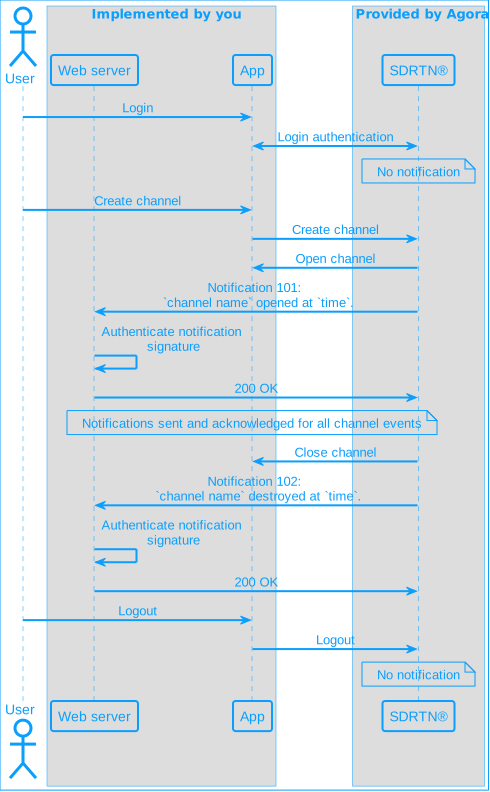
    The following figure illustrates the workflow when Notifications is enabled for the specific Voice Calling events you subscribe to:

    **Channel events notification workflow**
    ![rtc-channel](https://assets-docs.agora.io/images/shared/ncs-worflow.svg)

    1. A user commits an action that creates an event.
    2. Notifications sends an HTTPS POST request to your webhook.
    3. Your server validates the request signature, then sends a response to Notifications within 10 seconds. The response body must be in JSON.

    If Notifications receives `200 OK` within 10 seconds of sending the initial notification, the callback is considered successful. If these conditions are not met, Notifications immediately resends the notification. The interval between notification attempts gradually increases. Notifications stops sending notifications after three retries.

    ## Prerequisites [#prerequisites-4]

    To set up and use Notifications, you must have:

    * A [valid Agora account](../../manage-agora-account.md).
    * An [active Agora project](../../manage-agora-account.md).
    * A computer with Internet access.

      If your network access is restricted by a firewall, call the [IP address query API](#ip-address-query-api) to retrieve the Notifications IP addresses , then configure the firewall to allow these IP addresses.

    ## Handle notifications for specific events [#handle-notifications-for-specific-events-4]

    In order to handle notifications for the events you subscribe to, you need to:

    * [Create your webhook](#create-your-webhook)

    * [Enable Notifications](#enable-notifications)

    * [Verify Notifications signatures](#add-signature-verification)

    * [Handle redundant notifications and abnormal user activity](#handle-redundant-notifications-and-abnormal-user-activity)

    * [Implement online user status tracking](#implement-online-user-status-tracking)

    ### Create your webhook [#create-your-webhook-4]

    Once Notifications is enabled, Agora SDRTN® sends notification callbacks as `HTTPS POST` requests to your webhook when events that you are subscribed to occur. The data format of the requests is JSON, the character encoding is `UTF-8`, and the signature algorithm is `HMAC/SHA1` or `HMAC/SHA256`.

    For Notifications, a webhook is an endpoint on an `HTTPS` server that handles these requests. In a production environment you write this in your web infrastructure, for development purposes best practice is to create a simple local server and use a service such as [ngrok](https://ngrok.com/download) to supply a public URL that you register with Agora SDRTN® when you enable Notifications.

    To do this, take the following steps:

    1. **Set up Go**

       Ensure you have Go installed on your system. If not, download and install it from the [official Go website](https://go.dev/dl/).

    2. **Create a Go project for your server**

       Create a new directory for your project and navigate into it:

       ```sh
       mkdir agora-webhook-server
       cd agora-webhook-server
       ```

       In the project directory, create a new file `main.go`. Open the file in your preferred text editor and add the following code:

       ```go
       package main

       import (
        "encoding/json"
        "fmt"
        "io"
        "log"
        "net/http"
       )

       type WebhookRequest struct {
         NoticeID  string `json:"noticeId"`
         ProductID int64 `json:"productId"`
         EventType int  `json:"eventType"`
         Payload  Payload `json:"payload"`
       }

       type Payload struct {
         ClientSeq  int64 `json:"clientSeq"`
         UID     int  `json:"uid"`
         ChannelName string `json:"channelName"`
       }

       func rootHandler(w http.ResponseWriter, r *http.Request) {
         response := `<h1>Agora Notifications demo</h1>`
         w.WriteHeader(http.StatusOK)
         w.Write([]byte(response))
       }

       func ncsHandler(w http.ResponseWriter, r *http.Request) {
         agoraSignature := r.Header.Get("Agora-Signature")
         fmt.Println("Agora-Signature:", agoraSignature)

         body, err := io.ReadAll(r.Body)
         if err != nil {
           http.Error(w, "Unable to read request body", http.StatusBadRequest)
           return
         }

         var req WebhookRequest
         if err := json.Unmarshal(body, &req); err != nil {
           http.Error(w, "Invalid JSON", http.StatusBadRequest)
           return
         }

         fmt.Printf("Event code: %d Uid: %d Channel: %s ClientSeq: %d\n",
           req.EventType, req.Payload.UID, req.Payload.ChannelName, req.Payload.ClientSeq)

         w.WriteHeader(http.StatusOK)
         w.Write([]byte("Ok"))
       }

       func main() {
         http.HandleFunc("/", rootHandler)
         http.HandleFunc("/ncsNotify", ncsHandler)

         port := ":8080"
         fmt.Printf("Notifications webhook server started on port %s\n", port)
         if err := http.ListenAndServe(port, nil); err != nil {
           log.Fatalf("Failed to start server: %v", err)
         }
       }
       ```

    3. **Run your Go server**

       Run the server using the following command:

       ```sh
       go run main.go
       ```

    4. **Create a public URL for your server**

       In this example you use `ngrok` to create a public URL for your server.

       1. Download and install [ngrok](https://ngrok.com/download). If you have `Chocolatey`, use the following command:

          ```bash
          choco install ngrok
          ```

       2. Add an `authtoken` to ngrok:

          ```bash
          ngrok config add-authtoken <authToken>
          ```

       To obtain an `authToken`, [sign up](https://dashboard.ngrok.com/signup) with ngrok.

       1. Start a tunnel to your local server using the following command:

          ```bash
          ngrok http 127.0.0.1:8080
          ```

       You see a **Forwarding** URL and a **Web Interface** URL in the console. Open the web interface URL in your browser.

    5. **Test the server**

       Open a web browser and navigate to the public URL provided by `ngrok` to see the root handler response.

       Use curl, [Postman](https://www.postman.com/), or another tool to send a `POST` request to `https://<ngrok_url>/ncsNotify` with the required `JSON` payload.

       Example using `curl`:

       ```sh
       curl -X POST <ngrok_url>/ncsNotify \
       -H "Content-Type: application/json" \
       -H "Agora-Signature: your_signature" \
       -d '{
        "noticeId": "some_notice_id",
        "productId": 12345,
        "eventType": 1,
        "payload": {
         "clientSeq": 67890,
         "uid": 123,
         "channelName": "test_channel"
        }
       }'
       ```

       Make sure you replace `ngrok_url` with the forwarding url.

       Once the HTTP request is successful, you see the following `JSON` payload in your browser:

       ```json
       {
        "noticeId": "some_notice_id",
        "productId": 12345,
        "eventType": 1,
        "payload": {
         "clientSeq": 67890,
         "uid": 123,
         "channelName": "test_channel"
        }
       }
       ```

    ### Enable Notifications [#enable-notifications-4]

    To enable Notifications:

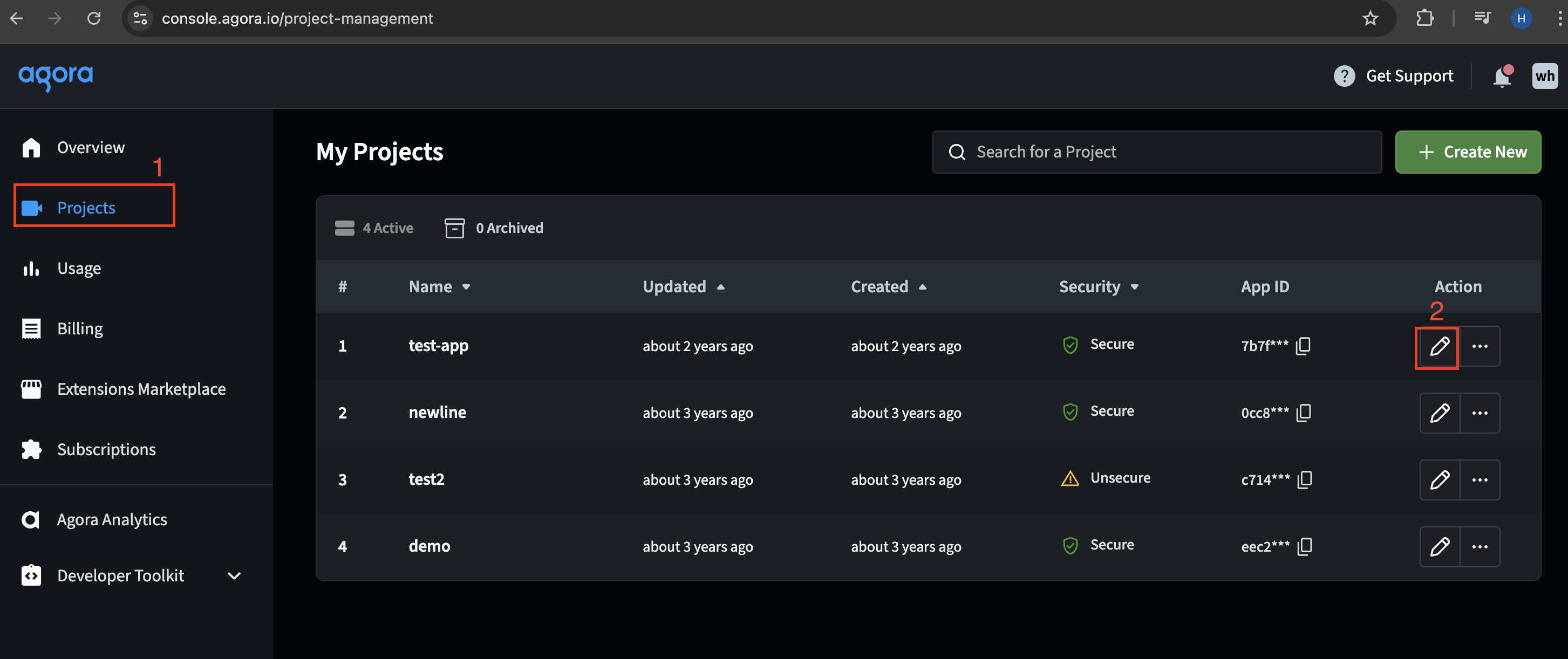
    1. Log in to [Agora Console](https://console.agora.io/v2). On the **Projects** tab, locate the project for which you want to enable Notifications and click **Edit**.
       ![Project tab](https://assets-docs.agora.io/images/video-sdk/enable-ncs-project-tabs.png)

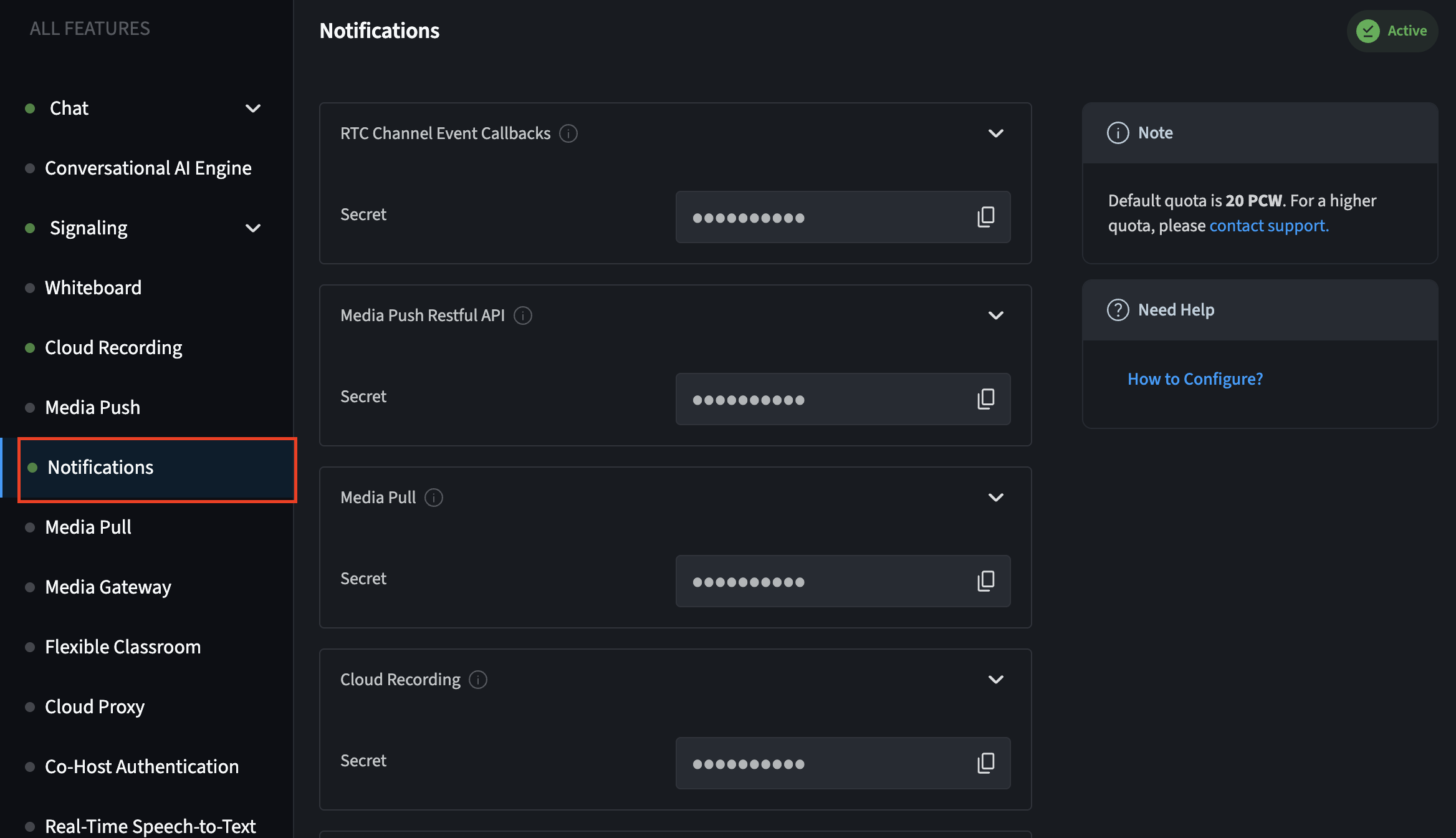
    2. In the **All Features** section, open the **Notifications** tab and click on the service for which you want to enable notifications. The section expands to show configuration options.
       ![Notification tab](https://assets-docs.agora.io/images/video-sdk/enable-ncs-notification-tab.png)

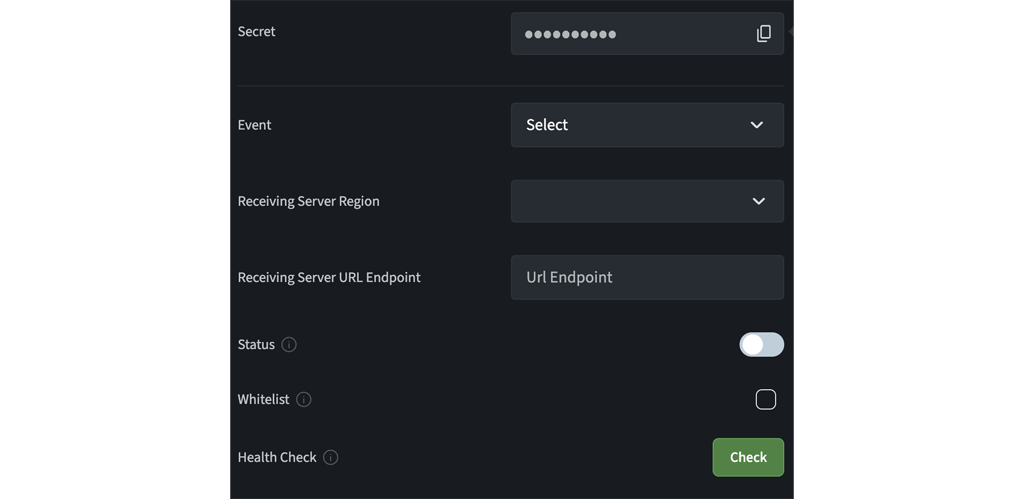
    3. Fill in the following information:

       * **Event**: Select all the events that you want to subscribe to.

       If the selected events generate a high number of queries per second (QPS), ensure that your server has sufficient processing capacity.

       * **Receiving Server Region**: Select the region where your server that receives the notifications is located. Agora connects to the nearest Agora node server based on your selection.

       * **Receiving Server URL Endpoint**: The `HTTPS` public address of your server that receives the notifications. For example, `https://1111-123-456-789-99.ap.ngrok.io/ncsNotify`.

    <CalloutContainer type="info">
      <CalloutDescription>
        For enhanced security, Notifications no longer supports `HTTP` addresses.
      </CalloutDescription>
    </CalloutContainer>

    * To reduce the delay in notification delivery, best practice is to activate `HTTP` persistent connection (also called `HTTP` keep-alive) on your server with the following settings:

      * `MaxKeepAliveRequests`: 100 or more
      * `KeepAliveTimeout`: 10 seconds or more

    * **Whitelist**: If your server is behind a firewall, check the box here, and ensure that you call the [IP address query API](#ip-address-query-api) to get the IP addresses of the Agora Notifications server and add them to the firewall's allowed IP list.
    ![Notification tab](https://assets-docs.agora.io/images/video-sdk/enable-ncs-configuration-tab.png)

    1. Copy the **Secret** displayed against the product name by clicking the copy icon. You use this secret to [Add signature verification](#add-signature-verification).

    2. Press **Check**. Agora performs a health test for your configuration as follows:

       1. The Notifications health test generates test events that correspond to your subscribed events, and then sends test event callbacks to your server.

       In test event callbacks, the channelName is `test_webhook`, and the uid is `12121212`.

       1. After receiving each test event callback, your server must respond within 10 seconds with a status code of `200`. The response body must be in JSON format.

       2. When the Notifications health test succeeds, read the prompt and press **Apply Settings**. After your configuration is saved, the **Status** of Notifications shows **Enabled**.
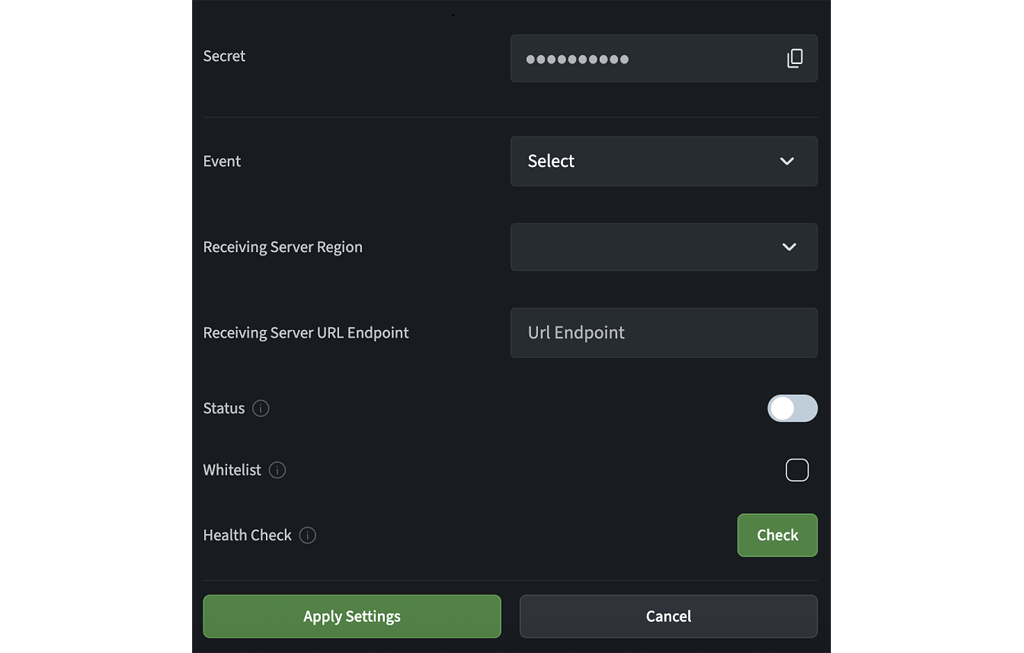
          ![Apply Settings](https://assets-docs.agora.io/images/video-sdk/enable-ncs-apply-settings.png)

       If the Notifications health test fails, follow the prompt on the Agora Console to troubleshoot the error. Common errors include the following:

       * Request timeout (590): Your server does not return the status code `200` within 10 seconds. Check whether your server responds to the request properly. If your server responds to the request properly, contact Agora Technical Support to check if the network connection between the Agora Notifications server and your server is working.

       * Domain name unreachable (591): The domain name is invalid and cannot be resolved to the target IP address. Check whether your server is properly deployed.

       * Certificate error (592): The Agora Notifications server fails to verify the SSL certificates returned by your server. Check if the SSL certificates of your server are valid. If your server is behind a firewall, check whether you have added all IP addresses of the Agora Notifications server to the firewall's allowed IP list.

       * Other response errors: Your server returns a response with a status code other than `200`. See the prompt on the Agora Console for the specific status code and error messages.

    **Video walkthrough**

    Your browser does not support the `video` element.
    \:::

    ### Add signature verification [#add-signature-verification-4]

    To communicate securely between Notifications and your webhook, Agora SDRTN® uses signatures for identity verification as follows:

    1. When you configure Notifications in Agora Console, Agora SDRTN® generates a secret you use for verification.
    2. When sending a notification, Notifications generates two signature values from the secret using `HMAC/SHA1` and `HMAC/SHA256` algorithms. These signatures are added as `Agora-Signature` and `Agora-Signature-V2` to the `HTTPS` request header.
    3. When your server receives a callback, you can verify `Agora-Signature` or `Agora-Signature-V2`:

       * To verify `Agora-Signature`, use the secret, the raw request body, and the `crypto/sha1` algorithm.
       * To verify `Agora-Signature-V2`, use the secret, the raw request body, and the `crypto/sha256` algorithm.

    The following sample code uses `crypto/sha1`.

    To add signature verification to your server, take the following steps:

    1. In the `main.go` file, replace your imports with the following:

       ```go
       import (
         "crypto/hmac"
         "crypto/sha1"
         "encoding/hex"
         "encoding/json"
         "fmt"
         "io"
         "log"
         "net/http"
       )
       ```

    2. Add the following code after the list of imports:

       ```go
       // Replace with your NCS secret
       const secret = "<Replace with your secret code>"

       // calcSignatureV1 computes the HMAC/SHA256 signature for a given payload and secret
       func calcSignatureV1(secret, payload string) string {
         mac := hmac.New(sha1.New, []byte(secret))
         mac.Write([]byte(payload))
         return hex.EncodeToString(mac.Sum(nil))
       }

       // verify checks if the provided signature matches the HMAC/SHA256 signature of the request body
       func verify(requestBody, signature string) bool {
         calculatedSignature := calcSignatureV1(secret, requestBody)
         fmt.Println("Calculated Signature:", calculatedSignature)
         fmt.Println("Received Signature:", signature)
         return calculatedSignature == signature
       }
       ```

    3. In `main.go`, add the following code after you read the request body:

       ```go
       // Verify the signature
       if !verify(string(body), agoraSignature) {
         http.Error(w, "Invalid signature", http.StatusUnauthorized)
         return
       }
       ```

    4. To test the server, follow the steps given in the [Enable notifications](#enable-notifications) section.

    5. When you receive an event from the console, and if the signature matches, the event details are displayed in your browser.

    ### Handle redundant notifications and abnormal user activity [#handle-redundant-notifications-and-abnormal-user-activity-4]

    When using Notifications to maintain the online status of your app users, your server might experience the following issues:

    * **Message notifications are redundant**. You receive multiple notifications because the Agora Notifications server can send more than one notification callback for each channel event to ensure reliability of the service.

    * **Message notifications arrive out of order**. Network issues cause callbacks to arrive at your server in a different order than the order of event occurrence.

    To accurately maintain the online status of users, your server needs to be able to deal with redundant notifications and handle received notifications in the same order as events occur. The following section shows you how to use channel event callbacks to accomplish this.

    #### Handle redundant or out of order notifications [#handle-redundant-or-out-of-order-notifications-4]

    Agora Notifications sends RTC channel event callbacks to your server. All channel events, except for `101` and `102` events, contain the `clientSeq` field (Unit64) in `payload`, which represents the sequence number of an event. This field is used to identify the order in which events occur on the app client. For notification callbacks reporting the activities of the same user, the value of the `clientSeq` field increases as events happen.

    Refer to the following steps to use the `clientSeq` field to enable your server to handle redundant messages, and messages arriving out of order:

    1. Enable Agora Notifications, and subscribe to RTC channel event callbacks. Best practice is to subscribe to the following event types according to your use-case:

       * In the `LIVE_BROADCASTING` profile: `103`, `104`, `105`, `106`, `111`, and `112`.
       * In the `COMMUNICATION` profile: `103`, `104`, `111`, and `112`.

    2. Use the channel event callbacks to get the latest status updates about the following at your server:

       * Channel lists
       * User lists in each channel
       * Data for each user, including the user ID, user role, whether the user is in a channel, and `clientSeq` of channel events

    3. When receiving notification callbacks of a user, search for the user in the user lists. If there is no data for the user, create data specific to the user.

    4. Compare the value in the `clientSeq` field of the latest notification callback you receive with that of the last notification callback handled by your server:

       * If the former is greater than the latter, the notification callback needs to be handled.
       * If the former is less than the latter, the notification callback should be ignored.

    5. When receiving notification callbacks reporting a user leaving a channel, wait for one minute before deleting the user data. If it is deleted immediately, your server cannot handle notifications in the same order as channel events happen when receiving redundant notifications or notifications out of order.

    #### Deal with abnormal user activities [#deal-with-abnormal-user-activities-4]

    When your server receives a notification callback of event `104` with reason as `999`, it means that the user is considered to have abnormal activities due to frequent login and logout actions. In this case, best practice is that your server calls the Banning user privileges API to remove the user from the current channel one minute after receiving such notification callback; otherwise, the notification callbacks your server receives about the user's events might be redundant or arrive out of order, which makes it hard for you to accurately maintain the online status of this user.

    ### Implement online user status tracking [#implement-online-user-status-tracking-4]

    This section provides sample Go code to show how to use channel event callbacks to maintain online user status at your app server.

    To maintain a user registry, take the following steps:

    1. Replace the content of the `main.go` file with the following code:

       ```go
       package main

       import (
         "crypto/hmac"
         "crypto/sha1"
         "encoding/hex"
         "encoding/json"
         "fmt"
         "io"
         "log"
         "net/http"
         "sync"
         "time"
       )

       const secret = "<Add Your secret key here>"

       type WebhookRequest struct {
         NoticeID string `json:"noticeId"`
         ProductID int64  `json:"productId"`
         EventType int   `json:"eventType"`
         Payload  Payload `json:"payload"`
       }

       type Payload struct {
         ClientSeq  int64 `json:"clientSeq"`
         UID     int  `json:"uid"`
         ChannelName string `json:"channelName"`
       }

       const (
         EventBroadcasterJoin     = 103
         EventBroadcasterQuit     = 104
         EventAudienceJoin      = 105
         EventAudienceQuit      = 106
         EventChangeRoleToBroadcaster = 111
         EventChangeRoleToAudience  = 112

         RoleBroadcaster = 1
         RoleAudience  = 2
         WaitTimeoutMs  = 60 * 1000
       )

       var (
         channels = make(map[string]*Channel)
         mu    sync.Mutex
       )

       type User struct {
         UID      int
         Role     int
         IsOnline   bool
         LastClientSeq int64
       }

       type Channel struct {
         Users map[int]*User
       }

       func handleNCSEvent(channelName string, uid int, eventType int, clientSeq int64) {
         mu.Lock()
         defer mu.Unlock()

         if !isValidEventType(eventType) {
           return
         }

         isOnlineInNotice := isUserOnlineInNotice(eventType)
         roleInNotice := getUserRoleInNotice(eventType)

         channel, exists := channels[channelName]
         if !exists {
           channel = &Channel{Users: make(map[int]*User)}
           channels[channelName] = channel
           fmt.Println("New channel", channelName, "created")
         }

         user, exists := channel.Users[uid]
         if !exists {
           user = &User{UID: uid, Role: roleInNotice, IsOnline: isOnlineInNotice, LastClientSeq: clientSeq}
           channel.Users[uid] = user

           if isOnlineInNotice {
             fmt.Println("New User", uid, "joined channel", channelName)
           } else {
             delayedRemoveUserFromChannel(channelName, uid, clientSeq)
           }
         } else if clientSeq > user.LastClientSeq {
           user.Role = roleInNotice
           user.IsOnline = isOnlineInNotice
           user.LastClientSeq = clientSeq

           if !isOnlineInNotice && user.IsOnline {
             fmt.Println("User", uid, "quit channel", channelName)
             delayedRemoveUserFromChannel(channelName, uid, clientSeq)
           }
         }
       }

       func delayedRemoveUserFromChannel(channelName string, uid int, clientSeq int64) {
         time.AfterFunc(WaitTimeoutMs*time.Millisecond, func() {
           mu.Lock()
           defer mu.Unlock()

           channel, exists := channels[channelName]
           if !exists {
             return
           }

           user, exists := channel.Users[uid]
           if !exists {
             return
           }

           if user.LastClientSeq != clientSeq {
             return
           }

           if !user.IsOnline {
             delete(channel.Users, uid)
             fmt.Println("Removed user", uid, "from channel", channelName)
           } else {
             fmt.Println("User", uid, "is online while delayed removing, cancelled")
           }

           if len(channel.Users) == 0 {
             delete(channels, channelName)
             fmt.Println("Removed channel", channelName)
           }
         })
       }

       func isValidEventType(eventType int) bool {
         return eventType == EventBroadcasterJoin ||
           eventType == EventBroadcasterQuit ||
           eventType == EventAudienceJoin ||
           eventType == EventAudienceQuit ||
           eventType == EventChangeRoleToBroadcaster ||
           eventType == EventChangeRoleToAudience
       }

       func isUserOnlineInNotice(eventType int) bool {
         return eventType == EventBroadcasterJoin ||
           eventType == EventAudienceJoin ||
           eventType == EventChangeRoleToBroadcaster ||
           eventType == EventChangeRoleToAudience
       }

       func getUserRoleInNotice(eventType int) int {
         if eventType == EventBroadcasterJoin ||
           eventType == EventBroadcasterQuit ||
           eventType == EventChangeRoleToBroadcaster {
           return RoleBroadcaster
         }
         return RoleAudience
       }

       func calcSignature(secret, payload string) string {
         mac := hmac.New(sha1.New, []byte(secret))
         mac.Write([]byte(payload))
         return hex.EncodeToString(mac.Sum(nil))
       }

       func verifySignature(requestBody, signature string) bool {
         calculatedSignature := calcSignature(secret, requestBody)
         fmt.Println("Calculated Signature:", calculatedSignature)
         fmt.Println("Received Signature:", signature)
         return calculatedSignature == signature
       }

       func rootHandler(w http.ResponseWriter, r *http.Request) {
         response := `<h1>Agora Notifications demo</h1><h2>Port: 80</h2>`
         w.WriteHeader(http.StatusOK)
         w.Write([]byte(response))
       }

       func ncsHandler(w http.ResponseWriter, r *http.Request) {
         agoraSignature := r.Header.Get("Agora-Signature")
         fmt.Println("Agora-Signature:", agoraSignature)

         body, err := ioutil.ReadAll(r.Body)
         if err != nil {
           http.Error(w, "Unable to read request body", http.StatusBadRequest)
           return
         }

         if !verifySignature(string(body), agoraSignature) {
           http.Error(w, "Invalid signature", http.StatusUnauthorized)
           return
         }

         var req WebhookRequest
         if err := json.Unmarshal(body, &req); err != nil {
           http.Error(w, "Invalid JSON", http.StatusBadRequest)
           return
         }

         fmt.Printf("Event code: %d Uid: %d Channel: %s ClientSeq: %d\n",
           req.EventType, req.Payload.UID, req.Payload.ChannelName, req.Payload.ClientSeq)

         handleNCSEvent(req.Payload.ChannelName, req.Payload.UID, req.EventType, req.Payload.ClientSeq)

         w.WriteHeader(http.StatusOK)
         w.Write([]byte("Ok"))
       }

       func main() {
         http.HandleFunc("/", rootHandler)
         http.HandleFunc("/ncsNotify", ncsHandler)

         port := ":80"
         fmt.Printf("Notifications webhook server started on port %s\n", port)
         if err := http.ListenAndServe(port, nil); err != nil {
           log.Fatalf("Failed to start server: %v", err)
         }
       }
       ```

    2. To test signature verification, follow the steps given in the [Enable notifications](#enable-notifications) section.

    When adopting the solutions recommended by Agora to maintain user online status, you need to recognize the following:

    * The solutions only guarantee eventual consistency of user status.

    * To improve accuracy, notification callbacks specific to one channel must be handled in a single process.

    ## Reference [#reference-4]

    This section contains in depth information about Notifications.

    ### Request Header [#request-header-8]

    The header of notification callbacks contains the following fields:

    | Field name           | Value                                                                                                                                                                                                                                                |
    | :------------------- | :--------------------------------------------------------------------------------------------------------------------------------------------------------------------------------------------------------------------------------------------------- |
    | `Content-Type`       | `application/json`                                                                                                                                                                                                                                   |
    | `Agora-Signature`    | The signature generated by Agora using the **Secret** and the HMAC/SHA1 algorithm. You need to use the Secret and HMAC/SHA1 algorithm to verify the signature value. For details, see [Signature verification](#add-signature-verification).         |
    | `Agora-Signature-V2` | The signature generated by Agora using the **Secret** and the HMAC/SHA256 algorithm. You need to use the Secret and the HMAC/SHA256 algorithm to verify the signature value. For details, see [Signature verification](#add-signature-verification). |

    ### Request Body [#request-body-8]

    The request body of notification callbacks contains the following fields:

    | Field name  | Type        | Description                                                                                                                                             |
    | :---------- | :---------- | :------------------------------------------------------------------------------------------------------------------------------------------------------ |
    | `noticeId`  | String      | The notification ID, identifying the notification callback when the event occurs.                                                                       |
    | `productId` | Number      | The product ID:- `1`: Realtime Communication (RTC) service
    - `3`: Cloud Recording
    - `4`: Media Pull
    - `5`: Media Push                                   |
    | `eventType` | Number      | The type of event being notified. For details, see [event types](#event-types).                                                                         |
    | `notifyMs`  | Number      | The Unix timestamp (ms) when Notifications sends a callback to your server. This value is updated when Notifications resends the notification callback. |
    | `payload`   | JSON Object | The content of the event being notified. The payload varies with event type.                                                                            |

    #### Example [#example-44]

    ```json
    {
      "noticeId":"2000001428:4330:107",
      "productId":1,
      "eventType":101,
      "notifyMs":1611566412672,
      "payload":{
       ...
      }
    }
    ```

    ### Event types [#event-types-4]

    The Agora Notifications server notifies your server of the following RTC channel event types when you use the RTC service:

    | eventType                                                | Event name                                 | Description                                                                                                                          |
    | :------------------------------------------------------- | :----------------------------------------- | :----------------------------------------------------------------------------------------------------------------------------------- |
    | [`101`](#101-channel-create)                             | channel create                             | Initializes the channel.                                                                                                             |
    | [`102`](#102-channel-destroy)                            | channel destroy                            | Destroys the channel.                                                                                                                |
    | [`103`](#103-broadcaster-join-channel)                   | broadcaster join channel                   | In the streaming profile, the host joins the channel.                                                                                |
    | [`104`](#104-broadcaster-leave-channel)                  | broadcaster leave channel                  | In the streaming profile, the host leaves the channel.                                                                               |
    | [`105`](#105-audience-join-channel)                      | audience join channel                      | In the streaming profile, an audience member joins the channel.                                                                      |
    | [`106`](#106-audience-leave-channel)                     | audience leave channel                     | In the streaming profile, an audience member leaves the channel.                                                                     |
    | [`107`](#107-user-join-channel-with-communication-mode)  | user join channel with communication mode  | In the communication profile, a user joins the channel.                                                                              |
    | [`108`](#108-user-leave-channel-with-communication-mode) | user leave channel with communication mode | In the communication profile, a user leaves the channel.                                                                             |
    | [`111`](#111-client-role-change-to-broadcaster)          | client role change to broadcaster          | In the communication profile in RTC v4. x products or in the streaming profile, an audience member switches their user role to host. |
    | [`112`](#112-client-role-change-to-audience)             | client role change to audience             | In the communication profile in RTC v4. x products or in the streaming profile, a host switches their user role to audience member.  |

    #### 101 channel create [#101-channel-create-4]

    This event type indicates that a channel is initialized (when the first user joins the channel). The payload contains the following fields:

    | Field name    | Type   | Description                                                           |
    | :------------ | :----- | :-------------------------------------------------------------------- |
    | `channelName` | String | The name of the channel.                                              |
    | `ts`          | Number | The Unix timestamp (s) when the event occurs on the Agora RTC server. |

    ##### Example [#example-45]

    ```json
    {
      "channelName":"test_webhook",
      "ts":1560399999
    }
    ```

    #### 102 channel destroy [#102-channel-destroy-4]

    This event type indicates that the last user in the channel leaves the channel and the channel is destroyed. The payload contains the following fields:

    | Field name    | Type   | Description                                                                                                                                                                                            |
    | :------------ | :----- | :----------------------------------------------------------------------------------------------------------------------------------------------------------------------------------------------------- |
    | `channelName` | String | The name of the channel.                                                                                                                                                                               |
    | `ts`          | Number | The Unix timestamp (s) when the event occurs on the Agora RTC server.                                                                                                                                  |
    | `lastUid`     | Number | The ID of the last user to leave the channel. Note: If multiple people leave the channel at the same time, Agora message notification may return different `lastUid`s. You can choose any one of them. |

    ##### Example [#example-46]

    ```json
    {
      "channelName":"test_webhook",
      "ts":1560399999,
      "lastUid":12121212
    }
    ```

    #### 103 broadcaster join channel [#103-broadcaster-join-channel-4]

    This event type indicates that a host joins the channel in the streaming profile. The payload contains the following fields:

    | Field name    | Type   | Description                                                                                                                                                                                  |
    | :------------ | :----- | :------------------------------------------------------------------------------------------------------------------------------------------------------------------------------------------- |
    | `channelName` | String | The name of the channel.                                                                                                                                                                     |
    | `uid`         | Number | The user ID of the host in the channel.                                                                                                                                                      |
    | `platform`    | Number | The platform type of the host's device:- 1: Android
    - 2: iOS
    - 5: Windows
    - 6: Linux
    - 7: Web
    - 8: macOS
    - 0: Other platform                                                                 |
    | `clientType`  | Number | The type of services used by the host on Linux. Common return values include:- 3: On-premise Recording
    - 10: Cloud RecordingThis field is only returned when platform is 6.                  |
    | `clientSeq`   | Number | The sequence number, which is used to identify the order in which events occur on the app client. You can use the value of this field to sort the events of a user into chronological order. |
    | `ts`          | Number | The Unix timestamp (s) when the event occurs on the Agora RTC server.                                                                                                                        |

    ##### Example [#example-47]

    ```json
    {
      "channelName":"test_webhook",
      "uid":12121212,
      "platform":1,
      "clientSeq":1625051030746,
      "ts":1560396843
    }
    ```

    #### 104 broadcaster leave channel [#104-broadcaster-leave-channel-4]

    This event type indicates that a host leaves the channel in the streaming profile. The payload contains the following fields:

    | Field name    | Type   | Description                                                                                                                                                                                                                                                                                                                                                                                                                                                                                                                                                                                                                                                                                                                                                                                                                                                                                                                                                                                                                                                                                                                                                                                                                                                                                                                                                                                                                                                                                                                                                                                                                                                                                                                                                                                                                                                                                                                                                                       |
    | :------------ | :----- | :-------------------------------------------------------------------------------------------------------------------------------------------------------------------------------------------------------------------------------------------------------------------------------------------------------------------------------------------------------------------------------------------------------------------------------------------------------------------------------------------------------------------------------------------------------------------------------------------------------------------------------------------------------------------------------------------------------------------------------------------------------------------------------------------------------------------------------------------------------------------------------------------------------------------------------------------------------------------------------------------------------------------------------------------------------------------------------------------------------------------------------------------------------------------------------------------------------------------------------------------------------------------------------------------------------------------------------------------------------------------------------------------------------------------------------------------------------------------------------------------------------------------------------------------------------------------------------------------------------------------------------------------------------------------------------------------------------------------------------------------------------------------------------------------------------------------------------------------------------------------------------------------------------------------------------------------------------------------------------- |
    | `channelName` | String | The name of the channel.                                                                                                                                                                                                                                                                                                                                                                                                                                                                                                                                                                                                                                                                                                                                                                                                                                                                                                                                                                                                                                                                                                                                                                                                                                                                                                                                                                                                                                                                                                                                                                                                                                                                                                                                                                                                                                                                                                                                                          |
    | `uid`         | Number | The user ID of the host in the channel.                                                                                                                                                                                                                                                                                                                                                                                                                                                                                                                                                                                                                                                                                                                                                                                                                                                                                                                                                                                                                                                                                                                                                                                                                                                                                                                                                                                                                                                                                                                                                                                                                                                                                                                                                                                                                                                                                                                                           |
    | `platform`    | Number | The platform type of the host's device:- 1: Android
    - 2: iOS
    - 5: Windows
    - 6: Linux
    - 7: Web
    - 8: macOS
    - 0: Other platform                                                                                                                                                                                                                                                                                                                                                                                                                                                                                                                                                                                                                                                                                                                                                                                                                                                                                                                                                                                                                                                                                                                                                                                                                                                                                                                                                                                                                                                                                                                                                                                                                                                                                                                                                                                                                                                      |
    | `clientType`  | Number | The type of services used by the host on Linux. Common return values include:- 3: On-premise Recording
    - 10: Cloud RecordingThis field is only returned when platform is 6.                                                                                                                                                                                                                                                                                                                                                                                                                                                                                                                                                                                                                                                                                                                                                                                                                                                                                                                                                                                                                                                                                                                                                                                                                                                                                                                                                                                                                                                                                                                                                                                                                                                                                                                                                                                                       |
    | `clientSeq`   | Number | The sequence number, which is used to identify the order in which events occur on the app client. You can use the value of this field to sort the events of a user into chronological order.                                                                                                                                                                                                                                                                                                                                                                                                                                                                                                                                                                                                                                                                                                                                                                                                                                                                                                                                                                                                                                                                                                                                                                                                                                                                                                                                                                                                                                                                                                                                                                                                                                                                                                                                                                                      |
    | `reason`      | Number | The reason why the host leaves the channel:- 1: The host quits the call.
    - 2: The connection between the app client and the Agora RTC server times out, which occurs when the Agora SDRTN® does not receive any data packets from the app client for more than 10 seconds.
    - 3: Permission issues. For example, the host is kicked out of the channel by the administrator through the Banning user privileges RESTful API.
    - 4: Internal issues with the Agora RTC server. For example, the Agora RTC server disconnects from the app client for a short period of time for load balancing. When the load balancing is finished, the Agora RTC server reconnects with the client.
    - 5: The host uses a new device to join the channel, which forces the old device to leave the channel.
    - 9: The app client has multiple IP addresses, therefore the SDK actively disconnects from the Agora RTC server and reconnects. The user is not aware of this process. Check whether the app client has multiple public IP addresses or uses a VPN
    - 10: Due to network connection issues, for example, the SDK does not receive any data packets from the Agora RTC server for more than 4 seconds or the socket connection error occurs, the SDK actively disconnects from the Agora server and reconnects. The user is not aware of this process. Check the network connection status.
    - 12: Token error or expired token.
    - 99: The SDK disconnected from the Agora server due to an unknown network problem. Normally, the SDK tries to reconnect.
    - 999: The user has unusual activities, such as frequent login and logout actions. 60 seconds after receiving the 104 or 106 event callback with reason as 999, your app server needs to call the Banning user privileges API to remove the user from the current channel; otherwise, your server could fail to receive any notification callbacks about the user's events if the user rejoins the channel.
    - 0: Other reasons. |
    | `ts`          | Number | The Unix timestamp (s) when the event occurs on the Agora RTC server.                                                                                                                                                                                                                                                                                                                                                                                                                                                                                                                                                                                                                                                                                                                                                                                                                                                                                                                                                                                                                                                                                                                                                                                                                                                                                                                                                                                                                                                                                                                                                                                                                                                                                                                                                                                                                                                                                                             |
    | `duration`    | Number | The length of time (s) that the host stays in the channel.                                                                                                                                                                                                                                                                                                                                                                                                                                                                                                                                                                                                                                                                                                                                                                                                                                                                                                                                                                                                                                                                                                                                                                                                                                                                                                                                                                                                                                                                                                                                                                                                                                                                                                                                                                                                                                                                                                                        |

    ##### Example [#example-48]

    ```json
    {
      "channelName":"test_webhook",
      "uid":12121212,
      "platform":1,
      "clientSeq":1625051030789,
      "reason":1,
      "ts":1560396943,
      "duration":600
    }
    ```

    #### 105 audience join channel [#105-audience-join-channel-4]

    This event type indicates that an audience member joins the channel in the streaming profile The payload includes the following fields:

    | Field name    | Type   | Description                                                                                                                                                                                  |
    | :------------ | :----- | :------------------------------------------------------------------------------------------------------------------------------------------------------------------------------------------- |
    | `channelName` | String | The name of the channel.                                                                                                                                                                     |
    | `uid`         | Number | The user ID of the audience member in the channel.                                                                                                                                           |
    | `platform`    | Number | The platform type of the audience member's device:- 1: Android
    - 2: iOS
    - 5: Windows
    - 6: Linux
    - 7: Web
    - 8: macOS
    - 0: Other platform                                                      |
    | `clientType`  | Number | The type of services used by the host on Linux. Common return values include:- 3: On-premise Recording
    - 10: Cloud RecordingThis field is only returned when platform is 6.                  |
    | `clientSeq`   | Number | The sequence number, which is used to identify the order in which events occur on the app client. You can use the value of this field to sort the events of a user into chronological order. |
    | `ts`          | Number | The Unix timestamp (s) when the event occurs on the Agora RTC server.                                                                                                                        |

    ##### Example [#example-49]

    ```json
    {
      "channelName":"test_webhook",
      "uid":12121212,
      "platform":1,
      "clientSeq":1625051035346,
      "ts":1560396843
    }
    ```

    #### 106 audience leave channel [#106-audience-leave-channel-4]

    This event type indicates that an audience member leaves the channel in the streaming profile. The payload includes the following fields:

    | Field name    | Type   | Description                                                                                                                                                                                                                                                                                                                                                                                                                                                                                                                                                                                                                                                                                                                                                                                                                                                                                                                                                                                                                                                                                                                                                                                                                                                                                                                                                                                                                                                                                                                                                                                                                                                                                                                                                                                                                                                     |
    | :------------ | :----- | :-------------------------------------------------------------------------------------------------------------------------------------------------------------------------------------------------------------------------------------------------------------------------------------------------------------------------------------------------------------------------------------------------------------------------------------------------------------------------------------------------------------------------------------------------------------------------------------------------------------------------------------------------------------------------------------------------------------------------------------------------------------------------------------------------------------------------------------------------------------------------------------------------------------------------------------------------------------------------------------------------------------------------------------------------------------------------------------------------------------------------------------------------------------------------------------------------------------------------------------------------------------------------------------------------------------------------------------------------------------------------------------------------------------------------------------------------------------------------------------------------------------------------------------------------------------------------------------------------------------------------------------------------------------------------------------------------------------------------------------------------------------------------------------------------------------------------------------------------------------- |
    | `channelName` | String | The name of the channel.                                                                                                                                                                                                                                                                                                                                                                                                                                                                                                                                                                                                                                                                                                                                                                                                                                                                                                                                                                                                                                                                                                                                                                                                                                                                                                                                                                                                                                                                                                                                                                                                                                                                                                                                                                                                                                        |
    | `uid`         | Number | The user ID of the audience member in the channel.                                                                                                                                                                                                                                                                                                                                                                                                                                                                                                                                                                                                                                                                                                                                                                                                                                                                                                                                                                                                                                                                                                                                                                                                                                                                                                                                                                                                                                                                                                                                                                                                                                                                                                                                                                                                              |
    | `platform`    | Number | The platform type of the audience member's device:- 1: Android
    - 2: iOS
    - 5: Windows
    - 6: Linux
    - 7: Web
    - 8: macOS
    - 0: Other platform                                                                                                                                                                                                                                                                                                                                                                                                                                                                                                                                                                                                                                                                                                                                                                                                                                                                                                                                                                                                                                                                                                                                                                                                                                                                                                                                                                                                                                                                                                                                                                                                                                                                                                                         |
    | `clientType`  | Number | The type of services used by the audience member on Linux. Common return values include:- 3: On-premise Recording
    - 10: Cloud RecordingThis field is only returned when platform is 6.                                                                                                                                                                                                                                                                                                                                                                                                                                                                                                                                                                                                                                                                                                                                                                                                                                                                                                                                                                                                                                                                                                                                                                                                                                                                                                                                                                                                                                                                                                                                                                                                                                                                          |
    | `clientSeq`   | Number | The sequence number, which is used to identify the order in which events occur on the app client. You can use the value of this field to sort the events of a user into chronological order.                                                                                                                                                                                                                                                                                                                                                                                                                                                                                                                                                                                                                                                                                                                                                                                                                                                                                                                                                                                                                                                                                                                                                                                                                                                                                                                                                                                                                                                                                                                                                                                                                                                                    |
    | `reason`      | Number | The reason why the audience member leaves the channel:- 1: The audience member quits the call.
    - 2: The connection between the app client and the Agora RTC server times out, which occurs when the Agora SDRTN® does not receive any data packets from the app client for more than 10 seconds.
    - 3: Permission issues. For example, the audience member is kicked out of the channel by the administrator through the Banning user privileges RESTful API.
    - 4: Internal issues with the Agora RTC server. For example, the Agora RTC server disconnects from the app client for a short period of time for load balancing. When the load balancing is finished, the Agora RTC server reconnects with the client.
    - 5: The audience member uses a new device to join the channel, which forces the old device to leave the channel.
    - 9: The app client has multiple IP addresses, therefore the SDK actively disconnects from the Agora RTC server and reconnects. The user is not aware of this process. Check whether the app client has multiple public IP addresses or uses a VPN
    - 10: Due to network connection issues, for example, the SDK does not receive any data packets from the Agora RTC server for more than 4 seconds or the socket connection error occurs, the SDK actively disconnects from the Agora server and reconnects. The user is not aware of this process. Check the network connection status.
    - 999: The user has unusual activities, such as frequent login and logout actions. 60 seconds after receiving the 104 or 106 event callback with reason as 999, your app server needs to call the Banning user privileges API to remove the user from the current channel; otherwise, your server could fail to receive any notification callbacks about the user's events if the user rejoins the channel.
    - 0: Other reasons. |
    | `ts`          | Number | The Unix timestamp (s) when the event occurs on the Agora RTC server.                                                                                                                                                                                                                                                                                                                                                                                                                                                                                                                                                                                                                                                                                                                                                                                                                                                                                                                                                                                                                                                                                                                                                                                                                                                                                                                                                                                                                                                                                                                                                                                                                                                                                                                                                                                           |
    | `duration`    | Number | The length of time (s) that the audience member stays in the channel.                                                                                                                                                                                                                                                                                                                                                                                                                                                                                                                                                                                                                                                                                                                                                                                                                                                                                                                                                                                                                                                                                                                                                                                                                                                                                                                                                                                                                                                                                                                                                                                                                                                                                                                                                                                           |

    ##### Example [#example-50]

    ```json
    {
      "channelName":"test_webhook",
      "uid":12121212,
      "platform":1,
      "clientSeq":1625051035390,
      "reason":1,
      "ts":1560396943,
      "duration":600
    }
    ```

    #### 107 user join channel with communication mode [#107-user-join-channel-with-communication-mode-4]

    This event type indicates that a user joins the channel in the communication profile. The payload includes the following fields:

    | Field name    | Type   | Description                                                                                                                                                                                  |
    | :------------ | :----- | :------------------------------------------------------------------------------------------------------------------------------------------------------------------------------------------- |
    | `channelName` | String | The name of the channel.                                                                                                                                                                     |
    | `uid`         | Number | The user ID of the user in the channel.                                                                                                                                                      |
    | `platform`    | Number | The platform type of the host's device:- 1: Android
    - 2: iOS
    - 5: Windows
    - 6: Linux
    - 7: Web
    - 8: macOS
    - 0: Other platform                                                                 |
    | `clientSeq`   | Number | The sequence number, which is used to identify the order in which events occur on the app client. You can use the value of this field to sort the events of a user into chronological order. |
    | `ts`          | Number | The Unix timestamp (s) when the event occurs on the Agora RTC server.                                                                                                                        |

    ##### Example [#example-51]

    ```json
    {
      "channelName":"test_webhook",
      "uid":12121212,
      "platform":1,
      "clientSeq":1625051035369,
      "ts":1560396834
    }
    ```

    #### 108 user leave channel with communication mode [#108-user-leave-channel-with-communication-mode-4]

    This event type indicates that a user leaves the channel in the communication profile. The payload includes the following fields:

    | Field name    | Type   | Description                                                                                                                                                                                                                                                                                                                                                                                                                                                                                                                                                                                                                                                                                                                                                                                                                                                                                                                                                                                                                                                                                                                                                                                                                                                                                                                                                                                                                                                                                                                                                                                                                                                                                                                                                                                                       |
    | :------------ | :----- | :---------------------------------------------------------------------------------------------------------------------------------------------------------------------------------------------------------------------------------------------------------------------------------------------------------------------------------------------------------------------------------------------------------------------------------------------------------------------------------------------------------------------------------------------------------------------------------------------------------------------------------------------------------------------------------------------------------------------------------------------------------------------------------------------------------------------------------------------------------------------------------------------------------------------------------------------------------------------------------------------------------------------------------------------------------------------------------------------------------------------------------------------------------------------------------------------------------------------------------------------------------------------------------------------------------------------------------------------------------------------------------------------------------------------------------------------------------------------------------------------------------------------------------------------------------------------------------------------------------------------------------------------------------------------------------------------------------------------------------------------------------------------------------------------------------------- |
    | `channelName` | String | The name of the channel.                                                                                                                                                                                                                                                                                                                                                                                                                                                                                                                                                                                                                                                                                                                                                                                                                                                                                                                                                                                                                                                                                                                                                                                                                                                                                                                                                                                                                                                                                                                                                                                                                                                                                                                                                                                          |
    | `uid`         | Number | The user ID of the user in the channel.                                                                                                                                                                                                                                                                                                                                                                                                                                                                                                                                                                                                                                                                                                                                                                                                                                                                                                                                                                                                                                                                                                                                                                                                                                                                                                                                                                                                                                                                                                                                                                                                                                                                                                                                                                           |
    | `platform`    | Number | The platform type of the user's device:- 1: Android
    - 2: iOS
    - 5: Windows
    - 6: Linux
    - 7: Web
    - 8: macOS
    - 0: Other platform                                                                                                                                                                                                                                                                                                                                                                                                                                                                                                                                                                                                                                                                                                                                                                                                                                                                                                                                                                                                                                                                                                                                                                                                                                                                                                                                                                                                                                                                                                                                                                                                                                                                                      |
    | `clientSeq`   | Number | The sequence number, which is used to identify the order in which events occur on the app client. You can use the value of this field to sort the events of a user into chronological order.                                                                                                                                                                                                                                                                                                                                                                                                                                                                                                                                                                                                                                                                                                                                                                                                                                                                                                                                                                                                                                                                                                                                                                                                                                                                                                                                                                                                                                                                                                                                                                                                                      |
    | `reason`      | Number | The reason why a user leaves the channel:- 1: The user quits the call.
    - 2: The connection between the app client and the Agora RTC server times out, which occurs when the Agora SDRTN® does not receive any data packets from the app client for more than 10 seconds.
    - 3: Permission issues. For example, the user is kicked out of the channel by the administrator through the Banning user privileges RESTful API.
    - 4: Internal issues with the Agora RTC server. For example, the Agora RTC server disconnects from the app client for a short period of time for load balancing. When the load balancing is finished, the Agora RTC server reconnects with the client.
    - 5: The user uses a new device to join the channel, which forces the old device to leave the channel.
    - 9: The app client has multiple IP addresses, therefore the SDK actively disconnects from the Agora RTC server and reconnects. The user is not aware of this process. Check whether the app client has multiple public IP addresses or uses a VPN
    - 10: Due to network connection issues, for example, the SDK does not receive any data packets from the Agora RTC server for more than 4 seconds or the socket connection error occurs, the SDK actively disconnects from the Agora server and reconnects. The user is not aware of this process. Check the network connection status.
    - 999: The user has unusual activities, such as frequent login and logout actions. 60 seconds after receiving the 104 or 106 event callback with reason as 999, your app server needs to call the Banning user privileges API to remove the user from the current channel; otherwise, your server could fail to receive any notification callbacks about the user's events if the user rejoins the channel.
    - 0: Other reasons. |
    | `ts`          | Number | The Unix timestamp (s) when the event occurs on the Agora RTC server.                                                                                                                                                                                                                                                                                                                                                                                                                                                                                                                                                                                                                                                                                                                                                                                                                                                                                                                                                                                                                                                                                                                                                                                                                                                                                                                                                                                                                                                                                                                                                                                                                                                                                                                                             |
    | `duration`    | Number | The length of time (s) that the user stays in the channel.                                                                                                                                                                                                                                                                                                                                                                                                                                                                                                                                                                                                                                                                                                                                                                                                                                                                                                                                                                                                                                                                                                                                                                                                                                                                                                                                                                                                                                                                                                                                                                                                                                                                                                                                                        |

    ##### Example [#example-52]

    ```json
    {
      "channelName":"test_webhook",
      "uid":12121212,
      "platform":1,
      "clientSeq":1625051037369,
      "reason":1,
      "ts":1560496834,
      "duration":600
    }
    ```

    #### 111 client role change to broadcaster [#111-client-role-change-to-broadcaster-4]

    This event type indicates that an audience member calls setClientRole to switch their user role to host in the streaming profile. The payload includes the following fields:

    | Field name    | Type   | Description                                                                                                                                                                                  |
    | :------------ | :----- | :------------------------------------------------------------------------------------------------------------------------------------------------------------------------------------------- |
    | `channelName` | String | The name of the channel.                                                                                                                                                                     |
    | `uid`         | Number | The user ID of the user in the channel.                                                                                                                                                      |
    | `clientSeq`   | Number | The sequence number, which is used to identify the order in which events occur on the app client. You can use the value of this field to sort the events of a user into chronological order. |
    | `ts`          | Number | The Unix timestamp (s) when the event occurs on the Agora RTC server.                                                                                                                        |

    ##### Example [#example-53]

    ```json
    {
      "channelName":"test_webhook",
      "uid":12121212,
      "clientSeq":1625051035469,
      "ts":1560396834
    }
    ```

    #### 112 client role change to audience [#112-client-role-change-to-audience-4]

    This event type indicates that a host call setClientRole to switch their user role to audience member in the streaming profile. The payload contains the following fields:

    | Field name    | Type   | Description                                                                                                                                                                                  |
    | :------------ | :----- | :------------------------------------------------------------------------------------------------------------------------------------------------------------------------------------------- |
    | `channelName` | String | The name of the channel.                                                                                                                                                                     |
    | `uid`         | Number | The user ID of the user in the channel.                                                                                                                                                      |
    | `clientSeq`   | Number | The sequence number, which is used to identify the order in which events occur on the app client. You can use the value of this field to sort the events of a user into chronological order. |
    | `ts`          | Number | The Unix timestamp (s) when the event occurs on the Agora RTC server.                                                                                                                        |

    ##### Example [#example-54]

    ```json
    {
      "channelName":"test_webhook",
      "uid":12121212,
      "clientSeq":16250510358369,
      "ts":1560496834
    }
    ```

    ### IP address query API [#ip-address-query-api-4]

    If your server that receives notification callbacks is behind a firewall, call the IP address query API to retrieve the IP addresses of Notifications and configure your firewall to trust all these IP addresses.

    Agora occasionally adjusts the Notifications IP addresses. Best practice is to call this endpoint at least every 24 hours and automatically update the firewall configuration.

    #### Prototype [#prototype-4]

    * Method: `GET`
    * Endpoint: `https://api.agora.io/v2/ncs/ip`

    #### Request header [#request-header-9]

    Authorization: You must generate a Base64-encoded credential with the Customer ID and Customer Secret provided by Agora, and then pass the credential to the Authorization field in the HTTP request header.

    #### Request body [#request-body-9]

    This API has no body parameters.

    #### Response body [#response-body-4]

    When the request succeeds, the response body looks like the following:

    ```json
    {
      "data": {
        "service": {
          "hosts": [
            {
              "primaryIP": "xxx.xxx.xxx.xxx"
            },
            {
              "primaryIP": "xxx.xxx.xxx.xxx"
            }
          ]
        }
      }
    }
    ```

    Each primary IP field shows an IP address of Notifications server. When you receive a response, you need to note the primary IP fields and add all these IP addresses to your firewall's allowed IP list.

    ### Considerations [#considerations-4]

    * Notifications does not guarantee that notification callbacks arrive at your server in the same order as events occur. Implement a strategy to handle messages arriving out of order.
    * For improved reliability of Notifications, your server may receive more than one notification callback for a single event. Your server must be able to handle repeated messages.

    <CalloutContainer type="success">
      <CalloutDescription>
        To implement a strategy to ensure that you log only one callback event and ignore duplicate events, use a combination of the `noticeId` and `notifyMs` fields in the response body.
      </CalloutDescription>
    </CalloutContainer>


