# Quickstart (/en/realtime-media/video/get-started-sdk/react-native)
> For AI agents: see the complete documentation index at [llms.txt](/llms.txt).
This page provides a step-by-step guide on how to create a basic Video Calling app using the Agora Video SDK.
## Understand the tech [#understand-the-tech-7]
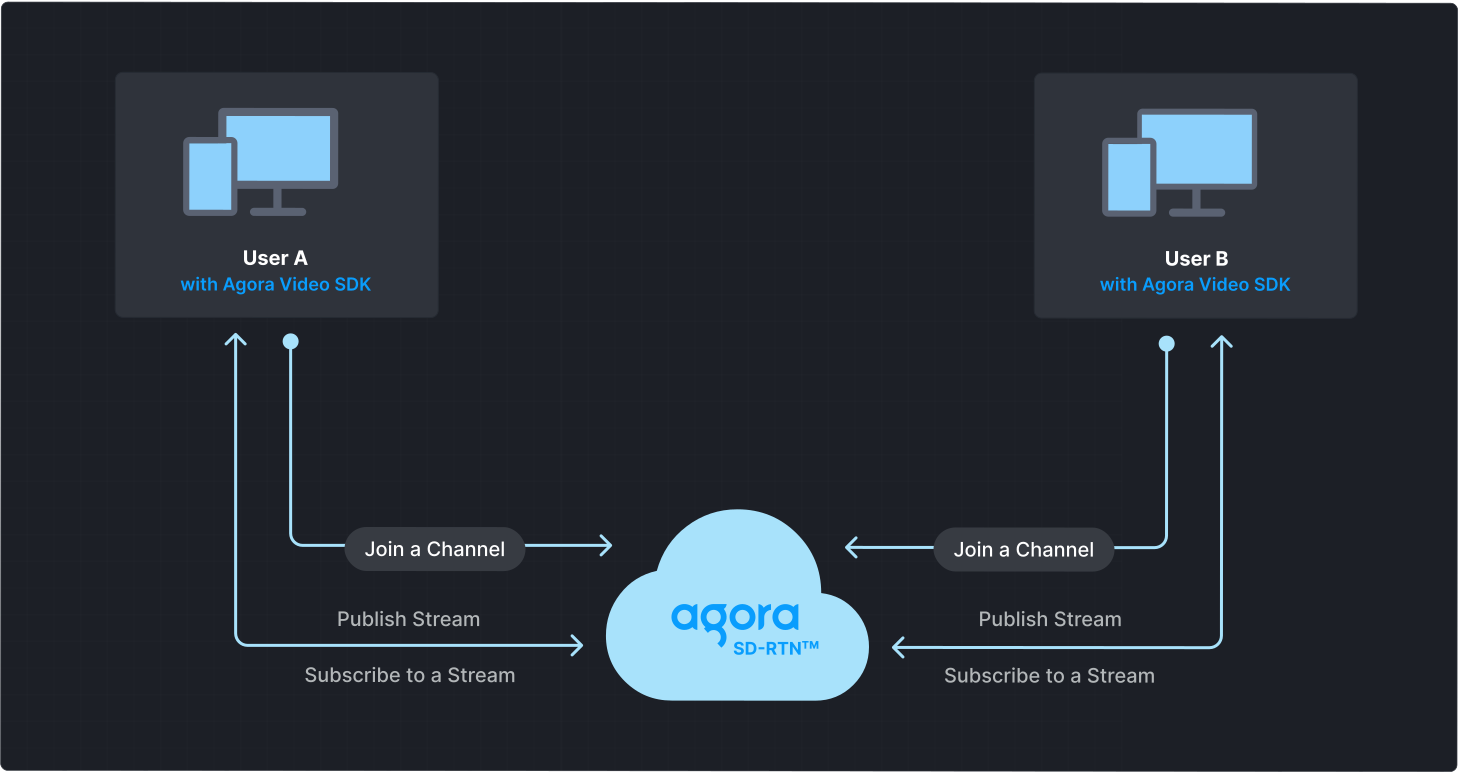
To start a Video Calling session, implement the following steps in your app:
* **Initialize the engine**: Before calling other APIs, create and initialize an engine instance.
* **Join a channel**: Call methods to create and join a channel.
* **Send and receive audio and video**: All users can publish streams to the channel and subscribe to audio and video streams published by other users in the channel.
## Prerequisites [#prerequisites-7]
* A camera and a microphone.
* A valid Agora account and project. See [Agora account management](/en/realtime-media/video/manage-agora-account) for details.
* React Native 0.60 or later. See [Get Started with React Native](https://reactnative.dev/docs/environment-setup).
* Node.js 16 or later.
* Depending on your target platform:
* Android: a machine running macOS, Windows, or Linux; [JDK 11](https://openjdk.org/projects/jdk/11/) or later; the latest version of Android Studio; and a physical or virtual Android device running Android 5.0 or later.
* iOS: a machine running macOS; Xcode 10 or later; CocoaPods; and a physical or virtual iOS device running iOS 9.0 or later. If you use React Native 0.63 or later, ensure your iOS version is 10.0 or later.
## Set up your project [#set-up-your-project-7]
### Create a project [#create-a-project]
To create a new application using [React Native Community CLI](https://github.com/react-native-community/cli), see [Get Started Without a Framework](https://reactnative.dev/docs/getting-started-without-a-framework).
### Install the SDK [#install-the-sdk-7]
Download and add the Agora Video SDK to your React Native project. Choose either of the following methods:
npm
Yarn
In your project folder, execute the following command:
```bash
npm i --save react-native-agora
```
In your project folder, execute the following commands:
```bash
# Install yarn
npm install -g yarn
# Use yarn to download Agora React Native SDK
yarn add react-native-agora
```
information
React Native 0.60.0 and later support automatic linking of native modules. Manual linking is not recommended. See [Autolinking](https://github.com/react-native-community/cli/blob/master/docs/autolinking.md) for details
## Implement Video Calling [#implement-video-calling-7]
This section guides you through the implementation of basic real-time audio and video interaction in your app.
The following figure illustrates the essential steps:
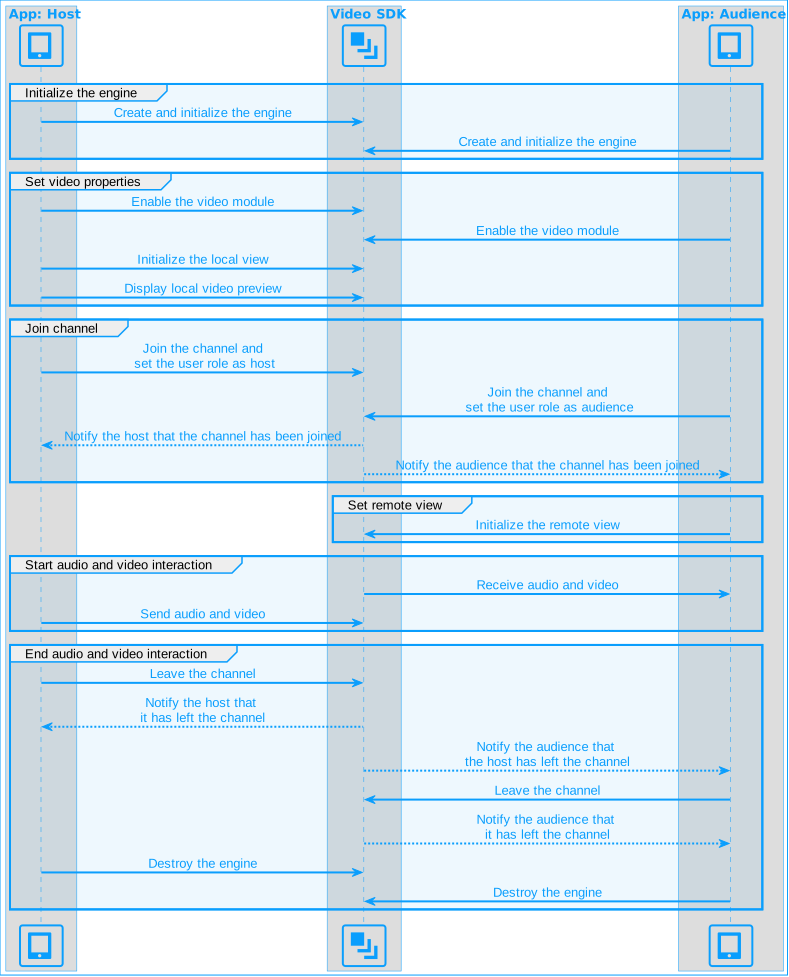
This guide includes [complete sample code](#complete-sample-code) that demonstrates implementing basic real-time interaction. To understand the core API calls in the sample code, review the following implementation steps and use the code in your `App.tsx` file.
### Import dependencies [#import-dependencies-1]
Add the required Agora dependencies to your app.
```tsx
import {
createAgoraRtcEngine,
ChannelProfileType,
ClientRoleType,
IRtcEngine,
RtcSurfaceView,
RtcConnection,
IRtcEngineEventHandler,
} from 'react-native-agora';
```
### Initialize the engine [#initialize-the-engine-6]
For real-time communication, call `createAgoraRtcEngine` to create an `RtcEngine` instance, and then `initialize` the engine using `RtcEngineContext` to specify the [App ID](/en/realtime-media/video/manage-agora-account#get-the-app-id).
```tsx
const appId = '<-- Insert app ID -->';
const setupVideoSDKEngine = async () => {
if (Platform.OS === 'android') { await getPermission(); }
agoraEngineRef.current = createAgoraRtcEngine();
const agoraEngine = agoraEngineRef.current;
await agoraEngine.initialize({ appId: appId });
};
```
### Join a channel [#join-a-channel-7]
To join a channel, call `joinChannel` with the following parameters:
* **Channel name**: The name of the channel to join. Clients that pass the same channel name join the same channel. If a channel with the specified name does not exist, it is created when the first user joins.
* **Authentication token**: A dynamic key that authenticates a user when the client joins a channel. In a production environment, you obtain a token from a [token server](/en/realtime-media/video/build/authenticate-users/deploy-token-server) in your security infrastructure. For the purpose of this guide [Generate a temporary token](/en/realtime-media/video/manage-agora-account#generate-temporary-tokens).
* **User ID**: A 32-bit signed integer that identifies a user in the channel. You can specify a unique user ID for each user yourself. If you set the user ID to `0` when joining a channel, the SDK generates a random number for the user ID and returns the value in the `onJoinChannelSuccess` callback.
* **Channel media options**: Configure `ChannelMediaOptions` to define publishing and subscription settings, optimize performance for your specific use-case, and set optional parameters.
For Video Calling, set the `channelProfile` to `ChannelProfileCommunication` and the `clientRoleType` to `ClientRoleBroadcaster`.
```tsx
const token = '<-- Insert token -->';
const channelName = '<-- Insert channel name -->';
const localUid = 0; // Local user UID, no need to modify
// Define the join method called after clicking the join channel button
const join = async () => {
if (isJoined) {
return;
}
if (isHost) {
// Join the channel as a broadcaster
agoraEngineRef.current?.joinChannel(token, channelName, localUid, {
// Set channel profile to live broadcast
channelProfile: ChannelProfileType.ChannelProfileCommunication,
// Set user role to broadcaster
clientRoleType: ClientRoleType.ClientRoleBroadcaster,
// Publish audio collected by the microphone
publishMicrophoneTrack: true,
// Publish video collected by the camera
publishCameraTrack: true,
// Automatically subscribe to all audio streams
autoSubscribeAudio: true,
// Automatically subscribe to all video streams
autoSubscribeVideo: true,
});
} else {
// Join the channel as an audience
agoraEngineRef.current?.joinChannel(token, channelName, localUid, {
// Set channel profile to live broadcast
channelProfile: ChannelProfileType.ChannelProfileCommunication,
// Set user role to audience
clientRoleType: ClientRoleType.ClientRoleAudience,
// Do not publish audio collected by the microphone
publishMicrophoneTrack: false,
// Do not publish video collected by the camera
publishCameraTrack: false,
// Automatically subscribe to all audio streams
autoSubscribeAudio: true,
// Automatically subscribe to all video streams
autoSubscribeVideo: true,',
});
}
};
```
Since the engine runs locally, reloading the app using the Metro bundler may cause the engine reference to be lost, preventing channel joining. To resolve this issue, restart the app.
### Subscribe to Video SDK events [#subscribe-to-video-sdk-events-5]
The Video SDK provides an interface for subscribing to channel events. To use it, create an instance of `IRtcEngineEventHandler` and implement the event methods you want to handle. Call `registerEventHandler` to register your custom event handler.
```tsx
const [remoteUid, setRsemoteUid] = useState(0); // Uid of the remote user
const setupEventHandler = () => {
eventHandler.current = {
// Triggered when the local user successfully joins a channel
onJoinChannelSuccess: () => {
setMessage('Successfully joined channel: ' + channelName);
setupLocalVideo();
setIsJoined(true);
},
// Triggered when a remote user joins the channel
onUserJoined: (_connection: RtcConnection, uid: number) => {
setMessage('Remote user ' + uid + ' joined');
setRemoteUid(uid);
},
// Triggered when a remote user leaves the channel
onUserOffline: (_connection: RtcConnection, uid: number) => {
setMessage('Remote user ' + uid + ' left the channel');
setRemoteUid(uid);
},
};
// Register the event handler
agoraEngineRef.current?.registerEventHandler(eventHandler.current);
};
```
To ensure that you receive all Video SDK events, register the event handler before joining a channel.
### Enable the video module [#enable-the-video-module-5]
Call `enableVideo` to activate the video module, and use `startPreview` to enable the local video preview.
```tsx
const setupLocalVideo = () => {
agoraEngineRef.current?.enableVideo();
agoraEngineRef.current?.startPreview();
};
```
### Display the local video [#display-the-local-video-7]
To display the local user's video stream, use the `RtcSurfaceView` component. Set the `uid` to `0` and `style` the video container.
```tsx
```
### Display remote video [#display-remote-video-7]
To display the remote user's video, use the `RtcSurfaceView` component. Pass the `remoteUid` of the remote user to the component and set the desired `style` for the video container.
```tsx
```
### Handle permissions [#handle-permissions-5]
To access the camera and microphone, ensure that the user grants the necessary permissions when the app starts.
Android
iOS
On Android devices, pop up a prompt box to obtain permission to use the microphone and camera.
```tsx
// Import components related to Android device permissions
const getPermission = async () => {
if (Platform.OS === 'android') {
await PermissionsAndroid.requestMultiple([
PermissionsAndroid.PERMISSIONS.RECORD_AUDIO,
PermissionsAndroid.PERMISSIONS.CAMERA,
]);
}
};
```
In Xcode, open the `info.plist` file and add the following content to the list on the right to obtain the corresponding device permissions:
| Key | Type | Value |
| -------------------------------------- | ------ | ------------------------------------------------------------------------------------------- |
| Privacy - Microphone Usage Description | String | The purpose of using the microphone, for example, for a call or live interactive streaming. |
| Privacy - Camera Usage Description | String | The purpose of using the camera, for example, for a call or live interactive streaming. |
### Leave the channel [#leave-the-channel-2]
To exit a Video Calling channel, call `leaveChannel`.
```tsx
const leave = () => {
// Leave the channel
agoraEngineRef.current?.leaveChannel();
setIsJoined(false);
};
```
### Clean up resources [#clean-up-resources]
Before closing your client, unregister the event handler and call `release` to free up resources.
```tsx
const cleanupAgoraEngine = () => {
return () => {
agoraEngineRef.current?.unregisterEventHandler(eventHandler.current!);
agoraEngineRef.current?.release();
};
};
```
After calling `release,` methods and callbacks of the SDK are no longer available. To use the SDK functions again, create a new engine instance.
### Complete sample code [#complete-sample-code-7]
A complete code sample demonstrating the basic process of real-time interaction is provided for your reference. To use the sample code, copy the code into `ProjectName/App.tsx` to quickly implement the basic functionality.
```tsx
// Import React Hooks
import React, { useRef, useState, useEffect } from 'react';
// Import user interface elements
import {
SafeAreaView,
ScrollView,
StyleSheet,
Text,
View,
Switch,
} from 'react-native';
// Import components related to obtaining Android device permissions
import { PermissionsAndroid, Platform } from 'react-native';
// Import Agora SDK
import {
createAgoraRtcEngine,
ChannelProfileType,
ClientRoleType,
IRtcEngine,
RtcSurfaceView,
RtcConnection,
IRtcEngineEventHandler,
VideoSourceType,
} from 'react-native-agora';
// Define basic information
const appId = '<-- Insert App ID -->';
const token = '<-- Insert Token -->';
const channelName = '<-- Insert Channel Name -->';
const localUid = 0; // Local user Uid, no need to modify
const App = () => {
const agoraEngineRef = useRef(); // IRtcEngine instance
const [isJoined, setIsJoined] = useState(false); // Whether the local user has joined the channel
const [isHost, setIsHost] = useState(true); // User role
const [remoteUid, setRemoteUid] = useState(0); // Uid of the remote user
const [message, setMessage] = useState(''); // User prompt message
const eventHandler = useRef(); // Implement callback functions
useEffect(() => {
const init = async () => {
await setupVideoSDKEngine();
setupEventHandler();
};
init();
return () => {
cleanupAgoraEngine(); // Ensure this is synchronous
};
}, []); // Empty dependency array ensures it runs only once
const setupEventHandler = () => {
eventHandler.current = {
onJoinChannelSuccess: () => {
setMessage('Successfully joined channel: ' + channelName);
setupLocalVideo();
setIsJoined(true);
},
onUserJoined: (_connection: RtcConnection, uid: number) => {
setMessage('Remote user ' + uid + ' joined');
setRemoteUid(uid);
},
onUserOffline: (_connection: RtcConnection, uid: number) => {
setMessage('Remote user ' + uid + ' left the channel');
setRemoteUid(uid);
},
};
agoraEngineRef.current?.registerEventHandler(eventHandler.current);
};
const setupVideoSDKEngine = async () => {
try {
if (Platform.OS === 'android') { await getPermission(); }
agoraEngineRef.current = createAgoraRtcEngine();
const agoraEngine = agoraEngineRef.current;
await agoraEngine.initialize({ appId: appId });
} catch (e) {
console.error(e);
}
};
const setupLocalVideo = () => {
agoraEngineRef.current?.enableVideo();
agoraEngineRef.current?.startPreview();
};
// Define the join method called after clicking the join channel button
const join = async () => {
if (isJoined) {
return;
}
try {
if (isHost) {
// Join the channel as a broadcaster
agoraEngineRef.current?.joinChannel(token, channelName, localUid, {
// Set channel profile to live broadcast
channelProfile: ChannelProfileType.ChannelProfileCommunication,
// Set user role to broadcaster
clientRoleType: ClientRoleType.ClientRoleBroadcaster,
// Publish audio collected by the microphone
publishMicrophoneTrack: true,
// Publish video collected by the camera
publishCameraTrack: true,
// Automatically subscribe to all audio streams
autoSubscribeAudio: true,
// Automatically subscribe to all video streams
autoSubscribeVideo: true,
});
} else {
// Join the channel as an audience
agoraEngineRef.current?.joinChannel(token, channelName, localUid, {
// Set channel profile to live broadcast
channelProfile: ChannelProfileType.ChannelProfileCommunication,
// Set user role to audience
clientRoleType: ClientRoleType.ClientRoleAudience,
// Do not publish audio collected by the microphone
publishMicrophoneTrack: false,
// Do not publish video collected by the camera
publishCameraTrack: false,
// Automatically subscribe to all audio streams
autoSubscribeAudio: true,
// Automatically subscribe to all video streams
autoSubscribeVideo: true,
});
}
} catch (e) {
console.log(e);
}
};
// Define the leave method called after clicking the leave channel button
const leave = () => {
try {
// Call leaveChannel method to leave the channel
agoraEngineRef.current?.leaveChannel();
setRemoteUid(0);
setIsJoined(false);
showMessage('Left the channel');
} catch (e) {
console.log(e);
}
};
const cleanupAgoraEngine = () => {
return () => {
agoraEngineRef.current?.unregisterEventHandler(eventHandler.current!);
agoraEngineRef.current?.release();
};
};
// Render user interface
return (
Agora Video SDK Quickstart
Join Channel
Leave Channel
Audience
{
setIsHost(switchValue);
if (isJoined) {
leave();
}
}}
value={isHost}
/>
Host
{isJoined && isHost ? (
Local user uid: {localUid}
) : (
Join a channel
)}
{isJoined && remoteUid !== 0 ? (
Remote user uid: {remoteUid}
) : (
{isJoined && !isHost ? 'Waiting for remote user to join' : ''}
)}
{message}
);
// Display information
function showMessage(msg: string) {
setMessage(msg);
}
};
// Define user interface styles
const styles = StyleSheet.create({
button: {
paddingHorizontal: 25,
paddingVertical: 4,
fontWeight: 'bold',
color: '#ffffff',
backgroundColor: '#0055cc',
margin: 5,
},
main: { flex: 1, alignItems: 'center' },
scroll: { flex: 1, backgroundColor: '#ddeeff', width: '100%' },
scrollContainer: { alignItems: 'center' },
videoView: { width: '90%', height: 200 },
btnContainer: { flexDirection: 'row', justifyContent: 'center' },
head: { fontSize: 20 },
info: { backgroundColor: '#ffffe0', paddingHorizontal: 8, color: '#0000ff' },
});
const getPermission = async () => {
if (Platform.OS === 'android') {
await PermissionsAndroid.requestMultiple([
PermissionsAndroid.PERMISSIONS.RECORD_AUDIO,
PermissionsAndroid.PERMISSIONS.CAMERA,
]);
}
};
export default App;
```
### Create a user interface [#create-a-user-interface-7]
Design a user interface for your project based on your application use-case. A basic interface consists of two view frames to display local and remote videos. Add **Join channel** and **Leave channel** buttons to enable the user to join and leave a channel. To create such an interface, refer to the following code:
### Sample code to create the user interface [#sample-code-to-create-the-user-interface-6]
```jsx
import React, { useState } from 'react';
// Import user interface elements
import {
SafeAreaView,
ScrollView,
StyleSheet,
Text,
View,
Switch,
} from 'react-native';
const localUid = 0; // Local user Uid, no need to modify
const App = () => {
const [isJoined, setIsJoined] = useState(false); // Whether the local user has joined the channel
const [isHost, setIsHost] = useState(true); // User role
const [remoteUid, setRemoteUid] = useState(0); // Uid of the remote user
const [message, setMessage] = useState(''); // User prompt message
// Render user interface
return (
Agora Video SDK Quickstart
Join Channel
Leave Channel
Audience
{
setIsHost(switchValue);
if (isJoined) {
leave();
}
}}
value={isHost}
/>
Host
{isJoined && isHost ? (
Local user uid: {localUid}
) : (
Join a channel
)}
{isJoined && remoteUid !== 0 ? (
Remote user uid: {remoteUid}
) : (
{isJoined && !isHost ? 'Waiting for remote user to join' : ''}
)}
{message}
);
};
// Define user interface styles
const styles = StyleSheet.create({
button: {
paddingHorizontal: 25,
paddingVertical: 4,
fontWeight: 'bold',
color: '#ffffff',
backgroundColor: '#0055cc',
margin: 5,
},
main: { flex: 1, alignItems: 'center' },
scroll: { flex: 1, backgroundColor: '#ddeeff', width: '100%' },
scrollContainer: { alignItems: 'center' },
videoView: { width: '90%', height: 200 },
btnContainer: { flexDirection: 'row', justifyContent: 'center' },
head: { fontSize: 20 },
info: { backgroundColor: '#ffffe0', paddingHorizontal: 8, color: '#0000ff' },
});
export default App;
```
## Test the sample code [#test-the-sample-code-7]
Take the following steps to test the sample code:
1. Update the values for `appId`, `token`, and `channelName` in your code.
2. Run the app.
Caution
Some simulators may not support all the functions of this project. Best practice is to run the project on a physical device.
Android
iOS
To run the client on an Android device:
1. Turn on the developer options of the Android device and connect the Android device to the computer through a USB cable.
2. In the project root directory, execute `npx react-native run-android`.
To run the client on an iOS device:
1. Open the `ProjectName/ios/ProjectName.xcworkspace` folder using Xcode.
2. Connect the iOS device to your computer through a USB cable.
3. In Xcode, click the **Build and Run** button.
Information
For detailed steps on running the app on a real Android or iOS device, refer to [Running On Device](https://reactnative.dev/docs/running-on-device).
1. Launch the app and click the **Join channel** button to join a channel.
2. Invite a friend to install and run the client on a second device. Alternatively, use the [Web demo](https://webdemo.agora.io/basicVideoCall/index.html) to join the same channel. Once your friend joins the channel, you can see and hear each other.
## Reference [#reference-7]
This section contains content that completes the information on this page, or points you to documentation that explains other aspects of this product.
* If a firewall is deployed in your network environment, refer to [Connect with Cloud Proxy](/en/realtime-media/video/build/manage-connection-and-quality/cloud-proxy) to use Agora services normally.
### Next steps [#next-steps-7]
After implementing the quickstart sample, read the following documents to learn more:
* To ensure communication security in a test or production environment, best practice is to obtain and use a token from an authentication server. For details, see [Secure authentication with tokens](/en/realtime-media/video/build/authenticate-users/authentication-workflow).
### Sample project [#sample-project-7]
Agora provides open source sample projects on [GitHub](https://github.com/AgoraIO-Extensions/react-native-agora/blob/main/example/src/examples) for your reference. Download or view the [JoinChannelVideo](https://github.com/AgoraIO-Extensions/react-native-agora/blob/main/example/src/examples/basic/JoinChannelVideo) project for a more detailed example.
### API reference [#api-reference-7]
* [`createAgoraRtcEngine`](https://api-ref.agora.io/en/video-sdk/react-native/4.x/API/class_irtcengine.html#api_createagorartcengine)
* [`initialize`](https://api-ref.agora.io/en/video-sdk/react-native/4.x/API/class_irtcengine.html#api_irtcengine_initialize)
* [`registerEventHandler`](https://api-ref.agora.io/en/video-sdk/react-native/4.x/API/class_irtcengine.html#api_irtcengine_addhandler)
* [`setChannelProfile`](https://api-ref.agora.io/en/video-sdk/react-native/4.x/API/class_irtcengine.html#api_irtcengine_setchannelprofile)
* [`joinChannel`](https://api-ref.agora.io/en/video-sdk/react-native/4.x/API/class_irtcengine.html#api_irtcengine_joinchannel2)
* [`leaveChannel`](https://api-ref.agora.io/en/video-sdk/react-native/4.x/API/class_irtcengine.html#api_irtcengine_leavechannel2)
### Frequently asked questions [#frequently-asked-questions-7]
* [How can I fix black screen issues?](/en/api-reference/faq/quality/video_blank#black-screen-on-the-local-side)
* [Why can't I turn on the camera?](/en/api-reference/faq/quality/video_camera)
* [How can I listen for audience joining or leaving a channel?](/en/api-reference/faq/integration/audience_event)
* [How can I solve channel-related issues?](/en/api-reference/faq/integration/channel)
* [How can I set the log file?](/en/api-reference/faq/integration/set_log_file)