# Secure channel encryption (/en/realtime-media/video/build/secure-and-protect-channels/media-stream-encryption/ios)
> For AI agents: see the complete documentation index at [llms.txt](/llms.txt).
Media stream encryption refers to encrypting audio and video streams in an app using a unique [key](https://en.wikipedia.org/wiki/Public_key_certificate) and [salt](https://en.wikipedia.org/wiki/Salt_\(cryptography\)) controlled by the app developer. Encryption ensures that only the authorized users in a channel see and hear each other. Video SDK provides built-in encryption methods that you can use to guarantee data confidentiality during transmission.
This article describes how to integrate Agora built-in media stream encryption into your app.
## Understand the tech [#understand-the-tech]
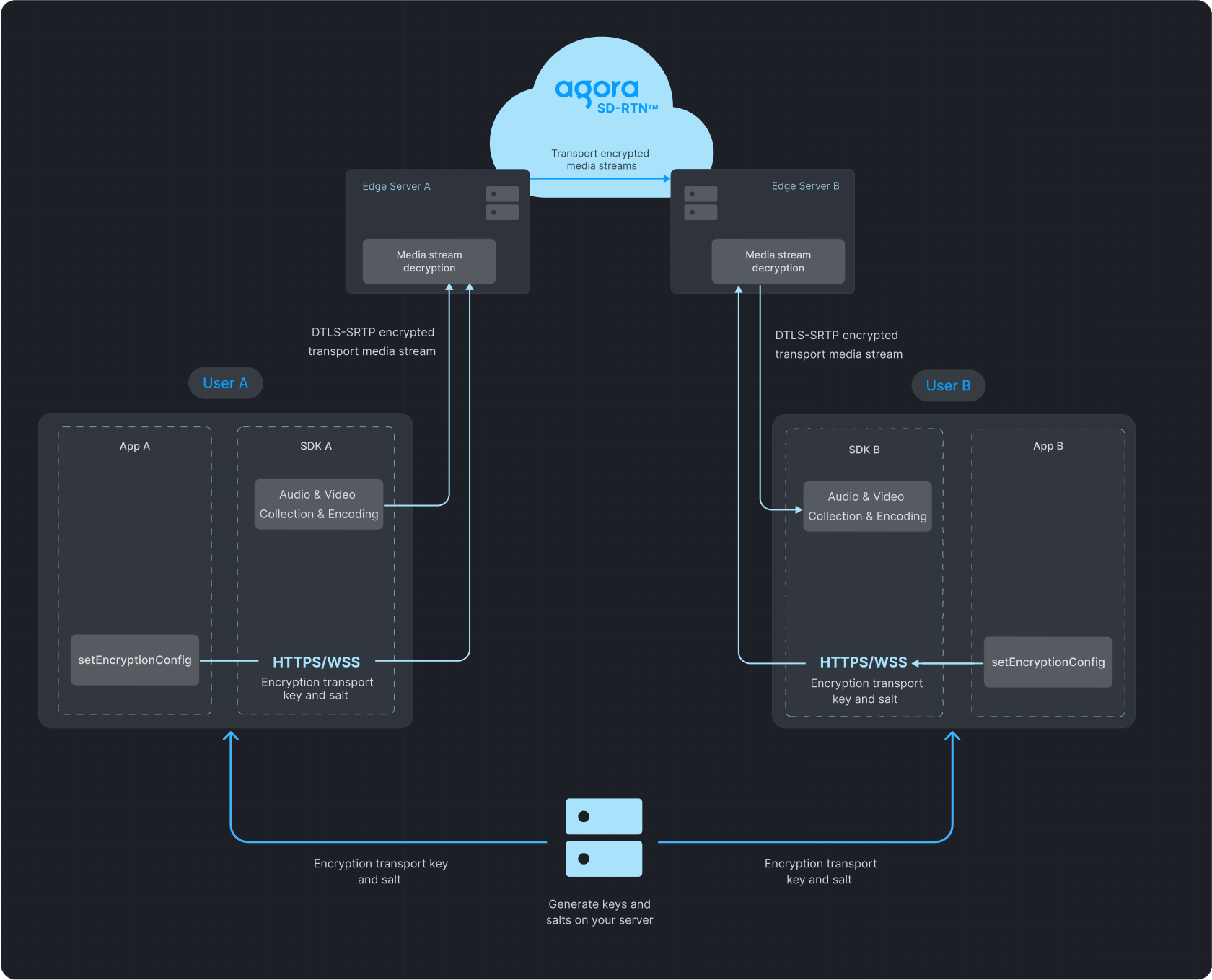
The following figure illustrates the process of data transfer with media stream encryption enabled.
**Data transfer process**
## Prerequisites [#prerequisites]
Ensure that you have implemented the [SDK quickstart](/en/realtime-media/video/get-started-sdk) in your project.
## Implement media stream encryption [#implement-media-stream-encryption]
To add built-in media stream encryption to your app, refer to the following steps:
1. Generate a key and salt on your server
* To generate a random 32-byte hexadecimal key on your server as a string, refer to the following `OpenSSL` command:
```shell
# Generate a 32-byte hexadecimal key
openssl rand -hex 32
```
* To generate a random Base64-encoded, 32-byte salt on your server, refer to the following `OpenSSL` command:
```shell
# Generate a Base64-encoded, 32-byte salt
openssl rand -base64 32
```
2. Implement client-side logic
1. To manually add the encryption library to your project:
1. Copy the `AgoraRtcCryptoLoader.framework` file from the Agora Video SDK package to your project folder.
2. Open Xcode, go to **TARGETS > Project Name > General > Frameworks, Libraries, and Embedded Content**.
3. Click **`+`** and choose **Add Other...**, then add `AgoraRtcCryptoLoader.framework`.
4. To ensure that the dynamic library's signature is consistent with the app's signature, set the **Embed** attribute of the dynamic library to **Embed & Sign**.
note
Apple requires that an app's extension not contain dynamic libraries. If you need to integrate the SDK into a dynamic library within an extension, change the file's status to **Do Not Embed**.
2. To import the `AgoraRtcCryptoLoader` library, add the following line to the `ViewController.swift` file:
```swift
import AgoraRtcCryptoLoader
```
3. Get the String key and Base64-encoded salt from the server.
4. Convert the salt from Base64 to `uint8_t`.
5. Before joining the channel, call `enableEncryption` to set the encryption mode, and pass the key and salt to the SDK.
note
* All users in a channel must use the same encryption mode, key, and salt. Discrepancies may lead to unexpected behavior, such as black screens or audio loss.
* To ensure security, best practice is to use a new key and salt each time you enable media stream encryption.
To implement this logic, refer to the following code:
```swift
func getEncryptionSaltFromServer() -> Data {
let base64Salt = "EncryptionKdfSaltInBase64Strings"
return Data(base64Encoded: base64Salt)!
}
let config = AgoraEncryptionConfig()
config.encryptionMode = .AES128GCM2
config.encryptionKdfSalt = getEncryptionSaltFromServer()
config.encryptionKey = getEncryptionKeyFromServer()
let ret = agoraKit.enableEncryption(true, encryptionConfig: config)
if ret != 0 {
self.showAlert(title: "Error", message: "enableEncryption call failed: \\(ret), please check your params")
}
```
### Development considerations [#development-considerations-1]
The media stream encryption feature is supported in both communication and live broadcasting use-cases. However, in the live broadcasting use-case, Agora does not support pushing the encrypted media stream to CDN.
### API reference [#api-reference-1]
* [`enableEncryption`](https://api-ref.agora.io/en/video-sdk/ios/4.x/documentation/agorartckit/agorartcenginekit/enableencryption\(_\:encryptionconfig:\))
* [`AgoraEncryptionConfig`](https://api-ref.agora.io/en/video-sdk/ios/4.x/documentation/agorartckit/agoraencryptionconfig/)