# Secure channel encryption (/en/realtime-media/video/build/secure-and-protect-channels/media-stream-encryption)
> For AI agents: see the complete documentation index at [llms.txt](/llms.txt).
Media stream encryption refers to encrypting audio and video streams in an app using a unique [key](https://en.wikipedia.org/wiki/Public_key_certificate) and [salt](https://en.wikipedia.org/wiki/Salt_\(cryptography\)) controlled by the app developer. Encryption ensures that only the authorized users in a channel see and hear each other. Video SDK provides built-in encryption methods that you can use to guarantee data confidentiality during transmission.
This article describes how to integrate Agora built-in media stream encryption into your app.
## Understand the tech [#understand-the-tech]
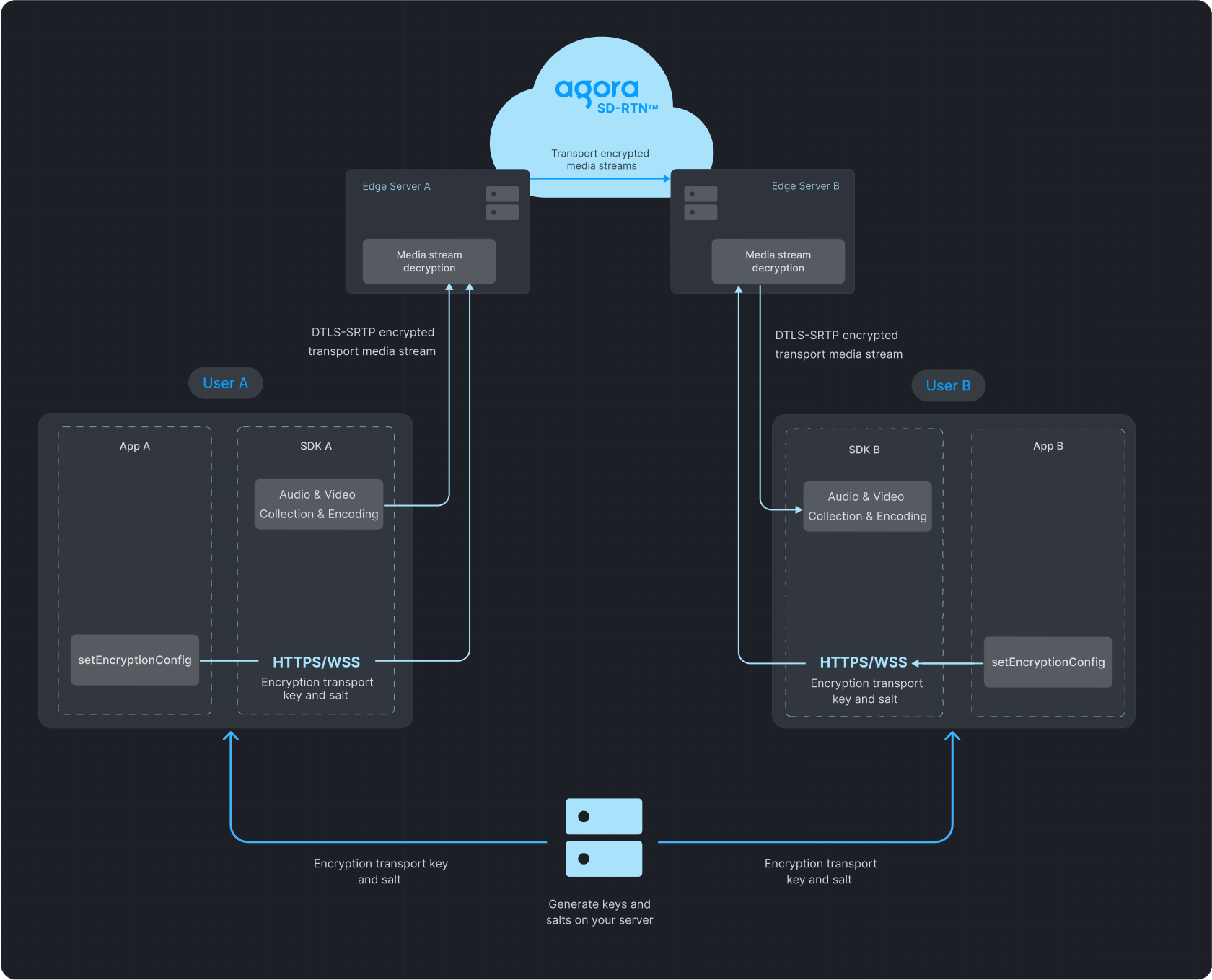
The following figure illustrates the process of data transfer with media stream encryption enabled.
**Data transfer process**
## Prerequisites [#prerequisites]
Ensure that you have implemented the [SDK quickstart](/en/realtime-media/video/get-started-sdk) in your project.
## Implement media stream encryption [#implement-media-stream-encryption]
<_PlatformTabsGroup groupMode="structured" canonicalPlatform="web" platforms="["android","ios","macos","windows","electron","flutter","react-native","unity","web"]" showTabs="true">
<_PlatformPanel platform="android">
<_PlatformProcessedMarker groupMode="structured" canonicalPlatform="web" platform="android" />
To add built-in media stream encryption to your app, refer to the following steps:
1. Generate a key and salt on your server
* To generate a random 32-byte hexadecimal key on your server as a string, refer to the following `OpenSSL` command:
```shell
# Generate a 32-byte hexadecimal key
openssl rand -hex 32
```
* To generate a random Base64-encoded, 32-byte salt on your server, refer to the following `OpenSSL` command:
```shell
# Generate a Base64-encoded, 32-byte salt
openssl rand -base64 32
```
2. Implement client-side logic
1. Obtain a String key and Base64-encoded salt from the server.
2. Convert the salt from Base64 to `uint8_t`.
3. Before joining the channel, call `enableEncryption` to set the `AES_128_GCM2` or `AES_256_GCM2` encryption mode, and pass the key and salt to the SDK.
note
* All users in a channel must use the same encryption mode, key, and salt. Discrepancies may lead to unexpected behavior, such as black screens or audio loss.
* To ensure security, best practice is to use a new key and salt each time you enable media stream encryption.
To implement this logic, refer to the following code:
```java
import java.util.Base64;
byte[] getEncryptionKdfSaltFromServer() {
String base64Salt = "EncryptionKdfSaltInBase64Strings";
return Base64.getDecoder().decode(base64Salt);
}
// Create an EncryptionConfig instance
EncryptionConfig config = new EncryptionConfig();
// Set the encryption mode to AES_128_GCM2
config.encryptionMode = EncryptionMode.AES_128_GCM2;
// Obtain the Base64-encoded salt from the server
config.encryptionKdfSalt = getEncryptionKdfSaltFromServer();
// Obtain the String type key from the server
config.encryptionKey = getEncryptionKeyFromServer();
int ret = rtcEngine.enableEncryption(true, config);
if (ret != 0) {
showAlert("Error", "enableEncryption call failed: " + ret + ", please check your params");
}
```
### Development considerations [#development-considerations]
The media stream encryption feature is supported in both communication and live broadcasting use-cases. However, in the live broadcasting use-case, Agora does not support pushing the encrypted media stream to CDN.
### API reference [#api-reference]
* [`enableEncryption`](https://api-ref.agora.io/en/video-sdk/android/4.x/API/class_irtcengine.html#api_irtcengine_enableencryption)
* [`EncryptionConfig`](https://api-ref.agora.io/en/video-sdk/android/4.x/API/class_encryptionconfig.html)
* [`EncryptionMode`](https://api-ref.agora.io/en/video-sdk/android/4.x/API/namespaceagora_1_1rtc.html#a8fbe0baa82fa7db7ad7276f1fdb5cc53)
<_PlatformProcessedMarker close="true" />
<_PlatformPanel platform="ios">
<_PlatformProcessedMarker groupMode="structured" canonicalPlatform="web" platform="ios" />
To add built-in media stream encryption to your app, refer to the following steps:
1. Generate a key and salt on your server
* To generate a random 32-byte hexadecimal key on your server as a string, refer to the following `OpenSSL` command:
```shell
# Generate a 32-byte hexadecimal key
openssl rand -hex 32
```
* To generate a random Base64-encoded, 32-byte salt on your server, refer to the following `OpenSSL` command:
```shell
# Generate a Base64-encoded, 32-byte salt
openssl rand -base64 32
```
2. Implement client-side logic
1. To manually add the encryption library to your project:
1. Copy the `AgoraRtcCryptoLoader.framework` file from the Agora Video SDK package to your project folder.
2. Open Xcode, go to **TARGETS > Project Name > General > Frameworks, Libraries, and Embedded Content**.
3. Click **`+`** and choose **Add Other...**, then add `AgoraRtcCryptoLoader.framework`.
4. To ensure that the dynamic library's signature is consistent with the app's signature, set the **Embed** attribute of the dynamic library to **Embed & Sign**.
note
Apple requires that an app's extension not contain dynamic libraries. If you need to integrate the SDK into a dynamic library within an extension, change the file's status to **Do Not Embed**.
2. To import the `AgoraRtcCryptoLoader` library, add the following line to the `ViewController.swift` file:
```swift
import AgoraRtcCryptoLoader
```
3. Get the String key and Base64-encoded salt from the server.
4. Convert the salt from Base64 to `uint8_t`.
5. Before joining the channel, call `enableEncryption` to set the encryption mode, and pass the key and salt to the SDK.
note
* All users in a channel must use the same encryption mode, key, and salt. Discrepancies may lead to unexpected behavior, such as black screens or audio loss.
* To ensure security, best practice is to use a new key and salt each time you enable media stream encryption.
To implement this logic, refer to the following code:
```swift
func getEncryptionSaltFromServer() -> Data {
let base64Salt = "EncryptionKdfSaltInBase64Strings"
return Data(base64Encoded: base64Salt)!
}
let config = AgoraEncryptionConfig()
config.encryptionMode = .AES128GCM2
config.encryptionKdfSalt = getEncryptionSaltFromServer()
config.encryptionKey = getEncryptionKeyFromServer()
let ret = agoraKit.enableEncryption(true, encryptionConfig: config)
if ret != 0 {
self.showAlert(title: "Error", message: "enableEncryption call failed: \\(ret), please check your params")
}
```
### Development considerations [#development-considerations-1]
The media stream encryption feature is supported in both communication and live broadcasting use-cases. However, in the live broadcasting use-case, Agora does not support pushing the encrypted media stream to CDN.
### API reference [#api-reference-1]
* [`enableEncryption`](https://api-ref.agora.io/en/video-sdk/ios/4.x/documentation/agorartckit/agorartcenginekit/enableencryption\(_\:encryptionconfig:\))
* [`AgoraEncryptionConfig`](https://api-ref.agora.io/en/video-sdk/ios/4.x/documentation/agorartckit/agoraencryptionconfig/)
<_PlatformProcessedMarker close="true" />
<_PlatformPanel platform="macos">
<_PlatformProcessedMarker groupMode="structured" canonicalPlatform="web" platform="macos" />
To add built-in media stream encryption to your app, refer to the following steps:
1. Generate a key and salt on your server
* To generate a random 32-byte hexadecimal key on your server as a string, refer to the following `OpenSSL` command:
```shell
# Generate a 32-byte hexadecimal key
openssl rand -hex 32
```
* To generate a random Base64-encoded, 32-byte salt on your server, refer to the following `OpenSSL` command:
```shell
# Generate a Base64-encoded, 32-byte salt
openssl rand -base64 32
```
2. Implement client-side logic
1. To manually add the encryption library to your project:
1. Copy the `AgoraRtcCryptoLoader.framework` file from the Agora Video SDK package to your project folder.
2. Open Xcode, go to **TARGETS > Project Name > General > Frameworks, Libraries, and Embedded Content**.
3. Click **`+`** and choose **Add Other...**, then add `AgoraRtcCryptoLoader.framework`.
4. To ensure that the dynamic library's signature is consistent with the app's signature, set the **Embed** attribute of the dynamic library to **Embed & Sign**.
2. To import the `AgoraRtcCryptoLoader` library, add the following line to the `ViewController.swift` file:
```swift
import AgoraRtcCryptoLoader
```
3. Get the String key and Base64-encoded salt from the server.
4. Convert the salt from Base64 to `uint8_t`.
5. Before joining the channel, call `enableEncryption` to set the encryption mode, and pass the key and salt to the SDK.
note
* All users in a channel must use the same encryption mode, key, and salt. Discrepancies may lead to unexpected behavior, such as black screens or audio loss.
* To ensure security, best practice is to use a new key and salt each time you enable media stream encryption.
To implement this logic, refer to the following code:
```swift
func getEncryptionSaltFromServer() -> Data {
let base64Salt = "EncryptionKdfSaltInBase64Strings"
return Data(base64Encoded: base64Salt)!
}
let config = AgoraEncryptionConfig()
config.encryptionMode = .AES128GCM2
config.encryptionKdfSalt = getEncryptionSaltFromServer()
config.encryptionKey = getEncryptionKeyFromServer()
let ret = agoraKit.enableEncryption(true, encryptionConfig: config)
if ret != 0 {
self.showAlert(title: "Error", message: "enableEncryption call failed: \\(ret), please check your params")
}
```
### Development considerations [#development-considerations-2]
The media stream encryption feature is supported in both communication and live broadcasting use-cases. However, in the live broadcasting use-case, Agora does not support pushing the encrypted media stream to CDN.
### API reference [#api-reference-2]
* [`enableEncryption`](https://api-ref.agora.io/en/video-sdk/macos/4.x/documentation/agorartckit/agorartcenginekit/enableencryption\(_\:encryptionconfig:\))
* [`AgoraEncryptionConfig`](https://api-ref.agora.io/en/video-sdk/macos/4.x/documentation/agorartckit/agoraencryptionconfig/)
<_PlatformProcessedMarker close="true" />
<_PlatformPanel platform="windows">
<_PlatformProcessedMarker groupMode="structured" canonicalPlatform="web" platform="windows" />
To add built-in media stream encryption to your app, refer to the following steps:
1. Generate a key and salt on your server
* To generate a random 32-byte hexadecimal key on your server as a string, refer to the following `OpenSSL` command:
```shell
# Generate a 32-byte hexadecimal key
openssl rand -hex 32
```
* To generate a random Base64-encoded, 32-byte salt on your server, refer to the following `OpenSSL` command:
```shell
# Generate a Base64-encoded, 32-byte salt
openssl rand -base64 32
```
2. Implement client-side logic
1. Get the String key and Base64-encoded salt from the server.
2. Convert salt from Base64 to `uint8_t`.
3. Before joining the channel, call `enableEncryption` to set the `AES_128_GCM2` or `AES_256_GCM2` encryption mode, and pass the key and salt to the SDK.
note
* All users in a channel must use the same encryption mode, key, and salt. Discrepancies may lead to unexpected behavior, such as black screens or audio loss.
* To ensure security, best practice is to use a new key and salt each time you enable media stream encryption.
To implement this logic, refer to the following code:
```cpp
#include
#include
#include
#include
#include
namespace detail {
using Base64FromBinary = boost::archive::iterators::base64_from_binary<
boost::archive::iterators::transform_width>;
using BinaryFromBase64 = boost::archive::iterators::transform_width<
boost::archive::iterators::binary_from_base64,
8, 6>;
}
void decodeBase64(const std::string& encoded, std::vector& out) {
auto unpadded = encoded;
const auto num_padded = std::count(begin(encoded), end(encoded), '=');
std::replace(begin(unpadded), end(unpadded), '=', 'A');
std::string decoded{
detail::BinaryFromBase64{begin(unpadded)},
detail::BinaryFromBase64{begin(unpadded) + unpadded.length()}};
decoded.erase(end(decoded) - num_padded, end(decoded));
std::copy(begin(decoded), end(decoded), out.begin());
}
int enableEncryption() {
std::string secret;
std::string kdfSaltBase64;
std::vector kdfSalt(32, 0);
if (!getSecretAndSaltFromSever(secret, kdfSaltBase64)) return -1;
if (rtcEngine) {
decodeBase64(kdfSaltBase64, kdfSalt);
agora::rtc::EncryptionConfig config;
config.encryptionMode = AES_128_GCM2;
config.encryptionKey = secret.c_str();
memcpy(config.encryptionKdfSalt, kdfSalt.data(), sizeof(config.encryptionKdfSalt));
return rtcEngine->enableEncryption(true, config);
}
return -1;
}
```
### Development considerations [#development-considerations-3]
The media stream encryption feature is supported in both communication and live broadcasting use-cases. However, in the live broadcasting use-case, Agora does not support pushing the encrypted media stream to CDN.
### API reference [#api-reference-3]
* [`enableEncryption`](https://api-ref.agora.io/en/video-sdk/cpp/4.x/API/class_irtcengine.html#api_irtcengine_enableencryption)
* [`EncryptionConfig`](https://api-ref.agora.io/en/video-sdk/cpp/4.x/API/class_encryptionconfig.html)
<_PlatformProcessedMarker close="true" />
<_PlatformPanel platform="electron">
<_PlatformProcessedMarker groupMode="structured" canonicalPlatform="web" platform="electron" />
To add built-in media stream encryption to your app, refer to the following steps:
1. Generate a key and salt on your server
* To generate a random 32-byte hexadecimal key on your server as a string, refer to the following `OpenSSL` command:
```shell
# Generate a 32-byte hexadecimal key
openssl rand -hex 32
```
* To generate a random Base64-encoded, 32-byte salt on your server, refer to the following `OpenSSL` command:
```shell
# Generate a Base64-encoded, 32-byte salt
openssl rand -base64 32
```
2. Implement client-side logic
1. Obtain a String key and Base64-encoded salt from the server.
2. Convert the salt from Base64 to `uint8_t`.
3. Before joining the channel, call `enableEncryption` to set the `AES_128_GCM2` or `AES_256_GCM2` encryption mode, and pass the key and salt to the SDK.
note
* All users in a channel must use the same encryption mode, key, and salt. Discrepancies may lead to unexpected behavior, such as black screens or audio loss.
* To ensure security, best practice is to use a new key and salt each time you enable media stream encryption.
To implement this logic, refer to the following code:
```typescript
enableEncryption = () => {
const encryptionMode = EncryptionMode.Aes128Xts;
const encryptionKey = '';
const encryptionKdfSalt = new Array(32).fill(1, 0, 32);
if (!encryptionKey) {
this.error("encryptionKey is invalid");
return;
}
rtcEngine.enableEncryption(true, {
encryptionMode,
encryptionKey,
encryptionKdfSalt,
});
};
```
### Development considerations [#development-considerations-4]
The media stream encryption feature is supported in both communication and live broadcasting use-cases. However, in the live broadcasting use-case, Agora does not support pushing the encrypted media stream to CDN.
### API reference [#api-reference-4]
* [`enableEncryption`](https://api-ref.agora.io/en/video-sdk/electron/4.x/API/class_irtcengine.html#api_irtcengine_enableencryption)
<_PlatformProcessedMarker close="true" />
<_PlatformPanel platform="flutter">
<_PlatformProcessedMarker groupMode="structured" canonicalPlatform="web" platform="flutter" />
To add built-in media stream encryption to your app, refer to the following steps:
1. Generate a key and salt on your server
* To generate a random 32-byte hexadecimal key on your server as a string, refer to the following `OpenSSL` command:
```shell
# Generate a 32-byte hexadecimal key
openssl rand -hex 32
```
* To generate a random Base64-encoded, 32-byte salt on your server, refer to the following `OpenSSL` command:
```shell
# Generate a Base64-encoded, 32-byte salt
openssl rand -base64 32
```
2. Implement client-side logic
1. Obtain a String key and Base64-encoded salt from the server.
2. Convert the salt from Base64 to `Uint8List`.
3. Before joining the channel, call `enableEncryption` to set the `aes128Gcm2` or `aes256Gcm2` encryption mode, and pass the key and salt to the SDK.
note
* All users in a channel must use the same encryption mode, key, and salt. Discrepancies may lead to unexpected behavior, such as black screens or audio loss.
* To ensure security, best practice is to use a new key and salt each time you enable media stream encryption.
To implement this logic, refer to the following code:
```dart
import 'dart:convert';
import 'dart:typed_data';
import 'package:agora_rtc_engine/agora_rtc_engine.dart';
Future enableEncryption(RtcEngine rtcEngine) async {
final String encryptionKdfSaltBase64 = await Server.getEncryptionKdfSaltBase64();
final String encryptionSecret = await Server.getEncryptionSecret();
final Uint8List encryptionKdfSalt = base64Decode(encryptionKdfSaltBase64);
final config = EncryptionConfig(
encryptionMode: EncryptionMode.aes128Gcm2,
encryptionKey: encryptionSecret,
encryptionKdfSalt: encryptionKdfSalt,
);
await rtcEngine.enableEncryption(enabled: true, config: config);
}
```
### Development considerations [#development-considerations-5]
The media stream encryption feature is supported in both communication and live broadcasting use-cases. However, in the live broadcasting use-case, Agora does not support pushing the encrypted media stream to CDN.
### API reference [#api-reference-5]
* [`enableEncryption`](https://api-ref.agora.io/en/video-sdk/flutter/6.x/API/class_irtcengine.html#api_irtcengine_enableencryption)
* [`EncryptionConfig`](https://api-ref.agora.io/en/video-sdk/flutter/6.x/API/class_encryptionconfig.html)
<_PlatformProcessedMarker close="true" />
<_PlatformPanel platform="react-native">
<_PlatformProcessedMarker groupMode="structured" canonicalPlatform="web" platform="react-native" />
To add built-in media stream encryption to your app, refer to the following steps:
1. Generate a key and salt on your server
* To generate a random 32-byte hexadecimal key on your server as a string, refer to the following `OpenSSL` command:
```shell
# Generate a 32-byte hexadecimal key
openssl rand -hex 32
```
* To generate a random Base64-encoded, 32-byte salt on your server, refer to the following `OpenSSL` command:
```shell
# Generate a Base64-encoded, 32-byte salt
openssl rand -base64 32
```
2. Implement client-side logic
1. Obtain a String key and Base64-encoded salt from the server.
2. Convert the salt from Base64 to `uint8_t`.
3. Before joining the channel, call `enableEncryption` to set the `AES_128_GCM2` or `AES_256_GCM2` encryption mode, and pass the key and salt to the SDK.
note
* All users in a channel must use the same encryption mode, key, and salt. Discrepancies may lead to unexpected behavior, such as black screens or audio loss.
* To ensure security, best practice is to use a new key and salt each time you enable media stream encryption.
To implement this logic, refer to the following code:
```typescript
enableEncryption = () => {
const encryptionMode = EncryptionMode.Aes128Xts;
const encryptionKey = '';
const encryptionKdfSalt = new Array(32).fill(1, 0, 32);
if (!encryptionKey) {
this.error("encryptionKey is invalid");
return;
}
rtcEngine.enableEncryption(true, {
encryptionMode,
encryptionKey,
encryptionKdfSalt,
});
};
```
### Development considerations [#development-considerations-6]
The media stream encryption feature is supported in both communication and live broadcasting use-cases. However, in the live broadcasting use-case, Agora does not support pushing the encrypted media stream to CDN.
### API reference [#api-reference-6]
* [`enableEncryption`](https://api-ref.agora.io/en/video-sdk/react-native/4.x/API/class_irtcengine.html#api_irtcengine_enableencryption)
<_PlatformProcessedMarker close="true" />
<_PlatformPanel platform="unity">
<_PlatformProcessedMarker groupMode="structured" canonicalPlatform="web" platform="unity" />
To add built-in media stream encryption to your app, refer to the following steps:
1. Generate a key and salt on your server
* To generate a random 32-byte hexadecimal key on your server as a string, refer to the following `OpenSSL` command:
```shell
# Generate a 32-byte hexadecimal key
openssl rand -hex 32
```
* To generate a random Base64-encoded, 32-byte salt on your server, refer to the following `OpenSSL` command:
```shell
# Generate a Base64-encoded, 32-byte salt
openssl rand -base64 32
```
2. Implement client-side logic
1. Obtain a String key and Base64-encoded salt from the server.
2. Convert the salt from Base64 to `uint8_t`.
3. Before joining the channel, call `EnableEncryption` to set the `AES_128_GCM2` or `AES_256_GCM2` encryption mode, and pass the key and salt to the SDK.
note
* All users in a channel must use the same encryption mode, key, and salt. Discrepancies may lead to unexpected behavior, such as black screens or audio loss.
* To ensure security, best practice is to use a new key and salt each time you enable media stream encryption.
To implement this logic, refer to the following code:
```csharp
string secret;
byte[] kdfSal;
ENCRYPTION_MODE EncrytionMode = ENCRYPTION_MODE.AES_128_GCM2;
var config = new EncryptionConfig
{
encryptionMode = EncrytionMode,
encryptionKey = secret,
encryptionKdfSalt = kdfSal
};
var nRet = RtcEngine.EnableEncryption(true, config);
Debug.Log("EnableEncryption: " + nRet);
```
### Development considerations [#development-considerations-7]
The media stream encryption feature is supported in both communication and live broadcasting use-cases. However, in the live broadcasting use-case, Agora does not support pushing the encrypted media stream to CDN.
### API reference [#api-reference-7]
* [`EnableEncryption`](https://api-ref.agora.io/en/video-sdk/unity/4.x/API/class_irtcengine.html#api_irtcengine_enableencryption)
<_PlatformProcessedMarker close="true" />
<_PlatformPanel platform="web">
<_PlatformProcessedMarker groupMode="structured" canonicalPlatform="web" platform="web" />
This section shows you how to add built-in media stream encryption to your app.
Video SDK supports the following encryption modes:
* `"aes-128-xts"`: 128-bit AES encryption, XTS mode.
* `"aes-256-xts"`: 256-bit AES encryption, XTS mode.
* `"aes-128-gcm"`: 128-bit AES encryption, GCM mode.
* `"aes-256-gcm"`: 256-bit AES encryption, GCM mode.
* `"aes-128-ecb"`: 128-bit AES encryption, ECB mode.
* `"sm4-128-ecb"`: 128-bit SM4 encryption, ECB mode.
Available only in Web SDK v4.5.0 and higher:
* `"aes-128-gcm2"`: 128-bit AES encryption, GCM mode, salted.
* `"aes-256-gcm2"`: 256-bit AES encryption, GCM mode, salted.
For maximum security, best practice is to set the encryption mode to `"aes-128-gcm2"` or `"aes-256-gcm2"`, and specify an encryption key and salt. If you choose another encryption mode, you only need to specify the encryption key.
To add built-in media stream encryption to your app, refer to the following steps:
1. Generate a key and salt on your server
* To generate a random 32-byte hexadecimal key on your server as a string, refer to the following `OpenSSL` command:
```bash
# Generate a 32-byte hexadecimal key
openssl rand -hex 32
```
* To generate a random Base64-encoded, 32-byte salt on your server, refer to the following `OpenSSL` command:
```bash
# Generate a Base64-encoded, 32-byte salt
openssl rand -base64 32
```
2. Implement client-side logic
3. Obtain a String key and Base64-encoded salt from the server.
4. Before joining a channel, call `AgoraRTCClient.setEncryptionConfig` to select the encryption mode and specify the encryption key and salt.
5. When you call `setEncryptionConfig`, the web client:
* Converts the key from Hex to ASCII, before passing it to the Video SDK.
* Converts the salt from Base64 to Uint8Array, before passing it to the Video SDK.
* All users in a channel must use the same encryption mode, key, and salt. Discrepancies may lead to unexpected behavior, such as black screens or audio loss.
* To ensure security, best practice is to use a new key and salt each time you enable media stream encryption.
To implement this logic, refer to the following code:
```javascript
// Declare a utility function to convert Base64 to Uint8Array
function base64ToUint8Array(base64Str: string): Uint8Array {
const raw = window.atob(base64Str);
const result = new Uint8Array(new ArrayBuffer(raw.length));
for (let i = 0; i < raw.length; i += 1) {
result[i] = raw.charCodeAt(i);
}
return result;
}
// Declare a utility function to convert Hex to ASCII
function hex2ascii(hexx) {
const hex = hexx.toString();//force conversion
let str = '';
for (let i = 0; i < hex.length; i += 2)
str += String.fromCharCode(parseInt(hex.substr(i, 2), 16));
return str;
}
async function getSecretAndSalt() {
// Retrieve the key and salt value from the server
let [secret, salt] = await getSecretAndSaltFromServer();
salt = base64ToUint8Array(salt);
secret = hex2ascii(secret);
return [secret, salt];
}
let [secret, salt] = await getSecretAndSalt();
// Set the encryption scheme to AES-256-GCM2 and pass in secret and salt
client.setEncryptionConfig("aes-256-gcm2", secret, salt);
```
The sample code refers to the local `client` object created using `AgoraRTC.createClient`.
### Development considerations [#development-considerations-8]
The media stream encryption feature is supported in both communication and live broadcasting use-cases. However, in the live broadcasting use-case, Agora does not support pushing the encrypted media stream to CDN.
### API reference [#api-reference-8]
* [`setEncryptionConfig`](https://api-ref.agora.io/en/video-sdk/web/4.x/interfaces/iagorartcclient.html#setencryptionconfig)
* [`EncryptionMode`](https://api-ref.agora.io/en/video-sdk/web/4.x/globals.html#encryptionmode)
<_PlatformProcessedMarker close="true" />