# Optimize video experience in multi-host scenarios (/en/realtime-media/video/build/manage-connection-and-quality/optimize-multihost-video/ios)
> For AI agents: see the complete documentation index at [llms.txt](/llms.txt).
In multi-host streaming scenarios where 4 or more hosts stream videos simultaneously, users with the audience role face the following challenges:
* **Device performance and bandwidth pressure**: Subscribing to multiple video streams can put significant pressure on device performance and downstream bandwidth, especially for mid-to-low-end devices. Audience members might experience lag or frame drops, leading to a suboptimal viewing experience.
* **Flexible layout needs**: A custom video layout is often required, allowing viewers to adjust the position of each host's video to suit their individual preferences.
* **Window switching and zooming**: With multiple hosts, the video size of each host may be limited. Flexible switching and resizing allow for a more personalized viewing experience.
Agora offers a video experience optimization solution for multi-host video scenarios through a client-customized composite layout, designed to enhance user experience by focusing on smooth, personalized viewing.
This solution is ideal for scenarios such as:
* Team battle PK
* Multi-person conference
* Online education for large classes
## Understand the tech [#understand-the-tech-1]
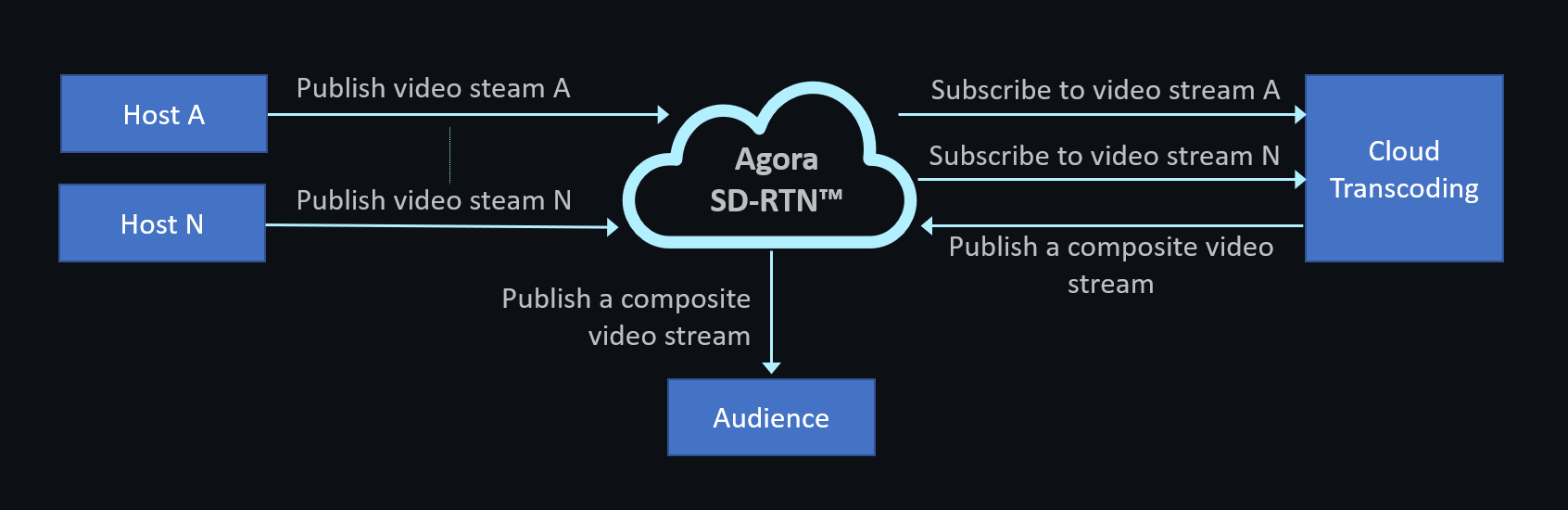
The following figure shows how the client-customized composite layout is used in conjunction with the Cloud Transcoding service:
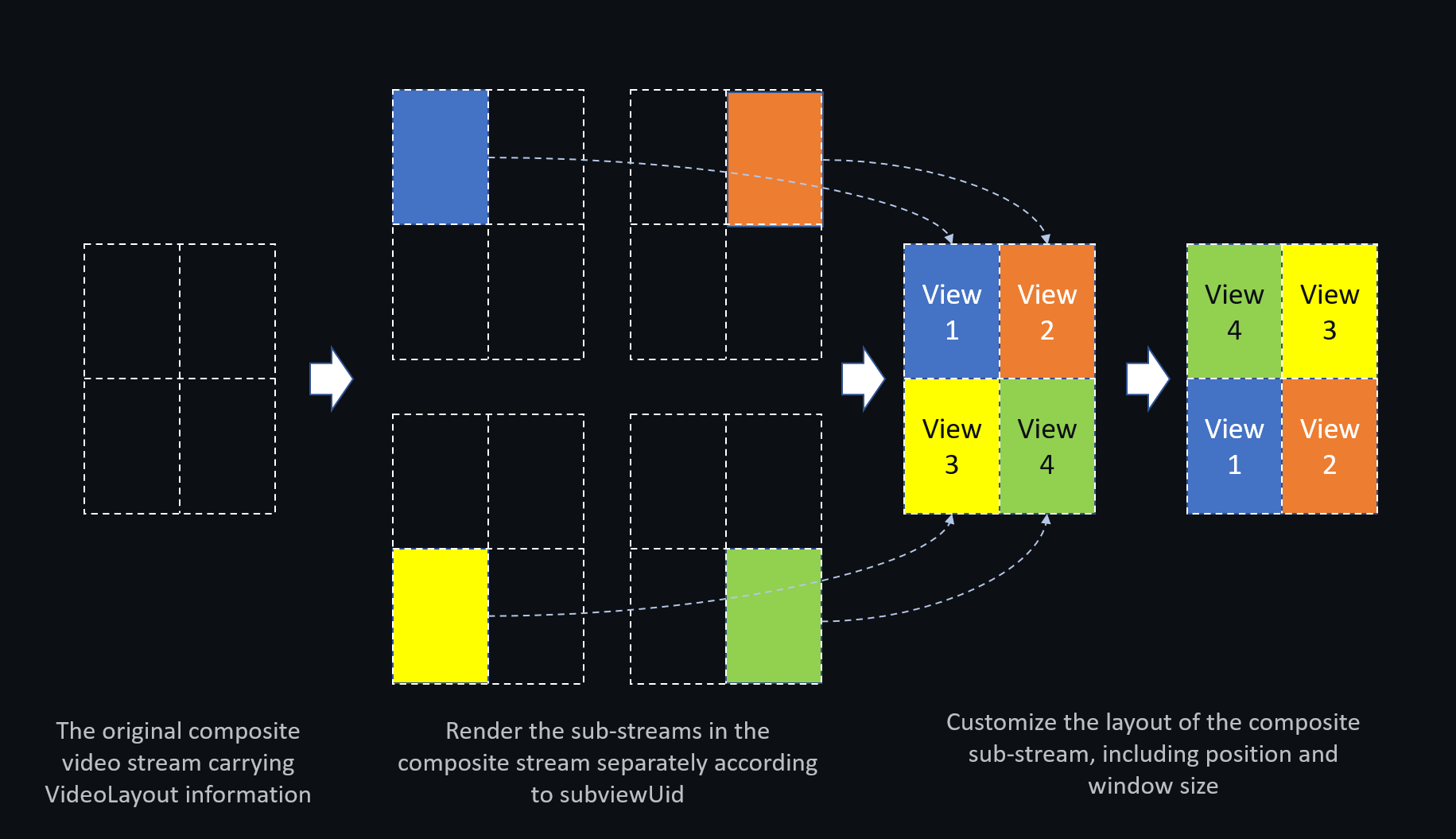
After the audience receives the transcoded composite video stream, the custom composite layout is implemented locally as follows:
## Prerequisites [#prerequisites-1]
Make sure you have:
* Implemented basic real-time audio and video functionality with SDK version 4.5 or later. See the [SDK quickstart](/en/realtime-media/video/get-started-sdk).
* Implemented [Cloud Transcoding](/en/realtime-media/transcoding) to forward composite video to other channels. Make sure you set the following parameters when you configure transcoding:
```json
"outputs": [
{
"seiOption": {
"source": {
"agora": {
"uidvideoLayout": true
}
},
"sink": {
"type": 100
}
}
}
]
```
## Implementation [#implementation-1]
This section explains how to implement a client-customized composite layout, with the API call sequence illustrated in the diagram.
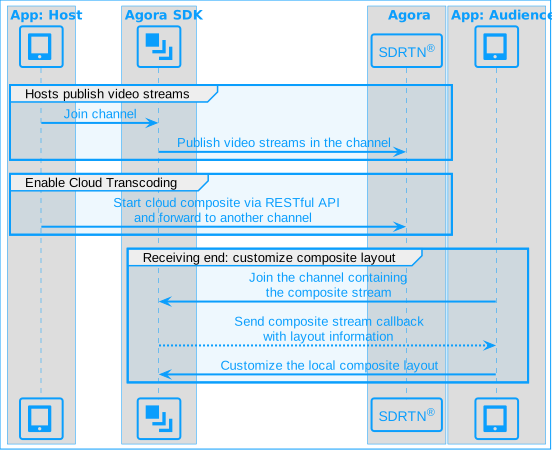
To implement a client-customized composite layout for the audience, follow these steps:
1. Call `joinChannel` \[2/2] to join the channel where the composite stream is located.
2. Obtain the following information about the composite video stream through the `didTranscodedStreamLayoutInfoUpdatedWithUserId` callback triggered by the SDK:
* The width and height of the composite stream, and the user ID of the user publishing it.
* The user ID of each host publishing a sub-stream within the composite stream.
* The x and y coordinates of each sub-stream on the composite canvas.
* The width and height of each sub-stream.
* The rendering state of each sub-stream on the composite canvas:
* Normal rendering
* Displayed as a placeholder
* Displayed as a black image
3. Call `setupRemoteVideo` to configure local rendering of the remote video stream. Set the following key parameters:
* `sourceType`: Set to `.transCoded`, indicating the video source is a transcoded composite stream.
* `uid`: The user ID of the user forwarding the composite stream to the current channel, obtained from the `didTranscodedStreamLayoutInfoUpdatedWithUserId` callback.
* `view`: The remote video view displayed locally. Use this parameter to set the display position of each sub-stream in the local view.
* `subviewUid`: The user ID corresponding to a specific sub-stream within the composite stream.
- When `subviewUid` is not `0`, the default value of `setupMode` is `.replace` (add a view).
- If `subviewUid` is set, the setting of `cropArea` does not take effect.
Use the following sample code as a reference for calling `setupRemoteVideoEx` in a multi-channel scenario. Calling `setupRemoteVideo` in a single-channel scenario is similar.
```swift
agoraKit.joinChannelEx(byToken: nil, connection: connection, delegate: self, mediaOptions: mediaOptions)
func rtcEngine(_ engine: AgoraRtcEngineKit, didTranscodedStreamLayoutInfoUpdatedWithUserId uid: UInt, videoLayoutInfo: AgoraVideoLayoutInfo) {
DispatchQueue.main.async { [weak self] in
guard let self = self else { return }
guard let layoutList = videoLayoutInfo.layoutList else { return }
for subLayout in layoutList {
let subUid = subLayout.uid
if self.userViews[subUid] != nil {
continue
}
// Dynamically add the view
let view = UIView()
view.translatesAutoresizingMaskIntoConstraints = false
self.containerView.addSubview(view)
self.userViews[subUid] = view
// Configure AgoraRtcVideoCanvas; set uid and subviewUid as shown,
// and configure other parameters as needed
let canvas = AgoraRtcVideoCanvas()
// User ID of the user forwarding the composite stream to the current channel
canvas.uid = uid
// User ID corresponding to a specific sub-stream
canvas.subviewUid = subUid
canvas.view = view
canvas.renderMode = .fit
canvas.sourceType = .transCoded
self.agoraKit.setupRemoteVideoEx(canvas, connection: connection)
// To remove a specific sub-stream, use the following code
// Do not include this in the same flow as the add code above.
let canvasToRemove = AgoraRtcVideoCanvas()
canvasToRemove.uid = uid
canvasToRemove.subviewUid = subUid
canvasToRemove.view = view
canvasToRemove.setupMode = .remove
self.agoraKit.setupRemoteVideoEx(canvasToRemove, connection: connection)
}
}
}
```
4. When the layout of the composite stream changes, the `didTranscodedStreamLayoutInfoUpdatedWithUserId` callback fires again. Each time it fires, call `setupRemoteVideo` with the updated information to adjust the local rendering layout.
Layout changes can occur in the following situations:
* The coordinates of a sub-stream on the composite canvas change.
* The width or height of the composite stream or a sub-stream changes.
* The state of a sub-stream changes. When the host publishing a sub-stream leaves the channel, the `videoState` parameter for that sub-stream changes from `0` (normal) to `1` (no video available). To stop rendering that host's video, call `setupRemoteVideo` with `subviewUid` set to that host's user ID and `setupMode` set to `.remove`.
5. Listen for the `didOfflineOfUid` callback. When the user forwarding the composite stream leaves the channel, stop rendering the composite stream on the receiving end.
Note
* Client-customized composite layout is currently supported on mobile platforms only.
* If a watermark is applied to the composite stream, the watermark renders within its designated region and may appear split across sub-stream boundaries.
## Reference [#reference-1]
This section contains content that completes the information on this page, or points you to documentation that explains other aspects of this product.
### API reference [#api-reference-1]
* [`rtcEngine(_:didTranscodedStreamLayoutInfoUpdatedWithUserId:videoLayoutInfo:)`](https://api-ref.agora.io/en/video-sdk/ios/4.x/documentation/agorartckit/agorartcenginedelegate/rtcengine\(_\:didtranscodedstreamlayoutinfoupdatedwithuserid\:videolayoutinfo:\))
* [`setupRemoteVideo(_:)`](https://api-ref.agora.io/en/video-sdk/ios/4.x/documentation/agorartckit/agorartcenginekit/setupremotevideo\(_:\))
* [`setupRemoteVideoEx(_:connection:)`](https://api-ref.agora.io/en/video-sdk/ios/4.x/documentation/agorartckit/agorartcenginekit/setupremotevideoex\(_\:connection:\))