# Restrict media zones (/en/realtime-media/video/build/manage-connection-and-quality/geofencing/unreal)
> For AI agents: see the complete documentation index at [llms.txt](/llms.txt).
When a user joins a channel, Video SDK automatically connects them to the Agora SDRTN(R) media zone that is geographically closest to the user. However, to meet the laws and regulations of the user's country, you may need to specify, or filter out connections to a specific geographical zone. Agora enables you to control and customize data routing in your app by specifying the Agora SDRTN(R) media zone users connect to.
This is an advanced feature suitable only for use-cases with access security restrictions.
## Understand the tech [#understand-the-tech-10]
After you turn on the restricted media zones feature, the SDK only accesses the Agora server in the specified zone(s), irrespective of the geographical location of the user. As an example, the following table shows the outcome if you specify North America as the access zone, and users connect to Agora SDRTN(R) from North America and China respectively:
| Designated access zone | User's location | Zone actually accessed by the SDK | User experience |
| ---------------------- | --------------- | --------------------------------- | ----------------------- |
| North America | North America | North America | Normal |
| North America | China | North America | Quality may be affected |
* If a server in the specified zone is not available, the SDK reports an error.
* Due to cross-regional public internet between the designated zone and the geographical location where the app user is located, the audio and video experience may be affected.
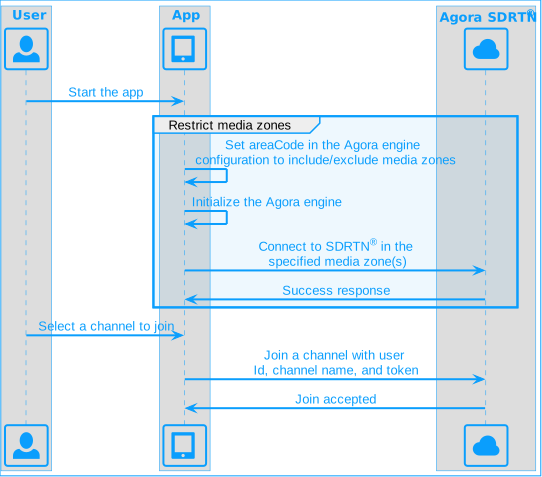
The following figure shows the workflow you implement to restrict access to media zones:
**Restrict media zones**
## Prerequisites [#prerequisites-10]
Ensure that you have implemented the [SDK quickstart](/en/realtime-media/video/get-started-sdk) in your project.
## Implement restricted media zones [#implement-restricted-media-zones-10]
This section shows you how to restrict access to media zones in your app.
By default, the SDK connects to the nearest Agora server. Set the `areaCode` property of `RtcEngineContext` when calling the `initialize` method to specify the media zones. After setting the media zone(s), the SDK only connects to Agora servers in the specified zone(s).
You can set the `areaCode` to:
* `AREA_CODE_GLOB`: Global (Default)
* `AREA_CODE_CN`: Mainland China
* `AREA_CODE_NA`: North America
* `AREA_CODE_EU`: Europe
* `AREA_CODE_AS`: Asia except Mainland China
* `AREA_CODE_JP`: Japan
* `AREA_CODE_IN`: India
Media zones support bitwise operations. To include a zone, use the `|` operator, to exclude a zone use `^`.
Refer to the following code:
```cpp
void UMyUserWidget::setupVideoSDKEngine()
{
// Create an engine instance.
agoraEngine = agora::rtc::ue::createAgoraRtcEngine();
// Specify a context for the engine.
RtcEngineContext context;
context.appId = appId.c_str();
context.eventHandler = this;
// Choose the communication profile for video calling.
context.channelProfile = CHANNEL_PROFILE_TYPE::CHANNEL_PROFILE_COMMUNICATION;
// Only connect to Agora SDRTN® located in North America.
context.areaCode = AREA_CODE::AREA_CODE_NA;
// Initialize the engine instance with the context.
agoraEngine->initialize(context);
// Enable the local audio capture to init the local video stream.
agoraEngine->enableAudio();
// Enable the local video capture to init the local video stream.
agoraEngine->enableVideo();
}
```
## Reference [#reference-10]
This section contains content that completes the information on this page, or points you to documentation that explains other aspects to this product.
### API reference [#api-reference-10]
* [`initialize`](https://api-ref.agora.io/en/video-sdk/unreal-engine/4.x/API/class_irtcengine.html#api_irtcengine_initialize)
* [`RtcEngineContext`](https://api-ref.agora.io/en/video-sdk/unreal-engine/4.x/API/class_rtcengineconfig.html)
* [`AREA_CODE`](https://api-ref.agora.io/en/video-sdk/unreal-engine/4.x/API/enum_areacode.html)