# Connect with Cloud Proxy (/en/realtime-media/video/build/manage-connection-and-quality/cloud-proxy/web)
> For AI agents: see the complete documentation index at [llms.txt](/llms.txt).
Large enterprises, hospitals, universities, banks, and other institutions commonly deploy firewalls to meet their stringent security requirements. To ensure uninterrupted access to its services for enterprise users behind firewalls, Agora offers firewall whitelist and Cloud proxy services.
Admins enable users to use Video SDK in network-restricted environments by adding specific IP addresses and ports to the firewall whitelist. Users make API calls to configure the Cloud proxy service.
## Understand the tech [#understand-the-tech]
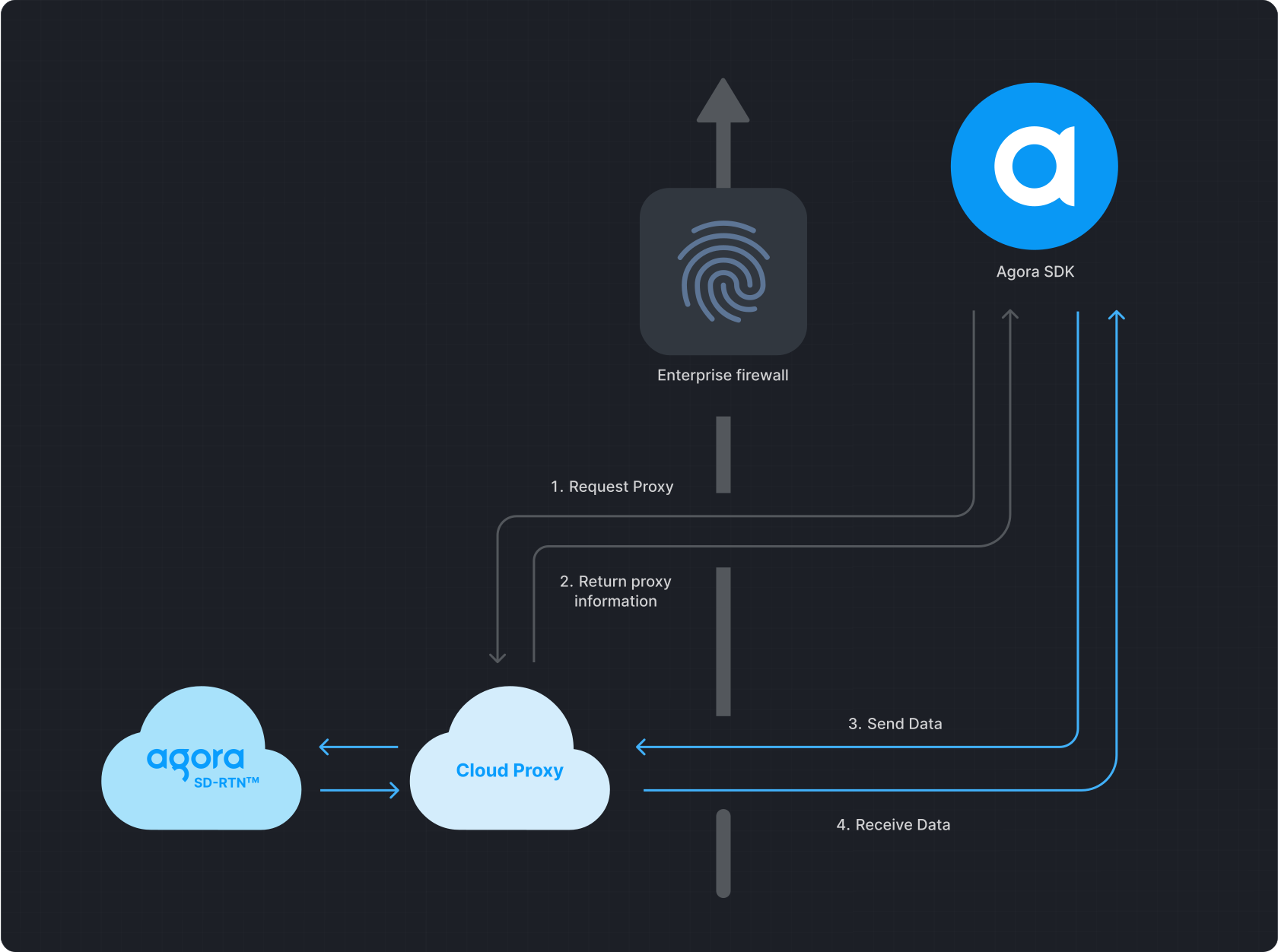
Cloud proxy works as follows:
1. Video SDK initiates a request to Cloud proxy.
2. Cloud proxy returns the corresponding proxy information.
3. Agora SDK sends data to Cloud proxy. Cloud proxy receives the data and transmits it to Agora SDRTN®.
4. SDRTN® returns data to Cloud proxy. Cloud proxy receives the data and sends it to the SDK.
## Prerequisites [#prerequisites]
Ensure that you have implemented the [SDK quickstart](/en/realtime-media/video/get-started-sdk) in your project.
## Implement Cloud Proxy [#implement-cloud-proxy]
Take the following steps to use Cloud proxy in your app:
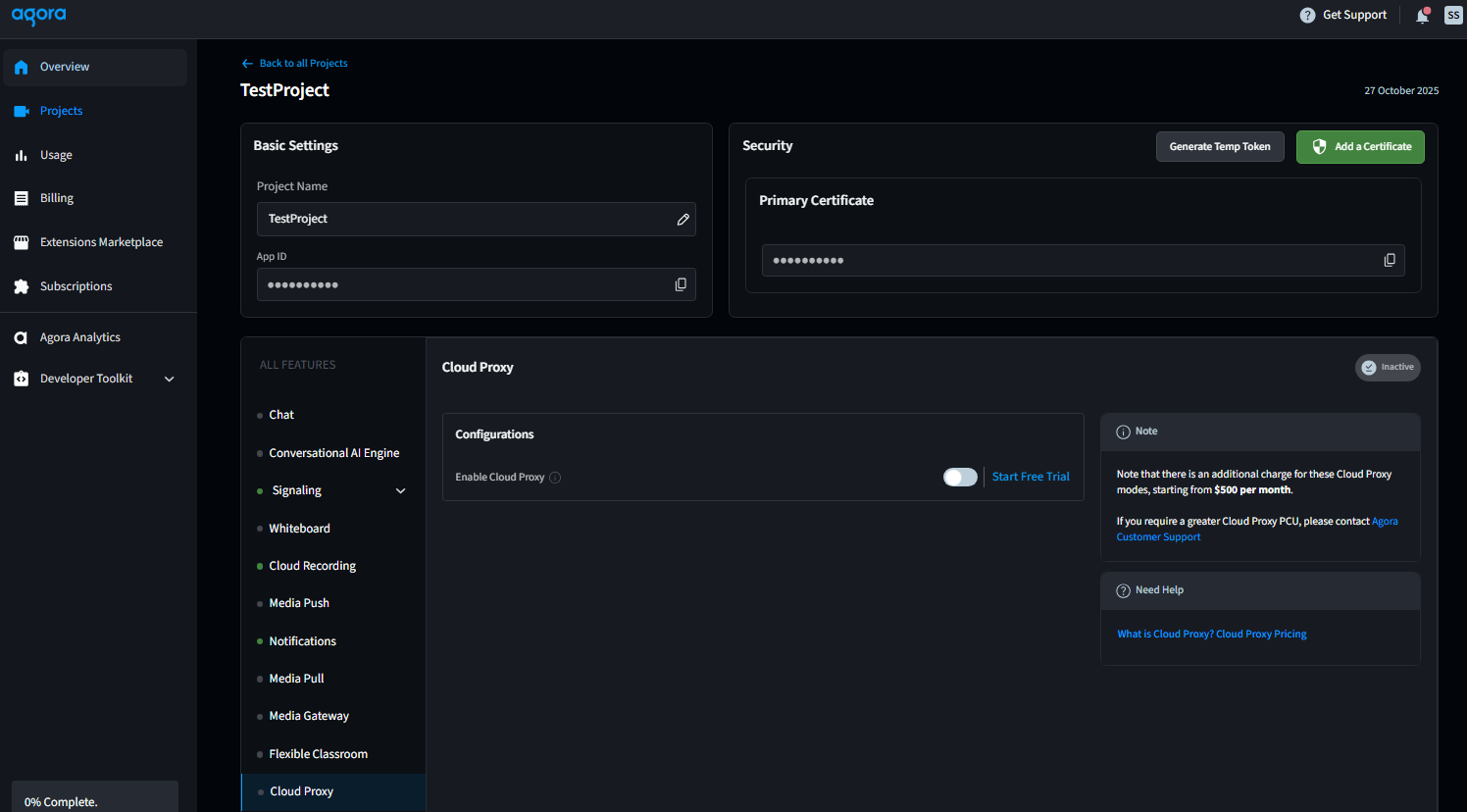
1. Enable Cloud Proxy in [Agora Console](https://console.agora.io/):
1. Log in to the console.
2. Under **Projects**, locate the project that you want to edit, then click **Configure**.
3. Under **All Features**, select **Cloud Proxy**.
4. Click **Enable Cloud Proxy**.
2. Configure the enterprise firewall to allow traffic from the IP address and port ranges in the [Agora Allowed IP List](/en/realtime-media/video/reference/cloud-proxy-allowed-ips).
### Platform-specific steps [#platform-specific-steps]
Since Web SDK v4.3.0, Agora has optimized the Cloud proxy architecture, enhanced the connectivity of the SDK in environments with restricted network access, and supports restricted access areas. Agora recommends that you upgrade to v4.3.0 or above.
Depending on the Web SDK version you are using, refer to the corresponding implementation method:
### v4.3.0 or above [#v430-or-above]
Enable Cloud Proxy in [Agora Console](https://console.agora.io/):
1. Log in to the console.
2. Under **Projects**, locate the project that you want to edit, then click **Configure**.
3. Under **All Features**, select **Cloud Proxy**.
4. Click **Enable Cloud Proxy**.

Call the `startProxyServer` method and set the `mode` parameter before joining the channel:
* **Force UDP cloud proxy mode**: Set `mode` to `3`. Cloud proxy using UDP protocol. In this mode, the SDK always transmits data using UDP protocol.
* **Force TCP cloud proxy mode**: Set `mode` to `5`. Supported since v4.9.0. In this mode, the SDK always transmits data over TLS 443.
Test if you can initiate audio and video calls or live broadcasts normally.
Video SDK provides a `client.on("is-using-cloud-proxy")` event that triggers the callback after the media stream is successfully published locally, to inform whether the current media stream is forwarded by the cloud proxy service.
```javascript
const client = AgoraRTC.createClient({mode: 'live',codec: 'vp8'});
// Enable cloud proxy
client.startProxyServer(3);
// Join channel
client.join("", "").then(() => {
/** ... **/
});
```
To stop using the proxy server, call `stopProxyServer` after leaving the channel.
```javascript
// Leave channel
client.leave();
// Turn off the cloud proxy service
client.stopProxyServer();
// Rejoin channel
client.join("", "").then(() => {
/** ... **/
});
```
### v4.0.0-v4.2.1 [#v400-v421]
Enable Cloud Proxy in [Agora Console](https://console.agora.io/):
1. Log in to the console.
2. Under **Projects**, locate the project that you want to edit, then click **Configure**.
3. Under **All Features**, select **Cloud Proxy**.
4. Click **Enable Cloud Proxy**.

Configure the firewall whitelist.
Add the following test IP addresses and ports to your corporate firewall whitelist. The source address is the client integrated with the Web SDK.
**Domestic testing**
| Protocol | Target Address | Port | Port Usage |
| -------- | -------------- | ---------------------- | ---------------------------------------------- |
| TCP | 150.138.153.78 | 443, 4000, 3433 - 3460 | Message data transmission, media data exchange |
| TCP | 47.74.211.17 | 443 | Edge node communication |
| TCP | 52.80.192.229 | 443 | Edge node communication |
| TCP | 52.52.84.170 | 443 | Edge node communication |
| TCP | 47.96.234.219 | 443 | Edge node communication |
| UDP | 150.138.153.78 | 3478-3500 | media data exchange |
**Overseas testing**
| Protocol | Target Address | Port | Port Usage |
| -------- | -------------- | ---------------------- | ---------------------------------------------- |
| TCP | 23.236.115.138 | 443, 4000, 3433 - 3460 | Message data transmission, media data exchange |
| TCP | 148.153.66.218 | 443, 4000, 3433 - 3460 | Message data transmission, media data exchange |
| TCP | 47.74.211.17 | 443 | Edge node communication |
| TCP | 52.80.192.229 | 443 | Edge node communication |
| TCP | 52.52.84.170 | 443 | Edge node communication |
| TCP | 47.96.234.219 | 443 | Edge node communication |
| UDP | 23.236.115.138 | 3478-3500 | media data exchange |
| UDP | 148.153.66.218 | 3478-3500 | media data exchange |
:::information[Information]
The above IPs are only meant for debugging during the test phase. Before official launch, apply for custom cloud proxy service resources from Agora.
:::
To turn on cloud proxy server before joining the channel, call:
```javascript
client.startProxyServer();
```
To turn off cloud proxy server after leaving the channel, call:
```javascript
client.stopProxyServer();
```
## Reference [#reference]
This section contains content that completes the information on this page, or points you to documentation that explains other aspects to this product.
### Pricing [#pricing]
Agora charges for use of Cloud Proxy as follows.
### Duration-based pricing [#duration-based-pricing]
Duration-based pricing is based on the total number of minutes used per month across all users.
| Duration | Price per 1000 minutes/month |
| :------------------------- | ---------------------------: |
| UDP Audio Duration | $0.99 |
| UDP video HD Duration | $3.99 |
| UDP video Full HD Duration | $8.99 |
| UDP video 2K Duration | $15.99 |
| UDP video 2K+ Duration | $35.99 |
| TCP Audio Duration | $0.99 |
| TCP video HD Duration | $3.99 |
| TCP video Full HD Duration | $8.99 |
| TCP video 2K Duration | $15.99 |
| TCP video 2K+ Duration | $35.99 |
For volume pricing discount, contact [Agora support](mailto\:support@agora.io).
#### PCU-based pricing [#pcu-based-pricing]
PCU is the maximum number of simultaneous users connected to the Cloud Proxy service at any point during the billing cycle. For PCU-based usage, Agora charges $500.00 for each VID.
For volume pricing discount, contact [Agora support](mailto\:support@agora.io).
### IP addresses for Cloud Proxy [#ip-addresses-for-cloud-proxy]
To use Agora Cloud Proxy, your end users must first configure their firewalls to trust the following [IP address and port ranges](/en/realtime-media/video/reference/cloud-proxy-allowed-ips).
### Firewall whitelist [#firewall-whitelist]
Alternatively, you can whitelist the following domains and ports to ensure seamless communication with Agora's services. For the complete and current Web SDK allowlist, see [Firewall requirements](/en/realtime-media/video/reference/firewall).
v4.24.5 and above
v4.4.0 - v4.24.4
v4.0.0 - v4.4.0
```text tabGroup="web-sdk-version"
*.agora.io
*.edge.agora.io
*.sd-rtn.com
*.edge.sd-rtn.com
*.rtnsvc.com
*.edge.rtnsvc.com
*.rtesvc.com
*.edge.rtesvc.com
```
```text tabGroup="web-sdk-version"
*.agora.io
*.edge.agora.io
*.sd-rtn.com
*.edge.sd-rtn.com
```
```text tabGroup="web-sdk-version"
*.agora.io
*.edge.agora.io
*.agoraio.cn
*.edge.agoraio.cn
```
To improve connectivity over public networks, we recommend adding the domains listed above to your firewall allowlist.
| Target Ports | Protocol | Action |
| :--------------------------------------------------------------------------------------------------- | -------- | ------ |
| 80; 443; 3433; 4700 - 5000; 5668; 5669; 6080; 6443; 8667; 9667; 30011 - 30013 (for bypass push flow) | TCP | allow |
| 3478; 4700 - 5000 (version 2.9.0 and later); 10000 - 65535 (version before 2.9.0) | UDP | allow |
### API reference [#api-reference-9]
* [`startProxyServer`](https://api-ref.agora.io/en/video-sdk/web/4.x/interfaces/iagorartcclient.html#startproxyserver)
* [`stopProxyServer`](https://api-ref.agora.io/en/video-sdk/web/4.x/interfaces/iagorartcclient.html#stopproxyserver)