# Screen sharing (/en/realtime-media/video/build/capture-and-render-video/screen-sharing/web)
> For AI agents: see the complete documentation index at [llms.txt](/llms.txt).
During Video Calling sessions, hosts use the screen sharing feature in the Agora Video SDK to share their screen content with other users or viewers in the form of a video stream. Screen sharing is typically used in the following use-cases:
| Use-case | Description |
| :------------------------- | :------------------------------------------------------------------------------------------------------------- |
| Online education | Teachers share their slides, software, or other teaching materials with students for classroom demonstrations. |
| Game live broadcast | Hosts share their game footage with the audience. |
| Interactive live broadcast | Anchors share their screens and interact with the audience. |
| Video conferencing | Meeting participants share the screen to show a presentation or documents. |
| Remote control | A controlled terminal displays its desktop on the master terminal. |
Try out the [online demo](https://webdemo-global.agora.io/index.html) for [Screen sharing](https://webdemo-global.agora.io/example/advanced/shareTheScreen/index.html).
Agora screen sharing offers the following advantages:
* **Ultra HD quality experience**: Supports Ultra HD video (4K resolution, 60 FPS frame rate), giving users a smoother, high-definition, ultimate picture experience.
* **Multi-app support**: Compatible with many mainstream apps such as WPS Office, Microsoft Office Power Point, Visual Studio Code, Adobe Photoshop, Windows Media Player, and Scratch. This makes it convenient for users to directly share specific apps.
* **Multi-device support**: Supports multiple devices sharing at the same time. Screen sharing is compatible with Windows 8 systems, devices without independent graphics cards, dual graphics card devices, and external screen devices.
* **Multi-platform adaptation**: Supports iOS, Android, macOS, Windows, Web, Unity, Flutter, React Native, Unreal Engine, and other platforms.
* **High security**: Supports sharing only a single app or part of the screen. Also supports blocking specified app windows, effectively ensuring user information security.
This page shows you how to implement screen sharing in your app.
## Understand the tech [#understand-the-tech-3]
The screen sharing feature provides the following screen sharing modes for use in various use-cases:
**Screen sharing use-cases**
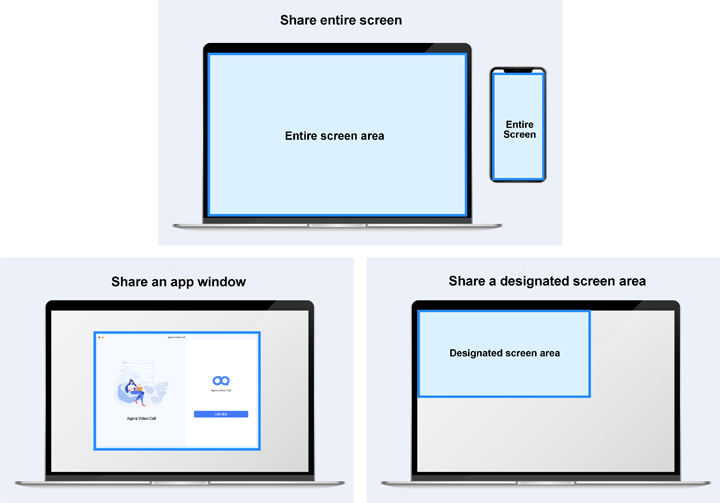
* **Share the entire screen**: Share your entire screen, including all the information on the screen. This feature supports collecting and sharing information from two screens at the same time.
* **Share an app window**: If you don't want to share the entire screen with other users, you can share only the area within an app window.
* **Share a designated screen area**: If you only want to share a portion of the screen or app window, you can set a sharing area when starting screen sharing.
Screen sharing modes are available on different platforms as follows:
* **Desktop** (Windows and macOS): Supports all screen sharing features listed above.
* **Mobile** (Android and iOS): Screen sharing is not supported on mobile browsers.
## Prerequisites [#prerequisites-3]
* The Agora Video SDK only supports screen sharing in the following desktop browsers:
* Chrome 58 or above.
* Firefox 56 or above.
* Edge 80 and above on Windows 10+ platform.
* Safari 13 or above.
* Ensure that you have implemented the [SDK quickstart](/en/realtime-media/video/get-started-sdk) in your project.
## Set up your project [#set-up-your-project-3]
## Implement screen sharing [#implement-screen-sharing-3]
This section shows you how to implement screen sharing in your Web project.
### Chrome browser [#chrome-browser]
The Agora Web SDK supports screen sharing on Chrome version 58 and higher. Follow these steps to share your screen.
Call `createScreenVideoTrack` to create a screen sharing track.
This method requires Chrome 74 or above. If you are using an older version, use the screen sharing plug-in to share the screen.
```javascript
AgoraRTC.createScreenVideoTrack({
// Configure screen sharing encoding parameters, see API documentation for details
encoderConfig: "1080p_1",
// Set the video transmission optimization mode to prioritize quality ("detail"), or smoothness ("motion")
optimizationMode: "detail"
}).then(localScreenTrack => {
/** ... **/
});
```
#### Share audio [#share-audio]
The Web SDK supports simultaneous sharing the screen and locally played background sounds on Windows and macOS platforms with the Chrome browser version 74 and higher.
When calling the `createScreenVideoTrack` method, set the `withAudio` parameter to `enable`.
The `createScreenVideoTrack` method returns a list containing the following:
* Video track object for screen sharing.
* Audio track object for local background sound playback.
```javascript
AgoraRTC.createScreenVideoTrack({
encoderConfig: "1080p_1",
}, "enable").then(([screenVideoTrack, screenAudioTrack]) => {
/** ... **/
});
```
* After you call the method, the end user must check **Share Audio** in the screen sharing popup box for the setting to take effect.
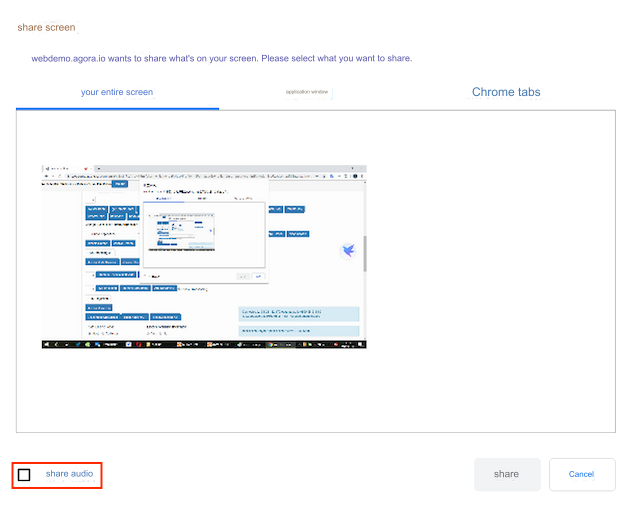
* If you choose to share a single app window, the audio cannot be shared.
### Edge browser [#edge-browser]
Video SDK for Web supports screen sharing on Edge 80 and higher on the Windows 10+ platform.
To create a screen sharing track, call `createScreenVideoTrack` as follows:
```javascript
AgoraRTC.createScreenVideoTrack({
// Configure the screen sharing encoding parameters here, refer to the API documentation for details
encoderConfig: "1080p_1",
}).then(localScreenTrack => {
/** ... **/
});
```
### Firefox browser [#firefox-browser]
Video SDK for Web supports screen sharing on Firefox 56 and higher. For Firefox, you specify the type of screen sharing by setting `screenSourceType`.
Choose one of the following values for `screenSourceType`:
* `screen`: Share the entire screen.
* `application`: Share all windows of an application (Firefox does not support this mode on Windows).
* `window`: Share a window of an application.
```javascript
AgoraRTC.createScreenVideoTrack({
screenSourceType: 'screen' // 'screen', 'application', 'window'
}).then(localScreenTrack => {
/** ... **/
});
```
### Safari browser [#safari-browser]
Video SDK for Web supports screen sharing on Safari 13 and higher on the macOS platform.
To create a screen sharing track, call `createScreenVideoTrack` as follows:
```javascript
AgoraRTC.createScreenVideoTrack({
// Configure the screen sharing encoding parameters here, refer to the API documentation for details
encoderConfig: "1080p_1",
}).then(localScreenTrack => {
/** ... **/
});
```
#### Additional notes [#additional-notes-1]
When using screen sharing on Safari, the entire screen is shared by default, and you cannot choose the content to share.
### Electron [#electron]
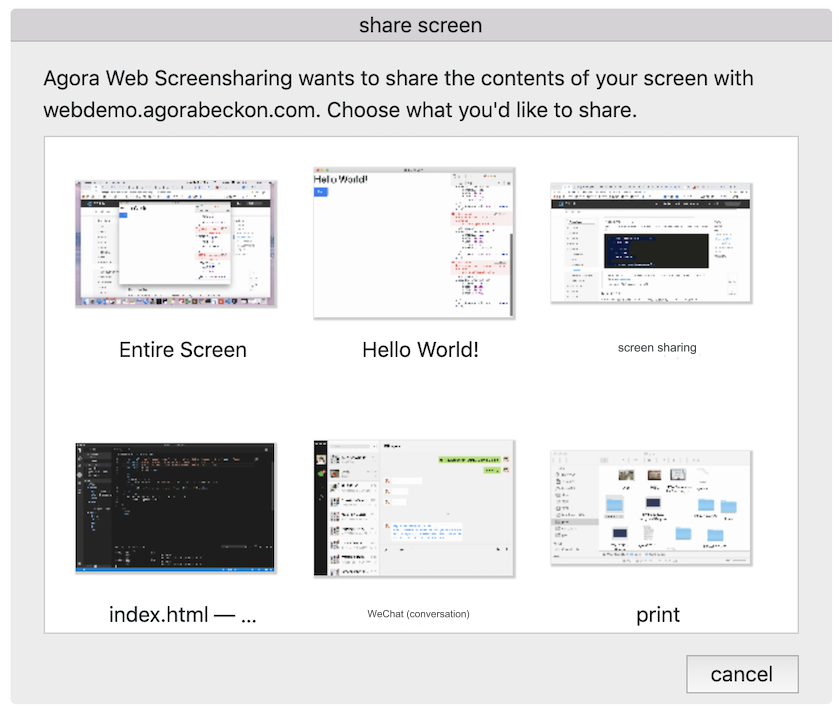
For Electron, you need to draw the selection interface for screen sharing yourself. For quick integration, Agora provides a default selection interface.
If you use Electron v17.x or higher, add the following code to the main process to ensure that you obtain the screen sharing source:
```javascript
const { ipcMain, desktopCapturer } = require("electron");
ipcMain.handle("DESKTOP_CAPTURER_GET_SOURCES", (event, opts) => desktopCapturer.getSources(opts));
```
#### Default interface [#default-interface]
If you choose to use the default interface, there is no difference between using screen sharing under Electron and eb. Just call `createScreenVideoTrack` directly:
```javascript
AgoraRTC.createScreenVideoTrack({
encoderConfig: "1080p_1",
}).then(localScreenTrack => {
/** ... **/
});
```
The SDK provides its own default interface for end users to select a screen or window to share, as shown in the following figure:
#### Custom interface [#custom-interface]
To customize the selection interface, refer to the following steps:
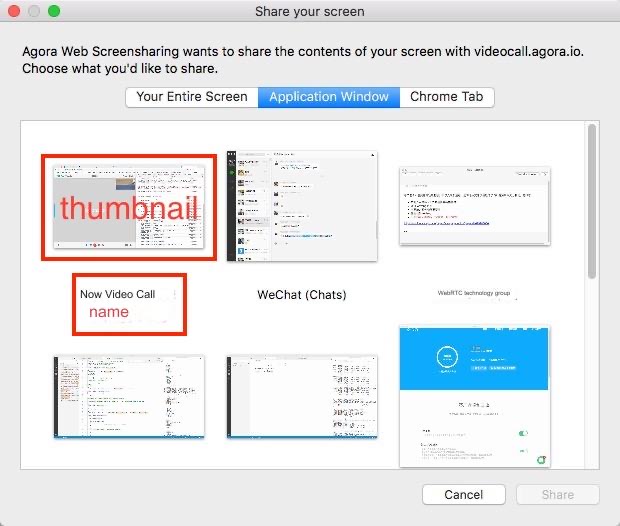
1. Call the `AgoraRTC.getElectronScreenSources` method provided by the SDK to get information about the screens that can be shared. `sources` is a list of `source` objects that contain information about the sharing source and `sourceId`. Its `source` properties are as follows:
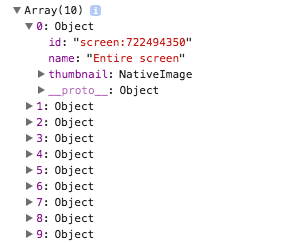
* **`id`**: The `sourceId`.
* **`name`**: The name of the screen source.
* **`thumbnail`**: The snapshot of the screen source.
```javascript
AgoraRTC.getElectronScreenSources().then(sources => {
console.log(sources);
})
```
2. Based on the attributes of `source`, draw a selection interface using HTML and CSS to allow the user to select the screen source to be shared. The corresponding relationship between the properties of `source` and the screen sharing selection interface is as follows:
3. Get the `sourceId` selected by the user.
4. Call the `createScreenVideoTrack` method and fill in `sourceId` with `electronScreenSourceId` to create the corresponding screen share stream.
```javascript
AgoraRTC.createScreenVideoTrack({
// Fill in the sourceId selected by the user
electronScreenSourceId: sourceId,
}).then(localScreenTrack => {
/** ... **/
});
```
##### Additional notes [#additional-notes-2]
* The `getElectronScreenSources` method is a wrapper around `desktopCapturer.getSources` provided by Electron, see [desktopCapturer](https://electronjs.org/docs/api/desktop-capturer) for details.
* Passing in a non-Electron `sourceId` is ignored.
### Share screen and start video simultaneously [#share-screen-and-start-video-simultaneously]
An `AgoraRTCClient` object can only send one video track at a time. If you need to share the screen and turn on camera video capture at the same time, create two `AgoraRTCClient`s, one to send the screen sharing track and the other to send the camera track.
```javascript
async function startScreenCall() {
const screenClient = AgoraRTC.createClient({ mode: "rtc", codec: "vp8" });
await screenClient.join("", "");
const screenTrack = await AgoraRTC.createScreenVideoTrack();
await screenClient.publish(screenTrack);
return screenClient;
}
async function startVideoCall() {
const videoClient = AgoraRTC.createClient({ mode: "rtc", codec: "vp8" });
await videoClient.join("", "");
const videoTrack = await AgoraRTC.createCameraVideoTrack();
await videoClient.publish(videoTrack);
return videoClient;
}
Promise.all([startScreenCall(), startVideoCall()]).then(() => { /** ... **/ });
```
Subscribing to your own track incurs additional charges, as illustrated in the following figure:
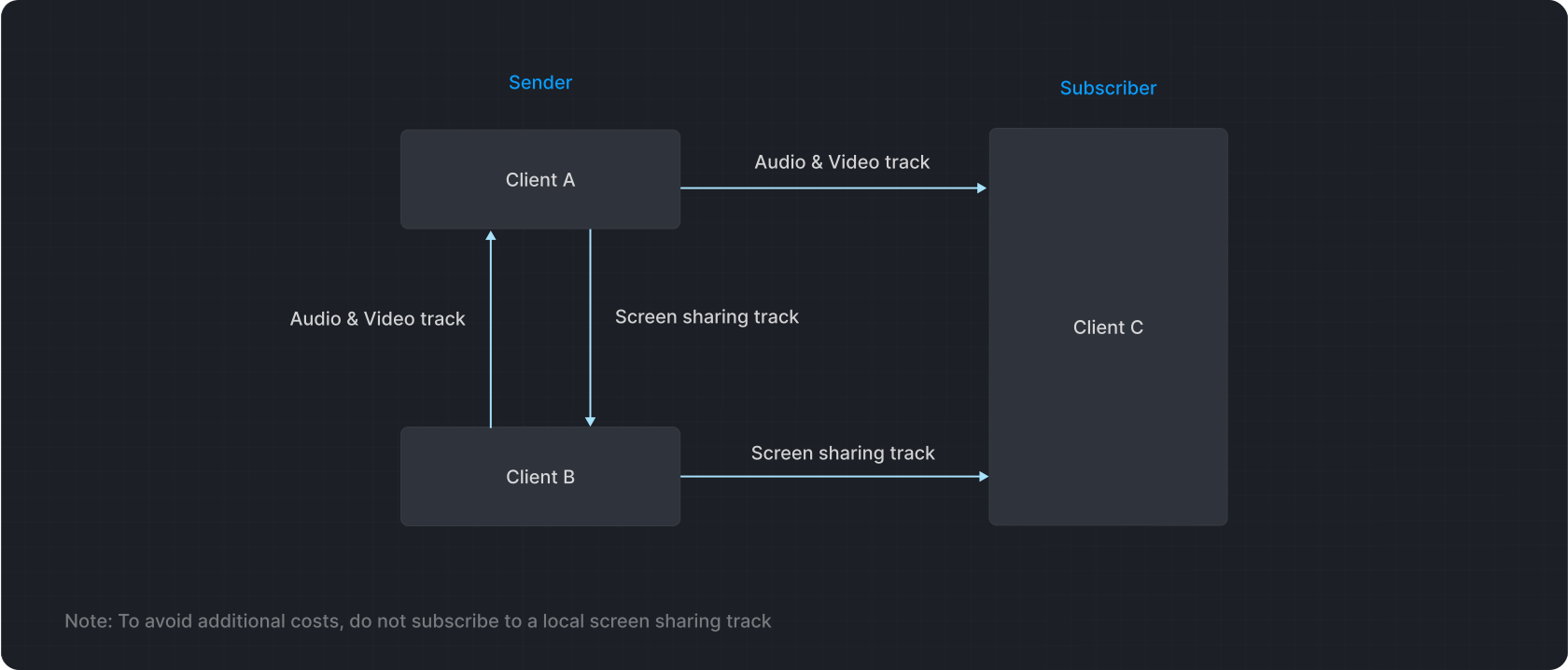
* To avoid double billing, best practice is to store the `uid` returned by each client after successfully joining a channel in a list. Each time a `user-published` event is monitored, check if the track is a local track; if so, do not subscribe.
* The client sharing the screen should not subscribe to any streams.
### Limitations [#limitations-3]
Be aware of the following limitations:
* An `AgoraRTCClient` object can only send one video track.
* The user ID of the user publishing screen sharing should not be fixed at the same value, otherwise sharing streams with the same user ID may cause mutual kicks in some scenarios.
* During screen sharing, the client publishing the local stream should not subscribe to the local screen sharing track, to avoid additional billing.
* When screen sharing on the Windows platform, sharing the QQ chat window causes a black screen.
## Reference [#reference-3]
This section contains content that completes the information on this page, or points you to documentation that explains other aspects to this product.
### Sample project [#sample-project-3]
Agora provides open source Web sample projects which you can download or view the source code in **index.js** and experience:
* [GitHub-shareTheScreen](https://github.com/AgoraIO/API-Examples-Web/tree/main/src/example/advanced/shareTheScreen): Screen sharing implementation in GitHub.