# Stream media to a channel (/en/realtime-media/video/build/capture-and-render-video/play-media)
> For AI agents: see the complete documentation index at [llms.txt](/llms.txt).
<_PlatformTabsGroup groupMode="structured" canonicalPlatform="android" platforms="["android","ios","macos","windows","electron","react-native","unity"]" showTabs="true">
<_PlatformPanel platform="android">
<_PlatformProcessedMarker groupMode="structured" canonicalPlatform="android" platform="android" />
Playing media files during online business presentations, educational sessions, or casual meetups heightens user engagement. Video SDK enables you to add media playing functionality to your app.
This page shows you how to use media player-related APIs to play local or online media resources with remote users in Video Calling channels.
## Understand the tech [#understand-the-tech]
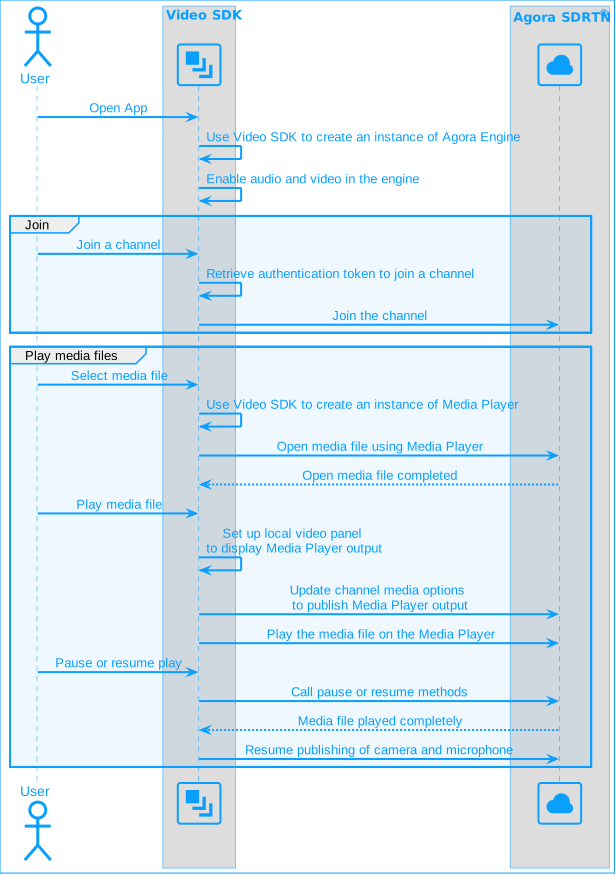
To play a media file in a channel, you open the file using a media player instance. When the file is ready to be played, you set up the local video container to display the media player output. You update channel media options to start publishing the media player stream, and stop publishing the camera and microphone streams. The remote user sees the camera and microphone streams of the media publishing user replaced by media streams.
**Media player flow**
## Prerequisites [#prerequisites]
Ensure that you have implemented the [SDK quickstart](/en/realtime-media/video/get-started-sdk) in your project.
## Implement the logic [#implement-the-logic]
To implement a media player in your app, follow these steps:
1. After initializing an `RtcEngine` instance, create an `IMediaPlayer` object and register a player observer by calling the `registerPlayerObserver` method.
Java
Kotlin
```java
mRtcEngine = RtcEngine.create(config);
// Create a media player object
mediaPlayer = mRtcEngine.createMediaPlayer();
// Register a player observer
mediaPlayer.registerPlayerObserver(this);
```
```kotlin
mRtcEngine = RtcEngine.create(config)
// Create a media player object
mediaPlayer = mRtcEngine.createMediaPlayer()
// Register a player observer
mediaPlayer.registerPlayerObserver(this)
```
2. Implement the callbacks for the media player observer. Observe the player's state through the `onPlayerStateChanged` callback, get the current media file's playback progress through `onPositionChanged`, and handle player events through the `onPlayerEvent` callback.
Java
Kotlin
```java
@Override
// Observe the player's state
public void onPlayerStateChanged(io.agora.mediaplayer.Constants.MediaPlayerState mediaPlayerState, io.agora.mediaplayer.Constants.MediaPlayerError mediaPlayerError) {
Log.e(TAG, "onPlayerStateChanged mediaPlayerState " + mediaPlayerState);
Log.e(TAG, "onPlayerStateChanged mediaPlayerError " + mediaPlayerError);
if (mediaPlayerState.equals(PLAYER_STATE_OPEN_COMPLETED)) {
setMediaPlayerViewEnable(true);
} else if (mediaPlayerState.equals(PLAYER_STATE_IDLE) || mediaPlayerState.equals(PLAYER_STATE_PLAYBACK_COMPLETED)) {
setMediaPlayerViewEnable(false);
}
}
@Override
// Observe the current playback progress
public void onPositionChanged(long position) {
Log.e(TAG, "onPositionChanged position " + position);
if (playerDuration > 0) {
final int result = (int) ((float) position / (float) playerDuration * 100);
handler.post(new Runnable() {
@Override
public void run() {
progressBar.setProgress(Long.valueOf(result).intValue());
}
});
}
}
@Override
// Observe player events
public void onPlayerEvent(io.agora.mediaplayer.Constants.MediaPlayerEvent mediaPlayerEvent) {
Log.e(TAG, " onPlayerEvent mediaPlayerEvent " + mediaPlayerEvent);
}
```
```kotlin
// Observe the player's state
override fun onPlayerStateChanged(
mediaPlayerState: io.agora.mediaplayer.Constants.MediaPlayerState,
mediaPlayerError: io.agora.mediaplayer.Constants.MediaPlayerError
) {
Log.e(TAG, "onPlayerStateChanged mediaPlayerState $mediaPlayerState")
Log.e(TAG, "onPlayerStateChanged mediaPlayerError $mediaPlayerError")
when (mediaPlayerState) {
PLAYER_STATE_OPEN_COMPLETED -> setMediaPlayerViewEnable(true)
PLAYER_STATE_IDLE, PLAYER_STATE_PLAYBACK_COMPLETED -> setMediaPlayerViewEnable(false)
}
}
// Observe the current playback progress
override fun onPositionChanged(position: Long) {
Log.e(TAG, "onPositionChanged position $position")
if (playerDuration > 0) {
val result = (position.toFloat() / playerDuration.toFloat() * 100).toInt()
handler.post {
progressBar.progress = result
}
}
}
// Observe player events
override fun onPlayerEvent(mediaPlayerEvent: io.agora.mediaplayer.Constants.MediaPlayerEvent) {
Log.e(TAG, "onPlayerEvent mediaPlayerEvent $mediaPlayerEvent")
}
```
3. Call `setupLocalVideo` to render the local media player view.
Java
Kotlin
```java
VideoCanvas videoCanvas = new VideoCanvas(surfaceView, Constants.RENDER_MODE_HIDDEN, Constants.VIDEO_MIRROR_MODE_AUTO,
Constants.VIDEO_SOURCE_MEDIA_PLAYER, mediaPlayer.getMediaPlayerId(), 0);
mRtcEngine.setupLocalVideo(videoCanvas);
```
```kotlin
val videoCanvas = VideoCanvas(
surfaceView,
Constants.RENDER_MODE_HIDDEN,
Constants.VIDEO_MIRROR_MODE_AUTO,
Constants.VIDEO_SOURCE_MEDIA_PLAYER,
mediaPlayer.mediaPlayerId,
0
)
mRtcEngine.setupLocalVideo(videoCanvas)
```
4. When joining a channel, use `ChannelMediaOptions` to set the media player ID, publish media player audio and video, and share media resources with remote users in the channel.
Java
Kotlin
```java
private ChannelMediaOptions options = new ChannelMediaOptions();
// Set up options
options.publishMediaPlayerId = mediaPlayer.getMediaPlayerId();
options.publishMediaPlayerAudioTrack = true;
options.publishMediaPlayerVideoTrack = true;
// Join the channel
int res = mRtcEngine.joinChannel(accessToken, channelId, 0, options);
```
```kotlin
val options = ChannelMediaOptions()
// Set up options
options.publishMediaPlayerId = mediaPlayer.mediaPlayerId
options.publishMediaPlayerAudioTrack = true
options.publishMediaPlayerVideoTrack = true
// Join the channel
val res = mRtcEngine.joinChannel(accessToken, channelId, 0, options)
```
5. Use the `open` method to open a local or online media file.
Java
Kotlin
```java
mediaPlayer.open(url, 0);
```
```kotlin
mediaPlayer.open(url, 0)
```
6. Call the `play` method to play the media file.
Java
Kotlin
```java
mediaPlayer.play();
```
```kotlin
mediaPlayer?.play()
```
Call the `play` method to play the media file only after receiving the `onPlayerStateChanged` callback reporting the player state as `PLAYER_STATE_OPEN_COMPLETED`.
7. When a user leaves the channel, call `stop` to stop playback, `destroy` to destroy the media player, `unRegisterPlayerObserver` to unregister the player observer, and release allocated resources.
Java
Kotlin
```java
mediaPlayer.stop();
mediaPlayer.destroy();
mediaPlayer.unRegisterPlayerObserver(this);
```
```kotlin
mediaPlayer.stop()
mediaPlayer.destroy()
mediaPlayer.unRegisterPlayerObserver(this)
```
## Reference [#reference]
This section contains content that completes the information on this page, or points you to documentation that explains other aspects to this product.
### Supported formats and protocols [#supported-formats-and-protocols]
The media player supports the following media formats and protocols:
#### Video encoding formats [#video-encoding-formats]
* H.263, H.264, H.265, MPEG-4, MPEG-2, RMVB, Theora, VP3, VP8, AVS, WMV
#### Audio coding formats [#audio-coding-formats]
* WAV, MP2, MP3, AAC, OPUS, FLAC, Vorbis, AMR-NB, AMR-WB, WMA v1, WMA v2
#### Container formats [#container-formats]
* WAV, FLAC, OGG, MOV, ASF, FLV, MP3, MP4, MPEG-TS, Matroska (MKV), AVI, ASS, CONCAT, DTS, AVS
#### Supported protocols [#supported-protocols]
* HTTP, HTTPS, RTMP, HLS, RTP, RTSP
### Sample project [#sample-project]
Agora provides an open source sample project [MediaPlayer](https://github.com/AgoraIO/API-Examples/blob/4.2.2/Android/APIExample/app/src/main/java/io/agora/api/example/examples/advanced/MediaPlayer.java) on GitHub. Download it or view the source code for a more detailed example.
### API reference [#api-reference]
* [`createMediaPlayer`](https://api-ref.agora.io/en/video-sdk/android/4.x/API/class_irtcengine.html#api_irtcengine_createmediaplayer)
* [`registerPlayerObserver`](https://api-ref.agora.io/en/video-sdk/android/4.x/API/class_imediaplayer.html#api_imediaplayer_registerplayersourceobserver)
* [`onPlayerStateChanged`](https://api-ref.agora.io/en/video-sdk/android/4.x/API/class_imediaplayersourceobserver.html#callback_imediaplayersourceobserver_onplayersourcestatechanged)
* [`onPositionChanged`](https://api-ref.agora.io/en/video-sdk/android/4.x/API/class_imediaplayersourceobserver.html#callback_imediaplayersourceobserver_onpositionchanged)
* [`getMediaPlayerId`](https://api-ref.agora.io/en/video-sdk/android/4.x/API/class_imediaplayer.html#api_imediaplayer_registeraudioframeobserver2__parameters)
* [`open`](https://api-ref.agora.io/en/video-sdk/android/4.x/API/class_imediaplayer.html#api_imediaplayer_open)
* [`play`](https://api-ref.agora.io/en/video-sdk/android/4.x/API/class_imediaplayer.html#api_imediaplayer_play)
* [`pause`](https://api-ref.agora.io/en/video-sdk/android/4.x/API/class_imediaplayer.html#api_imediaplayer_pause)
* [`stop`](https://api-ref.agora.io/en/video-sdk/android/4.x/API/class_imediaplayer.html#api_imediaplayer_stop)
* [`unRegisterPlayerObserver`](https://api-ref.agora.io/en/video-sdk/android/4.x/API/class_imediaplayer.html#api_imediaplayer_unregisterplayersourceobserver)
* [`destroy`](https://api-ref.agora.io/en/video-sdk/android/4.x/API/class_imediaplayer.html#api_irtcengine_destroymediaplayer)
<_PlatformProcessedMarker close="true" />
<_PlatformPanel platform="ios">
<_PlatformProcessedMarker groupMode="structured" canonicalPlatform="android" platform="ios" />
Playing media files during online business presentations, educational sessions, or casual meetups heightens user engagement. Video SDK enables you to add media playing functionality to your app.
This page shows you how to use media player-related APIs to play local or online media resources with remote users in Video Calling channels.
## Understand the tech [#understand-the-tech-1]
To play a media file in a channel, you open the file using a media player instance. When the file is ready to be played, you set up the local video container to display the media player output. You update channel media options to start publishing the media player stream, and stop publishing the camera and microphone streams. The remote user sees the camera and microphone streams of the media publishing user replaced by media streams.
**Media player flow**

## Prerequisites [#prerequisites-1]
Ensure that you have implemented the [SDK quickstart](/en/realtime-media/video/get-started-sdk) in your project.
## Implement the logic [#implement-the-logic-1]
To implement a media player in your app, follow these steps:
1. After initializing an instance of `AgoraRtcEngineKit`, create a `mediaPlayerKit` object.
```swift
// Initialize AgoraRtcEngineKit and create a mediaPlayerKit object.
agoraKit = AgoraRtcEngineKit.sharedEngine(with: config, delegate: self)
// Create mediaPlayerKit object
mediaPlayerKit = agoraKit.createMediaPlayer(with: self)
```
2. Implement media player callbacks. Observe the status of the player through callbacks and obtain the playback progress of the current media file.
```swift
extension MediaPlayerMain: AgoraRtcMediaPlayerDelegate {
// Observe the state of the player
func agoraRtcMediaPlayer(_ playerKit: AgoraRtcMediaPlayerProtocol, didChangedTo state: AgoraMediaPlayerState, error: AgoraMediaPlayerError) {
LogUtils.log(message: "Player RTC channel publish helper state changed to: \(state.rawValue), error: \(error.rawValue)", level: .info)
DispatchQueue.main.async { [weak self] in
guard let weakself = self else { return }
switch state {
case .failed:
weakself.showAlert(message: "Media player error: \(error.rawValue)")
break
case .openCompleted:
let duration = weakself.mediaPlayerKit.getDuration()
weakself.playerControlStack.isHidden = false
weakself.playerDurationLabel.text = "\(String(format: "%02d", duration / 60)) : \(String(format: "%02d", duration % 60))"
weakself.playerProgressSlider.setValue(0, animated: true)
break
case .stopped:
weakself.playerControlStack.isHidden = true
weakself.playerProgressSlider.setValue(0, animated: true)
weakself.playerDurationLabel.text = "00 : 00"
break
default: break
}
}
}
// Observe the current playback progress
func agoraRtcMediaPlayer(_ playerKit: AgoraRtcMediaPlayerProtocol, didChangedToPosition position: Int) {
let duration = Float(mediaPlayerKit.getDuration() * 1000)
var progress: Float = 0
var left: Int = 0
if duration > 0 {
progress = Float(mediaPlayerKit.getPosition()) / duration
left = Int((mediaPlayerKit.getDuration() * 1000 - mediaPlayerKit.getPosition()) / 1000)
}
DispatchQueue.main.async { [weak self] in
guard let weakself = self else { return }
weakself.playerDurationLabel.text = "\(String(format: "%02d", left / 60)) : \(String(format: "%02d", left % 60))"
if !weakself.playerProgressSlider.isTouchInside {
weakself.playerProgressSlider.setValue(progress, animated: true)
}
}
}
}
```
3. Call the `setupLocalVideo` method to render the local media player view.
```swift
mediaPlayerKit.setView(localVideo.videoView)
let videoCanvas = AgoraRtcVideoCanvas()
videoCanvas.view = localVideo.videoView
videoCanvas.renderMode = .hidden
videoCanvas.sourceType = .mediaPlayer
videoCanvas.sourceId = mediaPlayerKit.getMediaPlayerId()
agoraKit.setupLocalVideo(videoCanvas)
```
4. When joining a channel using `joinChannelByToken`, set the media player ID, publish media player's audio and video, and share media resources with remote users in the channel through the `mediaOptions` parameter.
```swift
let option1 = AgoraRtcChannelMediaOptions()
```
// ...
option1.publishMediaPlayerId = .of((Int32)(mediaPlayerKit.getMediaPlayerId()))
````
5. Use the `open` method to open a local or online media file.
```swift
mediaPlayerKit.open(url, startPos: 0)
````
6. Call the `play` method to play the media file.
```swift
mediaPlayerKit.play()
```
Call the `play` method to play the media file only after receiving the `didChangedToState` callback reporting the player state as `AgoraMediaPlayerStateOpenCompleted`.
7. When a user leaves the channel, call `stop` to stop playback, and `destroyMediaPlayer` to release resources.
```swift
mediaPlayerKit.stop()
agoraKit.destroyMediaPlayer(mediaPlayerKit)
```
## Reference [#reference-1]
This section contains content that completes the information on this page, or points you to documentation that explains other aspects to this product.
### Supported formats and protocols [#supported-formats-and-protocols-1]
The media player supports the following media formats and protocols:
#### Video encoding formats [#video-encoding-formats-1]
* H.263, H.264, H.265, MPEG-4, MPEG-2, RMVB, Theora, VP3, VP8, AVS, WMV
#### Audio coding formats [#audio-coding-formats-1]
* WAV, MP2, MP3, AAC, OPUS, FLAC, Vorbis, AMR-NB, AMR-WB, WMA v1, WMA v2
#### Container formats [#container-formats-1]
* WAV, FLAC, OGG, MOV, ASF, FLV, MP3, MP4, MPEG-TS, Matroska (MKV), AVI, ASS, CONCAT, DTS, AVS
#### Supported protocols [#supported-protocols-1]
* HTTP, HTTPS, RTMP, HLS, RTP, RTSP
### Sample project [#sample-project-1]
Agora provides an open source sample project [MediaPlayer](https://github.com/AgoraIO/API-Examples/blob/4.2.2/Android/APIExample/app/src/main/java/io/agora/api/example/examples/advanced/MediaPlayer.java) on GitHub. Download it or view the source code for a more detailed example.
### API reference [#api-reference-1]
* [`createMediaPlayer(with:)`](https://api-ref.agora.io/en/video-sdk/ios/4.x/documentation/agorartckit/agorartcenginekit/createmediaplayer\(with:\))
* [`getMediaPlayerId`](https://api-ref.agora.io/en/video-sdk/ios/4.x/documentation/agorartckit/agorartcmediaplayerprotocol/getmediaplayerid\(\))
* [`open`](https://api-ref.agora.io/en/video-sdk/ios/4.x/documentation/agorartckit/agorartcmediaplayerprotocol/open\(_\:startpos:\))
* [`play`](https://api-ref.agora.io/en/video-sdk/ios/4.x/documentation/agorartckit/agorartcmediaplayerprotocol/play\(\))
* [`pause`](https://api-ref.agora.io/en/video-sdk/ios/4.x/documentation/agorartckit/agorartcmediaplayerprotocol/pause\(\))
* [`stop`](https://api-ref.agora.io/en/video-sdk/ios/4.x/documentation/agorartckit/agorartcmediaplayerprotocol/stop\(\))
* [`destroyMediaPlayer`](https://api-ref.agora.io/en/video-sdk/ios/4.x/documentation/agorartckit/agorartcenginekit/destroymediaplayer\(_:\))
<_PlatformProcessedMarker close="true" />
<_PlatformPanel platform="macos">
<_PlatformProcessedMarker groupMode="structured" canonicalPlatform="android" platform="macos" />
Playing media files during online business presentations, educational sessions, or casual meetups heightens user engagement. Video SDK enables you to add media playing functionality to your app.
This page shows you how to use media player-related APIs to play local or online media resources with remote users in Video Calling channels.
## Understand the tech [#understand-the-tech-2]
To play a media file in a channel, you open the file using a media player instance. When the file is ready to be played, you set up the local video container to display the media player output. You update channel media options to start publishing the media player stream, and stop publishing the camera and microphone streams. The remote user sees the camera and microphone streams of the media publishing user replaced by media streams.
**Media player flow**

## Prerequisites [#prerequisites-2]
Ensure that you have implemented the [SDK quickstart](/en/realtime-media/video/get-started-sdk) in your project.
## Implement the logic [#implement-the-logic-2]
To implement a media player in your app, follow these steps:
1. After initializing an instance of `AgoraRtcEngineKit`, create a `mediaPlayerKit` object.
```swift
// Initialize AgoraRtcEngineKit and create a mediaPlayerKit object.
agoraKit = AgoraRtcEngineKit.sharedEngine(with: config, delegate: self)
// Create mediaPlayerKit object
mediaPlayerKit = agoraKit.createMediaPlayer(with: self)
```
2. Implement media player callbacks. Observe the status of the player through callbacks and obtain the playback progress of the current media file.
```swift
extension MediaPlayerMain: AgoraRtcMediaPlayerDelegate {
// Observe the state of the player
func agoraRtcMediaPlayer(_ playerKit: AgoraRtcMediaPlayerProtocol, didChangedTo state: AgoraMediaPlayerState, error: AgoraMediaPlayerError) {
LogUtils.log(message: "Player RTC channel publish helper state changed to: \(state.rawValue), error: \(error.rawValue)", level: .info)
DispatchQueue.main.async { [weak self] in
guard let weakself = self else { return }
switch state {
case .failed:
weakself.showAlert(message: "Media player error: \(error.rawValue)")
break
case .openCompleted:
let duration = weakself.mediaPlayerKit.getDuration()
weakself.playerControlStack.isHidden = false
weakself.playerDurationLabel.text = "\(String(format: "%02d", duration / 60)) : \(String(format: "%02d", duration % 60))"
weakself.playerProgressSlider.setValue(0, animated: true)
break
case .stopped:
weakself.playerControlStack.isHidden = true
weakself.playerProgressSlider.setValue(0, animated: true)
weakself.playerDurationLabel.text = "00 : 00"
break
default: break
}
}
}
// Observe the current playback progress
func agoraRtcMediaPlayer(_ playerKit: AgoraRtcMediaPlayerProtocol, didChangedToPosition position: Int) {
let duration = Float(mediaPlayerKit.getDuration() * 1000)
var progress: Float = 0
var left: Int = 0
if duration > 0 {
progress = Float(mediaPlayerKit.getPosition()) / duration
left = Int((mediaPlayerKit.getDuration() * 1000 - mediaPlayerKit.getPosition()) / 1000)
}
DispatchQueue.main.async { [weak self] in
guard let weakself = self else { return }
weakself.playerDurationLabel.text = "\(String(format: "%02d", left / 60)) : \(String(format: "%02d", left % 60))"
if !weakself.playerProgressSlider.isTouchInside {
weakself.playerProgressSlider.setValue(progress, animated: true)
}
}
}
}
```
3. Call the `setupLocalVideo` method to render the local media player view.
```swift
mediaPlayerKit.setView(localVideo.videoView)
let videoCanvas = AgoraRtcVideoCanvas()
videoCanvas.view = localVideo.videoView
videoCanvas.renderMode = .hidden
videoCanvas.sourceType = .mediaPlayer
videoCanvas.sourceId = mediaPlayerKit.getMediaPlayerId()
agoraKit.setupLocalVideo(videoCanvas)
```
4. When joining a channel using `joinChannelByToken`, set the media player ID, publish media player's audio and video, and share media resources with remote users in the channel through the `mediaOptions` parameter.
```swift
let option1 = AgoraRtcChannelMediaOptions()
```
// ...
option1.publishMediaPlayerId = .of((Int32)(mediaPlayerKit.getMediaPlayerId()))
````
5. Use the `open` method to open a local or online media file.
```swift
mediaPlayerKit.open(url, startPos: 0)
````
6. Call the `play` method to play the media file.
```swift
mediaPlayerKit.play()
```
Call the `play` method to play the media file only after receiving the `didChangedToState` callback reporting the player state as `AgoraMediaPlayerStateOpenCompleted`.
7. When a user leaves the channel, call `stop` to stop playback, and `destroyMediaPlayer` to release resources.
```swift
mediaPlayerKit.stop()
agoraKit.destroyMediaPlayer(mediaPlayerKit)
```
## Reference [#reference-2]
This section contains content that completes the information on this page, or points you to documentation that explains other aspects to this product.
### Supported formats and protocols [#supported-formats-and-protocols-2]
The media player supports the following media formats and protocols:
#### Video encoding formats [#video-encoding-formats-2]
* H.263, H.264, H.265, MPEG-4, MPEG-2, RMVB, Theora, VP3, VP8, AVS, WMV
#### Audio coding formats [#audio-coding-formats-2]
* WAV, MP2, MP3, AAC, OPUS, FLAC, Vorbis, AMR-NB, AMR-WB, WMA v1, WMA v2
#### Container formats [#container-formats-2]
* WAV, FLAC, OGG, MOV, ASF, FLV, MP3, MP4, MPEG-TS, Matroska (MKV), AVI, ASS, CONCAT, DTS, AVS
#### Supported protocols [#supported-protocols-2]
* HTTP, HTTPS, RTMP, HLS, RTP, RTSP
### Sample project [#sample-project-2]
Agora provides an open source sample project [MediaPlayer](https://github.com/AgoraIO/API-Examples/blob/main/macOS/APIExample/Examples/Advanced/MediaPlayer/MediaPlayer.swift) on GitHub. Download it or view the source code for a more detailed example.
### API reference [#api-reference-2]
* [`createMediaPlayer(with:)`](https://api-ref.agora.io/en/video-sdk/macos/4.x/documentation/agorartckit/agorartcenginekit/createmediaplayer\(with:\))
* [`getMediaPlayerId`](https://api-ref.agora.io/en/video-sdk/macos/4.x/documentation/agorartckit/agorartcmediaplayerprotocol/getmediaplayerid\(\))
* [`open`](https://api-ref.agora.io/en/video-sdk/macos/4.x/documentation/agorartckit/agorartcmediaplayerprotocol/open\(_\:startpos:\))
* [`play`](https://api-ref.agora.io/en/video-sdk/macos/4.x/documentation/agorartckit/agorartcmediaplayerprotocol/play\(\))
* [`pause`](https://api-ref.agora.io/en/video-sdk/macos/4.x/documentation/agorartckit/agorartcmediaplayerprotocol/pause\(\))
* [`stop`](https://api-ref.agora.io/en/video-sdk/macos/4.x/documentation/agorartckit/agorartcmediaplayerprotocol/stop\(\))
* [`destroyMediaPlayer`](https://api-ref.agora.io/en/video-sdk/macos/4.x/documentation/agorartckit/agorartcenginekit/destroymediaplayer\(_:\))
<_PlatformProcessedMarker close="true" />
<_PlatformPanel platform="windows">
<_PlatformProcessedMarker groupMode="structured" canonicalPlatform="android" platform="windows" />
Playing media files during online business presentations, educational sessions, or casual meetups heightens user engagement. Video SDK enables you to add media playing functionality to your app.
This page shows you how to use media player-related APIs to play local or online media resources with remote users in Video Calling channels.
## Understand the tech [#understand-the-tech-3]
To play a media file in a channel, you open the file using a media player instance. When the file is ready to be played, you set up the local video container to display the media player output. You update channel media options to start publishing the media player stream, and stop publishing the camera and microphone streams. The remote user sees the camera and microphone streams of the media publishing user replaced by media streams.
**Media player flow**

## Prerequisites [#prerequisites-3]
Ensure that you have implemented the [SDK quickstart](/en/realtime-media/video/get-started-sdk) in your project.
## Implement the logic [#implement-the-logic-3]
To implement a media player in your app, follow these steps:
1. After initializing an instance of `IRtcEngine`, create an `IMediaPlayer` object.
```cpp
void CAgoraMediaPlayer::InitMediaPlayerKit() {
// Create Agora media player
m_mediaPlayer = m_rtcEngine->createMediaPlayer().get();
m_lstInfo.InsertString(m_lstInfo.GetCount(), _T("createAgoraMediaPlayer"));
m_lstInfo.InsertString(m_lstInfo.GetCount(), _T("Media player initialization"));
// Set the player rendering view
RECT rc = {0};
m_localVideoWnd.GetWindowRect(&rc);
int ret = m_mediaPlayer->setView(
(agora::media::base::view_t)m_localVideoWnd.GetSafeHwnd());
// Set the window to receive player events
m_mediaPlayerEvent.SetMsgReceiver(m_hWnd);
}
```
2. To register the playback observer, call `registerPlayerSourceObserverthe` before you join the channel. To unregister the playback observer, call `unregisterPlayerSourceObserver` before you leave the channel.
```cpp
void CAgoraMediaPlayer::OnBnClickedButtonJoinchannel() {
// ...
// Register the player observer
ret = m_mediaPlayer->registerPlayerSourceObserver(&m_mediaPlayerEvent);
m_lstInfo.InsertString(m_lstInfo.GetCount(),
_T("registerPlayerSourceObserver"));
if (0 ==
m_rtcEngine->joinChannel(APP_TOKEN, szChannelId.c_str(), 0, options)) {
strInfo.Format(_T("Join channel %s, use ChannelMediaOptions"),
getCurrentTime());
}
else {
// Unregister the player observer
ret = m_mediaPlayer->unregisterPlayerSourceObserver(&m_mediaPlayerEvent);
m_lstInfo.InsertString(m_lstInfo.GetCount(),
_T("unregisterPlayerSourceObserver"));
// Leave the channel in the engine.
if (0 == m_rtcEngine->leaveChannel()) {
strInfo.Format(_T("Leave channel %s"), getCurrentTime());
}
}
m_lstInfo.InsertString(m_lstInfo.GetCount(), strInfo);
}
```
3. Implement callbacks for the observer.
```cpp
// Observe player state changes
LRESULT CAgoraMediaPlayer::OnmediaPlayerStateChanged(WPARAM wParam,
LPARAM lParam) {
CString strState;
CString strError;
switch ((agora::media::base::MEDIA_PLAYER_STATE)wParam) {
case agora::media::base::PLAYER_STATE_OPEN_COMPLETED:
strState = _T("PLAYER_STATE_OPEN_COMPLETED");
m_mediaPlayerState = mediaPLAYER_OPEN;
int64_t duration;
m_mediaPlayer->getDuration(duration);
m_sldVideo.SetRangeMax((int)duration);
break;
// Additional cases for other player states...
}
switch ((agora::media::base::MEDIA_PLAYER_ERROR)lParam) {
case agora::media::base::PLAYER_ERROR_URL_NOT_FOUND:
strError = _T("PLAYER_ERROR_URL_NOT_FOUND");
// Additional cases for other player errors...
break;
}
CString strInfo;
strInfo.Format(_T("State:%s,\nError:%s"), strState, strError);
m_lstInfo.InsertString(m_lstInfo.GetCount(), strInfo);
return TRUE;
}
// Observe current playback progress
LRESULT CAgoraMediaPlayer::OnmediaPlayerPositionChanged(WPARAM wParam,
LPARAM lParam) {
int64_t *p = (int64_t *)wParam;
m_sldVideo.SetPos((int)*p);
delete p;
return TRUE;
}
```
4. When joining a channel use `ChannelMediaOptions` to set the media player ID, publish media player's audio and video, and share media resources with remote users in the channel.
```cpp
void CAgoraMediaPlayer::OnBnClickedButtonPublishVideo() {
if (m_publishMeidaplayer) {
ChannelMediaOptions op;
op.clientRoleType = CLIENT_ROLE_BROADCASTER;
op.publishMediaPlayerVideoTrack = false;
op.publishMediaPlayerAudioTrack = false;
op.publishMediaPlayerId = m_mediaPlayer->getMediaPlayerId();
int ret = m_rtcEngine->updateChannelMediaOptions(op);
ChannelMediaOptions op2;
op2.clientRoleType = CLIENT_ROLE_BROADCASTER;
op2.publishCameraTrack = true;
ret = m_rtcEngine->updateChannelMediaOptions(op2);
m_publishMeidaplayer = false;
} else {
ChannelMediaOptions options;
options.clientRoleType = CLIENT_ROLE_BROADCASTER;
options.publishMediaPlayerVideoTrack = true;
options.publishMediaPlayerAudioTrack = true;
options.publishMediaPlayerId = m_mediaPlayer->getMediaPlayerId();
options.publishCameraTrack = false;
options.publishAudioTrack = false;
options.autoSubscribeAudio = false;
options.autoSubscribeVideo = false;
m_rtcEngine->updateChannelMediaOptions(options);
m_publishMeidaplayer = true;
}
}
```
5. Use the `open` method to open a local or online media file.
```swift
void CAgoraMediaPlayer::OnBnClickedButtonOpen() {
CString strUrl;
CString strInfo;
m_edtVideoSource.GetWindowText(strUrl);
std::string tmp = cs2utf8(strUrl);
switch (m_mediaPlayerState) {
case mediaPLAYER_READY:
case mediaPLAYER_STOP:
if (tmp.empty()) {
AfxMessageBox(_T("you can fill video source."));
return;
}
m_mediaPlayer->open(tmp.c_str(), 0);
break;
default:
m_lstInfo.InsertString(m_lstInfo.GetCount(),
_T("can not open player."));
break;
}
}
```
6. Call the `play` method to play the media file.
```cpp
void CAgoraMediaPlayer::OnBnClickedButtonPlay() {
int ret;
switch (m_mediaPlayerState) {
case mediaPLAYER_PAUSE:
case mediaPLAYER_OPEN:
// Play media file
ret = m_mediaPlayer->play();
if (ret == 0) {
m_mediaPlayerState = mediaPLAYER_PLAYING;
}
break;
case mediaPLAYER_PLAYING:
// Pause playback
ret = m_mediaPlayer->pause();
if (ret == 0) {
m_mediaPlayerState = mediaPLAYER_PAUSE;
}
break;
default:
break;
}
}
```
Call the `play` method to play the media file only after receiving the `onPlayerSourceStateChanged` callback reporting the player state as `PLAYER_STATE_OPEN_COMPLETED`.
7. When a user stops playback or leaves the channel, call `stop` to stop playback, and `destroyMediaPlayer` to release resources.
```cpp
void CAgoraMediaPlayer::OnBnClickedButtonStop() {
if (m_mediaPlayerState == mediaPLAYER_OPEN ||
m_mediaPlayerState == mediaPLAYER_PLAYING ||
m_mediaPlayerState == mediaPLAYER_PAUSE) {
// Stop playback
m_mediaPlayer->stop();
m_mediaPlayerState = mediaPLAYER_STOP;
}
}
void CAgoraMediaPlayer::OnDestroy() {
// Destroy the media player
CDialogEx::OnDestroy();
m_mediaPlayer->destroy();
}
```
## Reference [#reference-3]
This section contains content that completes the information on this page, or points you to documentation that explains other aspects to this product.
### Supported formats and protocols [#supported-formats-and-protocols-3]
The media player supports the following media formats and protocols:
#### Video encoding formats [#video-encoding-formats-3]
* H.263, H.264, H.265, MPEG-4, MPEG-2, RMVB, Theora, VP3, VP8, AVS, WMV
#### Audio coding formats [#audio-coding-formats-3]
* WAV, MP2, MP3, AAC, OPUS, FLAC, Vorbis, AMR-NB, AMR-WB, WMA v1, WMA v2
#### Container formats [#container-formats-3]
* WAV, FLAC, OGG, MOV, ASF, FLV, MP3, MP4, MPEG-TS, Matroska (MKV), AVI, ASS, CONCAT, DTS, AVS
#### Supported protocols [#supported-protocols-3]
* HTTP, HTTPS, RTMP, HLS, RTP, RTSP
### Sample project [#sample-project-3]
Agora provides an open source [MediaPlayer](https://github.com/AgoraIO/API-Examples/tree/main/windows/APIExample/APIExample/Advanced/MediaPlayer) sample project on GitHub. Download it or view the source code for a more detailed example.
### API reference [#api-reference-3]
* [`createMediaPlayer`](https://api-ref.agora.io/en/video-sdk/cpp/4.x/API/class_irtcengine.html#api_irtcengine_createmediaplayer)
* [`registerPlayerObserver`](https://api-ref.agora.io/en/video-sdk/cpp/4.x/API/class_imediaplayer.html#api_imediaplayer_registerplayersourceobserver)
* [`onPlayerStateChanged`](https://api-ref.agora.io/en/video-sdk/cpp/4.x/API/class_imediaplayersourceobserver.html#callback_imediaplayersourceobserver_onplayersourcestatechanged)
* [`onPositionChanged`](https://api-ref.agora.io/en/video-sdk/cpp/4.x/API/class_imediaplayersourceobserver.html#callback_imediaplayersourceobserver_onpositionchanged)
* [`getMediaPlayerId`](https://api-ref.agora.io/en/video-sdk/cpp/4.x/API/class_imediaplayer.html#api_imediaplayer_registeraudioframeobserver2__parameters)
* [`open`](https://api-ref.agora.io/en/video-sdk/cpp/4.x/API/class_imediaplayer.html#api_imediaplayer_open)
* [`play`](https://api-ref.agora.io/en/video-sdk/cpp/4.x/API/class_imediaplayer.html#api_imediaplayer_play)
* [`pause`](https://api-ref.agora.io/en/video-sdk/cpp/4.x/API/class_imediaplayer.html#api_imediaplayer_pause)
* [`stop`](https://api-ref.agora.io/en/video-sdk/cpp/4.x/API/class_imediaplayer.html#api_imediaplayer_stop)
* [`unRegisterPlayerObserver`](https://api-ref.agora.io/en/video-sdk/cpp/4.x/API/class_imediaplayer.html#api_imediaplayer_unregisterplayersourceobserver)
<_PlatformProcessedMarker close="true" />
<_PlatformPanel platform="electron">
<_PlatformProcessedMarker groupMode="structured" canonicalPlatform="android" platform="electron" />
Playing media files during online business presentations, educational sessions, or casual meetups heightens user engagement. Video SDK enables you to add media playing functionality to your app.
This page shows you how to use media player-related APIs to play local or online media resources with remote users in Video Calling channels.
## Understand the tech [#understand-the-tech-4]
To play a media file in a channel, you open the file using a media player instance. When the file is ready to be played, you set up the local video container to display the media player output. You update channel media options to start publishing the media player stream, and stop publishing the camera and microphone streams. The remote user sees the camera and microphone streams of the media publishing user replaced by media streams.
**Media player flow**

## Prerequisites [#prerequisites-4]
Ensure that you have implemented the [SDK quickstart](/en/realtime-media/video/get-started-sdk) in your project.
## Implement the logic [#implement-the-logic-4]
To implement a media player in your app, follow these steps:
1. Initialize `IRtcEngine` and create an `IMediaPlayer` object:
```javascript
// Create and initialize the engine
let rtcEngine = createAgoraRtcEngine();
rtcEngine.initialize({
appId,
});
// Create a media player object
let mediaPlayer = rtcEngine.createMediaPlayer();
```
2. Register the playback observer using `registerPlayerSourceObserver`.
```javascript
// Register playback observer
mediaPlayer.registerPlayerSourceObserver(this);
```
3. Register media player observer callbacks based on your needs:
* `onPlayerSourceStateChanged`: Reports player state changes.
* `onPositionChanged`: Reports playback progress.
* `onPlayerEvent`: Reports player events.
```js
const EventHandles = {
// Report player state change
onPlayerSourceStateChanged: (state, ec) => {
console.log(`state: ${state}, ec: ${ec}`);
},
// Report current media file playback progress
onPositionChanged: (position) => {
console.log(`position: ${position}`);
},
// Report player event
onPlayerEvent: (eventCode, elapsedTime, message) => {
console.log(
`eventCode: ${eventCode}, elapsedTime: ${elapsedTime}, message: ${message}`
);
}
};
// Register main callback events
rtcEngine.registerEventHandler(EventHandles);
```
4. Open a media file:
```javascript
open = () => {
const url = 'https://example/video.mov';
if (!url) {
this.error("url is invalid");
return;
}
mediaPlayer.open(url, 0);
};
```
5. Play and control media playback:
```javascript
// Play the media file
play = () => {
const { position, duration } = this.state;
if (position === duration && duration !== 0) {
mediaPlayer.seek(0); // If playback is at the end, seek to the start
} else {
mediaPlayer.play(); // Otherwise, play the media
}
};
// Pause the media file
pause = () => {
mediaPlayer.pause(); // Pause playback
};
// Resume the media file
resume = () => {
mediaPlayer.resume(); // Resume playback
};
```
6. Stop playback and release resources:
```javascript
// Stop playing
mediaPlayer.stop();
// Destroy the media player
rtcEngine.destroyMediaPlayer(this.player);
// Unregister the playback observer
rtcEngine.unregisterEventHandler(this);
```
## Reference [#reference-4]
This section contains content that completes the information on this page, or points you to documentation that explains other aspects to this product.
### Sample project [#sample-project-4]
Agora provides an open source [MediaPlayer](https://github.com/AgoraIO-Extensions/Electron-SDK/blob/main/example/src/renderer/examples/advanced/MediaPlayer/MediaPlayer.tsx) sample project on GitHub. Download it or view the source code for a more detailed example.
### API reference [#api-reference-4]
* [`createMediaPlayer`](https://api-ref.agora.io/en/video-sdk/electron/4.x/API/class_irtcengine.html#api_irtcengine_createmediaplayer)
* [`registerPlayerObserver`](https://api-ref.agora.io/en/video-sdk/electron/4.x/API/class_imediaplayer.html#api_imediaplayer_registerplayersourceobserver)
* [`onPlayerStateChanged`](https://api-ref.agora.io/en/video-sdk/electron/4.x/API/class_imediaplayersourceobserver.html#callback_imediaplayersourceobserver_onplayersourcestatechanged)
* [`onPositionChanged`](https://api-ref.agora.io/en/video-sdk/electron/4.x/API/class_imediaplayersourceobserver.html#callback_imediaplayersourceobserver_onpositionchanged)
* [`getMediaPlayerId`](https://api-ref.agora.io/en/video-sdk/electron/4.x/API/class_imediaplayer.html#api_imediaplayer_getmediaplayerid)
* [`open`](https://api-ref.agora.io/en/video-sdk/electron/4.x/API/class_imediaplayer.html#api_imediaplayer_open)
* [`play`](https://api-ref.agora.io/en/video-sdk/electron/4.x/API/class_imediaplayer.html#api_imediaplayer_play)
* [`pause`](https://api-ref.agora.io/en/video-sdk/electron/4.x/API/class_imediaplayer.html#api_imediaplayer_pause)
* [`stop`](https://api-ref.agora.io/en/video-sdk/electron/4.x/API/class_imediaplayer.html#api_imediaplayer_stop)
* [`unRegisterPlayerObserver`](https://api-ref.agora.io/en/video-sdk/electron/4.x/API/class_imediaplayer.html#api_imediaplayer_unregisterplayersourceobserver)
<_PlatformProcessedMarker close="true" />
<_PlatformPanel platform="react-native">
<_PlatformProcessedMarker groupMode="structured" canonicalPlatform="android" platform="react-native" />
Playing media files during online business presentations, educational sessions, or casual meetups heightens user engagement. Video SDK enables you to add media playing functionality to your app.
This page shows you how to use media player-related APIs to play local or online media resources with remote users in Video Calling channels.
## Understand the tech [#understand-the-tech-5]
To play a media file in a channel, you open the file using a media player instance. When the file is ready to be played, you set up the local video container to display the media player output. You update channel media options to start publishing the media player stream, and stop publishing the camera and microphone streams. The remote user sees the camera and microphone streams of the media publishing user replaced by media streams.
**Media player flow**

## Prerequisites [#prerequisites-5]
Ensure that you have implemented the [SDK quickstart](/en/realtime-media/video/get-started-sdk) in your project.
## Implement the logic [#implement-the-logic-5]
To implement a media player in your app, follow these steps:
1. Initialize `IRtcEngine` and create an `IMediaPlayer` object:
```typescript
// Create and initialize the engine
let rtcEngine = createAgoraRtcEngine();
rtcEngine.initialize({
appId,
});
// Create a media player object
let mediaPlayer = rtcEngine.createMediaPlayer();
```
2. Register the playback observer using `registerPlayerSourceObserver`.
```typescript
// Register playback observer
mediaPlayer.registerPlayerSourceObserver(this);
```
3. Register media player observer callbacks based on your needs:
* `onPlayerSourceStateChanged`: Reports player state changes.
* `onPositionChanged`: Reports playback progress.
* `onPlayerEvent`: Reports player events.
```js
const EventHandles = {
// Report player state change
onPlayerSourceStateChanged: (state, ec) => {
console.log(`state: ${state}, ec: ${ec}`);
},
// Report current media file playback progress
onPositionChanged: (position) => {
console.log(`position: ${position}`);
},
// Report player event
onPlayerEvent: (eventCode, elapsedTime, message) => {
console.log(
`eventCode: ${eventCode}, elapsedTime: ${elapsedTime}, message: ${message}`
);
}
};
// Register main callback events
rtcEngine.registerEventHandler(EventHandles);
```
4. Open a media file:
```typescript
open = () => {
const url = 'https://example/video.mov';
if (!url) {
this.error("url is invalid");
return;
}
mediaPlayer.open(url, 0);
};
```
5. Play and control media playback:
```typescript
// Play the media file
play = () => {
const { position, duration } = this.state;
if (position === duration && duration !== 0) {
mediaPlayer.seek(0); // If playback is at the end, seek to the start
} else {
mediaPlayer.play(); // Otherwise, play the media
}
};
// Pause the media file
pause = () => {
mediaPlayer.pause(); // Pause playback
};
// Resume the media file
resume = () => {
mediaPlayer.resume(); // Resume playback
};
```
6. Stop playback and release resources:
```typescript
// Stop playing
mediaPlayer.stop();
// Destroy the media player
rtcEngine.destroyMediaPlayer(this.player);
// Unregister the playback observer
rtcEngine.unregisterEventHandler(this);
```
## Reference [#reference-5]
This section contains content that completes the information on this page, or points you to documentation that explains other aspects to this product.
### Sample project [#sample-project-5]
Agora provides an open source [MediaPlayer](https://github.com/AgoraIO-Extensions/react-native-agora/blob/main/example/src/examples/advanced/MediaPlayer/MediaPlayer.tsx) sample project on GitHub. Download it or view the source code for a more detailed example.
### API reference [#api-reference-5]
* [`createMediaPlayer`](https://api-ref.agora.io/en/video-sdk/react-native/4.x/API/class_irtcengine.html#api_irtcengine_createmediaplayer)
* [`registerPlayerObserver`](https://api-ref.agora.io/en/video-sdk/react-native/4.x/API/class_imediaplayer.html#api_imediaplayer_registerplayersourceobserver)
* [`onPlayerStateChanged`](https://api-ref.agora.io/en/video-sdk/react-native/4.x/API/class_imediaplayersourceobserver.html#callback_imediaplayersourceobserver_onplayersourcestatechanged)
* [`onPositionChanged`](https://api-ref.agora.io/en/video-sdk/react-native/4.x/API/class_imediaplayersourceobserver.html#callback_imediaplayersourceobserver_onpositionchanged)
* [`getMediaPlayerId`](https://api-ref.agora.io/en/video-sdk/react-native/4.x/API/class_imediaplayer.html#api_imediaplayer_getmediaplayerid)
* [`open`](https://api-ref.agora.io/en/video-sdk/react-native/4.x/API/class_imediaplayer.html#api_imediaplayer_open)
* [`play`](https://api-ref.agora.io/en/video-sdk/react-native/4.x/API/class_imediaplayer.html#api_imediaplayer_play)
* [`pause`](https://api-ref.agora.io/en/video-sdk/react-native/4.x/API/class_imediaplayer.html#api_imediaplayer_pause)
* [`stop`](https://api-ref.agora.io/en/video-sdk/react-native/4.x/API/class_imediaplayer.html#api_imediaplayer_stop)
* [`unRegisterPlayerObserver`](https://api-ref.agora.io/en/video-sdk/react-native/4.x/API/class_imediaplayer.html#api_imediaplayer_unregisterplayersourceobserver)
<_PlatformProcessedMarker close="true" />
<_PlatformPanel platform="unity">
<_PlatformProcessedMarker groupMode="structured" canonicalPlatform="android" platform="unity" />
Playing media files during online business presentations, educational sessions, or casual meetups heightens user engagement. Video SDK enables you to add media playing functionality to your game.
This page shows you how to use media player-related APIs to play local or online media resources with remote users in Video Calling channels.
## Understand the tech [#understand-the-tech-6]
To play a media file in a channel, you open the file using a media player instance. When the file is ready to be played, you set up the local video container to display the media player output. You update channel media options to start publishing the media player stream, and stop publishing the camera and microphone streams. The remote user sees the camera and microphone streams of the media publishing user replaced by media streams.
**Media player flow**

## Prerequisites [#prerequisites-6]
Ensure that you have implemented the [SDK quickstart](/en/realtime-media/video/get-started-sdk) in your project.
## Implement the logic [#implement-the-logic-6]
To implement a media player in your game, follow these steps:
### Create a media player object [#create-a-media-player-object]
After initializing an `IRtcEngine` instance, call `createMediaPlayer` to create an `IMediaPlayer` object.
```csharp
MediaPlayer = RtcEngine.CreateMediaPlayer();
if (MediaPlayer == null)
{
this.Log.UpdateLog("Failed to create media player.");
return;
}
```
If you need multiple media player objects, call `createMediaPlayer` multiple times.
### Register callback events and implement callbacks [#register-callback-events-and-implement-callbacks]
Call `InitEventHandler` from the `IMediaPlayer` class to register media player callback events.
```csharp
MpkEventHandler handler = new MpkEventHandler(this);
MediaPlayer.InitEventHandler(handler);
this.Log.UpdateLog("Player ID: " + MediaPlayer.GetId());
```
Implement `IMediaPlayerSourceObserver` callbacks as needed.
```csharp
class MpkEventHandler : IMediaPlayerSourceObserver
{
// Report player status changes
public override void OnPlayerSourceStateChanged(MEDIA_PLAYER_STATE state, MEDIA_PLAYER_REASON reason)
{
}
// Report player events
public override void OnPlayerEvent(MEDIA_PLAYER_EVENT @event, Int64 elapsedTime, string message)
{
Debug.Log($"OnPlayerEvent state: {@event}");
}
// Report preload events
public override void OnPreloadEvent(string src, PLAYER_PRELOAD_EVENT @event)
{
Debug.Log($"OnPreloadEvent src: {src}, event: {@event}");
}
// Report media resource playback progress
public override void OnPositionChanged(long positionMs, long timestampMs)
{
}
}
```
### Set the video rendering window [#set-the-video-rendering-window]
To play a video, set the video renderer after opening the media resource. Destroy the video view when playback stops. Use `GetId` to retrieve the player ID and set `VIDEO_SOURCE_TYPE` to `VIDEO_SOURCE_MEDIA_PLAYER`.
```csharp
// Handle player status changes
public override void OnPlayerSourceStateChanged(MEDIA_PLAYER_STATE state, MEDIA_PLAYER_REASON reason)
{
Debug.Log($"State: {state}, Reason: {reason}, Player ID: {_sample.MediaPlayer.GetId()}");
if (state == MEDIA_PLAYER_STATE.PLAYER_STATE_OPEN_COMPLETED)
{
// Create a view to display the video stream when the media resource opens
MakeVideoView((uint)_sample.MediaPlayer.GetId(), "", VIDEO_SOURCE_TYPE.VIDEO_SOURCE_MEDIA_PLAYER);
}
else if (state == MEDIA_PLAYER_STATE.PLAYER_STATE_STOPPED)
{
// Destroy the video view after playback stops
DestroyVideoView((uint)_sample.MediaPlayer.GetId());
}
}
```
To set the video display, call `SetForUser`, and start rendering with `SetEnable`.
```csharp
// Create a video view
static void MakeVideoView(uint uid, string channelId = "", VIDEO_SOURCE_TYPE videoSourceType = VIDEO_SOURCE_TYPE.VIDEO_SOURCE_CAMERA)
{
var go = GameObject.Find(uid.ToString());
if (go != null) return;
// Create a GameObject for rendering video
var videoSurface = MakeImageSurface(uid.ToString());
if (videoSurface == null) return;
// Set up video display
videoSurface.SetForUser(uid, channelId, videoSourceType);
videoSurface.SetEnable(true);
// Adjust video surface size
videoSurface.OnTextureSizeModify += (int width, int height) =>
{
var transform = videoSurface.GetComponent();
if (transform != null)
{
transform.sizeDelta = new Vector2(width / 2, height / 2);
transform.localScale = Vector3.one;
}
else
{
float scale = (float)height / (float)width;
videoSurface.transform.localScale = new Vector3(-1, 1, scale);
}
Debug.Log($"Texture size modified: {width} x {height}");
};
}
// Destroy the video view
static void DestroyVideoView(uint uid)
{
var go = GameObject.Find(uid.ToString());
if (go != null)
{
Destroy(go);
}
}
// Create a video view with a RawImage component
private static VideoSurface MakeImageSurface(string goName)
{
GameObject go = new GameObject(goName);
go.AddComponent();
go.AddComponent();
var canvas = GameObject.Find("VideoCanvas");
if (canvas != null)
{
go.transform.SetParent(canvas.transform);
Debug.Log("Added video view");
}
else
{
Debug.Log("Canvas not found for video view");
}
go.transform.Rotate(0f, 0f, 180f);
go.transform.localPosition = Vector3.zero;
go.transform.localScale = new Vector3(4.5f, 3f, 1f);
return go.AddComponent();
}
```
### Open media resources [#open-media-resources]
Call `Open` to load a local or online media file. You can also set the playback start position. For supported formats, see [Supported Formats](#supported-formats-and-protocols).
```csharp
public void OnOpenButtonPress()
{
var ret = MediaPlayer.Open("Your File Path", 0);
Debug.Log("Open returns: " + ret);
}
```
Alternatively, use `OpenWithMediaSource` to open media resources and configure playback settings, like automatic playback and real-time caching.
### Publish the audio and video streams [#publish-the-audio-and-video-streams]
When joining a channel, set the `ChannelMediaOptions` as follows:
```csharp
ChannelMediaOptions options = new ChannelMediaOptions();
// Enable automatic subscription to audio and video streams
options.autoSubscribeAudio.SetValue(true);
options.autoSubscribeVideo.SetValue(true);
options.publishCustomAudioTrack.SetValue(false);
options.publishCameraTrack.SetValue(false);
// Enable publishing audio and video streams from the media player
options.publishMediaPlayerAudioTrack.SetValue(true);
options.publishMediaPlayerVideoTrack.SetValue(true);
// Provide the media player ID
options.publishMediaPlayerId.SetValue(MediaPlayer.GetId());
// Enable audio playback
options.enableAudioRecordingOrPlayout.SetValue(true);
// Set the user role to broadcaster
options.clientRoleType.SetValue(CLIENT_ROLE_TYPE.CLIENT_ROLE_BROADCASTER);
var ret = RtcEngine.JoinChannel(_token, _channelName, 0, options);
this.Log.UpdateLog($"JoinChannel returns: {ret}");
```
### Preload media resources [#preload-media-resources]
To play multiple media resources continuously, preload the media resources to ensure optimal audience experience when switching resources.
1. Call `PreloadSrc` to preload media resources. To load multiple resources, call this method multiple times. Listen to the `OnPreloadEvent` callbacks to receive preload related events.
```csharp
public void OnPreloadSrcButtonClick()
{
var nRet = MediaPlayer.PreloadSrc(PRELOAD_URL, 0);
this.Log.UpdateLog("PreloadSrc: " + nRet);
}
```
2. Call `PlayPreloadedSrc` to play the preloaded media resource. After you call this method successfully, you receive a `OnPlayerStateChanged` callback reporting status `PLAYER_STATE_PLAYING`.
```csharp
public void OnPlayPreloadButtonClick()
{
var nRet = MediaPlayer.PlayPreloadedSrc(PRELOAD_URL);
this.Log.UpdateLog("PlayPreloadedSrc: " + nRet);
}
```
3. When you no longer need the loaded media resources, call `UnloadSrc` to release the preloaded resources.
```csharp
var nRet = MediaPlayer.UnloadSrc(PRELOAD_URL);
this.Log.UpdateLog("UnloadSrc: " + nRet);
```
### Playback control [#playback-control]
1. Call `Play` to start playing a local or online media resource.
```csharp
public void OnPlayButtonPress()
{
var ret = MediaPlayer.Play();
Debug.Log($"Play return: {ret}");
}
```
If you use `Open` to load a media resource, wait for the `OnPlayerSourceStateChanged` callback to report the state as `PLAYER_STATE_OPEN_COMPLETED` before calling `Play`. If you use `OpenWithMediaSource` with `autoPlay` enabled, playback starts automatically.
2. To loop playback, call `SetLoopCount`. Set the value to `-1` for infinite looping. The default value of `0` means no loop playback.
```csharp
public void OnPlayButtonPress()
{
MediaPlayer.SetLoopCount(this.IsLoop() ? -1 : 0);
var ret = MediaPlayer.Play();
this.Log.UpdateLog($"Play return: {ret}");
}
```
3. To play from a specific position, use `Seek`. Ensure `Seek` is called after receiving the `PLAYER_STATE_OPEN_COMPLETED` state in the `OnPlayerSourceStateChanged` callback.
If you call `Seek` while playback is paused, the media remains paused after the call. Call `Resume` or `Play` to continue playback.
4. Call `SetPlaybackSpeed` to control the playback speed.
```csharp
public void OnSetPlaybackSpeedButtonPress()
{
var ret = MediaPlayer.SetPlaybackSpeed(2);
this.Log.UpdateLog($"SetPlaybackSpeed return: {ret}");
}
```
#### Pause, resume, and stop [#pause-resume-and-stop]
To control playback, use the following methods:
* `Pause`: Pauses playback.
```csharp
public void OnPauseButtonPress()
{
var ret = MediaPlayer.Pause();
this.Log.UpdateLog($"Pause return: {ret}");
}
```
* `Resume`: Resumes playback after pausing.
```csharp
public void OnResumeButtonPress()
{
var ret = MediaPlayer.Resume();
this.Log.UpdateLog($"Resume returns: {ret}");
}
```
* `Stop`: Stops playback. Reopen the media resource to play again.
```csharp
public void OnStopButtonPress()
{
var ret = MediaPlayer.Stop();
this.Log.UpdateLog($"Stop return: {ret}");
}
```
### Adjust the volume [#adjust-the-volume]
To adjust the local playback volume, call `AdjustPlayoutVolume`. To adjust the volume of the audio stream sent to the remote end, call `AdjustPublishSignalVolume`.
```csharp
var ret = MediaPlayer.AdjustPlayoutVolume(30);
this.Log.UpdateLog($"AdjustPlayoutVolume return: {ret}");
ret = MediaPlayer.AdjustPublishSignalVolume(50);
this.Log.UpdateLog($"AdjustPublishSignalVolume return: {ret}");
```
### Leave channel [#leave-channel]
Follow these steps to leave a channel:
1. Call `DestroyMediaPlayer` to destroy the media player object.
2. Call `InitEventHandler` to unregister the player event observer.
3. Call `LeaveChannel` to leave the channel.
4. Call `Dispose` to destroy `IRtcEngine` object and releases resources used by the SDK.
```csharp
public void OnLeaveChannelButtonPress()
{
if (RtcEngine == null) return;
// Destroy the media player object
if (MediaPlayer != null) RtcEngine.DestroyMediaPlayer(MediaPlayer);
// Unregister the media player event handler
RtcEngine.InitEventHandler(null);
// Leave the channel
RtcEngine.LeaveChannel();
// Destroy the engine and release resources
RtcEngine.Dispose();
RtcEngine = null;
MediaPlayer = null;
}
```
## Reference [#reference-6]
This section contains content that completes the information on this page, or points you to documentation that explains other aspects to this product.
### Supported formats and protocols [#supported-formats-and-protocols-4]
The media player supports the following media formats and protocols:
#### Video encoding formats [#video-encoding-formats-4]
* H.263, H.264, H.265, MPEG-4, MPEG-2, RMVB, Theora, VP3, VP8, AVS, WMV
#### Audio coding formats [#audio-coding-formats-4]
* WAV, MP2, MP3, AAC, OPUS, FLAC, Vorbis, AMR-NB, AMR-WB, WMA v1, WMA v2
#### Container formats [#container-formats-4]
* WAV, FLAC, OGG, MOV, ASF, FLV, MP3, MP4, MPEG-TS, Matroska (MKV), AVI, ASS, CONCAT, DTS, AVS
#### Supported protocols [#supported-protocols-4]
* HTTP, HTTPS, RTMP, HLS, RTP, RTSP
### Sample project [#sample-project-6]
Agora provides an open source sample project [MediaPlayer](https://github.com/AgoraIO-Extensions/Agora-Unity-Quickstart/blob/main/API-Example-Unity/Assets/API-Example/Examples/Advanced/MediaPlayer/MediaPlayerExample.cs) on GitHub. Download it or view the source code for a more detailed example.
### API reference [#api-reference-6]
* [`CreateMediaPlayer`](https://api-ref.agora.io/en/video-sdk/unity/4.x/API/class_irtcengine.html#api_irtcengine_createmediaplayer)
* [`InitEventHandler`](https://api-ref.agora.io/en/video-sdk/unity/4.x/API/class_imediaplayer.html#api_imediaplayer_initeventhandler)
* [`OnPlayerStateChanged`](https://api-ref.agora.io/en/video-sdk/unity/4.x/API/class_imediaplayersourceobserver.html#callback_imediaplayersourceobserver_onplayersourcestatechanged)
* [`OnPositionChanged`](https://api-ref.agora.io/en/video-sdk/unity/4.x/API/class_imediaplayersourceobserver.html#callback_imediaplayersourceobserver_onpositionchanged)
* [`GetMediaPlayerId`](https://api-ref.agora.io/en/video-sdk/unity/4.x/API/class_imediaplayer.html#api_imediaplayer_registeraudioframeobserver2__parameters)
* [`Open`](https://api-ref.agora.io/en/video-sdk/unity/4.x/API/class_imediaplayer.html#api_imediaplayer_open)
* [`Play`](https://api-ref.agora.io/en/video-sdk/unity/4.x/API/class_imediaplayer.html#api_imediaplayer_play)
* [`Pause`](https://api-ref.agora.io/en/video-sdk/unity/4.x/API/class_imediaplayer.html#api_imediaplayer_pause)
* [`Stop`](https://api-ref.agora.io/en/video-sdk/unity/4.x/API/class_imediaplayer.html#api_imediaplayer_stop)
<_PlatformProcessedMarker close="true" />