# Deploy a middleware server (/en/realtime-media/video/build/authenticate-users/middleware-token-server)
> For AI agents: see the complete documentation index at [llms.txt](/llms.txt).
To streamline token authentication and REST API workflows in your infrastructure, Agora's developer community offers the open-source [Agora Go Backend Middleware](https://github.com/AgoraIO-Community/agora-go-backend-middleware). The backend provides RESTful APIs for tasks such as token generation, cloud recording management, and real-time transcription. This guide shows you how to implement a token server using the community middleware for Video Calling.
## Understand the tech [#understand-the-tech]
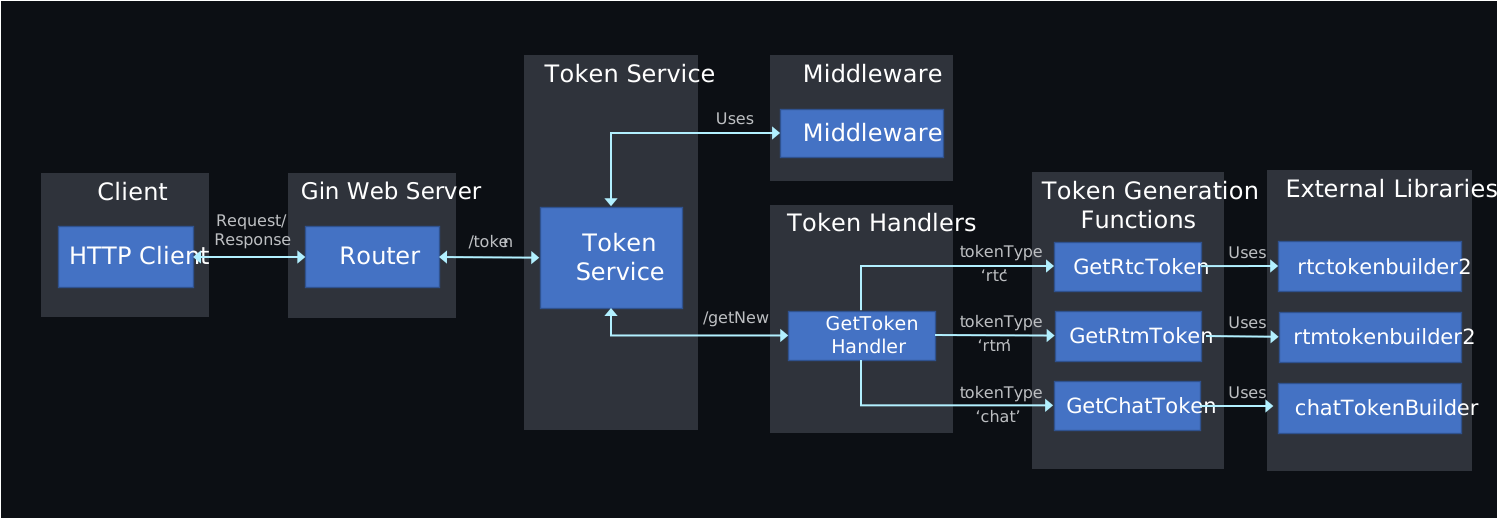
The following figure illustrates the architecture of the middleware token generation microservice.
## Set up and run the Go backend middleware [#set-up-and-run-the-go-backend-middleware]
Take the following steps to set up and run the middleware project:
1. **Clone the repository**
```bash
git clone https://github.com/AgoraIO-Community/agora-go-backend-middleware.git
```
2. **Install dependencies**
Ensure you have [Go](https://go.dev/doc/install) installed on your system. Navigate to the project directory and install the project dependencies:
```bash
cd agora-go-backend-middleware
go mod download
```
3. **Configure environment variables**
Copy the example `.env` file.
```bash
cp .env.example .env
```
Update the following variables in the `.env` file:
* `APP_ID`: Your Agora App ID.
* `APP_CERTIFICATE`: Your Agora App Certificate.
4. **Run the middleware**
Start the middleware server using the following command:
```bash
go run cmd/main.go
```
The middleware runs on the default port, for example `localhost:8080`.
## Generate tokens [#generate-tokens]
Refer to the following `curl` example to test the middleware's token generation API endpoint.
The command-line examples in this guide are for demonstration purposes only. Do not use them directly in a production environment. Implement RESTful API requests through your application server.
**POST:** `/token/getNew`
```bash
curl -X POST http://localhost:8080/token/getNew \
-H "Content-Type: application/json" \
-d '{
"tokenType": "rtc",
"channel": "testChannel",
"role": "publisher",
"uid": "12345",
"expire": 3600
}'
```
Replace `localhost:8080` with your server's address.
## Reference [#reference]
This section contains content that completes the information on this page, or points you to documentation that explains other aspects to this product.
### Middleware token generation API [#middleware-token-generation-api]
This section provides details about the middleware token generation API endpoints.
#### Generate Token [#generate-token]
Generates a Video SDK, Signaling, or Chat token based on the provided parameters.
#### Endpoint [#endpoint]
`POST /token/getNew`
#### Request body [#request-body]
```json
{
"tokenType": "rtc|rtm|chat",
"channel": "string",
"uid": "string",
"role": "publisher|subscriber",
"expire": 0
}
```
#### Response [#response]
```json
{
"token": "string"
}
```