# Virtual Background (/en/realtime-media/video/build/apply-video-effects/virtual-background/unreal)
> For AI agents: see the complete documentation index at [llms.txt](/llms.txt).
Virtual Background enables users to blur their background, or replace it with a solid color or an image. This feature is applicable to use-cases such as online conferences, online classes, and live streaming. It helps protect personal privacy and reduces audience distraction.
## Understand the tech [#understand-the-tech-10]
Virtual Background offers the following options:
| Feature | Example |
| --------------------------------------- | --------------------------------------------------------------------------------------------------------------------------------------------------------------------------------------------------------------------------------------------------------------------------------------------------------------------- |
| Blurred background and image background | 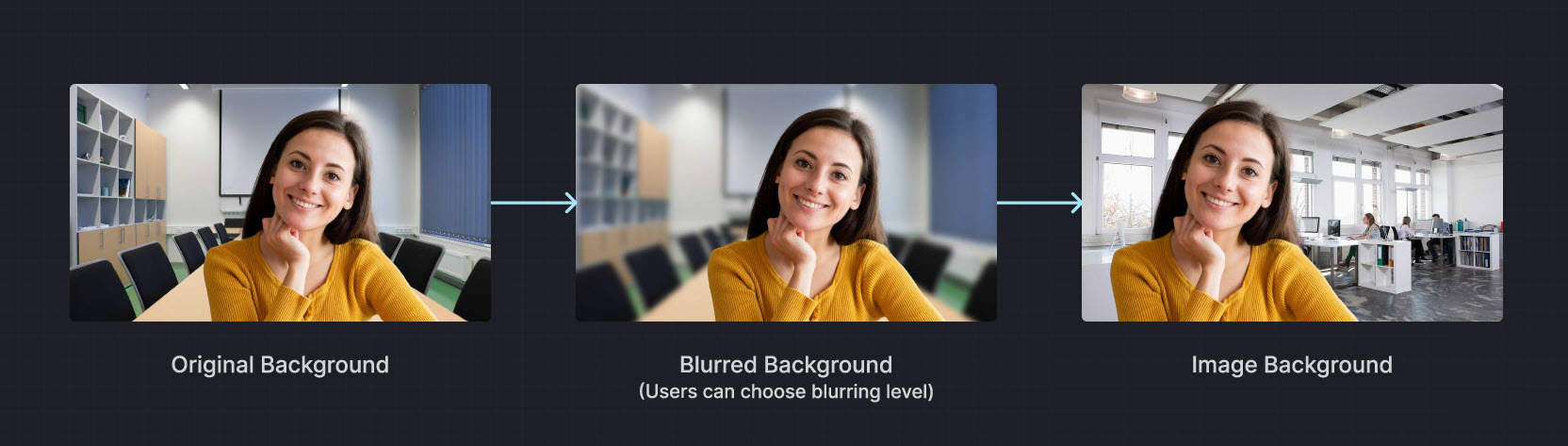 |
| Video/Animated background | |
| Portrait-in-picture |  Allows the presenter to use slides as the virtual background while superimposing their video. The effect is similar to a weather news cast on television, preventing interruptions during a layout toggle. |
Want to test Virtual Background? Try the online demo.
## Prerequisites [#prerequisites-10]
Ensure that you have implemented the [SDK quickstart](/en/realtime-media/video/get-started-sdk) in your project.
## Implement virtual background [#implement-virtual-background-10]
This section shows you how to add a virtual background to the local video.
### Set a blurred background [#set-a-blurred-background-9]
To blur the video background, use the following code:
```cpp
void UMyUserWidget::SetBackgroundBlur(VirtualBackgroundSource& virtualBackgroundSource)
{
VirtualBackgroundSource virtualBackgroundSource;
SegmentationProperty segmentationProperty;
// Set background blur
virtualBackgroundSource.background_source_type = VirtualBackgroundSource::BACKGROUND_BLUR;
virtualBackgroundSource.blur_degree = VirtualBackgroundSource::BACKGROUND_BLUR_DEGREE::BLUR_DEGREE_HIGH;
// Set processing properties for background
segmentationProperty.modelType = SegmentationProperty::SEG_MODEL_AI;
segmentationProperty.greenCapacity = 0.5F;
// Enable virtual background
agoraEngine->enableVirtualBackground(true, virtualBackgroundSource, segmentationProperty);
UE_LOG(LogTemp, Log, TEXT("Blur background enabled"));
}
```
### Set a color background [#set-a-color-background-9]
To apply a solid color as the virtual background, use a hexadecimal color code. For example, `0x0000FF` for blue:
```cpp
void UMyUserWidget::SetBackgroundColor(VirtualBackgroundSource& virtualBackgroundSource)
{
VirtualBackgroundSource virtualBackgroundSource;
SegmentationProperty segmentationProperty;
// Set a solid background color
virtualBackgroundSource.background_source_type = VirtualBackgroundSource::BACKGROUND_COLOR;
virtualBackgroundSource.color = 0x0000FF;
// Set processing properties for background
segmentationProperty.modelType = SegmentationProperty::SEG_MODEL_AI;
segmentationProperty.greenCapacity = 0.5F;
// Enable virtual background
agoraEngine->enableVirtualBackground(true, virtualBackgroundSource, segmentationProperty);
UE_LOG(LogTemp, Log, TEXT("Color background enabled"));
}
```
### Set an image background [#set-an-image-background-9]
To set a custom image as the virtual background, specify the absolute path to the image file.
```cpp
void UMyUserWidget::SetBackgroundImage(VirtualBackgroundSource& virtualBackgroundSource)
{
VirtualBackgroundSource virtualBackgroundSource;
SegmentationProperty segmentationProperty;
// Set a background image
virtualBackgroundSource.background_source_type = VirtualBackgroundSource::BACKGROUND_IMG;
virtualBackgroundSource.source = "";
// Set processing properties for background
segmentationProperty.modelType = SegmentationProperty::SEG_MODEL_AI;
segmentationProperty.greenCapacity = 0.5F;
// Enable virtual background
agoraEngine->enableVirtualBackground(true, virtualBackgroundSource, segmentationProperty);
UE_LOG(LogTemp, Log, TEXT("Image background enabled"));
}
```
### Reset the background [#reset-the-background-8]
To disable the virtual background and revert to the original video state, use the following code:
```cpp
void UMyUserWidget::ResetVirtualBackground()
{
VirtualBackgroundSource virtualBackgroundSource;
SegmentationProperty segmentationProperty;
// Reset the background state
virtualBackgroundSource.background_source_type = VirtualBackgroundSource::BACKGROUND_COLOR;
virtualBackgroundSource.color = 0xFFFFFF;
// Set processing properties for background
segmentationProperty.modelType = SegmentationProperty::SEG_MODEL_AI;
segmentationProperty.greenCapacity = 0.5F;
// Disable virtual background
agoraEngine->enableVirtualBackground(false, virtualBackgroundSource, segmentationProperty);
}
```
## Reference [#reference-10]
This section contains content that completes the information in this page, or points you to documentation that explains other aspects of this product.
### API reference [#api-reference-9]
* [`enableVirtualBackground`](https://api-ref.agora.io/en/video-sdk/unreal/4.x/API/class_irtcengine.html#api_irtcengine_enablevirtualbackground)
* [`VirtualBackgroundSource`](https://api-ref.agora.io/en/video-sdk/unreal/4.x/API/class_virtualbackgroundsource.html)
* [`SegmentationProperty`](https://api-ref.agora.io/en/video-sdk/unreal/4.x/API/class_segmentationproperty.html)