# Local screenshot upload (/en/realtime-media/video/build/add-advanced-video-features/screenshot-upload/react-native)
> For AI agents: see the complete documentation index at [llms.txt](/llms.txt).
To meet the needs of video content supervision, Agora Video SDK enables you to take screenshots of the video stream in a channel and then upload these images to third-party cloud storage.
This page shows you how to enable screenshot uploads on your app and handle screenshot upload callbacks.
Local screenshot upload is a paid service. For billing details, refer to [Pricing](/en/realtime-media/video/reference/pricing).
## Understand the tech [#understand-the-tech-6]
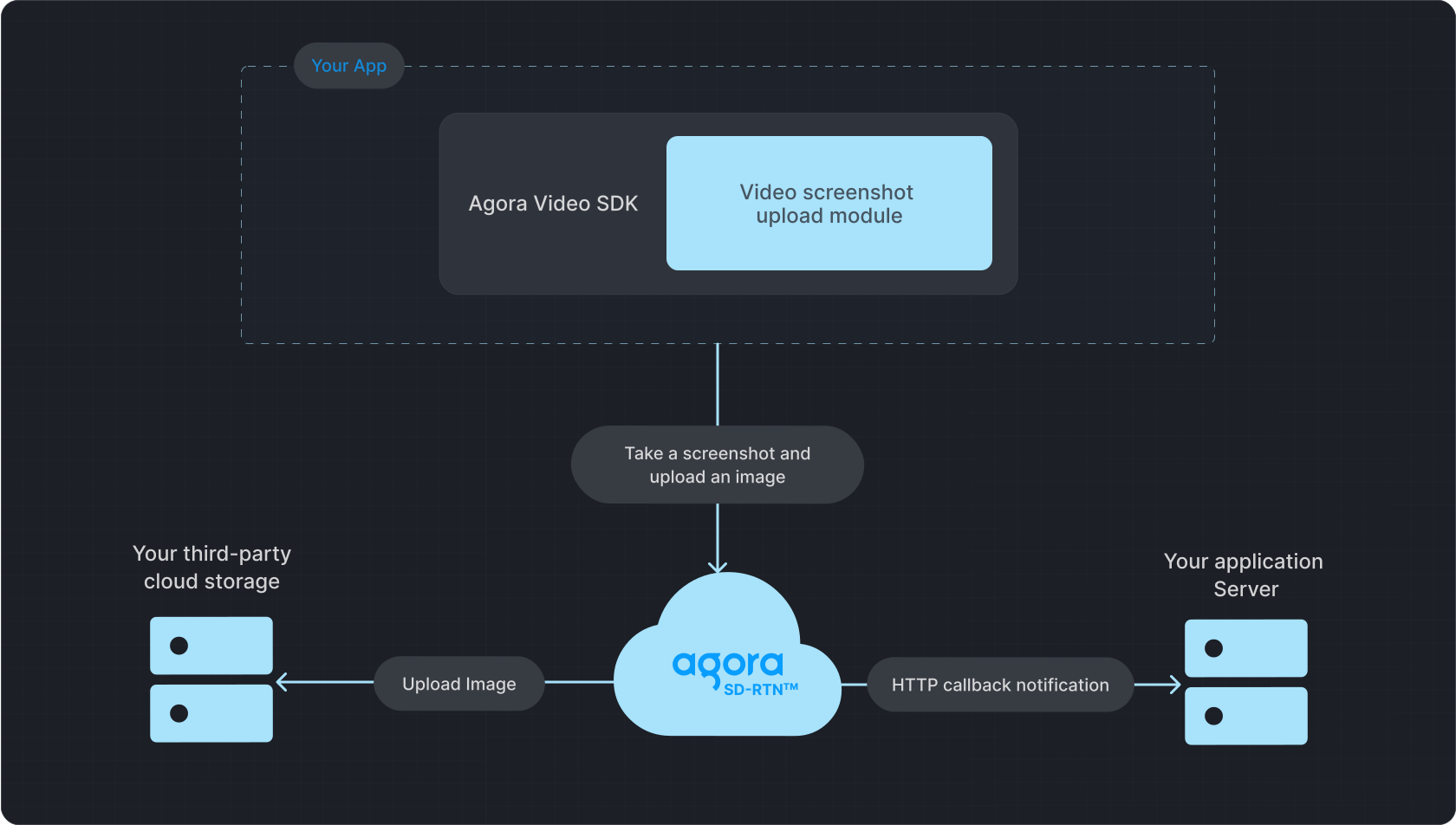
When you enable screenshot upload, you set the interval between screenshots. After each interval, Video SDK takes a screenshot of the video stream sent by local users, and uploads the image to Agora SDRTN®. Agora SDRTN® uploads each screenshot to your third-party cloud storage and sends a callback notification to your server in the form of an `HTTPS` request.
**Screenshot upload**
## Prerequisites [#prerequisites-6]
Before implementing the Agora local screenshot upload feature, take the following steps:
1. **Activate local screenshot upload service**
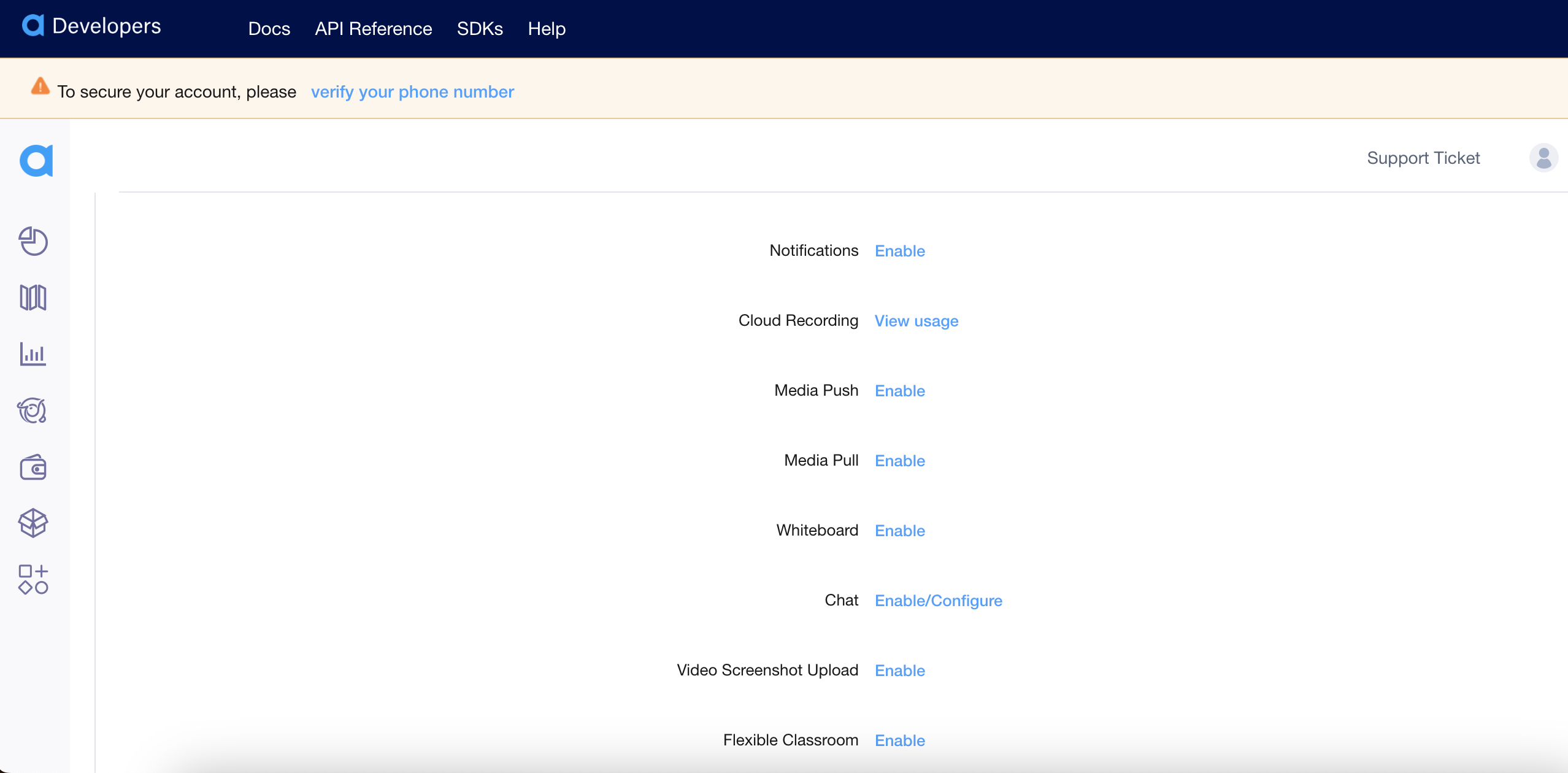
Log in to [Agora Console](https://console.agora.io), select the project for which you want to activate the local screenshot upload service, and then click **Configure**. Scroll down to the features section to find **Video Screenshot Upload** and click **Config**.
2. **Configure third-party cloud storage**
In the **Video Screenshot Upload Configuration**, update the screenshot upload settings:
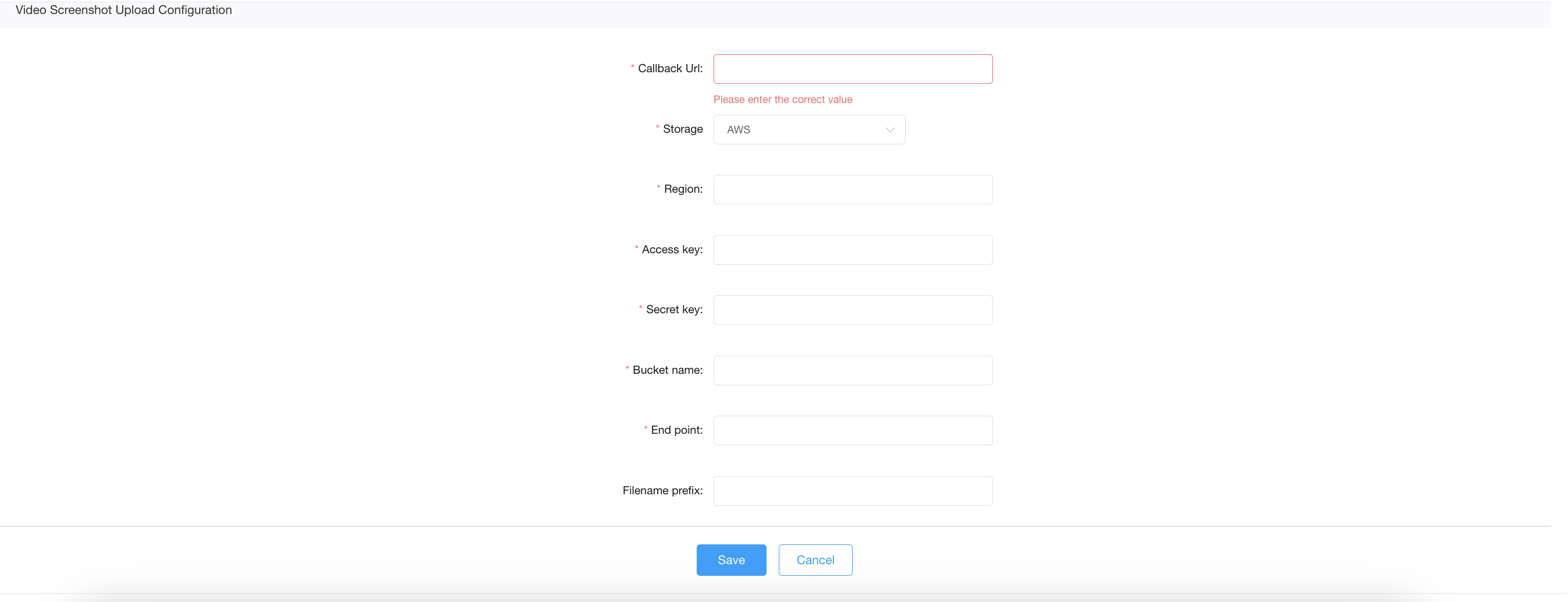
Currently, the Agora local screenshot upload service supports Amazon S3 and Alibaba Cloud OSS as the third-party cloud storage providers. If you want to use other provider, [contact](mailto\:support@agora.io) technical support.
Fill in the following information:
AWS
Alibaba Cloud
* **Screenshot Callback Address**: The server address to receive callback notifications of local screenshot upload results.
* **Storage**: Third-party cloud storage provider. Select AWS.
* **Region**: The data center region setting for third-party cloud storage. See [AWS Official Documentation](https://docs.aws.amazon.com/general/latest/gr/rande.html#s3_region) for details.
* **Access Key**: String type, the access key of the third-party cloud storage. Best practice is to provide a write-only access key.
* **Secret Key**: String type, the secret key of the third-party cloud storage.
* **Bucket Name**: String type, the bucket name of the third-party cloud storage. The bucket name must comply with the naming rules of the corresponding third-party cloud storage service.
* **Endpoint**: Specify the access domain (Endpoint) of the bucket. See [AWS Official Documentation](https://docs.aws.amazon.com/general/latest/gr/rande.html#s3_region) for details.
* **Filename Prefix**: (Optional) JSON Array, an array composed of multiple strings, indicating the storage location of screenshots in the third-party cloud storage. For example, if `fileNamePrefix` = `["directory1","directory2"]`, the prefix `directory1/directory2/` will be added to the screenshot filename, that is, `directory1/directory2/xxx.jpg`. The prefix length, including slashes, must not exceed 128 characters. The string should not contain symbols such as slashes, underscores, parentheses, and so on. The supported character set is as follows:
* 26 lowercase English letters a-z
* 26 uppercase English letters A-Z
* 10 digits 0-9
**Sample configuration**
* Snapshot Callback Address: `https://webhook.site/2e75da2d-xxxx-xxxx-xxx-a0ef44a5259d`
* Storage: AWS
* Region: `cn-north-1`
* Access Key: `12345678`
* Secret Key: `abcd123`
* Bucket Name: `test-artifacts`
* Endpoint: `s3.cn-north-1.amazonaws.com.cn`
* Filename Prefix: `test`
* **Screenshot Callback Address**: The server address to receive callback notifications of local screenshot upload results.
* **Storage**: Third-party cloud storage provider. Select Alibaba Cloud.
* **Access Key**: String type, the access key of the third-party cloud storage. Best practice is to provide a write-only access key.
* **Secret Key**: String type, the secret key of the third-party cloud storage.
* **Bucket Name**: String type, the bucket name of the third-party cloud storage. The bucket name must comply with the naming rules of the corresponding third-party cloud storage service.
* **Endpoint**: Specify the access domain (Endpoint) of the bucket. See [Alibaba Cloud Official Documentation](https://help.aliyun.com/zh/oss/user-guide/regions-and-endpoints?spm=a2c4g.11186623.0.0.7ac5667aLnjEtX) for details.
* **Filename Prefix**: (Optional) JSON Array, an array composed of multiple strings, indicating the storage location of screenshots in the third-party cloud storage. For example, if `fileNamePrefix` = `["directory1","directory2"]`, the prefix `directory1/directory2/` will be added to the screenshot filename, that is, `directory1/directory2/xxx.jpg`. The prefix length, including slashes, must not exceed 128 characters. The string should not contain symbols such as slashes, underscores, parentheses, and so on. The supported character set is as follows:
* 26 lowercase English letters a-z
* 26 uppercase English letters A-Z
* 10 digits 0-9
**Sample configuration**
* Snapshot Callback Address: `https://webhook.site/2e75da2d-xxxx-xxxx-xxx-a0ef44a5259d`
* Storage: Alibaba Cloud
* Region: `cn-north-1`
* Access Key: `12345678`
* Secret Key: `abcd123`
* Bucket Name: `test-artifacts`
* Endpoint: `oss-accelerate.aliyuncs.com`
* Filename Prefix: `test`
3. **Integrate Video SDK**
Integrate the Video SDK (including the local screenshot upload dynamic library) into your project, join a channel, and publish a video stream. See [SDK quickstart](/en/realtime-media/video/get-started-sdk) for details.
## Implement local screenshot upload [#implement-local-screenshot-upload-6]
You enable screenshot upload in your Video Calling client and handle the notification callback from Agora on your callback server.
### Enable screenshot upload [#enable-screenshot-upload-6]
Call the `enableContentInspect` method to enable the local screenshot upload feature. After successfully enabling the feature, the SDK will capture screenshots at the specified frequency and upload them to the Agora cloud server. To implement this logic, refer to the following code:
```typescript
// Define ContentInspectModule Function Modules
const modules = [{
// Use Agora's own screenshot upload function
type: ContentInspectType.ContentInspectSupervision,
// The frequency of local screenshot upload.
interval: 2, // Once every 2 seconds
}];
rtcEngine.enableContentInspect(
// Enable local screenshot upload
true,
// Local screenshot upload configuration
{
modules: modules
moduleCount: modules.length,
}
);
```
### HTTP notification callback [#http-notification-callback-6]
After a screenshot is successfully uploaded to the Agora SDRTN®, Agora sends a message notification callback to your application server in the form of an `HTTPS` `POST` request. The data format is `JSON`, and the character encoding is `UTF-8`.
Upon receiving the message notification, your application server must respond with status code `200`. The expected response body format is `JSON`. In any of the following cases, the notification is considered to have failed:
* No response is received from your server within 5 seconds after sending the message notification.
* The `HTTP` status code of the response is not `200`, or the response body format is not `JSON`.
The Agora service immediately retries after the first notification failure, and sends the message three times in total.
#### Request header [#request-header-5]
| Field Name | Value |
| :------------- | :------------------------------- |
| `Content-Type` | `application/json;charset=utf-8` |
#### Request body [#request-body-5]
The request body is a JSON Object, containing the following fields:
| Field | Type | Description |
| :-------------- | :---------- | :--------------------------------------------------------------------------------------------------------------------------------------------------------------------------------------------------------------------------------------------------------------------------------------------------------------------------------------------------------------------------------------------------------------------------------------------------------------------------------------------------------------------------------------------------------------------------------------------------------------------------------------- |
| `requestId` | String | Callback notification ID, identifying an event notification from the Agora business server. |
| `callbackParam` | JSON Object | Custom fields passed in the callback, currently includes the `cname` field, representing the channel name. |
| `callbackData` | String | String data passed through by the SDK local screenshot upload module. |
| `checksum` | String | MD5 value calculated from the parameters `callbackAddr`, `code`, `object`, and `requestId`. Used to verify whether this callback notification comes from the local screenshot upload service. |
| `object` | String | Name of the screenshot file. The naming convention for this file is: `//___uid_s___uid_e__utc.jpg`. The meanings of the fields in the filename are as follows: `: Screenshot ID, a unique identifier for a screenshot.`: Channel name to which the user being screenshotted belongs.`: The user ID set when joining the channel.`: File type, supports only `video`.\`\`: Unix timestamp of this screenshot. UTC time, consists of year, month, day, hour, minute, second, and millisecond. For example, if `utc` is equal to `20190611073246073`, it represents the start time of this slice file as UTC June 11, 2019, 7:32:46.073 AM. |
| `code` | Number | Status code of this screenshot. `200` indicates that the screenshot is completed. |
| `msg` | String | Status of this screenshot. `"Supervise complete"` indicates that the screenshot is completed. |
| `channelName` | String | Channel name to which the user being screenshotted belongs. Consistent with `object.cname`. |
| `userId` | String | User ID of the user being screenshotted. Consistent with `object.uid`. |
| `timestamp` | Int | Unix timestamp (milliseconds) of this screenshot. UTC time, consistent with `object.utc`. |
**Request Example**
```json
{
"requestId": "38f8e3cfdcXXXXXXXXX1ceba380d7e1a_1652693284_b5813fe2ae4fa5cdfe5abd8fef82526f",
"callbackParam": {
"cname": "httpClient463224"
},
"callbackData": "",
"checksum": "75ee988XXXXXXc2ad4ec2aef58f178fd8",
"object": "test/20201216/38f8e3cfdc474cd56fc1ceba380d7e1a_httpClient463224__uid_s_91__uid_e_video_20200413081128672.jpg",
"code": 200,
"msg": "Supervise complete",
"channelName": "httpClient463224",
"userId": "91",
"timestamp": 20190611073246070
}
```
#### Response [#response-5]
After receiving the message notification, your application server is expected to respond. The response package format is JSON. In any of the following cases, the Agora service considers the notification as failed:
* After sending a message notification, no response is received from your server within 5 seconds.
* The HTTP status code of the response is not `200`, or the response body format is not JSON.
The Agora service immediately retries and sends the message notification again after the first notification fails. It attempts to notify you three times in total.
## Reference [#reference-6]
This section contains content that completes the information on this page, or points you to documentation that explains other aspects to this product.
### Pricing [#pricing-6]
Agora charges for local screenshot upload based on two metrics:
* **Screenshot fee**
* **QPS overage fee** (queries per second)
At the end of each month, Agora calculates:
* The total number of screenshots generated
* The monthly peak QPS if it exceeds the free quota
**Billing formula:**
```md
Monthly fee = (Number of screenshots - free quota) × Screenshot unit price
+ (Monthly peak QPS - free QPS) × QPS overage unit price
```
| Billing Type | Unit Price | Discount Policy |
| --------------- | ----------------------- | ------------------------------------------------------------------------------------------------- |
| Screenshot Fee | $0.30 per 10,000 images | First 10,000 images per month are free |
| QPS Overage Fee | $1.5 per QPS | Includes 500 QPS per month:- ≤ 500 QPS: No charge
- > 500 QPS: Charged based on monthly peak QPS |
* **Example 1:**
A project generates **910,000 screenshots** in one month. Peak QPS = **100**
- Screenshots: 910,000 - 10,000 (free) = 900,000 billable images
- Screenshot fee: 900,000 ÷ 10,000 × $0.30 = **$27.00**
- QPS fee: 100 ≤ 500 (free), so **$0**
- **Total fee = $27.00**
* **Example 2:**
A project generates **2.91 million screenshots** in one month. Peak QPS = **600**
- Screenshots: 2,910,000 - 10,000 (free) = 2,900,000 billable images
- Screenshot fee: 2,900,000 ÷ 10,000 × $0.30 = **$87.00**
- QPS fee: (600 - 500) × $1.5 = **$150.00**
- **Total fee = $237.00**
### API reference [#api-reference-5]
* [`enableContentInspect`](https://api-ref.agora.io/en/video-sdk/react-native/4.x/API/class_irtcengine.html#api_irtcengine_enablecontentinspect)
### local screenshot upload dynamic library [#local-screenshot-upload-dynamic-library-6]
You can find details about the name of the local screenshot upload dynamic library and the increase in app size after integration in [App size optimization](app-size-optimization.mdx).
### HTTP status codes [#http-status-codes-6]
The HTTP status codes for the application server responses are as follows:
| Status Code | Description |
| :---------- | :---------------------------------------------------------------------------------------------------------------------------------- |
| `200` | Successful request. |
| `201` | Successful request and creation of a new resource. |
| `206` | No user streamed during the entire screenshot process, or some screenshot files were not uploaded to the third-party cloud storage. |
| `400` | Syntax error in the request (For example, parameter error), and the server cannot understand it. |
| `401` | Unauthorized (App ID or Customer Certificate mismatch). |
| `404` | The server cannot find the requested resource (webpage). |
| `500` | Internal server error, unable to complete the request. |
| `504` | Internal server error. The server acting as a gateway or proxy did not receive a timely response from the upstream server. |