# REST quickstart (/en/realtime-media/speech-to-text/get-started/quickstart)
> For AI agents: see the complete documentation index at [llms.txt](/llms.txt).
A Real-Time STT agent subscribes to the audio content of a media stream and transcribes it into text in real time. This page shows you how to use basic RESTful API methods to start, stop, and query a Real-Time STT agent.
The command-line examples are for demonstration purposes only. In a production environment, send RESTful API requests through your application server.
## Understand the tech [#understand-the-tech]
The following diagram outlines the process of implementing Real-Time STT:
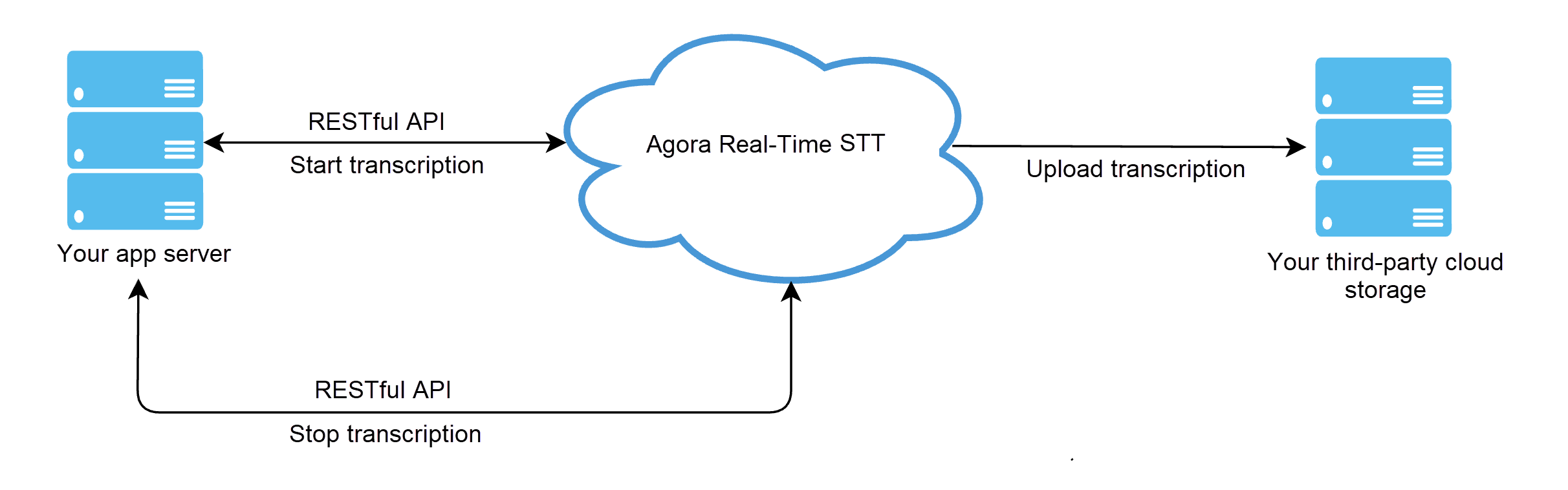
This process includes calling the following RESTful API methods:
1. `start`: Call this method to join the channel and start transcription. If the request is successful, you receive an `agent_id` in the response body that identifies the current transcription session.
2. `update`: While a transcription agent is running, use the `update` method to modify transcription or translation languages or update the hosts for which transcription is enabled.
3. `query`: Use this method to query the agent status between `start` and `stop` calls.
4. `stop`: Call this method to stop transcription.
## Prerequisites [#prerequisites]
To follow this procedure, you must:
* Have a valid [Agora Account](https://console.agora.io/v2).
* Have a valid Agora project with an app ID and a temporary token or a token
server. For details, see [Agora account management](/en/realtime-media/voice/manage-agora-account).
* Have a computer with access to the internet. If your network has a firewall, follow the steps in [Firewall requirements](../reference/firewall).
* Join a Video SDK channel as a host and start streaming. Refer to the [Voice SDK quickstart](/en/realtime-media/voice/quickstart) guide.
## Project setup [#project-setup]
To enable Real-Time STT before using it for the first time, take the following steps:
1. Log in to [Agora Console](https://console.agora.io/v2) and open the **Projects** page.
2. Find the project for which you want to enable Real-Time STT and click the ✏️ icon.
3. On the **Edit Project** page, find **Real-Time Speech-to-Text** and click **Enable Real-Time-STT**.
4. Click **Enable Real-Time STT** and **Confirm**.
Now you can use Agora Real-Time STT and see the usage statistics on the **Usage** page.
## Implement Real-Time STT [#implement-real-time-stt]
This section presents sample API calls to `start`, `stop`, `update`, and `query` a Real-Time STT agent.
### Authentication [#authentication]
Real-Time STT RESTful APIs require basic HTTP authentication. Set the `Authorization` parameter to a Base64-encoded credential in every HTTP request header. For details on how to get the `Authorization` value, see [RESTful authentication](../reference/restful-authentication).
### Start an agent [#start-an-agent]
Call `start` to start subtitle recording and translation.
When the request is successful you receive an `agent_id` in the HTTP response body. This ID is a unique identifier of your transcription session.
**Request example**
Following is a simple request example to start a Real-Time STT agent. Refer to [Encrypt captions](../build/process-transcription-data/encrypt-captions), [Record captions](../build/process-transcription-data/record-captions), and [Transcribe specified hosts](../build/start-transcribing-and-translating/transcribe-individual-host) for more feature configurations.
```bash
curl --request post \
--url https://api.agora.io/api/speech-to-text/v1/projects/:appid/join \
--header 'Authorization: Basic ' \
--data '
{
"languages": [
"en-US"
],
"name": "agora-test",
"maxIdleTime": 50,
"rtcConfig": {
"channelName": "agora-test",
"subBotUid": "47091",
"pubBotUid": "88222"
},
"translateConfig": {
"languages": [
{
"source": "en-US",
"target": [
"ar-SA",
"id-ID",
"fr-FR",
"ja-JP"
]
}
]
},
"captionConfig": {
"sliceDuration": 60,
"storage": {
"accessKey": "test-oss",
"secretKey": "test-oss",
"bucket": "test-oss",
"vendor": 2,
"region": 3
}
}
}'
```
* String UIDs are supported only on a 128 host environment, with full support planned in the near future.
* `pubBotUid` and `subBotUid` are `int` type UIDs that must be different to avoid unknown issues.
**Response example**
* Success
```json
{
"agent_id": "Agent ID.",
"create_ts": 1730974708,
"status": "RUNNING"
}
```
| Parameter Name | Type | Description |
| -------------- | ------- | ------------------------------------------------------------------------------------------------------------------------------------------------------------------------------------------------------------------------------------------------------------------------------------ |
| `agent_id` | String | The ID of the agent. |
| `createTs` | Integer | The Unix timestamp (seconds) when the agent was created. |
| `status` | String | Agent Status:- `IDLE`: The agent is not initialized.
- `STARTING`: The agent is starting.
- `RUNNING`: The agent is running.
- `STOPPING`: The agent is exiting.
- `STOPPED`: The agent exited successfully.
- `RECOVERING`: The agent is recovering.
- `FAILED`: Agent exit failed. |
* Failure
```json
{
"detail": "Details of the request failure.",
"reason": "The reason why the request failed."
}
```
### Query agent status [#query-agent-status]
Call `query` to get the status of an agent during a transcription session. When the request is successful, you receive the current status and related information in the response body.
**Request example**
```bash
curl --request get \
--url https://api.agora.io/api/speech-to-text/v1/projects/:appid/agents/:agentId \
--header 'Authorization: Basic '
```
**Response example**
* Success
```json
{
"message": "Details of the request result.",
"agent_id": "Agent ID.",
"create_ts": 1730974708,
"status": "RUNNING"
}
```
* Failure
```json
{
"message": "Details of the failed request.",
"agent_id": "Agent ID.",
"create_ts": 1730974708,
"status": "FAILED"
}
```
### Update configuration [#update-configuration]
See [Update configuration](../build/start-transcribing-and-translating/update-service) for details.
### Stop the agent [#stop-the-agent]
Call `stop` to stop transcribing. When the request is successful, you receive the status of the transcription session in the response body.
**Request example**
```bash
curl --request post \
--url https://api.agora.io/api/speech-to-text/v1/projects/:appid/agents/:agentId/leave \
--header 'Authorization: Basic '
```
## Reference [#reference]
This section contains content that completes the information on this page, or points you to documentation that explains other aspects to this product.
### Demo app and source code [#demo-app-and-source-code]
Check out the [demo](https://stt-demo.agora.io) to try out Real-Time STT and evaluate its accuracy and latency.
You can also refer to the [demo code on Github](https://github.com/AgoraIO-Community/Agora-RTT-Demo) to see how captions and transcription are implemented. For more demo code, contact [support@agora.io](mailto\:support@agora.io).
### REST API middleware [#rest-api-middleware]
[Agora Go Backend Middleware](https://github.com/AgoraIO-Community/agora-go-backend-middleware) is an open-source microservice that exposes a RESTful API designed to simplify Real-Time STT interactions with Agora. Written in Golang and powered by the Gin framework, this community project serves as a middleware to bridge front-end applications using Agora's Video SDK or Voice SDK with Agora's RESTful APIs.