# Signaling Quickstart (/en/realtime-media/rtm/quickstart/unity)

> For AI agents: see the complete documentation index at [llms.txt](/llms.txt).

Use Signaling SDK to add low-latency, high-concurrency signaling and synchronization capabilities to your app.

Signaling also helps you enhance the user experience in Video Calling, Voice Calling, Interactive Live Streaming, and Broadcast Streaming applications.

This page shows you how to use the Signaling SDK to rapidly build a simple application that sends and receives messages. It shows you how to integrate the Signaling SDK in your project and implement pub/sub messaging through [Message channels](/en/realtime-media/rtm/build/work-with-channels/message-channel). To get started with stream channels, follow this guide to create a basic Signaling app and then refer to the [Stream channels](/en/realtime-media/rtm/build/work-with-channels/stream-channel) guide.


    ## Understand the tech [#understand-the-tech-5]

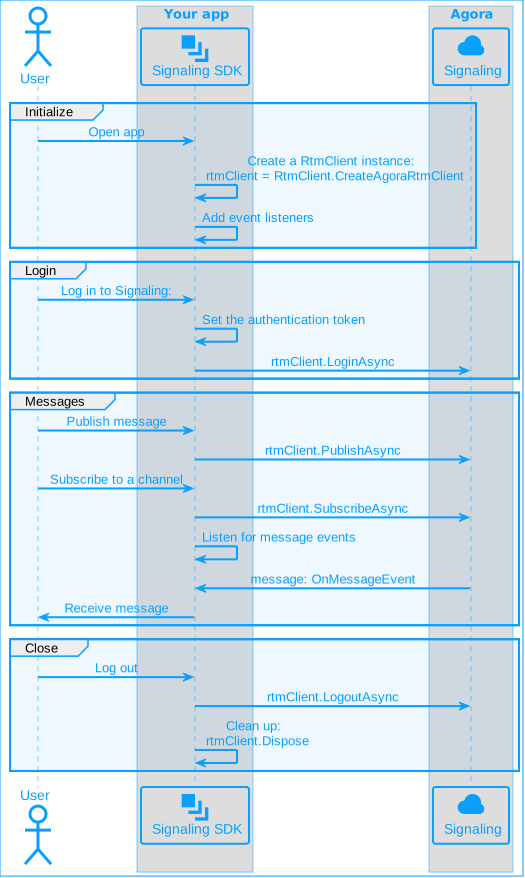
    To use Signaling features in your game, you initialize a Signaling client instance and add event listeners. To connect to Signaling, you login using an authentication token. To send a message to a message channel, you publish the message. Signaling creates a channel when a user subscribes to it. To receive messages other users publish to a channel, your game listens for events.

    To create a pub/sub session for Signaling, implement the following steps in your game:
    <Accordions>
      <Accordion title="Signaling workflow">
        ![Signaling workflow for Unity](https://assets-docs.agora.io/images/signaling/get-started-workflow-unity.svg)
      </Accordion>
    </Accordions>

    ## Prerequisites [#prerequisites-5]

    To implement the code presented on this page you need to have:

    * An Agora [account](/en/realtime-media/rtm/manage-agora-account) and [project](/en/realtime-media/rtm/manage-agora-account).

    * [Enabled Signaling](/en/realtime-media/rtm/manage-agora-account) in Agora Console

    * [Unity Hub](https://unity.com/download)

    * [Unity Editor 2018.4.0 or higher](https://unity.com/releases/editor/archive)

    * Operating System and compiler requirements:

      | Development Platform | Operating system version | Compiler version                      |
      | -------------------- | ------------------------ | ------------------------------------- |
      | Android              | Android 4.1 or above     | Android Studio 3.0 or above           |
      | iOS                  | iOS 11.0 or above        | Xcode 9.0 or above                    |
      | macOS                | macOS 10.10 or above     | Xcode 9.0 or above                    |
      | Windows              | Windows 7 or above       | Microsoft Visual Studio 2017 or above |

    * Ensure that a firewall is not blocking your network communication.

    <CalloutContainer type="info">
      <CalloutDescription>
        Signaling 2.x is an enhanced version compared to 1.x with a wide range of new features. It follows a new pricing structure. See [Pricing](/en/realtime-media/rtm/reference/pricing) for details.
      </CalloutDescription>
    </CalloutContainer>

    ## Project setup [#project-setup-5]

    ### Create a project [#create-a-project-4]

    1. In Unity Hub, select **Projects**, then click **New Project**.

    2. In **All templates**, select **3D**. Set the **Project name** and **Location**, then click **Create Project**.

    3. In **Projects**, double-click the project you created. Your project opens in Unity.

    ### Integrate the SDK [#integrate-the-sdk-4]

    1. [Download](/en/api-reference/sdks?product=signaling\&platform=unity) the latest version of the Agora Signaling SDK, and unzip the contents to a local folder.

    2. In Unity, click **Assets > Import Package > Custom Package**.

    3. Navigate to the Signaling SDK package and click **Open**.

    4. In **Import Unity Package**, click **Import**.

    ### Create a user interface [#create-a-user-interface-2]

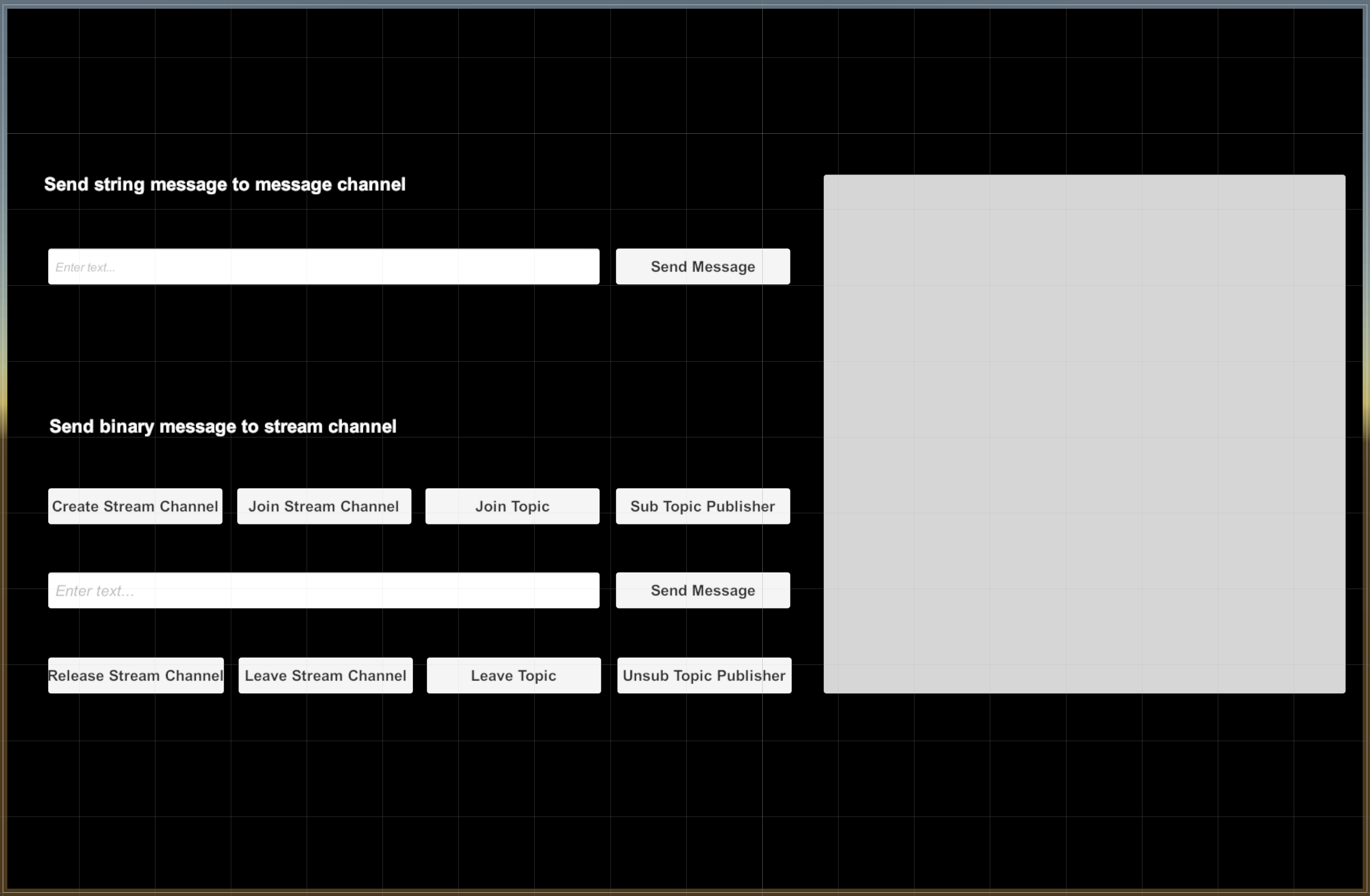
    To create a simple UI for verifying the basic features of Signaling, add the following elements to your interface:

    ```text
    SampleScene

    - Main Camera
    - Canvas
     - Image            // Window background
     - Txt1             // Text label, text content is Send string message to message channel
     - InputField1      // Message input box
     - Btn1             // Send message
     - Txt2             // Text label, text content is Send binary message to stream channel
     - Btn2             // Create Stream Channel
     - Btn3             // Join Stream Channel
     - Btn4             // Join Topic
     - Btn5             // Subscribe to message publishers in Topic
     - InputField2      // Message input box
     - Btn6             // Send message button
     - Btn7             // Release Stream Channel button
     - Btn8             // Leave Stream Channel button
     - Btn9             // Leave Topic button
     - Btn10            // Unsubscribe from message publishers in Topic
     - Pannel           // Information output panel
         - Txt3         // Information output text
    - EventSystem
    ```

    Your interface should look similar to the following:
    ![](https://assets-docs.agora.io/images/signaling/signaling-quickstart-ui-unity.png)

    ## Implement Signaling [#implement-signaling-5]

    A complete code sample that implements the basic features of Signaling is presented here for your reference. To use the sample code, create a new script for the project. In Unity editor, from the **Assets** menu, select **Create**, then **C# Script**. Name the new script file `HelloWorld.cs` and paste the following code in the file:

    **Complete sample code for Signaling**

    ```csharp
    using System.Collections.Generic;
    using UnityEngine;
    using UnityEngine.UI;
    using Agora.Rtm;

    public class HelloWorld : MonoBehaviour
    {
        [SerializeField]
        private string appId = "your_appId"; // Get an App ID from Agora console
        private string userId = "your_userId"; // Change the user ID to a numeric string
        private string token = "your_token"; // Login token
        private string rtcToken = "your_RTC_token"; // Token to join a stream channel
        private string msChannelName = "SeeYou";
        private string stChannelName = "Greeting";
        private string topicName = "Hello_world";
        private IRtmClient rtmClient;
        private IStreamChannel streamChannel;
        public void Awake()
        {
            Initialize();
        }
        // Initialize RTM
        public async void Initialize()
        {
            if (string.IsNullOrEmpty(userId) || string.IsNullOrEmpty(appId))
            {
                ShowMessage("We need a userId and appId to initialize!");
                return;
            }
            RtmLogConfig logConfig = new RtmLogConfig();
            // Set log file path
            logConfig.filePath = "myFilePath";
            // Set the file size of the agore.log file
            logConfig.fileSizeInKB = 512;
            // Set the log report level
            logConfig.level = RTM_LOG_LEVEL.INFO;
            RtmConfig config = new RtmConfig();
            config.appId = appId;
            config.userId = userId;
            config.logConfig = logConfig;
            // Create the RTM Client
            try
            {
                rtmClient = RtmClient.CreateAgoraRtmClient(config);
                ShowMessage("RTM Client Initialize Sucessfull");
                // Inactive unnecessary components
                string[] activeComponentsList = { "Btn2" };
                string[] inactiveComponentList = { "Btn3", "Btn4", "Btn5", "Btn6", "Btn7", "Btn8", "Btn9", "Btn10" };
                ChangeComponentView(activeComponentsList, "ACTIVATE");
                ChangeComponentView(inactiveComponentList, "INACTIVATE");
            }
            catch (RTMException e)
            {
                ShowMessage(string.Format("{0} is failed", e.Status.Operation));
                ShowMessage(string.Format("The error code is {0}, due to: {1}", e.Status.ErrorCode, e.Status.Reason));
            }
            // Add listener
            if (rtmClient != null)
            {
                // Add the message event listener
                rtmClient.OnMessageEvent += OnMessageEvent;
                // Add the presence event listener
                rtmClient.OnPresenceEvent += OnPresenceEvent;
                // Add the connection state change listener
                rtmClient.OnConnectionStateChanged += OnConnectionStateChanged;
                // Log in to the RTM server
                var result = await rtmClient.LoginAsync(token);
                var status = result.Status;
                var response = result.Response;
                if (status.Error)
                {
                    ShowMessage(string.Format("{0} is failed", status.Operation));
                    ShowMessage(string.Format("The error code is {0}, due to: {1}", status.ErrorCode, status.Reason));
                    Debug.Log(string.Format("Login failed"));
                }
                else
                {
                    ShowMessage("Login Successfully");
                }
                //Subscribe to a Message Channel
                SubscribeOptions options = new SubscribeOptions()
                {
                    withMessage = true,
                    withPresence = true
                };
                var result2 = await rtmClient.SubscribeAsync(msChannelName, options);
                var status2 = result2.Status;
                var response2 = result2.Response;
                if (status2.Error)
                {
                    ShowMessage(string.Format("{0} is failed", status2.Operation));
                    ShowMessage(string.Format("The error code is {0}, due to: {1}", status2.ErrorCode, status2.Reason));
                }
                else
                {
                    ShowMessage(string.Format("Subscribe channel success! at Channel:{0}", response2.ChannelName));
                }
            }
        }
        private void ChangeComponentView(string[] componentsList, string viewType)
        {
            for (int i = 0; i < componentsList.Length; i++)
            {
                if (viewType == "ACTIVATE")
                    GameObject.Find(componentsList[i]).GetComponent<Button>().interactable = true;
                else if (viewType == "INACTIVATE")
                    GameObject.Find(componentsList[i]).GetComponent<Button>().interactable = false;
            }
        }
        private void ShowMessage(string msg)
        {
            GameObject.Find("Txt3").GetComponent<Text>().text += "
    " + msg;
        }
        // Implement the event listener handler
        // Implement the connection state change event handler
        private void OnConnectionStateChanged(string channelName, RTM_CONNECTION_STATE state, RTM_CONNECTION_CHANGE_REASON reason)
        {
            ShowMessage(string.Format("Channel:{0} connection state have changed to:{1} because of {2}", channelName, state, reason));
        }
        // Implement the presence event handler
        private void OnPresenceEvent(PresenceEvent eve)
        {
            var channelName = eve.channelName;
            var channelType = eve.channelType;
            var eventType = eve.type;
            var publisher = eve.publisher;
            var stateItems = eve.stateItems;
            var interval = eve.interval;
            var snapshot = eve.snapshot;
            Debug.Log(string.Format("The Event : {0} Happend", eventType));
            switch (eventType)
            {
                case RTM_PRESENCE_EVENT_TYPE.SNAPSHOT:
                    ShowMessage(string.Format("You have sub or join channel:{0} channe type is:{1}", channelName, channelType));
                    break;
                case RTM_PRESENCE_EVENT_TYPE.INTERVAL:
                    ShowMessage(string.Format("The channel:{0} channe type is:{1} is now in interval mode!", channelName, channelType));
                    break;
                case RTM_PRESENCE_EVENT_TYPE.REMOTE_JOIN:
                    ShowMessage(string.Format("User:{0} sub or join channel:{1} channe type is:{2}", publisher, channelName, channelType));
                    break;
                case RTM_PRESENCE_EVENT_TYPE.REMOTE_LEAVE:
                    ShowMessage(string.Format("User:{0} unsub or leave channel:{1} channe type is:{2}", publisher, channelName, channelType));
                    break;
                case RTM_PRESENCE_EVENT_TYPE.REMOTE_TIMEOUT:
                    ShowMessage(string.Format("User:{0} timeout from channel:{1} channe type is:{2}", publisher, channelName, channelType));
                    break;
                case RTM_PRESENCE_EVENT_TYPE.REMOTE_STATE_CHANGED:
                    ShowMessage(string.Format("User:{0} state change in channel:{1} channe type is:{2}", publisher, channelName, channelType));
                    break;
                case RTM_PRESENCE_EVENT_TYPE.ERROR_OUT_OF_SERVICE:
                    ShowMessage(string.Format("User:{0} joined channel without presence service:{1} channe type is:{2}", publisher, channelName, channelType));
                    break;
            }
        }
        // Implement the message event handler
        private void OnMessageEvent(MessageEvent eve)
        {
            var channelName = eve.channelName;
            var channelType = eve.channelType;
            var topic = eve.channelTopic;
            var publisher = eve.publisher;
            var messageType = eve.messageType;
            var customType = eve.customType;
            var message = eve.message;
            if (messageType == RTM_MESSAGE_TYPE.STRING)
            {
                var stMessage = message.GetData<string>();
                ShowMessage(string.Format("You have recieved a string type message: {0} from: {1} in channel:{2}", stMessage, publisher, channelName));
                ShowMessage(string.Format("The channel type is {0}", channelType));
            }
            else
            {
                var biMessage = message.GetData<byte[]>();
                ShowMessage(string.Format("You have recieved a binary type message: {0},from: {1} in channel:{2}", System.BitConverter.ToString(biMessage), publisher, channelName));
                ShowMessage(string.Format("The channel type is {0}", channelType));
            }
        }
        // OnClick Event Handler for Btn1
        public async void PublishStringMessage()
        {
            // Publish string messages to a message channel
            var message = GameObject.Find("InputField1").GetComponent<InputField>().text;
            if (rtmClient != null)
            {
                PublishOptions options = new PublishOptions()
                {
                    channelType = RTM_CHANNEL_TYPE.MESSAGE,
                    customType = "PlainText"
                };
                var result = await rtmClient.PublishAsync(msChannelName, message, options);
                var status = result.Status;
                var response = result.Response;
                if (status.Error)
                {
                    ShowMessage(string.Format("{0} is failed, The error code is {1}", status.Operation, status.ErrorCode));
                }
                else
                {
                    ShowMessage("Publish Message Success!");
                }
            }
        }
        // OnClick Event Handler for Btn6
        public async void PublishBinaryMessage()
        {
            // Publish Binary Messahe to Stream Channel
            var message = GameObject.Find("InputField2").GetComponent<InputField>().text;
            byte[] byteMsg = System.Text.Encoding.Default.GetBytes(message);
            if (streamChannel != null)
            {
                TopicMessageOptions options = new TopicMessageOptions();
                options.customType = "PlainBinary";
                options.sendTs = 0;
                var result = await streamChannel.PublishTopicMessageAsync(topicName, byteMsg, options);
                var status = result.Status;
                var response = result.Response;
                if (status.Error)
                {
                    ShowMessage(string.Format("{0} is failed", status.Operation));
                    ShowMessage(string.Format("The error code is {0}, due to: {1}", status.ErrorCode, status.Reason));
                }
                else
                {
                    ShowMessage("Publish Binary Message Success!");
                }
            }
        }
        // Onclick event handler for Btn2
        public void CreateStChannel()
        {
            string[] activeComponentsList = { "Btn3", "Btn7" };
            string[] inactiveComponentList = { "Btn2", "Btn4", "Btn5", "Btn6", "Btn8", "Btn9", "Btn10" };
            // Create a Stream Channel
            if (rtmClient != null)
            {
                streamChannel = rtmClient.CreateStreamChannel(stChannelName);
                ShowMessage("Create Stream Channel:" + stChannelName + "Success !");
                // Disable unnecessary components
                ChangeComponentView(activeComponentsList, "ACTIVATE");
                ChangeComponentView(inactiveComponentList, "INACTIVATE");
            }
        }
        // Onclick event handler for Btn3
        public async void JoinStChannel()
        {
            string[] activeComponentsList = { "Btn4", "Btn5", "Btn8" };
            string[] inactiveComponentList = { "Btn2", "Btn3", "Btn6", "Btn9", "Btn10", "Btn7" };
            // Join a Stream Channel
            if (streamChannel != null)
            {
                JoinChannelOptions options = new JoinChannelOptions();
                options.withPresence = true;
                options.token = rtcToken;
                var result = await streamChannel.JoinAsync(options);
                var status = result.Status;
                var response = result.Response;
                if (status.Error)
                {
                    ShowMessage(string.Format("{0} is failed", status.Operation));
                    ShowMessage(string.Format("The error code is {0}, due to: {1}", status.ErrorCode, status.Reason));
                }
                else
                {
                    ShowMessage(string.Format("User:{0} Join stream channel success! at Channel:{1}", response.UserId, response.ChannelName));
                    ChangeComponentView(activeComponentsList, "ACTIVATE");
                    ChangeComponentView(inactiveComponentList, "INACTIVATE");
                }
            }
        }
        // Onclick event handler for Btn4
        public async void JoinTopic()
        {
            string[] activeComponentsList = { "Btn6", "Btn8", "Btn9" };
            string[] inactiveComponentList = { "Btn2", "Btn3", "Btn4", "Btn7" };
            // Join a topic
            if (streamChannel != null)
            {
                JoinTopicOptions options = new JoinTopicOptions();
                options.qos = RTM_MESSAGE_QOS.ORDERED;
                options.syncWithMedia = false;
                var result = await streamChannel.JoinTopicAsync(topicName, options);
                var status = result.Status;
                var response = result.Response;
                if (status.Error)
                {
                    ShowMessage(string.Format("{0} is failed", status.Operation));
                    ShowMessage(string.Format("The error code is {0}, due to: {1}", status.ErrorCode, status.Reason));
                }
                else
                {
                    ShowMessage(string.Format("User:{0} Join Topic:{1} success! at Channel:{2}", response.UserId, response.Topic, response.ChannelName));
                    ChangeComponentView(activeComponentsList, "ACTIVATE");
                    ChangeComponentView(inactiveComponentList, "INACTIVATE");
                }
            }
        }
        // Onclick event handler for Btn5
        public async void SubscribeTopic()
        {
            string[] activeComponentsList = { "Btn8", "Btn10" };
            string[] inactiveComponentList = { "Btn2", "Btn3", "Btn5", "Btn7" };
            // Subscribe a publisher from a topic
            List<string> userList = new List<string>();
            userList.Add("Tony");
            TopicOptions options = new TopicOptions();
            options.users = userList.ToArray();
            var result = await streamChannel.SubscribeTopicAsync(topicName, options);
            var status = result.Status;
            var response = result.Response;
            if (status.Error)
            {
                ShowMessage(string.Format("{0} is failed", status.Operation));
                ShowMessage(string.Format("The error code is {0}, due to: {1}", status.ErrorCode, status.Reason));
            }
            else
            {
                ShowMessage(string.Format("User:{0} Subscribe Topic:{1} success! at Channel:{2}", response.UserId, response.Topic, response.ChannelName));
                ChangeComponentView(activeComponentsList, "ACTIVATE");
                ChangeComponentView(inactiveComponentList, "INACTIVATE");
            }
        }
        // Onclick event handler for Btn7
        public async void ReleaseStChannel()
        {
            string[] activeComponentsList = { "Btn2" };
            string[] inactiveComponentList = { "Btn3", "Btn4", "Btn5", "Btn6", "Btn7", "Btn8", "Btn9", "Btn10" };
            // Release a Stream Channel
            if (rtmClient != null && streamChannel != null)
            {
                var result = await streamChannel.LeaveAsync();
                var status = result.Status;
                var response = result.Response;
                if (status.Error)
                {
                    ShowMessage(string.Format("{0} is failed", status.Operation));
                    ShowMessage(string.Format("The error code is {0}, due to: {1}", status.ErrorCode, status.Reason));
                }
                else
                {
                    ShowMessage("Dispose Channel Success!");
                    ChangeComponentView(activeComponentsList, "ACTIVATE");
                    ChangeComponentView(inactiveComponentList, "INACTIVATE");
                }
                var status1 = streamChannel.Dispose();
            }
        }
        // Onclick event handler for Btn8
        public async void LeaveStChannel()
        {
            string[] activeComponentsList = { "Btn3", "Btn7" };
            string[] inactiveComponentList = { "Btn2", "Btn4", "Btn5", "Btn6", "Btn8", "Btn9", "Btn10" };
            // Leave a Stream Channel
            if (streamChannel != null)
            {
                var result = await streamChannel.LeaveAsync();
                var status = result.Status;
                var response = result.Response;
                if (status.Error)
                {
                    ShowMessage(string.Format("{0} is failed", status.Operation));
                    ShowMessage(string.Format("The error code is {0}, due to: {1}", status.ErrorCode, status.Reason));
                }
                else
                {
                    ShowMessage(string.Format("User:{0} Leave stream channel success! at Channel:{1}", response.UserId, response.ChannelName));
                    ChangeComponentView(activeComponentsList, "ACTIVATE");
                    ChangeComponentView(inactiveComponentList, "INACTIVATE");
                }
            }
        }
        // Onclick event handler for Btn9
        public async void LeaveTopic()
        {
            string[] activeComponentsList = { "Btn4", "Btn8" };
            string[] inactiveComponentList = { "Btn2", "Btn3", "Btn6", "Btn7", "Btn9" };
            // Leave a topic
            if (streamChannel != null)
            {
                var result = await streamChannel.LeaveTopicAsync(topicName);
                var status = result.Status;
                var response = result.Response;
                if (status.Error)
                {
                    ShowMessage(string.Format("{0} is failed", status.Operation));
                    ShowMessage(string.Format("The error code is {0}, due to: {1}", status.ErrorCode, status.Reason));
                }
                else
                {
                    ShowMessage(string.Format("User:{0} Leave Topic:{1} success! at Channel:{2}", response.UserId, response.Topic, response.ChannelName));
                    ChangeComponentView(activeComponentsList, "ACTIVATE");
                    ChangeComponentView(inactiveComponentList, "INACTIVATE");
                }
            }
        }
        // Onclick event handler for Btn10
        public async void UnsubscribeTopic()
        {
            string[] activeComponentsList = { "Btn5", "Btn8" };
            string[] inactiveComponentList = { "Btn2", "Btn3", "Btn7", "Btn10" };
            // Unsubscribe a publisher from a topic
            List<string> userList = new List<string>();
            userList.Add("Tony");
            TopicOptions options = new TopicOptions();
            options.users = userList.ToArray();
            var result = await streamChannel.UnsubscribeTopicAsync(topicName, options);
            var status = result.Status;
            var response = result.Response;
            if (status.Error)
            {
                ShowMessage(string.Format("{0} is failed", status.Operation));
                ShowMessage(string.Format("The error code is {0}, due to: {1}", status.ErrorCode, status.Reason));
            }
            else
            {
                ShowMessage(string.Format("Unsubscribe Topic Success!"));
                ChangeComponentView(activeComponentsList, "ACTIVATE");
                ChangeComponentView(inactiveComponentList, "INACTIVATE");
            }
        }
        private async void OnDestroy()
        {
            string[] activeComponentsList = { "Btn4", "Btn5", "Btn8" };
            string[] inactiveComponentList = { "Btn2", "Btn3", "Btn6", "Btn9", "Btn10", "Btn7" };
            // Dispose a Stream Channel
            if (rtmClient != null && streamChannel != null)
            {
                var result = await streamChannel.LeaveAsync();
                var status = result.Status;
                var response = result.Response;
                if (status.Error)
                {
                    ShowMessage(string.Format("{0} is failed", status.Operation));
                    ShowMessage(string.Format("The error code is {0}, due to: {1}", status.ErrorCode, status.Reason));
                }
                else
                {
                    ShowMessage("Dispose Channel Success!");
                    ChangeComponentView(activeComponentsList, "ACTIVATE");
                    ChangeComponentView(inactiveComponentList, "INACTIVATE");
                }
                var status1 = streamChannel.Dispose();
            }
            if (rtmClient != null)
            {
                var result = await rtmClient.UnsubscribeAsync(msChannelName);
                var status2 = result.Status;
                var response2 = result.Response;
                if (status2.Error)
                {
                    Debug.Log(string.Format("{0} is failed", status2.Operation));
                    Debug.Log(string.Format("The error code is {0}, because of: {1}", status2.ErrorCode, status2.Reason));
                }
                else
                {
                    Debug.Log("Unsubscribe Channel Success!");
                }
                var status3 = rtmClient.Dispose();
                Debug.Log("Dispose rtmClient Success!");
                rtmClient = null;
            }
        }
    }
    ```

    Follow the implementation steps to understand the core API calls in the sample code or use the snippets in your own code.

    ### Import Agora classes [#import-agora-classes-1]

    To use the relevant Unity and Signaling APIs in your project, import the corresponding namespaces:

    ```csharp
    using System.Collections;
    using System.Collections.Generic;
    using UnityEngine;
    using UnityEngine.UI;
    using Agora.Rtm;
    ```

    ### Initialize the Signaling engine [#initialize-the-signaling-engine-5]

    Before calling any other Signaling SDK API, initialize an `IRtmClient` instance.

    ```csharp
    if (string.IsNullOrEmpty(userId) || string.IsNullOrEmpty(appId))
    {
        ShowMessage("We need a userId and appId to initialize!");
        return;
    }
    RtmLogConfig logConfig = new RtmLogConfig();
    // Set log file path
    logConfig.filePath = "myFilePath";
    // Set the file size of the agore.log file
    logConfig.fileSizeInKB = 512;
    // Set the log report level
    logConfig.level = RTM_LOG_LEVEL.INFO;
    RtmConfig config = new RtmConfig();
    config.appId = appId;
    config.userId = userId;
    config.logConfig = logConfig;
    // Create the RTM Client
    try
    {
        rtmClient = RtmClient.CreateAgoraRtmClient(config);
        ShowMessage("RTM Client Initialize Sucessfull");
        // Inactive unnecessary components
        string[] activeComponentsList = { "Btn2" };
        string[] inactiveComponentList = { "Btn3", "Btn4", "Btn5", "Btn6", "Btn7", "Btn8", "Btn9", "Btn10" };
        ChangeComponentView(activeComponentsList, "ACTIVATE");
        ChangeComponentView(inactiveComponentList, "INACTIVATE");
    }
    catch (RTMException e)
    {
        ShowMessage(string.Format("{0} is failed", e.Status.Operation));
        ShowMessage(string.Format("The error code is {0}, due to: {1}", e.Status.ErrorCode, e.Status.Reason));
    }
    ```

    ### Add an event listener [#add-an-event-listener-5]

    The event listener enables you to implement the processing logic in response to Signaling events. Use the following code to handle event notifications or display received messages:

    ```csharp
    private void OnConnectionStateChanged(string channelName, RTM_CONNECTION_STATE state, RTM_CONNECTION_CHANGE_REASON reason)
    {
        ShowMessage(string.Format("Channel:{0} connection state have changed to:{1} because of {2}", channelName, state, reason));
    }
    // Implement the presence event handler
    private void OnPresenceEvent(PresenceEvent eve)
    {
        var channelName = eve.channelName;
        var channelType = eve.channelType;
        var eventType = eve.type;
        var publisher = eve.publisher;
        var stateItems = eve.stateItems;
        var interval = eve.interval;
        var snapshot = eve.snapshot;
        Debug.Log(string.Format("The Event : {0} Happend", eventType));
        switch (eventType)
        {
            case RTM_PRESENCE_EVENT_TYPE.SNAPSHOT:
                ShowMessage(string.Format("You have sub or join channel:{0} channe type is:{1}", channelName, channelType));
                break;
            case RTM_PRESENCE_EVENT_TYPE.INTERVAL:
                ShowMessage(string.Format("The channel:{0} channe type is:{1} is now in interval mode!", channelName, channelType));
                break;
            case RTM_PRESENCE_EVENT_TYPE.REMOTE_JOIN:
                ShowMessage(string.Format("User:{0} sub or join channel:{1} channe type is:{2}", publisher, channelName, channelType));
                break;
            case RTM_PRESENCE_EVENT_TYPE.REMOTE_LEAVE:
                ShowMessage(string.Format("User:{0} unsub or leave channel:{1} channe type is:{2}", publisher, channelName, channelType));
                break;
            case RTM_PRESENCE_EVENT_TYPE.REMOTE_TIMEOUT:
                ShowMessage(string.Format("User:{0} timeout from channel:{1} channe type is:{2}", publisher, channelName, channelType));
                break;
            case RTM_PRESENCE_EVENT_TYPE.REMOTE_STATE_CHANGED:
                ShowMessage(string.Format("User:{0} state change in channel:{1} channe type is:{2}", publisher, channelName, channelType));
                break;
            case RTM_PRESENCE_EVENT_TYPE.ERROR_OUT_OF_SERVICE:
                ShowMessage(string.Format("User:{0} joined channel without presence service:{1} channe type is:{2}", publisher, channelName, channelType));
                break;
        }
    }
    // Implement the message event handler
    private void OnMessageEvent(MessageEvent eve)
    {
        var channelName = eve.channelName;
        var channelType = eve.channelType;
        var topic = eve.channelTopic;
        var publisher = eve.publisher;
        var messageType = eve.messageType;
        var customType = eve.customType;
        var message = eve.message;
        if (messageType == RTM_MESSAGE_TYPE.STRING)
        {
            var stMessage = message.GetData<string>();
            ShowMessage(string.Format("You have recieved a string type message: {0} from: {1} in channel:{2}", stMessage, publisher, channelName));
            ShowMessage(string.Format("The channel type is {0}", channelType));
        }
        else
        {
            var biMessage = message.GetData<byte[]>();
            ShowMessage(string.Format("You have recieved a binary type message: {0},from: {1} in channel:{2}", System.BitConverter.ToString(biMessage), publisher, channelName));
            ShowMessage(string.Format("The channel type is {0}", channelType));
        }
    }
    ```

    ### Log in to Signaling [#log-in-to-signaling-5]

    To connect to Signaling and access Signaling network resources, such as sending messages, and subscribing to channels, call `login`.

    During a login operation, the client attempts to establish a connection with Signaling. Once the connection is established, the client transmits heartbeat information to the Signaling server at fixed intervals to keep the client active until the client actively logs out or is disconnected. The connection is interrupted when timeout occurs. During this period, users may freely access the Signaling network resources subject to their own permissions and usage restrictions.

    ```csharp
    // Log in to Signaling
    var result = await rtmClient.LoginAsync(token);
    var status = result.Status;
    var response = result.Response;
    if (status.Error)
    {
        ShowMessage(string.Format("{0} is failed", status.Operation));
        ShowMessage(string.Format("The error code is {0}, due to: {1}", status.ErrorCode, status.Reason));
    }
    else
    {
        ShowMessage("Login Successfully");
    }
    ```

    Use the `LoginAsync` return value, or listen to the `OnConnectionStateChanged` event notification to confirm that login is successful or obtain the error code and cause of login failure. When performing a login operation, the client's network connection state is `CONNECTING`. After a successful login, the state is updated to `CONNECTED`.

    <CalloutContainer type="info">
      <CalloutTitle>
        Best practice
      </CalloutTitle>

      <CalloutDescription>
        To continuously monitor the network connection state of the client, best practice is to continue to listen for `OnConnectionStateChanged` event notifications throughout the life cycle of the application. For further details, see [Event listeners](/en/realtime-media/rtm/build/send-and-receive-messages/add-event-listener).
      </CalloutDescription>
    </CalloutContainer>

    <CalloutContainer type="warning">
      <CalloutDescription>
        After a user successfully logs into Signaling, the application's PCU increases, which affects your billing data.
      </CalloutDescription>
    </CalloutContainer>

    ### Send a message [#send-a-message-4]

    To distribute a message to all subscribers of a message channel, call `PublishAsync`. The following code sends a string type message.

    ```csharp
    // Send a message to a channel
    var message = GameObject.Find("InputField1").GetComponent<InputField>().text;
    if (rtmClient != null)
    {
        PublishOptions options = new PublishOptions()
        {
            channelType = RTM_CHANNEL_TYPE.MESSAGE,
            customType = "PlainText"
        };
        var result = await rtmClient.PublishAsync(msChannelName, message, options);
        var status = result.Status;
        var response = result.Response;
        if (status.Error)
        {
            ShowMessage(string.Format("{0} is failed, The error code is {1}", status.Operation, status.ErrorCode));
        }
        else
        {
            ShowMessage("Publish Message Success!");
        }
    }
    ```

    <CalloutContainer type="info">
      <CalloutDescription>
        Before calling `PublishAsync` to send a message, serialize the message payload as a string.
      </CalloutDescription>
    </CalloutContainer>

    ### Subscribe and unsubscribe [#subscribe-and-unsubscribe-5]

    To receive messages sent to a channel, call `SubscribeAsync` to subscribe to channel messages:

    ```csharp
    //Subscribe to a Message Channel
    SubscribeOptions options = new SubscribeOptions()
    {
        withMessage = true,
        withPresence = true
    };
    var result2 = await rtmClient.SubscribeAsync(msChannelName, options);
    var status2 = result2.Status;
    var response2 = result2.Response;
    if (status2.Error)
    {
        ShowMessage(string.Format("{0} is failed", status2.Operation));
        ShowMessage(string.Format("The error code is {0}, due to: {1}", status2.ErrorCode, status2.Reason));
    }
    else
    {
        ShowMessage(string.Format("Subscribe channel success! at Channel:{0}", response2.ChannelName));
    }
    ```

    When you no longer need to receive messages from a channel, call `UnsubscribeAsync` to unsubscribe from the channel:

    ```csharp
    if (rtmClient != null)
    {
        var result = await rtmClient.UnsubscribeAsync(msChannelName);
        var status2 = result.Status;
        var response2 = result.Response;
        if (status2.Error)
        {
            Debug.Log(string.Format("{0} is failed", status2.Operation));
            Debug.Log(string.Format("The error code is {0}, because of: {1}", status2.ErrorCode, status2.Reason));
        }
        else
        {
            Debug.Log("Unsubscribe Channel Success!");
        }
        var status3 = rtmClient.Dispose();
        Debug.Log("Dispose rtmClient Success!");
        rtmClient = null;
    }
    ```

    For more information about sending and receiving messages see [Message channels](/en/realtime-media/rtm/build/work-with-channels/message-channel) and [Stream channels](/en/realtime-media/rtm/build/work-with-channels/stream-channel).

    ### Log out of Signaling [#log-out-of-signaling-5]

    When a user no longer needs to use Signaling, call `LogoutAsync`. Logging out means closing the connection between the client and Signaling. The user is automatically logged out or unsubscribed from all message and stream channels. Other users in the channel receive an `OnPresenceEvent` notification of the user leaving the channel.

    ```csharp
    // Logout of Signaling
    var (status,response) = await rtmClient.LogoutAsync();
    ```

    ## Test Signaling [#test-signaling-5]

    Take the following steps to test the sample code:

    1. In your code, replace `your_appId` with your app ID from Agora Console and `your_userId` with a numeric string.

    2. Use the [Token Builder](https://agora-token-generator-demo.vercel.app/) to generate a Signaling token:

       1. Select Signaling from the Agora products dropdown.
       2. Fill in your app ID and app certificate from [Agora Console](https://console.agora.io/v2). Leave the remaining fields blank.
       3. Click **Generate Token**.
       4. In your code, replace `your_token` with the generated token.

    3. Repeat the previous step to generate a stream channel token but this time also fill in the channel name with the value for `stChannelName` and the User ID with the value for `userId` from your code. Use the generated token to replace `your_RTC_token` in your code.

    4. In the Unity Editor, mount the event handling functions defined in the code to the corresponding Button components.

    5. In Unity, click **Play**. You see the game running on your device.

    6. Run another instance of the game with the same `appId` but a different `userId` and tokens.

    7. In either game instance, type a message in the input box under **Send string message to message channel** and press **Send Message**.

       You see the message displayed in the other game instance.

       Congratulations! You have successfully integrated Signaling into your project.

    ## Reference [#reference-5]

    This section contains content that completes the information on this page, or points you to documentation that explains other aspects to this product.

    ### Token authentication [#token-authentication-5]

    In this guide you retrieve a temporary token from a [Token Builder](https://agora-token-generator-demo.vercel.app/). To understand how to create an authentication server for development purposes, see [Secure authentication with tokens](./build/connect-and-authenticate/authentication-workflow).

    ### API reference [#api-reference-5]

    * [API reference](/en/api-reference/api-ref/signaling)
    * [Event listeners](./build/send-and-receive-messages/add-event-listener)


