# Signaling Quickstart (/en/realtime-media/rtm/quickstart/linux-cpp)
> For AI agents: see the complete documentation index at [llms.txt](/llms.txt).
Use Signaling SDK to add low-latency, high-concurrency signaling and synchronization capabilities to your app.
Signaling also helps you enhance the user experience in Video Calling, Voice Calling, Interactive Live Streaming, and Broadcast Streaming applications.
This page shows you how to use the Signaling SDK to rapidly build a simple application that sends and receives messages. It shows you how to integrate the Signaling SDK in your project and implement pub/sub messaging through [Message channels](/en/realtime-media/rtm/build/work-with-channels/message-channel). To get started with stream channels, follow this guide to create a basic Signaling app and then refer to the [Stream channels](/en/realtime-media/rtm/build/work-with-channels/stream-channel) guide.
## Understand the tech [#understand-the-tech-4]
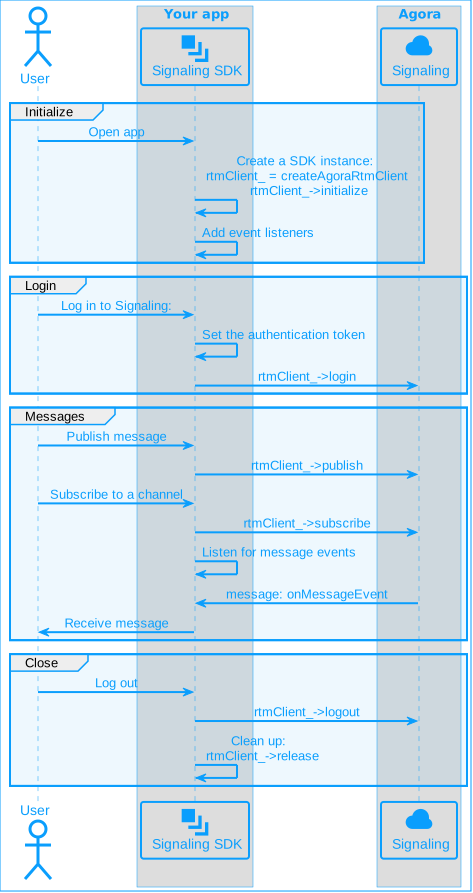
To use Signaling features in your app, you initialize a Signaling client instance and add event listeners. To connect to Signaling, you login using an authentication token. To send a message to a message channel, you publish the message. Signaling creates a channel when a user subscribes to it. To receive messages other users publish to a channel, your app listens for events.
To create a pub/sub session for Signaling, implement the following steps in your app:
## Prerequisites [#prerequisites-4]
To implement the code presented on this page you need to have:
* An Agora [account](/en/realtime-media/rtm/manage-agora-account) and [project](/en/realtime-media/rtm/manage-agora-account).
* [Enabled Signaling](/en/realtime-media/rtm/manage-agora-account) in Agora Console
- A device running Linux Ubuntu 14.04 or above; 18.04+ is recommended.
- At least 2 GB of memory.
- `cmake` 3.6.0 or above.
* Ensure that a firewall is not blocking your network communication.
Signaling 2.x is an enhanced version compared to 1.x with a wide range of new features. It follows a new pricing structure. See [Pricing](/en/realtime-media/rtm/reference/pricing) for details.
## Project setup [#project-setup-4]
### Create a project [#create-a-project-3]
Create the following folder structure for your project:
```bash
RTMProject/
├── include/
└── lib/
```
### Integrate the SDK [#integrate-the-sdk-3]
To integrate the Linux C++ Signaling SDK into your project:
1. [Download](/en/api-reference/sdks?product=signaling\&platform=linux) the latest version of the SDK and unzip it.
To integrate Signaling SDK 2.2.1 or later, and Video SDK 4.3.0 or later in the same project, refer to [handle integration issues](/en/api-reference/faq/integration/rtm2_rtc_integration_issue).
2. Copy the files in the SDK package to the project folder as follows:
* Copy the `/rtm/sdk/libagora_rtm_sdk.so` file to the project's `lib` folder.
* Copy all `*.h` files in `/rtm/sdk/high_level_api/include` to the project's `include` folder.
3. To use `CMake` to compile the project, create the following files in the `RTMProject` folder:
* `CMakeLists.txt`
```bash
# CMakeLists.txt
cmake_minimum_required (VERSION 2.8)
project(RTMProject)
set(TARGET_NAME RTMQuickStart)
set(SOURCES RTMQuickStart.cpp)
set(HEADERS)
set(TARGET_BUILD_TYPE "Debug")
set(CMAKE_CXX_FLAGS "-fPIC -O2 -g -std=c++11 -msse2")
include_directories(${CMAKE_SOURCE_DIR}/include)
link_directories(${CMAKE_SOURCE_DIR}/lib)
add_executable(${TARGET_NAME} ${SOURCES} ${HEADERS})
target_link_libraries(${TARGET_NAME} agora_rtm_sdk pthread)
```
* `clean_build.sh`
```bash
# clean_build.sh
rm -fr build
mkdir -p build
cd build
cmake ..
make
cd ..
```
## Implement Signaling [#implement-signaling-4]
A complete code sample that implements the basic features of Signaling is presented here for your reference. To use the sample code, create a new file named `RTMQuickStart.cpp` in the `RTMProject` folder and add the following code:
**Complete sample code for Signaling**
```cpp
#include
#include
#include
#include
//#include
#include "IAgoraRtmClient.h"
// Pass in your App ID and token
const std::string APP_ID = "";
const std::string TOKEN = "";
// Terminal color codes for UBUNTU/LINUX
#define RESET "\\033\[0m"
#define BLACK "\\033\[30m" /* Black */
#define RED "\\033\[31m" /* Red */
#define GREEN "\\033\[32m" /* Green */
#define YELLOW "\\033\[33m" /* Yellow */
#define BLUE "\\033\[34m" /* Blue */
#define MAGENTA "\\033\[35m" /* Magenta */
#define CYAN "\\033\[36m" /* Cyan */
#define WHITE "\\033\[37m" /* White */
#define BOLDBLACK "\\033\[1m\\033\[30m" /* Bold Black */
#define BOLDRED "\\033\[1m\\033\[31m" /* Bold Red */
#define BOLDGREEN "\\033\[1m\\033\[32m" /* Bold Green */
#define BOLDYELLOW "\\033\[1m\\033\[33m" /* Bold Yellow */
#define BOLDBLUE "\\033\[1m\\033\[34m" /* Bold Blue */
#define BOLDMAGENTA "\\033\[1m\\033\[35m" /* Bold Magenta */
#define BOLDCYAN "\\033\[1m\\033\[36m" /* Bold Cyan */
#define BOLDWHITE "\\033\[1m\\033\[37m" /* Bold White */
using namespace agora::rtm;
class RtmEventHandler : public IRtmEventHandler {
public:
// Add the event listener
void onLoginResult(const uint64_t requestId, RTM_ERROR_CODE errorCode) override {
cbPrint("onLoginResult, request id: %lld, errorCode: %d", requestId, errorCode);
}
void onLogoutResult(const uint64_t requestId, RTM_ERROR_CODE errorCode) {
cbPrint("onLogoutResult, request id: %lld, errorCode: %d", requestId, errorCode);
}
void onConnectionStateChanged(const char *channelName, RTM_CONNECTION_STATE state, RTM_CONNECTION_CHANGE_REASON reason) override {
cbPrint("onConnectionStateChanged, channelName: %s, state: %d, reason: %d", channelName, state, reason);
}
void onLinkStateEvent(const LinkStateEvent& event) override {
cbPrint("onLinkStateEvent, state: %d -> %d, operation: %d, reason: %s", event.previousState, event.currentState, event.operation, event.reason);
}
void onPublishResult(const uint64_t requestId, RTM_ERROR_CODE errorCode) override {
cbPrint("onPublishResult request id: %lld result: %d", requestId, errorCode);
}
void onMessageEvent(const MessageEvent &event) override {
cbPrint("receive message from: %s, message: %s", event.publisher, event.message);
}
void onSubscribeResult(const uint64_t requestId, const char *channelName, RTM_ERROR_CODE errorCode) override {
cbPrint("onSubscribeResult: channel:%s, request id: %lld result: %d", channelName, requestId, errorCode);
}
void onUnsubscribeResult(const uint64_t requestId, const char *channelName, RTM_ERROR_CODE errorCode) override {
cbPrint("onUnsubscribeResult: channel:%s, request id: %lld result: %d", channelName, requestId, errorCode);
}
private:
void cbPrint(const char* fmt, ...) {
printf("\\x1b[32m<< RTM async callback: ");
va_list args;
va_start(args, fmt);
vprintf(fmt, args);
va_end(args);
printf(" >>\\x1b[0m\\n");
}
};
class RtmDemo {
public:
RtmDemo()
: eventHandler_(new RtmEventHandler()),
rtmClient_(nullptr) { Init(); }
void Init() {
std::cout << YELLOW << "Please enter userID (literal \\"null\\" or starting"
<< "with space is not allowed, no more than 64 characters!):" << std::endl;
std::string userID;
std::getline(std::cin, userID);
RtmConfig config;
config.appId = APP_ID.c_str();
config.userId = userID.c_str();
config.eventHandler = eventHandler_.get();
// Create an IRtmClient instance
int errorCode = 0;
rtmClient_ = createAgoraRtmClient(config, errorCode);
if (!rtmClient_ || errorCode != 0) {
std::cout << RED <<"error creating rtm service!" << std::endl;
exit(0);
}
}
void start() {
// Log in the RTM server
uint64_t requestId = 0;
rtmClient_->login(TOKEN.c_str(), requestId);
// Sample codes for the user interface
mainMeun();
std::cout << YELLOW << "quit ? yes/no" << std::endl;
std::string input;
std::getline(std::cin, input);
if (input.compare("yes") == 0) {
exit(0);
}
}
// Log out from the RTM server
void logout() {
uint64_t requestId = 0;
rtmClient_->logout(requestId);
}
// Subscribe to a channel
void subscribeChannel(const std::string& channelName) {
uint64_t requestId = 0;
rtmClient_->subscribe(channelName.c_str(), SubscribeOptions(), requestId);
}
// Unsubscribe from a channel
void unsubscribeChannel(const std::string& channelName) {
uint64_t requestId = 0;
rtmClient_->unsubscribe(channelName.c_str(), requestId);
}
// Publish a message
void publishMessage(const std::string& channelName, const std::string& message) {
PublishOptions options;
options.messageType = RTM_MESSAGE_TYPE_STRING;
uint64_t requestId;
rtmClient_->publish(channelName.c_str(), message.c_str(), message.size(), options, requestId);
}
// Sample codes for the user interface
void mainMeun() {
bool quit = false;
while (!quit) {
std::cout << WHITE
<< "1: subscribe channel\\n"
<< "2: unsubscribe channel\\n"
<< "3: publish message\\n"
<< "4: logout" << std::endl;
std::cout << YELLOW <<"please input your choice: " << std::endl;
std::string input;
std::getline(std::cin, input);
int32_t choice = 0;
try {
choice = std::stoi(input);
} catch(...) {
std::cout < eventHandler_;
IRtmClient* rtmClient_;
};
int main(int argc, const char * argv[]) {
RtmClient messaging;
messaging.login();
return 0;
}
```
Follow the implementation steps to understand the core API calls in the sample code or use the snippets in your own code.
### Include the header file [#include-the-header-file]
To use Signaling APIs in your project, include the `IAgoraRtmClient` header file:
```cpp
#include "IAgoraRtmClient.h"
```
### Initialize the Signaling engine [#initialize-the-signaling-engine-4]
Before calling any other Signaling SDK API, initialize an `IRtmClient` object instance.
```cpp
std::string userID;
std::getline(std::cin, userID);
RtmConfig config;
config.appId = APP_ID.c_str();
config.userId = userID.c_str();
config.eventHandler = eventHandler_.get();
// Create an IRtmClient instance
int errorCode = 0;
rtmClient_ = createAgoraRtmClient(config, errorCode);
if (!rtmClient_ || errorCode != 0) {
std::cout << RED <<"error creating rtm service!" << std::endl;
exit(0);
}
```
### Add an event listener [#add-an-event-listener-4]
The event listener enables you to implement the processing logic in response to Signaling events. Use the following code to handle event notifications or display received messages:
```cpp
void onLoginResult(const uint64_t requestId, RTM_ERROR_CODE errorCode) override {
cbPrint("onLoginResult, request id: %lld, errorCode: %d", requestId, errorCode);
}
void onLogoutResult(const uint64_t requestId, RTM_ERROR_CODE errorCode) {
cbPrint("onLogoutResult, request id: %lld, errorCode: %d", requestId, errorCode);
}
void onConnectionStateChanged(const char *channelName, RTM_CONNECTION_STATE state, RTM_CONNECTION_CHANGE_REASON reason) override {
cbPrint("onConnectionStateChanged, channelName: %s, state: %d, reason: %d", channelName, state, reason);
}
void onLinkStateEvent(const LinkStateEvent& event) override {
cbPrint("onLinkStateEvent, state: %d -> %d, operation: %d, reason: %s", event.previousState, event.currentState, event.operation, event.reason);
}
void onPublishResult(const uint64_t requestId, RTM_ERROR_CODE errorCode) override {
cbPrint("onPublishResult request id: %lld result: %d", requestId, errorCode);
}
void onMessageEvent(const MessageEvent &event) override {
cbPrint("receive message from: %s, message: %s", event.publisher, event.message);
}
void onSubscribeResult(const uint64_t requestId, const char *channelName, RTM_ERROR_CODE errorCode) override {
cbPrint("onSubscribeResult: channel:%s, request id: %lld result: %d", channelName, requestId, errorCode);
}
void onUnsubscribeResult(const uint64_t requestId, const char *channelName, RTM_ERROR_CODE errorCode) override {
cbPrint("onUnsubscribeResult: channel:%s, request id: %lld result: %d", channelName, requestId, errorCode);
}
```
### Log in to Signaling [#log-in-to-signaling-4]
To connect to Signaling and access Signaling network resources, such as sending messages, and subscribing to channels, call `login`.
During a login operation, the client attempts to establish a connection with Signaling. Once the connection is established, the client transmits heartbeat information to the Signaling server at fixed intervals to keep the client active until the client actively logs out or is disconnected. The connection is interrupted when timeout occurs. During this period, users may freely access the Signaling network resources subject to their own permissions and usage restrictions.
```cpp
// Log in to Signaling
uint64_t requestId = 0;
rtmClient_->login(TOKEN.c_str(), requestId);
```
After you call this method, the SDK triggers the `onLoginResult` callback and returns the API call result.
Use the `login` return value, or listen to the `onConnectionStateChanged` event notification to confirm that login is successful or obtain the error code and cause of login failure. When performing a login operation, the client's network connection state is `RTM_CONNECTION_STATE_CONNECTING`. After a successful login, the state is updated to `RTM_CONNECTION_STATE_CONNECTED`.
Best practice
To continuously monitor the network connection state of the client, best practice is to continue to listen for `onConnectionStateChanged` event notifications throughout the life cycle of the application. For further details, see [Event listeners](/en/realtime-media/rtm/build/send-and-receive-messages/add-event-listener).
After a user successfully logs into Signaling, the application's PCU increases, which affects your billing data.
### Send a message [#send-a-message-3]
To distribute a message to all subscribers of a message channel, call `publish`. The following code sends a string type message.
```cpp
// Publish a message to the channel
void publishMessage(const std::string& channelName, const std::string& message) {
PublishOptions options;
options.messageType = RTM_MESSAGE_TYPE_STRING;
uint64_t requestId;
rtmClient_->publish(channelName.c_str(), message.c_str(), message.size(), options, requestId);
}
```
Before calling `publish` to send a message, serialize the message payload as a string.
### Subscribe and unsubscribe [#subscribe-and-unsubscribe-4]
To receive messages sent to a channel, call `subscribe` to subscribe to channel messages:
```cpp
// Subscribe to a channel
void subscribeChannel(const std::string& channelName) {
uint64_t requestId = 0;
rtmClient_->subscribe(channelName.c_str(), SubscribeOptions(), requestId);
}
```
When you no longer need to receive messages from a channel, call `unsubscribe` to unsubscribe from the channel:
```cpp
// Unsubscribe from a channel
void unsubscribeChannel(const std::string& channelName) {
uint64_t requestId = 0;
rtmClient_->unsubscribe(channelName.c_str(), requestId);
}
```
For more information about sending and receiving messages see [Message channels](/en/realtime-media/rtm/build/work-with-channels/message-channel) and [Stream channels](/en/realtime-media/rtm/build/work-with-channels/stream-channel).
### Log out of Signaling [#log-out-of-signaling-4]
When a user no longer needs to use Signaling, call `logout`. Logging out means closing the connection between the client and Signaling. The user is automatically logged out or unsubscribed from all message and stream channels. Other users in the channel receive an `onPresenceEvent` notification of the user leaving the channel.
```cpp
// Log out of Signaling
void logout() {
uint64_t requestId = 0;
rtmClient_->logout(requestId);
}
// Clean up
rtmClient_->release();
```
## Test Signaling [#test-signaling-4]
Take the following steps to test the sample code:
1. Use the [Token Builder](https://agora-token-generator-demo.vercel.app/) to generate a Signaling token:
1. Select Signaling from the Agora products dropdown.
2. Fill in your app ID and app certificate from [Agora Console](https://console.agora.io/v2). Leave the remaining fields blank.
3. Click **Generate Token**.
2. In your code, replace `` with your app ID from Agora Console and `` with the generated token. Save the project. Make sure Signaling is activated for your project in [Agora Console](https://console.agora.io/v2).
3. In the terminal, run the following command to compile the project:
```bash
sh +x clean_build.sh
```
4. Use the following commands to navigate to the `build` folder and run the app:
```bash
cd build
./RTMQuickStart
```
You see menu options to **subscribe**, **unsubscribe**, **publish**, and **logout**.
5. Follow the prompts to **subscribe** to a channel.
6. Run another instance of the app using a different user ID. Follow the prompts to **publish** a message to the same channel that you subscribed to from the other instance.
7. You see the message displayed in the instance that you used to subscribe to the channel.
Congratulations! You have successfully integrated Signaling into your project.
## Reference [#reference-4]
This section contains content that completes the information on this page, or points you to documentation that explains other aspects to this product.
### Token authentication [#token-authentication-4]
In this guide you retrieve a temporary token from a [Token Builder](https://agora-token-generator-demo.vercel.app/). To understand how to create an authentication server for development purposes, see [Secure authentication with tokens](./build/connect-and-authenticate/authentication-workflow).
### Sample project [#sample-project-2]
Agora provides an open source [sample project](https://github.com/AgoraIO/RTM2/tree/main/Agora-RTM2-QuickStart-Linux-C%2B%2B) on GitHub for your reference. Download it or view the source code for a more detailed example.
### API reference [#api-reference-4]
* [API reference](/en/api-reference/api-ref/signaling)
* [Event listeners](./build/send-and-receive-messages/add-event-listener)