# Signaling Quickstart (/en/realtime-media/rtm/quickstart/ios)
> For AI agents: see the complete documentation index at [llms.txt](/llms.txt).
Use Signaling SDK to add low-latency, high-concurrency signaling and synchronization capabilities to your app.
Signaling also helps you enhance the user experience in Video Calling, Voice Calling, Interactive Live Streaming, and Broadcast Streaming applications.
This page shows you how to use the Signaling SDK to rapidly build a simple application that sends and receives messages. It shows you how to integrate the Signaling SDK in your project and implement pub/sub messaging through [Message channels](/en/realtime-media/rtm/build/work-with-channels/message-channel). To get started with stream channels, follow this guide to create a basic Signaling app and then refer to the [Stream channels](/en/realtime-media/rtm/build/work-with-channels/stream-channel) guide.
## Understand the tech [#understand-the-tech-1]
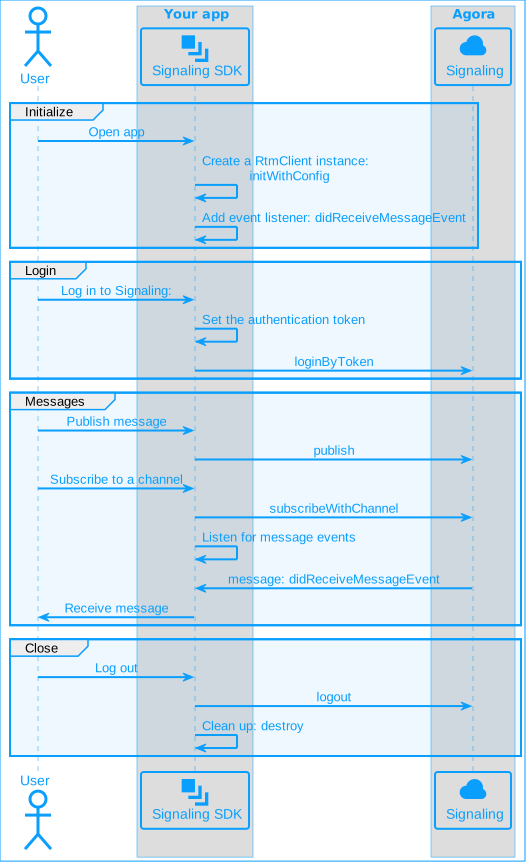
To use Signaling features in your app, you initialize a Signaling client instance and add event listeners. To connect to Signaling, you login using an authentication token. To send a message to a message channel, you publish the message. Signaling creates a channel when a user subscribes to it. To receive messages other users publish to a channel, your app listens for events.
To create a pub/sub session for Signaling, implement the following steps in your app:
## Prerequisites [#prerequisites-1]
To implement the code presented on this page you need to have:
* An Agora [account](/en/realtime-media/rtm/manage-agora-account) and [project](/en/realtime-media/rtm/manage-agora-account).
* [Enabled Signaling](/en/realtime-media/rtm/manage-agora-account) in Agora Console
* Xcode 12.0 or higher.
* A device running iOS 9.0 or higher.
* Ensure that a firewall is not blocking your network communication.
Signaling 2.x is an enhanced version compared to 1.x with a wide range of new features. It follows a new pricing structure. See [Pricing](/en/realtime-media/rtm/reference/pricing) for details.
## Project setup [#project-setup-1]
### Create a project [#create-a-project-1]
In Xcode, create a Single View app under the iOS platform. Configure the project settings as follows:
* Product Name: `RtmQuickstart`
* Organization Identifier: `agora`
* User Interface: Storyboard
* Language: Choose Swift or Objective-C
### Integrate the SDK [#integrate-the-sdk-1]
Use either of the following methods to integrate Signaling SDK into your project.
**Using CDN**
1. [Download](/en/api-reference/sdks?product=signaling\&platform=ios) the latest version of Signaling SDK.
2. Copy the files in the SDK package folder `/libs/AgoraRtmKit.xcframework` to the project path.
3. Open Xcode and navigate to the **TARGETS > Project Name > General > Frameworks, Libraries, and Embedded Content** menu.
4. Click **+ > Add Other… > Add Files** to add the dynamic library `EmbedAgoraRtmKit.xcframework`, and ensure that the **Embed** property of the added dynamic library is set to **Embed & Sign**.
**Using Cocoapods**
1. To follow this procedure, ensure that you have Cocoapods installed. To install Cocoapods, refer to [Getting Started with CocoaPods](https://guides.cocoapods.org/using/getting-started.html#getting-started).
2. In the terminal, go to the project root directory and run the `pod init` command. A text file named `Podfile` is generated in the project folder .
3. Open the `Podfile` and modify the content as follows:
```ruby
platform :ios, '11.0'
target 'Your App' do
pod 'AgoraRtm', 'x.y.z'
end
```
Replace `Your App` with your target name and `x.y.z` with the specific SDK version number, such as 2.2.0. To get the latest version number, check the [Release notes](/en/realtime-media/rtm/reference/release-notes).
If you are using an SDK version earlier than `2.2.0`, change the package name to `AgoraRtm_iOS`.
4. Run the `pod install` command in the terminal to install the Signaling SDK. You see the message "Pod installation complete!".
5. After successful installation, a file with the `.xcworkspace` suffix is generated in the project folder. Open the file in Xcode for subsequent operations.
**Using Swift Package Manager**
Use the following link to integrate the SDK using Swift Package Manager (SPM):
```text
{`https://github.com/AgoraIO/AgoraRtm_Apple.git`}
```
To integrate Signaling SDK version 2.2.0 or above, and Video SDK version 4.3.0 or above at the same time, refer to [handle integration issues](/en/api-reference/faq/integration/rtm2_rtc_integration_issue).
### Create a user interface [#create-a-user-interface-1]
This section helps you create a simple user interface to explore the basic features of Signaling. Modify it according to your specific needs.
The demo interface consists of the following UI elements:
* Input boxes for user ID, channel name, and message
* Buttons to log in and log out of Signaling
* Buttons to subscribe and unsubscribe from a channel
* A button to publish a message
**Sample code to create the user interface**
Swift
Objective-C
```swift
// User Interface
struct ContentView: View {
@StateObject private var viewModel = ChatViewModel()
var body: some View {
VStack {
TextField("Enter username", text: $viewModel.username)
.padding()
.textFieldStyle(RoundedBorderTextFieldStyle())
.font(.title)
HStack {
Button("Login") {
viewModel.login()
}
.buttonStyle(LoginButtonStyle())
Button("Logout") {
viewModel.logout()
}
.buttonStyle(LogoutButtonStyle())
}
TextField("Channel name", text: $viewModel.channel)
.padding()
.textFieldStyle(RoundedBorderTextFieldStyle())
.font(.title)
HStack {
Button("Subscribe") {
viewModel.subscribe()
}
.buttonStyle(SubscribeButtonStyle())
Button("Unsubscribe") {
viewModel.unsubscribe()
}
.buttonStyle(UnsubscribeButtonStyle())
}
TextField("Enter message", text: $viewModel.message)
.padding()
.textFieldStyle(RoundedBorderTextFieldStyle())
.font(.title)
Button("Send") {
viewModel.sendMessage()
}
.buttonStyle(SendButtonStyle())
// Display messages
ScrollViewReader { scrollProxy in
List(viewModel.messages) { message in
Text(message.content)
.id(message.id)
}
.onChange(of: viewModel.messages) { _ in
if let lastMessage = viewModel.messages.last {
withAnimation {
scrollProxy.scrollTo(lastMessage.id, anchor: .bottom)
}
}
}
}
.padding()
}
.padding()
}
}
// Preview
struct ContentView_Previews: PreviewProvider {
static var previews: some View {
ContentView()
}
}
```
Open `Main.storyboard` using **Code View** and replace the file contents with the following:
```xml
```
Open the file `ViewController.h` and replace the contents with the following:
```objc
#import
#import
@interface ViewController : UIViewController
// Buttons
@property (weak, nonatomic) IBOutlet UIButton *LoginButton;
@property (weak, nonatomic) IBOutlet UIButton *LogoutButton;
@property (weak, nonatomic) IBOutlet UIButton *SubsctibeButton;
@property (weak, nonatomic) IBOutlet UIButton *UnSubscribeButton;
@property (weak, nonatomic) IBOutlet UIButton *GroupMsgButton;
// TextFields
@property (weak, nonatomic) IBOutlet UITextField *UserIDTextField;
@property (weak, nonatomic) IBOutlet UITextField *ChannelIDTextField;
@property (weak, nonatomic) IBOutlet UITextField *GroupMsgTextField;
@property (weak, nonatomic) IBOutlet UITextView *MsgTextView;
@end
```
## Implement Signaling [#implement-signaling-1]
A complete code sample that implements the basic features of Signaling is presented here for your reference. To use the sample code, open `ViewController.m` and replace the contents with the following:
**Complete sample code for real-time Signaling**
Swift
Objective-C
```swift
import SwiftUI
import Combine
import AgoraRtmKit
struct Message: Identifiable, Equatable {
let id = UUID()
let content: String
}
class ChatViewModel: NSObject, ObservableObject, AgoraRtmClientDelegate {
var appid: String = <#YOUR APPID#>
var token: String = <#YOUR TOKEN#>
var rtmKit: AgoraRtmClientKit? = nil
@Published var username: String = ""
@Published var message: String = ""
@Published var channel: String = ""
@Published var messages: [Message] = []
override init() {
super.init()
initializeEngine()
}
// Initialization the engine
func initializeEngine() {
if rtmKit == nil {
let config = AgoraRtmClientConfig(appId: appid)
rtmKit = try? AgoraRtmClientKit(config, delegate: self)
}
}
// Log in to Signaling
func login() {
if rtmKit != nil {
addToMessageList(str: "RTM already logged in! Logout first!")
return
}
let config = AgoraRtmClientConfig(appId: appid, userId: username)
rtmKit = try! AgoraRtmClientKit(config, delegate: self)
rtmKit?.login(token, userId: username, completion: { response, error in
if let error = error {
self.addToMessageList(str: "Login failed. Error code: \(error.errorCode.rawValue), reason: \(error.reason)")
} else {
self.addToMessageList(str: "\(self.username) logged in successfully.")
}
})
}
// Log out from the RTM server
func logout() {
guard let rtmKit = rtmKit else {
addToMessageList(str: "RTM is already logged out!")
return
}
rtmKit.logout()
rtmKit.destroy()
self.rtmKit = nil
addToMessageList(str: "RTM logged out!")
}
// Subscribe to a channel
func subscribe() {
guard let rtmKit = rtmKit else { return }
rtmKit.subscribe(channelName: channel, option: nil) { response, error in
if let error = error {
self.addToMessageList(str: "Subscribe to channel '\(self.channel)' failed. Error code: \(error.errorCode.rawValue), reason: \(error.reason)")
} else {
self.addToMessageList(str: "Subscribed to channel: \(self.channel) successfully.")
}
}
}
// Unsubscribe from a channel
func unsubscribe() {
guard let rtmKit = rtmKit else { return }
rtmKit.unsubscribe(channel) { response, error in
if let error = error {
self.addToMessageList(str: "Unsubscribe from channel '\(self.channel)' failed. Error code: \(error.errorCode.rawValue), reason: \(error.reason)")
} else {
self.addToMessageList(str: "Unsubscribed from channel: \(self.channel) successfully.")
}
}
}
// Publish a message
func sendMessage() {
guard !message.isEmpty, let rtmKit = rtmKit else { return }
rtmKit.publish(channelName: channel, message: message, option: nil) { response, error in
if let error = error {
self.addToMessageList(str: "Publish failed. Error code: \(error.errorCode.rawValue), reason: \(error.reason)")
} else {
self.addToMessageList(str: "Message published to channel: \(self.channel) successfully.")
}
}
message = ""
}
func addToMessageList(str: String) {
messages.append(Message(content: str))
}
// AgoraRtmClientDelegate methods
func rtmKit(_ rtmKit: AgoraRtmClientKit, didReceiveLinkStateEvent event: AgoraRtmLinkStateEvent) {
addToMessageList(str: "RTM link state changed. Current state: \(event.currentState.rawValue), previous state: \(event.previousState.rawValue)")
}
func rtmKit(_ rtmKit: AgoraRtmClientKit, didReceiveMessageEvent event: AgoraRtmMessageEvent) {
addToMessageList(str: "Message received. Channel: \(event.channelName), Publisher: \(event.publisher), Message: \(event.message.stringData!)")
}
}
// User Interface
struct ContentView: View {
@StateObject private var viewModel = ChatViewModel()
var body: some View {
VStack {
TextField("Enter username", text: $viewModel.username)
.padding()
.textFieldStyle(RoundedBorderTextFieldStyle())
.font(.title)
HStack {
Button("Login") {
viewModel.login()
}
Button("Logout") {
viewModel.logout()
}
}
TextField("Channel name", text: $viewModel.channel)
.padding()
.textFieldStyle(RoundedBorderTextFieldStyle())
.font(.title)
HStack {
Button("Subscribe") {
viewModel.subscribe()
}
Button("Unsubscribe") {
viewModel.unsubscribe()
}
}
TextField("Enter message", text: $viewModel.message)
.padding()
.textFieldStyle(RoundedBorderTextFieldStyle())
.font(.title)
Button("Send") {
viewModel.sendMessage()
}
.buttonStyle(SendButtonStyle())
// Display messages
ScrollViewReader { scrollProxy in
List(viewModel.messages) { message in
Text(message.content)
.id(message.id)
}
.onChange(of: viewModel.messages) { _ in
if let lastMessage = viewModel.messages.last {
withAnimation {
scrollProxy.scrollTo(lastMessage.id, anchor: .bottom)
}
}
}
}
.padding()
}
.padding()
}
}
// Preview
struct ContentView_Previews: PreviewProvider {
static var previews: some View {
ContentView()
}
}
```
```objc
#import "ViewController.h"
@interface ViewController ()
@property(nonatomic, strong) AgoraRtmClientKit* kit;
@property NSString* appID;
@property NSString* token;
@property NSString* uid;
@property NSString* peerID;
@property NSString* channelID;
@property NSString* peerMsg;
@property NSString* channelMsg;
@property NSString* text;
@property NSMutableArray* textArray;
- (void)AddMsgToRecord:(NSString*)text;
@end
@implementation ViewController
- (void)viewDidLoad {
[super viewDidLoad];
// Enter your App ID
self.appID = @"your_appid";
self.MsgTextView.textColor = UIColor.blueColor;
self.textArray = [[NSMutableArray alloc]init];
}
- (void)rtmKit:(AgoraRtmClientKit *)rtmKit didReceiveMessageEvent:(AgoraRtmMessageEvent *)event {
NSLog(@"%@", self.text);
self.text = [NSString stringWithFormat:@"receive message
From channel: %@
publisher:%@
message:%@
", event.channelName, event.publisher, event.message.stringData];
[self AddMsgToRecord:(self.text)];
}
// Add message to the UI TextView
- (void)AddMsgToRecord:(NSString*)text {
[self.textArray addObject:(self.text)];
self.MsgTextView.text = [self.textArray componentsJoinedByString:(@"
")];
}
- (IBAction)Login:(id)sender {
self.uid = self.UserIDTextField.text;
// Enter your token
self.token = @"your_token";
AgoraRtmClientConfig* rtm_config = [[AgoraRtmClientConfig alloc] initWithAppId:_appID userId:_uid];
NSError* initError = nil;
_kit = [[AgoraRtmClientKit alloc] initWithConfig:rtm_config delegate:self error:&initError];
if (initError != nil) {
self.text = [NSString stringWithFormat:@"init error %@",initError];
NSLog(@"%@", self.text);
[self AddMsgToRecord:(self.text)];
}
// Log in to the RTM server
[_kit loginByToken:self.token completion:^(AgoraRtmCommonResponse * _Nullable response, AgoraRtmErrorInfo * _Nullable errorInfo) {
if (errorInfo.errorCode != AgoraRtmErrorOk) {
self.text = [NSString stringWithFormat:@"Login failed for user %@. Code: %ld", self.uid, (long)errorInfo.errorCode];
NSLog(@"%@", self.text);
} else {
self.text = [NSString stringWithFormat:@"Login successful for user %@. Code: %ld", self.uid, (long)errorInfo.errorCode];
NSLog(@"%@", self.text);
}
[self AddMsgToRecord:(self.text)];
}];
}
- (IBAction)Logout:(id)sender {
if (_kit != nil) {
// Log out from the RTM server
[_kit logout:^(AgoraRtmCommonResponse * _Nullable response, AgoraRtmErrorInfo * _Nullable errorInfo) {
if (errorInfo == nil) {
self.text = [NSString stringWithFormat:@"Logout successful"];
NSLog(@"%@", self.text);
[_kit destroy];
_kit = nil;
} else {
self.text = [NSString stringWithFormat:@"Logout failed. Code: %ld", (long)errorInfo.errorCode];
NSLog(@"%@", self.text);
}
[self AddMsgToRecord:(self.text)];
}];
}
}
- (IBAction)SubscribeChannel:(id)sender {
self.channelID = self.ChannelIDTextField.text;
if (_kit != nil) {
// Subscribe to a channel
[_kit subscribeWithChannel:self.channelID option:nil completion:^(AgoraRtmCommonResponse * _Nullable response, AgoraRtmErrorInfo * _Nullable errorInfo) {
if (errorInfo == nil) {
self.text = [NSString stringWithFormat:@"Successfully subscribed to channel %@", self.channelID];
NSLog(@"%@", self.text);
} else {
self.text = [NSString stringWithFormat:@"Failed to subscribe to channel %@. Code: %ld", self.channelID, (long)errorInfo.errorCode];
NSLog(@"%@", self.text);
}
[self AddMsgToRecord:(self.text)];
}];
}
}
- (IBAction)UnsubscribeChannel:(id)sender {
if (_kit == nil) return;
// Unsubscribe from a channel
[_kit unsubscribeWithChannel:self.channelID completion:^(AgoraRtmCommonResponse * _Nullable response, AgoraRtmErrorInfo * _Nullable errorInfo) {
if (errorInfo == nil) {
self.text = [NSString stringWithFormat:@"Successfully unsubscribed from channel"];
} else {
self.text = [NSString stringWithFormat:@"Failed to unsubscribe from channel. Code: %ld", (long)errorInfo.errorCode];
}
[self AddMsgToRecord:(self.text)];
}];
}
- (IBAction)SendMessageToMessageChannel:(id)sender {
self.channelID = self.ChannelIDTextField.text;
self.channelMsg = self.GroupMsgTextField.text;
// Publish a message
[_kit publish:self.channelID message:self.channelMsg option:nil completion:^(AgoraRtmCommonResponse * _Nullable response, AgoraRtmErrorInfo * _Nullable errorInfo) {
if (errorInfo == nil) {
self.text = [NSString stringWithFormat:@"Message sent to channel %@ : %@", self.channelID, self.channelMsg];
} else {
self.text = [NSString stringWithFormat:@"Message failed to send to channel %@ : %@. ErrorCode: %ld", self.channelID, self.channelMsg, (long)errorInfo.errorCode];
}
[self AddMsgToRecord:(self.text)];
}];
}
@end
```
Follow the implementation steps to understand the core API calls in the sample code or use the snippets in your own code.
### Declare the variables you need [#declare-the-variables-you-need]
To connect to Signaling from your project and send messages to a channel, declare variables to hold the app ID, token, user ID, and channel name:
Swift
Objective-C
```swift
var appid: String = <#YOUR APPID#>
var token: String = <#YOUR TOKEN#>
var rtmKit: AgoraRtmClientKit? = nil
@Published var username: String = ""
@Published var message: String = ""
@Published var channel: String = ""
@Published var messages: [Message] = []
```
```objc
#import "ViewController.h"
@interface ViewController ()
@property(nonatomic, strong)AgoraRtmClientKit* kit;
@property NSString* appID;
@property NSString* token;
@property NSString* uid;
@property NSString* peerID;
@property NSString* channelID;
@property NSString* peerMsg;
@property NSString* channelMsg;
@property NSString* text;
@property NSMutableArray* textArray;
```
### Initialize the Signaling engine [#initialize-the-signaling-engine-1]
Before calling any other Signaling SDK API, initialize an `AgoraRtmClientKit` object instance.
Swift
Objective-C
```swift
// Initialization the engine
func initializeEngine() {
if rtmKit == nil {
let config = AgoraRtmClientConfig(appId: appid)
rtmKit = try? AgoraRtmClientKit(config, delegate: self)
}
}
```
```objc
self.uid = self.UserIDTextField.text;
// Set engine configuration
AgoraRtmClientConfig* rtm_config = [[AgoraRtmClientConfig alloc] initWithAppId:_appID userId:_uid];
// Initialize the engine
NSError* initError = nil;
_kit = [[AgoraRtmClientKit alloc] initWithConfig:rtm_config delegate:self error:&initError];
if (initError != nil) {
self.text = [NSString stringWithFormat:@"init error %@",initError];
NSLog(@"%@", self.text);
[self AddMsgToRecord:(self.text)];
}
```
### Add an event listener [#add-an-event-listener-1]
The event listener enables you to implement the processing logic in response to Signaling events. Use the following code to handle event notifications or display received messages:
Swift
Objective-C
```swift
// Add the event listener
func rtmKit(_ rtmKit: AgoraRtmClientKit, didReceiveLinkStateEvent event: AgoraRtmLinkStateEvent) {
addToMessageList(str: "Signaling link state change current state is: \(event.currentState.rawValue) previous state is :\(event.previousState.rawValue)")
}
func rtmKit(_ rtmKit: AgoraRtmClientKit, didReceiveMessageEvent event: AgoraRtmMessageEvent) {
addToMessageList(str: "Message received.
channel: \(event.channelName), publisher: \(event.publisher), message content: \(event.message.stringData!)")
}
```
```objc
// Add the event listener
- (void)rtmKit:(AgoraRtmClientKit *)rtmKit didReceiveMessageEvent:(AgoraRtmMessageEvent *)event {
NSLog(@"%@", self.text);
self.text = [NSString stringWithFormat:@"receive message
From channel: %@
publisher:%@
message:%@
",event.channelName,event.publisher, event.message.stringData];
[self AddMsgToRecord:(self.text)];
}
```
### Log in to Signaling [#log-in-to-signaling-1]
To connect to Signaling and access Signaling network resources, such as sending messages, and subscribing to channels, login to Signaling server.
During a login operation, the client attempts to establish a connection with Signaling. Once the connection is established, the client transmits heartbeat information to the Signaling server at fixed intervals to keep the client active until the client actively logs out or is disconnected. The connection is interrupted when timeout occurs. During this period, users may freely access the Signaling network resources subject to their own permissions and usage restrictions.
Swift
Objective-C
```swift
// Log in to the Signaling server
func login() {
if rtmKit != nil {
addToMessageList(str: "RTM already logged in! Logout first!")
return
}
let config = AgoraRtmClientConfig(appId: appid, userId: username)
rtmKit = try! AgoraRtmClientKit(config, delegate: self)
rtmKit?.login(token, userId: username, completion: { response, error in
if let error = error {
self.addToMessageList(str: "Login failed. Error code: \(error.errorCode.rawValue), reason: \(error.reason)")
} else {
self.addToMessageList(str: "\(self.username) logged in successfully.")
}
})
}
```
```objc
// Log in to signaling
[_kit loginByToken:self.token completion:^(AgoraRtmCommonResponse * _Nullable response, AgoraRtmErrorInfo * _Nullable errorInfo) {
if (errorInfo.errorCode != AgoraRtmErrorOk){
self.text = [NSString stringWithFormat:@"Login failed for user %@. Code: %ld",self.uid, (long)errorInfo.errorCode];
NSLog(@"%@", self.text);
} else {
NSLog(@"%@", self.text);
self.text = [NSString stringWithFormat:@"Login successful for user %@. Code: %ld",self.uid, (long)errorInfo.errorCode];
}
[self AddMsgToRecord:(self.text)];
}];
```
Use the `login` return value, or listen to the `didReceiveLinkStateEvent` event notification to confirm that login is successful or obtain the error code and cause of login failure. When performing a login operation, the client's network connection state is `connecting`. After a successful login, the state is updated to `Connected`.
Best practice
To continuously monitor the network connection state of the client, best practice is to continue to listen for `AgoraRtmLinkState` event notifications throughout the life cycle of the application. For further details, see [Event listeners](/en/realtime-media/rtm/build/send-and-receive-messages/add-event-listener).
Use the `loginByToken` return value, or listen to the `connectionChangedToState` event notification to confirm that login is successful or obtain the error code and cause of login failure. When performing a login operation, the client's network connection state is `AgoraRtmClientConnectionStateConnecting`. After a successful login, the state is updated to `AgoraRtmClientConnectionStateConnected`.
Best practice
To continuously monitor the network connection state of the client, best practice is to continue to listen for `connectionChangedToState` event notifications throughout the life cycle of the application. For further details, see [Event listeners](/en/realtime-media/rtm/build/send-and-receive-messages/add-event-listener).
After a user successfully logs into Signaling, the application's Peak Connection Usage (PCU) increases, which affects your billing data.
### Send a message [#send-a-message]
To distribute a message to all subscribers of a message channel, call `publish`. The following code sends a string type message.
Swift
Objective-C
```swift
// Publish a message
func sendMessage() {
guard !message.isEmpty, let rtmKit = rtmKit else { return }
rtmKit.publish(channelName: channel, message: message, option: nil) { response, error in
if let error = error {
self.addToMessageList(str: "Publish failed. Error code: (error.errorCode.rawValue), reason: (error.reason)")
} else {
self.addToMessageList(str: "Message published to channel: (self.channel) successfully.")
}
}
message = ""
}
```
```objc
// Send a message
[_kit publish:self.channelID message:self.channelMsg option:nil completion:^(AgoraRtmCommonResponse * _Nullable response, AgoraRtmErrorInfo * _Nullable errorInfo) {
if (errorInfo == nil) {
self.text = [NSString stringWithFormat:@"Message sent to channel %@ : %@", self.channelID, self.channelMsg];
} else {
self.text = [NSString stringWithFormat:@"Message failed to send to channel %@ : %@ ErrorCode: %ld", self.channelID, self.channelMsg, (long)errorInfo.errorCode];
}
[self AddMsgToRecord:(self.text)];
}];
```
### Subscribe and unsubscribe [#subscribe-and-unsubscribe-1]
To receive messages sent to a channel, subscribe to channel messages:
Swift
Objective-C
```swift
// Subscribe to a channel
func subscribe() {
guard let rtmKit = rtmKit else { return }
rtmKit.subscribe(channelName: channel, option: nil) { response, error in
if let error = error {
self.addToMessageList(str: "Subscribe to channel '(self.channel)' failed. Error code: (error.errorCode.rawValue), reason: (error.reason)")
} else {
self.addToMessageList(str: "Subscribed to channel: (self.channel) successfully.")
}
}
}
```
```objc
// Subscribe to a channel
[_kit subscribeWithChannel:self.channelID option:nil completion:^(AgoraRtmCommonResponse * _Nullable response, AgoraRtmErrorInfo * _Nullable errorInfo) {
if(errorInfo == nil) {
self.text = [NSString stringWithFormat:@"Successfully subscribe channel %@",self.channelID];
NSLog(@"%@", self.text);
} else {
self.text = [NSString stringWithFormat:@"Failed to subscribe channel %@ Code: %ld",self.channelID, (long)errorInfo.errorCode];
NSLog(@"%@", self.text);
}
[self AddMsgToRecord:(self.text)];
}];
```
When you no longer need to receive messages from a channel, unsubscribe from the channel:
Swift
Objective-C
```swift
// Unsubscribe from a channel
func unsubscribe() {
guard let rtmKit = rtmKit else { return }
rtmKit.unsubscribe(channel) { response, error in
if let error = error {
self.addToMessageList(str: "Unsubscribe from channel '(self.channel)' failed. Error code: (error.errorCode.rawValue), reason: (error.reason)")
} else {
self.addToMessageList(str: "Unsubscribed from channel: (self.channel) successfully.")
}
}
}
```
```objc
// Unsubscribe from a channel
[_kit unsubscribeWithChannel:self.channelID completion:^(AgoraRtmCommonResponse * _Nullable response, AgoraRtmErrorInfo * _Nullable errorInfo) {
if (errorInfo == nil){
self.text = [NSString stringWithFormat:@"Leave channel successful"];
} else {
self.text = [NSString stringWithFormat:@"Failed to leave channel Code: %ld", (long)errorInfo.errorCode];
}
[self AddMsgToRecord:(self.text)];
}];
```
For more information about sending and receiving messages see [Message channels](/en/realtime-media/rtm/build/work-with-channels/message-channel) and [Stream channels](/en/realtime-media/rtm/build/work-with-channels/stream-channel).
### Log out of Signaling [#log-out-of-signaling-1]
When a user no longer needs to use Signaling, call `logout`. Logging out means closing the connection between the client and Signaling. The user is automatically logged out or unsubscribed from all message and stream channels. Other users in the channel receive a `didReceivePresenceEvent` notification of the user leaving the channel.
Swift
Objective-C
```swift
// Log out from the Signaling server
func logout() {
guard let rtmKit = rtmKit else {
addToMessageList(str: "Signaling is already logged out!")
return
}
rtmKit.logout()
rtmKit.destroy()
self.rtmKit = nil
addToMessageList(str: "Signaling logged out!")
}
```
```objc
// Log out of Signaling
[_kit logout:^(AgoraRtmCommonResponse * _Nullable response, AgoraRtmErrorInfo * _Nullable errorInfo) {
if (errorInfo == nil){
self.text = [NSString stringWithFormat:@"Logout successful"];
NSLog(@"%@", self.text);
[_kit destroy];
_kit = nil;
} else {
self.text = [NSString stringWithFormat:@"Logout failed. Code: %ld",(long)errorInfo.errorCode];
NSLog(@"%@", self.text);
}
[self AddMsgToRecord:(self.text)];
}];
// Clean up
[_kit destroy];
_kit = nil;
```
## Test Signaling [#test-signaling-1]
Take the following steps to test the sample code:
1. Use the [Token Builder](https://agora-token-generator-demo.vercel.app/) to generate a Signaling token:
1. Select Signaling from the Agora products dropdown.
2. Fill in your app ID and app certificate from [Agora Console](https://console.agora.io/v2). Leave the remaining fields blank.
3. Click **Generate Token**.
2. In your code, replace the values for `appID` and `token` with your app ID and the generated token.
3. Choose the device or simulator you want to run the app on from the device selection dropdown menu in the Xcode toolbar.
4. Click **Run** in the Xcode toolbar, or press Command + R on your keyboard. Xcode builds your project and launches the app on the selected device or simulator.
5. Use the device as the receiving end and perform the following operations:
1. Enter your **User ID** and click **Login**.
2. Enter the **Channel name** and click **Subscribe** .
6. On a second device, repeat the previous steps to install and launch the app. Use this device as the sending end.
1. Enter a different **User ID** and click **Login**.
2. Enter the same **Channel name**.
3. Type a message and click **Publish message**.
7. Swap the sending and receiving device roles and repeat the previous steps.
Congratulations! You have successfully integrated Signaling into your project.
## Reference [#reference-1]
This section contains content that completes the information on this page, or points you to documentation that explains other aspects to this product.
### Token authentication [#token-authentication-1]
In this guide you retrieve a temporary token from a [Token Builder](https://agora-token-generator-demo.vercel.app/). To understand how to create an authentication server for development purposes, see [Secure authentication with tokens](./build/connect-and-authenticate/authentication-workflow).
### Sample projects [#sample-projects-1]
Agora provides the following open source sample projects on GitHub for your reference.
* [Quickstart - Swift](https://github.com/AgoraIO/RTM2/tree/main/Agora-RTM2-QuickStart-iOS-Swift)
* [Quickstart - Objective-C](https://github.com/AgoraIO/RTM2/tree/main/Agora-RTM2-QuickStart-iOS-Objective-C)
### API reference [#api-reference-1]
**Swift**
* [API reference](/en/api-reference/api-ref/signaling)
* [Event listeners](./build/send-and-receive-messages/add-event-listener)
**Objective-C**
* [API reference](/en/api-reference/api-ref/signaling)
* [Event listeners](./build/send-and-receive-messages/add-event-listener)