# Signaling Quickstart (/en/realtime-media/rtm/quickstart/android)
> For AI agents: see the complete documentation index at [llms.txt](/llms.txt).
Use Signaling SDK to add low-latency, high-concurrency signaling and synchronization capabilities to your app.
Signaling also helps you enhance the user experience in Video Calling, Voice Calling, Interactive Live Streaming, and Broadcast Streaming applications.
This page shows you how to use the Signaling SDK to rapidly build a simple application that sends and receives messages. It shows you how to integrate the Signaling SDK in your project and implement pub/sub messaging through [Message channels](/en/realtime-media/rtm/build/work-with-channels/message-channel). To get started with stream channels, follow this guide to create a basic Signaling app and then refer to the [Stream channels](/en/realtime-media/rtm/build/work-with-channels/stream-channel) guide.
## Understand the tech [#understand-the-tech]
To use Signaling features in your app, you initialize a Signaling client instance and add event listeners. To connect to Signaling, you login using an authentication token. To send a message to a message channel, you publish the message. Signaling creates a channel when a user subscribes to it. To receive messages other users publish to a channel, your app listens for events.
To create a pub/sub session for Signaling, implement the following steps in your app:
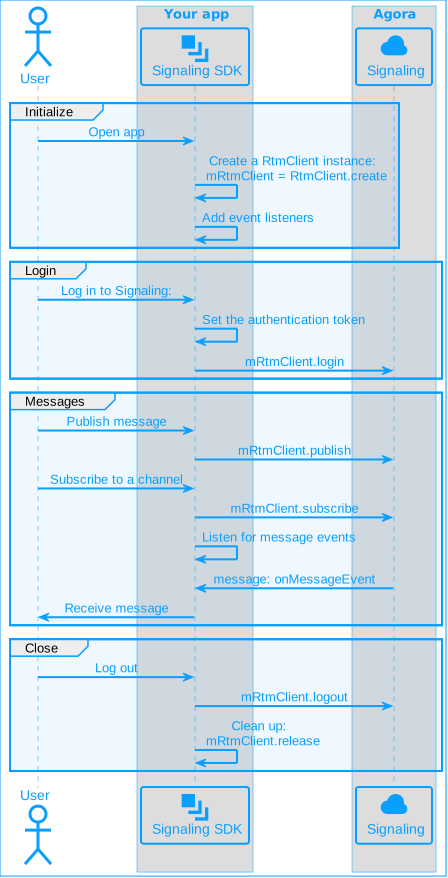
## Prerequisites [#prerequisites]
To implement the code presented on this page you need to have:
* An Agora [account](/en/realtime-media/rtm/manage-agora-account) and [project](/en/realtime-media/rtm/manage-agora-account).
* [Enabled Signaling](/en/realtime-media/rtm/manage-agora-account) in Agora Console
* [Android Studio](https://developer.android.com/studio) 4.1 or higher.
* Android SDK API Level 24 or higher.
* A mobile device that runs Android 4.1 or higher.
* Ensure that a firewall is not blocking your network communication.
Signaling 2.x is an enhanced version compared to 1.x with a wide range of new features. It follows a new pricing structure. See [Pricing](/en/realtime-media/rtm/reference/pricing) for details.
## Project setup [#project-setup]
### Create a project [#create-a-project]
1. **Create a [new project](https://developer.android.com/studio/projects/create-project)**.
1. Open Android Studio and select **File > New > New Project...**.
2. Select **Phone and Tablet** > **Empty Activity** and click **Next**.
3. Set the project name and storage path.
4. Select **Java** or **Kotlin** as the language, and click **Finish** to create the project.
After you create a project, Android Studio automatically starts gradle sync. Ensure that the synchronization is successful before proceeding to the next step.
2. **Add network permissions**
Open the `/app/src/main/AndroidManifest.xml` file and add the following permissions before ``:
```xml
```
3. **Prevent code obfuscation**
Open the `/app/proguard-rules.pro` file and add the following line to prevent code obfuscation:
```java
-keep class io.agora.**{*;}
```
### Integrate the SDK [#integrate-the-sdk]
Use either of the following methods to integrate Signaling SDK into your project.
**Using Maven Central**
1. Open the `settings.gradle` file in the project's root directory and add the Maven Central dependency, if it doesn't already exist:
```java
repositories {
mavenCentral()
}
```
If your Android project uses [`dependencyResolutionManagement`](https://docs.gradle.org/current/userguide/declaring_repositories.html#sub\:centralized-repository-declaration), there may be differences in how you add Maven Central dependencies.
2. Add the following to the `/Gradle Scripts/build.gradle(Module: .app)` file under `dependencies` to integrate the SDK into your Android project:
* Groovy
```text
implementation 'io.agora.rtm:rtm-sdk:x.y.z'
```
To resolve integration issues when co-integrating with the RTC SDK use:
```text
implementation 'io.agora.rtm:rtm-sdk-lite:x.y.z'
```
* Kotlin
```kotlin
implementation("io.agora.rtm:rtm-sdk:x.y.z")
```
To resolve integration issues when co-integrating with the RTC SDK use:
```kotlin
implementation("io.agora.rtm:rtm-sdk-lite:x.y.z")
```
Replace `x.y.z` with the specific SDK version number, such as `2.2.8`. To get the latest version number, check the [Release notes](/en/realtime-media/rtm/reference/release-notes).
**Using CDN**
1. [Download](/en/api-reference/sdks?product=signaling\&platform=android) the latest version of Signaling SDK for Android.
2. Copy all files in the `sdk` folder of the package to the `/app/libs` folder of the project.
3. To add the SDK reference, open the project file `/Gradle Scripts/build.gradle(Module: .app)` and add the following code:
1. Add a `ndk` node under the default `Config` node, to specify the supported architectures:
```text
Config {
// ...
ndk{
abiFilters 'armeabi-v7a', 'arm64-v8a', 'x86', 'x86_64'
}
}
```
Supporting all architectures increases the app size. Best practice is to only add essential architectures based on your targets. For most use-cases, `armeabi-v7a` and `arm64-v8a` architectures are sufficient when releasing the Android app.
2. Add a `sourceSets` node under the `android` node to include the jni libraries copied to the `libs` folder:
```text
android {
// ...
sourceSets {
main {
jniLibs.srcDirs = ['libs']
}
}
}
```
3. To include all `jar` files in the `libs` folder as dependencies, add the following under the `dependencies` node:
```text
dependencies {
implementation fileTree(dir: 'libs', include: ['*.jar'])
// ...
}
```
To integrate Signaling SDK version `2.2.0` or later alongside Video SDK version `4.3.0` or later, refer to [handle integration issues](/en/api-reference/faq/integration/rtm2_rtc_integration_issue).
### Create a user interface [#create-a-user-interface]
This section helps you create a simple user interface to explore the basic features of Signaling. Modify it according to your specific needs.
The demo interface consists of the following UI elements:
* Input boxes for user ID, channel name, and message
* Buttons to log in and log out of Signaling
* Buttons to subscribe and unsubscribe from a channel
* A button to publish a message
**Sample code to create the user interface**
Open the `/app/res/layout/activity_main.xml` file, and replace the contents with the following:
```xml
```
Open the `app/res/values/strings.xml` file and add following string resources:
```xml
Signaling QuickstartLoginLogoutSubscribeUnsubscribePublish messageUser IDMessage contentChannel nameyour_appidyour_token
```
## Implement Signaling [#implement-signaling]
A complete code sample that implements the basic features of Signaling is presented here for your reference. To use the sample code, copy the following lines into the `/app/src/main/java/com/example//MainActivity` file and replace `` in `package com.example.` with the name of your project.
**Complete sample code for Signaling**
Java
Kotlin
```java
package com.example.;
import android.os.Bundle;
import android.view.View;
import android.widget.EditText;
import android.widget.TextView;
import android.widget.Toast;
import androidx.appcompat.app.AppCompatActivity;
import io.agora.rtm.*;
public class JavaActivity extends AppCompatActivity {
private EditText etUserId;
private EditText etChannelName;
private EditText etMessageContent;
private TextView mMessageHistory;
private RtmClient mRtmClient;
private final RtmEventListener eventListener = new RtmEventListener() {
@Override
public void onMessageEvent(MessageEvent event) {
String text = "Message received from " + event.getPublisherId()
+ ", Message: " + event.getMessage().getData();
writeToMessageHistory(text);
}
@Override
public void onPresenceEvent(PresenceEvent event) {
String text = "Received presence event, user: " + event.getPublisherId()
+ ", Event: " + event.getEventType();
writeToMessageHistory(text);
}
@Override
public void onLinkStateEvent(LinkStateEvent event) {
String text = "Connection state changed to " + event.getCurrentState()
+ ", Reason: " + event.getReason();
writeToMessageHistory(text);
}
};
@Override
protected void onCreate(Bundle savedInstanceState) {
super.onCreate(savedInstanceState);
setContentView(R.layout.activity_main);
}
public void onClickLogin(View v) {
etUserId = findViewById(R.id.uid);
String userId = etUserId.getText().toString();
String token = getString(R.string.token);
if (createClient(userId)) {
login(token);
}
}
public void onClickLogout(View v) {
logout();
}
public void onClickSubscribe(View v) {
etChannelName = findViewById(R.id.channel_name);
String channelName = etChannelName.getText().toString();
subscribe(channelName);
}
public void onClickUnsubscribe(View v) {
etChannelName = findViewById(R.id.channel_name);
String channelName = etChannelName.getText().toString();
unsubscribe(channelName);
}
public void onClickSendChannelMsg(View v) {
etChannelName = findViewById(R.id.channel_name);
String channelName = etChannelName.getText().toString();
etMessageContent = findViewById(R.id.msg_box);
String message = etMessageContent.getText().toString();
publishMessage(channelName, message);
}
private boolean createClient(String userId) {
if (userId.isEmpty()) {
showToast("Invalid userId");
return false;
}
try {
RtmConfig config = new RtmConfig.Builder(getString(R.string.app_id), userId)
.eventListener(eventListener)
.build();
mRtmClient = RtmClient.create(config);
return true;
} catch (Exception e) {
showToast("Error creating RTM client.");
return false;
}
}
private void login(String token) {
if (mRtmClient == null) {
showToast("RTM client is null");
return;
}
mRtmClient.login(token, new ResultCallback<>() {
@Override
public void onSuccess(Void responseInfo) {
writeToMessageHistory("Successfully logged in to Signaling!");
}
@Override
public void onFailure(ErrorInfo errorInfo) {
writeToMessageHistory("Failed to log in to Signaling: " + errorInfo);
}
});
}
private void logout() {
if (mRtmClient == null) {
showToast("RTM client is null");
return;
}
mRtmClient.logout(new ResultCallback<>() {
@Override
public void onSuccess(Void responseInfo) {
writeToMessageHistory("Successfully logged out.");
}
@Override
public void onFailure(ErrorInfo errorInfo) {
writeToMessageHistory("Failed to log out: " + errorInfo);
}
});
}
private void subscribe(String channelName) {
if (mRtmClient == null) {
showToast("RTM client is null");
return;
}
SubscribeOptions options = new SubscribeOptions();
options.setWithMessage(true);
mRtmClient.subscribe(channelName, options, new ResultCallback<>() {
@Override
public void onSuccess(Void responseInfo) {
writeToMessageHistory("Successfully subscribed to the channel!");
}
@Override
public void onFailure(ErrorInfo errorInfo) {
writeToMessageHistory("Failed to subscribe to the channel: " + errorInfo);
}
});
}
private void unsubscribe(String channelName) {
if (mRtmClient == null) {
showToast("RTM client is null");
return;
}
mRtmClient.unsubscribe(channelName, new ResultCallback<>() {
@Override
public void onSuccess(Void responseInfo) {
writeToMessageHistory("Successfully unsubscribed from the channel!");
}
@Override
public void onFailure(ErrorInfo errorInfo) {
writeToMessageHistory("Failed to unsubscribe from the channel: " + errorInfo);
}
});
}
private void publishMessage(String channelName, String message) {
if (mRtmClient == null) {
showToast("RTM client is null");
return;
}
PublishOptions options = new PublishOptions();
options.setCustomType("");
mRtmClient.publish(channelName, message, options, new ResultCallback<>() {
@Override
public void onSuccess(Void responseInfo) {
writeToMessageHistory("Message sent to channel " + channelName + ": " + message);
}
@Override
public void onFailure(ErrorInfo errorInfo) {
writeToMessageHistory("Failed to send message to channel " + channelName + ": " + errorInfo);
}
});
}
private void writeToMessageHistory(String record) {
if (mMessageHistory == null) {
mMessageHistory = findViewById(R.id.message_history);
}
mMessageHistory.append("- " + record + "
");
}
private void showToast(String text) {
Toast.makeText(this, text, Toast.LENGTH_SHORT).show();
}
}
```
```kotlin
package com.example.
import android.content.pm.ActivityInfo
import android.os.Bundle
import android.view.View
import android.widget.EditText
import android.widget.TextView
import android.widget.Toast
import androidx.appcompat.app.AppCompatActivity
import io.agora.rtm.*
class MainActivity : AppCompatActivity() {
private lateinit var etUserId: EditText
private lateinit var etChannelName: EditText
private lateinit var etMessageContent: EditText
private var mRtmClient: RtmClient? = null
private lateinit var mMessageHistory: TextView
private val eventListener = object : RtmEventListener {
override fun onMessageEvent(event: MessageEvent) {
val text = "Message received from \${event.publisherId}, Message: \${event.message.data}"
writeToMessageHistory(text)
}
override fun onPresenceEvent(event: PresenceEvent) {
val text = "Received presence event, user: \${event.publisherId}, Event: \${event.eventType}"
writeToMessageHistory(text)
}
override fun onLinkStateEvent(event: LinkStateEvent) {
val text = "Connection state changed to \${event.currentState}, Reason: \${event.reason}"
writeToMessageHistory(text)
}
}
override fun onCreate(savedInstanceState: Bundle?) {
super.onCreate(savedInstanceState)
setContentView(R.layout.activity_main)
setRequestedOrientation(ActivityInfo.SCREEN_ORIENTATION_PORTRAIT)
}
fun onClickLogin(v: View) {
etUserId = findViewById(R.id.uid)
val userId = etUserId.text.toString()
val token = getString(R.string.token)
if (createClient(userId)) {
login(token)
}
}
fun onClickLogout(v: View) {
logout()
}
fun onClickSubscribe(v: View) {
etChannelName = findViewById(R.id.channel_name)
val channelName = etChannelName.text.toString()
subscribe(channelName)
}
fun onClickUnsubscribe(v: View) {
etChannelName = findViewById(R.id.channel_name)
val channelName = etChannelName.text.toString()
unsubscribe(channelName)
}
fun onClickSendChannelMsg(v: View) {
etChannelName = findViewById(R.id.channel_name)
val channelName = etChannelName.text.toString()
etMessageContent = findViewById(R.id.msg_box)
val message = etMessageContent.text.toString()
publishMessage(channelName, message)
}
private fun createClient(userId: String): Boolean {
if (userId.isEmpty()) {
showToast("Invalid userId")
return false
}
return try {
val config = RtmConfig.Builder(getString(R.string.app_id), userId)
.eventListener(eventListener)
.build()
mRtmClient = RtmClient.create(config)
true
} catch (e: Exception) {
showToast("Error creating RTM client.")
false
}
}
private fun login(token: String) {
mRtmClient?.login(token, object : ResultCallback {
override fun onSuccess(responseInfo: Void?) {
writeToMessageHistory("Successfully logged in to Signaling!")
}
override fun onFailure(errorInfo: ErrorInfo) {
writeToMessageHistory("Failed to log in to Signaling: $errorInfo")
}
}) ?: showToast("RTM client is null")
}
private fun logout() {
mRtmClient?.logout(object : ResultCallback {
override fun onSuccess(responseInfo: Void?) {
writeToMessageHistory("Successfully logged out.")
}
override fun onFailure(errorInfo: ErrorInfo) {
writeToMessageHistory("Failed to log out: $errorInfo")
}
}) ?: showToast("RTM client is null")
}
private fun subscribe(channelName: String) {
mRtmClient ?: run {
showToast("RTM client is null")
return
}
val options = SubscribeOptions().apply {
withMessage = true
}
mRtmClient!!.subscribe(channelName, options, object : ResultCallback {
override fun onSuccess(responseInfo: Void?) {
writeToMessageHistory("Successfully subscribed to the channel!")
}
override fun onFailure(errorInfo: ErrorInfo) {
writeToMessageHistory("Failed to subscribe to the channel: $errorInfo")
}
})
}
private fun unsubscribe(channelName: String) {
mRtmClient ?: run {
showToast("RTM client is null")
return
}
mRtmClient!!.unsubscribe(channelName, object : ResultCallback {
override fun onSuccess(responseInfo: Void?) {
writeToMessageHistory("Successfully unsubscribed from the channel!")
}
override fun onFailure(errorInfo: ErrorInfo) {
writeToMessageHistory("Failed to unsubscribe from the channel: $errorInfo")
}
})
}
private fun publishMessage(channelName: String, message: String) {
mRtmClient ?: run {
showToast("RTM client is null")
return
}
val options = PublishOptions().apply {
customType = ""
}
mRtmClient!!.publish(channelName, message, options, object : ResultCallback {
override fun onSuccess(responseInfo: Void?) {
writeToMessageHistory("Message sent to channel $channelName: $message")
}
override fun onFailure(errorInfo: ErrorInfo) {
writeToMessageHistory("Failed to send message to channel $channelName: $errorInfo")
}
})
}
private fun writeToMessageHistory(record: String) {
mMessageHistory = findViewById(R.id.message_history)
mMessageHistory.append("- $record
")
}
private fun showToast(text: String) {
Toast.makeText(this, text, Toast.LENGTH_SHORT).show()
}
}
```
Follow the implementation steps to understand the core API calls in the sample code or use the snippets in your own code.
### Import Agora classes [#import-agora-classes]
To use Signaling APIs in your project, import the relevant Agora classes and interfaces:
Java
Kotlin
```java
import io.agora.rtm.*;
```
```kotlin
import io.agora.rtm.*
```
### Initialize the Signaling engine [#initialize-the-signaling-engine]
Before calling any other Signaling SDK API, initialize an `RtmClient` object instance.
Java
Kotlin
```java
private boolean createClient(String userId) {
if (userId.isEmpty()) {
showToast("Invalid userId");
return false;
}
try {
RtmConfig config = new RtmConfig.Builder(getString(R.string.app_id), userId)
.eventListener(eventListener)
.build();
mRtmClient = RtmClient.create(config);
return true;
} catch (Exception e) {
showToast("Error creating RTM client.");
return false;
}
}
```
```kotlin
private fun createClient(userId: String): Boolean {
if (userId.isEmpty()) {
showToast("Invalid userId")
return false
}
return try {
// Create a configuration object
val config = RtmConfig.Builder(getString(R.string.app_id), userId)
.eventListener(eventListener)
.build()
// Use the configuration object to instantiate the engine
mRtmClient = RtmClient.create(config)
true
} catch (e: Exception) {
showToast("Error creating RTM client.")
false
}
}
```
### Add an event listener [#add-an-event-listener]
The event listener enables you to implement the processing logic in response to Signaling events. Use the following code to handle event notifications or display received messages:
Java
Kotlin
```java
private RtmEventListener eventListener = new RtmEventListener() {
@Override
public void onMessageEvent(MessageEvent event) {
String text = "Message received from " + event.getPublisherId()
+ " Message: " + event.getMessage().getData();
writeToMessageHistory(text);
}
@Override
public void onPresenceEvent(PresenceEvent event) {
String text = "Received presence event, user: " + event.getPublisherId()
+ " Event: " + event.getEventType();
writeToMessageHistory(text);
}
@Override
public void onLinkStateEvent(LinkStateEvent event) {
String text = "Connection state changed to " + event.getCurrentState()
+ ", Reason: " + event.getReason();
writeToMessageHistory(text);
}
};
```
```kotlin
private val eventListener = object : RtmEventListener {
override fun onMessageEvent(event: MessageEvent) {
val text = "Message received from \${event.publisherId} Message: \${event.message.data}"
writeToMessageHistory(text)
}
override fun onPresenceEvent(event: PresenceEvent) {
val text = "Received presence event, user: \${event.publisherId} event: \${event.eventType}"
writeToMessageHistory(text)
}
override fun onLinkStateEvent(event: LinkStateEvent) {
val text = "Connection state changed to \${event.currentState}, Reason: \${event.reason}"
writeToMessageHistory(text)
}
}
```
### Log in to Signaling [#log-in-to-signaling]
To connect to Signaling and access Signaling network resources, such as sending messages, and subscribing to channels, call `login`.
During a login operation, the client attempts to establish a connection with Signaling. Once the connection is established, the client transmits heartbeat information to the Signaling server at fixed intervals to keep the client active until the client actively logs out or is disconnected. The connection is interrupted when timeout occurs. During this period, users may freely access the Signaling network resources subject to their own permissions and usage restrictions.
Java
Kotlin
```java
private void login(String token) {
if (mRtmClient == null) {
showToast("RTM client is null");
return;
}
mRtmClient.login(token, new ResultCallback<>() {
@Override
public void onSuccess(Void responseInfo) {
writeToMessageHistory("Successfully logged in to Signaling!");
}
@Override
public void onFailure(ErrorInfo errorInfo) {
writeToMessageHistory("Failed to log in to Signaling: " + errorInfo);
}
});
}
```
```kotlin
private fun login(token: String) {
mRtmClient?.login(token, object : ResultCallback {
override fun onSuccess(responseInfo: Void?) {
writeToMessageHistory("Successfully logged in to Signaling!")
}
override fun onFailure(errorInfo: ErrorInfo) {
writeToMessageHistory("Failed to log in to Signaling: $errorInfo")
}
}) ?: showToast("RTM client is null")
}
```
To confirm that login is successful, use the `login` return value, or listen to the `onLinkStateEvent` event notification which provides the error code and reason for the login failure. When performing a login operation, the client's network connection state is `CONNECTING`. After a successful login, the state is updated to `CONNECTED`.
Best practice
To continuously monitor the network connection state of the client, best practice is to continue to listen for `onLinkStateEvent` notifications throughout the life cycle of the application. For further details, see [Event listeners](/en/realtime-media/rtm/build/send-and-receive-messages/add-event-listener).
After a user successfully logs into Signaling, the application's PCU increases, which affects your billing data.
### Publish a message [#publish-a-message]
To distribute a message to all subscribers of a message channel, call `publish`. The following code sends a string type message.
Java
Kotlin
```java
private void publishMessage(String channelName, String message) {
if (mRtmClient == null) {
showToast("RTM client is null");
return;
}
PublishOptions options = new PublishOptions();
options.setCustomType("");
mRtmClient.publish(channelName, message, options, new ResultCallback<>() {
@Override
public void onSuccess(Void responseInfo) {
writeToMessageHistory("Message sent to channel " + channelName + ": " + message);
}
@Override
public void onFailure(ErrorInfo errorInfo) {
writeToMessageHistory("Failed to send message to channel " + channelName + ": " + errorInfo);
}
});
}
```
```kotlin
private fun publishMessage(channelName: String, message: String) {
mRtmClient ?: run {
showToast("RTM client is null")
return
}
val options = PublishOptions().apply {
customType = ""
}
mRtmClient!!.publish(channelName, message, options, object : ResultCallback {
override fun onSuccess(responseInfo: Void?) {
writeToMessageHistory("Message sent to channel $channelName: $message")
}
override fun onFailure(errorInfo: ErrorInfo) {
writeToMessageHistory("Failed to send message to channel $channelName: $errorInfo")
}
})
}
```
Before calling `publish` to send a message, serialize the message payload as a string.
### Subscribe and unsubscribe [#subscribe-and-unsubscribe]
To subscribe to a channel, call `subscribe`. When you subscribe to a channel, you receive all messages published to the channel.
Java
Kotlin
```java
private void subscribe(String channelName) {
if (mRtmClient == null) {
showToast("RTM client is null");
return;
}
SubscribeOptions options = new SubscribeOptions();
options.setWithMessage(true);
mRtmClient.subscribe(channelName, options, new ResultCallback<>() {
@Override
public void onSuccess(Void responseInfo) {
writeToMessageHistory("Successfully subscribed to the channel!");
}
@Override
public void onFailure(ErrorInfo errorInfo) {
writeToMessageHistory("Failed to subscribe to the channel: " + errorInfo);
}
});
}
```
```kotlin
private fun subscribe(channelName: String) {
mRtmClient ?: run {
showToast("RTM client is null")
return
}
val options = SubscribeOptions().apply {
withMessage = true
}
mRtmClient!!.subscribe(channelName, options, object : ResultCallback {
override fun onSuccess(responseInfo: Void?) {
writeToMessageHistory("Successfully subscribed to the channel!")
}
override fun onFailure(errorInfo: ErrorInfo) {
writeToMessageHistory("Failed to subscribe to the channel: $errorInfo")
}
})
}
```
When you no longer need to receive messages from a channel, call `unsubscribe` to unsubscribe from the channel:
Java
Kotlin
```java
private void unsubscribe(String channelName) {
if (mRtmClient == null) {
showToast("RTM client is null");
return;
}
mRtmClient.unsubscribe(channelName, new ResultCallback<>() {
@Override
public void onSuccess(Void responseInfo) {
writeToMessageHistory("Successfully unsubscribed from the channel!");
}
@Override
public void onFailure(ErrorInfo errorInfo) {
writeToMessageHistory("Failed to unsubscribe from the channel: " + errorInfo);
}
});
}
```
```kotlin
private fun unsubscribe(channelName: String) {
mRtmClient ?: run {
showToast("RTM client is null")
return
}
mRtmClient!!.unsubscribe(channelName, object : ResultCallback {
override fun onSuccess(responseInfo: Void?) {
writeToMessageHistory("Successfully unsubscribed from the channel!")
}
override fun onFailure(errorInfo: ErrorInfo) {
writeToMessageHistory("Failed to unsubscribe from the channel: $errorInfo")
}
})
}
```
For more information about subscribing and sending messages, see [Message channels](/en/realtime-media/rtm/build/work-with-channels/message-channel) and [Stream channels](/en/realtime-media/rtm/build/work-with-channels/stream-channel).
### Log out of Signaling [#log-out-of-signaling]
When a user no longer needs to use Signaling, call `logout`. Logging out means closing the connection between the client and Signaling. The user is automatically logged out or unsubscribed from all message and stream channels. Other users in the channel receive an `onPresenceEvent` notification of the user leaving the channel.
Java
Kotlin
```java
private void logout() {
if (mRtmClient == null) {
showToast("RTM client is null");
return;
}
mRtmClient.logout(new ResultCallback<>() {
@Override
public void onSuccess(Void responseInfo) {
writeToMessageHistory("Successfully logged out.");
}
@Override
public void onFailure(ErrorInfo errorInfo) {
writeToMessageHistory("Failed to log out: " + errorInfo);
}
});
// Release resources
mRtmClient.release();
}
```
```kotlin
private fun logout() {
mRtmClient?.logout(object : ResultCallback {
override fun onSuccess(responseInfo: Void?) {
writeToMessageHistory("Successfully logged out.")
}
override fun onFailure(errorInfo: ErrorInfo) {
writeToMessageHistory("Failed to log out: $errorInfo")
}
}) ?: showToast("RTM client is null")
// Release resources
mRtmClient.release()
}
```
## Test Signaling [#test-signaling]
Take the following steps to test the sample code:
1. Use the [Token Builder](https://agora-token-generator-demo.vercel.app/) to generate a Signaling token:
1. Select Signaling from the Agora products dropdown.
2. Fill in your app ID and app certificate from [Agora Console](https://console.agora.io/v2). Leave the remaining fields blank.
3. Click **Generate Token**.
2. In `strings.xml`, replace the values for `app_id` and `token` with your app ID and generated token.
3. Enable developer options on your Android test device. Turn on USB debugging, connect the Android device to your development machine through a USB cable, and check that your device appears in the Android device options.
4. In Android Studio, click **Sync Project with Gradle Files** to resolve project dependencies and update the configuration.
5. After synchronization is successful, click ▶️. Android Studio starts compilation. After a few moments, the app is installed and launched on your Android device.
6. Use the device as the receiving end and perform the following operations:
1. Enter your **User ID** and click **Login**.
2. Enter the **Channel name** and click **Subscribe** .
7. On a second Android device, repeat the previous steps to install and launch the app. Use this device as the sending end.
1. Enter a different **User ID** and click **Login**.
2. Enter the same **Channel name**.
3. Type a message and click **Publish message**.
8. Swap the sending and receiving device roles and repeat the previous steps.
Congratulations! You have successfully integrated Signaling into your project.
## Reference [#reference]
This section contains content that completes the information on this page, or points you to documentation that explains other aspects to this product.
### Token authentication [#token-authentication]
In this guide you retrieve a temporary token from a [Token Builder](https://agora-token-generator-demo.vercel.app/). To understand how to create an authentication server for development purposes, see [Secure authentication with tokens](./build/connect-and-authenticate/authentication-workflow).
### Sample projects [#sample-projects]
Agora provides the following open source sample projects on GitHub for your reference.
**Java**
* [Quickstart](https://github.com/AgoraIO/RTM2/tree/main/Agora-RTM2-QuickStart-Android-Java)
* [Tutorial](https://github.com/AgoraIO/RTM2/tree/main/Agora-RTM2-Tutorial-Android-Java)
**Kotlin**
* [Quickstart](https://github.com/AgoraIO/RTM2/tree/main/Agora-RTM2-QuickStart-Android-Kotlin)
* [Tutorial](https://github.com/AgoraIO/RTM2/tree/main/Agora-RTM2-Tutorial-Android-Kotlin)
Download the projects or view the source code for more detailed examples.
### API reference [#api-reference]
* [API reference](/en/api-reference/api-ref/signaling)
* [Event listeners](./build/send-and-receive-messages/add-event-listener)