# Presence (/en/realtime-media/rtm/build/manage-presence-and-metadata/presence/flutter)
> For AI agents: see the complete documentation index at [llms.txt](/llms.txt).
In Signaling solutions, it is often important to know a user's current online status. For example, in instant messaging, chat applications, and online collaboration tools, users need to see the availability of their contacts. This information is typically displayed as a status message or icon next to a user's name. Presence features in Signaling SDK enable you to monitor join, leave, and status change notifications for users in a channel. Using Presence, you can:
* Get a list of users currently in a channel and their temporary status data.
* Get a list of channels a specified user has joined or is subscribed to.
* Get, set, or remove user statuses.
* Receive real-time event notifications when users join or leave specified channels.
* Receive user status change event notifications in real time.
## Understand the tech [#understand-the-tech-4]
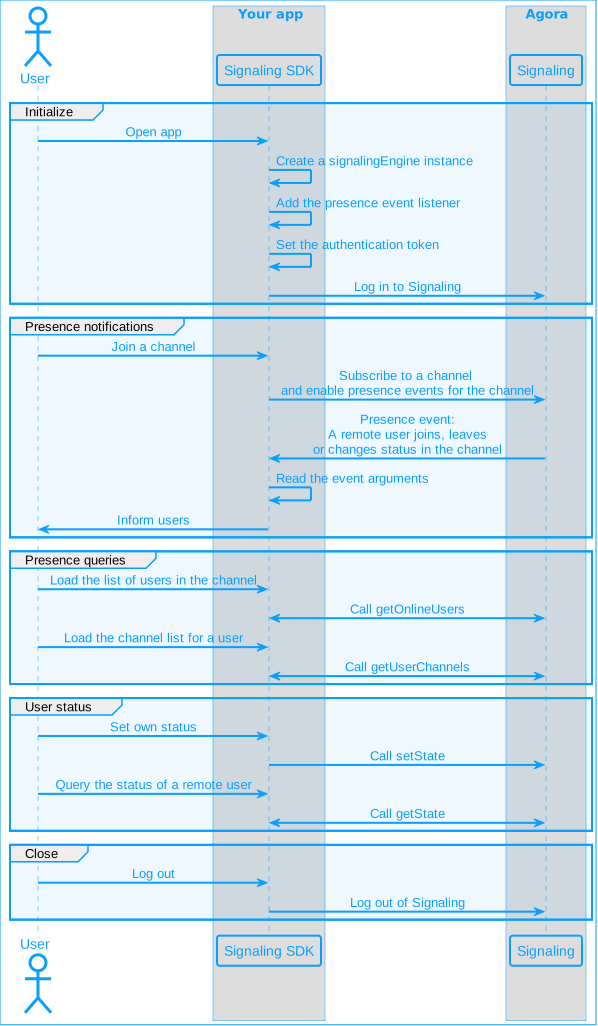
Presence provides real-time information about the availability, and the current status of users, for effective communication and collaboration. It enables you to retrieve a list of users in a channel, or to query the list of channels for a specific user. The following figure illustrates how you integrate presence features into your app.
**Presence workflow**
## Prerequisites [#prerequisites-4]
Ensure that you have integrated the Signaling SDK in your project, and implemented the framework functionality from the [SDK quickstart](../../quickstart) page.
Presence features require Signaling SDK version 2.2.0 or later.
## Implement presence features [#implement-presence-features-4]
Using presence, you can implement the following features:
### Get channel users [#get-channel-users-4]
To obtain a list of online users in a channel, call `getOnlineUsers`. Depending on your parameter settings, this method returns a list of online user IDs in a channel and their temporary status data, or just the number of online users in the channel. You do not need to join a channel to call this method. This method is applicable to both message channels and stream channels. Use the `channelType` parameter to specify the channel type.
After obtaining the initial online users list, update it in real time through `presence` event notifications.
Refer to the following sample code to query the list of online users in a channel and their current status:
```dart
final channelName = 'chat_room';
try {
var (status,response) = await rtmClient.getPresence.getOnlineUsers(
channelName,
RtmChannelType.message,
includeUserId:true,
includeState:true );
if (status == true){
print('${status.operation} failed, errorCode: ${status.errorCode}, due to ${status.reason}');
} else {
// If a nextPage exists, the next time getOnlineUsers is called, the value of nextPage should be filled in the page field
var nextPage = response.nextPage;
var count = response.count;
var userStateList = response.userStateList;
userStateList.forEach((userState) {
print(`${userState.userId} has states: ${userState.states}`);
});
}
} catch (e) {
print('something went wrong: $e');
}
```
The `getOnlineUsers` method retrieves one page of data at a time. Each page contains up to 100 online users. If the channel has more than 100 users, the `nextPage` field in the returned `response` contains a bookmark for the next page. After each query, check if `response.getNextPage` is empty to determine if there is more data. To retrieve the next page, set the `page` parameter in `getOnlineUsers` to the value of `response.getNextPage`. Repeat this process until `response.getNextPage` is null. Refer to the following code:
```dart
final channelName = 'chat_room';
try {
var (status,response) = await rtmClient.getPresence.getOnlineUsers(
channelName,
RtmChannelType.message,
includeUserId: true,
includeState: true
page: 'your_Next_Page_Bookmark'); // Next page bookmark from the previous call
if (status == true){
print('${status.operation} failed, errorCode: ${status.errorCode}, due to ${status.reason}');
} else {
// If a nextPage exists, the next time getOnlineUsers is called, the value of nextPage should be filled in the page field
var nextPage = response.nextPage;
var count = response.count;
var userStateList = response.userStateList;
userStateList.forEach((userState) {
print(`${userState.userId} has states: ${userState.states}`);
});
}
} catch (e) {
print('something went wrong: $e');
}
```
When there is a large number of users in a channel, you may only care about the total number of online users, and not their identities or temporary statuses. To get the total channel occupancy, set `includeState` and `includeUserId` in `getOnlineUsers` to `false`.
```dart
final channelName = 'chat_room';
try {
var (status,response) = await rtmClient.getPresence.getOnlineUsers(
channelName,
RtmChannelType.message,
includeUserId: false,
includeState: false);
if (status == true){
print('${status.operation} failed, errorCode: ${status.errorCode}, due to ${status.reason}');
} else {
var nextPage = response.nextPage;
var count = response.count;
print('There are $count occupants in $channelName channel');
}
} catch (e) {
print('something went wrong: $e');
}
```
In this case, only the `count` property in the response is valid while all other fields are empty.
You cannot set `includeState` to `true` and `includeUserId` to `false` at the same time. To get the temporary status of users, you must also retrieve their user IDs.
### Get user channels [#get-user-channels-4]
The `getUserChannels` method enables you to query which channels a user is currently in. This includes the message channels a user has subscribed to and the stream channels they have joined. This method is particularly useful for tracking user paths. Refer to the following sample code:
```dart
try {
var (status,response) = await rtmClient.getPresence.getUserChannels("Tony");
if (status == true){
print('${status.operation} failed, errorCode: ${status.errorCode}, due to ${status.reason}');
} else {
var channels = response.channels;
var count = response.count;
channels.forEach((channelInfo) {
print('${channelInfo.channelName}:${channelInfo.channelType}')
});
}
} catch (e) {
print('something went wrong: $e');
}
```
The `getUserChannels` method returns complete query results about the channels and their types that the queried user is in, without pagination.
## User status management [#user-status-management-4]
Signaling enables you to set and delete user status messages for the local user in each channel. The SDK notifies other online users in the channel of these changes through event notifications. This feature is useful in use-cases where user status sharing is required, such as real-time synchronization of the user's microphone status, mood, personal signature, score, and message input status.
Signaling does not permanently save the status data. When a user unsubscribes from a channel, times out, or exits a channel, the data is deleted. To save user data permanently, use the [Store user metadata](storage/store-user-metadata) feature.
When a user's temporary status changes, Signaling triggers a `remoteStateChanged` event notification in real time. Users who set `withPresence = true` when joining the channel, receive the event notification.
### Set status [#set-status-4]
Using presence, you can set the temporary user status for the local user. When you set the status before subscribing to or joining a channel, the data is cached on the client and does not take effect immediately. The status is updated and corresponding event notifications are triggered when you subscribe to or join a channel. The `setState` method applies to both message and stream channels; use the `channelType` parameter to specify the channel type.
```dart
var states = {
'Mode': 'Happy',
'Mic': 'False',
};
final channelName = 'chat_room';
try {
var (status,response) = await rtmClient.getPresence.setState(
channelName,
RtmChannelType.message,
states);
if (status == true){
print('${status.operation} failed,errorCode: ${status.errorCode},due to ${status.reason}');
} else {
print('set states success!');
}
} catch (e) {
print('something went wrong: $e');
}
```
When using `setState` to set temporary user status, if the specified key already exists, its value is overwritten by the new value. If the specified key does not exist, a new key/value pair is added.
### Get status [#get-status-4]
To obtain the temporary user status set by a user in a specified channel, use the `getState` method:
```dart
final channelName = 'chat_room';
try {
var (status,response) = await rtmClient.getPresence.getState(
channelName,
RtmChannelType.message,
'Tony');
if (status == true){
print('${status.operation} failed,errorCode: ${status.errorCode},due to ${status.reason}');
} else {
var userState = response.state;
print('States for ${userState.userId}: ${userState.states}');
}
} catch (e) {
print('something went wrong: $e');
}
```
If the queried user is not present in the specified channel, a `presenceUserNotExist` error message is returned by the SDK.
### Delete status [#delete-status-4]
Each user can set up to 32 key/value pairs in a channel. To remove items that are no longer needed, call `removeState` with a list of keys. The `removeState` method only deletes temporary user status data for the local user.
```dart
final channelName = 'chat_room';
final states = ['Mode','Mic'];
try {
var (status,response) = await rtmClient.getPresence.removeState(
channelName,
RtmChannelType.message,
states: states);
if (status == true){
print('${status.operation} failed,errorCode: ${status.errorCode},due to ${status.reason}');
} else {
var userState = response.state;
print('remove states success!');
}
} catch (e) {
print('something went wrong: $e');
}
```
Both the `setState` and `removeState` methods trigger `remoteStateChanged` event notifications. Users who join the channel with `withPresence` set to `true` receive event notifications containing full data of the user's temporary status.
## Receive presence event notifications [#receive-presence-event-notifications-4]
A presence event notification returns the [PresenceEvent](/en/api-reference/api-ref/signaling#configpresenceeventpropsag_platform) data structure, which includes the [RtmPresenceEventType](/en/api-reference/api-ref/signaling#enumvpresencetypepropsag_platform) parameter.
To receive presence event notifications, implement an event listener. See [event listeners](/en/api-reference/api-ref/signaling#event-listeners) for details. In addition, set the `withPresence` parameter to `true` when subscribing to or joining a channel.
### Event notification modes [#event-notification-modes-4]
The presence event notification mode determines how subscribed users receive event notifications. There are two notification modes:
* `Announce`: Real-time notification mode
* `Interval`: Scheduled notification mode
You set the **Max number of instant event** value in Agora Console to specify the condition for switching between the two modes. The scheduled notification mode helps prevent event noise that results from a large number of online users in the channel. See [Presence configuration](../../manage-agora-account#presence-configuration) for details.
#### Real-time notification mode [#real-time-notification-mode-4]
If the number of instant notifications in the channel is less than the **Max number of instant event** value, presence event notifications operate in real-time notification mode. In this mode, `remoteJoinChannel`, `remoteLeaveChannel`, `remoteTimeout`, and `remoteStateChanged` notifications are sent to the client in real-time.
Join
Leave
Timeout
Snapshot
State change
```js
{
type: RtmPresenceEventType.remoteJoinChannel,
channelType: RtmChannelType.message,
channelName: 'chat_room',
publisher: 'Tony',
stateItems: [],
interval: [],
snapshot: [],
timestamp: 1710487149497,
}
```
```js
{
type: RtmPresenceEventType.remoteLeaveChannel,
channelType: RtmChannelType.message,
channelName: 'chat_room',
publisher: 'Tony',
stateItems: [],
interval: [],
snapshot: [],
timestamp: 1710487149497,
}
```
```js
{
type: RtmPresenceEventType.remoteTimeout,
channelType: RtmChannelType.message,
channelName: 'chat_room',
publisher: 'Tony',
stateItems: [],
interval: [],
snapshot: [],
timestamp: 1710487149497,
}
```
```js
{
type: RtmPresenceEventType.snapshot,
channelType: RtmChannelType.message,
channelName: 'chat_room',
publisher: 'Tony',
stateItems: [],
interval: [],
snapshot: {[
{ userId: "user_a", states: []},
{ userId: "user_b", states: [{ key: 'mic', value : 'on'}]},
{ userId: "yourSelf", states: [{}]},
]},
timestamp: 1710487149497
}
```
```js
{
type: RtmPresenceEventType.remoteStateChanged,
channelType: RtmChannelType.message,
channelName: 'chat_room',
publisher: 'Tony',
stateItems: [{ key: 'mic', value : 'on'},{ key: 'mode', value : 'happy'}],
interval: [],
snapshot: [],
timestamp: 1710487149497
}
```
#### Scheduled notification mode [#scheduled-notification-mode-4]
When the number of online users in the channel exceeds the **Max number of instant event** value, the channel switches to the scheduled notification mode. In this mode, `remoteJoinChannel`, `remoteLeaveChannel`, `remoteTimeout`, and `remoteStateChanged` events are replaced by `interval` events and sent to all users in the channel at specific time intervals. Users receive the following notification:
```js
{
type : RtmPresenceEventType.interval,
channelTye : RtmChannelType.message,,
channelName : 'chat_room',
publisher : 'Tony',
interval : {
joinUserList : {users:['Tony','Lily']},
leaveUserList :{users:['Jason']},
timeoutUserList : {users:['Wang']},
userStateList : [
{
userId : 'Harvard',
states : [{ key: 'mic', value : 'on'},{ key: 'mode', value : 'happy'}],
},
{
userId : 'Harvard',
states : [{ key: 'mic', value : 'off'},{ key: 'mode', value : 'sad'}],
}
]
}
}
```
## Reference [#reference-4]
This section contains content that completes the information on this page, or points you to documentation that explains other aspects to this product.
### API reference [#api-reference-4]
* [`getOnlineUsers`](/en/api-reference/api-ref/signaling#getonlineusers)
* [`getUserChannels`](/en/api-reference/api-ref/signaling#getuserchannels)
* [`setState`](/en/api-reference/api-ref/signaling#presencesetstatepropsag_platform)
* [`getState`](/en/api-reference/api-ref/signaling#presencegetstatepropsag_platform)
* [`removeState`](/en/api-reference/api-ref/signaling#presenceremovestatepropsag_platform)
* [Event listeners](/en/api-reference/api-ref/signaling#event-listeners)