# Connection state transitions and recovery (/en/realtime-media/rtm/build/connect-and-authenticate/connection/connection-state-transitions/macos)
> For AI agents: see the complete documentation index at [llms.txt](/llms.txt).
During communication between the Signaling SDK and the server, the connection goes through multiple states. You observe and respond to these state transitions by listening to state change event notifications.
The information on this page is applicable to Signaling SDK versions 2.2.0 or later.
## Understand the tech [#understand-the-tech-3]
In real-world use-cases, disruptions affect a user's network connection. These disruptions cause corresponding changes in Signaling SDK's connection state. To maintain a seamless user experience despite these changes, the SDK ensures continuity of channel subscriptions and the temporary user status. Upon reconnecting from a disconnected state, the SDK automatically restores the previous subscriptions and the temporary user status, eliminating the need for user intervention.
This continuity assurance does not apply if you actively disconnect by logging out from Signaling. Logging out clears the channel subscriptions and the temporary user status, and resets the connection state to idle. In such cases, you must log in to the server again, re-establish channel subscriptions, and restore the previous usage status.
The Signaling SDK handles the following connection management tasks:
* Intelligently selects the nearest edge server for access and enables quick switchover to an alternate server in case of access failure.
* Selects the appropriate connection protocol and establishes connections with the server based on user configuration. To ensure service availability, Signaling employs a dual-protocol link mechanism and maintains both TCP and UDP connections simultaneously.
* Manages and preserves channel subscriptions and ensures continuity of temporary user status upon recovery from a temporary disconnection.
* Promptly notifies users of connection state changes to facilitate timely observation and response to a specific state change. This feature empowers you to enhance user experience through logical interventions at the business level.
## Connection states [#connection-states-3]
This section describes the various connection states and their transitions in both message and stream channels.
### Message channel connection states [#message-channel-connection-states-3]
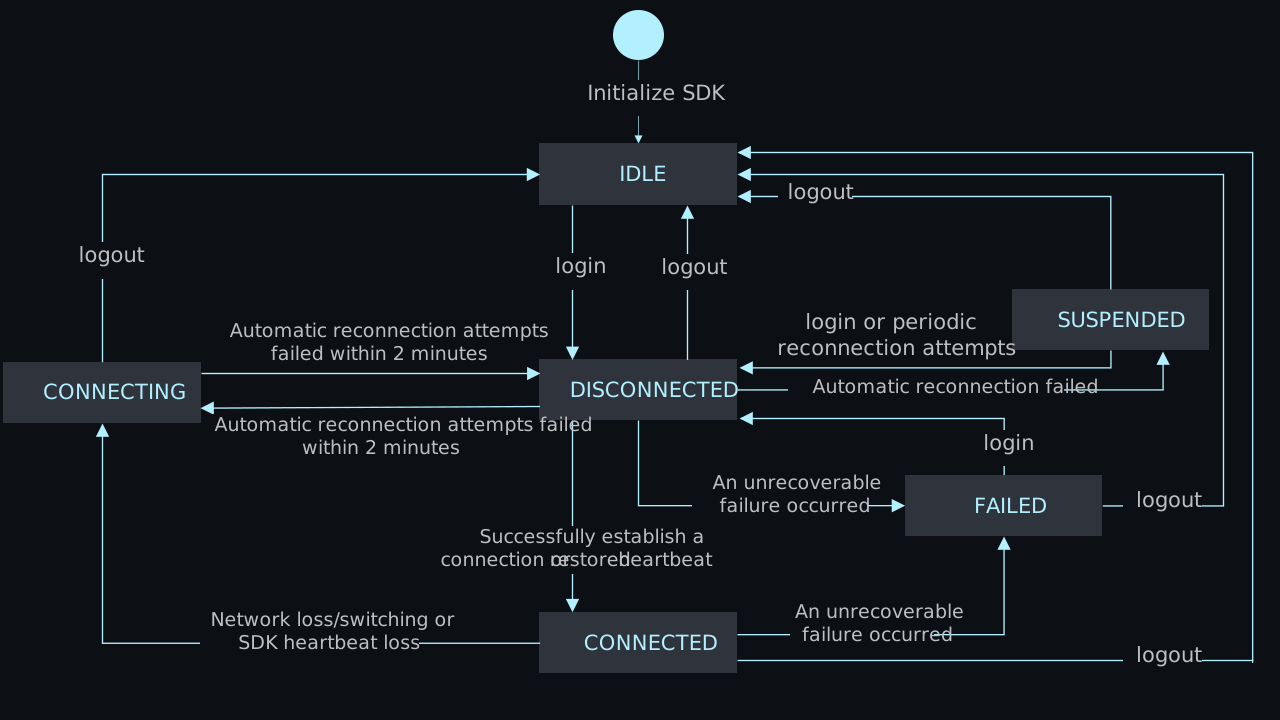
To use a message channel, you initialize the SDK and log in to initiate a connection with the server. In case of an unexpected interruption, the SDK automatically makes attempts to restore the connection at increasing time intervals (2, 4, 8, 16... seconds) for up to 2 minutes. If the attempts are still unsuccessful, the SDK transitions to a long suspended state and retries at fixed 30-second intervals.
The following table gives an overview of the various connection states:
The following figure shows possible transitions between message channel connection states:
#### Connection state transitions [#connection-state-transitions-6]
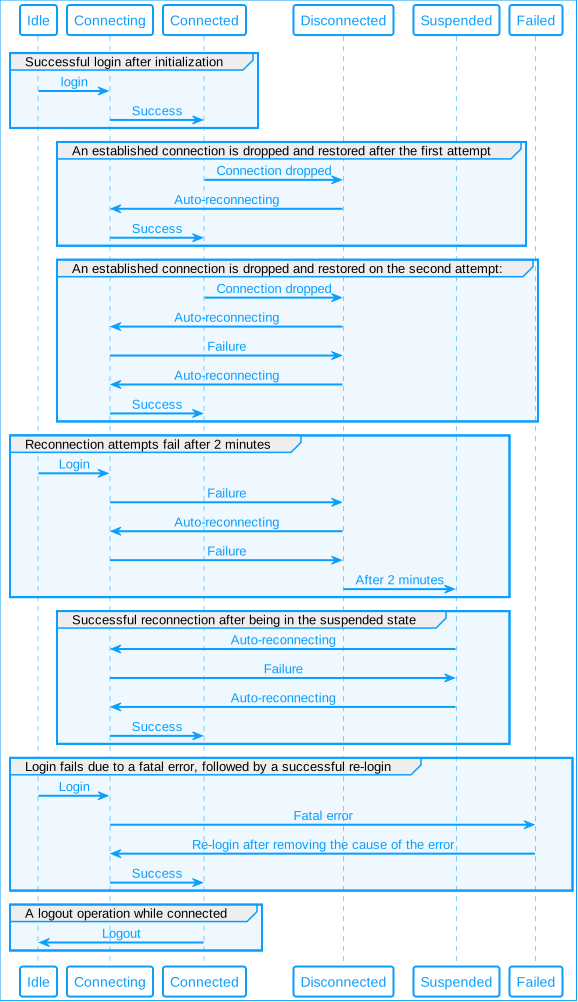
The state of the connection between the SDK and the Signaling server undergoes several transitions during communication. The following figure illustrates the state transitions during some common message channel connection use-cases.
**Message channel connection state transitions**
### Stream channel connection states [#stream-channel-connection-states-3]
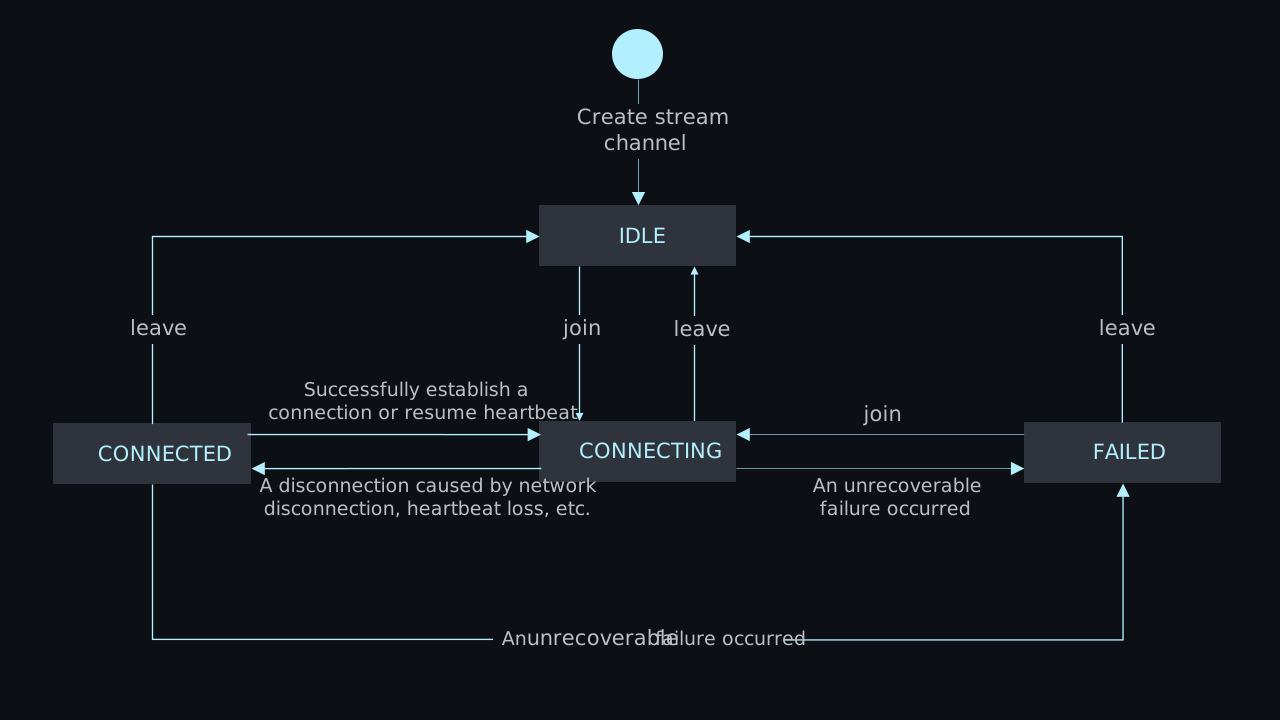
In a stream channel, you join a channel to initiate a connection with the server. In case of unexpected interruptions, the client automatically attempts reconnection for up to 20 minutes. If the attempts are unsuccessful, the stream channel connection state changes to failed, and the client ceases further reconnection attempts.
The table below provides an overview of the various stream channel connection states:
Swift
Objective-C
| State | Description |
| :------------- | :------------------------------------------------------------------------------------------------------------------------------------------------------------------------------------------------------------------------------------------------------------------------------------------------------------------------------------------------------------------------------------------------------------------------------------------------------------------------------------------------------------------------------------------------------------------------------------------------------------------------------------------------------------------------------------------------------------------------------------------------------------------------------------------------------------------------------------------------------------------ |
| `idle` | **Idle state**: The SDK enters this state when you create a client instance or after you explicitly call the `logout` method. In this state, the SDK does not attempt to establish or maintain a connection with the server. The SDK clears the session cache upon entering this state. |
| `connecting` | **Connecting state**: When you call the `login` method, the SDK immediately enters this state. It also enters this state during each reconnection attempt after the connection is accidentally disconnected. |
| `connected` | **Connected state**: In this state, the client and the server are connected normally; users can access all Signaling capabilities. |
| `disconnected` | **Disconnected state**: The connection is temporarily disconnected. The SDK enters this state after the connection is lost due to a temporary network failure, or after an unsuccessful reconnection attempt. In this state, the client attempts to restore the connection to the server after 2, 4, 8, ... seconds. If the connection is restored, the SDK restores the previous channel subscription and the user status. In this state, users cannot send or receive messages. This state lasts for up to 2 minutes and switches to `suspended` if the connection cannot be restored within this time. |
| `suspended` | **Connection pending state**: This is a long-term disconnection state entered into due to no network connection or server unavailability. If the connection cannot be restored within 2 minutes, it enters a suspended state after attempts to restore the connection fail. In this state, the SDK periodically tries to restore the connection every 30 seconds. You can also call the `login` method to try to reconnect. Users cannot send or receive messages while in this state. If automatic reconnection is successful, the SDK automatically restores the channel subscriptions and the temporary user status. You can actively call the `logout` method to return to the `Idle` state. However, note that doing so clears the session cache, and the SDK no longer guarantees the continuity of channel subscriptions and restoration of the user status. |
| `failed` | **Failed state**: If the client encounters an unrecoverable failure, such as a fatal error due to an incorrect app ID or expired token, the client enters this state. In this state, the SDK does not attempt to reconnect, and the client is unable to send or receive messages. To attempt reconnection, call the `login` method again. |
| State | Description |
| :------------------------------ | :------------------------------------------------------------------------------------------------------------------------------------------------------------------------------------------------------------------------------------------------------------------------------------------------------------------------------------------------------------------------------------------------------------------------------------------------------------------------------------------------------------------------------------------------------------------------------------------------------------------------------------------------------------------------------------------------------------------------------------------------------------------------------------------------------------------------------------------------------------------------------------------ |
| `AgoraRtmLinkStateIdle` | **Idle state**: The SDK enters this state when you create a client instance or after you explicitly call the `logout` method. In this state, the SDK does not attempt to establish or maintain a connection with the server. The SDK clears the session cache upon entering this state. |
| `AgoraRtmLinkStateConnecting` | **Connecting state**: When you call the `loginByToken` method, the SDK immediately enters this state. It also enters this state during each reconnection attempt after the connection is accidentally disconnected. |
| `AgoraRtmLinkStateConnected` | **Connected state**: In this state, the client and the server are connected normally; users can access all Signaling capabilities. |
| `AgoraRtmLinkStateDisconnected` | **Disconnected state**: The connection is temporarily disconnected. The SDK enters this state after the connection is lost due to a temporary network failure, or after an unsuccessful reconnection attempt. In this state, the client attempts to restore the connection to the server after 2, 4, 8, ... seconds. If the connection is restored, the SDK restores the previous channel subscription and the user status. In this state, users cannot send or receive messages. This state lasts for up to 2 minutes and switches to `AgoraRtmLinkStateSuspended` if the connection cannot be restored within this time. |
| `AgoraRtmLinkStateSuspended` | **Connection pending state**: This is a long-term disconnection state entered into due to no network connection or server unavailability. If the connection cannot be restored within 2 minutes, it enters a suspended state after attempts to restore the connection fail. In this state, the SDK periodically tries to restore the connection every 30 seconds. You can also call the `loginByToken` method to try to reconnect. Users cannot send or receive messages while in this state. If automatic reconnection is successful, the SDK automatically restores the channel subscriptions and the temporary user status. You can actively call the `logout` method to return to the `AgoraRtmLinkStateIdle` state. However, note that doing so clears the session cache, and the SDK no longer guarantees the continuity of channel subscriptions and restoration of the user status. |
| `AgoraRtmLinkStateFailed` | **Failed state**: If the client encounters an unrecoverable failure, such as a fatal error due to an incorrect app ID or expired token, the client enters this state. In this state, the SDK does not attempt to reconnect, and the client is unable to send or receive messages. To attempt reconnection, call the `loginByToken` method again. |
The following figure shows possible transitions between stream channel connection states:
#### Connection state transitions [#connection-state-transitions-7]
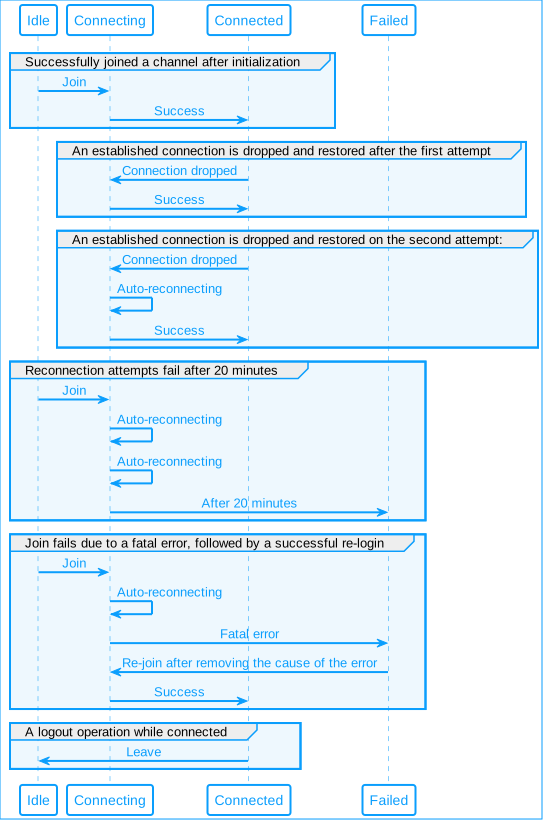
The connection state between the stream channel and the Signaling server undergoes various transitions during communication. The following figure illustrates the state transitions during some common stream channel connection use-cases.
**Stream channel connection state transitions**
## Listen for connection state events [#listen-for-connection-state-events-3]
The `didReceiveLinkStateEvent` callback provides the information you need to understand network state transitions.
Swift
Objective-C
```swift
class RtmListenerEx: NSObject, AgoraRtmClientDelegate {
func rtmKit(_ rtmKit: AgoraRtmClientKit, didReceiveLinkStateEvent event: AgoraRtmLinkStateEvent) {
// code for handle link state change
}
}
let listenerEx = RtmListenerEx()
rtm.addDelegate(listenerEx)
```
```objc
@interface RtmListenerEx : NSObject
@end
@implementation RtmListenerEx
- (void)rtmKit:(AgoraRtmClientKit *)rtmKit didReceiveLinkStateEvent:(AgoraRtmLinkStateEvent *)event {}
@end
RtmListenerEx* handlerEx = [[RtmListenerEx alloc] init];
[rtm addDelegate:handlerEx];
```
The event provides the following parameters:
* `previousState`: The state from which the change occurred.
* `currentState`: The current state after the change.
* `serviceType`: The type of service for which the connection state has changed.
* `operation`: The operation responsible for the change.
* `reason`: The reason behind the change.
To remove the callback use:
Swift
Objective-C
```swift
rtm.removeDelegate(listenerEx)
```
```objc
[rtm removeDelegate:handlerEx];
```
## Connection restoration mechanism [#connection-restoration-mechanism-3]
Each time you log in, the SDK attempts to establish a connection with the server and generates a local session cache. This cache stores information about the channels the user subscribes to or joins, along with temporary user status data. The cache applies to both message and stream channels.
If the client disconnects temporarily due to a network issue, it automatically tries to reconnect. Upon successful reconnection, the SDK uses the session cache to restore the user's channel subscriptions and temporary user status, ensuring session continuity. Whether the client recovers from a disconnected or suspended state, continuity is automatically maintained as long as the user does not log out. However, if the user logs out, the session cache is cleared, and the connection status returns to idle. The user must then log in again, resubscribe to channels, and reset their temporary user statuses.
In the event of a sudden network disconnection, you can check the names of affected channels in the `affectedChannels` field returned by the `didReceiveLinkStateEvent` event. The following example shows sample information contained in the `affectedChannels` field:
```json
"affectedChannels" : [
"ChatRoom",
"VirtualSpace"
]
```
## Handling connection errors [#handling-connection-errors-3]
The Signaling client automatically recovers from non-fatal error states, and notifies you of the event details through an `didReceiveLinkStateEvent` callback. Handle these events according to your business needs to optimize the user experience.
### Fatal errors [#fatal-errors-3]
Some errors are critical, meaning the system cannot automatically recover and enters a failed state. In this state, automatic reconnection is not attempted. To resolve such issues, troubleshoot the errors manually and explicitly trigger reconnection by logging in or rejoining the channel.
Following is a list of issues that may lead to fatal errors:
* An invalid or expired token.
* The user ID of the current user is banned.
* Signaling is not enabled for the current app ID or the app ID is invalid
* Edge server resources are unavailable.
* The message service is not deployed in the current environment.
* Usage limit exceeded.
* A stream channel instance was not created.
* The channel name is illegal.
### Non-fatal errors [#non-fatal-errors-3]
Some errors are non-fatal; for example, a client experiences a brief network outage while passing through an underground tunnel. In such cases, the SDK attempts automatic reconnection. If reconnection is successful, the previously subscribed channels and temporary user status are restored automatically. However, if the user chooses to log out during this process, the client cache is cleared. This means that the cached channel subscriptions and temporary user statuses are removed. In such cases, users must re-login, resubscribe to channels, and reset temporary user statuses to resume the previous status.