# Voice-only quickstart (/en/realtime-media/rtc/voice-quickstart/windows)
> For AI agents: see the complete documentation index at [llms.txt](/llms.txt).
This Windows quickstart shows you how to create a basic Voice Calling app using the Agora RTC SDK.
## Understand the tech
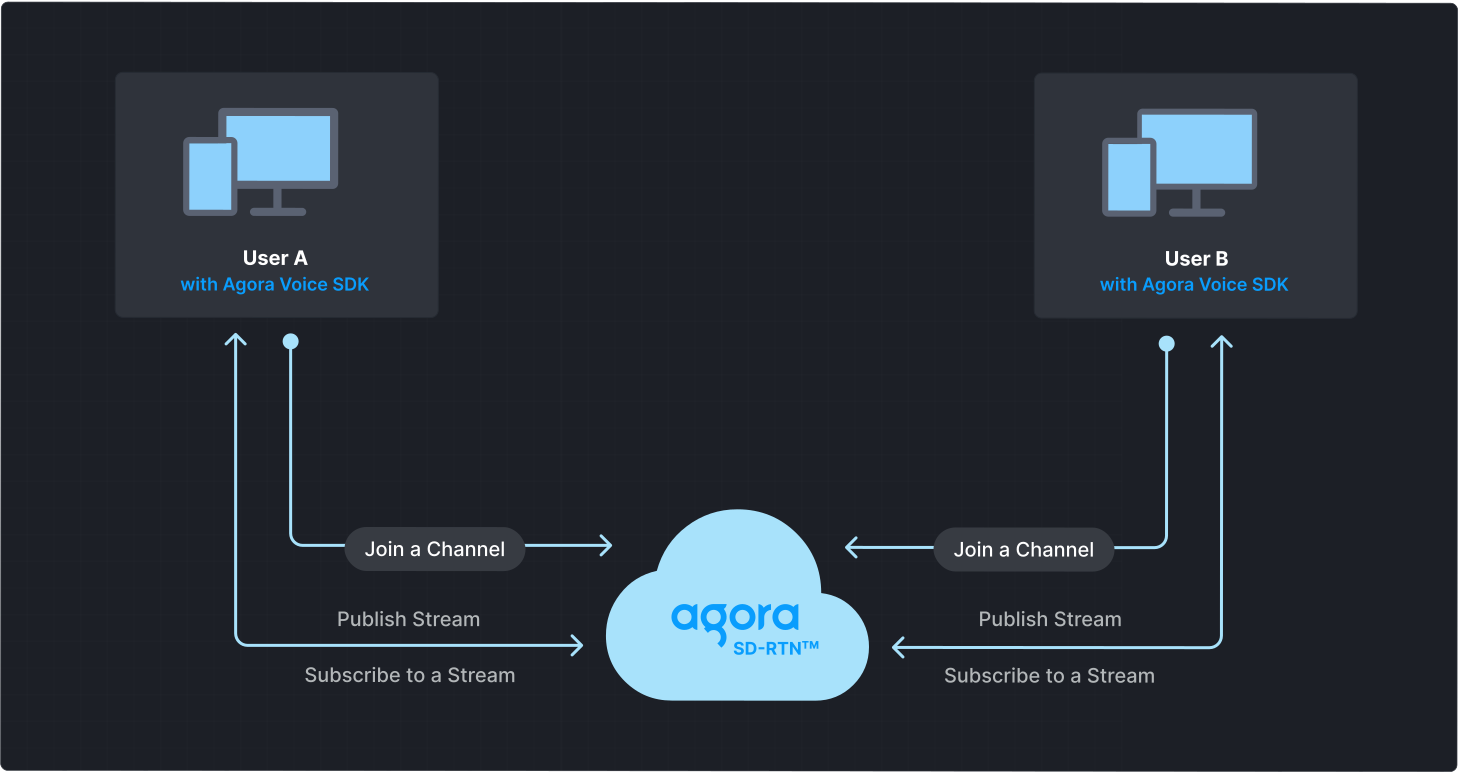
To start a Voice Calling session, implement the following steps in your app:
* **Initialize the Agora Engine**: Before calling other APIs, create and initialize an Agora Engine instance.
* **Join a channel**: Call methods to create and join a channel.
* **Send and receive audio**: All users can publish streams to the channel and subscribe to audio streams published by other users in the channel.
## Prerequisites
* A device running Windows 7 or higher.
* Microsoft Visual Studio 2017 or higher with [C++ desktop development](https://devblogs.microsoft.com/cppblog/windows-desktop-development-with-c-in-visual-studio/) support. C++ 11 or above.
* If you use C# for development, you also need the [.NET framework](https://learn.microsoft.com/en-us/dotnet/framework/install/guide-for-developers).
* A microphone
* A valid Agora account and project. Please refer to [Agora account management](manage-agora-account.md) for details.
## Set up your project
This section shows you how to set up your Windows project and install the Agora RTC SDK.
Create a new project
Add to an existing project
The following steps outline the process to set up a new Visual Studio 2022 project on Windows 11 for implementing real-time audio and video interaction functions.
1. In Visual Studio, select **File > New > Project** to create a new project. In the pop-up window, select **MFC application** as the project template, click **Next**, update the project name to `AgoraQuickStart`, set the project storage location, and then click **Create**.
2. In the pop-up MFC application window, set the application type to **Dialog-based** , and set **Use MFC** to **Use MFC in a shared DLL**. Enter the generated class, set the generated class to **Dlg**, set the base class to **CDialog**, and click **Finish**.
To integrate real-time audio interaction into your project:
1. Launch Visual Studio 2022 and open your existing project by selecting **File > Open > Project/Solution**.
2. Navigate to your project directory and open the `.sln` file.
3. Create a user-interface for your app based on your application use-case.
A basic UI consists of the following controls:
* Join channel button
* Leave channel button
* An Edit Control for entering a channel name
Refer to [Create a user interface](#create-a-user-interface) to get a bare bones sample layout.
### Install the SDK
Install the Agora RTC SDK:
1. Download the latest Windows [SDK](/en/api-reference/sdks?product=video\&platform=windows).
2. Unzip and open the downloaded SDK. Copy all subfolders in `sdk/` to your solution folder. Make sure these subfolders are in the same directory as your `.sln` file.
#### Configure the project
In the Solution Explorer window, right-click the project name and click **Properties** to configure the following:
1. Go to the **C/C++ > General > Additional Include Directory** menu, click **Edit**, and in the pop-up window enter `$(SolutionDir)sdk\high_level_api\include`.
2. Go to the **Linker > General > Additional Library Directory** menu, click **Edit**, and in the pop-up window:
* for 64 bit Windows, enter `$(SolutionDir)sdk\x86_64`.
* for x86 Windows, enter `$(SolutionDir)sdk\x86`.
3. Go to the **Linker > Input > Additional Dependencies** menu, click **Edit**, and in the pop-up window:
* for 64 bit Windows, enter `$(SolutionDir)sdk\x86_64\agora_rtc_sdk.dll.lib`.
* for x86 Windows, enter `$(SolutionDir)sdk\x86\agora_rtc_sdk.dll.lib`.
4. Enter the **Advanced** menu, and in **Advanced Properties**, set **Copy contents to OutDir** and **Copy C++ runtime to output directory** to `Yes`.
5. Go to the **Build Events > Post-Build Events > Command Line** menu and enter `copy $(SolutionDir)sdk\x86_64\*.dll $(SolutionDir)$(Platform)\$(Configuration)`.
6. Click **Apply** to save the configuration.
## Implement Voice Calling
This section guides you through the implementation of basic real-time audio interaction in your app.
The following figure illustrates the essential steps:
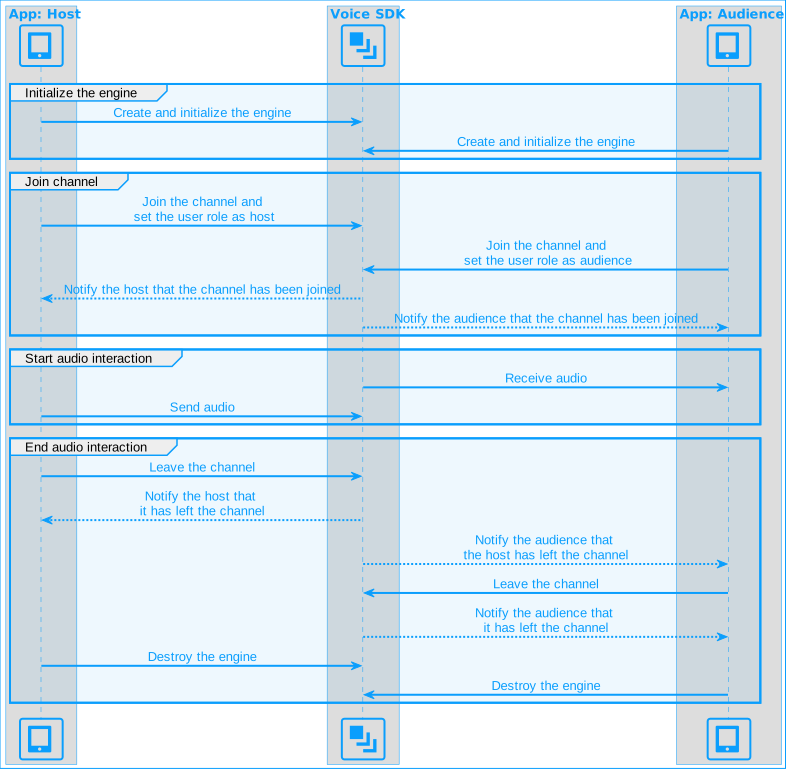
This guide includes [complete sample code](#complete-sample-code) that demonstrates implementing basic real-time interaction. To understand the core API calls in the sample code, review the following implementation steps.
### Initialize the engine
For real-time communication, initialize an `IRtcEngine` instance and set up event handlers to manage user interactions within the channel. Use `RtcEngineContext` to specify the [App ID](manage-agora-account.md), and custom [event handler](#subscribe-to-rtc-sdk-events), then call `initialize` to initialize the engine, enabling further channel operations. Add the following code to your header and `.cpp` files:
```cpp
// Declare the required variables
IRtcEngine* m_rtcEngine = nullptr; // RTC engine instance
CAgoraQuickStartRtcEngineEventHandler m_eventHandler; // IRtcEngineEventHandler
```
```cpp
void CAgoraQuickStartDlg::initializeAgoraEngine() {
// Create IRtcEngine object
m_rtcEngine = createAgoraRtcEngine();
// Create IRtcEngine context object
RtcEngineContext context;
// Input your App ID. You can obtain your project's App ID from the Agora Console
context.appId = APP_ID;
// Add event handler for callbacks and events
context.eventHandler = &m_eventHandler;
// Initialize
int ret = m_rtcEngine->initialize(context);
m_initialize = (ret == 0);
if (!m_initialize) {
AfxMessageBox(_T("Failed to initialize Agora RTC engine"));
}
}
```
### Join a channel
To join a channel, call `joinChannel`\[2/2] with the following parameters:
* **Channel name**: The name of the channel to join. Clients that pass the same channel name join the same channel. If a channel with the specified name does not exist, it is created when the first user joins.
* **Authentication token**: A dynamic key that authenticates a user when the client joins a channel. In a production environment, you obtain a token from a [token server](build/authenticate-users/deploy-token-server.mdx) in your security infrastructure. For the purpose of this guide [Generate a temporary token](manage-agora-account.md).
* **User ID**: A 32-bit signed integer that identifies a user in the channel. You can specify a unique user ID for each user yourself. If you set the user ID to `0` when joining a channel, the SDK generates a random number for the user ID and returns the value in the `onJoinChannelSuccess` callback.
* **Channel media options**: Configure `ChannelMediaOptions` to define publishing and subscription settings, optimize performance for your specific use-case, and set optional parameters.
For Voice Calling, set the `channelProfile` to `CHANNEL_PROFILE_COMMUNICATION` and the user role to `CLIENT_ROLE_BROADCASTER`.
```cpp
void CAgoraQuickStartDlg::joinChannel(const char* token, const char* channelName) {
ChannelMediaOptions options;
// Set channel profile to live broadcasting
options.channelProfile = CHANNEL_PROFILE_COMMUNICATION;
// Set user role to broadcaster; keep default value if setting user role to audience
options.clientRoleType = CLIENT_ROLE_BROADCASTER;
// Publish the audio stream captured by the microphone
options.publishMicrophoneTrack = true;
// Automatically subscribe to all audio streams
options.autoSubscribeAudio = true;
// Join the channel using the token and channel name (both are const char*)
m_rtcEngine->joinChannel(token, channelName, 0, options);
}
```
### Subscribe to RTC SDK events
The RTC SDK provides an interface for subscribing to channel events. To use it, create a custom event handler class by inheriting from `IRtcEngineEventHandler` and override its methods to handle real-time interaction events. Add callbacks to receive notification of users joining and leaving the channel.
To ensure that you receive all RTC SDK events, set the Agora Engine event handler before joining a channel.
```cpp
// Define the CAgoraQuickStartRtcEngineEventHandler class to handle callback events such as users joining and leaving the channel
class CAgoraQuickStartRtcEngineEventHandler
: public IRtcEngineEventHandler {
public:
CAgoraQuickStartRtcEngineEventHandler()
: m_hMsgHandler(nullptr) {
}
// Set the handle of the message receiving window
void SetMsgReceiver(HWND hWnd) {
m_hMsgHandler = hWnd;
}
// Register onJoinChannelSuccess callback
// This callback is triggered when a local user successfully joins a channel
virtual void onJoinChannelSuccess(const char* channel, uid_t uid, int elapsed) {
if (m_hMsgHandler) {
::PostMessage(m_hMsgHandler, WM_MSGID(EID_JOIN_CHANNEL_SUCCESS), uid, 0);
}
}
// Register onUserJoined callback
// This callback is triggered when the remote host successfully joins the channel
virtual void onUserJoined(uid_t uid, int elapsed) {
if (m_hMsgHandler) {
::PostMessage(m_hMsgHandler, WM_MSGID(EID_USER_JOINED), uid, 0);
}
}
// Register onUserOffline callback
// This callback is triggered when the remote host leaves the channel or is offline
virtual void onUserOffline(uid_t uid, USER_OFFLINE_REASON_TYPE reason) {
if (m_hMsgHandler) {
::PostMessage(m_hMsgHandler, WM_MSGID(EID_USER_OFFLINE), uid, 0);
}
}
private:
HWND m_hMsgHandler;
};
```
Implement the callback functions.
```cpp
LRESULT CAgoraQuickStartDlg::OnEIDJoinChannelSuccess(WPARAM wParam, LPARAM lParam) {
// Join channel success callback
uid_t localUid = wParam;
return 0;
}
LRESULT CAgoraQuickStartDlg::OnEIDUserJoined(WPARAM wParam, LPARAM lParam) {
// Remote user joined callback
return 0;
}
LRESULT CAgoraQuickStartDlg::OnEIDUserOffline(WPARAM wParam, LPARAM lParam) {
// Remote user left callback
return 0;
}
```
### Leave the channel
When a user ends a call, or closes the app call `leaveChannel` to exit the current channel.
```cpp
// Leave the channel
m_rtcEngine->leaveChannel();
```
### Release resources
To destroy the engine instance, call `release` :
```cpp
// Release resources when the object is destroyed
m_rtcEngine->release(true);
m_rtcEngine = NULL;
```
After you call `Dispose`, you can no longer use any SDK methods or callbacks. To use real-time Voice Calling again, you must create a new engine. For more information, see [Initialize the Engine](#initialize-the-engine).
### Complete sample code
A complete code sample that implements the basic process of real-time interaction is presented here for your reference. Copy the sample code into your project to quickly implement the basic functions of real-time interaction.
**AgoraQuickStartDlg.h**
```cpp
#pragma once
#include
// Import related header files
#include
using namespace now;
using namespace agora::rtc;
using namespace agora::media;
using namespace agora::media::base;
// Define the message ID
#define WM_MSGID(code) (WM_USER+0x200+code)
#define EID_JOIN_CHANNEL_SUCCESS 0x00000002
#define EID_USER_JOINED 0x00000004
#define EID_USER_OFFLINE 0x00000004
// Define the CAgoraQuickStartRtcEngineEventHandler class to handle callback events such as users joining and leaving the channel
class CAgoraQuickStartRtcEngineEventHandler
: public IRtcEngineEventHandler {
public:
CAgoraQuickStartRtcEngineEventHandler()
: m_hMsgHandler(nullptr) {
}
// Set the handle of the message receiving window
void SetMsgReceiver(HWND hWnd) {
m_hMsgHandler = hWnd;
}
// Register onJoinChannelSuccess callback
// This callback is triggered when a local user successfully joins a channel
virtual void onJoinChannelSuccess(const char* channel, uid_t uid, int elapsed) {
if (m_hMsgHandler) {
::PostMessage(m_hMsgHandler, WM_MSGID(EID_JOIN_CHANNEL_SUCCESS), uid, 0);
}
}
// Register onUserJoined callback
// This callback is triggered when the remote host successfully joins the channel
virtual void onUserJoined(uid_t uid, int elapsed) {
if (m_hMsgHandler) {
::PostMessage(m_hMsgHandler, WM_MSGID(EID_USER_JOINED), uid, 0);
}
}
// Register onUserOffline callback
// This callback is triggered when the remote host leaves the channel or is offline
virtual void onUserOffline(uid_t uid, USER_OFFLINE_REASON_TYPE reason) {
if (m_hMsgHandler) {
::PostMessage(m_hMsgHandler, WM_MSGID(EID_USER_OFFLINE), uid, 0);
}
}
private:
HWND m_hMsgHandler;
};
// CAgoraQuickStartDlg dialog box
class CAgoraQuickStartDlg : public CDialog
{
// Construction
public:
CAgoraQuickStartDlg(CWnd* pParent = nullptr); // Standard constructor
virtual ~CAgoraQuickStartDlg();
// Dialog box data
#ifdef AFX_DESIGN_TIME
enum { IDD = IDD_AGORAQUICKSTART_DIALOG };
#endif
// Handle the join/leave button click event
afx_msg void OnBnClickedBtnJoin();
afx_msg void OnBnClickedBtnLeave();
// Handle callback events such as user joining/user leaving
afx_msg LRESULT OnEIDJoinChannelSuccess(WPARAM wParam, LPARAM lParam);
afx_msg LRESULT OnEIDUserJoined(WPARAM wParam, LPARAM lParam);
afx_msg LRESULT OnEIDUserOffline(WPARAM wParam, LPARAM lParam);
protected:
HICON m_hIcon;
CEdit m_edtChannelName;
// DDX/DDV support
virtual void DoDataExchange(CDataExchange* pDX);
virtual BOOL OnInitDialog();
afx_msg void OnSysCommand(UINT nID, LPARAM lParam);
afx_msg void OnPaint();
afx_msg HCURSOR OnQueryDragIcon();
DECLARE_MESSAGE_MAP()
std::string cs2utf8(CString str);
private:
IRtcEngine* m_rtcEngine = nullptr;
CAgoraQuickStartRtcEngineEventHandler m_eventHandler;
bool m_initialize = false;
bool m_remoteRender = false;
};
```
**AgoraQuickStartDlg.cpp**
```cpp
// AgoraQuickStartDlg.cpp: implementation file
#include "pch.h"
#include "framework.h"
#include "AgoraQuickStart.h"
#include "AgoraQuickStartDlg.h"
#include "afxdialogex.h"
#ifdef _DEBUG
#define new DEBUG_NEW
#endif
// CAboutDlg dialog box for the application's "About" menu item
class CAboutDlg : public CDialogEx {
public:
CAboutDlg();
// Dialog box data
#ifdef AFX_DESIGN_TIME
enum { IDD = IDD_ABOUTBOX };
#endif
protected:
virtual void DoDataExchange(CDataExchange* pDX); // DDX/DDV support
// Implementation
protected:
DECLARE_MESSAGE_MAP()
};
CAboutDlg::CAboutDlg() : CDialogEx(IDD_ABOUTBOX) {
}
void CAboutDlg::DoDataExchange(CDataExchange* pDX) {
CDialogEx::DoDataExchange(pDX);
}
BEGIN_MESSAGE_MAP(CAboutDlg, CDialogEx)
END_MESSAGE_MAP()
// CAgoraQuickStartDlg dialog box
CAgoraQuickStartDlg::CAgoraQuickStartDlg(CWnd* pParent /*=nullptr*/)
: CDialog(IDD_AGORAQUICKSTART_DIALOG, pParent) {
m_hIcon = AfxGetApp()->LoadIcon(IDR_MAINFRAME);
}
CAgoraQuickStartDlg::~CAgoraQuickStartDlg() {
CDialog::~CDialog();
// Release the engine and related resources when deleting the CAgoraQuickStartDlg object
if (m_rtcEngine) {
m_rtcEngine->release(true);
m_rtcEngine = NULL;
}
}
void CAgoraQuickStartDlg::DoDataExchange(CDataExchange* pDX) {
CDialog::DoDataExchange(pDX);
// Associate the control with the variable
DDX_Control(pDX, IDC_EDIT_CHANNEL, m_edtChannelName);
}
BEGIN_MESSAGE_MAP(CAgoraQuickStartDlg, CDialog)
ON_WM_SYSCOMMAND()
ON_WM_PAINT()
ON_WM_QUERYDRAGICON()
ON_BN_CLICKED(ID_BTN_JOIN, &CAgoraQuickStartDlg::OnBnClickedBtnJoin)
ON_BN_CLICKED(ID_BTN_LEAVE, &CAgoraQuickStartDlg::OnBnClickedBtnLeave)
ON_MESSAGE(WM_MSGID(EID_JOIN_CHANNEL_SUCCESS), &CAgoraQuickStartDlg::OnEIDJoinChannelSuccess)
ON_MESSAGE(WM_MSGID(EID_USER_JOINED), &CAgoraQuickStartDlg::OnEIDUserJoined)
ON_MESSAGE(WM_MSGID(EID_USER_OFFLINE), &CAgoraQuickStartDlg::OnEIDUserOffline)
END_MESSAGE_MAP()
// Application constants
#define APP_ID ""
#define token ""
void CAgoraQuickStartDlg::initializeAgoraEngine() {
m_rtcEngine = createAgoraRtcEngine();
RtcEngineContext context;
context.appId = APP_ID;
context.eventHandler = &m_eventHandler;
int ret = m_rtcEngine->initialize(context);
m_initialize = (ret == 0);
if (!m_initialize) {
AfxMessageBox(_T("Failed to initialize Agora RTC engine"));
}
}
BOOL CAgoraQuickStartDlg::OnInitDialog() {
CDialog::OnInitDialog();
// Add "About..." menu item to the system menu
CMenu* pSysMenu = GetSystemMenu(FALSE);
if (pSysMenu != nullptr) {
CString strAboutMenu;
strAboutMenu.LoadString(IDS_ABOUTBOX);
if (!strAboutMenu.IsEmpty()) {
pSysMenu->AppendMenu(MF_SEPARATOR);
pSysMenu->AppendMenu(MF_STRING, IDM_ABOUTBOX, strAboutMenu);
}
}
// Set the dialog icons
SetIcon(m_hIcon, TRUE); // Set big icon
SetIcon(m_hIcon, FALSE); // Set small icon
// Set the message receiver
m_eventHandler.SetMsgReceiver(m_hWnd);
// Initialize Agora engine
initializeAgoraEngine();
return TRUE; // Unless focus is set to a control, return TRUE
}
void CAgoraQuickStartDlg::OnSysCommand(UINT nID, LPARAM lParam) {
if ((nID & 0xFFF0) == IDM_ABOUTBOX) {
CAboutDlg dlgAbout;
dlgAbout.DoModal();
} else {
CDialog::OnSysCommand(nID, lParam);
}
}
void CAgoraQuickStartDlg::OnPaint() {
if (IsIconic()) {
CPaintDC dc(this); // Device context for drawing
SendMessage(WM_ICONERASEBKGND, reinterpret_cast(dc.GetSafeHdc()), 0);
int cxIcon = GetSystemMetrics(SM_CXICON);
int cyIcon = GetSystemMetrics(SM_CYICON);
CRect rect;
GetClientRect(&rect);
int x = (rect.Width() - cxIcon + 1) / 2;
int y = (rect.Height() - cyIcon + 1) / 2;
dc.DrawIcon(x, y, m_hIcon);
} else {
CDialog::OnPaint();
}
}
HCURSOR CAgoraQuickStartDlg::OnQueryDragIcon() {
return static_cast(m_hIcon);
}
std::string CAgoraQuickStartDlg::cs2utf8(CString str) {
char szBuf[2 * MAX_PATH] = { 0 };
WideCharToMultiByte(CP_UTF8, 0, str.GetBuffer(0), str.GetLength(), szBuf, 2 * MAX_PATH, NULL, NULL);
return szBuf;
}
void CAgoraQuickStartDlg::joinChannel(const char* token, const char* channelName) {
ChannelMediaOptions options;
options.channelProfile = CHANNEL_PROFILE_LIVE_BROADCASTING;
options.clientRoleType = CLIENT_ROLE_BROADCASTER;
options.publishMicrophoneTrack = true;
options.autoSubscribeAudio = true;
m_rtcEngine->joinChannel(token, channelName, 0, options);
}
void CAgoraQuickStartDlg::OnBnClickedBtnJoin() {
CString strChannelName;
m_edtChannelName.GetWindowText(strChannelName);
if (strChannelName.IsEmpty()) {
AfxMessageBox(_T("Fill channel name first"));
return;
}
joinChannel(token, CW2A(strChannelName));
}
void CAgoraQuickStartDlg::OnBnClickedBtnLeave() {
m_rtcEngine->leaveChannel();
}
LRESULT CAgoraQuickStartDlg::OnEIDJoinChannelSuccess(WPARAM wParam, LPARAM lParam) {
uid_t localUid = static_cast(wParam);
return 0;
}
LRESULT CAgoraQuickStartDlg::OnEIDUserJoined(WPARAM wParam, LPARAM lParam) {
uid_t remoteUid = static_cast(wParam);
return 0;
}
LRESULT CAgoraQuickStartDlg::OnEIDUserOffline(WPARAM wParam, LPARAM lParam) {
uid_t remoteUid = static_cast(wParam);
return 0;
}
```
### Create a user interface
Follow these steps to create a bare-bones UI for your project.
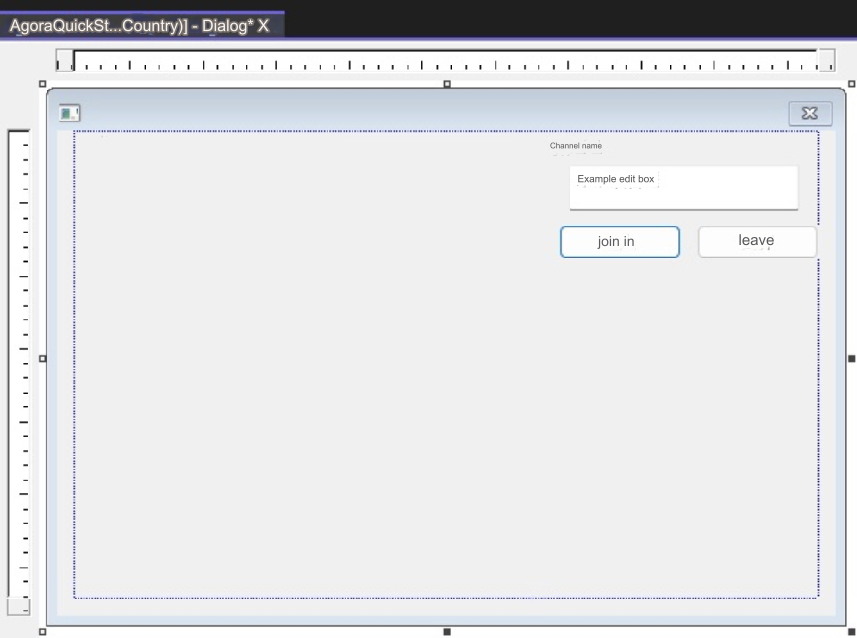
**Steps to create a minimalistic UI**
1. In the right menu bar, switch the project to resource view, then open the `.Dialog` file.
2. Add an input box for the channel name:
1. Go to **View** > **Toolbox** and select **Add Static Text** control.
2. Change the description text to `Channel name` in the properties.
3. Add an **Edit Control** as an input box.
4. In **Properties** > **Miscellaneous**, set the control's ID to `IDC_EDIT_CHANNEL`.
3. Add join and leave channel buttons:
1. In **View** > **Toolbox**, add two `Button` controls.
2. In **Properties** > **Miscellaneous**, set the IDs of the controls to `ID_BTN_JOIN` and `ID_BTN_LEAVE`.
3. Set the description text to `Join` and `Leave` respectively.
Your interface looks similar to the following:
## Test the sample code
To test your app, follow these steps:
1. In Visual Studio, select local Windows debugger to start compiling the application.
2. Enter the name of the channel you want to join in the input box and click the **Join** button to join the channel.
3. Use the [Web demo](https://webdemo.agora.io/basicVideoCall/index.html) to join the same channel and test the following use-cases:
* If users on both devices join the channel as hosts, they can hear each other.
* If one user joins as host and the other as audience, the audience can hear the host.
## Reference
This section contains content that completes the information on this page, or points you to documentation that explains other aspects to this product.
* If a firewall is deployed in your network environment, refer to [Connect with Cloud Proxy](build/manage-connection-and-quality/cloud-proxy.mdx) to use Agora services normally.
### Next steps
After implementing the quickstart sample, read the following documents to learn more:
* To ensure communication security in a test or production environment, best practice is to obtain and use a token from an authentication server. For details, see [Secure authentication with tokens](build/authenticate-users/authentication-workflow.mdx).
### Sample project
Agora provides open source sample projects on [GitHub](https://github.com/AgoraIO/API-Examples/tree/main/windows/APIExample/) for your reference.
* Download or view the [sample project](https://github.com/AgoraIO/API-Examples/tree/main/windows/APIExample/APIExample/Basic/LiveBroadcasting) for a more detailed example.
* For a Windows C# implementation, see [this sample project](https://github.com/AgoraIO-Extensions/Agora-C_Sharp-SDK/tree/master/APIExample/src/Basic/JoinChannelVideo).
### API Reference
* [`createAgoraRtcEngine`](https://api-ref.agora.io/en/video-sdk/cpp/4.x/API/class_irtcengine.html#api_createagorartcengine)
* [`joinChannel`](https://api-ref.agora.io/en/video-sdk/cpp/4.x/API/class_irtcengine.html#api_irtcengine_joinchannel2)
* [`IRtcEngineEventHandler`](https://api-ref.agora.io/en/video-sdk/cpp/4.x/API/class_irtcengineeventhandler.html#class_irtcengineeventhandler)
* [`leaveChannel`](https://api-ref.agora.io/en/video-sdk/cpp/4.x/API/class_irtcengine.html#api_irtcengine_leavechannel)
* [`release`](https://api-ref.agora.io/en/video-sdk/cpp/4.x/API/class_irtcengine.html#api_irtcengine_release)
### Frequently asked questions
* [How can I listen for audience joining or leaving a channel?](/en/api-reference/faq/integration/audience_event)
* [How can I solve channel-related issues?](/en/api-reference/faq/integration/channel)
* [How can I set the log file?](/en/api-reference/faq/integration/set_log_file)
### See also
* [Error codes](reference/error-codes.mdx)
* [Connection status management](build/manage-connection-and-quality/connection-status-management.mdx)