# Voice-only quickstart (/en/realtime-media/rtc/voice-quickstart/react-native)
> For AI agents: see the complete documentation index at [llms.txt](/llms.txt).
This React Native quickstart shows you how to create a basic Voice Calling app using the Agora RTC SDK.
## Understand the tech
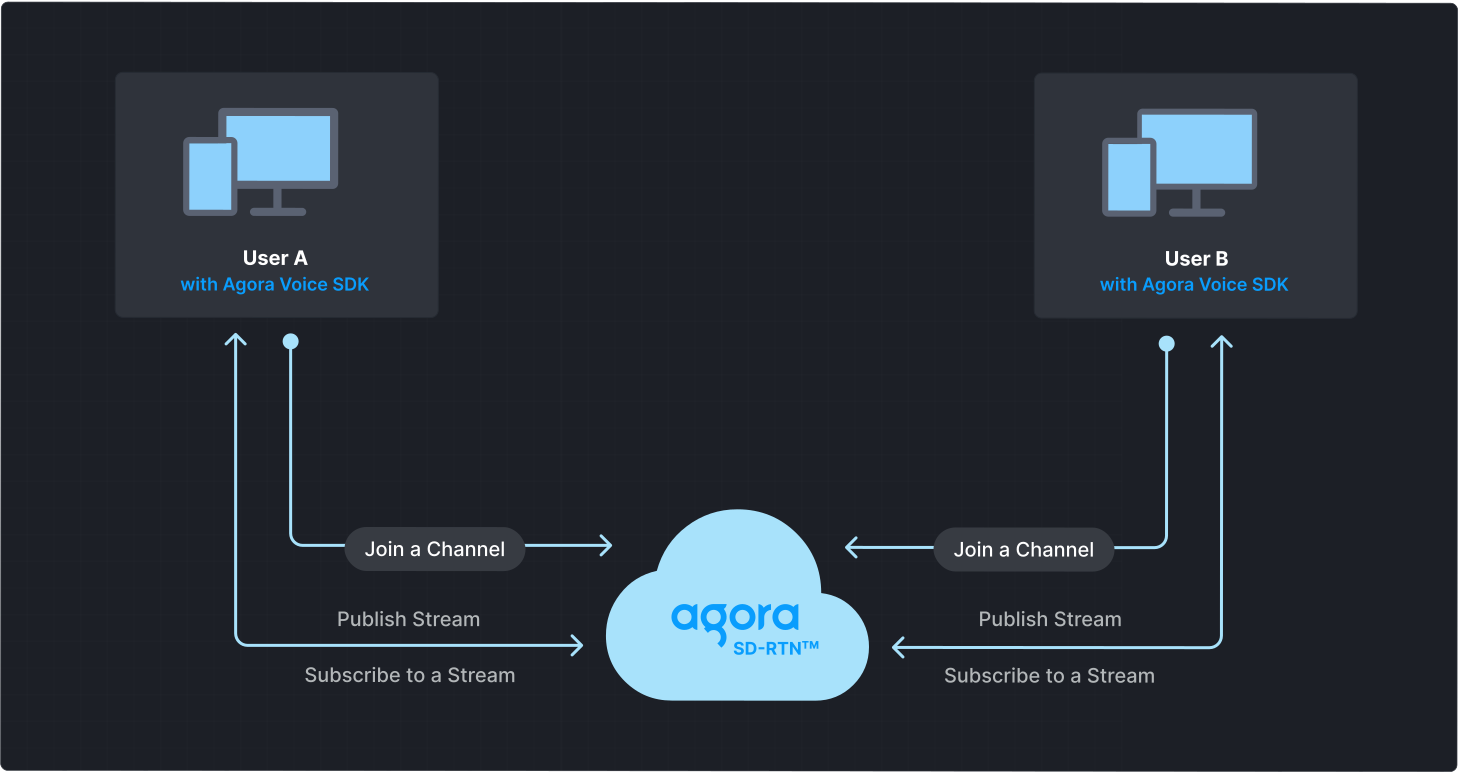
To start a Voice Calling session, implement the following steps in your app:
* **Initialize the Agora Engine**: Before calling other APIs, create and initialize an Agora Engine instance.
* **Join a channel**: Call methods to create and join a channel.
* **Send and receive audio**: All users can publish streams to the channel and subscribe to audio streams published by other users in the channel.
## Prerequisites
* React Native 0.60 or later. For more information, see [Get Started with React Native](https://reactnative.dev/docs/environment-setup).
* Node 16 or later
For your target platform, prepare the following:
Android
iOS
* A machine running macOS, Windows, or Linux
* [Java Development Kit (JDK) 11](https://openjdk.org/projects/jdk/11/) or later
* Latest version of Android Studio
* A physical or virtual mobile device running Android 5.0 or later
* A machine running macOS
* Xcode 10 or later
* CocoaPods
* A physical or virtual mobile device running iOS 9.0 or later.
If you use React Native 0.63 or later, ensure your iOS version is 10.0 or later.
* A microphone
* A valid Agora account and project. Please refer to [Agora account management](manage-agora-account.md) for details.
## Set up your project
This section shows you how to set up your React Native project and install the Agora RTC SDK.
### Create a project
To create a new application using [React Native Community CLI](https://github.com/react-native-community/cli), see [Get Started Without a Framework](https://reactnative.dev/docs/getting-started-without-a-framework).
### Install the SDK
Download and add the Agora RTC SDK to your React Native project. Choose either of the following methods:
npm
yarn
In your project folder, execute the following command:
```bash
npm i --save react-native-agora
```
In your project folder, execute the following commands:
```bash
# Install yarn
npm install -g yarn
# Use yarn to download Agora React Native SDK
yarn add react-native-agora
```
React Native 0.60.0 and later support automatic linking of native modules. Manual linking is not recommended. See [Autolinking](https://github.com/react-native-community/cli/blob/master/docs/autolinking.md) for details
## Implement Voice Calling
This section guides you through the implementation of basic real-time audio interaction in your app.
The following figure illustrates the essential steps:
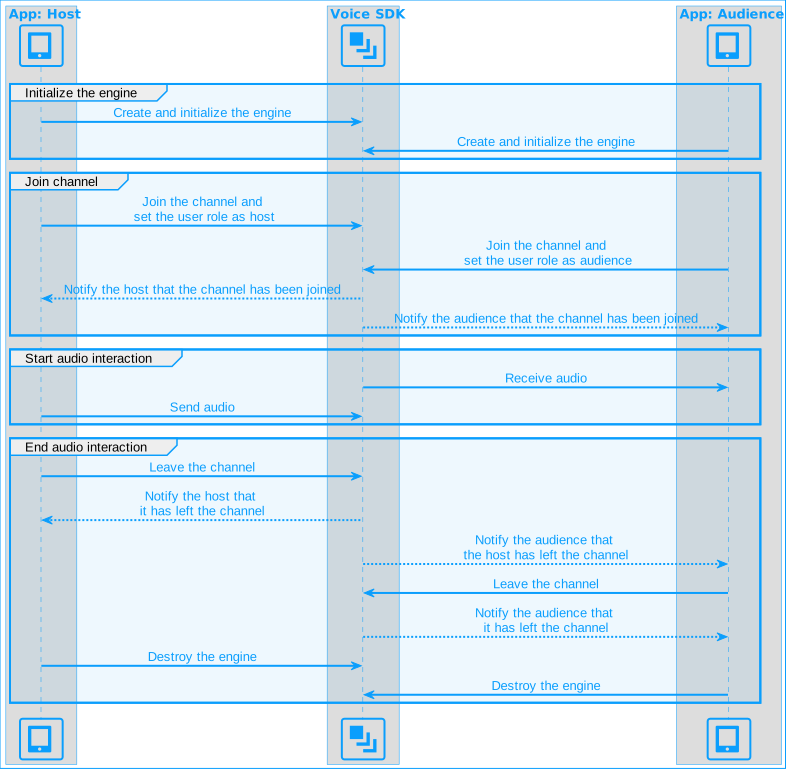
This guide includes [complete sample code](#complete-sample-code) that demonstrates implementing basic real-time interaction. To understand the core API calls in the sample code, review the following implementation steps and use the code in your `App.tsx` file.
### Import dependencies
Add the required Agora dependencies to your app.
```tsx
import {
createAgoraRtcEngine,
ChannelProfileType,
ClientRoleType,
IRtcEngine,
RtcConnection,
IRtcEngineEventHandler,
} from 'react-native-agora';
```
### Initialize the engine
For real-time communication, call `createAgoraRtcEngine` to create an `RtcEngine` instance, and then `initialize` the engine using `RtcEngineContext` to specify the [App ID](manage-agora-account.md).
```tsx
const appId = '<-- Insert app ID -->';
const setupVoiceSDKEngine = async () => {
if (Platform.OS === 'android') { await getPermission(); }
agoraEngineRef.current = createAgoraRtcEngine();
const agoraEngine = agoraEngineRef.current;
await agoraEngine.initialize({ appId: appId });
};
```
### Join a channel
To join a channel, call `joinChannel` with the following parameters:
* **Channel name**: The name of the channel to join. Clients that pass the same channel name join the same channel. If a channel with the specified name does not exist, it is created when the first user joins.
* **Authentication token**: A dynamic key that authenticates a user when the client joins a channel. In a production environment, you obtain a token from a [token server](build/authenticate-users/deploy-token-server.mdx) in your security infrastructure. For the purpose of this guide [Generate a temporary token](manage-agora-account.md).
* **User ID**: A 32-bit signed integer that identifies a user in the channel. You can specify a unique user ID for each user yourself. If you set the user ID to `0` when joining a channel, the SDK generates a random number for the user ID and returns the value in the `onJoinChannelSuccess` callback.
* **Channel media options**: Configure `ChannelMediaOptions` to define publishing and subscription settings, optimize performance for your specific use-case, and set optional parameters.
For Voice Calling, set the `channelProfile` to `ChannelProfileCommunication` and the `clientRoleType` to `ClientRoleBroadcaster`.
```tsx
const token = '<-- Insert token -->';
const channelName = '<-- Insert channel name -->';
const localUid = 0; // Local user UID, no need to modify
// Define the join method called after clicking the join channel button
const join = async () => {
if (isJoined) {
return;
}
// Join the channel as a broadcaster
agoraEngineRef.current?.joinChannel(token, channelName, localUid, {
// Set channel profile to live broadcast
channelProfile: ChannelProfileType.ChannelProfileCommunication,
// Set user role to broadcaster
clientRoleType: ClientRoleType.ClientRoleBroadcaster,
// Publish audio collected by the microphone
publishMicrophoneTrack: true,
// Automatically subscribe to all audio streams
autoSubscribeAudio: true,
});
};
```
Since the Agora Engine runs locally, reloading the app using the Metro bundler may cause the engine reference to be lost, preventing channel joining. To resolve this issue, restart the app.
### Subscribe to RTC SDK events
The RTC SDK provides an interface for subscribing to channel events. To use it, create an instance of `IRtcEngineEventHandler` and implement the event methods you want to handle. Call `registerEventHandler` to register your custom event handler.
```tsx
const [remoteUid, setRsemoteUid] = useState(0); // Uid of the remote user
const setupEventHandler = () => {
eventHandler.current = {
// Triggered when the local user successfully joins a channel
onJoinChannelSuccess: () => {
setMessage('Successfully joined channel: ' + channelName);
setIsJoined(true);
},
// Triggered when a remote user joins the channel
onUserJoined: (_connection: RtcConnection, uid: number) => {
setMessage('Remote user ' + uid + ' joined');
setRemoteUid(uid);
},
// Triggered when a remote user leaves the channel
onUserOffline: (_connection: RtcConnection, uid: number) => {
setMessage('Remote user ' + uid + ' left the channel');
setRemoteUid(uid);
},
};
// Register the event handler
agoraEngineRef.current?.registerEventHandler(eventHandler.current);
};
```
To ensure that you receive all RTC SDK events, register the event handler before joining a channel.
### Handle permissions
To access the microphone, ensure that the user grants the necessary permissions when the app starts.
Android
iOS
On Android devices, pop up a prompt box to obtain permission to use the microphone.
```tsx
// Import components related to Android device permissions
import {PermissionsAndroid, Platform} from 'react-native';
const getPermission = async () => {
if (Platform.OS === 'android') {
await PermissionsAndroid.requestMultiple([
PermissionsAndroid.PERMISSIONS.RECORD_AUDIO,
]);
}
};
```
In Xcode, open the `info.plist` file and add the following content to the list on the right to obtain the corresponding device permissions:
| Key | Type | Value |
| -------------------------------------- | ------ | ------------------------------------------------------------------------------------------- |
| Privacy - Microphone Usage Description | String | The purpose of using the microphone, for example, for a call or live interactive streaming. |
### Leave the channel
To exit a Voice Calling channel, call `leaveChannel`.
```tsx
const leave = () => {
// Leave the channel
agoraEngineRef.current?.leaveChannel();
setIsJoined(false);
};
```
### Clean up resources
Before closing your app, unregister the event handler and call `release` to free up resources.
```tsx
const cleanupAgoraEngine = () => {
return () => {
agoraEngineRef.current?.unregisterEventHandler(eventHandler.current!);
agoraEngineRef.current?.release();
};
};
```
After calling `release,` methods and callbacks of the SDK are no longer available. To use the SDK functions again, create a new engine instance.
### Complete sample code
A complete code sample demonstrating the basic process of real-time interaction is provided for your reference. To use the sample code, copy the code into `ProjectName/App.tsx` to quickly implement the basic functionality.
```tsx
// Import React Hooks
import React, { useRef, useState, useEffect } from 'react';
// Import user interface elements
import {
SafeAreaView,
StyleSheet,
Text,
View,
} from 'react-native';
// Import components related to obtaining Android device permissions
import { PermissionsAndroid, Platform } from 'react-native';
// Import Agora SDK
import {
createAgoraRtcEngine,
ChannelProfileType,
ClientRoleType,
IRtcEngine,
RtcConnection,
IRtcEngineEventHandler,
} from 'react-native-agora';
// Define basic information
const appId = '<-- Insert App ID -->';
const token = '<-- Insert Token -->';
const channelName = '<-- Insert Channel Name -->';
const localUid = 0; // Local user Uid, no need to modify
const App = () => {
const agoraEngineRef = useRef(); // IRtcEngine instance
const [isJoined, setIsJoined] = useState(false); // Whether the local user has joined the channel
const [remoteUid, setRemoteUid] = useState(0); // Uid of the remote user
const [message, setMessage] = useState(''); // User prompt message
const eventHandler = useRef(); // Implement callback functions
useEffect(() => {
const init = async () => {
await setupVoiceSDKEngine();
setupEventHandler();
};
init();
return () => {
cleanupAgoraEngine(); // Ensure this is synchronous
};
}, []); // Empty dependency array ensures it runs only once
const setupEventHandler = () => {
eventHandler.current = {
onJoinChannelSuccess: () => {
setMessage('Successfully joined channel: ' + channelName);
setIsJoined(true);
},
onUserJoined: (_connection: RtcConnection, uid: number) => {
setMessage('Remote user ' + uid + ' joined');
setRemoteUid(uid);
},
onUserOffline: (_connection: RtcConnection, uid: number) => {
setMessage('Remote user ' + uid + ' left the channel');
setRemoteUid(uid);
},
};
agoraEngineRef.current?.registerEventHandler(eventHandler.current);
};
const setupVoiceSDKEngine = async () => {
try {
if (Platform.OS === 'android') { await getPermission(); }
agoraEngineRef.current = createAgoraRtcEngine();
const agoraEngine = agoraEngineRef.current;
await agoraEngine.initialize({ appId: appId });
} catch (e) {
console.error(e);
}
};
// Define the join method called after clicking the join channel button
const join = async () => {
if (isJoined) {
return;
}
try {
// Join the channel as a broadcaster
agoraEngineRef.current?.joinChannel(token, channelName, localUid, {
// Set channel profile to live broadcast
channelProfile: ChannelProfileType.ChannelProfileCommunication,
// Set user role to broadcaster
clientRoleType: ClientRoleType.ClientRoleBroadcaster,
// Publish audio collected by the microphone
publishMicrophoneTrack: true,
// Automatically subscribe to all audio streams
autoSubscribeAudio: true,
});
} catch (e) {
console.log(e);
}
};
// Define the leave method called after clicking the leave channel button
const leave = () => {
try {
// Call leaveChannel method to leave the channel
agoraEngineRef.current?.leaveChannel();
setRemoteUid(0);
setIsJoined(false);
showMessage('Left the channel');
} catch (e) {
console.log(e);
}
};
const cleanupAgoraEngine = () => {
return () => {
agoraEngineRef.current?.unregisterEventHandler(eventHandler.current!);
agoraEngineRef.current?.release();
};
};
// Render user interface
return (
Agora RTC SDK Quickstart
Join Channel
Leave Channel
{isJoined ? (
You joined
) : (
Join a channel
)}
{isJoined && remoteUid !== 0 ? (
{remoteUid} joined
) : (
{isJoined ? 'Waiting for remote user to join' : ''}
)}
{message}
);
// Display information
function showMessage(msg: string) {
setMessage(msg);
}
};
const styles = StyleSheet.create({
button: {
paddingHorizontal: 25,
paddingVertical: 4,
fontWeight: 'bold',
color: '#ffffff',
backgroundColor: '#0055cc',
margin: 5,
},
main: {
flex: 1,
alignItems: 'center',
},
btnContainer: {
flexDirection: 'row',
justifyContent: 'center',
},
head: {
fontSize: 20,
},
messageContainer: {
position: 'absolute',
bottom: 20,
left: 0,
right: 0,
alignItems: 'center',
},
info: {
backgroundColor: '#ffffe0',
paddingHorizontal: 8,
paddingVertical: 4,
color: '#0000ff',
textAlign: 'center',
},
});
const getPermission = async () => {
if (Platform.OS === 'android') {
await PermissionsAndroid.requestMultiple([
PermissionsAndroid.PERMISSIONS.RECORD_AUDIO,
]);
}
};
export default App;
```
### Create a user interface
Design a user interface for your project based on your application use-case. Add **Join channel** and **Leave channel** buttons to enable the user to join and leave a channel. To create such an interface, refer to the following code:
**Sample code to create the user interface**
```swift
// Import React Hooks
import React, { useState } from 'react';
// Import user interface elements
import {
SafeAreaView,
StyleSheet,
Text,
View,
} from 'react-native';
const localUid = 0; // Local user Uid, no need to modify
const App = () => {
const [isJoined, setIsJoined] = useState(false); // Whether the local user has joined the channel
const [remoteUid, setRemoteUid] = useState(0); // Uid of the remote user
const [message, setMessage] = useState(''); // User prompt message
// Render user interface
return (
Agora RTC SDK Quickstart
Join Channel
Leave Channel
{isJoined ? (
You joined
) : (
Join a channel
)}
{isJoined && remoteUid !== 0 ? (
{remoteUid} joined
) : (
{isJoined ? 'Waiting for remote user to join' : ''}
)}
{message}
);
};
const styles = StyleSheet.create({
button: {
paddingHorizontal: 25,
paddingVertical: 4,
fontWeight: 'bold',
color: '#ffffff',
backgroundColor: '#0055cc',
margin: 5,
},
main: {
flex: 1,
alignItems: 'center',
},
btnContainer: {
flexDirection: 'row',
justifyContent: 'center',
},
head: {
fontSize: 20,
},
messageContainer: {
position: 'absolute',
bottom: 20,
left: 0,
right: 0,
alignItems: 'center',
},
info: {
backgroundColor: '#ffffe0',
paddingHorizontal: 8,
paddingVertical: 4,
color: '#0000ff',
textAlign: 'center',
},
});
export default App;
```
## Test the sample code
Take the following steps to test the sample code:
1. Update the values for `appId`, `token`, and `channelName` in your code.
2. Run the app.
Some simulators may not support all the functions of this project. Best practice is to run the project on a physical device.
Android
iOS
To run the app on an Android device:
1. Turn on the developer options of the Android device and connect the Android device to the computer through a USB cable.
2. In the project root directory, execute `npx react-native run-android`.
To run on the app on an iOS device:
1. Open the `ProjectName/ios/ProjectName.xcworkspace` folder using Xcode.
2. Connect the iOS device to your computer through a USB cable.
3. In Xcode, click the **Build and Run** button.
For detailed steps on running the app on a real Android or iOS device, please refer to [Running On Device](https://reactnative.dev/docs/running-on-device).
1. Launch the app and click the **Join channel** button to join a channel.
2. Invite a friend to install and run the app on a second device. Alternatively, use the [Web demo](https://webdemo.agora.io/basicVideoCall/index.html) to join the same channel. Once your friend joins the channel, you can talk to each other.
## Reference
This section contains content that completes the information on this page, or points you to documentation that explains other aspects to this product.
* If a firewall is deployed in your network environment, refer to [Connect with Cloud Proxy](build/manage-connection-and-quality/cloud-proxy.mdx) to use Agora services normally.
### Next steps
After implementing the quickstart sample, read the following documents to learn more:
* To ensure communication security in a test or production environment, best practice is to obtain and use a token from an authentication server. For details, see [Secure authentication with tokens](build/authenticate-users/authentication-workflow.mdx).
### Sample project
Agora provides open source sample projects on [GitHub](https://github.com/AgoraIO-Extensions/react-native-agora/blob/main/example/src/examples) for your reference. Download or view the [JoinChannelAudio](https://github.com/AgoraIO-Extensions/react-native-agora/tree/main/example/src/examples/basic/JoinChannelAudio) project for a more detailed example.
### API reference
* [`createAgoraRtcEngine`](https://api-ref.agora.io/en/video-sdk/react-native/4.x/API/class_irtcengine.html#api_createagorartcengine)
* [`initialize`](https://api-ref.agora.io/en/video-sdk/react-native/4.x/API/class_irtcengine.html#api_irtcengine_initialize)
* [`registerEventHandler`](https://api-ref.agora.io/en/video-sdk/react-native/4.x/API/class_irtcengine.html#api_irtcengine_addhandler)
* [`setChannelProfile`](https://api-ref.agora.io/en/video-sdk/react-native/4.x/API/class_irtcengine.html#api_irtcengine_setchannelprofile)
* [`joinChannel`](https://api-ref.agora.io/en/video-sdk/react-native/4.x/API/class_irtcengine.html#api_irtcengine_joinchannel2)
* [`leaveChannel`](https://api-ref.agora.io/en/video-sdk/react-native/4.x/API/class_irtcengine.html#api_irtcengine_leavechannel2)
### Frequently asked questions
* [How can I listen for audience joining or leaving a channel?](/en/api-reference/faq/integration/audience_event)
* [How can I solve channel-related issues?](/en/api-reference/faq/integration/channel)
* [How can I set the log file?](/en/api-reference/faq/integration/set_log_file)
### See also
* [Error codes](reference/error-codes.mdx)
* [Connection status management](build/manage-connection-and-quality/connection-status-management.mdx)