# Voice-only quickstart (/en/realtime-media/rtc/voice-quickstart/flutter)
> For AI agents: see the complete documentation index at [llms.txt](/llms.txt).
This Flutter quickstart shows you how to create a basic Voice Calling app using the Agora RTC SDK.
## Understand the tech
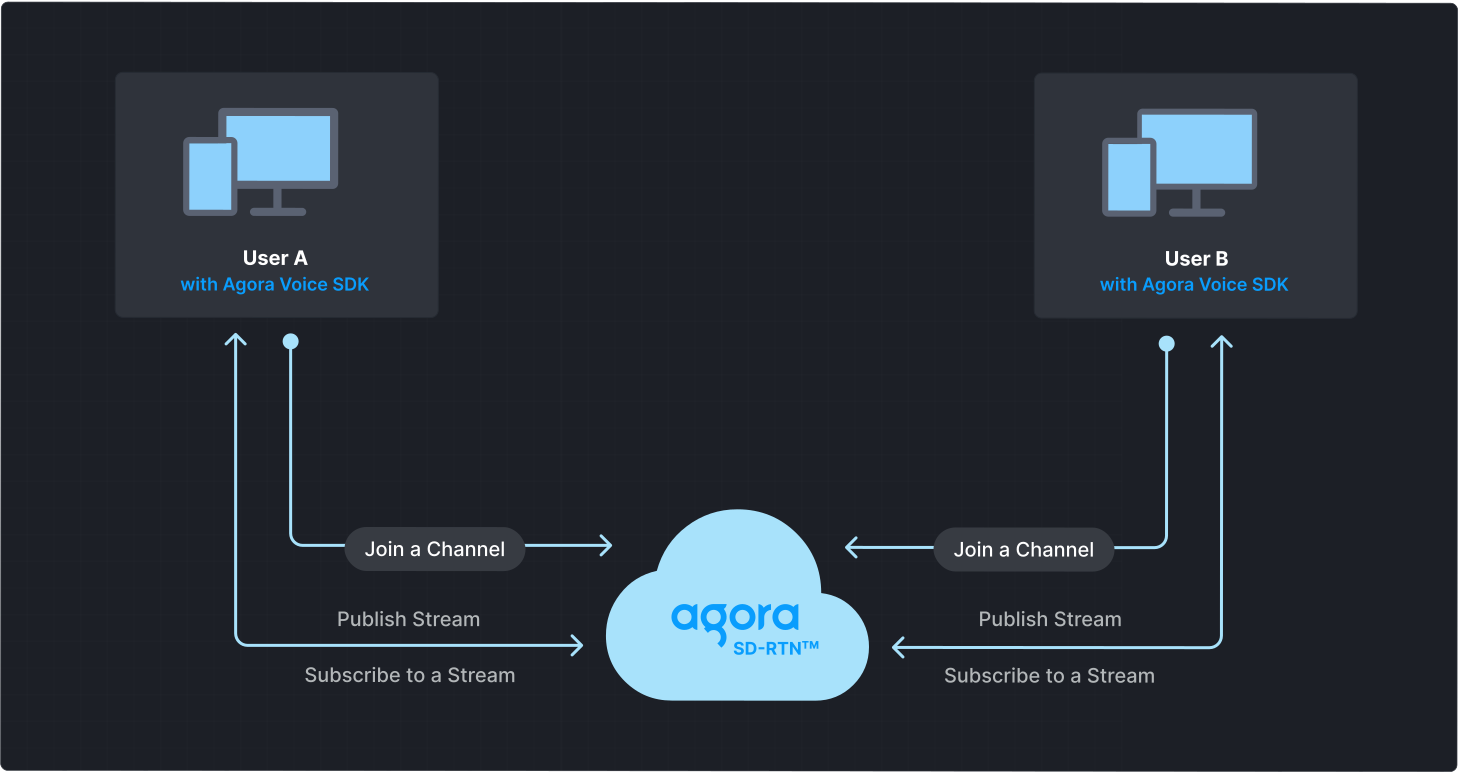
To start a Voice Calling session, implement the following steps in your app:
* **Initialize the Agora Engine**: Before calling other APIs, create and initialize an Agora Engine instance.
* **Join a channel**: Call methods to create and join a channel.
* **Send and receive audio**: All users can publish streams to the channel and subscribe to audio streams published by other users in the channel.
## Prerequisites
* [Flutter](https://docs.flutter.dev/get-started/install) 2.10.5 or higher with Dart 2.14.0 or higher.
* [Android Studio](https://developer.android.com/studio), IntelliJ, VS Code, or any other IDE that supports Flutter. See [Set up an editor](https://docs.flutter.dev/get-started/editor).
* Prepare your development and testing environment according to your [target platform](reference/supported-platforms.md).
Run the `flutter doctor` command to confirm that your development environment is set up correctly for Flutter development.
* A microphone
* A valid Agora account and project. Please refer to [Agora account management](manage-agora-account.md) for details.
## Set up your project
This section shows you how to set up your Flutter project and install the Agora RTC SDK.
Create a new project
Add to an existing project
From the Terminal, run the following commands to create a new project named `agora_project`, or follow the [steps for your IDE](https://docs.flutter.dev/get-started/test-drive?tab=vscode#choose-your-ide):
```bash
flutter create agora_project
cd agora_project
```
To add Voice Calling to your existing project:
1. Open your Flutter project and navigate to the `lib` folder.
2. Add a new file to the `lib` folder and name it `agora_logic.dart`.
### Install the SDK
Install the Agora RTC SDK and other dependencies.
1. Add the [latest version](https://pub.dev/packages/agora_rtc_engine) of Agora RTC SDK to your Flutter project:
```bash
flutter pub add agora_rtc_engine
```
2. Add the permission processing package:
```bash
flutter pub add permission_handler
```
The `dependencies` in your `pubspec.yaml` file should look like the following:
```yaml
dependencies:
flutter:
sdk: flutter
agora_rtc_engine: ^6.5.0 # Agora Flutter SDK, please use the latest version
permission_handler: ^11.3.1 # Package for managing runtime permissions
cupertino_icons: ^1.0.8
```
3. Install the dependencies.
Execute the following command in the project path:
```bash
flutter pub get
```
## Implement Voice Calling
This section guides you through the implementation of basic real-time audio interaction in your app.
The following figure illustrates the essential steps:
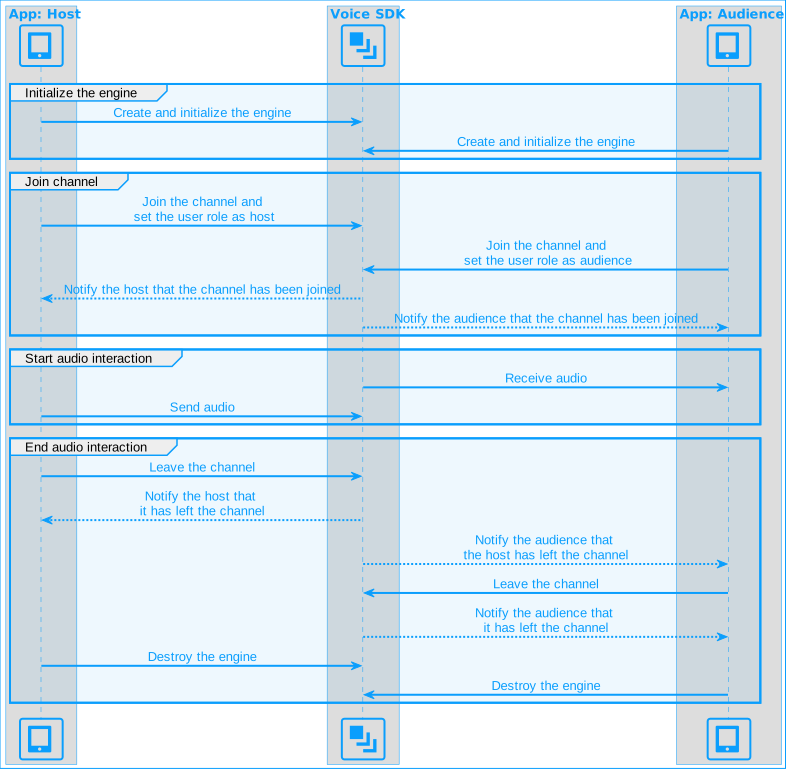
This guide includes [complete sample code](#complete-sample-code) that demonstrates implementing basic real-time interaction. To understand the core API calls in the sample code, review the following implementation steps.
### Import packages
Import the following packages in your dart file.
```dart
import 'dart:async';
import 'package:agora_rtc_engine/agora_rtc_engine.dart';
import 'package:flutter/material.dart';
import 'package:permission_handler/permission_handler.dart';
```
### Initialize the engine
For real-time communication, initialize an `RtcEngine` instance. Use `RtcEngineContext` to specify the [App ID](manage-agora-account.md), and other configuration parameters. In your dart file, add the following code:
```dart
// Set up the Agora RTC engine instance
Future _initializeAgoraVoiceSDK() async {
_engine = createAgoraRtcEngine();
await _engine.initialize(const RtcEngineContext(
appId: "<-- Insert app Id -->",
channelProfile: ChannelProfileType.channelProfileCommunication,
));
}
```
### Join a channel
To join a channel, call `joinChannel` with the following parameters:
* **Channel name**: The name of the channel to join. Clients that pass the same channel name join the same channel. If a channel with the specified name does not exist, it is created when the first user joins.
* **Authentication token**: A dynamic key that authenticates a user when the client joins a channel. In a production environment, you obtain a token from a [token server](build/authenticate-users/deploy-token-server.mdx) in your security infrastructure. For the purpose of this guide [Generate a temporary token](manage-agora-account.md).
* **User ID**: A 32-bit signed integer that identifies a user in the channel. You can specify a unique user ID for each user yourself. If you set the user ID to `0` when joining a channel, the SDK generates a random number for the user ID and returns the value in the `onJoinChannelSuccess` callback.
* **Channel media options**: Configure `ChannelMediaOptions` to define publishing and subscription settings, optimize performance for your specific use-case, and set optional parameters.
For Voice Calling, set the `clientRoleType` to `clientRoleBroadcaster`.
```dart
// Join a channel
Future _joinChannel() async {
await _engine.joinChannel(
token: token,
channelId: channel,
options: const ChannelMediaOptions(
autoSubscribeAudio: true, // Automatically subscribe to all audio streams
publishMicrophoneTrack: true, // Publish microphone-captured audio
// Use clientRoleBroadcaster to act as a host or clientRoleAudience for audience
clientRoleType: ClientRoleType.clientRoleBroadcaster,
),
uid: 0,
);
}
```
### Subscribe to RTC SDK events
The SDK provides the `RtcEngineEventHandler` for subscribing to channel events. To use it, pass an instance of `RtcEngineEventHandler` to `registerEventHandler` and implement the event methods you want to handle.
Call `registerEventHandler` to bind the event handler to the SDK.
```dart
// Register an event handler for Agora RTC
void _setupEventHandlers() {
_engine.registerEventHandler(
RtcEngineEventHandler(
onJoinChannelSuccess: (RtcConnection connection, int elapsed) {
debugPrint("Local user ${connection.localUid} joined");
},
onUserJoined: (RtcConnection connection, int remoteUid, int elapsed) {
debugPrint("Remote user $remoteUid joined");
setState(() {
_remoteUid = remoteUid; // Store remote user ID
});
},
onUserOffline: (RtcConnection connection, int remoteUid, UserOfflineReasonType reason) {
debugPrint("Remote user $remoteUid left");
setState(() {
_remoteUid = null; // Remove remote user ID
});
},
),
);
}
```
To ensure that you receive all RTC SDK events, register the event handler before joining a channel.
### Handle permissions
Request the microphone permission for Voice Calling.
```dart
// Requests microphone permission
Future _requestPermissions() async {
await [Permission.microphone].request();
}
```
If your target platform is iOS or macOS, add the microphone permission declaration required for real-time interaction to [`Info.plist`](https://help.apple.com/xcode/mac/current/#/dev3f399a2a6).
* Microphone: Set the `key` to `Privacy - Microphone Usage Description` and the `value` to the purpose of use, such as `for audio calls`.
### Start and close the app
To start Voice Calling, request microphone permission, initialize the Agora SDK instance, set up an event handler, and join a channel.
```dart
await _requestPermissions();
await _initializeAgoraVoiceSDK();
_setupEventHandlers();
await _joinChannel();
```
To stop Voice Calling, leave the channel and release the engine instance.
```dart
// Leaves the channel and releases resources
Future _cleanupAgoraEngine() async {
await _engine.leaveChannel();
await _engine.release();
}
```
After you call `release`, you no longer have access to the methods and callbacks of the SDK. To use Voice Calling features again, create a new engine instance.
### Complete sample code
A complete code sample demonstrating the basic process of real-time interaction is provided for your reference. To use the sample code, copy the following code to replace the entire contents of the `.dart` file in your project.
```dart
import 'dart:async';
import 'package:agora_rtc_engine/agora_rtc_engine.dart';
import 'package:flutter/material.dart';
import 'package:permission_handler/permission_handler.dart';
void main() => runApp(const MyApp());
// Fill in the app ID obtained from Agora Console
const appId = "<-- Insert app Id -->";
// Fill in the temporary token generated from Agora Console
const token = "<-- Insert token -->";
// Fill in the channel name you used to generate the token
const channel = "<-- Insert channel name -->";
// Main App Widget
class MyApp extends StatelessWidget {
const MyApp({Key? key}) : super(key: key);
@override
Widget build(BuildContext context) {
return const MaterialApp(
home: _MainScreen(),
);
}
}
// Voice call Screen Widget
class _MainScreen extends StatefulWidget {
const _MainScreen({Key? key}) : super(key: key);
@override
_MainScreenScreenState createState() => _MainScreenScreenState();
}
class _MainScreenScreenState extends State<_MainScreen> {
late RtcEngine _engine; // Stores Agora RTC Engine instance
int? _remoteUid; // Stores the remote user's UID
@override
void initState() {
super.initState();
_startVoiceCalling();
}
// Initializes Agora SDK
Future _startVoiceCalling() async {
await _requestPermissions();
await _initializeAgoraVoiceSDK();
_setupEventHandlers();
await _joinChannel();
}
// Requests microphone permission
Future _requestPermissions() async {
await [Permission.microphone].request();
}
// Set up the Agora RTC engine instance
Future _initializeAgoraVoiceSDK() async {
_engine = createAgoraRtcEngine();
await _engine.initialize(const RtcEngineContext(
appId: appId,
channelProfile: ChannelProfileType.channelProfileLiveBroadcasting,
));
}
// Register an event handler for Agora RTC
void _setupEventHandlers() {
_engine.registerEventHandler(
RtcEngineEventHandler(
onJoinChannelSuccess: (RtcConnection connection, int elapsed) {
debugPrint("Local user \${connection.localUid} joined");
},
onUserJoined: (RtcConnection connection, int remoteUid, int elapsed) {
debugPrint("Remote user \$remoteUid joined");
setState(() {
_remoteUid = remoteUid; // Store remote user ID
});
},
onUserOffline: (RtcConnection connection, int remoteUid, UserOfflineReasonType reason) {
debugPrint("Remote user \$remoteUid left");
setState(() {
_remoteUid = null; // Remove remote user ID
});
},
),
);
}
// Join a channel
Future _joinChannel() async {
await _engine.joinChannel(
token: token,
channelId: channel,
options: const ChannelMediaOptions(
autoSubscribeAudio: true,
publishMicrophoneTrack: true,
clientRoleType: ClientRoleType.clientRoleBroadcaster,
),
uid: 0,
);
}
@override
void dispose() {
_cleanupAgoraEngine();
super.dispose();
}
// Leaves the channel and releases resources
Future _cleanupAgoraEngine() async {
await _engine.leaveChannel();
await _engine.release();
}
@override
Widget build(BuildContext context) {
return MaterialApp(
title: 'Agora Voice Call',
home: Scaffold(
appBar: AppBar(
title: const Text('Agora Voice Call'),
),
body: Center(
child: Text(
_remoteUid != null
? "Remote user $_remoteUid joined"
: "No remote user in the channel", // Show appropriate message
style: const TextStyle(fontSize: 18),
),
),
),
);
}
}
```
In the `appId` and `token` fields, enter the corresponding values you obtained from Agora Console. Use the same `channel` name you filled in when generating the temporary token.
### Create a user interface
To connect the sample code to your existing UI, ensure that your widget tree includes the `_remoteVideo` and `_localVideo` widgets used to [Display the local video](#display-the-local-video) and [Display remote video](#display-remote-video).
Alternatively, use the following sample code to generate a basic user interface:
**Sample code to create the user interface**
Use the following code sample to build a basic user interface:
```dart
// Build UI
@override
Widget build(BuildContext context) {
return MaterialApp(
title: 'Agora Voice Call',
home: Scaffold(
appBar: AppBar(
title: const Text('Agora Voice Call'),
),
body: Center(
child: Text(
_remoteUid != null
? "Remote user $_remoteUid joined"
: "No remote user in the channel", // Show appropriate message
style: const TextStyle(fontSize: 18),
),
),
),
);
}
```
## Test the sample code
Take the following steps to test the sample code:
1. In `main.dart` update the values for `appId`, and `token` with values from Agora Console. Fill in the same `channel` name you used to generate the token.
2. Connect a target device to your development computer.
3. Open Terminal and execute the following command in the project folder to run the sample project:
```bash
flutter run
```
4. Launch the App, grant microphone permission.
5. On a second target device, repeat the previous steps to install and launch the app. Test the following use-cases:
* If users on both devices join the channel as hosts, they can hear each other.
* If one user joins as host and the other as audience, the audience can hear the host.
## Reference
This section contains content that completes the information on this page, or points you to documentation that explains other aspects to this product.
* If a firewall is deployed in your network environment, refer to [Connect with Cloud Proxy](build/manage-connection-and-quality/cloud-proxy.mdx) to use Agora services normally.
### Next steps
After implementing the quickstart sample, read the following documents to learn more:
* To ensure communication security in a test or production environment, best practice is to obtain and use a token from an authentication server. For details, see [Secure authentication with tokens](build/authenticate-users/authentication-workflow.mdx).
### Sample project
Agora provides open source sample projects on [GitHub](https://github.com/AgoraIO-Extensions/Agora-Flutter-SDK/tree/main/example/lib/examples) for your reference. Download or view [join\_channel\_audio.dart](https://github.com/AgoraIO-Extensions/Agora-Flutter-SDK/tree/main/example/lib/examples/basic/join_channel_audio) for a more detailed example.
### API reference
* [`registerEventHandler`](https://api-ref.agora.io/en/video-sdk/flutter/6.x/API/class_irtcengine.html#api_irtcengine_addhandler)
* [`setClientRole`](https://api-ref.agora.io/en/video-sdk/flutter/6.x/API/class_irtcengine.html#api_irtcengine_setclientrole2)
* [`setChannelProfile`](https://api-ref.agora.io/en/video-sdk/flutter/6.x/API/class_irtcengine.html#api_irtcengine_setchannelprofile)
* [`joinChannel`](https://api-ref.agora.io/en/video-sdk/flutter/6.x/API/class_irtcengine.html#api_irtcengine_joinchannel2)
* [`leaveChannel`](https://api-ref.agora.io/en/video-sdk/flutter/6.x/API/class_irtcengine.html#api_irtcengine_leavechannel2)
### Frequently asked questions
* [How can I listen for audience joining or leaving a channel?](/en/api-reference/faq/integration/audience_event)
* [How can I solve channel-related issues?](/en/api-reference/faq/integration/channel)
* [How can I set the log file?](/en/api-reference/faq/integration/set_log_file)
### See also
* [Error codes](reference/error-codes.mdx)
* [Connection status management](build/manage-connection-and-quality/connection-status-management.mdx)