# Voice-only quickstart (/en/realtime-media/rtc/voice-quickstart/android)
> For AI agents: see the complete documentation index at [llms.txt](/llms.txt).
This Android quickstart shows you how to create a basic Voice Calling app using the Agora RTC SDK.
## Understand the tech
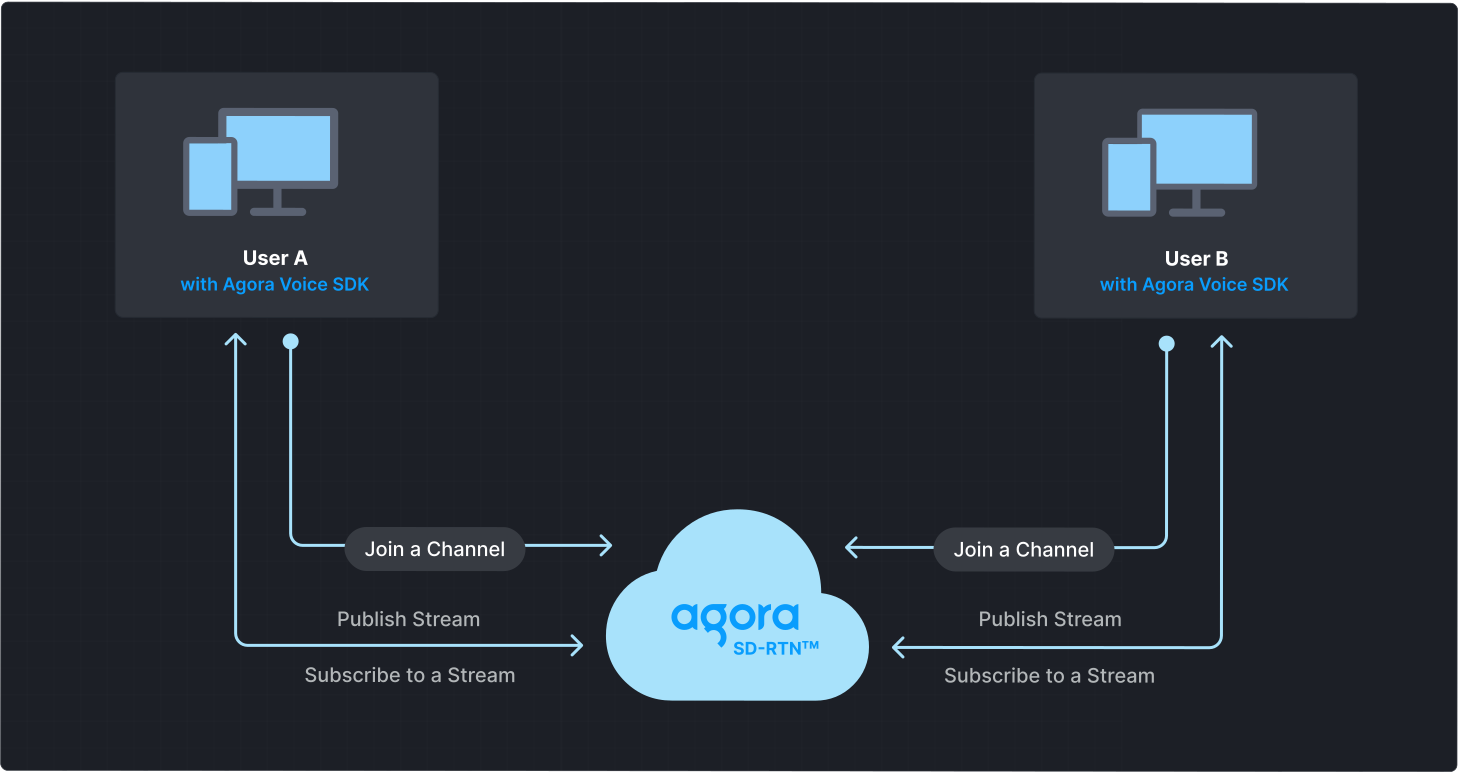
To start a Voice Calling session, implement the following steps in your app:
* **Initialize the Agora Engine**: Before calling other APIs, create and initialize an Agora Engine instance.
* **Join a channel**: Call methods to create and join a channel.
* **Send and receive audio**: All users can publish streams to the channel and subscribe to audio streams published by other users in the channel.
## Prerequisites
* [Android Studio](https://developer.android.com/studio) 4.2 or higher.
* Android SDK API Level 21 or higher.
* Two mobile devices running Android 5.0 or higher.
* A microphone
* A valid Agora account and project. Please refer to [Agora account management](manage-agora-account.md) for details.
## Set up your project
This section shows you how to set up your Android project and install the Agora RTC SDK.
Create a new project
Add to an existing project
1. Create a [new project](https://developer.android.com/studio/projects/create-project).
1. Open Android Studio and select **File > New > New Project...**.
2. Select **Phone and Tablet** > **Empty Activity** and click **Next**.
3. Set the project name and storage path.
4. Select **Java** or **Kotlin** as the language, and click **Finish** to create the Android project.
After you create a project, Android Studio automatically starts gradle sync. Ensure that the synchronization is successful before proceeding to the next step.
1. Add a new activity to your project.
1. Open your project in Android Studio.
2. Right-click on the `app/src/main/java/` folder.
3. Select **New → Activity → Empty Activity**.
4. Enter an activity name and click **Finish**.
This guide uses `MainActivity` as the activity name in the sample code. Replace it with your activity name where required.
2. Add a layout file for your activity.
Set up a basic layout for your activity. Refer to [Create a user interface](#create-a-user-interface) to get a bare bones sample layout.
### Install the SDK
Use either of the following methods to add RTC SDK to your project.
Maven Central
Manual integration
1. Open the `settings.gradle` file in the project's root directory and add the Maven Central dependency, if it doesn't already exist:
```text
repositories {
mavenCentral()
}
```
If your Android project uses dependencyResolutionManagement, the method of adding the Maven Central dependency may differ.
1. To integrate the RTC SDK into your Android project, add the following to the `dependencies` block in your project module `build.gradle` file:
* Groovy `build.gradle`
```json
implementation 'io.agora.rtc:voice-sdk:x.y.z'
```
* Kotlin `build.gradle.kts`
```kotlin
implementation("io.agora.rtc:voice-sdk:x.y.z")
```
Replace `x.y.z` with the specific SDK version number, such as `4.5.0`.
To get the latest version number, check the [Release notes](reference/release-notes.mdx). To integrate the Lite SDK, use `io.agora.rtc:lite-sdk` instead.
1. Prevent code obfuscation
Open the `/app/proguard-rules.pro` file and add the following lines to prevent the RTC SDK code from being obfuscated:
```java
-keep class io.agora.** { *; }
-dontwarn io.agora.**
```
1. Download the latest version of RTC SDK from the [SDKs](/en/api-reference/sdks?product=voice\&platform=android) page and unzip it.
2. Open the unzipped file and copy the following files or subfolders to your project path.
| File or folder | Project path |
| :----------------------------------- | :----------------------- |
| `agora-rtc-sdk.jar` file | `/app/libs/` |
| `arm64-v8a` folder | `/app/src/main/jniLibs/` |
| `armeabi-v7a` folder | `/app/src/main/jniLibs/` |
| `x86` folder | `/app/src/main/jniLibs/` |
| `x86_64` folder | `/app/src/main/jniLibs/` |
| `high_level_api` in `include` folder | `/app/src/main/jniLibs/` |
1. Select the file `/app/libs/agora-rtc-sdk.jar` in the left navigation bar of Android Studio project files, right-click, and select **add as a library** from the drop-down menu.
2. Prevent code obfuscation
Open the `/app/proguard-rules.pro` file and add the following lines to prevent the RTC SDK code from being obfuscated:
```java
-keep class io.agora.** { *; }
-dontwarn io.agora.**
```
## Implement Voice Calling
This section guides you through the implementation of basic real-time audio interaction in your app.
The following figure illustrates the essential steps:
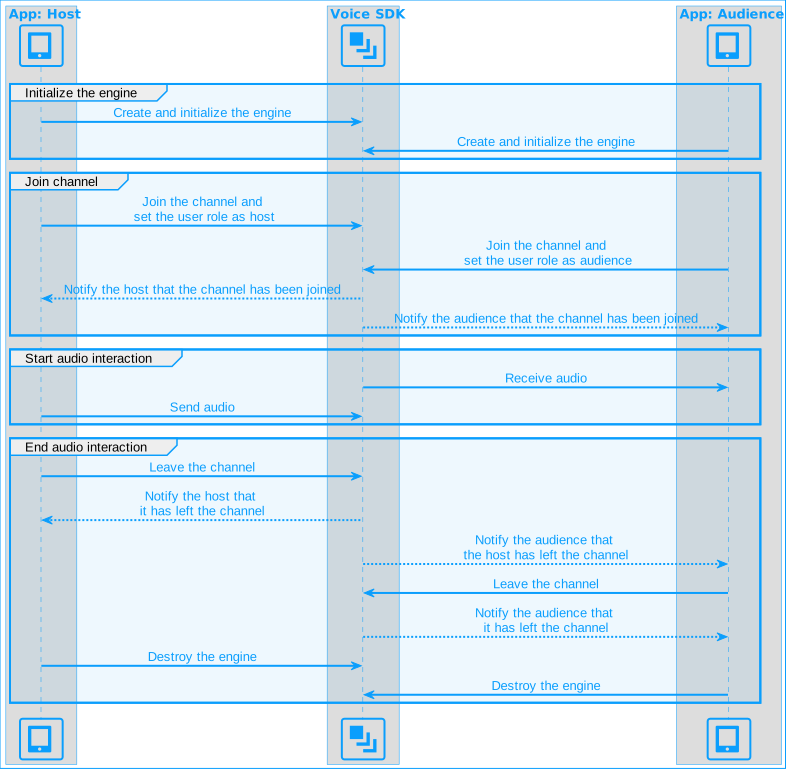
This guide includes [complete sample code](#complete-sample-code) that demonstrates implementing basic real-time interaction. To understand the core API calls in the sample code, review the following implementation steps and use the code in your `MainActivity` file.
### Import Agora classes
Import the relevant Agora classes and interfaces:
Java
Kotlin
```java
import io.agora.rtc2.Constants;
import io.agora.rtc2.IRtcEngineEventHandler;
import io.agora.rtc2.RtcEngine;
import io.agora.rtc2.RtcEngineConfig;
import io.agora.rtc2.ChannelMediaOptions;
```
```kotlin
import io.agora.rtc2.ChannelMediaOptions
import io.agora.rtc2.Constants
import io.agora.rtc2.IRtcEngineEventHandler
import io.agora.rtc2.RtcEngine
import io.agora.rtc2.RtcEngineConfig
```
### Initialize the engine
For real-time communication, initialize an `RtcEngine` instance and set up event handlers to manage user interactions within the channel. Use `RtcEngineConfig` to specify the application context, [App ID](manage-agora-account.md), and custom [event handler](#subscribe-to-rtc-sdk-events), then call `RtcEngine.create(config)` to initialize the engine, enabling further channel operations. In your `MainActivity` file, add the following code:
Java
Kotlin
```java
// Fill in the app ID from Agora Console
private String myAppId = "";
private RtcEngine mRtcEngine;
private void initializeAgoraVoiceSDK() {
try {
RtcEngineConfig config = new RtcEngineConfig();
config.mContext = getBaseContext();
config.mAppId = myAppId;
config.mEventHandler = mRtcEventHandler;
mRtcEngine = RtcEngine.create(config);
} catch (Exception e) {
throw new RuntimeException("Error initializing RTC engine: " + e.getMessage());
}
}
```
```kotlin
// Fill in the App ID obtained from the Agora Console
private val myAppId = ""
private var mRtcEngine: RtcEngine? = null
private fun initializeAgoraVoiceSDK() {
try {
val config = RtcEngineConfig().apply {
mContext = baseContext
mAppId = myAppId
mEventHandler = mRtcEventHandler
}
mRtcEngine = RtcEngine.create(config)
} catch (e: Exception) {
throw RuntimeException("Error initializing RTC engine: ${e.message}")
}
}
```
### Join a channel
To join a channel, call `joinChannel` with the following parameters:
* **Channel name**: The name of the channel to join. Clients that pass the same channel name join the same channel. If a channel with the specified name does not exist, it is created when the first user joins.
* **Authentication token**: A dynamic key that authenticates a user when the client joins a channel. In a production environment, you obtain a token from a [token server](build/authenticate-users/deploy-token-server.mdx) in your security infrastructure. For the purpose of this guide [Generate a temporary token](manage-agora-account.md).
* **User ID**: A 32-bit signed integer that identifies a user in the channel. You can specify a unique user ID for each user yourself. If you set the user ID to `0` when joining a channel, the SDK generates a random number for the user ID and returns the value in the `onJoinChannelSuccess` callback.
* **Channel media options**: Configure `ChannelMediaOptions` to define publishing and subscription settings, optimize performance for your specific use-case, and set optional parameters.
For Voice Calling, set the `channelProfile` to `CHANNEL_PROFILE_COMMUNICATION` and the user role to `CLIENT_ROLE_BROADCASTER`.
Java
Kotlin
```java
// Fill in the channel name
private String channelName = "";
// Fill in the temporary token generated from Agora Console
private String token = "";
private void joinChannel() {
ChannelMediaOptions options = new ChannelMediaOptions();
options.clientRoleType = Constants.CLIENT_ROLE_BROADCASTER;
options.channelProfile = Constants.CHANNEL_PROFILE_COMMUNICATION;
options.publishCameraTrack = true;
mRtcEngine.joinChannel(token, channelName, 0, options);
}
```
```kotlin
// Fill in the channel name
private val channelName = ""
// Fill in the temporary token generated from Agora Console
private val token = ""
private fun joinChannel() {
val options = ChannelMediaOptions().apply {
clientRoleType = Constants.CLIENT_ROLE_BROADCASTER
channelProfile = Constants.CHANNEL_PROFILE_COMMUNICATION
publishMicrophoneTrack = true;
}
mRtcEngine?.joinChannel(token, channelName, 0, options)
}
```
### Subscribe to RTC SDK events
The RTC SDK provides an interface for subscribing to channel events. To use it, create an instance of `IRtcEngineEventHandler` and implement the event methods you want to handle.
To ensure that you receive all RTC SDK events, set the Agora Engine event handler before joining a channel.
Java
Kotlin
```java
private final IRtcEngineEventHandler mRtcEventHandler = new IRtcEngineEventHandler() {
// Callback when successfully joining the channel
@Override
public void onJoinChannelSuccess(String channel, int uid, int elapsed) {
super.onJoinChannelSuccess(channel, uid, elapsed);
showToast("Joined channel " + channel);
}
// Callback when a remote user or host joins the current channel
@Override
public void onUserJoined(int uid, int elapsed) {
super.onUserJoined(uid, elapsed);
runOnUiThread(() -> {
showToast("User joined: " + uid); // Show toast for user joining
});
}
// Callback when a remote user or host leaves the current channel
@Override
public void onUserOffline(int uid, int reason) {
super.onUserOffline(uid, reason);
runOnUiThread(() -> {
showToast("User offline: " + uid); // Show toast for user going offline
});
}
};
```
```kotlin
private val mRtcEventHandler = object : IRtcEngineEventHandler() {
override fun onJoinChannelSuccess(channel: String?, uid: Int, elapsed: Int) {
super.onJoinChannelSuccess(channel, uid, elapsed)
runOnUiThread {
showToast("Joined channel $channel")
}
}
override fun onUserJoined(uid: Int, elapsed: Int) {
runOnUiThread {
showToast("User joined: $uid")
}
}
override fun onUserOffline(uid: Int, reason: Int) {
super.onUserOffline(uid, reason)
runOnUiThread {
showToast("User offline: $uid")
}
}
}
```
### Handle permissions
To access the microphone on Android devices, declare the necessary permissions in the app's manifest and ensure that the user grants these permissions when the app starts.
1. Open your project's `AndroidManifest.xml` file and add the following permissions before ``:
```xml
```
2. Use the following code to handle runtime permissions in your Android app. The logic ensures that the necessary permissions are granted before starting Voice Calling. In your `MainActivity` file, add the following code:
Java
Kotlin
```java
private static final int PERMISSION_REQ_ID = 22;
private boolean checkPermissions() {
for (String permission : getRequiredPermissions()) {
if (ContextCompat.checkSelfPermission(this, permission) != PackageManager.PERMISSION_GRANTED) {
return false;
}
}
return true;
}
private void requestPermissions() {
ActivityCompat.requestPermissions(this, getRequiredPermissions(), PERMISSION_REQ_ID);
}
private String[] getRequiredPermissions() {
if (Build.VERSION.SDK_INT >= Build.VERSION_CODES.S) {
return new String[]{
Manifest.permission.RECORD_AUDIO,
Manifest.permission.READ_PHONE_STATE,
Manifest.permission.BLUETOOTH_CONNECT
};
} else {
return new String[]{Manifest.permission.RECORD_AUDIO};
}
}
@Override
public void onRequestPermissionsResult(int requestCode, @NonNull String[] permissions, @NonNull int[] grantResults) {
super.onRequestPermissionsResult(requestCode, permissions, grantResults);
if (checkPermissions()) {
startVoiceCalling();
}
}
```
```kotlin
private val permissionReqId = 22
private fun checkPermissions(): Boolean {
for (permission in getRequiredPermissions()) {
if (ContextCompat.checkSelfPermission(this, permission) != PackageManager.PERMISSION_GRANTED) {
return false
}
}
return true
}
private fun requestPermissions() {
ActivityCompat.requestPermissions(this, getRequiredPermissions(), PERMISSION_REQ_ID)
}
private fun getRequiredPermissions(): Array {
return if (Build.VERSION.SDK_INT >= Build.VERSION_CODES.S) {
arrayOf(
Manifest.permission.RECORD_AUDIO,
Manifest.permission.READ_PHONE_STATE,
Manifest.permission.BLUETOOTH_CONNECT
)
} else {
arrayOf(Manifest.permission.RECORD_AUDIO)
}
}
override fun onRequestPermissionsResult(requestCode: Int, permissions: Array, grantResults: IntArray) {
super.onRequestPermissionsResult(requestCode, permissions, grantResults)
if (checkPermissions()) {
startVoiceCalling()
}
}
```
### Start and close the app
When a user launches your app, start real-time interaction. When a user closes the app, stop the interaction.
1. In the `onCreate` callback, check whether the app has been granted the required permissions. If the permissions have not been granted, request the required permissions from the user. If permissions are granted, initialize `RtcEngine` and join a channel.
Java
Kotlin
```java
@Override
protected void onCreate(Bundle savedInstanceState) {
super.onCreate(savedInstanceState);
setContentView(R.layout.activity_main);
if (checkPermissions()) {
startVoiceCalling();
} else {
requestPermissions();
}
}
```
```kotlin
override fun onCreate(savedInstanceState: Bundle?) {
super.onCreate(savedInstanceState)
setContentView(R.layout.activity_main)
if (checkPermissions()) {
startVoiceCalling()
} else {
requestPermissions()
}
}
```
2. When a user closes the app, or switches the app to the background, call `leaveChannel` to leave the current channel and release all session-related resources.
Java
Kotlin
```java
private void cleanupAgoraEngine() {
if (mRtcEngine != null) {
mRtcEngine.leaveChannel();
mRtcEngine = null;
}
}
```
```kotlin
private fun cleanupAgoraEngine() {
mRtcEngine?.apply {
leaveChannel()
}
mRtcEngine = null
}
```
### Complete sample code
A complete code sample demonstrating the basic process of real-time interaction is provided for your reference. To use the sample code, copy the following lines into the `MainActivity` file in your project. Then, replace `` in package `com.example.` with your project's name.
Java
Kotlin
```java
package com.example.;
import android.Manifest;
import android.content.pm.PackageManager;
import android.os.Build;
import android.os.Bundle;
import android.widget.Toast;
import androidx.annotation.NonNull;
import androidx.appcompat.app.AppCompatActivity;
import androidx.core.app.ActivityCompat;
import androidx.core.content.ContextCompat;
import io.agora.rtc2.ChannelMediaOptions;
import io.agora.rtc2.Constants;
import io.agora.rtc2.IRtcEngineEventHandler;
import io.agora.rtc2.RtcEngine;
import io.agora.rtc2.RtcEngineConfig;
public class MainActivity extends AppCompatActivity {
private static final int PERMISSION_REQ_ID = 22;
private final String myAppId = "";
private final String channelName = "";
private final String token = "";
private RtcEngine mRtcEngine;
private final IRtcEngineEventHandler mRtcEventHandler = new IRtcEngineEventHandler() {
// Callback when successfully joining the channel
@Override
public void onJoinChannelSuccess(String channel, int uid, int elapsed) {
super.onJoinChannelSuccess(channel, uid, elapsed);
showToast("Joined channel " + channel);
}
// Callback when a remote user or host joins the current channel
@Override
public void onUserJoined(int uid, int elapsed) {
super.onUserJoined(uid, elapsed);
runOnUiThread(() -> {
showToast("User joined: " + uid); // Show toast for user joining
});
}
// Callback when a remote user or host leaves the current channel
@Override
public void onUserOffline(int uid, int reason) {
super.onUserOffline(uid, reason);
runOnUiThread(() -> {
showToast("User offline: " + uid); // Show toast for user going offline
});
}
};
@Override
protected void onCreate(Bundle savedInstanceState) {
super.onCreate(savedInstanceState);
setContentView(R.layout.activity_main);
if (checkPermissions()) {
startVoiceCalling();
} else {
requestPermissions();
}
}
private boolean checkPermissions() {
for (String permission : getRequiredPermissions()) {
if (ContextCompat.checkSelfPermission(this, permission) != PackageManager.PERMISSION_GRANTED) {
return false;
}
}
return true;
}
private void requestPermissions() {
ActivityCompat.requestPermissions(this, getRequiredPermissions(), PERMISSION_REQ_ID);
}
private String[] getRequiredPermissions() {
if (Build.VERSION.SDK_INT >= Build.VERSION_CODES.S) {
return new String[]{
Manifest.permission.RECORD_AUDIO,
Manifest.permission.READ_PHONE_STATE,
Manifest.permission.BLUETOOTH_CONNECT
};
} else {
return new String[]{Manifest.permission.RECORD_AUDIO};
}
}
@Override
public void onRequestPermissionsResult(int requestCode, @NonNull String[] permissions, @NonNull int[] grantResults) {
super.onRequestPermissionsResult(requestCode, permissions, grantResults);
if (checkPermissions()) {
startVoiceCalling();
}
}
private void startVoiceCalling() {
initializeAgoraVoiceSDK();
joinChannel();
}
private void initializeAgoraVoiceSDK() {
try {
RtcEngineConfig config = new RtcEngineConfig();
config.mContext = getApplicationContext();
config.mAppId = myAppId;
config.mEventHandler = mRtcEventHandler;
mRtcEngine = RtcEngine.create(config);
} catch (Exception e) {
throw new RuntimeException("Error initializing RTC engine: " + e.getMessage());
}
}
private void joinChannel() {
ChannelMediaOptions options = new ChannelMediaOptions();
options.clientRoleType = Constants.CLIENT_ROLE_BROADCASTER;
options.channelProfile = Constants.CHANNEL_PROFILE_COMMUNICATION;
options.publishMicrophoneTrack = true;
mRtcEngine.joinChannel(token, channelName, 0, options);
}
@Override
protected void onDestroy() {
super.onDestroy();
cleanupAgoraEngine();
}
private void cleanupAgoraEngine() {
if (mRtcEngine != null) {
mRtcEngine.leaveChannel();
mRtcEngine = null;
}
}
private void showToast(String message) {
runOnUiThread(() -> Toast.makeText(MainActivity.this, message, Toast.LENGTH_SHORT).show());
}
}
```
```kotlin
package com.example.
import android.Manifest
import android.content.pm.PackageManager
import android.os.Build
import android.os.Bundle
import android.widget.Toast
import androidx.appcompat.app.AppCompatActivity
import androidx.core.app.ActivityCompat
import androidx.core.content.ContextCompat
import io.agora.rtc2.ChannelMediaOptions
import io.agora.rtc2.Constants
import io.agora.rtc2.IRtcEngineEventHandler
import io.agora.rtc2.RtcEngine
import io.agora.rtc2.RtcEngineConfig
class MainActivity : AppCompatActivity() {
private val PERMISSION_REQ_ID = 22
private val myAppId = ""
private val channelName = ""
private val token = ""
private var mRtcEngine: RtcEngine? = null
private val mRtcEventHandler = object : IRtcEngineEventHandler() {
override fun onJoinChannelSuccess(channel: String?, uid: Int, elapsed: Int) {
super.onJoinChannelSuccess(channel, uid, elapsed)
runOnUiThread {
showToast("Joined channel $channel")
}
}
override fun onUserJoined(uid: Int, elapsed: Int) {
runOnUiThread {
showToast("A user joined")
}
}
override fun onUserOffline(uid: Int, reason: Int) {
super.onUserOffline(uid, reason)
runOnUiThread {
showToast("User offline: $uid")
}
}
}
override fun onCreate(savedInstanceState: Bundle?) {
super.onCreate(savedInstanceState)
setContentView(R.layout.activity_main)
if (checkPermissions()) {
startVoiceCalling()
} else {
requestPermissions()
}
}
private fun checkPermissions(): Boolean {
for (permission in getRequiredPermissions()) {
if (ContextCompat.checkSelfPermission(this, permission) != PackageManager.PERMISSION_GRANTED) {
return false
}
}
return true
}
private fun requestPermissions() {
ActivityCompat.requestPermissions(this, getRequiredPermissions(), PERMISSION_REQ_ID)
}
private fun getRequiredPermissions(): Array {
return if (Build.VERSION.SDK_INT >= Build.VERSION_CODES.S) {
arrayOf(
Manifest.permission.RECORD_AUDIO,
Manifest.permission.READ_PHONE_STATE,
Manifest.permission.BLUETOOTH_CONNECT
)
} else {
arrayOf(Manifest.permission.RECORD_AUDIO)
}
}
override fun onRequestPermissionsResult(requestCode: Int, permissions: Array, grantResults: IntArray) {
super.onRequestPermissionsResult(requestCode, permissions, grantResults)
if (checkPermissions()) {
startVoiceCalling()
}
}
private fun startVoiceCalling() {
initializeAgoraVoiceSDK()
joinChannel()
}
private fun initializeAgoraVoiceSDK() {
try {
val config = RtcEngineConfig().apply {
mContext = baseContext
mAppId = myAppId
mEventHandler = mRtcEventHandler
}
mRtcEngine = RtcEngine.create(config)
} catch (e: Exception) {
throw RuntimeException("Error initializing RTC engine: ${e.message}")
}
}
private fun joinChannel() {
val options = ChannelMediaOptions().apply {
clientRoleType = Constants.CLIENT_ROLE_BROADCASTER
channelProfile = Constants.CHANNEL_PROFILE_COMMUNICATION
publishMicrophoneTrack = true
}
mRtcEngine?.joinChannel(token, channelName, 0, options)
}
override fun onDestroy() {
super.onDestroy()
cleanupAgoraEngine()
}
private fun cleanupAgoraEngine() {
mRtcEngine?.apply {
stopPreview()
leaveChannel()
}
mRtcEngine = null
}
private fun showToast(message: String) {
runOnUiThread {
Toast.makeText(this@MainActivity, message, Toast.LENGTH_SHORT).show()
}
}
}
```
For the `myAppId` and `token` variables, replace the placeholders with the values you obtained from Agora Console. Ensure you enter the same `channelName` you used when generating the temporary token.
### Create a user interface
Use the following code to generate a basic user interface. Paste the code into the `/app/src/main/res/layout/activity_main.xml` file, replacing the existing content.
**Sample code to create the user interface**
```xml
```
## Test the sample code
Take the following steps to test the sample code:
1. In `MainActivity` update the values for `myAppId`, and `token` with values from Agora Console. Fill in the same `channelName` you used to generate the token.
2. Enable developer options on your Android test device. Turn on USB debugging, connect the Android device to your development machine through a USB cable, and check that your device appears in the Android device options.
3. In Android Studio, click  **Sync Project with Gradle Files** to resolve project dependencies and update the configuration.
4. After synchronization is successful, click  **Run app**. Android Studio starts compilation. After a few moments, the app is installed on your Android device.
5. Launch the App, grant the recording permission.
6. On a second Android device, repeat the previous steps to install and launch the app. Alternatively, use the [Web demo](https://webdemo.agora.io/basicVideoCall/index.html) to join the same channel and test the following use-cases:
* If users on both devices join the channel as hosts, they can hear each other.
* If one user joins as host and the other as audience, the audience can hear the host.
## Reference
This section contains content that completes the information on this page, or points you to documentation that explains other aspects to this product.
* If a firewall is deployed in your network environment, refer to [Connect with Cloud Proxy](build/manage-connection-and-quality/cloud-proxy.mdx) to use Agora services normally.
### Next steps
After implementing the quickstart sample, read the following documents to learn more:
* To ensure communication security in a test or production environment, best practice is to obtain and use a token from an authentication server. For details, see [Secure authentication with tokens](build/authenticate-users/authentication-workflow.mdx).
### Sample project
Agora provides open source sample projects on [GitHub](https://github.com/AgoraIO/API-Examples) for your reference. Download or view the [JoinChannelAudio](https://github.com/AgoraIO/API-Examples/blob/main/Android/APIExample/app/src/main/java/io/agora/api/example/examples/basic/JoinChannelAudio.java) project for a more detailed example.
### API reference
* [`RtcEngineConfig`](https://api-ref.agora.io/en/voice-sdk/android/4.x/API/class_rtcengineconfig.html)
* [`create`](https://api-ref.agora.io/en/voice-sdk/android/4.x/API/class_irtcengine.html#api_irtcengine_create)
* [`ChannelMediaOptions`](https://api-ref.agora.io/en/voice-sdk/android/4.x/API/class_channelmediaoptions.html)
* [`joinChannel`](https://api-ref.agora.io/en/voice-sdk/android/4.x/API/class_irtcengine.html#api_irtcengine_joinchannel2)
* [`leaveChannel`](https://api-ref.agora.io/en/voice-sdk/android/4.x/API/class_irtcengine.html#api_irtcengine_leavechannel)
* [`IRtcEngineEventHandler`](https://api-ref.agora.io/en/voice-sdk/android/4.x/API/class_irtcengineeventhandler.html#class_irtcengineeventhandler)
### Frequently asked questions
* [How can I listen for audience joining or leaving a channel?](/en/api-reference/faq/integration/audience_event)
* [How can I solve channel-related issues?](/en/api-reference/faq/integration/channel)
* [How can I set the log file?](/en/api-reference/faq/integration/set_log_file)
* [Why do apps on some Android versions fail to capture audio and video after screen locking or switching to the background?](/en/api-reference/faq/quality/android_background)
### See also
* [Error codes](reference/error-codes.mdx)
* [Connection status management](build/manage-connection-and-quality/connection-status-management.mdx)