# Manage media and devices (/en/realtime-media/rtc/build/control-audio-and-devices/volume-control-and-mute/unreal)
> For AI agents: see the complete documentation index at [llms.txt](/llms.txt).
This page shows you how to configure volume settings for audio recording, audio playback, and for the playback of music files.
## Understand the tech
Agora RTC SDK supports adjusting the audio volume for both recording and playback to meet practical application use-cases. For example, during a two-person call, you can mute a remote user by adjusting the playback volume setting to 0.
The figure below shows the workflow of adjusting the volume.
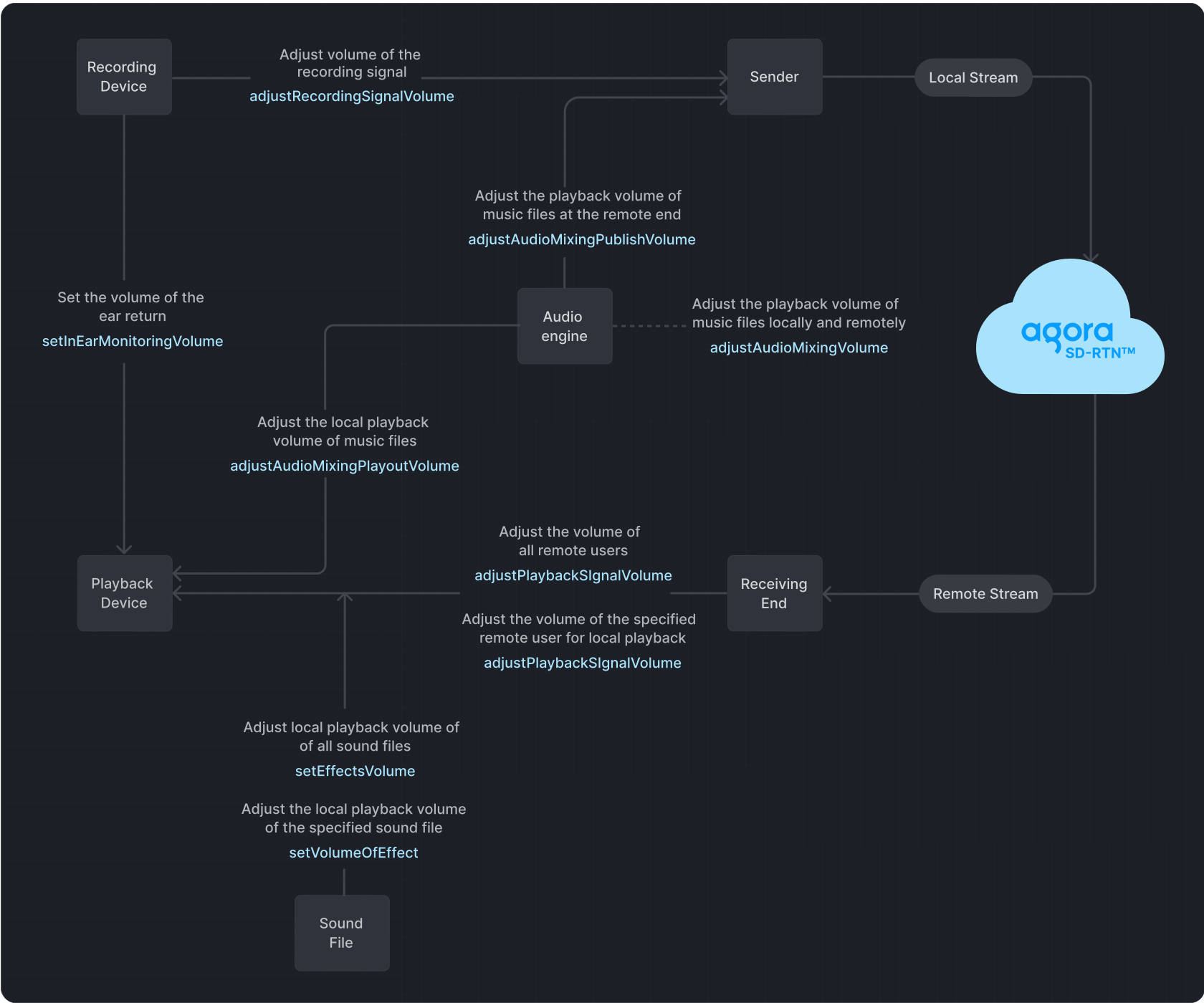
**Playback** refers to transmitting an audio signal from a sender to a recipient, where it is played back through a playback device.
**Recording** refers to the process in which audio signals are captured by a recording device and then sent to the transmitter.
Caution
If you set the volume too high using the signal volume adjustment methods, it may lead to audio distortion on some devices.
## Prerequisites
Ensure that you have implemented the [SDK quickstart](/en/realtime-media/rtc/get-started-sdk) in your project.
## Implement volume control
Use one or more of the following volume control methods to adjust volume settings.
### Mute and unmute users
To mute or unmute the local audio stream, call `muteLocalAudioStream`:
```cpp
// Stop publishing the local audio stream
m_rtcEngine->muteLocalAudioStream(true);
// Resume publishing the local audio stream
m_rtcEngine->muteLocalAudioStream(false);
```
To mute or unmute a remote user, call `muteRemoteAudioStream` with the `uid` of the remote user:
```cpp
// Stop subscribing to the audio stream of the remote user
m_rtcEngine->muteRemoteAudioStream(remoteUid, true);
// Resume subscribing to the audio stream of the remote user
m_rtcEngine->muteRemoteAudioStream(remoteUid, false);
```
To mute remote users without unsubscribing, set their [playback volume](#adjust-the-playback-volume) to `0`.
### Adjust the playback volume
Call `adjustPlaybackSignalVolume` or `adjustUserPlaybackSignalVolume` to adjust the volume of the audio playback signal.
```cpp
int volume = 50;
int uid = 123456;
// Set the local playback volume for all remote users
m_rtcEngine->adjustPlaybackSignalVolume(volume);
// Set the local playback volume for a specific remote user. For example, user 123456
m_rtcEngine->adjustUserPlaybackSignalVolume(uid, volume)
```
### Adjust the recording volume
Call `adjustRecordingSignalVolume` to adjust the volume of the audio recording signal.
```cpp
// Adjust the recording signal volume to 50
int vol = 50;
m_rtcEngine->adjustRecordingSignalVolume(vol);
```
When configuring audio settings, it's essential to understand the default behavior and the options available. Here are the key points to keep in mind:
* The SDK defaults to a device volume of `85` when using the recording device to capture audio signals.
* A volume of `0` means mute, and a volume of `255` represents the maximum volume of the device.
* If the SDK detects that the recording volume is too low in the current environment, it automatically increases the volume of the recording device.
* The volume of the recording device directly influences the global volume of the device.
* If the default recording device volume does not meet your requirements, adjust it by regulating the signal amplitude captured by the microphone or sound card.
### Get volume information of users
RTC SDK enables you to obtain the user IDs and corresponding volumes of the three users with the highest instantaneous volumes in a channel during the process of audio recording, mixing, and playback. You use the `onAudioVolumeIndication` callback to obtain this information. A returned `uid` of `0` in the callback indicates the local user.
```cpp
// Retrieve the user IDs of the three users with the highest instantaneous speaking volume,
// their respective volumes, and determine whether the local user is speaking.
void CAudioVolumeEventHandler::onAudioVolumeIndication(const AudioVolumeInfo* speakers, unsigned int speakerNumber, int totalVolume){
}
// Enable the onAudioVolumeIndication callback
m_rtcEngine->enableAudioVolumeIndication(1000, 0, true);
```
Note
Call `enableAudioVolumeIndication` to enable reporting of the users' volume in the callback.
## Reference
This section contains content that completes the information on this page, or points you to documentation that explains other aspects to this product.
### API reference
* [`adjustRecordingSignalVolume`](https://api-ref.agora.io/en/video-sdk/unreal-engine/4.x/API/class_irtcengine.html#api_irtcengine_adjustrecordingsignalvolume)
* [`adjustPlaybackSignalVolume`](https://api-ref.agora.io/en/video-sdk/unreal-engine/4.x/API/class_irtcengine.html#api_irtcengine_adjustplaybacksignalvolume)
* [`adjustUserPlaybackSignalVolume`](https://api-ref.agora.io/en/video-sdk/unreal-engine/4.x/API/class_irtcengine.html#api_irtcengine_adjustuserplaybacksignalvolume)
* [`adjustAudioMixingPlayoutVolume`](https://api-ref.agora.io/en/video-sdk/unreal-engine/4.x/API/class_irtcengine.html#api_irtcengine_adjustaudiomixingplayoutvolume)
* [`onAudioVolumeIndication`](https://api-ref.agora.io/en/video-sdk/unreal-engine/4.x/API/class_irtcengineeventhandler.html#callback_irtcengineeventhandler_onaudiovolumeindication)
* [`muteLocalAudioStream`](https://api-ref.agora.io/en/video-sdk/unreal-engine/4.x/API/class_irtcengine.html#api_irtcengine_mutelocalaudiostream)
* [`muteRemoteAudioStream`](https://api-ref.agora.io/en/video-sdk/unreal-engine/4.x/API/class_irtcengine.html#api_irtcengine_muteremoteaudiostream)
### Sample project
Agora provides an open source sample project for your reference. Download or view the [SDK API-Example](https://github.com/AgoraIO-Extensions/Agora-Unreal-RTC-SDK/tree/main/Agora-Unreal-SDK-CPP-Example) source code for a more detailed example.
### Frequently asked questions
* [How can I solve the problem of low volume?](/en/api-reference/faq/quality/audio_low)
### See also
* [Custom audio source](/en/realtime-media/rtc/build/customize-audio-processing/custom-audio)
* [Custom video source](/en/realtime-media/rtc/build/capture-and-render-video/custom-video)