# Super Clarity (Beta) (/en/realtime-media/rtc/build/apply-video-effects/super-clarity)
> For AI agents: see the complete documentation index at [llms.txt](/llms.txt).
This feature is supported only on Web.
The Super Clarity extension leverages Agora's AI quality enhancement algorithm, which intelligently improves video quality without altering the resolution, thereby optimizing the viewing experience at the receiving end. The AI enhancement algorithm supports over 95% of mobile devices and ensures high-quality video rendering on low-end devices.
## Understand the tech
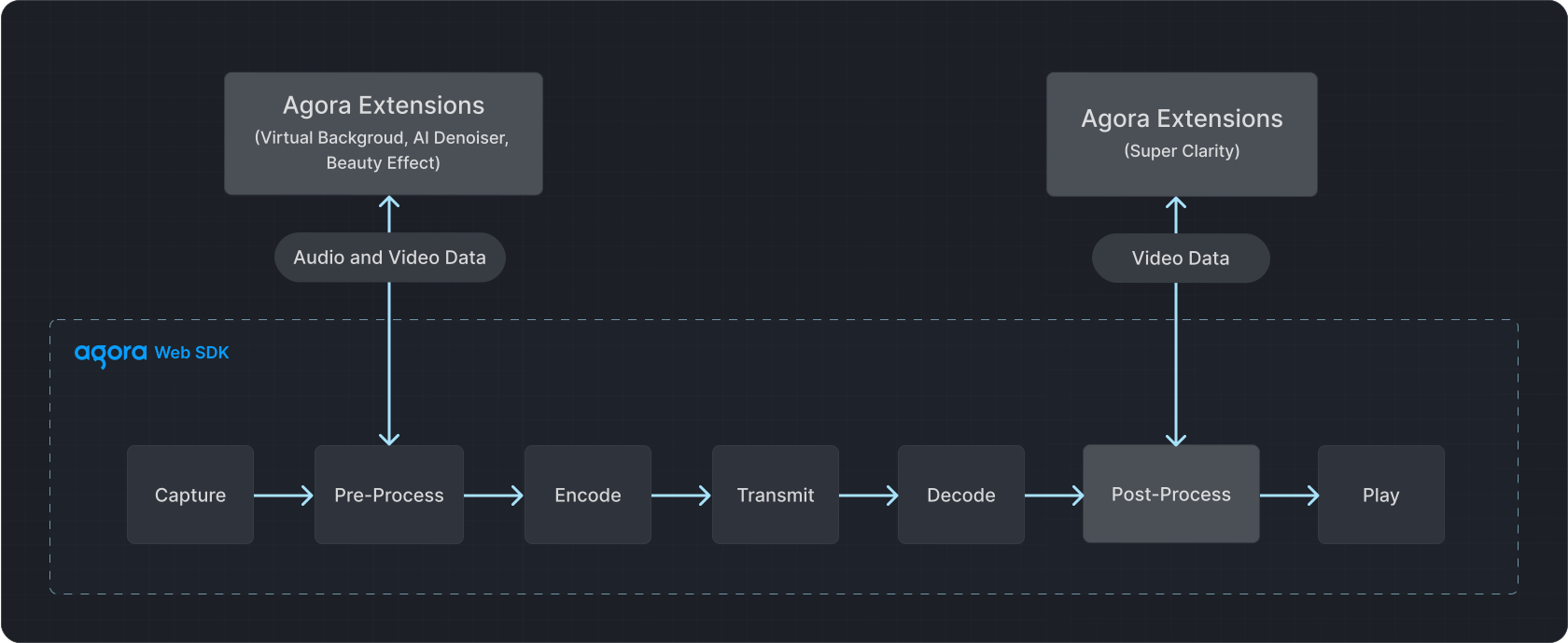
The media transmission pipeline of the Agora Web SDK consists of capture, pre-processing, encoding, transmission, decoding, post-processing, and playback stages. The Super Clarity extension processes video data in the post-processing stage to apply the AI enhancement effect.
## Prerequisites
Ensure that you have implemented the [SDK quickstart](/en/realtime-media/rtc/get-started-sdk) in your project.
## Implement the logic
This section shows you how to integrate the Super Clarity extension into your app.
### Integrate the extension
To install the [Super Clarity extension](https://www.npmjs.com/package/agora-extension-super-clarity), do the following:
1. Run the following command in the root directory of your project:
```bash
npm install agora-extension-super-clarity
```
2. To import the Super Clarity extension, use one of the following methods:
* **Method 1**: Add the following code to your JavaScript file:
```javascript
import {
SuperClarityExtension,
SuperClarityEvents,
SuperClarityProcessor,
} from 'agora-extension-super-clarity';
```
* **Method 2:** Import it in the HTML file using the script tag. After importing, you can directly use the `SuperClarityExtension` object in your JavaScript file.
```html
```
### Register the extension
Before joining a channel, create a `SuperClarityExtension` object and call the SDK's `registerExtensions` method to register the extension.
```javascript
// Create a SuperClarityExtension object
const extension = new SuperClarityExtension();
// Register the extension
AgoraRTC.registerExtensions([extension]);
const context = {
uid: undefined,
client: undefined,
track: undefined,
processor: undefined,
};
async function join(appid, channel) {
context.client = AgoraRTC.createClient({ mode: "live", codec: "vp8", role: "host" });
context.client.on("user-published", onUserPublished);
context.client.on("user-unpublished", onUserUnpublished);
await context.client.join(appid, channel, null);
}
// Join the channel
join('your-appid', 'your-channel');
```
### Enable the extension
When subscribing to a remote video track, follow these steps to enable the Super Clarity extension:
1. Call the extension's `createProcessor` method to create the extension's processor and listen to related events.
2. Call the SDK's `IRemoteVideoTrack.pipe` method to connect the pipeline between the Super Clarity extension and the video track.
3. Call the `enable` method of the extension to activate it. After enabling, play the video track to see the effect of the Super Clarity extension.
To avoid performance issues caused by multiple processors working simultaneously, you can create a maximum of two processors. As a result, the Super Clarity extension can only be applied to a maximum of two video tracks at the same time.
```typescript
async function onUserPublished(user, mediaType) {
if (!context.client || mediaType !== "video" || !!context.uid) {
return;
}
context.uid = user.uid;
context.track = await context.client.subscribe(user, mediaType);
// Create a processor
context.processor = extension.createProcessor();
// Listen for processor-related events
context.processor.on("first-video-frame", (stats) => {
console.log("Plugin received the first video frame, stats:", stats);
});
context.processor.on("error", (msg) => {
console.error("Plugin error:", msg);
});
context.processor.on("stats", (stats) => {
console.log("Plugin stats:", Date.now(), stats);
});
// Connect the pipeline between the processor and the video track
context.track.pipe(context.processor).pipe(context.track.processorDestination);
// Enable the extension
await context.processor.enable();
context.track.play('any-element-id');
}
```
### Switch video tracks
Although the extension limits the number of `processors` that can be created, you can use the same `processor` to perform Super Clarity processing on multiple video tracks by switching tracks.
To switch video tracks, call `IRemoteVideoTrack.unpipe` to disconnect the `processor` from the current video track, and then call `IRemoteVideoTrack.pipe` to connect the new video track.
```typescript
// Disconnect the processor from the current video track
await processor.disable();
processor.unpipe();
track?.unpipe();
track?.pipe(track.processorDestination);
// Connect to the new video track
track2.pipe(processor).pipe(track2.processorDestination);
await processor.enable();
track2.play(ele);
```
### Destroy the extension
To stop using the Super Clarity extension, follow these steps to ensure proper cleanup and avoid potential issues:
1. Call the SDK's `IRemoteVideoTrack.unpipe` method to disconnect the pipeline between the `processor` and the current video track.
2. Call the extension's `release` method to destroy the `processor`.
3. Call the SDK's `stop` method to stop the video track, set it to `null`, and destroy it.
```typescript
async function onUserUnpublished(user, mediaType) {
if (!context.client || mediaType !== "video" || context.uid !== user.uid) {
return;
}
// Disconnect the pipeline between the processor and the current video track
context.processor.unpipe();
context.track.unpipe();
// Destroy the processor and video track
await context.processor.release();
context.processor = undefined;
context.track.stop();
context.track = undefined;
}
```
### Complete sample code
This section presents the minimum code to integrate the Super Clarity extension into your project. Copy the following into your script file:
**Complete sample code for the Super Clarity extension**
```js
const extension = new SuperClarityExtension();
AgoraRTC.registerExtensions([extension]);
const context = {
uid: undefined,
client: undefined,
track: undefined,
processor: undefined,
};
async function join(appid, channel) {
context.client = AgoraRTC.createClient({ mode: "live", codec: "vp8", role: "host" });
client.on("user-published", onUserPublished);
client.on("user-unpublished", onUserUnpublished);
await client.join(appid, channel, null);
}
async function onUserPublished(user, mediaType) {
if (!context.client || mediaType !== "video" || !!context.uid) {
return;
}
context.uid = user.uid;
context.track = await context.client.subscribe(user, mediaType);
context.processor = extension.createProcessor();
context.processor.on("first-video-frame", (stats) => {
console.log("plugin have first video frame, stats:", stats);
});
context.processor.on("error", (msg) => {
console.log("plugin error:", msg);
});
context.processor.on("stats", (stats) => {
console.log("plugin stats:", Date.now(), stats);
});
context.track.pipe(context.processor).pipe(context.track.processorDestination);
await context.processor.enable();
context.track.play('any element id')
}
async function onUserUnpublished(user, mediaType) {
if (!context.client || mediaType !== "video" || context.uid !== user.uid) {
return;
}
context.processor.unpipe();
context.track.unpipe();
await context.processor.release();
context.processor = undefined;
context.track.stop();
context.track = undefined;
}
join('your-appid', 'your-channel');
```
## Reference
This section completes the information on this page, or points you to documentation that explains other aspects about this product.
### Considerations
The Super Clarity extension may not adaptively switch resolutions on iOS devices. As a workaround, when the remote video resolution changes, destroy the processor and then recreate it.
**Sample code to destroy the processor and then recreate it.**
```js
const isIOS =
// @ts-ignore
/iPad|iPhone|iPod/.test(navigator.userAgent) && !window.MSStream;
const isSafari = /^((?!chrome|android).)*safari/i.test(navigator.userAgent);
const versions = navigator.userAgent.match(/Version\/([\d.]+).*Safari/);
let version = 0;
if (versions && versions.length > 1) {
version = parseInt(versions[1]);
}
var shouldCleanResource: boolean =
isIOS && isSafari && version < 16 ? true : false;
var extension: SuperClarityExtension | undefined = undefined;
var initSCProcessor = async () => {
if (!extension) {
extension = new SuperClarityExtension();
AgoraRTC.registerExtensions([extension]);
}
var processor = extension.createProcessor();
processor.on(SuperClarityEvents.FIRST_VIDEO_FRAME, (stats: any) => {
console.log('plugin have first video frame, stats:', stats);
});
processor.on(SuperClarityEvents.ERROR, (msg: any) => {
console.log('plugin error:', msg);
});
processor.on(SuperClarityEvents.STATS, (stats: any) => {
console.log('plugin stats:', Date.now(), stats);
});
return processor;
};
var destroySCProcessor = async (processor) => {
if (!processor ) {
return;
}
processor.removeAllListeners(SuperClarityEvents.FIRST_VIDEO_FRAME);
processor.removeAllListeners(SuperClarityEvents.ERROR);
processor.removeAllListeners(SuperClarityEvents.STATS);
await processor .release();
processor= undefined;
};
// Refresh processor
{
var info:{ w?:number, h?:number}={}
if (shouldCleanResource) {
setInterval(async ()=>{
!info.w && info.w = track?.getStats().receiveResolutionWidth;
!info.h && info.h = track?.getStats().receiveResolutionHeight;
if (
(track?.getStats().receiveResolutionWidth &&
info.w &&
track?.getStats().receiveResolutionWidth !== info.w) ||
(track?.getStats().receiveResolutionHeight &&
info.h &&
track?.getStats().receiveResolutionHeight !== info.h)
) {
info.w = track?.getStats().receiveResolutionWidth;
info.h = track?.getStats().receiveResolutionHeight;
if (processor) {
processor.unpipe();
track?.unpipe();
track?.pipe(track.processorDestination);
await destroySCProcessor(processor);
processor= undefined;
}
processor = await initSCProcessor();
track!.pipe(processor !).pipe(track!.processorDestination);
await processor !.enable();
}
}, 1000);
}
}
```
### API reference
This section provides the API reference for the Super Clarity extension.
#### `ISuperClarityExtension`
##### `createProcessor`
Creates an instance of `ISuperClarityProcessor`.
```typescript
createProcessor(): ISuperClarityProcessor;
```
#### `ISuperClarityExtension`
##### `enable`
Enables the Super Clarity function.
```typescript
enable(): void | Promise;
```
##### `disable`
Disables the Super Clarity function.
```typescript
disable(): void | Promise;
```
##### `release`
Releases all resources used by the extension.
```typescript
release(): Promise;
```