# Send and receive media streams (/en/realtime-media/rtc-server-sdk/build/build-core-media-features/send-receive-media-streams/python)
> For AI agents: see the complete documentation index at [llms.txt](/llms.txt).
This page introduces how to use the Server Gateway to send media streams to the client and receive media streams from the client.
## Understand the tech
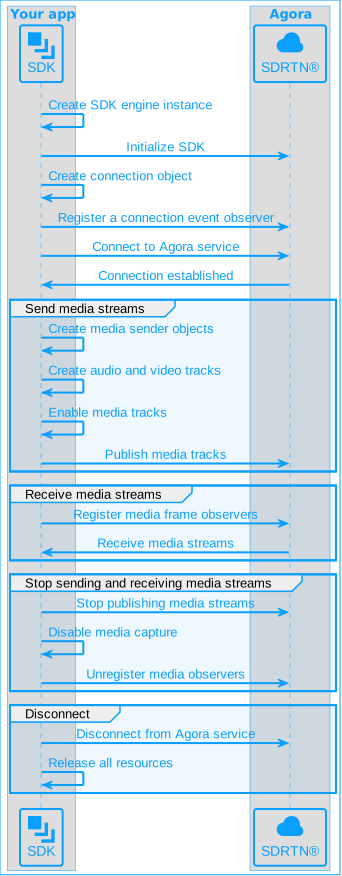
The following figure shows the basic workflow you implement to send and receive audio and video streams using Server Gateway:
## Prerequisites
Before you begin, ensure your development environment meets the necessary hardware and software requirements and that you have downloaded the latest Server Gateway SDK. See [Integrate the SDK](../../index).
## Initialize and connect
Before sending and receiving media streams, complete the following steps:
### Initialize the SDK
Create an `AgoraService` instance and call `initialize`. The `AgoraService` object persists as long as the server app is running.
The SDK supports user IDs in both integer and string formats. This page demonstrates use of user IDs in integer format where the character set consists of only digits. To learn more about using string user IDs, see [Using a string user ID](../build-core-media-features/stringuid.md).
```python
agora_service = AgoraService()
config = AgoraServiceConfig()
config.audio_scenario = AudioScenarioType.AUDIO_SCENARIO_CHORUS
config.appid = sample_options.app_id
agora_service.initialize(config)
```
### Connect to a Video SDK channel
After initializing the SDK, follow these steps to connect to a Video SDK channel.
1. Call `create_rtc_connection` to create an `RTCConnection` object for connecting to the Video SDK channel:
```python
con_config = RTCConnConfig(
client_role_type=ClientRoleType.CLIENT_ROLE_BROADCASTER,
channel_profile=ChannelProfileType.CHANNEL_PROFILE_LIVE_BROADCASTING,
)
connection = agora_service.create_rtc_connection(con_config)
if not connection:
logger.error("create connection failed")
return
```
2. Call `register_observer` to listen for connection events. The `DYSConnectionObserver` class inherits from the `IRTCConnectionObserver` class.
```python
# DYSConnectionObserver inherits from the IRTCConnectionObserver class
conn_observer = DYSConnectionObserver()
connection.register_observer(conn_observer)
```
3. Call `connect` to connect to a channel:
```python
ret = connection.connect(sample_options.token, channel_id, uid)
if ret < 0:
logger.error(f"connect failed: {ret}")
return
```
## Send media streams to the client
To send media streams to the client, refer to the following steps:
### Create a media stream sender
Use the `MediaNodeFactory` object to create various types of media stream senders:
* `AudioPcmDataSender`: Sends audio data in PCM format.
* `VideoFrameSender`: Sends video data in YUV format.
* `AudioEncodedFrameSender`: Sends encoded audio data.
* `VideoEncodedImageSender`: Sends encoded video data.
1. Create an `MediaNodeFactory` object:
```python
media_node_factory = agora_service.create_media_node_factory()
if not media_node_factory:
logger.error("create media node factory failed")
return
```
2. According to your requirements, create an `IAudioPcmDataSender` object for sending audio in PCM format, an `IVideoFrameSender` object for sending video in YUV format, an `IAudioEncodedFrameSender` object for sending encoded audio, or an `IVideoEncodedImageSender` object for sending encoded video:
```python
# Create a sender for transmitting audio data in PCM format
pcm_data_sender = media_node_factory.create_audio_pcm_data_sender()
if not pcm_data_sender:
logger.error("Failed to create PCM data sender")
return
# Create a sender for transmitting encoded audio data
audio_sender = media_node_factory.create_audio_encoded_frame_sender()
if not audio_sender:
logger.error("Failed to create audio sender")
return
# Create a sender for transmitting video data in YUV format
video_sender = media_node_factory.create_video_frame_sender()
if not video_sender:
logger.error("Failed to create video frame sender")
return
# Create a sender for transmitting encoded video data
video_sender = media_node_factory.create_video_encoded_image_sender()
if not video_sender:
logger.error("Failed to create video sender")
return
```
3. Create a `LocalAudioTrack` object and a `LocalVideoTrack` object, corresponding to the local audio track and local video tracks, for publishing to the channel:
```python
# Create a custom audio track using a sender for transmitting audio data in PCM format
audio_track = agora_service.create_custom_audio_track_pcm(pcm_data_sender)
if not audio_track:
logger.error("Failed to create audio track")
return
# Create a custom audio track using a sender for transmitting encoded audio data
audio_track = agora_service.create_custom_audio_track_encoded(audio_sender, 1)
if not audio_track:
logger.error("Failed to create audio track")
return
# Create a custom video track using a sender for transmitting video data in YUV format
video_track = agora_service.create_custom_video_track_frame(video_sender)
if not video_track:
logger.error("Failed to create video track")
return
# Create a custom video track using a sender for transmitting encoded video data
video_track = agora_service.create_custom_video_track_encoded(video_sender, sender_options)
if not video_track:
logger.error("Failed to create video track")
return
```
### Send media streams
1. To enable media tracks, call `setEnabled`:
```python
# Enable the local audio track
audio_track.set_enabled(1)
# Enable the local video track
video_track.set_enabled(1)
```
2. Call `publish_audio` and `publish_video` to publish the local audio and video tracks to the channel:
```python
# Publish the local audio track
local_user.publish_audio(audio_track)
# Publish the local video track
local_user.publish_video(video_track)
```
3. Start the audio and video transmission thread:
```python
async def send(self, sample_options: ExampleOptions, pcm_data_sender, yuv_data_sender):
# Create and start the audio transmission task
pcm_task = asyncio.create_task(push_pcm_data_from_file(sample_options.sample_rate, sample_options.num_of_channels, pcm_data_sender, sample_options.audio_file, self._exit))
# Create and start the video transmission task
yuv_task = asyncio.create_task(push_yuv_data_from_file(sample_options.width, sample_options.height, sample_options.fps, yuv_data_sender, sample_options.video_file, self._exit))
# Wait for the audio transmission task to complete
await pcm_task
# Wait for the video transmission task to complete
await yuv_task
logger.info("Transmission finished")
```
4. Send audio and video data. Refer to the following example to send PCM audio data and YUV video data:
```python
# Send PCM audio data
async def push_pcm_data_from_file(sample_rate, num_of_channels, pcm_data_sender: AudioPcmDataSender, audio_file_path, _exit: Event):
with open(audio_file_path, "rb") as audio_file:
pcm_sendinterval = 0.1
pacer_pcm = Pacer(pcm_sendinterval)
pcm_count = 0
send_size = int(sample_rate * num_of_channels * pcm_sendinterval * 2)
frame_buf = bytearray(send_size)
while not _exit.is_set():
success = audio_file.readinto(frame_buf)
if not success:
audio_file.seek(0)
continue
frame = PcmAudioFrame()
frame.data = frame_buf
frame.timestamp = 0
frame.samples_per_channel = int(sample_rate * pcm_sendinterval)
frame.bytes_per_sample = 2
frame.number_of_channels = num_of_channels
frame.sample_rate = sample_rate
ret = pcm_data_sender.send_audio_pcm_data(frame)
pcm_count += 1
logger.info(f"Sent PCM: count={pcm_count}, ret={ret}, send_size={send_size}, interval={pcm_sendinterval}")
await pacer_pcm.apace_interval(0.1)
frame_buf = None
```
```python
# Send YUV video data
async def push_yuv_data_from_file(width, height, fps, video_sender: VideoFrameSender, video_file_path, _exit: Event):
with open(video_file_path, "rb") as video_file:
yuv_sendinterval = 1.0 / fps
pacer_yuv = Pacer(yuv_sendinterval)
yuv_count = 0
yuv_len = int(width * height * 3 / 2)
frame_buf = bytearray(yuv_len)
while not _exit.is_set():
success = video_file.readinto(frame_buf)
if not success:
video_file.seek(0)
continue
frame = ExternalVideoFrame()
frame.buffer = frame_buf
frame.type = 1
frame.format = 1
frame.stride = width
frame.height = height
frame.timestamp = 0
frame.metadata = "hello metadata"
ret = video_sender.send_video_frame(frame)
yuv_count += 1
logger.info("Sent YUV: count=%d, ret=%s", yuv_count, ret)
await pacer_yuv.apace_interval(yuv_sendinterval)
frame_buf = None
```
## Receive media streams from the client
To receive media streams from the client, refer to the following steps:
1. According to your requirements, call the `register_audio_frame_observer` and `register_video_frame_observer` methods to register audio and video data observers and listen for related callbacks. The SDK supports the following data observers:
* `IAudioFrameObserver`: Monitors audio data.
* `IVideoFrameObserver`: Monitors raw video data.
* `IVideoEncodedImageReceiver`: Monitors encoded video data.
The following code demonstrates registering `IAudioFrameObserver` and `IVideoFrameObserver`:
```python
# Call the set_playback_audio_frame_before_mixing_parameters method before register_audio_frame_observer to set the audio data sampling rate
local_user.set_playback_audio_frame_before_mixing_parameters(1, 16000)
# The SampleAudioFrameObserver class inherits from IAudioFrameObserver
audio_frame_observer = SampleAudioFrameObserver()
local_user.register_audio_frame_observer(audio_frame_observer)
# The SampleVideoFrameObserver class inherits from IVideoFrameObserver
video_frame_observer = SampleVideoFrameObserver()
local_user.register_video_frame_observer(video_frame_observer)
```
2. When the client starts sending a media stream, the SDK receives the media stream through related callbacks. The following example demonstrates receiving encoded video, YUV-format video, and PCM-format audio:
```python
# Receive encoded video through the on_encoded_video_frame callback and output it as a file
class SampleVideoEncodedFrameObserver(IVideoEncodedFrameObserver):
def on_encoded_video_frame(self, uid, image_buffer, length, video_encoded_frame_info):
file_path = os.path.join(log_folder, str(uid) + '.h264')
with open(file_path, 'ab') as f:
f.write(image_buffer[:length])
return 1
# Receive YUV format video through the on_frame callback and output it as a file
class SampleVideoFrameObserver(IVideoFrameObserver):
def on_frame(self, channel_id, remote_uid, frame:VideoFrame):
file_path = os.path.join(log_folder, channel_id + "_" + remote_uid + '.yuv')
y_size = frame.y_stride * frame.height
uv_size = (frame.u_stride * frame.height) // 2 # Corrected the comment to explain the division
with open(file_path, 'ab') as f:
f.write(frame.y_buffer[:y_size])
f.write(frame.u_buffer[:uv_size])
f.write(frame.v_buffer[:uv_size])
return 1
# Receive PCM format audio through the on_playback_audio_frame_before_mixing callback and output it as a file
class SampleAudioFrameObserver(IAudioFrameObserver):
def on_playback_audio_frame_before_mixing(self, agora_local_user, channelId, uid, audio_frame:AudioFrame):
file_path = os.path.join(log_folder, channelId + "_" + uid + '.pcm')
with open(file_path, "ab") as f:
f.write(audio_frame.buffer)
return 1
```
## Stop sending and receiving media streams
When you no longer need to send or receive media streams, follow these steps:
1. To stop sending media streams:
* Call `unpublish_audio` and `unpublish_video` to stop publishing audio and video tracks.
* Call `set_enabled` to disable the local audio and video tracks.
```python
local_user.unpublish_audio(audio_track)
local_user.unpublish_video(video_track)
audio_track.set_enabled(0)
video_track.set_enabled(0)
```
2. To stop receiving media streams, call `unregister_audio_frame_observer` and `unregister_video_frame_observer` to unregister the audio and video data observers.
```python
local_user.unregister_audio_frame_observer(audio_frame_observer)
local_user.unregister_video_frame_observer(video_frame_observer)
```
## Disconnect and release resources
After completing your media sending and receiving tasks, follow these steps to disconnect from the channel and release resources.
It is important to follow the sequence in the sample code to release resources properly.
1. Call `disconnect` to disconnect from the channel.
```python
ret = connection.disconnect()
if ret < 0:
logger.error(f"disconnect failed: {ret}")
return
```
2. Call `unregister_observer` to unregister the connection event observer.
```python
connection.unregister_observer()
```
3. Release the created objects.
```python
connection.release()
agora_service.release()
```
## Test the implementation
To test your project, follow these steps:
1. Fill in the following parameters:
* **appId**: The App ID of your Agora project.
* **channelId**: A valid channel name, for example, `test_example`.
* **userId**: Your user ID, for example, `6`.
* **audioFile**: The storage path of the audio data file, for example, `./test_data/demo.pcm`. To facilitate testing, Agora provides [test data](https://download.agora.io/demo/test/test_data_202408221437.zip), that you can download and decompress to the `Agora-Python-Server-SDK` path.
* **sampleRate**: The audio sampling rate, for example, `16000`.
* **numOfChannels**: The number of audio channels, for example, `1`.
```python
# Assume your Python file path is Desktop/videocall.py
python Desktop/videocall.py --appId=0a****************************99 --channelId=test_dys --userId=6 --audioFile=./test_data/demo.pcm --sampleRate=16000 --numOfChannels=1
```
2. Run your Python script from the terminal.
3. Open the [Agora Live Interactive Web Demo](https://webdemo-global.agora.io/index.html), fill in the initialization settings, and simulate a client in the browser. Use the same App ID you specified earlier.
4. Select **Basic Video Calling**, fill in the same channel name you specified earlier in the **Channel** field, and click **Create Client** and **Join Channel** in that order.
5. After successfully joining the channel, you can start streaming. When there is a user streaming in the channel, the Web Demo automatically fills in the user ID of the streaming user in the input box under **Step 4: Subscribe & Play**. Click the **Subscribe & Play** button to subscribe to the streaming user.
Due to limitations of the Web Demo, follow these steps based on your use case:
* **To test server-sent streams**: First, join the channel on the Web, then run the project on the server to send the streams.
* **To test server-received streams**: Run the project on the server to connect to the channel first, then join the channel on the Web and send the streams.
## Sample project
Agora provides an open-source server-side [sample project](https://github.com/AgoraIO-Extensions/Agora-Python-Server-SDK) for your reference. Download it or view the source code for a more complete example.