# Send and receive media streams (/en/realtime-media/rtc-server-sdk/build/build-core-media-features/send-receive-media-streams/linux-java)
> For AI agents: see the complete documentation index at [llms.txt](/llms.txt).
This page introduces how to use the Server Gateway to send media streams to the client and receive media streams from the client.
## Understand the tech
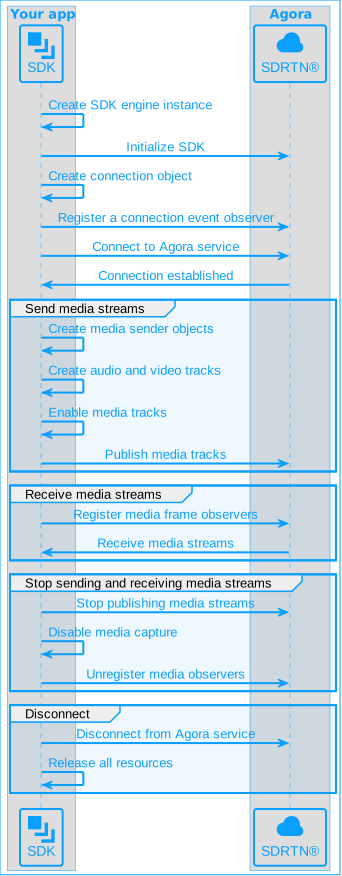
The following figure shows the basic workflow you implement to send and receive audio and video streams using Server Gateway:
## Prerequisites
Before you begin, ensure your development environment meets the necessary hardware and software requirements and that you have downloaded the latest Server Gateway SDK. See [Integrate the SDK](../../index).
## Initialize and connect
Before sending and receiving media streams, complete the following steps:
### Initialize the SDK
Create an `AgoraService` instance and call `initialize`. The `AgoraService` object persists as long as the server app is running.
The SDK supports user IDs in both integer and string formats. This page demonstrates use of user IDs in integer format where the character set consists of only digits. To learn more about using string user IDs, see [Using a string user ID](../build-core-media-features/stringuid.md).
```java
// Import SDK, AgoraService, and AgoraServiceConfig classes for initialization
import io.agora.rtc.SDK;
import io.agora.rtc.AgoraService;
import io.agora.rtc.AgoraServiceConfig;
// Creates an AgoraService object
SDK.load(); // ensure JNI library load
AgoraService service = new AgoraService();
// Initializes the AgoraServiceConfig object
AgoraServiceConfig config = new AgoraServiceConfig();
// Enables the audio processing module
config.setEnableAudioProcessor(1);
// Disables the audio device module (Normally we do not directly connect audio capture or playback devices to a server)
config.setEnableAudioDevice(0);
// Enables video
config.setEnableVideo(1);
// Sets Agora App ID
config.setAppId(appid);
// Initializes the SDK
service.initialize(config);
```
### Connect to the Agora Video SDK Channel
After initializing the SDK, follow these steps to connect to a Video SDK channel.
1. Call `agoraRtcConnCreate` to create an `AgoraRtcConn` object to connect to the Agora Video SDK channel:
```java
AgoraRtcConn conn = service.agoraRtcConnCreate(null);
```
2. Call `registerObserver` to listen to connection events:
```java
conn.registerObserver(new ConnObserver());
```
3. Call `connect` to connect to an Agora Video SDK channel:
```java
conn.connect(token, "test_channel", "1");
```
## Send media streams to the client
To send media streams to the client, refer to the following steps:
### Create a media stream sender
Use the `IMediaNodeFactory` object to create various types of media stream senders:
* `AgoraAudioPcmDataSender`: Sends audio data in PCM format.
* `AgoraVideoFrameSender`: Sends video data in YUV format.
* `AgoraAudioEncodedFrameSender`: Sends encoded audio data.
* `AgoraVideoEncodedImageSender`: Sends encoded video data.
1. Create an `IMediaNodeFactory` object:
```java
AgoraMediaNodeFactory factory = service.createMediaNodeFactory();
```
2. According to your requirements, create an `AgoraAudioPcmDataSender` object for sending audio in PCM format, an `AgoraVideoFrameSender` object for sending video in YUV format, an `AgoraAudioEncodedFrameSender` object for sending encoded audio, or an `AgoraVideoEncodedImageSender` object for sending encoded video:
```java
// Creates a sender for PCM audio
AgoraAudioPcmDataSender audioFrameSender = factory.createAudioPcmDataSender();
// Creates a sender for YUV video
AgoraVideoFrameSender videoFrameSender = factory.createVideoFrameSender();
// Creates a sender for encoded audio
AgoraAudioEncodedFrameSender audioFrameSender = factory.createAudioEncodedFrameSender();
// Creates a sender for encoded video
AgoraVideoEncodedImageSender imageSender = factory.createVideoEncodedImageSender();
```
3. Create an `AgoraLocalAudioTrack` object and an `AgoraLocalVideoTrack` object, corresponding to the local audio track and local video tracks, for publishing to the channel:
```java
// Creates a custom audio track that uses a PCM audio stream sender
customAudioTrack = service.createCustomAudioTrackPcm(audioFrameSender);
// Creates a custom audio track that uses an encoded audio stream sender
customAudioTrack = service.createCustomAudioTrackEncoded(audioFrameSender,0);
// Creates a custom video track that uses a YUV video stream sender
customVideoTrack = service.createCustomVideoTrackFrame(videoFrameSender);
// Creates a custom video track that uses encoded video stream sender
customVideoTrack = service.createCustomVideoTrackEncoded(videoFrameSender, option);
```
### Send media streams
1. To publish the local audio and video tracks to a Video SDK channel, call the `publishAudio` and `publishVideo` methods of the `AgoraLocalUser` object:
```java
// Enables and publishes audio and video track
customAudioTrack.setEnabled(1);
customVideoTrack.setEnabled(1);
conn.getLocalUser().publishAudio(customAudioTrack);
conn.getLocalUser().publishVideo(customVideoTrack);
```
2. Start the sending thread, which calls the send methods of the audio and video senders:
```java
pcmSender = new PcmSender(audioFile,audioFrameSender,numOfChannels,sampleRate);
h264Sender = new H264Sender(videoFile,1000/fps,0,0,videoFrameSender);
pcmSender.start();
h264Sender.start();
```
3. Send audio and video data. Refer to the following examples to send PCM audio data and H.264 video data:
Refer to the following code to send PCM audio data:
```java
// audio thread
// send audio data every 10 ms;
class PcmSender extends FileSender {
private AgoraAudioPcmDataSender audioFrameSender;
private static final int INTERVAL = 10; //ms
private int channels;
private int samplerate;
private int bufferSize = 0;
private byte[] buffer;
public PcmSender(String filepath, AgoraAudioPcmDataSender sender,int channels,int samplerate){
super(filepath, INTERVAL);
audioFrameSender = sender;
this.channels = channels;
this.samplerate = samplerate;
this.bufferSize = channels * samplerate * 2 * INTERVAL /1000;
this.buffer = new byte[this.bufferSize];
}
// sendOneFrame calls the send method of audioFrameSender to send PCM data
@Override
public void sendOneFrame(byte[] data) {
if(data == null) return;
audioFrameSender.send(data,(int)System.currentTimeMillis(),sampleRate/(1000/INTERVAL),2,channels,samplerate);
}
@Override
public byte[] readOneFrame(FileInputStream fos) {
if(fos != null ){
try {
int size = fos.read(buffer,0,bufferSize);
if( size <= 0){
reset();
return null;
}
} catch (IOException e) {
e.printStackTrace();
}
}
return buffer;
}
}
```
The following code demonstrates sending video data, using H.264 data as an example:
```java
class H264Sender extends FileSender {
private AgoraVideoEncodedImageSender imageSender;
private H264Reader h264Reader;
private int lastFrameType = 0;
private int height;
private int width;
private int fps;
public H264Sender(String path,int interval, int height,int width, AgoraVideoEncodedImageSender videoEncodedImageSender){
super(path,interval,false);
this.imageSender = videoEncodedImageSender;
this.h264Reader = new H264Reader(path);
this.height = height;
this.width = width;
this.fps = 1000/interval;
}
// sendOneH264Frame calls the send method of imageSender to send H.264 data.
@Override
public void sendOneFrame(byte[] data) {
if(data == null) return;
EncodedVideoFrameInfo info = new EncodedVideoFrameInfo();
long currentTime = System.currentTimeMillis();
info.setFrameType(lastFrameType);
info.setWidth(width);
info.setHeight(height);
info.setCodecType(Constants.VIDEO_CODEC_H264);
info.setCaptureTimeMs(currentTime);
info.setRenderTimeMs(currentTime);
info.setFramesPerSecond(fps);
info.setRotation(0);
imageSender.send(data,data.length,info);
}
@Override
public byte[] readOneFrame(FileInputStream fos) {
int retry = 0;
H264Reader.H264Frame frame = h264Reader.readNextFrame();
while ( frame == null && retry < 4){
h264Reader.reset();
frame = h264Reader.readNextFrame();
retry ++;
}
if( frame != null ) {
lastFrameType = frame.frameType;
return frame.data;
} else {
return null;
}
}
@Override
public void release() {
super.release();
h264Reader.close();
}
}
```
Set the format of the encoded video data by using the `info` parameter of the `send` method.
### Disconnect and release resources
After finishing media sending tasks, follow these steps to disconnect from the channel and release resources.
It is important to follow the sequence in the sample code to release resources properly.
1. Call the `unpublishAudio` and `unpublishVideo` methods to stop publishing audio and video:
```java
if(conn != null) {
conn.getLocalUser().unpublishAudio(customAudioTrack);
conn.getLocalUser().unpublishVideo(customVideoTrack);
}
```
2. Call `unregisterObserver` to unregister the connection observer:
```java
conn.unregisterObserver();
```
3. Call `disconnect` to disconnect from the Video SDK channel:
```java
int ret = conn.disconnect();
```
4. Release resources from created objects:
```java
conn.destroy();
```
## Receive media stream from the client
To receive media streams from the client, refer to the following steps:
### Register video and audio frame observers
Instantiate the video and audio frame observer object, and register the observer by using the member methods of the `ILocalUserObserver` class. After registration is successful, the SDK triggers callbacks when audio or video frames are available.
The `SampleLocalUserObserver` class in the sample code not only includes observer objects from the `IVideoEncodedFrameObserver` class, the `IAudioFrameObserverBase` class, and the `IVideoFrameObserver2` class, and inherits the `ILocalUserObserver` class as well. Use the member methods of the `ILocalUserObserver` class to register video and audio frame observer objects.
```java
// The SampleLocalUserObserver class inherits the ILocalUserObserver class
localUserObserver = new SampleLocalUserObserver(conn.getLocalUser());
conn.getLocalUser().registerObserver(localUserObserver);
// The PcmFrameObserver class inherits the IAudioFrameObserver class
int ret = conn.getLocalUser().setPlaybackAudioFrameBeforeMixingParameters(numOfChannels, sampleRate);
if (ret > 0) {
System.out.printf("setPlaybackAudioFrameBeforeMixingParameters fail ret=%d\n", ret);
return;
}
// The H264FrameReceiver class inherits the IVideoEncodedImageReceiver class
h264FrameReceiver = new H264FrameReceiver(videoFile);
conn.getLocalUser().registerVideoEncodedFrameObserver(new AgoraVideoEncodedFrameObserver(h264FrameReceiver));
```
`setAudioFrameObserver` and `registerVideoEncodedFrameObserver` are member methods of the `SampleLocalUserObserver` class and can be used to instantiate the `IAudioFrameObserver` class and the `AgoraVideoEncodedFrameObserver` class.
```java
localUserObserver.setAudioFrameObserver(pcmFrameObserver);
conn.getLocalUser().registerVideoEncodedFrameObserver(new AgoraVideoEncodedFrameObserver(h264FrameReceiver));
```
### Use callbacks to receive media streams
The following code shows how to receive encoded video, video in YUV format, and audio in PCM format.
```java
// Receives encoded video by using the onEncodedVideoFrame callback and save the video data in a file
class H264FrameReceiver extends FileWriter implements IVideoEncodedFrameObserver {
public H264FrameReceiver(String path) {
super(path);
}
@Override
public int onEncodedVideoFrame(AgoraVideoEncodedFrameObserver agora_video_encoded_frame_observer, int uid, byte[] image_buffer, long length, EncodedVideoFrameInfo video_encoded_frame_info) {
System.out.println("onEncodedVideoFrame success " + video_encoded_frame_info.getFrameType());
writeData(image_buffer, (int) length);
return 1;
}
}
// Receives YUV video by using the onFrame callback and save the video data in a file
class YuvFrameObserver extends FileWriter implements IVideoFrameObserver2 {
public YuvFrameObserver(String path) {
super(path);
}
@Override
public void onFrame(AgoraVideoFrameObserver2 agora_video_frame_observer2, String channel_id, String remote_uid, VideoFrame frame) {
System.out.println("onFrame success ");
writeData(frame.getYBuffer(), frame.getYBuffer().remaining());
writeData(frame.getUBuffer(), frame.getUBuffer().remaining());
writeData(frame.getVBuffer(), frame.getVBuffer().remaining());
return ;
}
}
// Receives PCM audio by using the onPlaybackAudioFrameBeforeMixing callback and save the audio data in a file
public static class PcmFrameObserver extends FileWriter implements IAudioFrameObserver {
public PcmFrameObserver(String outputFilePath) {
super(outputFilePath);
}
@Override
public int onRecordAudioFrame(AgoraLocalUser agora_local_user, String channel_id, AudioFrame frame) {
System.out.println("onRecordAudioFrame success");
return 1;
}
@Override
public int onPlaybackAudioFrame(AgoraLocalUser agora_local_user, String channel_id, AudioFrame frame) {
System.out.println("onPlaybackAudioFrame success");
return 1;
}
@Override
public int onMixedAudioFrame(AgoraLocalUser agora_local_user, String channel_id, AudioFrame frame) {
System.out.println("onMixedAudioFrame success");
return 1;
}
@Override
public int onPlaybackAudioFrameBeforeMixing(AgoraLocalUser agora_local_user, String channel_id, String uid, AudioFrame audioFrame) {
// Write PCM samples
int writeBytes = audioFrame.getSamplesPerChannel() * audioFrame.getChannels() * 2;
writeData(audioFrame.getBuffer(), writeBytes);
return 1;
}
}
```
### Disconnect and release resources
When the media receiving task is complete, refer to the following steps to disconnect from the channel.
It is important to follow the sequence in the sample code to release resources properly.
1. Call unset methods to release the video and audio observers.
```java
// Release video and audio observer
localUserObserver.unsetAudioFrameObserver();
localUserObserver.unsetVideoFrameObserver();
```
2. Call `disconnect` to disconnect from the channel.
```java
// Disconnect from the Agora channel
int ret = conn.disconnect();
if (ret != 0) {
System.out.printf("conn.disconnect fail ret=%d\n", ret);
}
```
3. Release the created objects.
```java
// Releases the created objects.
conn.destroy();
```
4. When your server app stops running, release the `AgoraService` object.
```java
// Destroy Agora Service
service.destroy();
```
Development considerations
* The methods mentioned on this page are all asynchronous and do not block the main thread.
* When you use the [Agora Video SDK](../../reference/glossary#video-sdk) to communicate with the Server Gateway, set the channel use-case of the Video SDK to `LIVE_BROADCASTING`.
* When sending audio data in AAC format, you cannot set the sampling rate to 44.1 Kbps.
## References
This section contains content that completes the information on this page, or points you to documentation that explains other aspects to this product.
### API reference
Refer to [Server Gateway API for Java](https://api-ref.agora.io/en/server-gateway-sdk/linux-java/4.x/index.html) to find detailed API and parameter descriptions.