# Send and receive media streams (/en/realtime-media/rtc-server-sdk/build/build-core-media-features/send-receive-media-streams/go)
> For AI agents: see the complete documentation index at [llms.txt](/llms.txt).
This page introduces how to use the Server Gateway to send media streams to the client and receive media streams from the client.
## Understand the tech
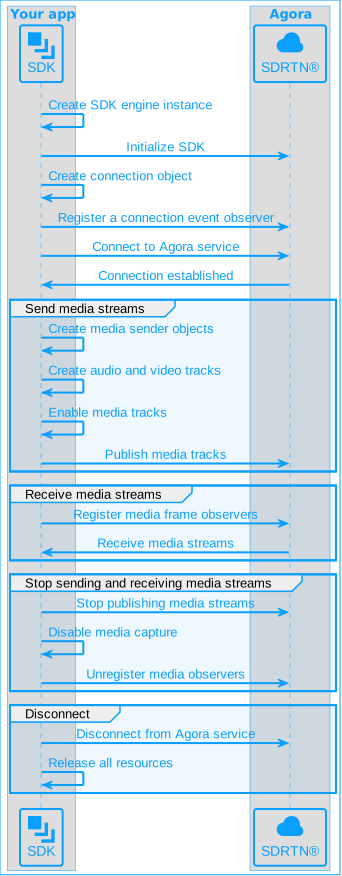
The following figure shows the basic workflow you implement to send and receive audio and video streams using Server Gateway:
## Prerequisites
Before you begin, ensure your development environment meets the necessary hardware and software requirements and that you have downloaded the latest Server Gateway SDK. See [Integrate the SDK](../../index).
## Initialize and connect
Before sending and receiving media streams, complete the following steps:
### Initialize the SDK
Import `agoraservice` and call `initialize` to create and initialize an `agoraservice` object instance. The object persists as long as the server app is running.
The SDK supports user IDs in both integer and string formats. This page demonstrates use of user IDs in integer format where the character set consists of only digits. To learn more about using string user IDs, see [Using a string user ID](../build-core-media-features/stringuid.md).
```go
package main
import (
agoraservice "github.com/AgoraIO-Extensions/Agora-Golang-Server-SDK/v2/go_sdk/agoraservice"
)
func main() {
svcCfg := agoraservice.NewAgoraServiceConfig()
// Set EnableVideo to true to send and receive video
svcCfg.EnableVideo = true
svcCfg.AppId = appid
// Initialize only once globally
agoraservice.Initialize(svcCfg)
}
```
### Connect to a Video SDK channel
After initializing the SDK, follow these steps to connect to a Video SDK channel.
1. Call `NewRtcConnection` to create an `RtcConnection` object for connecting to an Agora Video SDK channel:
Set `AutoSubscribeAudio: true` and `AutoSubscribeVideo: true` to automatically subscribe to audio and video data when creating a connection. Alternatively, call the `SubscribeAudio` and `SubscribeVideo` methods at any time after creating a connection to subscribe to audio and video data. This guide uses `AutoSubscribeAudio: true` and `AutoSubscribeVideo: true` as an example.
```go
conCfg := agoraservice.RtcConnectionConfig{
AutoSubscribeAudio: true,
AutoSubscribeVideo: true,
ClientRole: agoraservice.ClientRoleBroadcaster,
ChannelProfile: agoraservice.ChannelProfileLiveBroadcasting,
}
con := agoraservice.NewRtcConnection(&conCfg)
```
2. Call `RegisterObserver` to listen for connection events:
```go
conSignal := make(chan struct{})
conHandler := &agoraservice.RtcConnectionObserver{
OnConnected: func(con *agoraservice.RtcConnection, info *agoraservice.RtcConnectionInfo, reason int) {
fmt.Printf("Connected, reason %d\n", reason)
conSignal <- struct{}{}
},
OnDisconnected: func(con *agoraservice.RtcConnection, info *agoraservice.RtcConnectionInfo, reason int){
fmt.Printf("Disconnected, reason %d\n", reason)
},
OnConnecting: func(con *agoraservice.RtcConnection, conInfo *agoraservice.RtcConnectionInfo, reason int) {
fmt.Printf("Connecting, reason %d\n", reason)
},
OnReconnecting: func(con *agoraservice.RtcConnection, conInfo *agoraservice.RtcConnectionInfo, reason int) {
fmt.Printf("Reconnecting, reason %d\n", reason)
},
OnReconnected: func(con *agoraservice.RtcConnection, conInfo *agoraservice.RtcConnectionInfo, reason int) {
fmt.Printf("Reconnected, reason %d\n", reason)
},
OnConnectionLost: func(con *agoraservice.RtcConnection, conInfo *agoraservice.RtcConnectionInfo) {
fmt.Printf("Connection lost\n")
},
OnConnectionFailure: func(con *agoraservice.RtcConnection, conInfo *agoraservice.RtcConnectionInfo, errCode int) {
fmt.Printf("Connection failure, error code %d\n", errCode)
},
OnUserJoined: func(con *agoraservice.RtcConnection, uid string) {
fmt.Println("user joined, " + uid)
},
OnUserLeft: func(con *agoraservice.RtcConnection, uid string, reason int) {
fmt.Println("user left, " + uid)
},
}
con.RegisterObserver(conHandler)
```
3. Call `Connect` to establish a connection to an Video SDK channel. Provide the following parameters:
* `token`: The RTC token. If your project has an App Certificate enabled, provide the token (see [Get Temporary Token](../manage-agora-account.md#generate-temporary-tokens)). If not, pass an empty string.
* `channelName`: A valid channel name.
* `userId`: A numeric local user ID.
```go
con.Connect(token, channelName, userId)
// Wait for connection to succeed
<-conSignal
```
## Send media streams to the client
After establishing a connection, follow these steps to send media streams to the client:
### Create a media stream sender
1. Call `NewMediaNodeFactory` to create a `MediaNodeFactory` object.
```go
mediaNodeFactory := agoraservice.NewMediaNodeFactory()
```
2. Use the `MediaNodeFactory` object to create audio and video data senders according to your use-case. The following senders are supported:
* `AudioPcmDataSender`: Sends audio data in PCM format.
* `VideoFrameSender`: Sends video data in YUV format.
* `AudioEncodedFrameSender`: Sends encoded audio data.
* `VideoEncodedImageSender`: Sends encoded video data.
Refer to the following code to create senders for transmitting PCM audio data and YUV video data:
```go
// Create a sender to transmit audio data in PCM format
audioSender := mediaNodeFactory.NewAudioPcmDataSender()
defer audioSender.Release()
// Create a sender to transmit video data in YUV format
videoSender := mediaNodeFactory.NewVideoFrameSender()
defer videoSender.Release()
```
3. Use the audio and video data senders to create `LocalAudioTrack` and `LocalVideoTrack` objects corresponding to the local audio and video track respectively.
```go
// Create a custom audio track (using a sender to transmit audio data in PCM format)
audioTrack := agoraservice.NewCustomAudioTrackPcm(audioSender)
// If the audio track is no longer needed, call the Release method to free resources
defer audioTrack.Release()
// Create a custom video track (using a sender to transmit video data in YUV format)
videoTrack := agoraservice.NewCustomVideoTrackFrame(videoSender)
// If the video track is no longer needed, call the Release method to free resources
defer videoTrack.Release()
```
### Send media streams
1. To the enable local audio and video tracks, call `SetEnabled`:
```go
// Enable the local audio track
audioTrack.SetEnabled(true)
// Enable the local video track
videoTrack.SetEnabled(true)
```
2. Call `PublishAudio` and `PublishVideo` to publish the local audio and video tracks to the Video SDK channel:
```go
// Publish the local audio track
localUser.PublishAudio(audioTrack)
// Publish the local video track
localUser.PublishVideo(videoTrack)
```
3. To send PCM audio data, call the `SendAudioPcmData` method of the `AudioPcmDataSender` object:
```go
frame := agoraservice.AudioFrame{
Type: agoraservice.AudioFrameTypePCM16,
SamplesPerChannel: 160,
BytesPerSample: 2,
Channels: 1,
SamplesPerSec: 16000,
Buffer: make([]byte, 320),
RenderTimeMs: 0,
}
file, err := os.Open("./test.pcm")
if err != nil {
fmt.Println("Error opening file:", err)
return
}
defer file.Close()
firstSendTime := time.Now()
for !(*bStop) {
shouldSendCount := int(time.Since(firstSendTime).Milliseconds()/10) - (sendCount - 18)
for i := 0; i < shouldSendCount; i++ {
dataLen, err := file.Read(frame.Buffer)
if err != nil || dataLen < 320 {
fmt.Println("Finished reading file:", err)
file.Seek(0, 0)
i--
continue
}
sendCount++
ret := sender.SendAudioPcmData(&frame)
fmt.Printf("SendAudioPcmData %d ret: %d\n", sendCount, ret)
}
fmt.Printf("Sent %d frames this time\n", shouldSendCount)
time.Sleep(50 * time.Millisecond)
}
```
4. Call `SetVideoEncoderConfiguration` to set video encoding parameters, and then call `SendVideoFrame` to send YUV video data.
```go
// Set video encoding parameters such as resolution, frame rate, and bitrate
videoTrack.SetVideoEncoderConfiguration(&agoraservice.VideoEncoderConfiguration{
CodecType: agoraservice.VideoCodecTypeH264,
Width: 320,
Height: 240,
Framerate: 30,
Bitrate: 500,
MinBitrate: 100,
OrientationMode: agoraservice.OrientationModeAdaptive,
DegradePreference: 0,
})
w := SendYuvWidth
h := SendYuvHeight
dataSize := w * h * 3 / 2
data := make([]byte, dataSize)
// Open YUV file
file, err := os.Open(SendYuvPath)
if err != nil {
fmt.Printf("task %d Error opening file: %s\n", taskCtx.id, err.Error())
return
}
defer file.Close()
// Loop to read and send YUV file
ticker := time.NewTicker(33 * time.Millisecond)
for {
select {
case <-ticker.C:
dataLen, err := file.Read(data)
if err != nil || dataLen < dataSize {
file.Seek(0, 0)
continue
}
yuvSender.SendVideoFrame(&agoraservice.ExternalVideoFrame{
Type: agoraservice.VideoBufferRawData,
Format: agoraservice.VideoPixelI420,
Buffer: data,
Stride: w,
Height: h,
Timestamp: 0,
})
case <-ctx.Done():
fmt.Printf("task %d video sender finished\n", taskCtx.id)
return
}
}
```
## Receive media streams from the client
After establishing the connection, call `RegisterAudioFrameObserver` and `RegisterVideoFrameObserver` to register audio and video data observers based on your requirements. This allows you to listen for audio and video data callbacks.
* `AudioFrameObserver`: Observes audio data.
* `VideoFrameObserver`: Observes raw video data.
* `VideoEncodedFrameObserver`: Observes encoded video data.
The following code samples demonstrate receiving PCM audio data and YUV video data.
### Receive the audio stream
When the client starts sending audio data, receive PCM audio data through the `OnPlaybackAudioFrameBeforeMixing` callback:
```go
audioObserver := &agoraservice.AudioFrameObserver{
OnPlaybackAudioFrameBeforeMixing: func(localUser *agoraservice.LocalUser, channelId string, userId string, frame *agoraservice.AudioFrame) bool {
// Add processing logic
fmt.Printf("Playback audio frame before mixing, from userId %s\n", userId)
return true
},
}
localUser := con.GetLocalUser()
// Call SetPlaybackAudioFrameBeforeMixingParameters to set the audio data sampling rate before RegisterAudioFrameObserver
localUser.SetPlaybackAudioFrameBeforeMixingParameters(1, 16000)
// Register the audio data observer
localUser.RegisterAudioFrameObserver(audioObserver)
```
### Receive the video stream
When the client starts sending video data, receive YUV video data through the `OnFrame` callback.
```go
videoObserver := &agoraservice.VideoFrameObserver{
OnFrame: func(channelId string, userId string, frame *agoraservice.VideoFrame) bool {
// Add processing logic
fmt.Printf("recv video frame, from channel %s, user %s\n", channelId, userId)
return true
},
}
localUser := con.GetLocalUser()
// Register the video data observer
localUser.RegisterVideoFrameObserver(videoObserver)
```
## Stop receiving media stream from the client
When you no longer need to send or receive media streams, follow these steps:
1. To stop publishing audio and video tracks, call `UnpublishAudio` and `UnpublishVideo`:
```go
localUser.UnpublishAudio(audioTrack)
localUser.UnpublishVideo(videoTrack)
```
2. To disable the local audio and video tracks, call `SetEnabled`:
```go
audioTrack.SetEnabled(false)
videoTrack.SetEnabled(false)
```
3. To free the resources used by audio and video tracks, audio and video senders, and media node factories, call the `Release` method in the following sequence:
```go
// Release the audio track
defer audioTrack.Release()
// Release the audio sender
defer audioSender.Release()
// Release the video track
defer videoTrack.Release()
// Release the video sender
defer videoSender.Release()
// Release the media node factory
defer mediaNodeFactory.Release()
```
4. To stop receiving the media streams, call `UnregisterAudioFrameObserver` and `UnregisterVideoFrameObserver` to unregister the audio and video data observers.
```go
localUser.UnregisterAudioFrameObserver(audioObserver)
localUser.UnregisterVideoFrameObserver(videoObserver)
```
## Disconnect and release resources
After completing your media sending and receiving tasks, follow these steps to disconnect from the channel and release resources.
It is important to follow the sequence in the sample code to release resources properly.
1. Call `disconnect` to disconnect from the channel:
```go
con.Disconnect()
```
2. To stop receiving media streams, unregister the observer by calling `UnregisterObserver`:
```go
con.UnregisterObserver()
```
3. Call the `Release` method to free the `RTCConnection` object.
```go
defer con.Release()
```
4. When your server app stops running, release the `agoraService` object.
```go
defer agoraservice.Release()
```
## Test the implementation
Follow these steps to test your project:
1. Run the following command in the terminal to compile your Go project:
```bash
# Enter the SDK directory
cd go_rtc_sdk
# Clean up and update the project dependencies
go mod tidy
# Compile the project
go build
```
2. Open the [Agora Live Interactive Web Demo](https://webdemo-global.agora.io/index.html), fill in the initialization settings, and simulate a client in the browser. Use the same App ID you specified earlier.
3. Select **Basic Video Calling**, fill in the same channel name you specified earlier in the **Channel** field, and click **Create Client** and **Join Channel** in that order.
4. After successfully joining the channel, you can start streaming. When there is a user streaming in the channel, the Web Demo automatically fills in the user ID of the streaming user in the input box under **Step 4: Subscribe & Play**. Click the **Subscribe & Play** button to subscribe to the streaming user.
Due to limitations of the Web Demo, follow these steps based on your use case:
* **To test server-sent streams**: First, join the channel on the Web, then run the project on the server to send the streams.
* **To test server-received streams**: Run the project on the server to connect to the channel first, then join the channel on the Web and send the streams.
## Sample project
Agora provides an open-source server-side [sample project](https://github.com/AgoraIO-Extensions/Agora-Golang-Server-SDK) for your reference. Download it or view the source code for a more complete example.