# Quickstart (/en/realtime-media/on-premise-recording/quickstart/linux-cpp)
> For AI agents: see the complete documentation index at [llms.txt](/llms.txt).
This article describes how to use the On-Premise Recording SDK to record real-time audio and video.
## Understand the tech [#understand-the-tech]
Recording audio and video in a channel using the On-Premise Recording SDK works by adding a special user to the Video SDK channel. This special user captures the audio and video from the channel, transcodes it, and stores it on your Linux server.
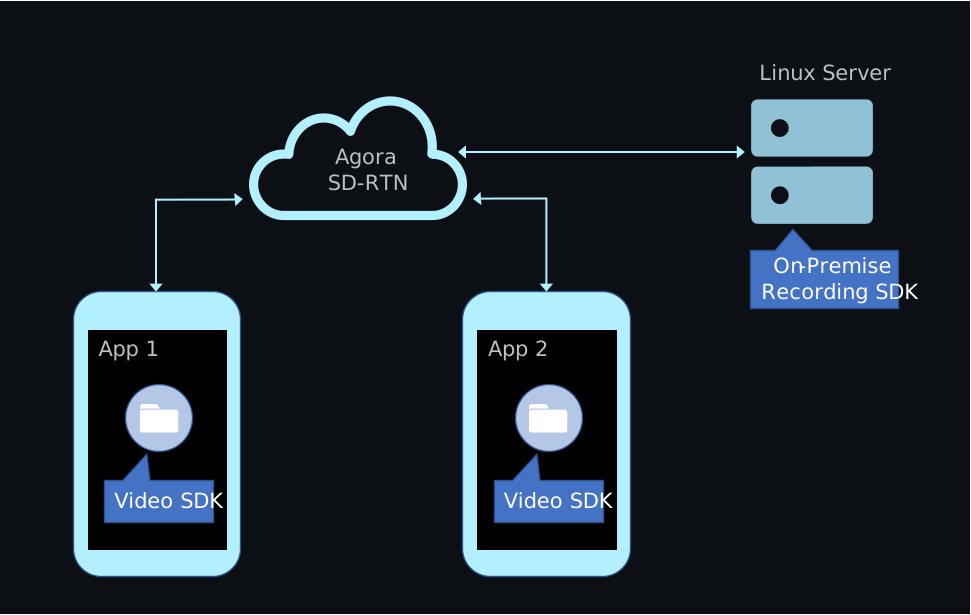
Integrate the On-Premise Recording SDK into your Linux server, not your client app. To record audio and video without deploying a Linux server, use Agora [Cloud Recording](/en/realtime-media/cloud-recording).
## Prerequisites [#prerequisites]
Before you begin, complete the following steps and ensure your environment meets the required specifications:
* [Create an Agora project](/en/realtime-media/on-premise-recording/manage-agora-account#generate-temporary-token) in the Agora Console and obtain an App ID and a temporary token.
* Implement a Video SDK project that includes basic audio and video interaction.
**Server hardware requirements:**
* **CPU**: 8 cores, 1.8 GHz
* **Memory**: At least 4 GB (recommended)
**Server software requirements:**
* **Operating system**: Ubuntu 18.04 or later, or CentOS 7.0 or later
* **CPU architecture**: arm64 or x86-64
* **glibc**: version 2.18 or later
* **gcc**: version 4.8 or later
**Network requirements:**
* The server is connected to the public internet and has a public IP address.
* The server allows access to the following domains:
* `*.agora.io`
* `*.agoralab.co`
## Project setup [#project-setup]
This section shows how to integrate the On-Premise Recording SDK into your app.
### Integrate the SDK [#integrate-the-sdk]
1. Download the latest On-Premise Recording SDK package from the [SDKs](/en/api-reference/sdks?product=on-premise-recording\&platform=linux) page.
2. Extract the package. The directory structure should look like this:
```text
.
├── agora_sdk
│ ├── include
│ ├── libagora-fdkaac.so
│ ├── libagora_rtc_sdk.so
│ └── libaosl.so
└── example
├── CMakeLists.txt
├── build.sh
├── out
├── recorder
├── recorder.json
├── singleVideo.json
├── scripts
└── third-party
```
3. Integrate the SDK into your project:
* Import the header files from `agora_sdk/include` into your project.
* Link the following dynamic library files from the `agora_sdk` directory:
* `libagora-fdkaac.so`
* `libagora_rtc_sdk.so`
* `libaosl.so`
The `example` directory contains a complete sample project for local recording. To run it, see [Test the project](#test-the-project).
## Implement On-Premise Recording [#implement-on-premise-recording]
This section shows how to implement On-Premise recording in your app, step by step.
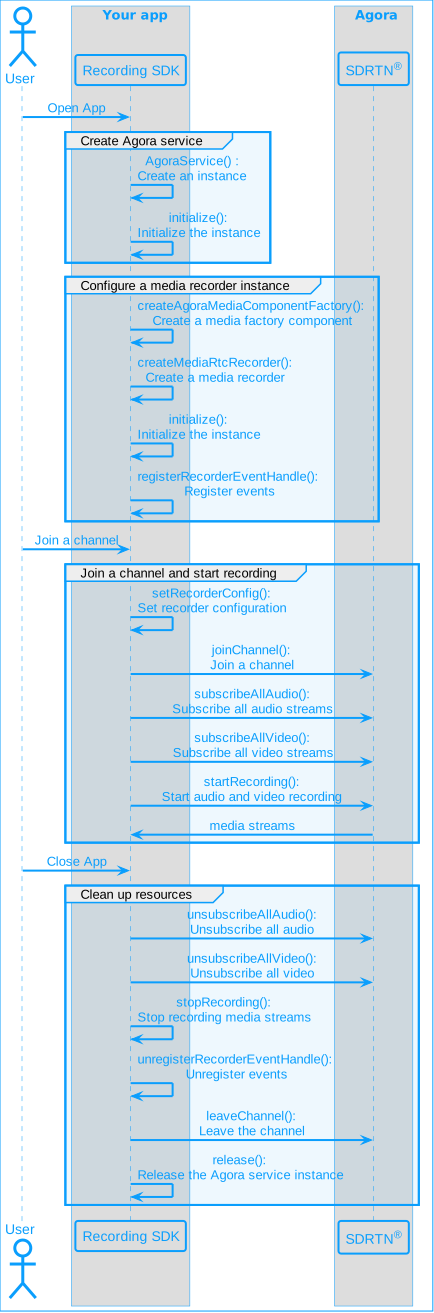
The following figure illustrates the essential steps:
Quickstart sequence diagram
### Initialize the service [#initialize-the-service]
Create the Agora service using `createAgoraService`. Then initialize it with media configuration options and logging settings.
```cpp
auto service = createAgoraService();
agora::base::AgoraServiceConfiguration service_config;
service_config.enableAudioDevice = false;
service_config.enableAudioProcessor = true;
service_config.enableVideo = true;
service_config.appId = config.appId.c_str();
service_config.useStringUid = config.UseStringUid;
service->initialize(service_config);
service->setLogFile("./io.agora.rtc_sdk/agorasdk.log", 1024 * 1024 * 5);
```
### Create the recorder instance [#create-the-recorder-instance]
Call `createAgoraMediaComponentFactory` and use it to create a `IAgoraMediaRtcRecorder` instance. Then initialize the recorder with the service and recording mode.
```cpp
agora::rtc::IMediaComponentFactory* factory = createAgoraMediaComponentFactory();
agora::agora_refptr recorder = factory->createMediaRtcRecorder();
// Set the recording mode
// - false: Record each user's audio and video stream separately (single stream recording)
// - true: Record all users' audio and video streams together (composite recording)
bool isMix = false;
// Initialize recorder
recorder->initialize(service, isMix);
```
### Register the event handler [#register-the-event-handler]
Call `registerRecorderEventHandle` to register a user-defined event handler that receives recorder callbacks.
```cpp
std::unique_ptr eventHandler{new RecorderEventHandler(recorder, config)};
recorder->registerRecorderEventHandle(eventHandler.get());
```
### Subscribe to audio and video streams [#subscribe-to-audio-and-video-streams]
Call `subscribeAllAudio` and `subscribeAllVideo` to receive all audio and video streams in the channel.
```cpp
recorder->subscribeAllAudio();
recorder->subscribeAllVideo(options);
```
### Configure recording [#configure-recording]
Call `setRecorderConfig` to define recording parameters such as resolution, frame rate, audio settings, and the storage location.
Ensure that the directory specified in `storagePath` exists. If not, the recording will fail.
```cpp
// Set recording configuration
agora::media::MediaRecorderConfiguration recorder_config;
recorder_config.width = config.video.width;
recorder_config.height = config.video.height;
recorder_config.fps = config.video.fps;
recorder_config.storagePath = config.recorderPath.c_str();
recorder_config.sample_rate = config.audio.sampleRate;
recorder_config.channel_num = config.audio.numOfChannels;
// Set recording stream type: audio stream, video stream, or audio and video stream
recorder_config.streamType = static_cast(config.recorderStreamType);
// Set the maximum recording duration
recorder_config.maxDurationMs = config.maxDuration * 1000;
recorder->setRecorderConfig(recorder_config);
```
### Join the channel and start recording [#join-the-channel-and-start-recording]
Call `joinChannel` to join the specified channel and `startRecording` to begin recording.
```cpp
recorder->joinChannel(config.token.c_str(), config.ChannelName.c_str(), config.UserId.c_str());
recorder->startRecording();
```
### Stop recording and release resources [#stop-recording-and-release-resources]
Call the cleanup methods to end recording, unsubscribe from streams, and release memory.
```cpp
recorder->unsubscribeAllAudio();
recorder->unsubscribeAllVideo();
recorder->stopRecording();
recorder->unregisterRecorderEventHandle(eventHandler.get());
eventHandler = nullptr;
recorder->leaveChannel();
recorder = nullptr;
service->release();
```
### Complete sample code [#complete-sample-code]
The following example shows the full implementation of an On-Premise Recording workflow.
Complete sample code for On-Premise Recording
```cpp
// Create and initialize the Agora service, and configure logging
auto service = createAgoraService();
agora::base::AgoraServiceConfiguration service_config;
service_config.enableAudioDevice = false;
service_config.enableAudioProcessor = true;
service_config.enableVideo = true;
service_config.appId = config.appId.c_str();
service_config.useStringUid = config.UseStringUid;
service->initialize(service_config);
service->setLogFile("./io.agora.rtc_sdk/agorasdk.log", 1024 * 1024 * 5);
// Create the media recorder instance
agora::rtc::IMediaComponentFactory* factory = createAgoraMediaComponentFactory();
agora::agora_refptr recorder = factory->createMediaRtcRecorder();
// Initialize the recorder
// Set to true for mixed recording or false for individual streams
bool isMix = false;
recorder->initialize(service, isMix);
// Register the event handler for recorder callbacks
std::unique_ptr eventHandler{new RecorderEventHandler(recorder, config)};
recorder->registerRecorderEventHandle(eventHandler.get());
// Subscribe to all audio and video streams
recorder->subscribeAllAudio();
recorder->subscribeAllVideo(options); // 'options' should be properly defined before use
// Configure recorder settings
agora::media::MediaRecorderConfiguration recorder_config;
recorder_config.width = config.video.width;
recorder_config.height = config.video.height;
recorder_config.fps = config.video.fps;
recorder_config.storagePath = config.recorderPath.c_str();
recorder_config.sample_rate = config.audio.sampleRate;
recorder_config.channel_num = config.audio.numOfChannels;
recorder_config.streamType = static_cast(config.recorderStreamType);
recorder_config.maxDurationMs = config.maxDuration * 1000;
recorder->setRecorderConfig(recorder_config);
// Join the channel and start recording
recorder->joinChannel(config.token.c_str(), config.ChannelName.c_str(), config.UserId.c_str());
recorder->startRecording();
// Stop recording and clean up
recorder->unsubscribeAllAudio();
recorder->unsubscribeAllVideo();
recorder->stopRecording();
recorder->unregisterRecorderEventHandle(eventHandler.get());
eventHandler = nullptr;
recorder->leaveChannel();
recorder = nullptr;
service->release();
```
## Test the project [#test-the-project]
Agora provides a complete sample project in the SDK download package. After downloading and extracting the package, follow these steps to build and run it:
1. Navigate to the sample project directory:
```sh
cd agora_rtc_sdk/example
```
2. Build the sample project:
```sh
./build.sh
```
3. Add the SDK library path to the `LD_LIBRARY_PATH` environment variable:
```sh
export LD_LIBRARY_PATH=../../agora_sdk:$LD_LIBRARY_PATH
```
4. Choose a configuration file for your recording mode:
* Use `recorder.json` for composite recording.
* Use `singleVideo.json` for individual recording.
For more information on the differences between mixed and individual recording modes, see [Individual recording](/en/realtime-media/on-premise-recording/build/record-audio-and-video/individual-mode) and [Composite recording](/en/realtime-media/on-premise-recording/build/record-audio-and-video/composite-mode).
5. Run the sample recorder with the selected configuration file:
```sh
# Example: Run individual recording
./out/sample_recorder singleVideo.json
```
## Reference [#reference]
This section contains content that completes the information on this page, or points you to documentation that explains other aspects to this product.
### API reference [#api-reference]
* [`createAgoraService`](/en/api-reference/api-ref/on-premise-recording#createagoraservice)
* [`initialize`](/en/api-reference/api-ref/on-premise-recording#initialize)
* [`setLogFile`](/en/api-reference/api-ref/on-premise-recording#setlogfile)
* [`createAgoraMediaComponentFactory`](/en/api-reference/api-ref/on-premise-recording#createagoramediacomponentfactory)
* [`registerRecorderEventHandle`](/en/api-reference/api-ref/on-premise-recording#registerrecordereventhandle)
* [`subscribeAllAudio`](/en/api-reference/api-ref/on-premise-recording#subscribeallaudio)
* [`subscribeAllVideo`](/en/api-reference/api-ref/on-premise-recording#subscribeallvideo)
* [`setRecorderConfig`](/en/api-reference/api-ref/on-premise-recording#setrecorderconfig)
* [`joinChannel`](/en/api-reference/api-ref/on-premise-recording#joinchannel)
* [`startRecording`](/en/api-reference/api-ref/on-premise-recording#startrecording)
* [`unsubscribeAllAudio`](/en/api-reference/api-ref/on-premise-recording#unsubscribeallaudio)
* [`unsubscribeAllVideo`](/en/api-reference/api-ref/on-premise-recording#unsubscribeallvideo)
* [`stopRecording`](/en/api-reference/api-ref/on-premise-recording#stoprecording)
* [`unregisterRecorderEventHandle`](/en/api-reference/api-ref/on-premise-recording#unregisterrecordereventhandle)
* [`leaveChannel`](/en/api-reference/api-ref/on-premise-recording#leavechannel)
* [`release`](/en/api-reference/api-ref/on-premise-recording#release)