# Virtual Background (/en/realtime-media/marketplace/build/add-video-and-ar-effects/virtual-background)

> For AI agents: see the complete documentation index at [llms.txt](/llms.txt).

Virtual Background enables users to blur their background, or replace it with a solid color or an image. This feature is applicable to use-cases such as online conferences, online classes, and live streaming. It helps protect personal privacy and reduces audience distraction.

<_PlatformTabsGroup groupMode="structured" canonicalPlatform="web" platforms="[&#x22;android&#x22;,&#x22;ios&#x22;,&#x22;web&#x22;,&#x22;windows&#x22;,&#x22;electron&#x22;,&#x22;flutter&#x22;,&#x22;react-native&#x22;,&#x22;unity&#x22;]" showTabs="true">
  <_PlatformPanel platform="android">
    <_PlatformProcessedMarker groupMode="structured" canonicalPlatform="web" platform="android" />

    ## Understand the tech [#understand-the-tech]

    Virtual Background offers the following options:

    | Feature                                 | Example                                                                                                                                                                                                                                                                                                               |
    | --------------------------------------- | --------------------------------------------------------------------------------------------------------------------------------------------------------------------------------------------------------------------------------------------------------------------------------------------------------------------- |
    | Blurred background and image background | ![image](https://assets-docs.agora.io/images/extensions-marketplace/blurred-background.jpg)                                                                                                                                                                                                                           |
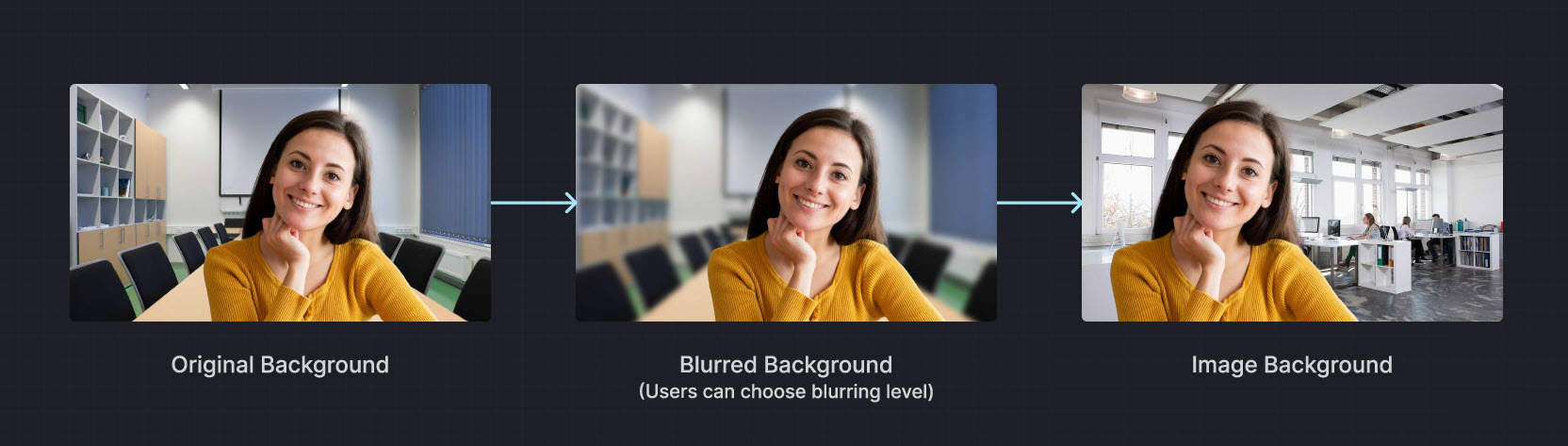
    | Video/Animated background               | <video src="https://assets-docs.agora.io/images/extensions-marketplace/virtual-background.mp4" poster="https://web-cdn.agora.io/docs-files/1654571689670" width="100%" height="auto">Your browser does not support the `video` element.</video>                                                                       |
    | Portrait-in-picture                     | ![portrait-in-picture](https://assets-docs.agora.io/images/extensions-marketplace/portrait-in-picture.jpg) Allows the presenter to use slides as the virtual background while superimposing their video. The effect is similar to a weather news cast on television, preventing interruptions during a layout toggle. |

    Want to test Virtual Background? Try the <a href="https://webdemo.agora.io/virtualBackground/index.html">online demo</a>.

    ## Prerequisites [#prerequisites]

    Ensure that you have implemented the [SDK quickstart](../../index.mdx) in your project.

    ## Implement virtual background [#implement-virtual-background]

    This section shows you how to add a virtual background to the local video.

    ### Check device compatibility [#check-device-compatibility]

    To avoid performance degradation or unavailable features when enabling Virtual Background on low-end devices, check whether the device supports the feature.

    <CodeBlockTabs defaultValue="java">
      <CodeBlockTabsList>
        <CodeBlockTabsTrigger value="java">
          Java
        </CodeBlockTabsTrigger>

        <CodeBlockTabsTrigger value="kotlin">
          Kotlin
        </CodeBlockTabsTrigger>
      </CodeBlockTabsList>

      <CodeBlockTab value="java">
        ```java
        boolean isFeatureAvailable() {
          return agoraEngine.isFeatureAvailableOnDevice(
            Constants.FEATURE_VIDEO_VIRTUAL_BACKGROUND
          );
        }
        ```
      </CodeBlockTab>

      <CodeBlockTab value="kotlin">
        ```kotlin
        fun isFeatureAvailable(): Boolean {
          return agoraEngine.isFeatureAvailableOnDevice(
            Constants.FEATURE_VIDEO_VIRTUAL_BACKGROUND
          )
        }
        ```
      </CodeBlockTab>
    </CodeBlockTabs>

    ### Set a blurred background [#set-a-blurred-background]

    To blur the video background, use the following code:

    <CodeBlockTabs defaultValue="java">
      <CodeBlockTabsList>
        <CodeBlockTabsTrigger value="java">
          Java
        </CodeBlockTabsTrigger>

        <CodeBlockTabsTrigger value="kotlin">
          Kotlin
        </CodeBlockTabsTrigger>
      </CodeBlockTabsList>

      <CodeBlockTab value="java">
        ```java
        void setBlurBackground() {
          VirtualBackgroundSource virtualBackgroundSource = new VirtualBackgroundSource();
          virtualBackgroundSource.setBackgroundSourceType(VirtualBackgroundSource.BACKGROUND_BLUR);
          virtualBackgroundSource.setBlurDegree(VirtualBackgroundSource.BLUR_DEGREE_MEDIUM);

          // Set processing properties for background
          SegmentationProperty segmentationProperty = new SegmentationProperty();
          segmentationProperty.setModelType(SegmentationProperty.SEG_MODEL_AI);
          // Use SEG_MODEL_GREEN if you have a green background
          segmentationProperty.setGreenCapacity(0.5f); // Accuracy for identifying green colors (range 0-1)

          // Enable or disable virtual background
          agoraEngine.enableVirtualBackground(true, virtualBackgroundSource, segmentationProperty);
        }
        ```
      </CodeBlockTab>

      <CodeBlockTab value="kotlin">
        ```kotlin
        fun setBlurBackground() {
          val virtualBackgroundSource = VirtualBackgroundSource()
          virtualBackgroundSource.setBackgroundSourceType(VirtualBackgroundSource.BACKGROUND_BLUR)
          virtualBackgroundSource.setBlurDegree(VirtualBackgroundSource.BLUR_DEGREE_MEDIUM)

          // Set processing properties for background
          val segmentationProperty = SegmentationProperty()
          segmentationProperty.setModelType(SegmentationProperty.SEG_MODEL_AI)
          // Use SEG_MODEL_GREEN if you have a green background
          segmentationProperty.setGreenCapacity(0.5f) // Accuracy for identifying green colors (range 0-1)

          // Enable or disable virtual background
          agoraEngine.enableVirtualBackground(true, virtualBackgroundSource, segmentationProperty)
        }
        ```
      </CodeBlockTab>
    </CodeBlockTabs>

    ### Set a color background [#set-a-color-background]

    To apply a solid color as the virtual background, use a hexadecimal color code. For example, `0x0000FF` for blue:

    <CodeBlockTabs defaultValue="java">
      <CodeBlockTabsList>
        <CodeBlockTabsTrigger value="java">
          Java
        </CodeBlockTabsTrigger>

        <CodeBlockTabsTrigger value="kotlin">
          Kotlin
        </CodeBlockTabsTrigger>
      </CodeBlockTabsList>

      <CodeBlockTab value="java">
        ```java
        void setSolidBackground() {
          VirtualBackgroundSource virtualBackgroundSource = new VirtualBackgroundSource();
          virtualBackgroundSource.setBackgroundSourceType(VirtualBackgroundSource.BACKGROUND_COLOR);
          virtualBackgroundSource.setColor(0x0000FF);

          // Set processing properties for background
          SegmentationProperty segmentationProperty = new SegmentationProperty();
          segmentationProperty.setModelType(SegmentationProperty.SEG_MODEL_AI);
          // Use SEG_MODEL_GREEN if you have a green background
          segmentationProperty.setGreenCapacity(0.5f); // Accuracy for identifying green colors (range 0-1)

          // Enable or disable virtual background
          agoraEngine.enableVirtualBackground(true, virtualBackgroundSource, segmentationProperty);
        }
        ```
      </CodeBlockTab>

      <CodeBlockTab value="kotlin">
        ```kotlin
        fun setSolidBackground() {
          val virtualBackgroundSource = VirtualBackgroundSource()
          virtualBackgroundSource.setBackgroundSourceType(VirtualBackgroundSource.BACKGROUND_COLOR)
          virtualBackgroundSource.setColor(0x0000FF)

          // Set processing properties for background
          val segmentationProperty = SegmentationProperty()
          segmentationProperty.setModelType(SegmentationProperty.SEG_MODEL_AI)
          // Use SEG_MODEL_GREEN if you have a green background
          segmentationProperty.setGreenCapacity(0.5f) // Accuracy for identifying green colors (range 0-1)

          // Enable or disable virtual background
          agoraEngine.enableVirtualBackground(true, virtualBackgroundSource, segmentationProperty)
        }
        ```
      </CodeBlockTab>
    </CodeBlockTabs>

    ### Set an image background [#set-an-image-background]

    To set a custom image as the virtual background, specify the absolute path to the image file.

    <CodeBlockTabs defaultValue="java">
      <CodeBlockTabsList>
        <CodeBlockTabsTrigger value="java">
          Java
        </CodeBlockTabsTrigger>

        <CodeBlockTabsTrigger value="kotlin">
          Kotlin
        </CodeBlockTabsTrigger>
      </CodeBlockTabsList>

      <CodeBlockTab value="java">
        ```java
        void setImageBackground() {
          VirtualBackgroundSource virtualBackgroundSource = new VirtualBackgroundSource();
          virtualBackgroundSource.setBackgroundSourceType(VirtualBackgroundSource.BACKGROUND_IMG);
          virtualBackgroundSource.setSource("<absolute path to an image file>");

          // Set processing properties for background
          SegmentationProperty segmentationProperty = new SegmentationProperty();
          segmentationProperty.setModelType(SegmentationProperty.SEG_MODEL_AI);
          // Use SEG_MODEL_GREEN if you have a green background
          segmentationProperty.setGreenCapacity(0.5f); // Accuracy for identifying green colors (range 0-1)

          // Enable or disable virtual background
          agoraEngine.enableVirtualBackground(true, virtualBackgroundSource, segmentationProperty);
        }
        ```
      </CodeBlockTab>

      <CodeBlockTab value="kotlin">
        ```kotlin
        fun setImageBackground() {
          val virtualBackgroundSource = VirtualBackgroundSource()
          virtualBackgroundSource.setBackgroundSourceType(VirtualBackgroundSource.BACKGROUND_IMG)
          virtualBackgroundSource.setSource("<absolute path to an image file>")

          // Set processing properties for background
          val segmentationProperty = SegmentationProperty()
          segmentationProperty.setModelType(SegmentationProperty.SEG_MODEL_AI)
          // Use SEG_MODEL_GREEN if you have a green background
          segmentationProperty.setGreenCapacity(0.5f) // Accuracy for identifying green colors (range 0-1)

          // Enable or disable virtual background
          agoraEngine.enableVirtualBackground(true, virtualBackgroundSource, segmentationProperty)
        }
        ```
      </CodeBlockTab>
    </CodeBlockTabs>

    ### Reset the background [#reset-the-background]

    To disable the virtual background and revert to the original video state, use the following code:

    <CodeBlockTabs defaultValue="java">
      <CodeBlockTabsList>
        <CodeBlockTabsTrigger value="java">
          Java
        </CodeBlockTabsTrigger>

        <CodeBlockTabsTrigger value="kotlin">
          Kotlin
        </CodeBlockTabsTrigger>
      </CodeBlockTabsList>

      <CodeBlockTab value="java">
        ```java
        void removeBackground() {
          // Disable virtual background
          agoraEngine.enableVirtualBackground(
            false,
            new VirtualBackgroundSource(),
            new SegmentationProperty()
          );
        }
        ```
      </CodeBlockTab>

      <CodeBlockTab value="kotlin">
        ```kotlin
        fun removeBackground() {
          // Disable virtual background
          agoraEngine.enableVirtualBackground(
            false,
            VirtualBackgroundSource(),
            SegmentationProperty()
          )
        }
        ```
      </CodeBlockTab>
    </CodeBlockTabs>

    ## Reference [#reference]

    This section contains content that completes the information in this page, or points you to documentation that explains other aspects to this product.

    ### API reference [#api-reference]

    * [`isFeatureAvailableOnDevice`](https://api-ref.agora.io/en/video-sdk/android/4.x/API/class_irtcengine.html#api_irtcengine_isfeatureavailableondevice)

    * [`enableVirtualBackground`](https://api-ref.agora.io/en/video-sdk/android/4.x/API/class_irtcengine.html#api_irtcengine_enablevirtualbackground)

    * [`VirtualBackgroundSource`](https://api-ref.agora.io/en/video-sdk/android/4.x/API/class_virtualbackgroundsource.html)

    * [`SegmentationProperty`](https://api-ref.agora.io/en/video-sdk/android/4.x/API/rtc_api_data_type.html#class_segmentationproperty)

    <_PlatformProcessedMarker close="true" />
  </_PlatformPanel>

  <_PlatformPanel platform="ios">
    <_PlatformProcessedMarker groupMode="structured" canonicalPlatform="web" platform="ios" />

    ## Understand the tech [#understand-the-tech-1]

    Virtual Background offers the following options:

    | Feature                                 | Example                                                                                                                                                                                                                                                                                                               |
    | --------------------------------------- | --------------------------------------------------------------------------------------------------------------------------------------------------------------------------------------------------------------------------------------------------------------------------------------------------------------------- |
    | Blurred background and image background | ![image](https://assets-docs.agora.io/images/extensions-marketplace/blurred-background.jpg)                                                                                                                                                                                                                           |

    | Video/Animated background               | <video src="https://assets-docs.agora.io/images/extensions-marketplace/virtual-background.mp4" poster="https://web-cdn.agora.io/docs-files/1654571689670" width="100%" height="auto">Your browser does not support the `video` element.</video>                                                                       |
    | Portrait-in-picture                     | ![portrait-in-picture](https://assets-docs.agora.io/images/extensions-marketplace/portrait-in-picture.jpg) Allows the presenter to use slides as the virtual background while superimposing their video. The effect is similar to a weather news cast on television, preventing interruptions during a layout toggle. |

    Want to test Virtual Background? Try the <a href="https://webdemo.agora.io/virtualBackground/index.html">online demo</a>.

    ## Prerequisites [#prerequisites-1]

    Ensure that you have implemented the [SDK quickstart](../../index.mdx) in your project.

    ## Implement virtual background [#implement-virtual-background-1]

    This section shows you how to add a virtual background to the local video.

    ### Check device compatibility [#check-device-compatibility-1]

    To avoid performance degradation or unavailable features when enabling Virtual Background on low-end devices, check whether the device supports the feature.

    ```swift
    guard agoraEngine.isFeatureAvailable(onDevice: .videoPreprocessVirtualBackground) else {
      // Device doesn't support virtual background
      return
    }
    ```

    ### Set a blurred background [#set-a-blurred-background-1]

    To blur the video background, use the following code:

    ```swift
    func blurBackground() {
      let virtualBackgroundSource = AgoraVirtualBackgroundSource()
      virtualBackgroundSource.backgroundSourceType = .blur
      virtualBackgroundSource.blurDegree = .high

      let segData = AgoraSegmentationProperty()
      segData.modelType = .agoraAi

      agoraEngine.enableVirtualBackground(true, backData: virtualBackgroundSource, segData: segData)
    }
    ```

    ### Set a color background [#set-a-color-background-1]

    To apply a solid color as the virtual background, use a hexadecimal color code.

    ```swift
    func colorBackground() {
      let virtualBackgroundSource = AgoraVirtualBackgroundSource()
      virtualBackgroundSource.backgroundSourceType = .color
      virtualBackgroundSource.color = convertColorToHex(.red)

      let segData = AgoraSegmentationProperty()
      segData.modelType = .agoraAi

      agoraEngine.enableVirtualBackground(true, backData: virtualBackgroundSource, segData: segData)
    }
    ```

    ### Set an image background [#set-an-image-background-1]

    To set a custom image as the virtual background, specify the absolute path to the image file.

    ```swift
    func imageBackground() {
      let virtualBackgroundSource = AgoraVirtualBackgroundSource()
      virtualBackgroundSource.backgroundSourceType = .img
      virtualBackgroundSource.source = Bundle.main.path(forResource: "background_ss", ofType: "jpg")

      let segData = AgoraSegmentationProperty()
      segData.modelType = .agoraAi

      agoraEngine.enableVirtualBackground(true, backData: virtualBackgroundSource, segData: segData)
    }
    ```

    ### Reset the background [#reset-the-background-1]

    To disable the virtual background and revert to the original video state, use the following code:

    ```swift
    agoraEngine.enableVirtualBackground(false, backData: nil, segData: nil)
    ```

    ## Reference [#reference-1]

    This section contains content that completes the information in this page, or points you to documentation that explains other aspects to this product.

    ### API reference [#api-reference-1]

    * [`isFeatureAvailable`](https://api-ref.agora.io/en/video-sdk/ios/4.x/documentation/agorartckit/agorartcenginekit/isfeatureavailable\(ondevice:\))

    * [`enableVirtualBackground`](https://api-ref.agora.io/en/video-sdk/ios/4.x/documentation/agorartckit/agorartcenginekit/enablevirtualbackground\(_\:backdata\:segdata:\))

    * [`AgoraVirtualBackgroundSource`](https://api-ref.agora.io/en/video-sdk/ios/4.x/documentation/agorartckit/agoravirtualbackgroundsource)

    * [`AgoraSegmentationProperty`](https://api-ref.agora.io/en/video-sdk/ios/4.x/documentation/agorartckit/agorasegmentationproperty)

    <_PlatformProcessedMarker close="true" />
  </_PlatformPanel>

  <_PlatformPanel platform="web">
    <_PlatformProcessedMarker groupMode="structured" canonicalPlatform="web" platform="web" />

    Try out the [online demo](https://webdemo-global.agora.io/index.html) for [Virtual background](https://webdemo-global.agora.io/example/plugin/virtualBackground/index.html).

    ## Understand the tech [#understand-the-tech-2]

    Virtual Background offers the following options:

    | Feature                                 | Example                                                                                                                                                                                                                                                                                                               |
    | --------------------------------------- | --------------------------------------------------------------------------------------------------------------------------------------------------------------------------------------------------------------------------------------------------------------------------------------------------------------------- |
    | Blurred background and image background | ![image](https://assets-docs.agora.io/images/extensions-marketplace/blurred-background.jpg)                                                                                                                                                                                                                           |

    | Video/Animated background               | <video src="https://assets-docs.agora.io/images/extensions-marketplace/virtual-background.mp4" poster="https://web-cdn.agora.io/docs-files/1654571689670" width="100%" height="auto">Your browser does not support the `video` element.</video>                                                                       |
    | Portrait-in-picture                     | ![portrait-in-picture](https://assets-docs.agora.io/images/extensions-marketplace/portrait-in-picture.jpg) Allows the presenter to use slides as the virtual background while superimposing their video. The effect is similar to a weather news cast on television, preventing interruptions during a layout toggle. |

    Want to test Virtual Background? Try the <a href="https://webdemo.agora.io/virtualBackground/index.html">online demo</a>.

    A typical transmission pipeline in the Agora Web SDK consists of a chain of procedures, including capture, preprocessing, encoding, transmitting, decoding, post-processing, and playback. In the preprocessing stage, extensions can modify the audio and video data in the pipeline to implement features such as virtual background and noise cancellation.

    **Web SDK typical transmission**
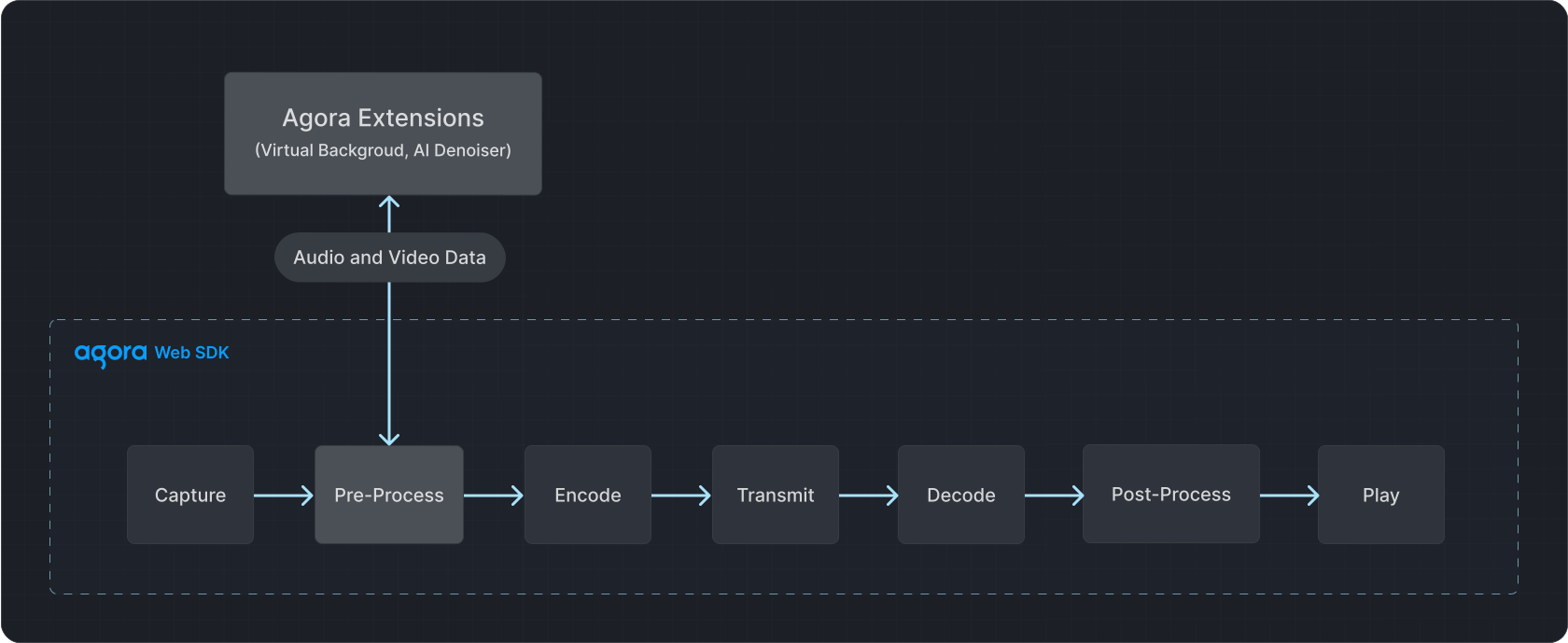
    ![web extensions](https://assets-docs.agora.io/images/extensions-marketplace/virtual-background.svg)

    ## Prerequisites [#prerequisites-2]

    Ensure that you have implemented the [SDK quickstart](../../index.mdx) in your project.

    ## Implement virtual background [#implement-virtual-background-2]

    This section shows you how to add a virtual background to the local video.

    ### Complete sample code [#complete-sample-code]

    Copy the following code into your script file:

    **Complete sample code for virtual background**

    ```js
    // Create Client
    var client = AgoraRTC.createClient({mode: "rtc", codec: "vp8"});
    // Create VirtualBackgroundExtension instance
    const extension = new VirtualBackgroundExtension();
    // Register plugin
    AgoraRTC.registerExtensions([extension]);

    let processor = null;
    var localTracks = {
     videoTrack: null,
     audioTrack: null
    };

    // Initialize
    async function getProcessorInstance() {
     if (!processor && localTracks.videoTrack) {
      // Create VirtualBackgroundProcessor instance
      processor = extension.createProcessor();

      try {
      // Initialize plugin
      await processor.init();
      } catch(e) {
       console.log("Fail to load WASM resource!");
       return null;
      }

      // Inject plugin into SDK's video processing pipeline
      localTracks.videoTrack.pipe(processor).pipe(localTracks.videoTrack.processorDestination);
     }
     return processor;
    }

    // Join channel
    async function join() {
     // Add event listeners
     client.on("user-published", handleUserPublished);
     client.on("user-unpublished", handleUserUnpublished);

     [options.uid, localTracks.audioTrack, localTracks.videoTrack] = await Promise.all([
      // Join channel
      client.join(options.appid, options.channel, options.token || null),
      // Create local microphone and camera tracks
      localTracks.audioTrack || AgoraRTC.createMicrophoneAudioTrack(),
      localTracks.videoTrack || AgoraRTC.createCameraVideoTrack({encoderConfig: '720p_4'})
     ]);

     // Play local tracks
     localTracks.videoTrack.play("local-player");
    }

    // Set solid color background
    async function setBackgroundColor() {
     if (localTracks.videoTrack) {
      document.getElementById("loading").style.display = "block";

      let processor = await getProcessorInstance();

      try {
       processor.setOptions({type: 'color', color: '#00ff00'});
       await processor.enable();
      } finally {
       document.getElementById("loading").style.display = "none";
      }

      virtualBackgroundEnabled = true;
     }
    }

    // Blur user's actual background
    async function setBackgroundBlurring() {
     if (localTracks.videoTrack) {
      document.getElementById("loading").style.display = "block";

      let processor = await getProcessorInstance();

      try {
       processor.setOptions({type: 'blur', blurDegree: 2});
       await processor.enable();
      } finally {
       document.getElementById("loading").style.display = "none";
      }

      virtualBackgroundEnabled = true;
     }
    }

    // Set image background
    async function setBackgroundImage() {
      const imgElement = document.createElement('img');

      imgElement.onload = async() => {
       document.getElementById("loading").style.display = "block";

       let processor = await getProcessorInstance();

       try {
        processor.setOptions({type: 'img', source: imgElement});
        await processor.enable();
       } finally {
        document.getElementById("loading").style.display = "none";
       }

       virtualBackgroundEnabled = true;
      }
      imgElement.src = '/images/background.png';
    }
    ```

    ### Integrate the virtual background extension [#integrate-the-virtual-background-extension]

    Run the following comment in the root directory of your project:

    ```bash
    npm install agora-extension-virtual-background
    ```

    ### Import the virtual background extension [#import-the-virtual-background-extension]

    You can add the extension in your app in the following ways:

    1. Add the following code to the script file:

       ```typescript
       import VirtualBackgroundExtension from "agora-extension-virtual-background";
       ```

    2. Add the following code to the html file:

       ```html
       <script src="../agora-extension-virtual-background.js"></script>
       ```

    ### Create and register the extension instance [#create-and-register-the-extension-instance]

    Register the extension instance with the Video SDK. To do this, add the following code to the script file:

    ```typescript
    // Create Client
    var client = AgoraRTC.createClient({mode: "rtc", codec: "vp8"});
    // Create VirtualBackgroundExtension instance
    const extension = new VirtualBackgroundExtension();
    // Check compatibility
    if (!extension.checkCompatibility()) {
      // The current browser does not support the virtual background plugin, you can stop executing the subsequent logic
      console.error("Does not support Virtual Background!");
    }
    // Register plugin
    AgoraRTC.registerExtensions([extension]);
    ```

    ### Inject a processor into the local video stream [#inject-a-processor-into-the-local-video-stream]

    1. Call `extension.createProcessor` to create a `VirtualBackgroundProcessor` instance.

       ```javascript
       processor = extension.createProcessor();
       ```

    2. Call `processor.init` to initialize the plugin. When resource loading or plug-in initialization fails, this method will throw an exception, and the application can catch the exception and handle it accordingly:

       ```javascript
       await processor.init();
       ```

    3. After creating the local camera video track, call `videoTrack.pipe` and specify the `videoTrack.processorDestination` attribute to inject the plug-in into the SDK's media processing pipeline.
       <CalloutContainer type="info">
         <CalloutDescription>
           For computing performance reasons, Agora recommends using the virtual background plug-in on a single video track.
           If you need two video tracks for preview, create multiple instances of `VirtualBackgroundProcessor`.
         </CalloutDescription>
       </CalloutContainer>

    ```javascript
    localTracks.videoTrack.pipe(processor).pipe(localTracks.videoTrack.processorDestination);
    ```

    ### Set a virtual background [#set-a-virtual-background]

    Call `processor.setOptions` to set the virtual background type and corresponding parameters. The following examples show how you use different backgrounds:

    1. Set a solid color background: Set the `type` parameter to `color`, then set the `color` parameter to a color value:

       ```javascript
       processor.setOptions({type: 'color', color: '#00ff00'});
       ```

    2. Set the picture background: Set the `type` parameter to `img`, and then set the `source` parameter to `HTMLImageElement`:

       ```javascript
       processor.setOptions({type: 'img', source: HTMLImageElement});
       ```

    3. Blur the user's actual background: Set the `type` parameter to `blur`, and then set the `blurDegree` parameter to low (`1`), medium (`2`), or high (`3`):

       ```javascript
       processor.setOptions({type: 'blur', blurDegree: 2});
       ```

    4. Set a dynamic background: Set the `type` parameter to `video`, and then set the `source` parameter to a video object:

       ```javascript
       processor.setOptions({type: 'video', source: HTMLVideoElement});
       ```

    ### Enable the virtual background [#enable-the-virtual-background]

    To enable a virtual background, call `processor.enable`:

    ```javascript
    await processor.enable();
    ```

    If `enable` is not called before calling `setOptions`, the SDK will enable the background blur effect by default, with a blur level of `1`. After turning on the virtual background, if you need to switch the virtual background effect, just adjust `setOptions`.

    ### Disable the virtual background [#disable-the-virtual-background]

    To disable the virtual background, call `disable` and `unpipe`:

    ```javascript
    await processor.disable();
    ```

    To remove the processor from the local video track, call `videoTrack.unpipe`:

    ```javascript
    localTracks.videoTrack.unpipe();
    ```

    <CalloutContainer type="info">
      <CalloutDescription>
        If you need to enable the virtual background again, you can reuse the existing `VirtualBackgroundProcessor` instance and do not need to recreate it. If multiple instances of `VirtualBackgroundProcessor` are created, it is recommended to call the `processor.release` method to release the plug-in resources that are no longer needed.
      </CalloutDescription>
    </CalloutContainer>

    ## Reference [#reference-2]

    This section contains content that completes the information in this page, or points you to documentation that explains other aspects to this product.

    * For a working example, check out the [Virtual background web demo](https://webdemo.agora.io/virtualBackground/index.html) and the associated [source code](https://github.com/AgoraIO/API-Examples-Web/tree/main/Demo/virtualBackground).

    ### Considerations [#considerations]

    * This extension works best when there is only one user in the video captured by the camera.
    * The browser support for the virtual background extension is as follows:
      * To get a better virtual background experience, Agora recommends using this feature on the latest version of Desktop Chrome.
      * Agora does not recommend enabling the virtual background feature on Firefox and Safari browsers. Backgrounding the web app on Firefox may cause the video to freeze, while the performance on Safari could be poor due to the browser's own performance issues.
      * Agora does not recommend enabling the virtual background feature on mobile browsers.
    * The virtual background feature has high performance requirements. Make sure your computer meets the following requirements:
      * CPU: Intel Core i5 4 cores or higher
      * 8G RAM or more
      * 64-bit operating system
    * If multiple extensions are enabled concurrently and other programs are occupying high system resources at the same time, your app may experience audio and video freezes.
    * When using this extension, Agora recommends selecting `Performance` mode or `Balanced` mode for your laptops. The computing requirements for this extension may not be met if the laptop is in a battery-saving mode.
    * This extension supports using a video as a dynamic virtual background since v1.0.0-beta-3. Videos must be in a format supported by `<video>` HTML elements. Agora also recommends meeting the following requirements:
      * The video adopts a resolution close to that of a portrait. Agora recommends not using a video with too high a bit rate.
      * Video content is suitable for looping to achieve a more natural dynamic virtual background effect.
      * Properly reduce the video frame rate, such as 15 fps or below. Video above 30 fps is not recommended by Agora.

    ### API reference [#api-reference-2]

    #### IVirtualBackgroundExtension [#ivirtualbackgroundextension]

    ##### createProcessor [#createprocessor]

    ```typescript
    createProcessor(): IVirtualBackgroundProcessor;
    ```

    Creates a `VirtualBackgroundProcessor` object.

    #### IVirtualBackgroundProcessor [#ivirtualbackgroundprocessor]

    ##### init [#init]

    ```typescript
    init(wasmDir: string): Promise<void>;
    ```

    Initializes the extension.

    Parameters:

    * `wasmDir`: The URL where the virtual background WASM module is located (without the `WASM` filename). Starting from v1.2.0, this parameter is optional.

    If the initialization of the extension fails due to the failure to access the Wasm file, this method throws an exception. Agora recommends that you disable the virtual background feature catching the exception.

    If the Wasm file is deployed on third-party services such as CDN and OSS across domains, you need to enable cross-domain access. For example, when deploying Nginx servers across domains, to enable cross-domain access, add the following configurations:

    ```text
    add_header 'Access-Control-Allow-Origin' "$http_origin";
    add_header 'Access-Control-Allow-Credentials' "true";
    ```

    <a name="setoptions" />

    ##### setOptions [#setoptions]

    ```typescript
    setOptions(options: VirtualBackgroundEffectOptions): void;
    ```

    Chooses the virtual background type, and sets parameters.

    Parameters:

    * `options`: The virtual background options. See [VirtualBackgroundEffectOptions](#virtualbackgroundeffectoptions).

    ##### enable [#enable]

    ```typescript
    enable(): void | Promise<void>;
    ```

    Enables the virtual background feature.

    If you do not call `setOptions` before calling this method, the default behavior of the SDK is to blur users' actual background with the blurring degree set as 1.

    ##### disable [#disable]

    ```typescript
    disable(): void | Promise<void>;
    ```

    Disables the virtual background feature.

    #### release [#release]

    ```typescript
    release(): Promise<void>;
    ```

    Releases all resources used by the extension, including created web workers .

    If `IVirtualBackgroundProcessor` is repeatedly created without releasing the resources occupied by the extension, it may cause memory exhaustion.

    ##### onoverload [#onoverload]

    ```typescript
    onoverload?: () => void;
    ```

    When the system performance cannot meet the processing requirements, the SDK triggers `onoverload`.

    Agora recommends calling `disable` in this event to disable virtual background and adding a UI prompt.

    ### Type definition [#type-definition]

    <a name="virtualbackgroundeffectoptions" />

    ##### VirtualBackgroundEffectOptions [#virtualbackgroundeffectoptions]

    Virtual background types and settings. Used in the [setOptions](#setoptions) method.

    ```typescript
    export type VirtualBackgroundEffectOptions = {
     type: string,
     color?: string;
     source?: HTMLImageElement;
     blurDegree?: Number;
    };
    ```

    Properties:

    * `type`: String. Choose the virtual background type:
      * `"color"`: Sets a solid color as the background.
      * `"img"`: Sets an image as the background.
      * `"blur"`: Blurs the user's original background.
      * `"video"`: Sets a video as the dynamic background.
      * `"none"`: Removes the background, that is, creates the effect of a portrait cutout.

    * `color`: String. When you set `type` as `"color"`, set this parameter to specify the color. The value must be a valid CSS color such as `"white"`, `"#00ff00"`, or ` "RGB(255, 0, 0)"`.

    * `source`: The HTMLImageElement object. When you set `type` as `"img"`, you can set a custom background image through this parameter.

    <CalloutContainer type="info">
      <CalloutDescription>
        - If the error "texture bound to texture unit 2 is not renderable. It might be non-power-of-2 or have incompatible texture filtering (maybe)?" occurs, check whether the product of the picture's width and height is a multiple of 2.
        - Due to the restriction of browsers' security policy, if your background image resources are deployed across domains, you need to enable your servers' cross-domain permission and set the `crossOrigin` property of the `HTMLImageElement` object as `anonymous`.
        - Since it takes time to load the image in the `HTMLImageElement` object, Agora recommends calling `setOptions` in the `onload` callback of the `HTMLImageElement` object, otherwise, the background momentarily turns black.
      </CalloutDescription>
    </CalloutContainer>

    * `blurDegree`: Number. When you set `type` as `"blur"`, set this parameter to choose the blurring degree:
      * `1`: Low
      * `2`: Medium
      * `3`: High

    * `fit`: String. Set this parameter to choose how the virtual background is filled:
      * `"contain"`: Fill in proportion to ensure that the background can be displayed completely, and fill the insufficient part with black.
      * `"cover"`: Fill in proportion and ensure that the background can fill the area, and the excess part will be cropped.
      * `"fill"`: Stretch to fill the area.

    <_PlatformProcessedMarker close="true" />
  </_PlatformPanel>

  <_PlatformPanel platform="windows">
    <_PlatformProcessedMarker groupMode="structured" canonicalPlatform="web" platform="windows" />

    ## Understand the tech [#understand-the-tech-3]

    Virtual Background offers the following options:

    | Feature                                 | Example                                                                                                                                                                                                                                                                                                               |
    | --------------------------------------- | --------------------------------------------------------------------------------------------------------------------------------------------------------------------------------------------------------------------------------------------------------------------------------------------------------------------- |
    | Blurred background and image background | ![image](https://assets-docs.agora.io/images/extensions-marketplace/blurred-background.jpg)                                                                                                                                                                                                                           |
    | Video/Animated background               | <video src="https://assets-docs.agora.io/images/extensions-marketplace/virtual-background.mp4" poster="https://web-cdn.agora.io/docs-files/1654571689670" width="100%" height="auto">Your browser does not support the `video` element.</video>                                                                       |
    | Portrait-in-picture                     | ![portrait-in-picture](https://assets-docs.agora.io/images/extensions-marketplace/portrait-in-picture.jpg) Allows the presenter to use slides as the virtual background while superimposing their video. The effect is similar to a weather news cast on television, preventing interruptions during a layout toggle. |

    Want to test Virtual Background? Try the <a href="https://webdemo.agora.io/virtualBackground/index.html">online demo</a>.

    ## Prerequisites [#prerequisites-3]

    Ensure that you have implemented the [SDK quickstart](../../index.mdx) in your project.

    ## Implement virtual background [#implement-virtual-background-3]

    This section shows you how to add a virtual background to the local video.

    ### Check device compatibility [#check-device-compatibility-2]

    To avoid performance degradation or unavailable features when enabling Virtual Background on low-end devices, check whether the device supports the feature.

    ```cpp
    if (!(m_rtcEngine->isFeatureAvailableOnDevice(FeatureType::VIDEO_VIRTUAL_BACKGROUND)))
    {
      AfxMessageBox(L"Device doesn't support virtual background");
      return;
    }
    ```

    ### Set a blurred background [#set-a-blurred-background-2]

    To blur the video background, use the following code:

    ```cpp
    void SetBackgroundBlur(VirtualBackgroundSource& virtualBackgroundSource) {

      VirtualBackgroundSource virtualBackgroundSource;
      SegmentationProperty segmentationProperty;

      // Set background blur
      virtualBackgroundSource.background_source_type = VirtualBackgroundSource:BACKGROUND_BLUR;
      virtualBackgroundSource.blur_degree = VirtualBackgroundSource::BLUR_DEGREE_HIGH;

      // Set processing properties for background
      segmentationProperty.modelType = SegmentationProperty::SEG_MODEL_AI;

      segmentationProperty.greenCapacity = 0.5F;
      // Enable or disable virtual background
      m_rtcEngine->enableVirtualBackground(true, virtualBackgroundSource, segmentationProperty);
    }
    ```

    ### Set a color background [#set-a-color-background-2]

    To apply a solid color as the virtual background, use a hexadecimal color code. For example, `0x0000FF` for blue:

    ```cpp
    void SetBackgroundColor(VirtualBackgroundSource& virtualBackgroundSource) {

      VirtualBackgroundSource virtualBackgroundSource;
      SegmentationProperty segmentationProperty;

      // Set a solid background color
      virtualBackgroundSource.background_source_type = VirtualBackgroundSource::BACKGROUND_COLOR;
      virtualBackgroundSource.color = 0x0000FF;

      // Set processing properties for background
      segmentationProperty.modelType = SegmentationProperty::SEG_MODEL_AI;

      segmentationProperty.greenCapacity = 0.5F;
      // Enable or disable virtual background
      m_rtcEngine->enableVirtualBackground(true, virtualBackgroundSource, segmentationProperty);
    }
    ```

    ### Set an image background [#set-an-image-background-2]

    To set a custom image as the virtual background, specify the absolute path to the image file.

    ```cpp
    void SetBackgroundImage(VirtualBackgroundSource& virtualBackgroundSource) {

      VirtualBackgroundSource virtualBackgroundSource;
      SegmentationProperty segmentationProperty;

      // Set a background image
      virtualBackgroundSource.background_source_type = VirtualBackgroundSource::BACKGROUND_IMG;
      virtualBackgroundSource.source = "<absolute path to an image file>";

      // Set processing properties for background
      segmentationProperty.modelType = SegmentationProperty::SEG_MODEL_AI;

      segmentationProperty.greenCapacity = 0.5F;
      // Enable or disable virtual background
      m_rtcEngine->enableVirtualBackground(true, virtualBackgroundSource, segmentationProperty);
    }
    ```

    ### Reset the background [#reset-the-background-2]

    To disable the virtual background and revert to the original video state, use the following code:

    ```cpp
    void ResetVirtualBackground() {
      // Set a default or reset state for the virtual background
      VirtualBackgroundSource virtualBackgroundSource;
      SegmentationProperty segmentationProperty;

      // For example, setting a default background color
      virtualBackgroundSource.background_source_type = VirtualBackgroundSource::BACKGROUND_COLOR;
      virtualBackgroundSource.color = 0xFFFFFF;

      // Set processing properties for background
      segmentationProperty.modelType = SegmentationProperty::SEG_MODEL_AI;
      segmentationProperty.greenCapacity = 0.5F;

      // Disable virtual background
      m_rtcEngine->enableVirtualBackground(false, virtualBackgroundSource, segmentationProperty);
    }
    ```

    ## Reference [#reference-3]

    This section contains content that completes the information in this page, or points you to documentation that explains other aspects to this product.

    ### API reference [#api-reference-3]

    * [`isFeatureAvailableOnDevice`](https://api-ref.agora.io/en/video-sdk/cpp/4.x/API/class_irtcengine.html#api_irtcengine_isfeatureavailableondevice)

    * [`enableVirtualBackground`](https://api-ref.agora.io/en/video-sdk/cpp/4.x/API/class_irtcengine.html#api_irtcengine_enablevirtualbackground)

    * [`VirtualBackgroundSource`](https://api-ref.agora.io/en/video-sdk/cpp/4.x/API/class_virtualbackgroundsource.html)

    * [`SegmentationProperty`](https://api-ref.agora.io/en/video-sdk/cpp/4.x/API/class_segmentationproperty.html)

    <_PlatformProcessedMarker close="true" />
  </_PlatformPanel>

  <_PlatformPanel platform="electron">
    <_PlatformProcessedMarker groupMode="structured" canonicalPlatform="web" platform="electron" />

    ## Understand the tech [#understand-the-tech-4]

    Virtual Background offers the following options:

    | Feature                                 | Example                                                                                                                                                                                                                                                                                                               |
    | --------------------------------------- | --------------------------------------------------------------------------------------------------------------------------------------------------------------------------------------------------------------------------------------------------------------------------------------------------------------------- |
    | Blurred background and image background | ![image](https://assets-docs.agora.io/images/extensions-marketplace/blurred-background.jpg)                                                                                                                                                                                                                           |
    | Video/Animated background               | <video src="https://assets-docs.agora.io/images/extensions-marketplace/virtual-background.mp4" poster="https://web-cdn.agora.io/docs-files/1654571689670" width="100%" height="auto">Your browser does not support the `video` element.</video>                                                                       |
    | Portrait-in-picture                     | ![portrait-in-picture](https://assets-docs.agora.io/images/extensions-marketplace/portrait-in-picture.jpg) Allows the presenter to use slides as the virtual background while superimposing their video. The effect is similar to a weather news cast on television, preventing interruptions during a layout toggle. |

    Want to test Virtual Background? Try the <a href="https://webdemo.agora.io/virtualBackground/index.html">online demo</a>.

    ## Prerequisites [#prerequisites-4]

    Ensure that you have implemented the [SDK quickstart](../../index.mdx) in your project.

    ## Implement virtual background [#implement-virtual-background-4]

    This section shows you how to add a virtual background to the local video.

    ### Enable the extension [#enable-the-extension]

    To enable the Virtual Background extension, use the following code:

    ```typescript
    this.engine?.enableExtension(
      'agora_video_filters_segmentation',
      'portrait_segmentation',
      true
     );
    ```

    ### Check device compatibility [#check-device-compatibility-3]

    To avoid performance degradation or unavailable features when enabling Virtual Background on low-end devices, check whether the device supports the feature.

    ```typescript
    if (!(this.engine?.isFeatureAvailableOnDevice(FeatureType.VIDEO_VIRTUAL_BACKGROUND)))
    {
      console.log("Device doesn't support virtual background");
      return;
    }
    ```

    ### Set a blurred background [#set-a-blurred-background-3]

    To blur the video background, use the following code:

    ```typescript
    public setBackgroundBlur = () => {
      this.engine?.enableVirtualBackground(true, BackgroundSourceType.BackgroundBlur, {
        blur_degree: BackgroundBlurDegree.BlurDegreeHigh
      });
    };
    ```

    ### Set a color background [#set-a-color-background-3]

    To apply a solid color as the virtual background, use a hexadecimal color code. For example, `0x0000FF` for blue:

    ```typescript
    public setBackgroundColor = () => {
      this.engine?.enableVirtualBackground(true, BackgroundSourceType.BackgroundColor, {
        color: 0x0000FF
      });
    };
    ```

    ### Set an image background [#set-an-image-background-3]

    To set a custom image as the virtual background, specify the absolute path to the image file.

    ```typescript
    public setBackgroundImage = (imagePath: string) => {
      this.engine?.enableVirtualBackground(true, BackgroundSourceType.BackgroundImg, {}, {}, imagePath);
    };
    ```

    ### Reset the background [#reset-the-background-3]

    To disable the virtual background and revert to the original video state, use the following code:

    ```typescript
    private disableVirtualBackground = () => {
      this.engine?.enableVirtualBackground(false, {}, {});
    };
    ```

    ## Reference [#reference-4]

    This section contains content that completes the information in this page, or points you to documentation that explains other aspects to this product.

    ### API reference [#api-reference-4]

    * [`enableExtension`](https://api-ref.agora.io/en/video-sdk/electron/4.x/API/class_irtcengine.html#api_irtcengine_enableextension)

    * [`enableVirtualBackground`](https://api-ref.agora.io/en/video-sdk/electron/4.x/API/class_irtcengine.html#api_irtcengine_enablevirtualbackground)

    * [`VirtualBackgroundSource`](https://api-ref.agora.io/en/video-sdk/electron/4.x/API/class_virtualbackgroundsource.html)

    * [`SegmentationProperty`](https://api-ref.agora.io/en/video-sdk/electron/4.x/API/class_segmentationproperty.html)

    <_PlatformProcessedMarker close="true" />
  </_PlatformPanel>

  <_PlatformPanel platform="flutter">
    <_PlatformProcessedMarker groupMode="structured" canonicalPlatform="web" platform="flutter" />

    ## Understand the tech [#understand-the-tech-5]

    Virtual Background offers the following options:

    | Feature                                 | Example                                                                                                                                                                                                                                                                                                               |
    | --------------------------------------- | --------------------------------------------------------------------------------------------------------------------------------------------------------------------------------------------------------------------------------------------------------------------------------------------------------------------- |
    | Blurred background and image background | ![image](https://assets-docs.agora.io/images/extensions-marketplace/blurred-background.jpg)                                                                                                                                                                                                                           |
    | Video/Animated background               | <video src="https://assets-docs.agora.io/images/extensions-marketplace/virtual-background.mp4" poster="https://web-cdn.agora.io/docs-files/1654571689670" width="100%" height="auto">Your browser does not support the `video` element.</video>                                                                       |
    | Portrait-in-picture                     | ![portrait-in-picture](https://assets-docs.agora.io/images/extensions-marketplace/portrait-in-picture.jpg) Allows the presenter to use slides as the virtual background while superimposing their video. The effect is similar to a weather news cast on television, preventing interruptions during a layout toggle. |

    Want to test Virtual Background? Try the <a href="https://webdemo.agora.io/virtualBackground/index.html">online demo</a>.

    ## Prerequisites [#prerequisites-5]

    Ensure that you have implemented the [SDK quickstart](../../index.mdx) in your project.

    ## Implement virtual background [#implement-virtual-background-5]

    This section shows you how to add a virtual background to the local video.

    ### Check device compatibility [#check-device-compatibility-4]

    To avoid performance degradation or unavailable features when enabling Virtual Background on low-end devices, check whether the device supports the feature.

    ```dart
    if (!await _engine.isFeatureAvailableOnDevice(FeatureType.videoVirtualBackground)) {
      return;
    }
    ```

    ### Set a blurred background [#set-a-blurred-background-4]

    To blur the video background, use the following code:

    ```dart
    Future<void> setBlurBackground() async {
      final virtualBackgroundSource = const VirtualBackgroundSource(
        backgroundSourceType: BackgroundSourceType.backgroundBlur,
        blurDegree: BackgroundBlurDegree.blurDegreeHigh,
      );

      final segmentationProperty = const SegmentationProperty(
        modelType: SegModelType.segModelAi,
        greenCapacity: 0.5,
      );

      // Enable or disable virtual background
      _engine.enableVirtualBackground(
        enabled: true,
        backgroundSource: virtualBackgroundSource,
        segproperty: segmentationProperty);
    }
    ```

    ### Set a color background [#set-a-color-background-4]

    To apply a solid color as the virtual background, use a hexadecimal color code. For example, `0x0000FF` for blue:

    ```dart
    Future<void> setColorBackground() async {
      final virtualBackgroundSource = const VirtualBackgroundSource(
        backgroundSourceType: BackgroundSourceType.backgroundColor,
        color: 0x0000FF,
      );

      final segmentationProperty = const SegmentationProperty(
        modelType: SegModelType.segModelAi,
        greenCapacity: 0.5,
      );

      // Enable or disable virtual background
      _engine.enableVirtualBackground(
        enabled: true,
        backgroundSource: virtualBackgroundSource,
        segproperty: segmentationProperty);
    }
    ```

    ### Set an image background [#set-an-image-background-4]

    To set a custom image as the virtual background, specify the path to the image file.

    ```dart
    Future<void> setImageBackground() async {
      final virtualBackgroundSource = const VirtualBackgroundSource(
        backgroundSourceType: BackgroundSourceType.backgroundImg,
        source: "<path to an image file>",
      );

      final segmentationProperty = const SegmentationProperty(
        modelType: SegModelType.segModelAi,
        greenCapacity: 0.5,
      );

      // Enable or disable virtual background
      _engine.enableVirtualBackground(
        enabled: true,
        backgroundSource: virtualBackgroundSource,
        segproperty: segmentationProperty);
    }
    ```

    ### Reset the background [#reset-the-background-4]

    To disable the virtual background and revert to the original video state, use the following code:

    ```dart
    Future<void> resetVirtualBackground() async {
      await enableVirtualBackground( false,
        const VirtualBackgroundSource(),
        const SegmentationProperty(),
      );
    }
    ```

    ## Reference [#reference-5]

    This section contains content that completes the information in this page, or points you to documentation that explains other aspects to this product.

    ### API reference [#api-reference-5]

    * [`isFeatureAvailableOnDevice`](https://api-ref.agora.io/en/video-sdk/flutter/6.x/API/class_irtcengine.html#api_irtcengine_isfeatureavailableondevice)

    * [`enableVirtualBackground`](https://api-ref.agora.io/en/video-sdk/flutter/6.x/API/class_irtcengine.html#api_irtcengine_enablevirtualbackground)

    * [`VirtualBackgroundSource`](https://api-ref.agora.io/en/video-sdk/flutter/6.x/API/class_virtualbackgroundsource.html)

    * [`SegmentationProperty`](https://api-ref.agora.io/en/video-sdk/flutter/6.x/API/class_segmentationproperty.html)

    <_PlatformProcessedMarker close="true" />
  </_PlatformPanel>

  <_PlatformPanel platform="react-native">
    <_PlatformProcessedMarker groupMode="structured" canonicalPlatform="web" platform="react-native" />

    ## Understand the tech [#understand-the-tech-6]

    Virtual Background offers the following options:

    | Feature                                 | Example                                                                                                                                                                                                                                                                                                               |
    | --------------------------------------- | --------------------------------------------------------------------------------------------------------------------------------------------------------------------------------------------------------------------------------------------------------------------------------------------------------------------- |
    | Blurred background and image background | ![image](https://assets-docs.agora.io/images/extensions-marketplace/blurred-background.jpg)                                                                                                                                                                                                                           |
    | Video/Animated background               | <video src="https://assets-docs.agora.io/images/extensions-marketplace/virtual-background.mp4" poster="https://web-cdn.agora.io/docs-files/1654571689670" width="100%" height="auto">Your browser does not support the `video` element.</video>                                                                       |
    | Portrait-in-picture                     | ![portrait-in-picture](https://assets-docs.agora.io/images/extensions-marketplace/portrait-in-picture.jpg) Allows the presenter to use slides as the virtual background while superimposing their video. The effect is similar to a weather news cast on television, preventing interruptions during a layout toggle. |

    Want to test Virtual Background? Try the <a href="https://webdemo.agora.io/virtualBackground/index.html">online demo</a>.

    ## Prerequisites [#prerequisites-6]

    Ensure that you have implemented the [SDK quickstart](../../index.mdx) in your project.

    ## Implement virtual background [#implement-virtual-background-6]

    This section shows you how to add a virtual background to the local video.

    ### Enable the extension [#enable-the-extension-1]

    To enable the Virtual Background extension, use the following code:

    ```typescript
    agoraEngineRef.current?.enableExtension(
      'agora_video_filters_segmentation',
      'portrait_segmentation',
      true,
    );
    ```

    ### Set a blurred background [#set-a-blurred-background-5]

    To blur the video background, use the following code:

    ```typescript
    const setBlurBackground = () => {
      backgroundSourceType = BackgroundSourceType.BackgroundBlur;
      backgroundBlurDegree = BackgroundBlurDegree.BlurDegreeHigh;
      agoraEngineRef.current?.enableVirtualBackground(
        true,
        {
          background_source_type: backgroundSourceType,
          blur_degree: backgroundBlurDegree,
        },
        {},
      );
    };
    ```

    ### Set a color background [#set-a-color-background-5]

    To apply a solid color as the virtual background, use a hexadecimal color code. For example, `0x0000FF` for blue:

    ```typescript
    const setColorBackground = () => {
      backgroundSourceType = BackgroundSourceType.BackgroundColor;
      color = 0x0000ff;
      agoraEngineRef.current?.enableVirtualBackground(
        true,
        {
          background_source_type: backgroundSourceType,
          color: color,
        },
        {},
      );
    };
    ```

    ### Set an image background [#set-an-image-background-5]

    To set a custom image as the virtual background, specify the absolute path to the image file.

    ```typescript
    const setImageBackground = () => {
      backgroundSourceType = BackgroundSourceType.BackgroundImg;
      source =
        '<<absolute path to an image file>>';
      agoraEngineRef.current?.enableVirtualBackground(
        true,
        {
          background_source_type: backgroundSourceType,
          source: source,
        },
        {},
      );
    };
    ```

    ### Reset the background [#reset-the-background-5]

    To disable the virtual background and revert to the original video state, use the following code:

    ```typescript
    const resetVirtualBackground = () => {
      setVirtualBackgroundStatus(false);
      agoraEngineRef.current?.enableVirtualBackground(false, {}, {});
    };
    ```

    ## Reference [#reference-6]

    This section contains content that completes the information in this page, or points you to documentation that explains other aspects to this product.

    ### API reference [#api-reference-6]

    * [`enableExtension`](https://api-ref.agora.io/en/video-sdk/react-native/4.x/API/class_irtcengine.html#api_irtcengine_enableextension)

    * [`enableVirtualBackground`](https://api-ref.agora.io/en/video-sdk/react-native/4.x/API/class_irtcengine.html#api_irtcengine_enablevirtualbackground)

    * [`VirtualBackgroundSource`](https://api-ref.agora.io/en/video-sdk/react-native/4.x/API/class_virtualbackgroundsource.html)

    * [`SegmentationProperty`](https://api-ref.agora.io/en/video-sdk/react-native/4.x/API/class_segmentationproperty.html)

    <_PlatformProcessedMarker close="true" />
  </_PlatformPanel>

  <_PlatformPanel platform="unity">
    <_PlatformProcessedMarker groupMode="structured" canonicalPlatform="web" platform="unity" />

    ## Understand the tech [#understand-the-tech-7]

    Virtual Background offers the following options:

    | Feature                                 | Example                                                                                                                                                                                                                                                                                                               |
    | --------------------------------------- | --------------------------------------------------------------------------------------------------------------------------------------------------------------------------------------------------------------------------------------------------------------------------------------------------------------------- |
    | Blurred background and image background | ![image](https://assets-docs.agora.io/images/extensions-marketplace/blurred-background.jpg)                                                                                                                                                                                                                           |
    | Video/Animated background               | <video src="https://assets-docs.agora.io/images/extensions-marketplace/virtual-background.mp4" poster="https://web-cdn.agora.io/docs-files/1654571689670" width="100%" height="auto">Your browser does not support the `video` element.</video>                                                                       |
    | Portrait-in-picture                     | ![portrait-in-picture](https://assets-docs.agora.io/images/extensions-marketplace/portrait-in-picture.jpg) Allows the presenter to use slides as the virtual background while superimposing their video. The effect is similar to a weather news cast on television, preventing interruptions during a layout toggle. |

    Want to test Virtual Background? Try the <a href="https://webdemo.agora.io/virtualBackground/index.html">online demo</a>.

    ## Prerequisites [#prerequisites-7]

    Ensure that you have implemented the [SDK quickstart](../../index.mdx) in your project.

    ## Implement virtual background [#implement-virtual-background-7]

    This section shows you how to add a virtual background to the local video.

    ### Check device compatibility [#check-device-compatibility-5]

    To avoid performance degradation or unavailable features when enabling Virtual Background on low-end devices, check whether the device supports the feature.

    ```csharp
    private bool IsFeatureAvailable() {
      return agoraEngine.IsFeatureAvailableOnDevice(FeatureType.VIDEO_VIRTUAL_BACKGROUND);
    }
    ```

    ### Set a blurred background [#set-a-blurred-background-6]

    To blur the video background, use the following code:

    ```csharp
    private void SetBackgroundBlur()
    {
      if(IsFeatureAvailable() == false)
      {
        Debug.Log("Device does not support the virtual background feature");
        return;
      }

      VirtualBackgroundSource virtualBackgroundSource = new VirtualBackgroundSource();

      // Set background blur
      virtualBackgroundSource.background_source_type = BACKGROUND_SOURCE_TYPE.BACKGROUND_BLUR;
      virtualBackgroundSource.blur_degree = BACKGROUND_BLUR_DEGREE.BLUR_DEGREE_HIGH;

      // Set processing properties for background
      SegmentationProperty segmentationProperty = new SegmentationProperty();
      segmentationProperty.modelType = SEG_MODEL_TYPE.SEG_MODEL_AI; // Use SEG_MODEL_GREEN if you have a green background
      segmentationProperty.greenCapacity = 0.5F; // Accuracy for identifying green colors (range 0-1)

      // Enable or disable virtual background
      agoraEngine.EnableVirtualBackground(true, virtualBackgroundSource, segmentationProperty, MEDIA_SOURCE_TYPE.PRIMARY_CAMERA_SOURCE);
    }
    ```

    ### Set a color background [#set-a-color-background-6]

    To apply a solid color as the virtual background, use a hexadecimal color code. For example, `0x0000FF` for blue:

    ```csharp
    private void SetBackgroundColor()
    {
      if(IsFeatureAvailable() == false)
      {
        Debug.Log("Device does not support the virtual background feature");
        return;
      }

      VirtualBackgroundSource virtualBackgroundSource = new VirtualBackgroundSource();

      // Set a solid background color
      virtualBackgroundSource.background_source_type = BACKGROUND_SOURCE_TYPE.BACKGROUND_COLOR;
      virtualBackgroundSource.color = 0x0000FF;

      // Set processing properties for background
      SegmentationProperty segmentationProperty = new SegmentationProperty();
      segmentationProperty.modelType = SEG_MODEL_TYPE.SEG_MODEL_AI; // Use SEG_MODEL_GREEN if you have a green background
      segmentationProperty.greenCapacity = 0.5F; // Accuracy for identifying green colors (range 0-1)

      // Enable or disable virtual background
      agoraEngine.EnableVirtualBackground(true, virtualBackgroundSource, segmentationProperty, MEDIA_SOURCE_TYPE.PRIMARY_CAMERA_SOURCE);
    }
    ```

    ### Set an image background [#set-an-image-background-6]

    To set a custom image as the virtual background, specify the absolute path to the image file.

    ```csharp
    private void SetBackgroundImage()
    {
      if(IsFeatureAvailable() == false)
      {
        Debug.Log("Device does not support the virtual background feature");
        return;
      }

      VirtualBackgroundSource virtualBackgroundSource = new VirtualBackgroundSource();

      virtualBackgroundSource.background_source_type = BACKGROUND_SOURCE_TYPE.BACKGROUND_IMG;
      string filePath = Path.Combine(Application.persistentDataPath, "<path-of-the-file>.png");
    #if UNITY_EDITOR_WIN || UNITY_STANDALONE_WIN
        filePath = filePath.Replace('/', '\\');
    #endif
      virtualBackgroundSource.source = filePath;

      var segproperty = new SegmentationProperty();
      RtcEngine.EnableVirtualBackground(true, virtualBackgroundSource, segproperty, MEDIA_SOURCE_TYPE.PRIMARY_CAMERA_SOURCE);
    }
    ```

    ### Reset the background [#reset-the-background-6]

    Resets the virtual background, disabling any applied effects and reverting to the original video state.

    ```csharp
    private void DisableVirtualBackground()
    {
      VirtualBackgroundSource virtualBackgroundSource = new VirtualBackgroundSource();
      var segproperty = new SegmentationProperty();
      RtcEngine.EnableVirtualBackground(false, virtualBackgroundSource, segproperty, MEDIA_SOURCE_TYPE.PRIMARY_CAMERA_SOURCE);
    }
    ```

    ## Reference [#reference-7]

    This section contains content that completes the information in this page, or points you to documentation that explains other aspects to this product.

    ### API reference [#api-reference-7]

    * [`IsFeatureAvailableOnDevice`](https://api-ref.agora.io/en/video-sdk/unity/4.x/API/class_irtcengine.html#api_irtcengine_isfeatureavailableondevice)

    * [`enableVirtualBackground`](https://api-ref.agora.io/en/video-sdk/unity/4.x/API/class_irtcengine.html#api_irtcengine_enablevirtualbackground)

    * [`VirtualBackgroundSource`](https://api-ref.agora.io/en/video-sdk/unity/4.x/API/class_virtualbackgroundsource.html)

    * [`SegmentationProperty`](https://api-ref.agora.io/en/video-sdk/unity/4.x/API/class_segmentationproperty.html)

    <_PlatformProcessedMarker close="true" />
  </_PlatformPanel>
</_PlatformTabsGroup>