# AI Noise Suppression (/en/realtime-media/marketplace/build/add-audio-effects/ains/android)
> For AI agents: see the complete documentation index at [llms.txt](/llms.txt).
AI Noise Suppression enables you to suppress hundreds of types of noise and reduce distortion in human voices when multiple people speak at the same time. In use-cases such as online meetings, online chat rooms, video consultations with doctors, and online gaming, AI Noise Suppression makes virtual communication as smooth as face-to-face interaction.
AI Noise Suppression reduces the following types of noise:
* Television
* Kitchen
* Street, such as birds chirping, traffic, and subway sounds
* Machine, such as fans, air conditioners, vacuum cleaners, and copiers
* Office, such as keyboard and mouse clicks
* Household, such as doors opening, creaking chairs, crying babies, and house renovations
* Constant knocking
* Beeps and clapping
* Music
You can choose following noise reduction strategies:
* Default: Reduces noise to a comfortable level without distorting human voice.
* Custom: A more enhanced or customized noise reduction strategy for your business use-case. Contact [support@agora.io](mailto\:support@agora.io) for details.
Want to try out AI Noise Suppression? Use the online demo.
## Understand the tech [#understand-the-tech]
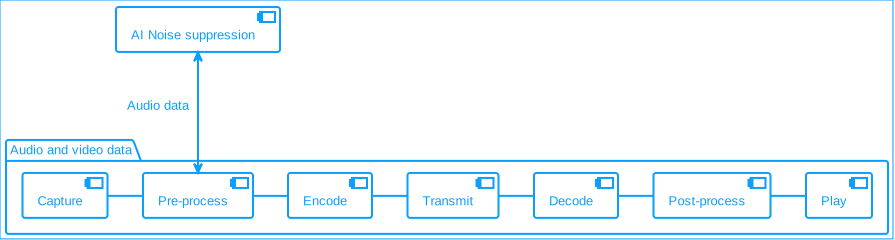
In the pre-processing stage, AI Noise Suppression uses deep learning noise reduction algorithms to modify data in the extensions pipeline.
**AI noise suppression**
## Prerequisites [#prerequisites]
Ensure that you have implemented the [SDK quickstart](../../index.mdx) in your project.
## Enable AI Noise Suppression [#enable-ai-noise-suppression]
This section shows you how to integrate AI Noise Suppression into your app.
Call `setAINSMode` to enable the AI noise suppression feature, and select a noise suppression mode:
Java
Kotlin
```java
// Noise reductions modes
// 0 -> Balance mode
// 1 -> Aggressive mode
// 2 -> Aggressive mode with low latency
int mode = 1;
// Set the mode for Audio AI Noise Suppression
int result = rtcEngine.setAINSMode(true, mode);
```
```kotlin
// Noise reductions modes
// 0 -> Balance mode
// 1 -> Aggressive mode
// 2 -> Aggressive mode with low latency
val mode = 1
// Set the mode for Audio AI Noise Suppression
val result = rtcEngine.setAINSMode(true, mode)
```
## Reference [#reference]
This section completes the information on this page, or points you to documentation that explains other aspects about this product.
### API reference [#api-reference]
*
`setAINSMode`