# AI Noise Suppression (/en/realtime-media/marketplace/build/add-audio-effects/ains)
> For AI agents: see the complete documentation index at [llms.txt](/llms.txt).
AI Noise Suppression enables you to suppress hundreds of types of noise and reduce distortion in human voices when multiple people speak at the same time. In use-cases such as online meetings, online chat rooms, video consultations with doctors, and online gaming, AI Noise Suppression makes virtual communication as smooth as face-to-face interaction.
<_PlatformTabsGroup groupMode="structured" canonicalPlatform="web" platforms="["android","ios","web","electron","react-native"]" showTabs="true">
<_PlatformPanel platform="android">
<_PlatformProcessedMarker groupMode="structured" canonicalPlatform="web" platform="android" />
AI Noise Suppression reduces the following types of noise:
* Television
* Kitchen
* Street, such as birds chirping, traffic, and subway sounds
* Machine, such as fans, air conditioners, vacuum cleaners, and copiers
* Office, such as keyboard and mouse clicks
* Household, such as doors opening, creaking chairs, crying babies, and house renovations
* Constant knocking
* Beeps and clapping
* Music
You can choose following noise reduction strategies:
* Default: Reduces noise to a comfortable level without distorting human voice.
* Custom: A more enhanced or customized noise reduction strategy for your business use-case. Contact [support@agora.io](mailto\:support@agora.io) for details.
Want to try out AI Noise Suppression? Use the online demo.
## Understand the tech [#understand-the-tech]
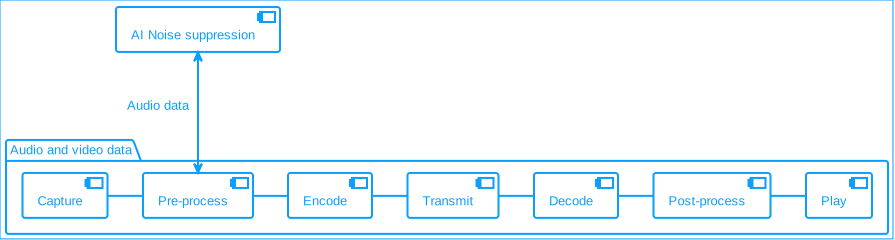
In the pre-processing stage, AI Noise Suppression uses deep learning noise reduction algorithms to modify data in the extensions pipeline.
**AI noise suppression**
## Prerequisites [#prerequisites]
Ensure that you have implemented the [SDK quickstart](../../index.mdx) in your project.
## Enable AI Noise Suppression [#enable-ai-noise-suppression]
This section shows you how to integrate AI Noise Suppression into your app.
Call `setAINSMode` to enable the AI noise suppression feature, and select a noise suppression mode:
Java
Kotlin
```java
// Noise reductions modes
// 0 -> Balance mode
// 1 -> Aggressive mode
// 2 -> Aggressive mode with low latency
int mode = 1;
// Set the mode for Audio AI Noise Suppression
int result = rtcEngine.setAINSMode(true, mode);
```
```kotlin
// Noise reductions modes
// 0 -> Balance mode
// 1 -> Aggressive mode
// 2 -> Aggressive mode with low latency
val mode = 1
// Set the mode for Audio AI Noise Suppression
val result = rtcEngine.setAINSMode(true, mode)
```
## Reference [#reference]
This section completes the information on this page, or points you to documentation that explains other aspects about this product.
### API reference [#api-reference]
*
`setAINSMode`
<_PlatformProcessedMarker close="true" />
<_PlatformPanel platform="ios">
<_PlatformProcessedMarker groupMode="structured" canonicalPlatform="web" platform="ios" />
AI Noise Suppression reduces the following types of noise:
* Television
* Kitchen
* Street, such as birds chirping, traffic, and subway sounds
* Machine, such as fans, air conditioners, vacuum cleaners, and copiers
* Office, such as keyboard and mouse clicks
* Household, such as doors opening, creaking chairs, crying babies, and house renovations
* Constant knocking
* Beeps and clapping
* Music
You can choose following noise reduction strategies:
* Default: Reduces noise to a comfortable level without distorting human voice.
* Custom: A more enhanced or customized noise reduction strategy for your business use-case. Contact [support@agora.io](mailto\:support@agora.io) for details.
Want to try out AI Noise Suppression? Use the online demo.
## Understand the tech [#understand-the-tech-1]
In the pre-processing stage, AI Noise Suppression uses deep learning noise reduction algorithms to modify data in the extensions pipeline.
**AI noise suppression**

## Prerequisites [#prerequisites-1]
Ensure that you have implemented the [SDK quickstart](../../index.mdx) in your project.
## Enable AI Noise Suppression [#enable-ai-noise-suppression-1]
This section shows you how to integrate AI Noise Suppression into your app.
Call `setAINSMode` to enable the AI noise suppression feature, and select a noise suppression mode:
```swift
// Set AINS mode to AINS_MODE_BALANCED (0)
// Set AINS mode to AINS_MODE_AGGRESSIVE (1)
// Set AINS mode to AINS_MODE_ULTRALOWLATENCY (2)
let result = agoraKit.setAINSMode(true, mode: 2)
```
When AI Noise Suppression is enabled, if Video SDK detects that the device performance is not sufficient, it:
* Disables AI Noise Suppression
* Enables traditional noise reduction
* Throws the `WARN_APM_AINS_CLOSED` (-1054) error code
## Reference [#reference-1]
This section completes the information on this page, or points you to documentation that explains other aspects about this product.
### Minimum device requirements [#minimum-device-requirements]
* iOS iPhone 6S
* iPadOS
* iPad Pro (2nd generation)
* iPad mini (5th generation)
* iPad Air (3rd generation)
* macOS MacBook Pro 2015
### API reference [#api-reference-1]
*
`setAINSMode`
<_PlatformProcessedMarker close="true" />
<_PlatformPanel platform="web">
<_PlatformProcessedMarker groupMode="structured" canonicalPlatform="web" platform="web" />
Try out the [online demo](https://webdemo-global.agora.io/index.html) for [AI noise suppression](https://webdemo-global.agora.io/example/plugin/aiDenoiser/index.html).
AI Noise Suppression reduces the following types of noise:
* Television
* Kitchen
* Street, such as birds chirping, traffic, and subway sounds
* Machine, such as fans, air conditioners, vacuum cleaners, and copiers
* Office, such as keyboard and mouse clicks
* Household, such as doors opening, creaking chairs, crying babies, and house renovations
* Constant knocking
* Beeps and clapping
* Music
You can choose following noise reduction strategies:
* Default: Reduces noise to a comfortable level without distorting human voice.
* Custom: A more enhanced or customized noise reduction strategy for your business use-case. Contact [support@agora.io](mailto\:support@agora.io) for details.
Want to try out AI Noise Suppression? Use the online demo.
## Understand the tech [#understand-the-tech-2]
In the pre-processing stage, AI Noise Suppression uses deep learning noise reduction algorithms to modify data in the extensions pipeline.
**AI noise suppression**

## Prerequisites [#prerequisites-2]
Ensure that you have implemented the [SDK quickstart](../../index.mdx) in your project.
## Enable AI Noise Suppression [#enable-ai-noise-suppression-2]
This section shows you how to integrate AI Noise Suppression into your app.
The following implementation steps apply to the latest version of the AI Noise Suppression extension. Refer to the [extension release notes](/en/realtime-media/video/reference/release-notes) for details.
1. Integrate AI Noise Suppression into your app
To install the AI Noise Suppression extension ([agora-extension-ai-denoiser](https://www.npmjs.com/package/agora-extension-ai-denoiser)), in the root of your project run the following command:
```javascript
npm install agora-extension-ai-denoiser
```
2. Import AI Noise Suppression
Add the following code to your `.js` file.
```javascript
import {AIDenoiserExtension} from "agora-extension-ai-denoiser";
```
3. Dynamically load the Wasm dependencies
The AI Noise Suppression extension depends on a few Wasm files. To ensure that the browser can load and execute these files, do the following:
1. Publish the files located in the `node_modules/agora-extension-ai-denoiser/external` directory to the CDN or static resource server, and put them under one public path. In subsequent steps, you need to pass in the public path URL to create an` AIDenoiserExtension` instance. The extension then dynamically loads these files.
* If the host URL of the Wasm files is not the same as that of the web application, enable the CORS policy.
* Do not put the Wasm files in an HTTP service, loading HTTP resources in the HTTPS domain is blocked by the browsers' security policy.
2. If you have enabled the Content Security Policy (CSP), because Wasm files are not allowed to load in Chrome and Edge by default, you need to configure the CSP as follows:
* For versions later than Chrome 97 and Edge 97 (Chrome 97 and Edge 97 included): Add `'wasm-unsafe-eval'` and `blob:` in the [`script-src`](https://developer.mozilla.org/en-US/docs/Web/HTTP/Headers/Content-Security-Policy/script-src) options. For example:
```xml
```
* For versions earlier than Chrome 97 and Edge 97: Add `'unsafe-eval'` and `blob:` in the `script-src` options.
3. Register the AI Noise Suppression extension
Call AgoraRTC.registerExtensions, and pass in the created `AIDenoiserExtension` instance. Optionally, listen for the callback reporting that the Wasm and JS files fail to load.
```typescript
// Create an AIDenoiserExtension instance, and pass in the host URL of the Wasm files
const denoiser = new AIDenoiserExtension({assetsPath:'./external'});
// Check compatibility
if (!denoiser.checkCompatibility()) {
// The extension might not be supported in the current browser. You can stop executing further code logic
console.error("Does not support AI Denoiser!");
}
// Register the extension
AgoraRTC.registerExtensions([denoiser]);
// (Optional) Listen for the callback reporting that the Wasm files fail to load
denoiser.onloaderror = (e) => {
// If the Wasm files fail to load, you can disable the extension, for example:
// openDenoiserButton.enabled = false;
console.log(e);
}
```
Best practice is to create one `AIDenoiserExtension` instance only.
5. Create an `IAIDenoiserProcessor` instance
Call the `createProcessor` method to create a `processor`, and set whether to enable the extension by default. If you do not set the default state, the extension inherits the previous state.
```typescript
// Create a processor
const processor = denoiser.createProcessor();
// Enable the extension by default
processor.enable();
// Disable the extension by default
// processor.disable();
```
6. Inject the extension to the audio processing pipeline
Call [pipe](https://api-ref.agora.io/en/video-sdk/web/4.x/interfaces/imicrophoneaudiotrack.html#pipe) and specify the [processorDestination](https://api-ref.agora.io/en/video-sdk/web/4.x/interfaces/imicrophoneaudiotrack.html#processordestination) property.
```typescript
// Create a local video track
const audioTrack = await AgoraRTC.createMicrophoneAudioTrack();
// Inject the extension to the audio processing pipeline
audioTrack.pipe(processor).pipe(audioTrack.processorDestination);
await processor.enable();
```
7. Enable or disable the extension
Call the `enable` or `disable` methods as needed.
```typescript
() => {
if (processor.enabled) {
await processor.disable();
} else {
await processor.enable();
}
}
```
8. Set the noise suppression mode and level
```javascript
// Listen for the callback reporting that the noise suppression process takes too long
processor.on("overload", async (elapsedTime) => {
console.log("overload!!!");
// Switch to steady-state noise reduction mode, temporarily disable AI noise reduction.
await processor.setMode("STATIONARY_NS");
// Completely disable AI noise reduction and use the browser's built-in noise reduction.
// await processor.disable()
});
```
9. Dump audio data
Best practice for logging is to dump audio data. This significantly improves the efficiency of troubleshooting. To do this, call the `dump` method and listen for the `dump` and `dumpend` events to dump the audio data during the noise suppression process.
```typescript
processor.on("dump", (blob, name) => {
// Dump the audio data files generated during the noise suppression process to your local machine in .pcm format.
const objectURL = URL.createObjectURL(blob);
const tag = document.createElement("a");
tag.download = name;
tag.href = objectURL;
tag.click();
setTimeout(() => {URL.revokeObjectURL(objectURL);}, 0);
});
processor.on("dumpend", () => {
console.log("dump ended!!");
});
processor.dump();
```
## Reference [#reference-2]
This section completes the information on this page, or points you to documentation that explains other aspects about this product.
* For a working example, check out the [AI Denoiser web demo](https://webdemo.agora.io/aiDenoiser/index.html) and the associated [source code](https://github.com/AgoraIO/API-Examples-Web/tree/main/Demo/aiDenoiser).
### API reference [#api-reference-2]
This section provides the API reference for the AI Denoiser extension.
#### IAIDenoiserExtension [#iaidenoiserextension]
##### checkCompatibility [#checkcompatibility]
Checks whether the current browser supports the AI Denoiser extension. The result returned by this method is for reference only.
```typescript
checkCompatibility(): boolean;
```
*Since v1.1.0*
##### createProcessor [#createprocessor]
Creates an `IAIDenoiserProcessor` instance.
```typescript
createProcessor(): IAIDenoiserProcessor;
```
##### setLogLevel [#setloglevel]
Sets the log level. For available log levels, see [AIDenoiserLogLevel](#aidenoiserloglevel).
```typescript
public setLogLevel(level: AIDenoiserLogLevel)
```
*Since v2.0.0*
##### onloaderror [#onloaderror]
Callback for Wasm dependency file loading failures.
```typescript
onloaderror?: (error: Error) => void;
```
*Deprecated since v2.0.0*
#### IAIDenoiserProcessor [#iaidenoiserprocessor]
##### kind [#kind]
The processor type, either video or audio.
```typescript
get kind(): 'video' | 'audio';
```
##### enabled [#enabled]
Whether the extension is enabled:
* `true`: Enabled.
* `false`: Not enabled.
```typescript
get enabled(): boolean;
```
##### enable [#enable]
Enables the AI denoising feature.
```typescript
enable(): void | Promise;
```
##### disable [#disable]
Disables the AI denoising feature.
```typescript
disable(): void | Promise;
```
This method must be called after [`pipe`](https://api-ref.agora.io/en/video-sdk/web/4.x/interfaces/imicrophoneaudiotrack.html).
##### setMode [#setmode]
Sets the denoising mode.
```typescript
setMode(mode: AIDenoiserProcessorMode): Promise;
```
*Since v1.1.0*
You can call this method in the [onoverload](#onoverload) callback to switch to stationary noise suppression to reduce overhead. See [AIDenoiserProcessorMode](#aidenoiserprocessormode) for details.
This method must be called after [`pipe`](https://api-ref.agora.io/en/video-sdk/web/4.x/interfaces/imicrophoneaudiotrack.html).
##### setLevel [#setlevel]
Sets the denoising intensity. See [AIDenoiserProcessorLevel](#aidenoiserprocessorlevel) for details.
```typescript
setLevel(level: AIDenoiserProcessorLevel): Promise;
```
*Since v1.1.0*
This method must be called after [`pipe`](https://api-ref.agora.io/en/video-sdk/web/4.x/interfaces/imicrophoneaudiotrack.html).
##### setLatency [#setlatency]
Sets the denoising latency level. See [AIDenoiserProcessorLatency](#aidenoiserprocessorlatency) for details.
```typescript
setLatency(latency: AIDenoiserProcessorLatency): Promise;
```
*Since v2.0.0*
This method must be called after [`pipe`](https://api-ref.agora.io/en/video-sdk/web/4.x/interfaces/imicrophoneaudiotrack.html).
##### dump [#dump]
Dumps audio data during the denoising process to help troubleshoot and analyze denoising issues.
```typescript
dump(): void;
```
This method must be called after [`pipe`](https://api-ref.agora.io/en/video-sdk/web/4.x/interfaces/imicrophoneaudiotrack.html).
Calling this method triggers 9 `dump` events, returning audio data processed by the extension 30 seconds before and 60 seconds after the method call, for a total of 9 audio files (see audio file description). Then it triggers the `dumpend` event, indicating that the audio data dump has completed.
**Audio file description**
Each audio file is encoded in PCM format with a duration of 30 seconds. The filename contains the following information:
* The processing stage of the audio data, one of the following:
* `input`: Audio data awaiting denoising.
* `ns_out`: Audio data after noise suppression.
* `agc_out`: Audio data after voice enhancement.
* Audio sample rate.
* Number of channels.
* Dump time: If the dump time is T (in seconds), the file contains audio data from the range \[T-30, T].
Example audio filename: `input_16000hz_1ch_0.pcm`
**Note**
* If you disable AI denoising before the `dump` event triggers 9 times, the dump process terminates immediately and triggers the `dumpend` event. In this case, fewer than 9 audio data files are returned.
* If the extension processes less than 30 seconds of audio, the corresponding audio file duration is also less than 30 seconds.
##### ondump [#ondump]
Callback for dumping audio data.
```typescript
ondump?: (blob: Blob, name: string) => void;
```
*Deprecated since v2.0.0*
This callback returns the following parameters:
* `blob`: The audio data file.
* `name`: The name of the audio data file.
##### ondumpend [#ondumpend]
Callback indicating that audio data dumping has completed.
```typescript
ondumpend?: () => void;
```
*Deprecated since v2.0.0*
##### onoverload [#onoverload]
Callback for when denoising processing takes too long.
```typescript
onoverload?: (elapsedTime: number) => void;
```
*Deprecated since v2.0.0*
**Parameters**
* `elapsedTime`: The time (in milliseconds) the extension takes to process one audio frame. This value is for reference only; precision depends on the browser's timing accuracy. For example, Firefox has lower time precision.
##### on callbacks [#on-callbacks]
Listens for events.
```typescript
on(event: "pipeerror", listener: AIDenoiserProcessorPipeErrorCallback): void;
on(event: "overload", listener: AIDenoiserProcessorOverloadCallback): void;
on(event: "dump", listener: AIDenoiserProcessorDumpCallback): void;
on(event: "dumpend", listener: AIDenoiserProcessorDumpEndCallback): void;
```
Since v2.0.0, the AI Denoiser extension listens for the following events using the `on` method:
* `pipeerror`: Wasm dependency file loading failure event. Replaces the `onloaderror` callback.
* `overload`: Denoising processing takes too long event. Replaces the `onoverload` callback.
* `dump`: Audio data dump event. Replaces the `ondump` callback.
* `dumpend`: Audio data dump completed event. Replaces the `ondumpend` callback.
#### Type definitions [#type-definitions]
##### AIDenoiserExtensionOptions [#aidenoiserextensionoptions]
AI Denoiser extension initialization parameters.
```typescript
export interface AIDenoiserExtensionOptions {
assetsPath: string
}
```
**Parameters**
* `assetsPath`: The URL path to the Wasm files required by the AI Denoiser extension. Do not include a trailing slash in the path, for example, `./external`.
The extension constructs the full path to the Wasm file based on `assetsPath`. If an incorrect path causes the Wasm file to fail loading, you receive a `pipeerror` event.
##### AIDenoiserProcessorMode [#aidenoiserprocessormode]
Denoising mode.
```typescript
export enum AIDenoiserProcessorMode {
NSNG = "NSNG",
STATIONARY_NS = "STATIONARY_NS",
}
```
**Values**
* `NSNG`: Hybrid noise reduction. This mode suppresses both stationary and non-stationary noise types.
* `STATIONARY_NS`: Stationary noise suppression. This mode only suppresses stationary noise. Use this mode only when AI denoising processing takes too long.
##### AIDenoiserProcessorLevel [#aidenoiserprocessorlevel]
Denoising intensity.
```typescript
export enum AIDenoiserProcessorLevel {
SOFT = "SOFT",
AGGRESSIVE = "AGGRESSIVE",
}
```
**Values**
* `SOFT`: (Recommended) Soft denoising.
* `AGGRESSIVE`: Aggressive denoising. Increasing the denoising intensity to aggressive increases the probability of damaging the voice signal.
##### AIDenoiserLogLevel [#aidenoiserloglevel]
AI Denoiser extension log level.
```typescript
export enum AIDenoiserLogLevel {
DEBUG = "DEBUG",
INFO = "INFO",
WARN = "WARN",
ERROR = "ERROR",
NONE = "NONE",
}
```
**Values**
* `DEBUG`: (0) Prints debug information, general information, warnings, and error logs.
* `INFO`: (1) Prints general information, warnings, and error logs.
* `WARN`: (2) Prints warnings and error logs.
* `ERROR`: (3) Prints error logs only.
* `NONE`: (4) Prints no logs.
##### AIDenoiserProcessorLatency [#aidenoiserprocessorlatency]
AI denoising latency level.
```typescript
export enum AIDenoiserProcessorLatency {
LOW = "LOW",
FULL = "FULL",
}
```
**Values**
* `LOW`: Low latency mode (approximately 40 ms). In this mode, denoising performance is slightly reduced.
* `FULL`: High latency mode.
### Considerations [#considerations]
Currently, AI Noise Suppression has the following limitations:
* If only some of the audio tracks on the current web page enable AI Noise Suppression, audio tracks that do not enable AI Noise Suppression could be affected. This is because AI Noise Suppression turns on AEC and AGC and turns off NS in the browser.
* Although AI Noise Suppression supports Safari v14.1 and greater, there are performance issues. Best practice is to not support Safari.
* AI Noise Suppression does not support browsers on mobile devices.
<_PlatformProcessedMarker close="true" />
<_PlatformPanel platform="electron">
<_PlatformProcessedMarker groupMode="structured" canonicalPlatform="web" platform="electron" />
AI Noise Suppression reduces the following types of noise:
* Television
* Kitchen
* Street, such as birds chirping, traffic, and subway sounds
* Machine, such as fans, air conditioners, vacuum cleaners, and copiers
* Office, such as keyboard and mouse clicks
* Household, such as doors opening, creaking chairs, crying babies, and house renovations
* Constant knocking
* Beeps and clapping
* Music
You can choose following noise reduction strategies:
* Default: Reduces noise to a comfortable level without distorting human voice.
* Custom: A more enhanced or customized noise reduction strategy for your business use-case. Contact [support@agora.io](mailto\:support@agora.io) for details.
Want to try out AI Noise Suppression? Use the online demo.
## Understand the tech [#understand-the-tech-3]
In the pre-processing stage, AI Noise Suppression uses deep learning noise reduction algorithms to modify data in the extensions pipeline.
**AI noise suppression**

## Prerequisites [#prerequisites-3]
Ensure that you have implemented the [SDK quickstart](../../index.mdx) in your project.
## Enable AI Noise Suppression [#enable-ai-noise-suppression-3]
This section shows you how to integrate AI Noise Suppression into your app.
Call `setAINSMode` to enable the AI noise suppression feature, and select a noise suppression mode:
```javascript
const enabled = true; // Enable or disable AINS
const result = rtcEngine.setAINSMode(enabled, AudioAinsMode.AinsModeUltralowlatency);
if (result === 0) {
// AINS mode set successfully
} else {
// Failed to enable AINS
}
```
## Reference [#reference-3]
This section completes the information on this page, or points you to documentation that explains other aspects about this product.
### API reference [#api-reference-3]
*
`setAINSMode`
<_PlatformProcessedMarker close="true" />
<_PlatformPanel platform="react-native">
<_PlatformProcessedMarker groupMode="structured" canonicalPlatform="web" platform="react-native" />
AI Noise Suppression reduces the following types of noise:
* Television
* Kitchen
* Street, such as birds chirping, traffic, and subway sounds
* Machine, such as fans, air conditioners, vacuum cleaners, and copiers
* Office, such as keyboard and mouse clicks
* Household, such as doors opening, creaking chairs, crying babies, and house renovations
* Constant knocking
* Beeps and clapping
* Music
You can choose following noise reduction strategies:
* Default: Reduces noise to a comfortable level without distorting human voice.
* Custom: A more enhanced or customized noise reduction strategy for your business use-case. Contact [support@agora.io](mailto\:support@agora.io) for details.
Want to try out AI Noise Suppression? Use the online demo.
## Understand the tech [#understand-the-tech-4]
In the pre-processing stage, AI Noise Suppression uses deep learning noise reduction algorithms to modify data in the extensions pipeline.
**AI noise suppression**

## Prerequisites [#prerequisites-4]
Ensure that you have implemented the [SDK quickstart](../../index.mdx) in your project.
## Enable AI Noise Suppression [#enable-ai-noise-suppression-4]
This section shows you how to integrate AI Noise Suppression into your app.
Call `setAINSMode` to enable the AI noise suppression feature, and select a noise suppression mode:
```typescript
const setAINSMode = () => {
try {
// Enable or disable AINS
const enabled = true;
// Choose the AINS mode based on your requirements
const mode = AgoraRtcEngine.AudioAinsMode.AINS_MODE_ULTRALOWLATENCY;
// Call setAINSMode method
const result = rtcEngine.setAINSMode(enabled, mode);
} catch (error) {
console.error('Error setting AINS mode:', error);
}
};
```
## Reference [#reference-4]
This section completes the information on this page, or points you to documentation that explains other aspects about this product.
### API reference [#api-reference-4]
*
`setAINSMode`
<_PlatformProcessedMarker close="true" />