# Multi-streaming (/en/realtime-media/iot/build/stream-and-optimize-media/multi-channel-streaming)
> For AI agents: see the complete documentation index at [llms.txt](/llms.txt).
<_PlatformTabsGroup groupMode="structured" canonicalPlatform="android" platforms="["android","linux-c"]" showTabs="true">
<_PlatformPanel platform="android">
<_PlatformProcessedMarker groupMode="structured" canonicalPlatform="android" platform="android" />
Some special use-cases require live streaming over two or more separate channels. For example, consider the case of a real-time monitoring system, where camera feed is shared over two channels for two types of users. There are also certain applications where you want to send multiple streams over the same channel. Consider the case of a monitoring system where feeds from multiple cameras are shared on the same channel.
Agora IoT SDK multi-streaming allows you to join multiple channels at the same time or send multiple streams over a single channel. This page shows you how to implement two different multi-streaming methods into your app using IoT SDK. Choose the method that best fits your particular use-case.
## Understand the tech [#understand-the-tech]
Agora IoT SDK provides the following approaches to implementing multi-streaming:
* **Push multiple streams to a single channel**
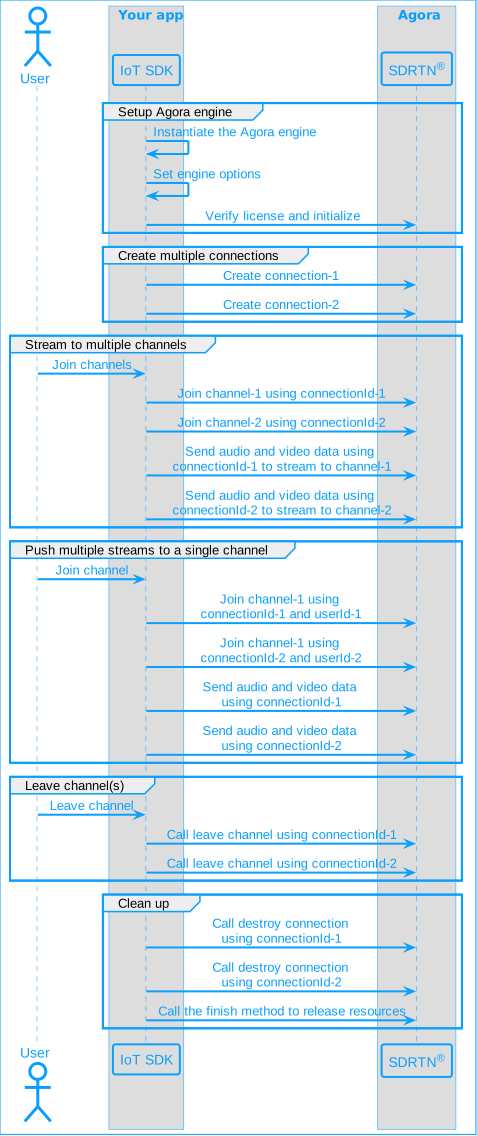
To push multiple streams to a single channel, you create multiple connections using Agora engine. You call the join channel method multiple times with the same channel name but different connection Ids and distinct user Ids to set up multiple streams. To send audio or video data, you use the connection Id of the intended stream.
* **Stream to multiple channels**
To stream over multiple channels, you create multiple connections using Agora engine. To join each channel, you use a distinct channel name and a dedicated connection Id. You use the connection Id to specify the intended channel when sending audio or video data, when leaving a particular channel, or when closing a connection.
The following figure shows the workflow you need to implement to add multi-streaming to your app:
## Prerequisites [#prerequisites]
To follow this procedure you must have implemented the [SDK quickstart](../../quickstart.mdx) for IoT SDK.
## Project setup [#project-setup]
In order to create the environment necessary to implement Agora multi-streaming feature into your app, open the IoT SDK [quickstart](../../quickstart.mdx) project you created previously.
## Implement multi-streaming [#implement-multi-streaming]
This section shows you how to implement the following multi-streaming methods:
* [Push multiple streams to a single channel](#push-multiple-streams-to-a-single-channel)
* [Stream to multiple channels](#stream-to-multiple-channels)
To implement either of the two multi-streaming methods, [update the UI](#implement-the-user-interface) and then follow the step-by-step procedure in the relevant section.
### Implement the user interface [#implement-the-user-interface]
You add two buttons to the UI to enable users to start and stop sending two streams.
1. In `/app/res/layout/activity_main.xml`, add the following code before ``:
```xml
```
You see errors in your IDE. This is because this layout refers to methods that you create later.
2. To access and modify the buttons from your code, add the following to the list of `import` statements in `MainActivity.java`:
```java
import android.widget.Button;
```
### Push multiple streams to a single channel [#push-multiple-streams-to-a-single-channel]
To send multiple audio and video streams to a single channel, take the following steps:
1. **Declare the variables you need**
To manage a second connection and a second stream, in `/app/java/com.example./MainActivity`, add the following variable declarations to the `MainActivity` class:
```java
private int connectionId2; // Id of the second connection
private boolean isJoined2 = false; // Status of the second connection
private int uid2 = 2; // User id for the second connection
private VideoSendThread videoThread2 = null; // A second video thread
```
2. **Create multiple connections**
When the app starts, you create multiple connections. You can use each connection to send an audio and a video stream. To create two connections, in `setupAgoraRtcService` **replace** the code after `// Create a connection` with the following:
```java
connectionId = agoraEngine.createConnection();
if (connectionId == AgoraRtcService.ConnectionIdSpecial.CONNECTION_ID_INVALID) {
showMessage("Failed to create connection 1");
} else {
showMessage("Connection1 created");
}
// Create a second connection
connectionId2 = agoraEngine.createConnection();
if (connectionId2 == AgoraRtcService.ConnectionIdSpecial.CONNECTION_ID_INVALID) {
showMessage("Failed to create connection 2");
} else {
showMessage("Connection2 created");
}
```
3. **Join the same channel multiple times**
When a user presses the **Join** button, you join the same channel twice with different user Ids and different connection Ids. To join the channel a second time, add the following code at the end of `joinChannel(View view)`:
```java
// Join the same channel using the second connection
ret = agoraEngine.joinChannel(connectionId2, channelName,
uid2, token, channelOptions);
if (ret != AgoraRtcService.ErrorCode.ERR_OKAY) {
showMessage("joinChannel on connection2 failed!");
isJoined2 = false;
} else {
isJoined2 = true;
}
```
4. **Set joined status**
When your call to `agoraEngine.joinChannel` succeeds, you receive a notification through the `onJoinChannelSuccess` callback. You use connection Id to identify the connection and set the corresponding `isJoined` variable to true. To do this, **replace** the `onJoinChannelSuccess` method under `agoraRtcEvents` with the following:
```java
@Override
public void onJoinChannelSuccess(int connId, int uid, int elapsed_ms) {
if (connId == connectionId) {
// Successfully joined channel 1
isJoined = true;
showMessage("Successfully joined channel on connection1");
} else if (connId == connectionId2) {
// Successfully joined channel 2
isJoined2 = true;
showMessage("Successfully joined channel on connection2");
}
}
```
5. **Stream video over the first connection**
In this example, you start a video stream over the first connection and a second video stream over the second connection to the same channel. To start or stop the first stream when a user taps the **Start stream 1** button, add the following method to the `MainActivity` class:
```java
public void stream1(View view) {
Button button = (Button) view;
if (!isJoined) {
showMessage("Join a channel first");
return;
} else if (videoThread != null && videoThread.isAlive()) {
videoThread.sendStop();
videoThread = null;
button.setText("Start stream 1");
return;
}
// Create a thread to send video frames
videoThread = new VideoSendThread(getApplicationContext(), agoraEngine,
channelName, connectionId);
// Start the video thread
videoThread.sendStart();
showMessage("Video thread started on connection1");
button.setText("Stop video stream on connection1");
}
```
6. **Stream video over the second connection**
To push another video stream to the same channel when a user taps the **Start stream 2** button, add the following method to the `MainActivity` class:
```java
public void stream2(View view) {
Button button = (Button) view;
if (!isJoined2) {
showMessage("Join a channel first");
return;
} else if (videoThread2 != null && videoThread2.isAlive()) {
videoThread2.sendStop();
videoThread2 = null;
button.setText("Start stream 2");
return;
}
// Create a second thread to send video frames
videoThread2 = new VideoSendThread(getApplicationContext(), agoraEngine,
channelName, connectionId2);
// Start the second video thread
videoThread2.sendStart();
showMessage("Video thread started on connection2");
button.setText("Stop video stream on connection2");
}
```
7. **Leave all connections to a channel**
To leave the channel on the second connection when a user taps **Leave**, add the following lines to `leaveChannel(View view)` after `int ret = agoraEngine.leaveChannel(connectionId);`:
```java
agoraEngine.leaveChannel(connectionId2);
isJoined2 = false;
```
8. **Destroy all connections**
To close all connections when a user exits the app, add the following lines to `onDestroy` after `agoraEngine.destroyConnection(connectionId);`
```java
agoraEngine.destroyConnection(connectionId2);
connectionId2 = AgoraRtcService.ConnectionIdSpecial.CONNECTION_ID_INVALID;
```
### Stream to multiple channels [#stream-to-multiple-channels]
To send audio and video streams to multiple channels, take the following steps:
1. **Declare the variables you need**
To manage a second connection and join an additional channel, in `/app/java/com.example./MainActivity`, add the following variable declarations to the `MainActivity` class:
```java
private int connectionId2; // Id of the second connection
private final String channelName2 = "demo2"; // Name of the second channel
private String token2 = "";
private boolean isJoined2 = false;
```
2. **Create multiple connections**
When the app starts, you create multiple connections. You can use each connection to send an audio and a video stream. To create two connections, in `setupAgoraEngine` **replace** the code after `// Create a connection` with the following:
```java
connectionId = agoraEngine.createConnection();
if (connectionId == AgoraRtcService.ConnectionIdSpecial.CONNECTION_ID_INVALID) {
showMessage("Failed to create connection 1");
} else {
showMessage("Connection1 created");
}
// Create a second connection
connectionId2 = agoraEngine.createConnection();
if (connectionId2 == AgoraRtcService.ConnectionIdSpecial.CONNECTION_ID_INVALID) {
showMessage("Failed to create connection 2");
} else {
showMessage("Connection2 created");
}
```
3. **Join multiple channels**
When a user presses the **Join** button, you join two channels. To join a second channel, add the following code at the end of `joinChannel(View view)`:
```java
// Join a second channel
ret = agoraEngine.joinChannel(connectionId2, channelName2,
uid, token2, channelOptions);
if (ret != AgoraRtcService.ErrorCode.ERR_OKAY) {
showMessage("Join channel2 failure!");
isJoined2 = false;
} else {
isJoined2 = true;
}
```
4. **Set joined status**
When your call to `agoraEngine.joinChannel` succeeds, you receive a notification through the `onJoinChannelSuccess` callback. You use connection Id to identify the channel and set the corresponding `isJoined` variable to true. To do this, **replace** the `onJoinChannelSuccess` method under `agoraRtcEvents` with the following:
```java
@Override
public void onJoinChannelSuccess(int connId, int uid, int elapsed_ms) {
if (connId == connectionId) {
// Successfully joined channel 1
isJoined = true;
showMessage("Successfully joined channel " + channelName);
} else if (connId == connectionId2) {
// Successfully joined channel 2
isJoined2 = true;
showMessage("Successfully joined channel " + channelName2);
}
}
```
5. **Stream audio to the first channel**
In this example, you stream audio to the first channel and video to the second channel. To start or stop the audio stream when a user taps the **Start stream 1** button, add the following method to the `MainActivity` class:
```java
public void stream1(View view) {
Button button = (Button) view;
if (!isJoined) {
showMessage("Join a channel first");
return;
} else if (audioThread != null && audioThread.isAlive()) {
// Audio thread is already running
audioThread.sendStop();
audioThread = null;
button.setText("Start stream 1");
return;
}
// Create a thread to send audio frames
audioThread = new AudioSendThread(getApplicationContext(), agoraEngine,
channelName, connectionId, 16000, 1, 2);
audioThread.sendStart();
showMessage("Audio thread started on channel " + channelName);
button.setText("Stop audio stream on channel " + channelName);
}
```
6. **Stream video to the second channel**
To stream video to the second channel when a user taps the **Start stream 2** button, add the following method to the `MainActivity` class:
```java
public void stream2(View view) {
Button button = (Button) view;
if (!isJoined2) {
showMessage("Join a channel first");
return;
} else if (videoThread != null && videoThread.isAlive()) {
// Video thread is already running
videoThread.sendStop();
videoThread = null;
button.setText("Start stream 2");
return;
}
// Create a thread to send video frames
videoThread = new VideoSendThread(getApplicationContext(), agoraEngine,
channelName2, connectionId2);
// Start the audio and video threads
videoThread.sendStart();
showMessage("Video thread started on channel " + channelName2);
button.setText("Stop video stream on channel " + channelName2);
}
```
7. **Leave all channels**
To leave both channels when a user taps **Leave**, add the following lines to `leaveChannel(View view)` after `int ret = agoraEngine.leaveChannel(connectionId);`:
```java
agoraEngine.leaveChannel(connectionId2);
isJoined2 = false;
```
8. **Destroy all connections**
To close all connections when a user exits the app, add the following lines to `onDestroy` after `agoraEngine.destroyConnection(connectionId);`
```java
agoraEngine.destroyConnection(connectionId2);
connectionId2 = AgoraRtcService.ConnectionIdSpecial.CONNECTION_ID_INVALID;
```
## Test your implementation [#test-your-implementation]
To ensure that you have implemented multi-streaming into your app, follow the relevant testing procedure:
### Test pushing multiple streams to a single channel [#test-pushing-multiple-streams-to-a-single-channel]
1. [Generate a temporary token](../manage-agora-account.md) in Agora Console.
2. In your browser, navigate to the [Agora web demo](https://webdemo.agora.io/basicVideoCall/index.html) and update *App ID*, *Channel*, and *Token* with the values for your temporary token, then click **Join**.
3. In Android Studio, in `app/java/com.example./MainActivity`, update `appId`, `channelName` and `token` with the values for your temporary token.
4. Update `uid` and `uid2` with distinct positive-integer values.
5. Connect a physical Android device to your development device.
6. In Android Studio, click **Run app**. A moment later you see the project installed on your device. If this is the first time you run the project, you need to grant microphone and camera access to your app.
You see notifications confirming creation of two connections.
7. Click **Join** to join a channel over each connection.
You see notifications confirming joining success over each connection.
8. Click **Start steam 1**.
You see a video stream playing in the browser.
9. Click **Start steam 2**.
You see a second video stream playing in the same channel.
10. Try starting and stopping the two streams.
You see that the streams are independent of each other.
11. Click **Leave** to stop the two streams and exit the channel.
### Test streaming to multiple channels [#test-streaming-to-multiple-channels]
1. Generate two [temporary tokens](../manage-agora-account.md) in Agora Console.
1. Generate `token` using the `appId` and `channelName`.
2. Generate `token2` using the `appId` and `channelName2`.
2. In your browser, navigate to the [Agora web demo](https://webdemo.agora.io/basicVideoCall/index.html) and join a channel using
`appId`, `channelName` and `token`.
3. In another browser tab, join the [Agora web demo](https://webdemo.agora.io/basicVideoCall/index.html) using `appId`, `channelName2` and `token2`.
4. In Android Studio, open `app/java/com.example./MainActivity`, and update `appId`, `channelName`, `channelName2`, `token` and `token2` with the values for your temporary tokens.
5. Connect a physical Android device to your development device.
6. In Android Studio, click **Run app**. A moment later you see the project installed on your device. If this is the first time you run the project, you need to grant microphone and camera access to your app.
You see notifications confirming creation of two connections.
7. Click **Join** to join two channels.
You see notifications confirming success in joining each channel.
8. Click **Start steam 1**.
You hear an audio stream playing in the web demo connected to `channelName`.
9. Click **Start steam 2**.
You see a video stream playing in the web demo connected to `channelName2`.
10. Click the buttons to stop stream 1 and stream 2.
11. Click **Leave** to stop the two streams and exit the channel.
## Reference [#reference]
This section contains content that completes the information on this page, or points you to documentation that explains other aspects to this product.
### API reference [#api-reference]
* [createConnection](https://api-ref.agora.io/en/iot-sdk/android/1.x/classio_1_1agora_1_1rtc_1_1_agora_rtc_service.html#a558085193ea80b9bbf8ffd257262ed74)
* [destroyConnection](https://api-ref.agora.io/en/iot-sdk/android/1.x/classio_1_1agora_1_1rtc_1_1_agora_rtc_service.html#a427f76570108b23da9d456fdd55b9251)
* [joinChannel](https://api-ref.agora.io/en/iot-sdk/android/1.x/classio_1_1agora_1_1rtc_1_1_agora_rtc_service.html#a3dd72e07c6799725a7dcce4b137028e2)
* [leaveChannel](https://api-ref.agora.io/en/iot-sdk/android/1.x/classio_1_1agora_1_1rtc_1_1_agora_rtc_service.html#a588efd08277fc89440d9f4b6eb524f56)
<_PlatformProcessedMarker close="true" />
<_PlatformPanel platform="linux-c">
<_PlatformProcessedMarker groupMode="structured" canonicalPlatform="android" platform="linux-c" />
Some special use-cases require live streaming over two or more separate channels. For example, consider the case of a real-time monitoring system, where camera feed is shared over two channels for two types of users. There are also certain applications where you want to send multiple streams over the same channel. Consider the case of a monitoring system where feeds from multiple cameras are shared on the same channel.
Agora IoT SDK multi-streaming allows you to join multiple channels at the same time or send multiple streams over a single channel. This page shows you how to implement two different multi-streaming methods into your app using IoT SDK. Choose the method that best fits your particular use-case.
## Understand the tech [#understand-the-tech-1]
Agora IoT SDK provides the following approaches to implementing multi-streaming:
* **Push multiple streams to a single channel**
To push multiple streams to a single channel, you create multiple connections using Agora engine. You call the join channel method multiple times with the same channel name but different connection Ids and distinct user Ids to set up multiple streams. To send audio or video data, you use the connection Id of the intended stream.
* **Stream to multiple channels**
To stream over multiple channels, you create multiple connections using Agora engine. To join each channel, you use a distinct channel name and a dedicated connection Id. You use the connection Id to specify the intended channel when sending audio or video data, when leaving a particular channel, or when closing a connection.
The following figure shows the workflow you need to implement to add multi-streaming to your app:

## Prerequisites [#prerequisites-1]
To follow this procedure you must have implemented the [SDK quickstart](/en/realtime-media/iot/quickstart) for IoT SDK.
## Project setup [#project-setup-1]
In order to create the environment necessary to implement Agora multi-streaming feature into your app, open the IoT SDK [quickstart](/en/realtime-media/iot/quickstart) project you created previously.
## Implement multi-streaming [#implement-multi-streaming-1]
This section shows you how to implement the following multi-streaming methods:
* [Push multiple streams to a single channel](#push-multiple-streams-to-a-single-channel)
* [Stream to multiple channels](#stream-to-multiple-channels)
### Add `pthread` library to your project [#add-pthread-library-to-your-project]
The [pthread](https://en.wikipedia.org/wiki/Pthreads) library enables you to control multiple different flows of
work that overlap in time. To integrate pthread into your app:
1. **Add the library into your project**
In the project you implemented for the [SDK quickstart](/en/realtime-media/iot/quickstart) for
IoT SDK, open `/agora_rtsa_sdk/example/hello_rtsa/CMakeLists.txt` and add the following line after `target_link_libraries(hello_rtsa_multi agora-rtc-sdk file_parser ${LIBS})`:
```bash
target_link_libraries(hello_rtsa_multi -lpthread)
```
2. **Include the header in your code**
Open `/agora_rtsa_sdk/example/hello_rtsa/hello_rtsa_multi.c` and add the following to the list of `#include` statements:
```c
#include
```
### Push multiple streams to a single channel [#push-multiple-streams-to-a-single-channel-1]
Pushing multiple audio and video streams to a single channel is implemented in
`/agora_rtsa_sdk/example/hello_rtsa/hello_rtsa_multi.c` in the sample project. The following
section shows and explains code snippets that you can reuse in your own app to integrate this functionality.
1. **Initialize the SDK, verify license, and set connection count**
The following code initializes the Agora engine event handler, configures options, and sets the connection
count. That is, the number of streams you push to a single channel:
```c
// Initialize the event handler
agora_rtc_event_handler_t event_handler = { 0 };
app_init_event_handler(&event_handler, config);
// Set Agora Engine options
rtc_service_option_t service_opt = { 0 };
service_opt.area_code = config->area;
service_opt.log_cfg.log_level = RTC_LOG_INFO;
service_opt.log_cfg.log_path = config->p_sdk_log_dir;
snprintf(service_opt.license_value, sizeof(service_opt.license_value), "%s", config->p_license);
// Initialize Agora rtc sdk
rval = agora_rtc_init(p_appid, &event_handler, &service_opt);
if (rval < 0) {
LOGE("Failed to initialize Agora sdk, reason: %s", agora_rtc_err_2_str(rval));
return -1;
}
// Set bandwidth parameters
agora_rtc_set_bwe_param(CONNECTION_ID_ALL, DEFAULT_BANDWIDTH_ESTIMATE_MIN_BITRATE,
DEFAULT_BANDWIDTH_ESTIMATE_MAX_BITRATE, DEFAULT_BANDWIDTH_ESTIMATE_START_BITRATE);
// Connection count
g_app.conn_cnt = 3;
```
2. **Create multiple connections**
When the app starts, you create the multiple connections that you use to send audio or video data to
a channel:
```c
// Create connections
for (i = 0; i < g_app.conn_cnt; i++)
{
rval = agora_rtc_create_connection(&g_app.conn_ids[i]);
if (rval < 0) {
LOGE("Failed to create connection, reason: %s", agora_rtc_err_2_str(rval));
return -1;
}
}
```
3. **Handle Agora engine events**
IoT SDK uses callbacks in the event handler to notify you of important events. For example, users
joining or leaving a channel, and receipt of audio or video data. The following code adds some important
methods to handle IoT SDK events and initializes the event handler.
```c
// Important events
static void __on_join_channel_success(connection_id_t conn_id, uint32_t uid, int elapsed)
{
int i = 0;
for (i = 0; i < g_app.conn_cnt; i++) {
if (conn_id == g_app.conn_ids[i]) {
g_app.conn_flags[i] = true;
}
}
g_app.b_connected_flag = true;
LOGI("[conn-%u] Join the channel successfully, uid %u elapsed %d ms", conn_id, uid, elapsed);
connection_info_t conn_info = { 0 };
if (agora_rtc_get_connection_info(conn_id, &conn_info) == 0) {
LOGI("conn_id=%u uid=%u cname=%s", conn_info.conn_id, conn_info.uid, conn_info.channel_name);
}
}
static void __on_connection_lost(connection_id_t conn_id)
{
int i = 0;
for (i = 0; i < g_app.conn_cnt; i++) {
if (conn_id == g_app.conn_ids[i]) {
g_app.conn_flags[i] = true;
}
}
g_app.b_connected_flag = false;
LOGW("[conn-%u] Lost connection from the channel", conn_id);
connection_info_t conn_info = { 0 };
if (agora_rtc_get_connection_info(conn_id, &conn_info) == 0) {
LOGI("conn_id=%u uid=%u cname=%s", conn_info.conn_id, conn_info.uid, conn_info.channel_name);
}
}
static void __on_user_joined(connection_id_t conn_id, uint32_t uid, int elapsed_ms)
{
LOGI("[conn-%u] Remote user \"%u\" has joined the channel, elapsed %d ms", conn_id, uid, elapsed_ms);
if (uid == 1 || uid == 2) {
LOGI("dddd");
}
}
static void __on_audio_data(connection_id_t conn_id, const uint32_t uid, uint16_t sent_ts, const void *data, size_t len,
const audio_frame_info_t *info_ptr)
{
LOGI("[conn-%u] on_audio_data, uid %u sent_ts %u data_type %d, len %zu", conn_id, uid, sent_ts,
info_ptr->data_type, len);
//write_file(g_app.audio_file_writer, data_type, data, len);
}
static void __on_video_data(connection_id_t conn_id, const uint32_t uid, uint16_t sent_ts, const void *data, size_t len,
const video_frame_info_t *info_ptr)
{
LOGI("[conn-%u] on_video_data: uid %u sent_ts %u data_type %d frame_type %d stream_type %d len %zu", conn_id,
uid, sent_ts, info_ptr->data_type, info_ptr->frame_type, info_ptr->stream_type, len);
//write_file(g_app.video_file_writer, info_ptr->data_type, data, len);
}
// Initialize the event_handler
static void app_init_event_handler(agora_rtc_event_handler_t *event_handler, app_config_t *config)
{
event_handler->on_join_channel_success = __on_join_channel_success;
event_handler->on_connection_lost = __on_connection_lost;
event_handler->on_rejoin_channel_success = __on_rejoin_channel_success;
event_handler->on_user_joined = __on_user_joined;
event_handler->on_user_offline = __on_user_offline;
event_handler->on_user_mute_audio = __on_user_mute_audio;
event_handler->on_user_mute_video = __on_user_mute_video;
event_handler->on_target_bitrate_changed = __on_target_bitrate_changed;
event_handler->on_key_frame_gen_req = __on_key_frame_gen_req;
event_handler->on_video_data = __on_video_data;
event_handler->on_error = __on_error;
if (config->enable_audio_mixer) {
event_handler->on_mixed_audio_data = __on_mixed_audio_data;
} else {
event_handler->on_audio_data = __on_audio_data;
}
}
```
4. **Join the same channel multiple times**
You configure `rtc_channel_options_t` and join the same channel multiple times with different user Ids and connection Ids.
```c
// Set Channel options
rtc_channel_options_t channel_options;
memset(&channel_options, 0, sizeof(channel_options));
channel_options.auto_subscribe_audio = true;
channel_options.auto_subscribe_video = true;
channel_options.subscribe_local_user = false;
// Join multiple channel with different user Ids and connection Ids.
for (i = 0; i < g_app.conn_cnt; i++) {
rval = agora_rtc_join_channel(g_app.conn_ids[i], config->p_channel, config->uid + i + 1, config->p_token,
&channel_options);
if (rval < 0) {
LOGE("Failed to join channel \"%s\", reason: %s", config->p_channel, agora_rtc_err_2_str(rval));
return -1;
}
}
```
5. **Stream audio and video data**
You create tasks, that is, asynchronous threads, to send video and audio frames.
```c
// Create tasks sending video and audio frames
pthread_t video_thread_id;
pthread_t audio_thread_id;
// Video stream task
rval = pthread_create(&video_thread_id, NULL, video_send_thread, 0);
if (rval < 0) {
printf("Unable to create video push thread\n");
return -1;
}
// Audio stream task
rval = pthread_create(&audio_thread_id, NULL, audio_send_thread, 0);
if (rval < 0) {
printf("Unable to create audio push thread\n");
return -1;
}
pthread_join(video_thread_id, NULL);
pthread_join(audio_thread_id, NULL);
```
6. **Send an audio frame to through muliple connections**
To send audio, you read data from an audio file and call `agora_rtc_send_audio_data`. The following code sends an audio frame each time it is called:
```c
static int app_send_audio(void)
{
app_config_t *config = &g_app.config;
int i = 0;
// Get audio frame data
frame_t frame;
if (file_parser_obtain_frame(g_app.audio_file_parser, &frame) < 0) {
LOGE("The file parser failed to obtain audio frame");
return -1;
}
// Send audio frames through all connections
audio_frame_info_t info = { 0 };
info.data_type = config->audio_data_type;
for (i = 0; i < g_app.conn_cnt; i++) {
if (!g_app.conn_flags[i]) {
continue;
}
int rval = agora_rtc_send_audio_data(g_app.conn_ids[i], frame.ptr, frame.len, &info);
if (rval < 0) {
LOGE("Failed to send audio data, reason: %s", agora_rtc_err_2_str(rval));
}
}
file_parser_release_frame(g_app.audio_file_parser, &frame);
return 0;
}
```
7. **Send a video frame to through muliple connections**
To send video, you read frame data from a video file, create a `video_frame_info_t`, and call `agora_rtc_send_video_data`. The following code sends a video frame each time it is called:
```c
static int app_send_video(void)
{
app_config_t *config = &g_app.config;
int i = 0;
// Get video frame data
frame_t frame;
if (file_parser_obtain_frame(g_app.video_file_parser, &frame) < 0) {
LOGE("The file parser failed to obtain audio frame");
return -1;
}
// Send video frames through all connections
video_frame_info_t info;
info.frame_type = frame.u.video.is_key_frame ? VIDEO_FRAME_KEY : VIDEO_FRAME_DELTA;
info.frame_rate = config->send_video_frame_rate;
info.data_type = config->video_data_type;
info.stream_type = VIDEO_STREAM_HIGH;
for (i = 0; i < g_app.conn_cnt; i++) {
if (!g_app.conn_flags[i]) {
continue;
}
int rval = agora_rtc_send_video_data(g_app.conn_ids[i], frame.ptr, frame.len, &info);
if (rval < 0) {
LOGE("Failed to send video data, reason: %s", agora_rtc_err_2_str(rval));
}
}
file_parser_release_frame(g_app.video_file_parser, &frame);
return 0;
}
```
8. **Leave a channel and clean up all connections**
To leave a channel and destroy all connections you call `agora_rtc_leave_channel` and `agora_rtc_destroy_connection` with their connection Ids.
```c
for (i = 0; i < g_app.conn_cnt; i++)
{
// Leave channel
agora_rtc_leave_channel(g_app.conn_ids[i]);
// Destroy connection
agora_rtc_destroy_connection(g_app.conn_ids[i]);
}
```
### Stream to multiple channels [#stream-to-multiple-channels-1]
To send audio and video streams to multiple channels, open the same sample project you implemented for [Push multiple streams to a single channel](#push-multiple-streams-to-a-single-channel) and make the following changes:
1. **Declare the variables you need**
To manage other connections and join additional channels, add the following variable declarations to the `main()` in `/agora_rtsa_sdk/example/hello_rtsa/hello_rtsa_multi.c`:
```c
char channel_name[10][512];
char token[10][512];
```
2. **Set channel name & token for each connection**
Using the sample project, your user can join 10 additional channels. In this page you set
channel names and tokens for three connections. To do this, add the following code before the join
channel loop, `agora_rtc_join_channel`:
```c
// Set channel name & token for each connection
strcpy(channel_name[0], );
strcpy(token[0], );
strcpy(channel_name[1], );
strcpy(token[1], );
strcpy(channel_name[2], );
strcpy(token[2], );
```
3. **Join multiple channels**
To send audio and video streams to multiple channels, join these different channels with different tokens, user
and connection Ids. Replace `agora_rtc_join_channel` in the join channel loop with:
```c
rval = agora_rtc_join_channel(g_app.conn_ids[i], channel_name[i], config->uid + i + 1, token[i],
&channel_options);
```
## Test your implementation [#test-your-implementation-1]
To ensure that you have implemented multi-streaming into your app, follow the relevant testing procedure:
### Test pushing multiple streams to a single channel [#test-pushing-multiple-streams-to-a-single-channel-1]
1. [Generate a temporary token](../manage-agora-account#generate-a-temporary-token) in Agora Console.
2. In your browser, navigate to the [Agora web demo](https://webdemo.agora.io/basicVideoCall/index.html) and update *App ID*, *Channel*, and *Token* with the values for your temporary token, then click **Join**.
3. Compile the sample project
In the terminal, execute the following commands:
```bash
cd /agora_rtsa_sdk/example
./build-x86_64.sh
```
4. Run the sample app:
1. In the terminal, navigate to the output folder:
```bash
cd out/x86_64
```
2. Launch the compiled app with your app ID, channel ID, and token from Agora Console
```bash
./hello_rtsa_multi --app-id --channel-id --token
```
You see 3 video streams with audio are playing in the browser. The terminal output shows all the connections sending streams to same channel:
```bash
[INF] [conn-1] on_audio_data, uid 3416170155 sent_ts 39985 data_type 100, len 640
[INF] [conn-3] on_audio_data, uid 3416170155 sent_ts 39985 data_type 100, len 640
[INF] [conn-2] on_audio_data, uid 3416170155 sent_ts 39985 data_type 100, len 640
[INF] [conn-3] on_audio_data, uid 3416170155 sent_ts 40005 data_type 100, len 640
[INF] [conn-2] on_audio_data, uid 3416170155 sent_ts 40005 data_type 100, len 640
[INF] [conn-1] on_audio_data, uid 3416170155 sent_ts 40005 data_type 100, len 640
```
### Test streaming to multiple channels [#test-streaming-to-multiple-channels-1]
1. Generate the following [temporary tokens](../manage-agora-account#generate-a-temporary-token) in Agora Console.
* `token1` - using the `appId` and `channelName1`.
* `token2` - using the `appId` and `channelName2`.
* `token3` - using the `appId` and `channelName3`.
2. In your browser, navigate to the [Agora web demo](https://webdemo.agora.io/basicVideoCall/index.html) and join a channel using
`appId`, `channelName1` and `token1`.
3. In another browser tab, join the [Agora web demo](https://webdemo.agora.io/basicVideoCall/index.html) using `appId`, `channelName2` and `token2`.
4. In another browser tab, join the [Agora web demo](https://webdemo.agora.io/basicVideoCall/index.html) using `appId`, `channelName3` and `token3`.
5. Compile the sample project
In the terminal, execute the following commands:
```bash
cd /agora_rtsa_sdk/example
./build-x86_64.sh
```
6. Run the sample app:
1. In the terminal, navigate to the output folder:
```bash
cd out/x86_64
```
2. Launch the compiled app using your app ID:
```bash
./hello_rtsa_multi --app-id
```
You see that your app joins all 3 [Agora web demo](https://webdemo.agora.io/basicVideoCall/index.html) channels. The video and audio streams are playing individually. The terminal
output shows the behavior:
```bash
[INF] [conn-3] Join the channel successfully, uid 3 elapsed 559 ms
[INF] conn_id=3 uid=3 cname=token55
[INF] joined-after: conn_id=1 uid=1 cname=token33
[INF] joined-after: conn_id=2 uid=2 cname=token44
[INF] joined-after: conn_id=3 uid=3 cname=token55
[INF] [conn-1] Join the channel successfully, uid 1 elapsed 2053 ms
[INF] conn_id=1 uid=1 cname=token33
[INF] [conn-2] Join the channel successfully, uid 2 elapsed 2164 ms
[INF] conn_id=2 uid=2 cname=token44
[INF] [conn-1] on_audio_data, uid 3416170155 sent_ts 37125 data_type 100, len 640
[INF] [conn-2] on_audio_data, uid 3416170155 sent_ts 37125 data_type 100, len 640
[INF] [conn-3] on_audio_data, uid 3416170155 sent_ts 37145 data_type 100, len 640
[INF] [conn-2] on_audio_data, uid 3416170155 sent_ts 37145 data_type 100, len 640
[INF] [conn-1] on_audio_data, uid 3416170155 sent_ts 37145 data_type 100, len 640
```
## Reference [#reference-1]
This section contains content that completes the information on this page, or points you to documentation that explains other aspects to this product.
### API reference [#api-reference-1]
* [agora\_rtc\_create\_connection](https://api-ref.agora.io/en/iot-sdk/linux/1.x/agora__rtc__api_8h.html#adef869ae47e2f1c194af611b57d06394)
* [agora\_rtc\_destroy\_connection](https://api-ref.agora.io/en/iot-sdk/linux/1.x/agora__rtc__api_8h.html#ac58d42a331c45233d81085fc13defcaf)
* [agora\_rtc\_send\_audio\_data](https://api-ref.agora.io/en/iot-sdk/linux/1.x/agora__rtc__api_8h.html#a0a00045d34a87e7a3798c6c906f9e197)
* [agora\_rtc\_send\_video\_data](https://api-ref.agora.io/en/iot-sdk/linux/1.x/agora__rtc__api_8h.html#a05973c4f32a5eb480e52b4f566601bf5)
* [agora\_rtc\_join\_channel](https://api-ref.agora.io/en/iot-sdk/linux/1.x/agora__rtc__api_8h.html#a6c29ff27f04623526a164cf6e5dcd738)
* [agora\_rtc\_leave\_channel](https://api-ref.agora.io/en/iot-sdk/linux/1.x/agora__rtc__api_8h.html#a939878648ce563ef4041da892d478f8b)
<_PlatformProcessedMarker close="true" />