# Raw video processing (/en/realtime-media/interactive-live-streaming/build/process-raw-and-custom-media/raw-video-processing/windows)
> For AI agents: see the complete documentation index at [llms.txt](/llms.txt).
In certain use-cases, it is necessary to process raw video captured through the camera to achieve desired functionality or enhance the user experience. Video SDK provides the capability to pre-process and post-process the captured video data, allowing you to implement custom playback effects.
## Understand the tech [#understand-the-tech-3]
Video SDK enables you to pre-process the captured video frames before sending the data to the encoder or perform post-processing on the received video frames after sending the data to the decoder.
The following figure shows the video data processing flow in the SDK video module.
**Process raw video**
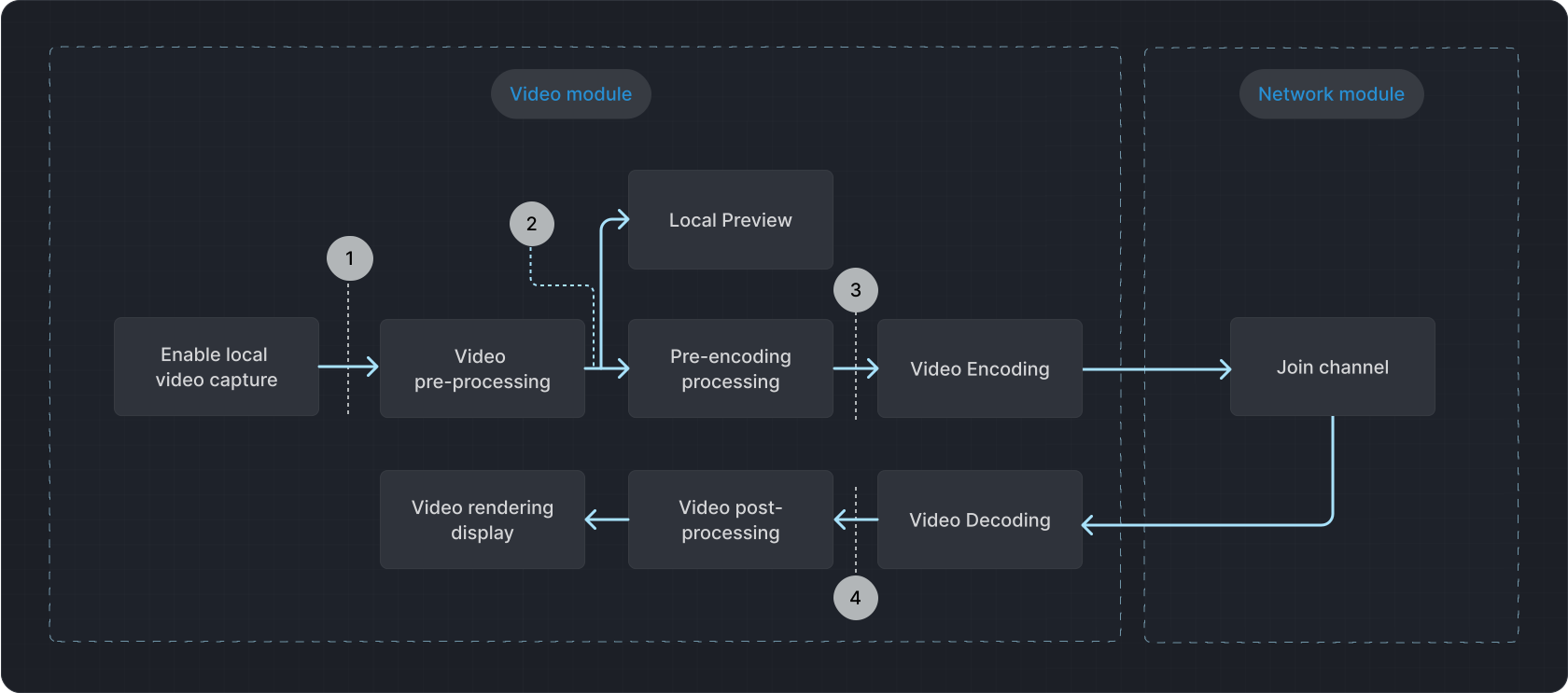
* Position (2) corresponds to the `onCaptureVideoFrame` callback.
* Position (3) corresponds to the `onPreEncodeVideoFrame` callback.
* Position (4) corresponds to the`onRenderVideoFrame` callback.
## Prerequisites [#prerequisites-3]
Ensure that you have implemented the [SDK quickstart](../../index.mdx) in your project.
## Implement raw video processing [#implement-raw-video-processing-3]
To implement raw video data functionality in your project, refer to the following steps:
1. Before joining the channel, create an instance of `IVideoFrameObserver` and call `registerVideoFrameObserver` to register the video observer.
When modifying parameters in a `VideoFrame`, ensure that the updated parameters match the actual video frame in the buffer. Failure to do so may result in unexpected rotation or distortion in both the local preview and the remote video.
```cpp
// Register or unregister the video observer
BOOL CGrayVideoProcFrameObserver::RegisterVideoFrameObserver(
BOOL bEnable, IVideoFrameObserver *videoFrameObserver) {
// Create an AutoPtr instance using IMediaEngine as a template for IMediaEngine
agora::util::AutoPtr mediaEngine;
// Use the queryInterface method through AutoPtr instance to get a pointer to IMediaEngine instance
// Access the IMediaEngine instance pointer through the arrow operator of AutoPtr instance
// Call registerVideoFrameObserver through IMediaEngine instance using AutoPtr instance
mediaEngine.queryInterface(m_rtcEngine, AGORA_IID_MEDIA_ENGINE);
int nRet = 0;
agora::base::AParameter apm(*m_rtcEngine);
if (mediaEngine.get() == NULL) return FALSE;
if (bEnable) {
// Register the video frame observer
nRet = mediaEngine->registerVideoFrameObserver(videoFrameObserver);
} else {
// Unregister the video observer
nRet = mediaEngine->registerVideoFrameObserver(nullptr);
}
return nRet == 0 ? TRUE : FALSE;
}
```
2. Obtain video data through the `onCaptureVideoFrame` and `onRenderVideoFrame` callbacks and process the video frames according to your requirements.
```cpp
// Process locally captured raw video data from the camera, perform grayscale processing, and then send it back to the SDK
bool CGrayVideoProcFrameObserver::onCaptureVideoFrame(VideoFrame &videoFrame) {
// Calculate the size of the video frame
int nSize = videoFrame.height * videoFrame.width;
// Apply grayscale processing to the U and V components of the video frame
memset(videoFrame.uBuffer, 128, nSize / 4);
memset(videoFrame.vBuffer, 128, nSize / 4);
// Return true to indicate successful processing
return true;
}
// Process raw video data received from a remote user
bool CGrayVideoProcFrameObserver::onRenderVideoFrame(const char *channelId,
rtc::uid_t remoteUid,
VideoFrame &videoFrame) {
// Return true to indicate that the received video frame is processed successfully
return true;
}
// Apply an average filter to the locally captured raw video data
bool CAverageFilterVideoProcFrameObserver::onCaptureVideoFrame(
VideoFrame &videoFrame) {
// Static variables to control the step size and direction of the average filter
static int step = 1;
static bool flag = true;
// Update the step size based on the flag
if (flag) {
step += 2;
} else {
step -= 2;
}
// Adjust step size and direction based on certain conditions
if (step >= 151) {
flag = false;
step -= 4;
} else if (step <= 0) {
flag = true;
step += 4;
}
// Apply average filtering to the Y, U, and V components of the video frame
AverageFiltering((unsigned char *)videoFrame.yBuffer, videoFrame.width,
videoFrame.height, step);
AverageFiltering((unsigned char *)videoFrame.uBuffer, videoFrame.width / 2,
videoFrame.height / 2, step);
AverageFiltering((unsigned char *)videoFrame.vBuffer, videoFrame.width / 2,
videoFrame.height / 2, step);
// Return true to indicate successful processing
return true;
}
// Process the locally captured raw video data from screen capture
bool CGrayVideoProcFrameObserver::onScreenCaptureVideoFrame(
VideoFrame &videoFrame) {
// Return true to indicate that the screen-captured video frame is processed successfully
return true;
}
```
## Reference [#reference-3]
This section contains content that completes the information on this page, or points you to documentation that explains other aspects to this product.
### Sample project [#sample-project-3]
Agora provides an open source sample project [OriginalVideo](https://github.com/AgoraIO/API-Examples/tree/main/windows/APIExample/APIExample/Advanced/OriginalVideo) on GitHub. Download it or view the source code for a more detailed example.
### API reference [#api-reference-3]
* [`registerVideoFrameObserver`](https://api-ref.agora.io/en/video-sdk/cpp/4.x/API/class_irtcengine.html#api_imediaengine_registervideoframeobserver)
* [`registerVideoEncodedFrameObserver`](https://api-ref.agora.io/en/video-sdk/cpp/4.x/API/class_irtcengine.html#api_imediaengine_registervideoencodedframeobserver)
* [`onCaptureVideoFrame`](https://api-ref.agora.io/en/video-sdk/cpp/4.x/API/class_ivideoframeobserver.html#callback_ivideoframeobserver_oncapturevideoframe)
* [`onRenderVideoFrame`](https://api-ref.agora.io/en/video-sdk/cpp/4.x/API/class_ivideoframeobserver.html#callback_ivideoframeobserver_onrendervideoframe)
* [`getVideoFrameProcessMode`](https://api-ref.agora.io/en/video-sdk/cpp/4.x/API/class_ivideoframeobserver.html#callback_ivideoframeobserver_getvideoframeprocessmode)
* [`onEncodedVideoFrameReceived`](https://api-ref.agora.io/en/video-sdk/cpp/4.x/API/class_ivideoencodedframeobserver.html#callback_ivideoencodedframeobserver_onencodedvideoframereceived)