# Custom video source (/en/realtime-media/interactive-live-streaming/build/process-raw-and-custom-media/custom-video/windows)
> For AI agents: see the complete documentation index at [llms.txt](/llms.txt).
Custom video capture refers to the collection of a video stream from a custom source. Unlike the default video capture method, custom video capture enables you to control the capture source, and precisely adjust video attributes. You can dynamically adjust parameters such as video quality, resolution, and frame rate to adapt to various application use-cases. For example, you can capture video from high-definition cameras, and drone cameras.
Agora recommends default video capture for its stability, reliability, and ease of integration. Custom video capture offers flexibility and customization for specific video capture use-cases where default video capture does not fulfill your requirements.
## Understand the tech [#understand-the-tech-4]
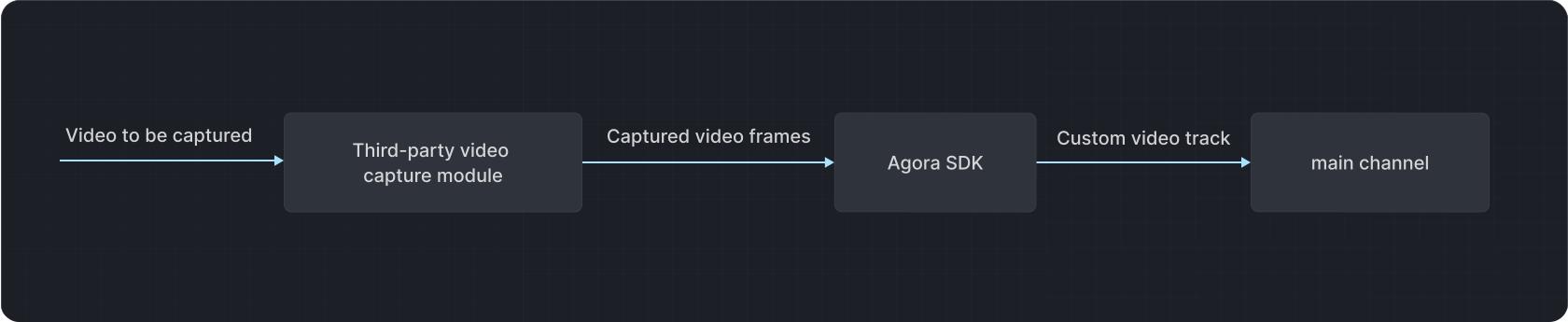
Video SDK provides a custom video track method for video self-collection. You can create and publish custom video tracks to one or more channels. You use the self-capture module to drive the capture device, and send the captured video frames to the SDK through the video track.
The following figure illustrates the video data transmission process when custom video capture is implemented:
## Prerequisites [#prerequisites-4]
Ensure that you have implemented the [SDK quickstart](/en/realtime-media/video/get-started-sdk) in your project.
## Implement the logic [#implement-the-logic-4]
This section shows you how to implement custom video capture and custom video rendering in your app.
### Custom video capture [#custom-video-capture-3]
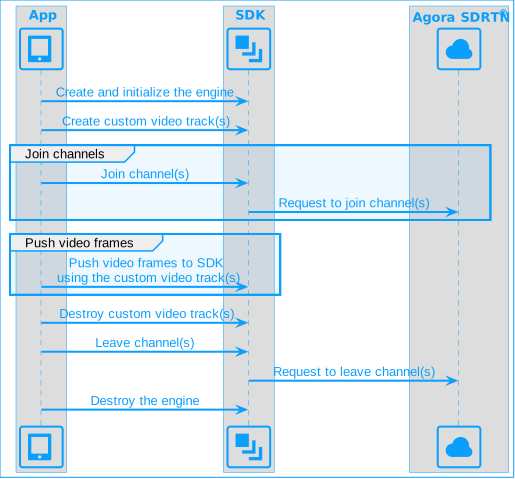
The following figure shows the workflow you implement to capture and stream a custom video source in your app.
**Custom video capture**
Take the following steps to implement this workflow:
1. Create a custom video track
To create a custom video track and obtain the video track ID, call `createCustomVideoTrack` after initializing an instance of `IRtcEngine`. To create multiple custom video tracks, call the method multiple times.
```cpp
// For creating multiple custom video tracks, call createCustomVideoTrack multiple times
int videoTrackId = m_rtcEngine->createCustomVideoTrack();
m_trackVideoTrackIds[trackIndex] = videoTrackId;
```
2. Join a channel and publish the custom video track
```cpp
// Create a ChannelMediaOptions instance
ChannelMediaOptions mediaOptions;
// Set the client role to broadcaster
mediaOptions.clientRoleType = CLIENT_ROLE_BROADCASTER;
// Publish the self-captured video stream
mediaOptions.publishCustomVideoTrack = true;
// Disable auto subscription for video and audio
mediaOptions.autoSubscribeVideo = false;
mediaOptions.autoSubscribeAudio = false;
// Set the custom video track ID
mediaOptions.customVideoTrackId = videoTrackId;
// Join the channel with the specified options
int ret = m_rtcEngine->joinChannel(APP_TOKEN, szChannelId.data(), 0, mediaOptions);
```
3. Implement self-capture module
Agora provides the [YUVReader.cpp](https://github.com/AgoraIO/API-Examples/blob/main/windows/APIExample/APIExample/YUVReader.cpp) and [YUVReader.h](https://github.com/AgoraIO/API-Examples/blob/main/windows/APIExample/APIExample/YUVReader.h) demo projects that show you how to read `YUV` format video data from a local file. In a production environment, create a custom video module for your device using Video SDK based on your business requirements.
```cpp
// Use the custom YUVReader class to continuously read YUV-format video data in the YUVReader thread and pass the data to the OnYUVRead callback for further processing
m_yuvReaderHandlers[trackIndex].Setup(m_rtcEngine, m_mediaEngine.get(), videoTrackId);
m_yuvReaders[trackIndex].start(std::bind(&MultiVideoSourceTracksYUVReaderHander::OnYUVRead, m_yuvReaderHandlers[trackIndex], std::placeholders::_1, std::placeholders::_2, std::placeholders::_3, std::placeholders::_4));
```
4. Push video data to the SDK
Call `pushVideoFrame` to push the captured video frames through the video track to Video SDK. Ensure that the `videoTrackId` matches the track ID you specified when joining the channel. Customize parameters like pixel format, data type, and timestamp in the `VideoFrame`.
To ensure audio-video synchronization, set the timestamp parameter of `VideoFrame` to the system's Monotonic Time. Use `getCurrentMonotonicTimeInMs` to obtain the current Monotonic Time.
```cpp
void MultiVideoSourceTracksYUVReaderHander::OnYUVRead(int width, int height,
unsigned char* buffer,
int size) {
if (m_mediaEngine == nullptr || m_rtcEngine == nullptr) {
return;
}
// Set the video pixel format to I420
m_videoFrame.format = agora::media::base::VIDEO_PIXEL_I420;
// Set the video data type to raw data
m_videoFrame.type = agora::media::base::ExternalVideoFrame::
VIDEO_BUFFER_TYPE::VIDEO_BUFFER_RAW_DATA;
// Pass the width, height, and buffer of the captured YUV video data to videoFrame
m_videoFrame.height = height;
m_videoFrame.stride = width;
m_videoFrame.buffer = buffer;
// Get the current Monotonic Time from the SDK and assign it to the timestamp parameter of videoFrame
m_videoFrame.timestamp = m_rtcEngine->getCurrentMonotonicTimeInMs();
// Push the video frame to the SDK
m_mediaEngine->pushVideoFrame(&m_videoFrame, m_videoTrackId);
}
```
The sample code demonstrates converting YUV format to raw video data in `I420` format. Agora video self-capture supports pushing external video frames in other formats; refer to [`VIDEO_PIXEL_FORMAT`](https://api-ref.agora.io/en/video-sdk/cpp/4.x/API/enum_videopixelformat.html).
If the captured custom video format is Texture and remote users experience flickering or distortion in the captured video, it is recommended to first duplicate the video data and then send both the original and duplicated video data back to the Video SDK. This helps eliminate anomalies during internal data encoding processes.
5. Destroy custom video tracks
To stop custom video capture and destroy the video track, call `destroyCustomVideoTrack`. To destroy multiple video tracks, call the method for each track.
```cpp
// Stop self-captured video data
m_yuvReaders[trackIndex].stop();
m_yuvReaderHandlers[trackIndex].Release();
// Destroy the custom video track
m_rtcEngine->destroyCustomVideoTrack(m_trackVideoTrackIds[trackIndex]);
// Leave the channel
m_rtcEngine->leaveChannelEx(m_trackConnections[trackIndex]);
```
### Custom video rendering [#custom-video-rendering-3]
To implement custom video rendering in your app, refer to the following steps:
1. Set up `onCaptureVideoFrame` or `onRenderVideoFrame` callback to obtain the video data to be played.
2. Implement video rendering and playback yourself.
## Reference [#reference-4]
This section contains content that completes the information on this page, or points you to documentation that explains other aspects to this product.
### Applicable use-cases [#applicable-use-cases-3]
Use custom video capture in the following industries and use-cases:
**Specialized video processing and enhancement**
In specific gaming or virtual reality use-cases, real-time effects processing, filter handling, or other enhancement effects necessitate direct access to the original video stream. Custom video capture facilitates this, enabling seamless real-time processing and enhances the overall gaming or virtual reality experience for a more realistic outcome.
**High-precision video capture**
In video surveillance applications, detailed observation and analysis of scene details is necessary. Custom video capture enables higher image quality and finer control over capture to meet the requirements of video monitoring.
**Capture from specific video sources**
Industries such as IoT and live streaming often require the use of specific cameras, monitoring devices, or non-camera video sources, such as video capture cards or screen recording data. In such situations, default Video SDK capture may not meet your requirements, necessitating use of custom video capture.
**Seamless integration with specific devices or third-party applications**
In smart home or IoT applications, transmitting video from devices to users' smartphones or computers for monitoring and control may require the use of specific devices or applications for video capture. Custom video capture facilitates seamless integration of specific devices or applications with the Video SDK.
**Specific video encoding formats**
In certain live streaming use-cases, specific video encoding formats may be needed to meet business requirements. In such cases, Video SDK default capture might not suffice, and custom video capture is required to capture and encode videos in specific formats.
### Advantages [#advantages-3]
Using custom video capture offers the following advantages:
**More types of video streams**
Custom video capture allows the use of higher quality and a greater variety of capture devices and cameras, resulting in clearer and smoother video streams. This enhances the user viewing experience and makes the product more competitive.
**More flexible video effects**
Custom video capture enables you to implement richer and more personalized video effects and filters, enhancing the user experience. You can implement effects such as beautification filters and dynamic stickers.
**Adaptation to diverse use-case requirements**
Custom video capture helps applications better adapt to the requirements of various use-cases, such as live streaming, video conferencing, and online education. You can customize different video capture solutions based on the use-case requirements to provide a more robust application.
### Sample project [#sample-project]
Agora provides the following open-source sample projects for your reference. Download the project or view the source code for a more detailed example.
* [MultiVideoSourceTracks](https://github.com/AgoraIO/API-Examples/tree/main/windows/APIExample/APIExample/Advanced/MultiVideoSourceTracks): Video self-capture
* [CustomVideoCapture](https://github.com/AgoraIO/API-Examples/blob/main/windows/APIExample/APIExample/Advanced/CustomVideoCapture/CAgoraCaptureVideoDlg.cpp): Custom video rendering
### API reference [#api-reference-4]
* [`createCustomVideoTrack`](https://api-ref.agora.io/en/video-sdk/cpp/4.x/API/class_irtcengine.html#api_irtcengine_createcustomvideotrack)
* [`destroyCustomVideoTrack`](https://api-ref.agora.io/en/video-sdk/cpp/4.x/API/class_irtcengine.html#api_irtcengine_destroycustomvideotrack)
* [`getCurrentMonotonicTimeInMs`](https://api-ref.agora.io/en/video-sdk/cpp/4.x/API/class_irtcengine.html#api_irtcengine_getcurrentmonotonictimeinms)
* [`joinChannel`](https://api-ref.agora.io/en/video-sdk/cpp/4.x/API/class_irtcengine.html#api_irtcengine_joinchannel)
* [`pushVideoFrame`](https://api-ref.agora.io/en/video-sdk/cpp/4.x/API/class_imediaengine.html#api_imediaengine_pushvideoframe)
* [`onCaptureVideoFrame`](https://api-ref.agora.io/en/video-sdk/cpp/4.x/API/class_ivideoframeobserver.html#callback_ivideoframeobserver_oncapturevideoframe)
* [`onRenderVideoFrame`](https://api-ref.agora.io/en/video-sdk/cpp/4.x/API/class_ivideoframeobserver.html#callback_ivideoframeobserver_onrendervideoframe)