# Pre-call tests (/en/realtime-media/interactive-live-streaming/build/optimize-quality-and-connection/pre-call-tests/android)
> For AI agents: see the complete documentation index at [llms.txt](/llms.txt).
In video calling implementations that demand high communication quality, pre-call detection helps identify and troubleshoot issues beforehand, ensuring seamless real-time interaction.
This page shows you how to use Video SDK to run pre-call tests to identify and troubleshoot communication quality issues in your app.
## Understand the tech [#understand-the-tech]
Pre-call testing typically covers two aspects:
* **Equipment quality test**
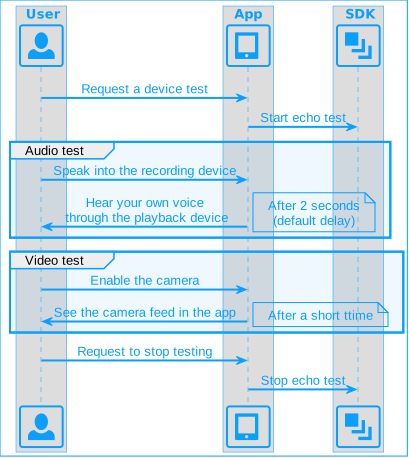
To test whether the local microphone, speaker, and camera are working properly, you run an echo test. The basic process of conducting an echo test is as follows:
**Pre-call echo test**
* **Network quality analysis**
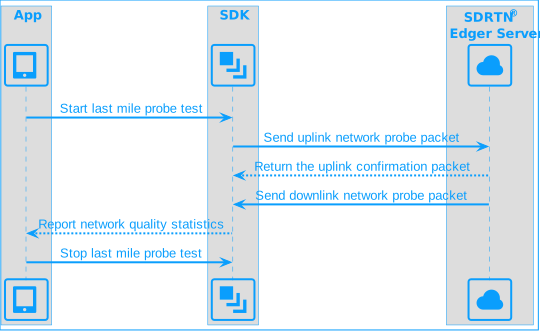
The quality of the last mile network affects the smoothness and clarity of the audio and video that the user sends and receives. Last mile refers to the last leg of communication network between the edge server of the Agora SDRTN® and the end-user devices. Network quality analysis enables you to get feedback on the available bandwidth, packet loss rate, network jitter, and round-trip delay of the upstream and downstream last-mile networks. The following figure shows the basic process of running a last-mile probe test.
**Pre-call last mile test**
Best practice is to run the device test first and then perform a network test.
## Prerequisites [#prerequisites]
Ensure that you have implemented the [SDK quickstart](../../index.mdx) project and that your app has obtained permissions to use the relevant devices.
## Implement pre-call testing [#implement-pre-call-testing]
This section shows you how to implement pre-call testing in your project.
### Equipment quality test [#equipment-quality-test]
The SDK provides the `startEchoTest` \[3/3] method to test the network connection and whether the audio and video devices are working properly. Refer to the following steps to implement the device quality test:
1. Before joining a channel, call `startEchoTest` \[3/3] with `EchoTestConfiguration`. Specify the channel name, whether to test audio or video, and the time interval for the echo.
2. After starting the test, face the camera and speak into the microphone. The user's audio or video is played back after a short delay. If the playback is normal, it means that the user's devices and upstream and downstream network are working normally.
3. To stop the test, call `stopEchoTest`, and then call `joinChannel` to join a channel.
Using `startEchoTest` \[3/3] to test an audio device and a video device at the same time may result in a brief audio-video desynchronization of the test results.
To implement running an echo test in your app, refer to the following code:
Java
Kotlin
```java
// Test audio device
private void testAudioDevice() {
// Create an EchoTestConfiguration instance
EchoTestConfiguration config = new EchoTestConfiguration();
// Disable video device testing
config.enableVideo = false;
// Enable audio device testing
config.enableAudio = true;
// Set the interval for returning test results
config.intervalInSeconds = MAX_COUNT_DOWN;
// Identify each test by channel name
config.channelId = "AudioEchoTest" + (new Random().nextInt(1000) + 10000);
// Start the test
engine.startEchoTest(config);
}
// Test video device
private void testVideoDevice() {
// Create an EchoTestConfiguration instance
EchoTestConfiguration config = new EchoTestConfiguration();
// Enable video device testing
config.enableVideo = true;
// Specify the view for rendering the local user's video
config.view = requireView().findViewById(R.id.surfaceView);
// Disable audio device testing
config.enableAudio = false;
// Set the expected delay for video rendering
config.intervalInSeconds = MAX_COUNT_DOWN;
// Identify each test by channel name
config.channelId = "VideoEchoTest" + (new Random().nextInt(1000) + 10000);
// Start the test
engine.startEchoTest(config);
}
```
```kotlin
// Test audio device
private fun testAudioDevice() {
// Create an EchoTestConfiguration instance
val config = EchoTestConfiguration().apply {
// Disable video device testing
enableVideo = false
// Enable audio device testing
enableAudio = true
// Set the interval for returning test results
intervalInSeconds = MAX_COUNT_DOWN
// Identify each test by channel name
channelId = "AudioEchoTest" + (Random().nextInt(1000) + 10000)
}
// Start the test
engine.startEchoTest(config)
}
// Test video device
private fun testVideoDevice() {
// Create an EchoTestConfiguration instance
val config = EchoTestConfiguration().apply {
// Enable video device testing
enableVideo = true
// Specify the view for rendering the local user's video
view = requireView().findViewById(R.id.surfaceView)
// Disable audio device testing
enableAudio = false
// Set the expected delay for video rendering
intervalInSeconds = MAX_COUNT_DOWN
// Identify each test by channel name
channelId = "VideoEchoTest" + (Random().nextInt(1000) + 10000)
}
// Start the test
engine.startEchoTest(config)
}
```
### Network quality analysis [#network-quality-analysis]
The SDK provides the `startLastmileProbeTest` method to probe the last-mile network quality before joining a channel. The method returns information about the network quality score and network statistics. Take the following steps to run a last-mile network quality probe test:
1. Before joining a channel or switching user roles, call `startLastmileProbeTest` to start the network test. Set the probe configuration and the expected maximum bitrate in `LastmileProbeConfig`.
2. After you start the test, the SDK triggers the following callbacks:
* `onLastmileQuality`: This callback is triggered two seconds after `startLastmileProbeTest` is called. It provides feedback on the upstream and downstream network quality through a subjective `quality` score.
* `onLastmileProbeResult`: This callback is triggered 30 seconds after `startLastmileProbeTest` is called. It returns objective real-time network statistics, including `packetLossRate`, network `jitter`, and `availableBandwidth`.
3. Call `stopLastmileProbeTest` to stop last-mile network testing.
To implement network quality testing in your app, refer to the following code:
Java
Kotlin
```java
// Configure a LastmileProbeConfig instance
LastmileProbeConfig config = new LastmileProbeConfig(){};
// Probe uplink network quality
config.probeUplink = true;
// Probe downlink network quality
config.probeDownlink = true;
// User's expected maximum sending bitrate (bps). Range: [100000,5000000]
config.expectedUplinkBitrate = 100000;
// User's expected maximum receiving bitrate (bps). Range: [100000,5000000]
config.expectedDownlinkBitrate = 100000;
// Start the network quality probe
engine.startLastmileProbeTest(config);
// Register callbacks
public void onLastmileQuality(int quality) {
statisticsInfo.setLastMileQuality(quality);
updateLastMileResult();
}
public void onLastmileProbeResult(LastmileProbeResult lastmileProbeResult) {
statisticsInfo.setLastMileProbeResult(lastmileProbeResult);
updateLastMileResult();
}
// Stop the network quality probe
engine.stopLastmileProbeTest();
```
```kotlin
// Configure a LastmileProbeConfig instance
val config = LastmileProbeConfig().apply {
// Probe uplink network quality
probeUplink = true
// Probe downlink network quality
probeDownlink = true
// User's expected maximum sending bitrate (bps). Range: [100000, 5000000]
expectedUplinkBitrate = 500000 // Adjust as needed
// User's expected maximum receiving bitrate (bps). Range: [100000, 5000000]
expectedDownlinkBitrate = 500000 // Adjust as needed
}
// Start the network quality probe
engine.startLastmileProbeTest(config)
// Register callbacks
fun onLastmileQuality(quality: Int) {
// Ensure statisticsInfo is initialized and updated
statisticsInfo.lastMileQuality = quality
updateLastMileResult() // Implement this function to handle the quality update
}
fun onLastmileProbeResult(lastmileProbeResult: LastmileProbeResult) {
// Ensure statisticsInfo is initialized and updated
statisticsInfo.lastMileProbeResult = lastmileProbeResult
updateLastMileResult() // Implement this function to handle the probe result update
}
// Stop the network quality probe when done
engine.stopLastmileProbeTest()
```
## Reference [#reference]
This section contains content that completes the information on this page, or points you to documentation that explains other aspects to this product.
### Troubleshooting device and network issues [#troubleshooting-device-and-network-issues]
If you encounter problems while running pre-call tests, first ensure that you have implemented the API calls properly. To troubleshoot device and network issues, refer to the following table:
| Problem | Solution |
| :-------------------------------------------------------------------------------- | :---------------------------------------------------------------------------------------------------------------------------------------------------------------------------------------------------------------------------------------------------------------------------------------------------------------------------------------------------------------------------------------------------------------------------------------------------------------------------------------------------------------------------------------------------------------------------------------------------------------------- |
| Can't hear sound when testing audio devices. | * Check that the recording device and the playback device are working properly, and are not occupied by other programs.
* Check that the network connection is normal. |
| Cannot see the screen when testing video devices. | - Check that the video device is working properly and not occupied by other programs.
- Check whether the network connection is normal. |
| Poor uplink network quality detected (packet loss > 5%; network jitter > 100ms) | * Check that the local network is working properly.
* Ensure that the bitrate of the published audio and video streams does not exceed the available uplink bandwidth by reducing the resolution or lowering the frame rate. |
| Poor downlink network quality detected (packet loss > 5%; network jitter > 100ms) | - Check that the local network is working properly.
- Ensure that the total bandwidth of the local subscription does not exceed the available downstream bandwidth by:
* Reducing the number of subscribed audio and video streams on the receiving end or reducing the bitrate of published audio and video streams on the sending end.
* Enabling dual-stream mode on the sending side and requesting to receive small streams on the receiving side to reduce bandwidth consumption.
* Enabling the video stream fallback function or the multiple streams by priority fallback function at the receiving end. |
### Sample project [#sample-project]
Agora provides an open-source [PreCallTest](https://github.com/AgoraIO/API-Examples/blob/main/Android/APIExample-Audio/app/src/main/java/io/agora/api/example/examples/advanced/PreCallTest.java) sample project for your reference. Download and explore this project for a more detailed example.
### API reference [#api-reference]
* [`startEchoTest` \[3/3\]](https://api-ref.agora.io/en/video-sdk/android/4.x/API/class_irtcengine.html#api_irtcengine_startechotest3)
* [`stopEchoTest`](https://api-ref.agora.io/en/video-sdk/android/4.x/API/class_irtcengine.html#api_irtcengine_stopechotest)
* [`startLastmileProbeTest`](https://api-ref.agora.io/en/video-sdk/android/4.x/API/class_irtcengine.html#api_irtcengine_startlastmileprobetest)
* [`stopLastmileProbeTest`](https://api-ref.agora.io/en/video-sdk/android/4.x/API/class_irtcengine.html#api_irtcengine_stoplastmileprobetest)
* [`onLastmileQuality`](https://api-ref.agora.io/en/video-sdk/android/4.x/API/class_irtcengineeventhandler.html#callback_irtcengineeventhandler_onlastmilequality)
* [`onLastmileProbeResult`](https://api-ref.agora.io/en/video-sdk/android/4.x/API/class_irtcengineeventhandler.html#callback_irtcengineeventhandler_onlastmileproberesult)