# Manage media and devices (/en/realtime-media/interactive-live-streaming/build/control-audio-and-devices/volume-control-and-mute/ios)
> For AI agents: see the complete documentation index at [llms.txt](/llms.txt).
This page shows you how to configure volume settings for audio recording, audio playback, and for the playback of music files.
## Understand the tech [#understand-the-tech]
Agora Video SDK supports adjusting the audio volume for both recording and playback to meet practical application use-cases. For example, during a two-person call, you can mute a remote user by adjusting the playback volume setting to 0.
The figure below shows the workflow of adjusting the volume.
**Volume adjust workflow**
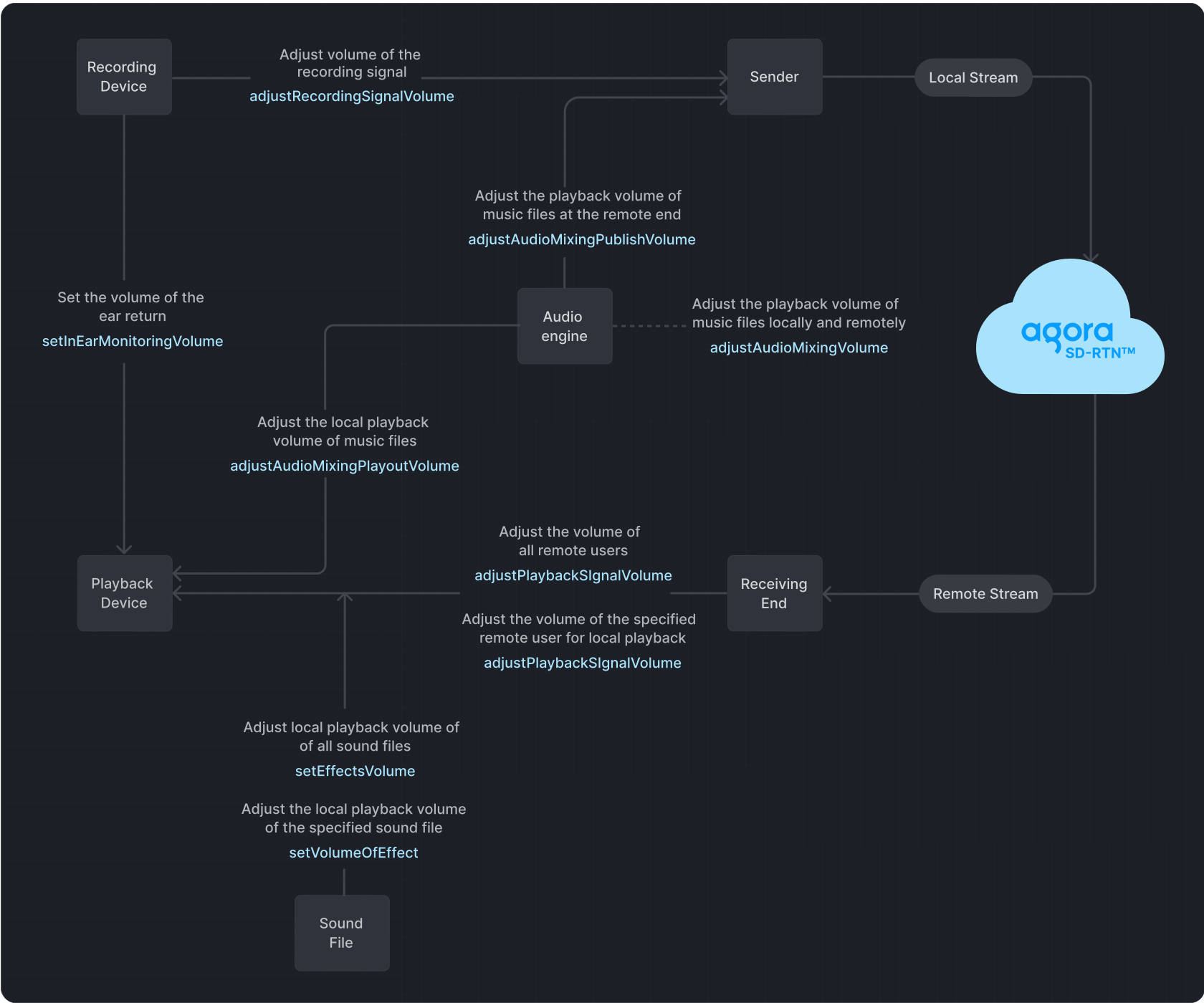
**Playback** refers to transmitting an audio signal from a sender to a recipient, where it is played back through a playback device.
**In-ear monitoring** refers to the process of playing audio captured by a device.
**Recording** refers to the process in which audio signals are captured by a recording device and then sent to the transmitter.
If you set the volume too high using the signal volume adjustment methods, it may lead to audio distortion on some devices.
## Prerequisites [#prerequisites-1]
Ensure that you have implemented the [SDK quickstart](../../index.mdx) in your project.
## Implement volume control [#implement-volume-control-1]
Use one or more of the following volume control methods to adjust volume settings.
### Mute and unmute users [#mute-and-unmute-users-1]
* To mute or unmute the local audio stream, call `muteLocalAudioStream`:
objc
swift
```objc
[agoraKit muteLocalAudioStream:YES];
```
```swift
// Stop publishing the local audio stream
agoraKit.muteLocalAudioStream(true)
// Resume publishing the local audio stream
agoraKit.muteLocalAudioStream(false)
```
* To mute or unmute a remote user, call `muteRemoteAudioStream` with the `uid` of the remote user:
objc
swift
```objc
[agoraKit muteRemoteAudioStream:remoteUid mute:YES];
```
```swift
// Stop subscribing to the audio stream of the remote user
agoraKit.muteRemoteAudioStream(remoteUid, mute: true)
// Resume subscribing to the audio stream of the remote user
agoraKit.muteRemoteAudioStream(remoteUid, mute: false)
```
To mute remote users without unsubscribing, set their [playback volume](#adjust-the-playback-volume) to `0`.
### Adjust the playback volume [#adjust-the-playback-volume-1]
Call `adjustPlaybackSignalVolume` or `adjustUserPlaybackSignalVolume` to adjust the volume of the audio playback signal.
objc
swift
```objc
// Set the volume of all remote users played locally
[agoraKit adjustPlaybackSignalVolume: 50];
// Set the local playback volume for a specific remote user.
[agoraKit adjustUserPlaybackSignalVolume: uid, volume: 50];
```
```swift
// Set the volume of all remote users played locally
agoraKit.adjustPlaybackSignalVolume(50)
// Set the local playback volume for a specific remote user
agoraKit.adjustUserPlaybackSignalVolume(uid, volume: 50)
```
### Adjust the in-ear monitoring volume [#adjust-the-in-ear-monitoring-volume-1]
During the process of audio capture, mixing, and playback, Agora enables you to adjust the volume of in-ear monitoring. Enable and set the in-ear monitoring through `enableInEarMonitoring` and `setInEarMonitoringVolume`.
objc
swift
```objc
// Enable in-ear monitoring
[agoraKit enableInEarMonitoring:true];
// Adjust in-ear monitoring volume
[agoraKit setInEarMonitoringVolume:50];
```
```swift
// Enable in-ear monitoring
agoraKit.enableInEarMonitoring(true)
// Adjust in-ear monitoring volume
agoraKit.setInEarMonitoringVolume(50)
```
### Adjust the recording volume [#adjust-the-recording-volume-1]
Call `adjustRecordingSignalVolume` to adjust the volume of the audio recording signal.
objc
swift
```objc
// Adjust the recording signal volume
[agoraKit adjustRecordingSignalVolume: 50];
```
```swift
// Adjust the recording signal volume
agoraKit.adjustRecordingSignalVolume(50)
```
When configuring audio settings, it's essential to understand the default behavior and the options available. Here are the key points to keep in mind:
* The SDK defaults to a device volume of `85` when using the recording device to capture audio signals.
* A volume of `0` means mute, and a volume of `255` represents the maximum volume of the device.
* If the SDK detects that the recording volume is too low in the current environment, it automatically increases the volume of the recording device.
* The volume of the recording device directly influences the global volume of the device.
* If the default recording device volume does not meet your requirements, adjust it by regulating the signal amplitude captured by the microphone or sound card.
### Get volume information of users [#get-volume-information-of-users-1]
Video SDK enables you to obtain the user IDs and corresponding volumes of the three users with the highest instantaneous volumes in a channel during the process of audio recording, mixing, and playback. You use `reportAudioVolumeIndicationOfSpeakers` callback to obtain this information. A returned `uid` of `0` in the callback indicates the local user.
Call `enableAudioVolumeIndication` to enable reporting of the users' volume in the callback.
objc
swift
```objc
// Retrieve the user IDs of the three users with the highest instantaneous speaking volume,
// their respective volumes, and determine whether the local user is speaking.
- (void)rtcEngine:(AgoraRtcEngineKit *_Nonnull)engine
reportAudioVolumeIndicationOfSpeakers:(NSArray *_Nonnull)speakers
totalVolume:(NSInteger)totalVolume {
}
```
```swift
// Retrieve the user IDs of the three users with the highest instantaneous speaking volume,
// their respective volumes, and determine whether the local user is speaking.
func rtcEngine(
_ engine: AgoraRtcEngineKit,
reportAudioVolumeIndicationOfSpeakers speakers: [AgoraRtcAudioVolumeInfo],
totalVolume: Int
) {
}
// Enable the reportAudioVolumeIndicationOfSpeakers callback
agoraKit.enableAudioVolumeIndication(200, smooth: 3, reportVad: true)
```
## Reference [#reference-1]
This section contains content that completes the information on this page, or points you to documentation that explains other aspects to this product.
### API reference [#api-reference-1]
* [`adjustRecordingSignalVolume`](https://api-ref.agora.io/en/video-sdk/ios/4.x/documentation/agorartckit/agorartcenginekit/adjustrecordingsignalvolume\(_:\))
* [`adjustPlaybackSignalVolume`](https://api-ref.agora.io/en/video-sdk/ios/4.x/documentation/agorartckit/agorartcenginekit/adjustplaybacksignalvolume\(_:\))
* [`adjustUserPlaybackSignalVolume`](https://api-ref.agora.io/en/video-sdk/ios/4.x/documentation/agorartckit/agorartcenginekit/adjustuserplaybacksignalvolumeex\(_\:volume\:connection:\))
* [`adjustAudioMixingPlayoutVolume`](https://api-ref.agora.io/en/video-sdk/ios/4.x/documentation/agorartckit/agorartcenginekit/adjustaudiomixingplayoutvolume\(_:\))
* [`enableInEarMonitoring`](https://api-ref.agora.io/en/video-sdk/ios/4.x/documentation/agorartckit/agorartcenginekit/enable\(inearmonitoring\:includeaudiofilters:\))
* [`setInEarMonitoringVolume`](https://api-ref.agora.io/en/video-sdk/ios/4.x/documentation/agorartckit/agorartcenginekit/setinearmonitoringvolume\(_:\))
* [`enableaudiovolumeindication`](https://api-ref.agora.io/en/video-sdk/ios/4.x/documentation/agorartckit/agorartcenginekit/enableaudiovolumeindication\(_\:smooth\:reportvad:\))
* [`muteLocalAudioStream`](https://api-ref.agora.io/en/video-sdk/ios/4.x/documentation/agorartckit/agoraspatialaudiokitbase/mutelocalaudiostream\(_:\))
* [`muteRemoteAudioStream`](https://api-ref.agora.io/en/video-sdk/ios/4.x/documentation/agorartckit/agorartcenginekit/muteremoteaudiostream\(_\:mute:\))
### Sample projects [#sample-projects-1]
Agora offers the following open-source sample project for adjusting recording, playback, and in-ear monitoring volumes for your reference:
* GitHub: [JoinChannelAudio](https://github.com/AgoraIO/API-Examples/tree/main/iOS/APIExample/APIExample/Examples/Basic/JoinChannelAudio)
For adjusting the playback volume of mixing or audio effect files, refer to the following sample project:
* GitHub: [AudioMixing](https://github.com/AgoraIO/API-Examples/tree/main/iOS/APIExample/APIExample/Examples/Advanced/AudioMixing)
### Frequently asked questions [#frequently-asked-questions-1]
* [How can I solve the problem of low volume?](/en/api-reference/faq/quality/audio_low)
### See also [#see-also-1]
* [Custom audio source](custom-audio.mdx)
* [Custom video source](custom-video.mdx)