# Cross-channel media stream relay (/en/realtime-media/interactive-live-streaming/build/connect-across-channels/cross-channel-media-relay/flutter)
> For AI agents: see the complete documentation index at [llms.txt](/llms.txt).
Some special use-cases require cross-channel media stream forwarding functionality. Video SDK enables you to relay the media stream of a host, from a source channel, to multiple target channels simultaneously. This functionality allows you to realize the following interactions:
* The hosts publish and receive each other's audio and video streams while engaging in *cross-channel* real-time interaction.
* The audience receive all audio and video streams from hosts and watch multiple hosts interact at the same time.
Due to its real-time and interactive nature, this feature enriches live broadcasts and game-play, It is especially suitable for live scenes such as co-hosting PK and online choir. It provides the audience with a better viewing experience, while bringing more traffic and revenue to the hosts.
Cross-channel media stream relay is included in Agora's policy of [10,000 free minutes](/en/api-reference/faq/account/billing_free) every month. For usage beyond the free quota, please refer to [Pricing](/en/realtime-media/interactive-live-streaming/reference/pricing).
## Prerequisites [#prerequisites-6]
* Ensure that you have implemented the [SDK quickstart](../../quickstart.mdx) in your project.
* Contact [technical support](https://agora-ticket.agora.io/) to activate the cross-channel media stream relay feature.
## Implement cross-channel media stream relay [#implement-cross-channel-media-stream-relay-6]
The following figure shows the workflow you implement to facilitate cross-channel media stream relay:
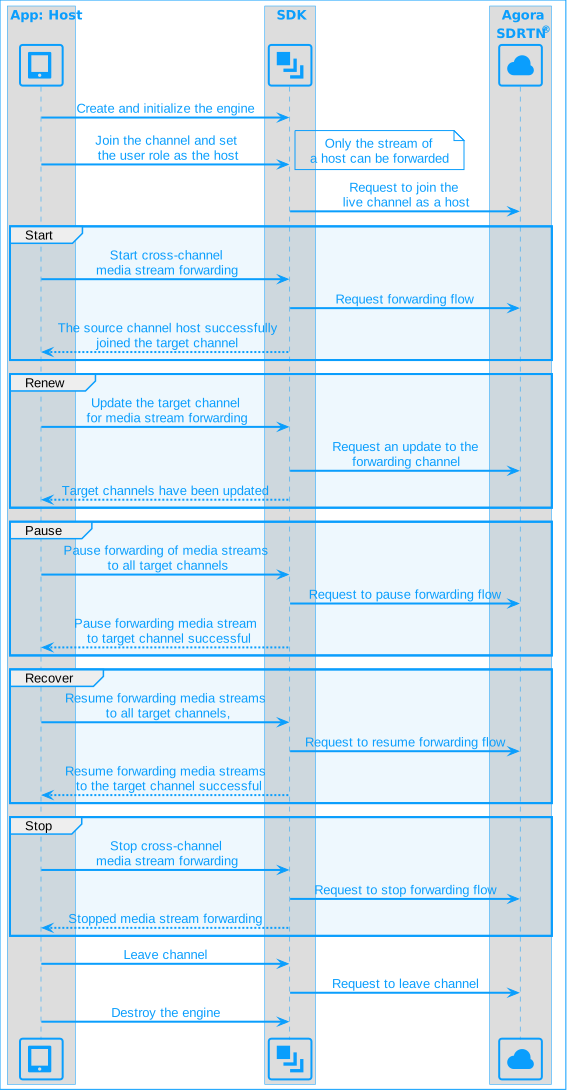
To implement cross-channel media stream relay in your app, take the following steps:
1. Start cross-channel media stream relay
After joining a channel, call `startOrUpdateChannelMediaRelay` to configure the source and target channel information and start forwarding a media stream.
```dart
// Configures the source channel information for media relay.
final srcChannelInfo = ChannelMediaInfo(
channelName: sourceChannelName,
token: srcToken, // Token generated with UID 0.
uid: 0,
);
// Configures the destination channel information for media relay.
final destChannelInfo = ChannelMediaInfo(
channelName: destChannelName,
token: destToken,
uid: 0,
);
// Creates the media relay configuration with source and destination channels.
final mediaRelayConfiguration = ChannelMediaRelayConfiguration(
srcChannelInfo: srcChannelInfo,
destInfos: {destChannelName: destChannelInfo},
);
// Starts relaying media streams from the source channel to the destination channel.
await engine.startOrUpdateChannelMediaRelay(mediaRelayConfiguration);
```
* Best practice is to set the UID of the source channel to `0`, allowing the SDK to assign a random UID.
* The source channel token in `srcChannelInfo` should be different from the one used when joining the source channel. Generate a new token using the source channel name and `uid = 0`.
* For the destination channel, set the uid to `0`, to allow the SDK to assign a random `uid`, or specify a `uid`, ensuring that it is different from all UIDs in the target channel.
2. Update media stream relay channels
To forward the stream to multiple target channels or exit the current forwarding channel after staring channel media relay, call `startOrUpdateChannelMediaRelay` again to add or remove target channels for forwarding.
The updated configuration completely **replaces** the previous configuration.
3. Pause or resume media stream relay
To pause forwarding the media stream to all target channels, call `pauseAllChannelMediaRelay`.
```dart
await engine.pauseAllChannelMediaRelay();
isPaused = true;
```
To resume forwarding the media stream to all target channels, call `resumeAllChannelMediaRelay`.
```dart
await engine.resumeAllChannelMediaRelay();
isPaused = false;
```
4. Stop cross-channel media stream relay
To stop forwarding the media stream, call `stopChannelMediaRelay`. When forwarding stops, the host exits all target channels.
```dart
await engine.stopChannelMediaRelay();
mediaRelaying = false;
```
If this method fails, call `leaveChannel` to leave the channel and stop cross-channel media stream relay.
5. Monitor cross-channel media stream status
During cross-channel media stream relay, the SDK reports changes in the status of media stream relay through the `onChannelMediaRelayStateChanged` callback. Implement the relevant business logic based on the [status codes](#status-codes).
```dart
engine.registerEventHandler(
RtcEngineEventHandler(
onChannelMediaRelayStateChanged: (state, code) {
switch (state) {
case ChannelMediaRelayState.relaying:
mediaRelaying = true;
print("Channel media relay connected.");
break;
case ChannelMediaRelayState.failure:
mediaRelaying = false;
print("Channel media relay failed with error code: $code");
break;
default:
break;
}
},
),
);
```
### Development considerations [#development-considerations-6]
* In live broadcast use cases, only users with the role of host can call `startOrUpdateChannelMediaRelay` to initiate cross-channel media stream forwarding.
* Call `startOrUpdateChannelMediaRelay` **after** successfully joining a channel; otherwise, the method call fails.
* Within a single channel, multiple hosts can forward media streams. Each host can forward a media stream to up to six target channels.
* This feature does not support String-type `uid`. To use cross-channel co-hosting, you must also use an int-type `uid` in regular co-hosting. Otherwise, cross-channel co-hosting will not work.
## Reference [#reference-6]
This section contains content that completes the information on this page, or points you to documentation that explains other aspects to this product.
### Status codes [#status-codes-5]
The following table shows the main forwarding states and their corresponding codes:
| Forwarding status | State and error code |
| ----------------------------------------------------------------------------------------------------------------------------------------------------------------------------- | ------------------------------------------------------------------------------- |
| The source channel starts transmitting data to the target channel. | `ChannelMediaRelayState.relayRunning (2)`, `ChannelMediaRelayError.relayOk (0)` |
| Forwarding encounters an exception. Troubleshoot the issue based on the [error code](https://api-ref.agora.io/en/video-sdk/flutter/6.x/API/enum_channelmediarelayerror.html). | `ChannelMediaRelayState.relayFailure (3)` |
| Forwarding has stopped. | `ChannelMediaRelayState.relayIdle (0)`, `ChannelMediaRelayError.relayOk (0)` |
### API reference [#api-reference-6]
* [`startOrUpdateChannelMediaRelay`](https://api-ref.agora.io/en/video-sdk/flutter/6.x/API/class_irtcengine.html#api_irtcengine_startorupdatechannelmediarelay)
* [`stopChannelMediaRelay`](https://api-ref.agora.io/en/video-sdk/flutter/6.x/API/class_irtcengine.html#api_irtcengine_stopchannelmediarelay)
* [`pauseAllChannelMediaRelay`](https://api-ref.agora.io/en/video-sdk/flutter/6.x/API/class_irtcengine.html#api_irtcengine_pauseallchannelmediarelay)
* [`resumeAllChannelMediaRelay`](https://api-ref.agora.io/en/video-sdk/flutter/6.x/API/class_irtcengine.html#api_irtcengine_resumeallchannelmediarelay)
* [`onChannelMediaRelayStateChanged`](https://api-ref.agora.io/en/video-sdk/flutter/6.x/API/class_irtcengineeventhandler.html#callback_irtcengineeventhandler_onchannelmediarelaystatechanged)
* [`ChannelMediaRelayConfiguration`](https://api-ref.agora.io/en/video-sdk/flutter/6.x/API/class_channelmediarelayconfiguration.html)
* [`ChannelMediaInfo`](https://api-ref.agora.io/en/video-sdk/flutter/6.x/API/class_channelmediainfo.html)