# Alpha transparency effect (/en/realtime-media/interactive-live-streaming/build/apply-effects-and-enhancements/alpha-transparency-effect)
> For AI agents: see the complete documentation index at [llms.txt](/llms.txt).
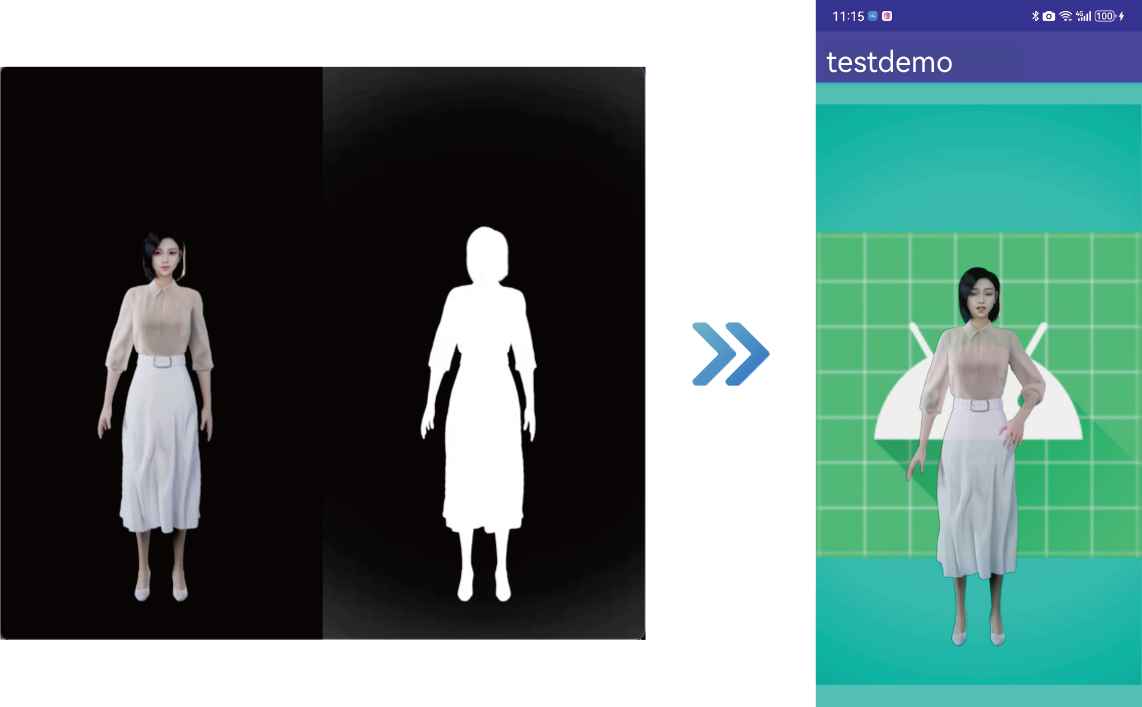
In various real-time video interaction use-cases, segmenting the host's background and applying transparent special effects can make the interaction more engaging, enhance immersion, and improve the overall interactive experience.
Consider the following sample use-cases:
* **Broadcaster background replacement**: The audience sees the broadcaster's background in the video replaced with a virtual scene, such as a gaming environment, a conference, or a tourist attractions.
* **Animated virtual gifts**: Display dynamic animations with a transparent background to avoid obscuring live content when multiple video streams are merged.
* **Chroma keying during live game streaming**: The audience sees the broadcaster's image cropped and positioned within the local game screen, making it appear as though the broadcaster is part of the game.
## Prerequisites
Ensure that you have implemented the [SDK quickstart](../../index.mdx) in your project.
## Implement alpha transparency
Choose one of the following methods to implement the Alpha transparency effect based on your specific business use-case.
### Custom video capture use-case
The implementation process for this use-case is illustrated in the figure below:
**Alpha transparency custom video capture use-case**
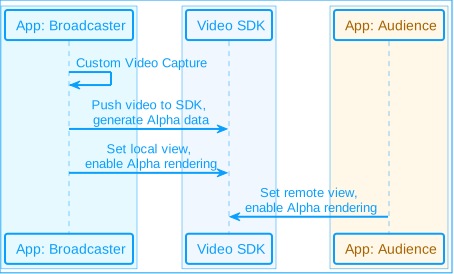
Take the following steps to implement this logic:
1. Process the captured video frames and generate Alpha data. You can choose from the following methods:
* **Method 1**: Call the `pushExternalVideoFrame`\[2/2] method and set the `alphaBuffer` parameter to specify Alpha channel data for the video frames. This data matches the size of the video frames, with each pixel value ranging from 0 to 255, where 0 represents the background and 255 represents the foreground.
Ensure that `alphaBuffer` is exactly the same size as the video frame (width × height), otherwise the app may crash.
Java
Kotlin
```java
JavaI420Buffer javaI420Buffer = JavaI420Buffer.wrap(width, height, dataY, width, dataU, strideUV, dataV, strideUV, null);
VideoFrame frame = new VideoFrame(javaI420Buffer, 0, timestamp);
ByteBuffer alphaBuffer = ByteBuffer.allocateDirect(width * height);
frame.fillAlphaData(alphaBuffer);
rtcEngine.pushExternalVideoFrame(frame);
```
```kotlin
val javaI420Buffer = JavaI420Buffer.wrap(width, height, dataY, width, dataU, strideUV, dataV, strideUV, null)
val frame = VideoFrame(javaI420Buffer, 0, timestamp)
val alphaBuffer = ByteBuffer.allocateDirect(width * height)
frame.fillAlphaData(alphaBuffer)
rtcEngine.pushExternalVideoFrame(frame)
```
* **Method 2**: Call the `pushExternalVideoFrame` method and use the `setAlphaStitchMode` method in the `VideoFrame` class to set the Alpha stitching mode. Construct a `VideoFrame` with the stitched Alpha data.
Java
Kotlin
```java
JavaI420Buffer javaI420Buffer = JavaI420Buffer.wrap(width, height, dataY, width, dataU, strideUV, dataV, strideUV, null);
VideoFrame frame = new VideoFrame(javaI420Buffer, 0, timestamp);
// Set the Alpha stitching mode, in the example below, Alpha is set to be below the video image
frame.setAlphaStitchMode(Constants.VIDEO_ALPHA_STITCH_BELOW);
rtcEngine.pushExternalVideoFrame(frame);
```
```kotlin
val javaI420Buffer = JavaI420Buffer.wrap(width, height, dataY, width, dataU, strideUV, dataV, strideUV, null)
val frame = VideoFrame(javaI420Buffer, 0, timestamp)
// Set the Alpha stitching mode, in the example below, Alpha is set to be below the video image
frame.setAlphaStitchMode(Constants.VIDEO_ALPHA_STITCH_BELOW)
rtcEngine.pushExternalVideoFrame(frame)
```
2. Render the local view and implement the Alpha transparency effect.
* Create a `TextureView` object for rendering the local view.
* Call the `setupLocalVideo` method to set the local view:
* Set the `enableAlphaMask` parameter to `true` to enable alpha mask rendering.
* Set `TextureView` as the display window for the local video.
Java
Kotlin
```java
// Alpha data input on the sender side and Alpha transmission is enabled
VideoEncoderConfiguration config = new VideoEncoderConfiguration(...);
// Alpha transfer needs to be enabled when setting encoding parameters.
config.advanceOptions.encodeAlpha = true;
rtcEngine.setVideoEncoderConfiguration(videoEncoderConfiguration);
// Set the view to TextureView
TextureView textureView = new TextureView(context);
// Enable transparent mode, allowing transparent portions in the view background and content
textureView.setOpaque(false);
fl_local.addView(textureView, new FrameLayout.LayoutParams(ViewGroup.LayoutParams.MATCH_PARENT, ViewGroup.LayoutParams.MATCH_PARENT));
VideoCanvas local = new VideoCanvas(textureView, RENDER_MODE_FIT, 0);
local.enableAlphaMask = true;
rtcEngine.setupLocalVideo(local);
```
```kotlin
// Alpha data input on the sender side and Alpha transmission is enabled
val config = VideoEncoderConfiguration(...)
// Alpha transfer needs to be enabled when setting encoding parameters.
config.advanceOptions.encodeAlpha = true
rtcEngine.setVideoEncoderConfiguration(videoEncoderConfiguration)
// Set the view to TextureView
val textureView = TextureView(context)
// Enable transparent mode, allowing transparent portions in the view background and content
textureView.isOpaque = false
fl_local.addView(textureView, FrameLayout.LayoutParams(ViewGroup.LayoutParams.MATCH_PARENT, ViewGroup.LayoutParams.MATCH_PARENT))
val local = VideoCanvas(textureView, RENDER_MODE_FIT, 0)
local.enableAlphaMask = true
rtcEngine.setupLocalVideo(local)
```
3. Render the local view of the remote video stream and implement alpha transparency effects.
* After receiving the `onUserJoined` callback, a `TextureView` object is created for rendering the remote view.
* Call the `setupRemoteVideo` method to set the remote view:
* Set the `enableAlphaMask` parameter to true to enable alpha mask rendering.
* Set the display window of the remote video stream in the local video.
Java
Kotlin
```java
// Enable transparent mode at the receiving end
TextureView textureView = new TextureView(context);
textureView.setOpaque(false);
fl_remote.addView(textureView, new FrameLayout.LayoutParams(ViewGroup.LayoutParams.MATCH_PARENT, ViewGroup.LayoutParams.MATCH_PARENT));
VideoCanvas remote = new VideoCanvas(textureView, VideoCanvas.RENDER_MODE_FIT, uid);
remote.enableAlphaMask = true;
rtcEngine.setupRemoteVideo(remote);
```
```kotlin
// Enable transparent mode at the receiving end
val textureView = TextureView(context)
textureView.isOpaque = false
fl_remote.addView(textureView, FrameLayout.LayoutParams(ViewGroup.LayoutParams.MATCH_PARENT, ViewGroup.LayoutParams.MATCH_PARENT))
val remote = VideoCanvas(textureView, VideoCanvas.RENDER_MODE_FIT, uid)
remote.enableAlphaMask = true
rtcEngine.setupRemoteVideo(remote)
```
### SDK Capture use-case
The implementation process for this use-case is illustrated in the following figure:
**Alpha transparency SDK capture use-case**
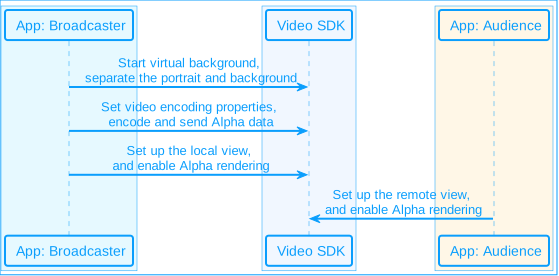
Take the following steps to implement this logic:
1. On the broadcasting end, call the `enableVirtualBackground` \[2/2] method to enable the background segmentation algorithm and obtain the Alpha data for the portrait area. Set the parameters as follows:
* `enabled`: Set to `true` to enable the virtual background.
* `backgroundSourceType`: Set to `BACKGROUND_NONE`(0), to segment the portrait and background, and process the background as Alpha data.
Java
Kotlin
```java
VirtualBackgroundSource virtualBackgroundSource = new VirtualBackgroundSource(...);
virtualBackgroundSource.backgroundSourceType = VirtualBackgroundSource.BACKGROUND_NONE; // Only generate alpha data, no background replacement
SegmentationProperty segmentationProperty = new SegmentationProperty(...);
rtcEngine.enableVirtualBackground(true, virtualBackgroundSource, segmentationProperty, sourceType);
```
```kotlin
val virtualBackgroundSource = VirtualBackgroundSource(...)
virtualBackgroundSource.backgroundSourceType = VirtualBackgroundSource.BACKGROUND_NONE // Only generate alpha data, no background replacement
val segmentationProperty = SegmentationProperty(...)
rtcEngine.enableVirtualBackground(true, virtualBackgroundSource, segmentationProperty, sourceType)
```
2. Call `setVideoEncoderConfiguration` on the broadcasting end to set the video encoding property and set `encodeAlpha` to `true`. Then the Alpha data will be encoded and sent to the remote end.
Java
Kotlin
```java
VideoEncoderConfiguration videoEncoderConfiguration = new VideoEncoderConfiguration(...);
videoEncoderConfiguration.advanceOptions = new VideoEncoderConfiguration.AdvanceOptions(...);
videoEncoderConfiguration.advanceOptions.encodeAlpha = true;
rtcEngine.setVideoEncoderConfiguration(videoEncoderConfiguration);
```
```kotlin
val videoEncoderConfiguration = VideoEncoderConfiguration(...)
videoEncoderConfiguration.advanceOptions = VideoEncoderConfiguration.AdvanceOptions(...)
videoEncoderConfiguration.advanceOptions.encodeAlpha = true
rtcEngine.setVideoEncoderConfiguration(videoEncoderConfiguration)
```
3. Render the local and remote views and implement the Alpha transparency effect. See the steps in the [Custom Video Capture use-case](#custom-video-capture-use-case) for details.
### Raw video data use-case
The implementation process for this use-case is illustrated in the following figure:
**Alpha transparency raw video data use-case**
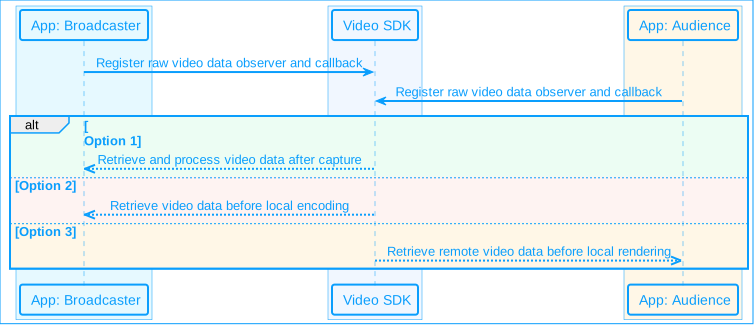
Take the following steps to implement this logic:
1. Call the `registerVideoFrameObserver` method to register a raw video frame observer and implement the corresponding callbacks as required.
Java
Kotlin
```java
// Register IVideoFrameObserver
public class MyVideoFrameObserver implements IVideoFrameObserver {
@Override
public boolean onRenderVideoFrame(String channelId, int uId, VideoFrame videoFrame) {
// ...
return false;
}
@Override
public boolean onCaptureVideoFrame(int type, VideoFrame videoFrame) {
// ...
return false;
}
@Override
public boolean onPreEncodeVideoFrame(int type, VideoFrame videoFrame) {
// ...
return false;
}
}
MyVideoFrameObserver observer = new MyVideoFrameObserver();
rtcEngine.registerVideoFrameObserver(observer);
```
```kotlin
// Register IVideoFrameObserver
class MyVideoFrameObserver : IVideoFrameObserver {
override fun onRenderVideoFrame(channelId: String, uId: Int, videoFrame: VideoFrame): Boolean {
// ...
return false
}
override fun onCaptureVideoFrame(type: Int, videoFrame: VideoFrame): Boolean {
// ...
return false
}
override fun onPreEncodeVideoFrame(type: Int, videoFrame: VideoFrame): Boolean {
// ...
return false
}
}
val observer = MyVideoFrameObserver()
rtcEngine.registerVideoFrameObserver(observer)
```
2. Use the `onCaptureVideoFrame` callback to obtain the captured video data and pre-process it as needed. You can modify the Alpha data or directly add Alpha data.
Java
Kotlin
```java
public boolean onCaptureVideoFrame(int type, VideoFrame videoFrame) {
// Modify Alpha data or directly add Alpha data
ByteBuffer alphaBuffer = videoFrame.getAlphaBuffer();
// ...
videoFrame.fillAlphaData(byteBuffer);
return false;
}
```
```kotlin
override fun onCaptureVideoFrame(type: Int, videoFrame: VideoFrame): Boolean {
// Modify Alpha data or directly add Alpha data
val alphaBuffer = videoFrame.alphaBuffer
// ...
videoFrame.fillAlphaData(byteBuffer)
return false
}
```
3. Use the `onPreEncodeVideoFrame` callback to obtain the local video data before encoding, and modify or directly add Alpha data as needed.
Java
Kotlin
```java
public boolean onPreEncodeVideoFrame(int type, VideoFrame videoFrame) {
// Modify Alpha data or directly add Alpha data
ByteBuffer alphaBuffer = videoFrame.getAlphaBuffer();
// ...
videoFrame.fillAlphaData(byteBuffer);
return false;
}
```
```kotlin
override fun onPreEncodeVideoFrame(type: Int, videoFrame: VideoFrame): Boolean {
// Modify Alpha data or directly add Alpha data
val alphaBuffer = videoFrame.alphaBuffer
// ...
videoFrame.fillAlphaData(byteBuffer)
return false
}
```
4. Use the `onRenderVideoFrame` callback to obtain the remote video data before rendering it locally. Modify the Alpha data, add Alpha data directly, or render the video image yourself based on the obtained Alpha data.
Java
Kotlin
```java
public boolean onRenderVideoFrame(int type, VideoFrame videoFrame) {
// Modify Alpha data, directly add Alpha data, or render the video image yourself based on the obtained Alpha data
ByteBuffer alphaBuffer = videoFrame.getAlphaBuffer();
// ...
videoFrame.fillAlphaData(byteBuffer);
return false;
}
```
```kotlin
override fun onRenderVideoFrame(type: Int, videoFrame: VideoFrame): Boolean {
// Modify Alpha data, directly add Alpha data, or render the video image yourself based on the obtained Alpha data
val alphaBuffer = videoFrame.alphaBuffer
// ...
videoFrame.fillAlphaData(byteBuffer)
return false
}
```
### Development notes
* Implement the transparency properties of the app window yourself and handle the transparency relationship when multiple windows are stacked on top of each other (achieved by adjusting the `zOrder` of the window).
* On Android, only `TextureView` and `SurfaceView` are supported when setting the view due to system limitations.
## Reference
This section contains content that completes the information on this page, or points you to documentation that explains other aspects to this product.
### API reference
* [`VideoFrame`](https://api-ref.agora.io/en/video-sdk/android/4.x/API/class_videoframe.html)
* [`pushExternalVideoFrame` \[2/2\]](https://api-ref.agora.io/en/video-sdk/android/4.x/API/class_irtcengine.html#api_irtcengine_pushvideoframe4)
* [`setupLocalVideo`](https://api-ref.agora.io/en/video-sdk/android/4.x/API/class_irtcengine.html#api_irtcengine_setuplocalvideo)
* [`setupRemoteVideo`](https://api-ref.agora.io/en/video-sdk/android/4.x/API/class_irtcengine.html#api_irtcengine_setupremotevideo)
* [`enableVirtualBackground`](https://api-ref.agora.io/en/video-sdk/android/4.x/API/class_irtcengine.html#api_irtcengine_enablevirtualbackground2)
* [`registerVideoFrameObserver`](https://api-ref.agora.io/en/video-sdk/android/4.x/API/class_irtcengine.html#api_imediaengine_registervideoframeobserver)
* [`onCaptureVideoFrame`](https://api-ref.agora.io/en/video-sdk/android/4.x/API/class_ivideoframeobserver.html#callback_ivideoframeobserver_oncapturevideoframe)
* [`onPreEncodeVideoFrame`](https://api-ref.agora.io/en/video-sdk/android/4.x/API/class_ivideoframeobserver.html#callback_ivideoframeobserver_onpreencodevideoframe)
* [`onRenderVideoFrame`](https://api-ref.agora.io/en/video-sdk/android/4.x/API/class_ivideoframeobserver.html#callback_ivideoframeobserver_onrendervideoframe)
## Platform-specific versions
- [Android](/en/realtime-media/interactive-live-streaming/build/apply-effects-and-enhancements/alpha-transparency-effect/android.md)
- [iOS](/en/realtime-media/interactive-live-streaming/build/apply-effects-and-enhancements/alpha-transparency-effect/ios.md)
- [macOS](/en/realtime-media/interactive-live-streaming/build/apply-effects-and-enhancements/alpha-transparency-effect/macos.md)
- [Windows](/en/realtime-media/interactive-live-streaming/build/apply-effects-and-enhancements/alpha-transparency-effect/windows.md)
- [React Native](/en/realtime-media/interactive-live-streaming/build/apply-effects-and-enhancements/alpha-transparency-effect/react-native.md)
- [Unity](/en/realtime-media/interactive-live-streaming/build/apply-effects-and-enhancements/alpha-transparency-effect/unity.md)