# AI Noise Suppression (/en/realtime-media/interactive-live-streaming/build/apply-effects-and-enhancements/ai-noise-suppression/web)
> For AI agents: see the complete documentation index at [llms.txt](/llms.txt).
AI Noise Suppression enables you to suppress hundreds of types of noise and reduce distortion in human voices when multiple people speak at the same time. In use cases such as online meetings, online chat rooms, video consultations with doctors, and online gaming, AI Noise Suppression makes virtual communication as smooth as face-to-face interaction.
Try the [AI Noise Suppression online demo](https://webdemo-global.agora.io/example/plugin/aiDenoiser/index.html).
AI Noise Suppression reduces the following types of noise:
* Television
* Kitchen
* Street, such as birds chirping, traffic, and subway sounds
* Machine, such as fans, air conditioners, vacuum cleaners, and copiers
* Office, such as keyboard and mouse clicks
* Household, such as doors opening, creaking chairs, crying babies, and house renovations
* Constant knocking
* Beeps and clapping
* Music
You can choose the following noise reduction strategies:
* Default: Reduces noise to a comfortable level without distorting human voice.
* Custom: A more enhanced or customized noise reduction strategy for your business use case. Contact [support@agora.io](mailto\:support@agora.io) for details.
Try the [AI Noise Suppression online demo](https://webdemo.agora.io/aiDenoiser/index.html).
## Understand the tech [#understand-the-tech-3]
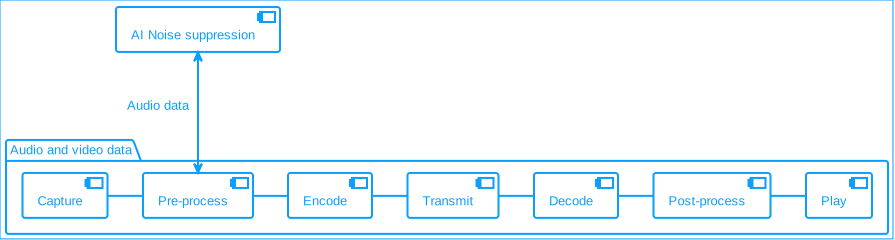
In the pre-processing stage, AI Noise Suppression uses deep learning noise reduction algorithms to modify audio data in the extensions pipeline.
**AI noise suppression**
## Prerequisites [#prerequisites-3]
Ensure that you have implemented the [SDK quickstart](../../index.mdx) in your project.
## Enable AI Noise Suppression [#enable-ai-noise-suppression-3]
This section shows you how to integrate AI Noise Suppression into your app.
The following implementation steps apply to the latest version of the AI Noise Suppression extension. Refer to the [extension release notes](../../reference/release-notes.mdx#ai-noise-suppression) for details.
1. Install the AI Noise Suppression extension.
The AI Noise Suppression extension ([agora-extension-ai-denoiser](https://www.npmjs.com/package/agora-extension-ai-denoiser)) requires Web SDK v4.15.1 or later. In the root of your project, run the following command to install the extension. By default, this installs the latest version (v2.0.2):
```bash
npm install agora-extension-ai-denoiser
```
To install a specific extension version, use one of the following commands:
* **v2.0.2** — Adds background voice removal, which further isolates the target voice in noisy or multi-speaker scenarios.
```bash
npm install agora-extension-ai-denoiser@2.0.2
```
* **v2.0.1** — Supports low-latency mode and log-level configuration. If you need background voice removal, use v2.0.2.
```bash
npm install agora-extension-ai-denoiser@2.0.1
```
2. Import AI Noise Suppression in your JavaScript or TypeScript file.
```typescript
import { AIDenoiserExtension } from 'agora-extension-ai-denoiser';
```
3. Dynamically load the Wasm dependencies.
Publish the files in `node_modules/agora-extension-ai-denoiser/external` to your CDN or static resource server, and pass the public path URL when creating an `AIDenoiserExtension` instance.
If the Wasm files are not hosted on the same origin as the web application, enable CORS.
Do not serve the Wasm files over HTTP when your page runs over HTTPS.
4. Register the AI Noise Suppression extension.
```typescript
const denoiser = new AIDenoiserExtension({ assetsPath: './external' });
if (!denoiser.checkCompatibility()) {
console.error('This browser does not support AI Denoiser.');
}
AgoraRTC.registerExtensions([denoiser]);
denoiser.onloaderror = (error) => {
console.log(error);
};
```
5. Create an `IAIDenoiserProcessor` instance.
```typescript
const processor = denoiser.createProcessor();
processor.enable();
```
6. Inject the extension into the audio processing pipeline.
```typescript
const audioTrack = await AgoraRTC.createMicrophoneAudioTrack();
audioTrack.pipe(processor).pipe(audioTrack.processorDestination);
await processor.enable();
```
7. Enable or disable the extension as needed.
```typescript
if (processor.enabled) {
await processor.disable();
} else {
await processor.enable();
}
```
8. Set the noise suppression mode and level.
```typescript
processor.on('overload', async () => {
await processor.setMode('STATIONARY_NS');
});
```
## Reference [#reference-3]
### Considerations [#considerations]
* If only some audio tracks on the current web page enable AI Noise Suppression, audio tracks that do not enable AI Noise Suppression may be affected because the extension turns on AEC and AGC and turns off browser NS.
* Although AI Noise Suppression supports Safari 14.1 and later, Safari may have performance issues. Best practice is not to support Safari.
* AI Noise Suppression does not support browsers on mobile devices.
### Sample project [#sample-project]
* [AI Denoiser web demo](https://webdemo.agora.io/aiDenoiser/index.html)
* [AI Denoiser source code](https://github.com/AgoraIO/API-Examples-Web/tree/main/Demo/aiDenoiser)
### API reference [#api-reference-3]
* [`AgoraRTC.registerExtensions`](https://api-ref.agora.io/en/video-sdk/web/4.x/interfaces/iagorartc.html#registerextensions)
* [`IMicrophoneAudioTrack.pipe`](https://api-ref.agora.io/en/video-sdk/web/4.x/interfaces/imicrophoneaudiotrack.html#pipe)