# UI Kit quickstart (/en/realtime-media/im/get-started-uikit/android)
> For AI agents: see the complete documentation index at [llms.txt](/llms.txt).
Instant messaging connects people wherever they are and allows them to communicate with others in real time. Agora offers an open-source Chat UI Kit project on GitHub. With built-in user interfaces for key Chat features, the Agora Chat UI Kit enables you to quickly embed real-time messaging into your app without requiring extra effort on the UI.
For the latest Agora Chat UIKit documentation, refer to the [UIKit 2.x Documentation](https://github.com/AgoraLab/agora-chat-uikit) GitHub repository.
Legacy UIkit 1.x documentation
This page shows sample code to add peer-to-peer messaging into your app by using the Agora Chat UI Kit.
## Understand the tech [#understand-the-tech]
The following figure shows the workflow of how clients send and receive peer-to-peer messages:
Chat UI kit workflow
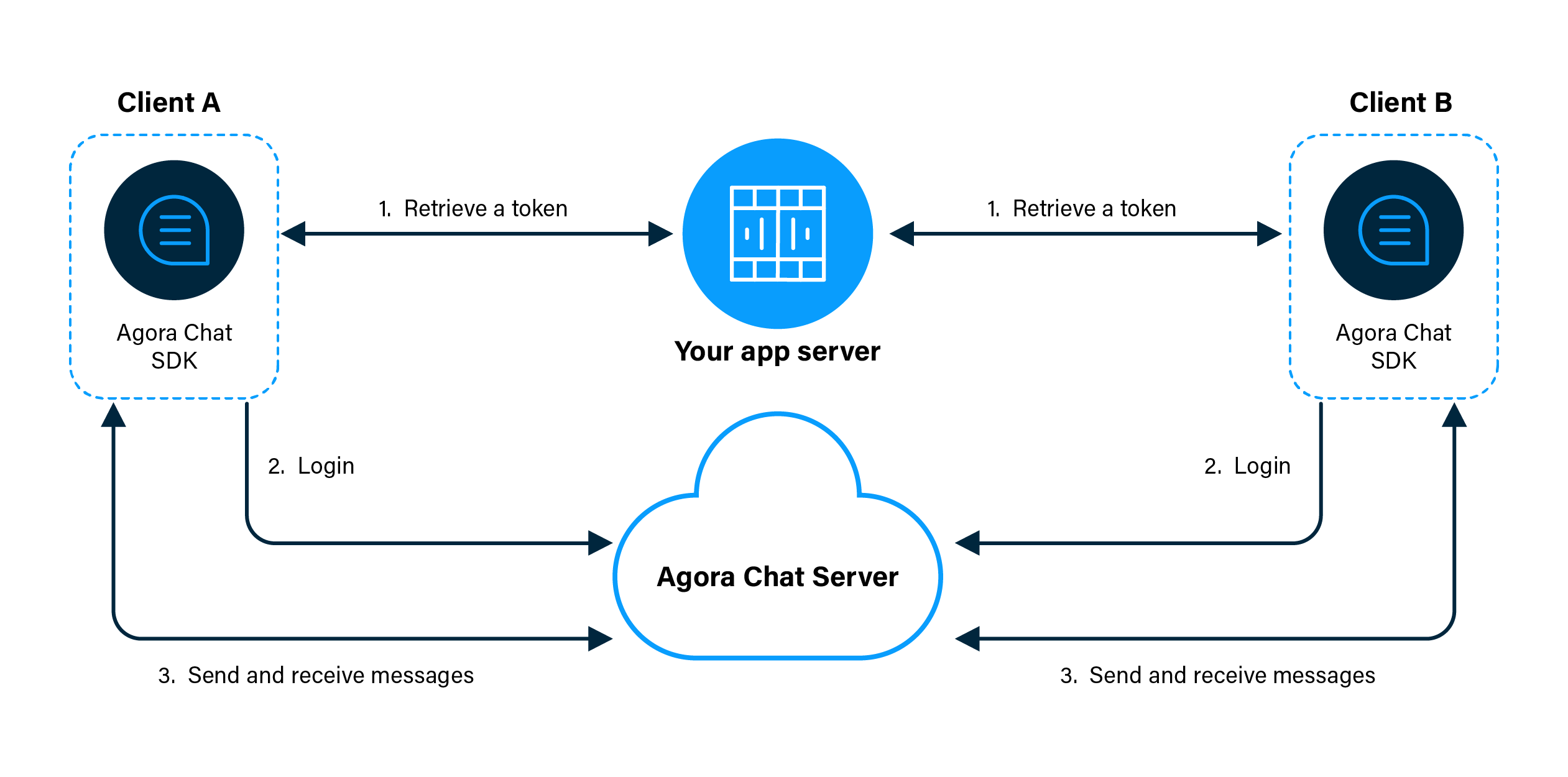
1. Clients retrieve a token from your app server.
2. Client A and Client B log in to Agora Chat.
3. Client A sends a message to Client B. The message is sent to the Agora Chat server, and the server delivers the message to Client B. When Client B receives the message, the SDK triggers an event. Client B listens for the event and gets the message.
## Prerequisites [#prerequisites]
* An Android simulator or a physical Android device.
* Android Studio 3.2 or higher.
* Java Development Kit (JDK). You can refer to the [User Guide of Android](https://developer.android.com/studio/write/java8-support) for applicable versions.
## Project setup [#project-setup]
Follow the steps to create the environment necessary to add video call into your app.
1. For new projects, in **Android Studio**, create a **Phone and Tablet** [Android project](https://developer.android.com/studio/projects/create-project) with an **Empty Activity**.
After creating the project, Android Studio automatically starts gradle sync. Ensure that the sync succeeds before you continue.
2. Integrate the Chat SDK into your project with Maven Central.
1. In `/Gradle Scripts/build.gradle(Project: )`, add the following lines to add the Maven Central dependency:
```java
buildscript {
repositories {
...
mavenCentral()
}
}
allprojects {
repositories {
...
mavenCentral()
}
}
```
2. In `/Gradle Scripts/build.gradle(Module: .app)`, add the following lines to integrate the Chat UI Samples into your Android project:
```java
android {
defaultConfig {
// The Android OS version should be 21 or higher.
minSdkVersion 21
}
compileOptions {
sourceCompatibility JavaVersion.VERSION_1_8
targetCompatibility JavaVersion.VERSION_1_8
}
}
dependencies {
...
// Replace X.Y.Z with the latest version of the Chat UI Samples.
// For the latest version, go to https://search.maven.org/.
implementation 'io.agora.rtc:chat-uikit:X.Y.Z'
}
```
3. Add permissions for network and device access.
In `/app/Manifests/AndroidManifest.xml`, add the following permissions after ``:
```xml
```
These are the minimum permissions you need to add to start Chat. You can also add other permissions according to your use case.
4. Prevent code obfuscation.
In `/Gradle Scripts/proguard-rules.pro`, add the following line:
```java
-keep class io.agora.** {*;}
-dontwarn io.agora.**
```
## Implementation [#implementation]
## Implement peer-to-peer messaging [#implement-peer-to-peer-messaging]
This section shows how to use the Chat UI Samples to implement peer-to-peer messaging in your app step by step.
### Create the UI [#create-the-ui]
1. To add the text strings used by the UI, open `app/res/values/strings.xml ` and replace the content with the following:
```xml
AgoraChatUIKitQuickstartUsername or password is emptySign up success!Sign in success!Sign out success!Send message success!Enter usernameEnter passwordSign inSign outSign upEnter to usernameStart chatEnter contentShow log area...An account has been signed in, please sign out first and then sign inPlease sign in firstPlease enter the username who you want to send first!41117440#383391
```
2. To add the UI framework, open `app/res/layout/activity_main.xml` and replace the content with the following:
```xml
```
### Implementation [#implementation-1]
To enable your app to send and receive messages between individual users, do the following:
1. Implement sending and receiving messages.
In `app/java/io.agora.agorachatquickstart/MainActivity`, replace the code with the following:
```java
package io.agora.chatuikitquickstart;
import android.Manifest;
import android.os.Bundle;
import android.text.TextUtils;
import android.text.method.ScrollingMovementMethod;
import android.view.MotionEvent;
import android.view.View;
import android.widget.EditText;
import android.widget.TextView;
import android.widget.Toast;
import androidx.appcompat.app.AppCompatActivity;
import androidx.core.content.ContextCompat;
import org.json.JSONObject;
import java.util.HashMap;
import java.util.Map;
import io.agora.CallBack;
import io.agora.ConnectionListener;
import io.agora.Error;
import io.agora.chat.ChatClient;
import io.agora.chat.ChatMessage;
import io.agora.chat.ChatOptions;
import io.agora.chat.uikit.EaseUIKit;
import io.agora.chat.uikit.chat.EaseChatFragment;
import io.agora.chat.uikit.chat.interfaces.OnChatExtendMenuItemClickListener;
import io.agora.chat.uikit.chat.interfaces.OnChatInputChangeListener;
import io.agora.chat.uikit.chat.interfaces.OnChatRecordTouchListener;
import io.agora.chat.uikit.chat.interfaces.OnMessageSendCallBack;
import io.agora.chatuikitquickstart.utils.LogUtils;
import io.agora.chatuikitquickstart.utils.PermissionsManager;
import io.agora.cloud.HttpClientManager;
import io.agora.cloud.HttpResponse;
import io.agora.util.EMLog;
import static io.agora.cloud.HttpClientManager.Method_POST;
public class MainActivity extends AppCompatActivity {
private static final String NEW_LOGIN = "NEW_LOGIN";
private static final String RENEW_TOKEN = "RENEW_TOKEN";
private static final String LOGIN_URL = "https://a41.chat.agora.io/app/chat/user/login";
private static final String REGISTER_URL = "https://a41.chat.agora.io/app/chat/user/register";
private EditText et_username;
private TextView tv_log;
private ConnectionListener connectionListener;
@Override
protected void onCreate(Bundle savedInstanceState) {
super.onCreate(savedInstanceState);
setContentView(R.layout.activity_main);
initView();
requestPermissions();
initSDK();
addConnectionListener();
}
private void initView() {
et_username = findViewById(R.id.et_username);
tv_log = findViewById(R.id.tv_log);
tv_log.setMovementMethod(new ScrollingMovementMethod());
}
private void requestPermissions() {
checkPermissions(Manifest.permission.WRITE_EXTERNAL_STORAGE, 110);
}
//=================== init SDK start ========================
private void initSDK() {
ChatOptions options = new ChatOptions();
// Set your appkey applied from Agora Console
String sdkAppkey = getString(R.string.app_key);
if(TextUtils.isEmpty(sdkAppkey)) {
Toast.makeText(MainActivity.this, "You should set your AppKey first!", Toast.LENGTH_SHORT).show();
return;
}
// Set your appkey to options
options.setAppKey(sdkAppkey);
// Set whether confirmation of delivery is required by the recipient. Default: false
options.setRequireDeliveryAck(true);
// Set not to log in automatically
options.setAutoLogin(false);
// Use UI Samples to initialize Chat SDK
EaseUIKit.getInstance().init(this, options);
// Make Chat SDK debuggable
ChatClient.getInstance().setDebugMode(true);
}
//=================== init SDK end ========================
//================= SDK listener start ====================
private void addConnectionListener() {
connectionListener = new ConnectionListener() {
@Override
public void onConnected() {
}
@Override
public void onDisconnected(int error) {
if (error == Error.USER_REMOVED) {
onUserException("account_removed");
} else if (error == Error.USER_LOGIN_ANOTHER_DEVICE) {
onUserException("account_conflict");
} else if (error == Error.SERVER_SERVICE_RESTRICTED) {
onUserException("account_forbidden");
} else if (error == Error.USER_KICKED_BY_CHANGE_PASSWORD) {
onUserException("account_kicked_by_change_password");
} else if (error == Error.USER_KICKED_BY_OTHER_DEVICE) {
onUserException("account_kicked_by_other_device");
} else if(error == Error.USER_BIND_ANOTHER_DEVICE) {
onUserException("user_bind_another_device");
} else if(error == Error.USER_DEVICE_CHANGED) {
onUserException("user_device_changed");
} else if(error == Error.USER_LOGIN_TOO_MANY_DEVICES) {
onUserException("user_login_too_many_devices");
}
}
@Override
public void onTokenExpired() {
//login again
signInWithToken(null);
LogUtils.showLog(tv_log,"ConnectionListener onTokenExpired");
}
@Override
public void onTokenWillExpire() {
getTokenFromAppServer(RENEW_TOKEN);
LogUtils.showLog(tv_log, "ConnectionListener onTokenWillExpire");
}
};
// Call removeConnectionListener(connectionListener) when the activity is destroyed
ChatClient.getInstance().addConnectionListener(connectionListener);
}
//================= SDK listener end ====================
//=================== click event start ========================
/**
* Sign up with username and password.
*/
public void signUp(View view) {
String username = et_username.getText().toString().trim();
String pwd = ((EditText) findViewById(R.id.et_pwd)).getText().toString().trim();
if(TextUtils.isEmpty(username) || TextUtils.isEmpty(pwd)) {
LogUtils.showErrorToast(this, tv_log, getString(R.string.username_or_pwd_miss));
return;
}
execute(()-> {
try {
Map headers = new HashMap<>();
headers.put("Content-Type", "application/json");
JSONObject request = new JSONObject();
request.putOpt("userAccount", username);
request.putOpt("userPassword", pwd);
LogUtils.showErrorLog(tv_log,"begin to signUp...");
HttpResponse response = HttpClientManager.httpExecute(REGISTER_URL, headers, request.toString(), Method_POST);
int code= response.code;
String responseInfo = response.content;
if (code == 200) {
if (responseInfo != null && responseInfo.length() > 0) {
JSONObject object = new JSONObject(responseInfo);
String resultCode = object.getString("code");
if(resultCode.equals("RES_OK")) {
LogUtils.showToast(MainActivity.this, tv_log, getString(R.string.sign_up_success));
}else{
String errorInfo = object.getString("errorInfo");
LogUtils.showErrorLog(tv_log,errorInfo);
}
} else {
LogUtils.showErrorLog(tv_log,responseInfo);
}
} else {
LogUtils.showErrorLog(tv_log,responseInfo);
}
} catch (Exception e) {
e.printStackTrace();
LogUtils.showErrorLog(tv_log, e.getMessage());
}
});
}
/**
* Log in with token.
*/
public void signInWithToken(View view) {
getTokenFromAppServer(NEW_LOGIN);
}
/**
* Sign out.
*/
public void signOut(View view) {
if(ChatClient.getInstance().isLoggedInBefore()) {
ChatClient.getInstance().logout(true, new CallBack() {
@Override
public void onSuccess() {
LogUtils.showToast(MainActivity.this, tv_log, getString(R.string.sign_out_success));
}
@Override
public void onError(int code, String error) {
LogUtils.showErrorToast(MainActivity.this, tv_log, "Sign out failed! code: "+code + " error: "+error);
}
@Override
public void onProgress(int progress, String status) {
}
});
}
}
public void startChat(View view) {
EditText et_to_username = findViewById(R.id.et_to_username);
String toChatUsername = et_to_username.getText().toString().trim();
// check username
if(TextUtils.isEmpty(toChatUsername)) {
LogUtils.showErrorToast(this, tv_log, getString(R.string.not_find_send_name));
return;
}
// 1: single chat; 2: group chat; 3: chat room
EaseChatFragment fragment = new EaseChatFragment.Builder(toChatUsername, EaseChatType.SINGLE_CHAT)
.useHeader(false)
.setOnChatExtendMenuItemClickListener(new OnChatExtendMenuItemClickListener() {
@Override
public boolean onChatExtendMenuItemClick(View view, int itemId) {
if(itemId == io.agora.chat.uikit.R.id.extend_item_take_picture) {
return !checkPermissions(Manifest.permission.CAMERA, 111);
}else if(itemId == io.agora.chat.uikit.R.id.extend_item_picture || itemId == io.agora.chat.uikit.R.id.extend_item_file || itemId == io.agora.chat.uikit.R.id.extend_item_video) {
return !checkPermissions(Manifest.permission.READ_EXTERNAL_STORAGE, 112);
}
return false;
}
})
.setOnChatRecordTouchListener(new OnChatRecordTouchListener() {
@Override
public boolean onRecordTouch(View v, MotionEvent event) {
return !checkPermissions(Manifest.permission.RECORD_AUDIO, 113);
}
})
.setOnMessageSendCallBack(new OnMessageSendCallBack() {
@Override
public void onSuccess(ChatMessage message) {
LogUtils.showLog(tv_log, "Send success: message type: " + message.getType().name());
}
@Override
public void onError(int code, String errorMsg) {
LogUtils.showErrorLog(tv_log, "Send failed: error code: "+code + " errorMsg: "+errorMsg);
}
})
.build();
getSupportFragmentManager().beginTransaction().replace(R.id.fl_fragment, fragment).commit();
}
//=================== click event end ========================
//=================== get token from server start ========================
private void getTokenFromAppServer(String requestType) {
if(ChatClient.getInstance().getOptions().getAutoLogin() && ChatClient.getInstance().isLoggedInBefore()) {
LogUtils.showErrorLog(tv_log, getString(R.string.has_login_before));
return;
}
String username = et_username.getText().toString().trim();
String pwd = ((EditText) findViewById(R.id.et_pwd)).getText().toString().trim();
if(TextUtils.isEmpty(username) || TextUtils.isEmpty(pwd)) {
LogUtils.showErrorToast(MainActivity.this, tv_log, getString(R.string.username_or_pwd_miss));
return;
}
execute(()-> {
try {
Map headers = new HashMap<>();
headers.put("Content-Type", "application/json");
JSONObject request = new JSONObject();
request.putOpt("userAccount", username);
request.putOpt("userPassword", pwd);
LogUtils.showErrorLog(tv_log,"begin to getTokenFromAppServer ...");
HttpResponse response = HttpClientManager.httpExecute(LOGIN_URL, headers, request.toString(), Method_POST);
int code = response.code;
String responseInfo = response.content;
if (code == 200) {
if (responseInfo != null && responseInfo.length() > 0) {
JSONObject object = new JSONObject(responseInfo);
String token = object.getString("accessToken");
if(TextUtils.equals(requestType, NEW_LOGIN)) {
ChatClient.getInstance().loginWithAgoraToken(username, token, new CallBack() {
@Override
public void onSuccess() {
LogUtils.showToast(MainActivity.this, tv_log, getString(R.string.sign_in_success));
}
@Override
public void onError(int code, String error) {
LogUtils.showErrorToast(MainActivity.this, tv_log, "Login failed! code: " + code + " error: " + error);
}
@Override
public void onProgress(int progress, String status) {
}
});
}else if(TextUtils.equals(requestType, RENEW_TOKEN)) {
ChatClient.getInstance().renewToken(token);
}
} else {
LogUtils.showErrorToast(MainActivity.this, tv_log, "getTokenFromAppServer failed! code: " + code + " error: " + responseInfo);
}
} else {
LogUtils.showErrorToast(MainActivity.this, tv_log, "getTokenFromAppServer failed! code: " + code + " error: " + responseInfo);
}
} catch (Exception e) {
e.printStackTrace();
LogUtils.showErrorToast(MainActivity.this, tv_log, "getTokenFromAppServer failed! code: " + 0 + " error: " + e.getMessage());
}
});
}
//=================== get token from server end ========================
/**
* Check and request permission
* @param permission
* @param requestCode
* @return
*/
private boolean checkPermissions(String permission, int requestCode) {
if(!PermissionsManager.getInstance().hasPermission(this, permission)) {
PermissionsManager.getInstance().requestPermissions(this, new String[]{permission}, requestCode);
return false;
}
return true;
}
/**
* user met some exception: conflict, removed or forbidden, goto login activity
*/
protected void onUserException(String exception) {
LogUtils.showLog(tv_log, "onUserException: " + exception);
ChatClient.getInstance().logout(false, null);
}
public void execute(Runnable runnable) {
new Thread(runnable).start();
}
@Override
protected void onDestroy() {
super.onDestroy();
if(connectionListener != null) {
ChatClient.getInstance().removeConnectionListener(connectionListener);
}
}
}
```
2. Add LogUtils and PermissionsManager.
To make troubleshooting less time-consuming, this quickstart also uses `LogUtils` class for logs. Navigate to `app/java/io.agora.agorachatquickstart/`, create a folder named `utils`. In this new folder, create a `.java` file, name it `LogUtils`, and copy the following codes into the file.
```java
package io.agora.chatuikitquickstart.utils;
import android.app.Activity;
import android.text.TextUtils;
import android.util.Log;
import android.widget.TextView;
import android.widget.Toast;
import java.text.SimpleDateFormat;
import java.util.Date;
import java.util.Locale;
public class LogUtils {
private static final String TAG = LogUtils.class.getSimpleName();
public static void showErrorLog(TextView tvLog, String content) {
showLog(tvLog, content);
}
public static void showNormalLog(TextView tvLog, String content) {
showLog(tvLog, content);
}
public static void showLog(TextView tvLog, String content) {
if(TextUtils.isEmpty(content) || tvLog == null) {
return;
}
String preContent = tvLog.getText().toString().trim();
StringBuilder builder = new StringBuilder();
builder.append(formatCurrentTime())
.append(" ")
.append(content)
.append("\n")
.append(preContent);
tvLog.post(()-> {
tvLog.setText(builder);
});
}
public static void showErrorToast(Activity activity, TextView tvLog, String content) {
if(activity == null || activity.isFinishing()) {
Log.e(TAG, "Context is null...");
return;
}
if(TextUtils.isEmpty(content)) {
return;
}
activity.runOnUiThread(()-> {
Toast.makeText(activity, content, Toast.LENGTH_SHORT).show();
showErrorLog(tvLog,content);
});
}
public static void showToast(Activity activity, TextView tvLog, String content) {
if(TextUtils.isEmpty(content) || activity == null || activity.isFinishing()) {
return;
}
activity.runOnUiThread(()-> {
Toast.makeText(activity, content, Toast.LENGTH_SHORT).show();
showNormalLog(tvLog, content);
});
}
private static String formatCurrentTime() {
SimpleDateFormat sdf = new SimpleDateFormat("yyyy-MM-dd HH:mm:ss", Locale.getDefault());
return sdf.format(new Date());
}
}
```
When your app launches, check if the permissions necessary to insert real-time chat into the app are granted. In the `utils` file, create a `.java` file, name it `PermissionsManager`, and copy the following codes into the file.
```java
package io.agora.chatuikitquickstart.utils;
import android.app.Activity;
import android.content.Context;
import android.content.pm.PackageManager;
import androidx.annotation.NonNull;
import androidx.annotation.Nullable;
import androidx.core.app.ActivityCompat;
public class PermissionsManager {
private static PermissionsManager mInstance = null;
public static PermissionsManager getInstance() {
if (mInstance == null) {
mInstance = new PermissionsManager();
}
return mInstance;
}
private PermissionsManager() {}
/**
* Check if has permission
* @param context
* @param permission
* @return
*/
@SuppressWarnings("unused")
public synchronized boolean hasPermission(@Nullable Context context, @NonNull String permission) {
return context != null && ActivityCompat.checkSelfPermission(context, permission)
== PackageManager.PERMISSION_GRANTED;
}
/**
* Request permissions
* @param activity
* @param permissions
* @param requestCode
*/
public synchronized void requestPermissions(Activity activity, String[] permissions, int requestCode) {
ActivityCompat.requestPermissions(activity, permissions, requestCode);
}
}
```
3. To send image and file messages, take the following configurations:
Under `/app/src/main/res/`, create a folder, name it `xml`, and create an xml file named `file_paths.xml` under `xml`. Open `file_paths.xml`, replace the code with the following:
```xml
```
In `/app/Manifests/AndroidManifest.xml`, add the following lines before ``:
```xml
```
4. Click `Sync Project with Gradle Files` to sync your project. Now you are ready to test your app.
## Test your app [#test-your-app]
To validate the peer-to-peer messaging you have just integrated into your app using Chat:
1. In Android Studio, click `Run 'app'`.
You see the following interface on your simulator or physical device:
2. Create a user account and click **SIGN UP**. Click **Sign in** and you will see a log that says Sign in success.
3. Run the app on another Android device or simulator and create another user account. Ensure that the usernames you created are unique.
4. On the first device or simulator, enter the username you just created and click **START CHAT**. You can now start chatting between the two clients.
## Next steps [#next-steps]
For demonstration purposes, Chat provides an app server that enables you to quickly retrieve a token using the App Key given in this guide. In a production context, the best practice is for you to deploy your own token server, use your own [App Key](./enable#get-the-information-of-the-agora-chat-project) to generate a token, and retrieve the token on the client side to log in to Agora. To see how to implement a server that generates and serves tokens on request, see [Authenticate your users with tokens](/en/realtime-media/im/build/secure-access-and-authentication/authentication).
## Reference [#reference]
Agora provides the fully featured [AgoraChat-Starter-Kit-Android](https://github.com/AgoraIO-Usecase/AgoraChat-UIKit-android) demo app as an implementation reference.