# Set up HTTP callbacks (/en/realtime-media/im/build/notifications-and-event-handling/setup-webhooks)
> For AI agents: see the complete documentation index at [llms.txt](/llms.txt).
Chat supports HTTP callbacks (webhooks) for synchronization of messages on your own server or moderation of message content. After you set up HTTP callbacks for your Chat app, the Chat server sends notifications in the form of HTTP POST requests to your app server when specified events occur. According to whether the message delivery is intervened, the callbacks are divided in two categories:
* Pre-delivery callbacks: Mainly used for content moderation. When the Chat server receives a message from the client app, it sends a request to your app server and waits for a response that decides if the message delivery is passed or rejected. Pre-delivery callbacks only apply to messages sent from your client apps.
* Post-delivery callbacks: Mainly used for data synchronization. When certain events occur, for example, a user sends out a message or gets offline, the Chat server sends a request to your app server and does not validate the response content. Post-delivery callbacks apply to messages and other events sent from you client and server apps.
## Understand the tech [#understand-the-tech]
**Difference between pre-delivery and post-delivery callbacks**
The following table summarizes the differences between the two categories of callbacks.
| Category | Pre-delivery callback | Post-delivery callback |
| -------------------- | --------------------- | ---------------------------- |
| Supported components | Client SDKs | Client SDKs and REST APIs |
| Supported scopes | Only messages | Messages and other events |
| Response required | Yes | No |
| Typical use case | Content moderation | Chat history synchronization |
**Callback security**
For pre-delivery and post-delivery callbacks, the Chat server sends HTTP/HTTPS POST requests with JSON payloads to your app server. The requests are encoded in UTF-8 and the message in each request is signed with an MD5 signature. In each request header, the `Content-Type` field is `application/json`.
For post-delivery callbacks, the message in requests is signed with an MD5 signature calculated with `org.apache.commons.codec.digest.DigestUtils#md5Hex`.
You can verify the signature to check whether the callbacks are sent from the Chat server.
1. Retrieve the following information:
* The callback ID, which is the `callId` parameter in the request body of the callback.
* The secret assigned to the callback rule. You can find it on the callback rule list on the **Callback** page on the [Agora console](https://console.agora.io/).
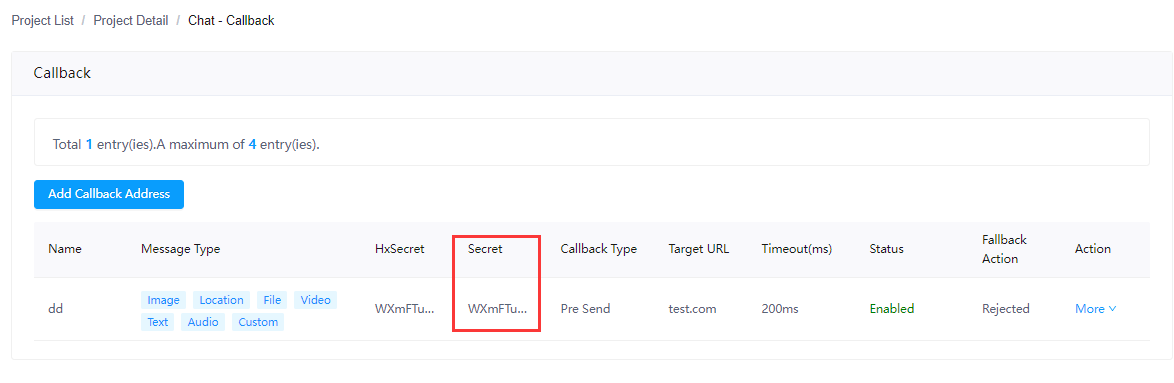
* The callback timestamp, which is the timestamp parameter in the request body of the callback.
2. Calculate the [MD5](https://en.wikipedia.org/wiki/MD5) value of the concatenated string of the callback ID, the secret, and the callback timestamp.
3. Check if the calculated value equals to the secret parameter in the request body. If yes, the callback is sent by Agora Chat.
## Prerequisites [#prerequisites]
To use the HTTP callbacks, you must meet the following requirements:
* You have an Agora project with Chat [enabled](../../get-started/enable).
* You understand the API call frequency limit as described in [Limitations](../limitations).
* The HTTP callback feature is not enabled by default. To use this feature, you need to subscribe to the **Pro** or **Enterprise** [pricing plan](../../reference/pricing-plan-details) and enable it in [Agora Console](https://console.agora.io/v2).
You must contact [support@agora.io](mailto\:support@agora.io) to disable this feature as this operation will delete all the relevant configurations.
## Configure callback rules [#configure-callback-rules]
To receive the HTTP callbacks, you need to configure rules for the pre- or post-delivery callbacks in Agora Console.
1. Log in to Agora Console and find your project on the **Project Management** page, then click the edit button.
2. Find **Chat** on the project editing page, and click **Configure**.
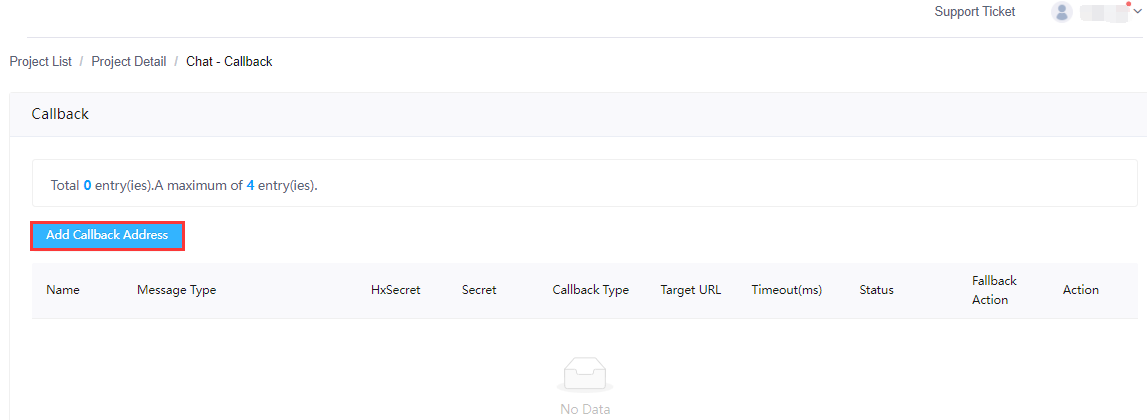
3. Choose **Features** > **Callback** and click **Add Callback Address** on the **Callback** page.
4. To add a rule for pre-delivery callbacks, fill the following fields under the **Pre Send** tab and then click **Save**:
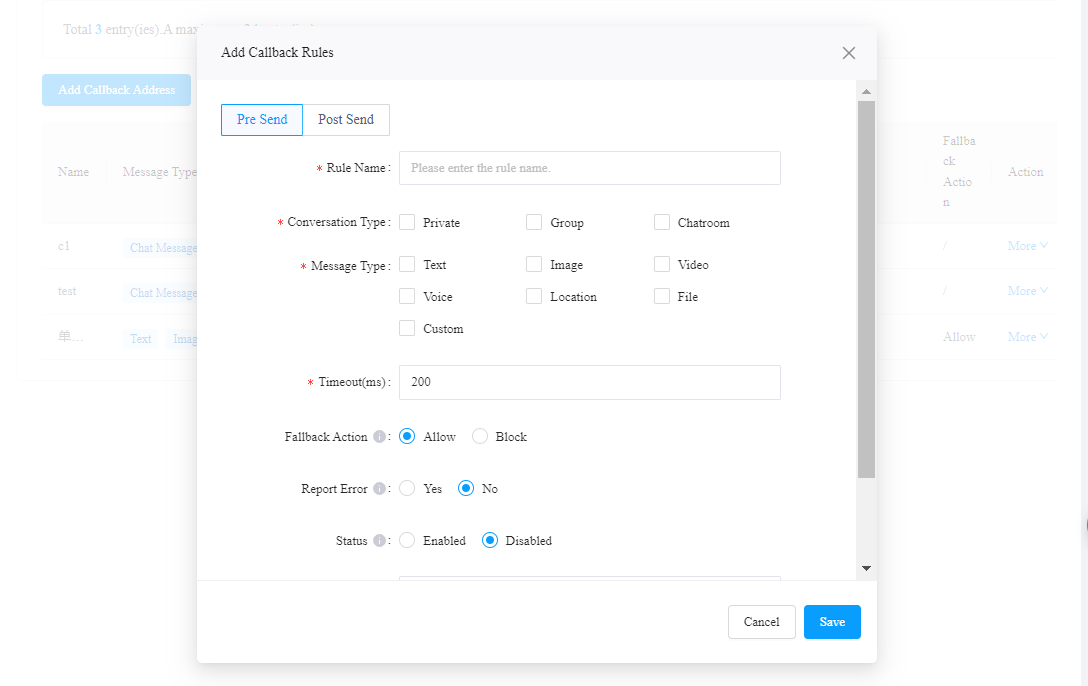
* **Rule Name**: Enter a name for the rule. Under one project, each rule must have a unique name.
* **Conversation Type**: Select the types of chat this rule applies to.
* **Message Type**: Select the types of messages this rule applies to.
* **Timeout**: Specify the time (in ms) that the Chat server should wait for the HTTP responses. The default value is 200ms. If the response times out, the Chat server continues with the fallback action.
* **Fallback Action**: Select the action of the Chat server when the HTTP response times out or an error is returned. The default value is **Passed**.
* **Report Error**: Set whether to notify the message sender when their message is rejected. The default value is **No**, indicating that the sender is not notified of the message delivery failure.
* **Status**: Set whether to enable this rule. The default value is **Disabled**.
* **Callback URL**: Enter the URL of your app server for receiving the pre-delivery callbacks. Both HTTP and HTTPS URLs are allowed.
5. To add a rule for post-delivery callbacks, fill the following fields under the **Post Send** tab and then click **Save**:
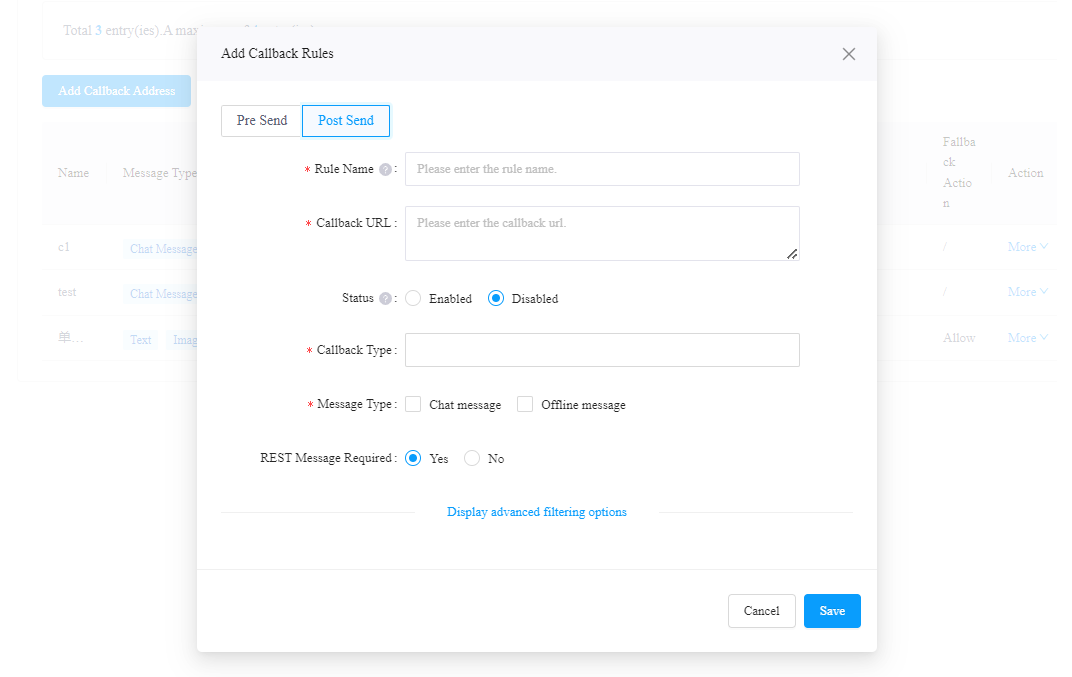
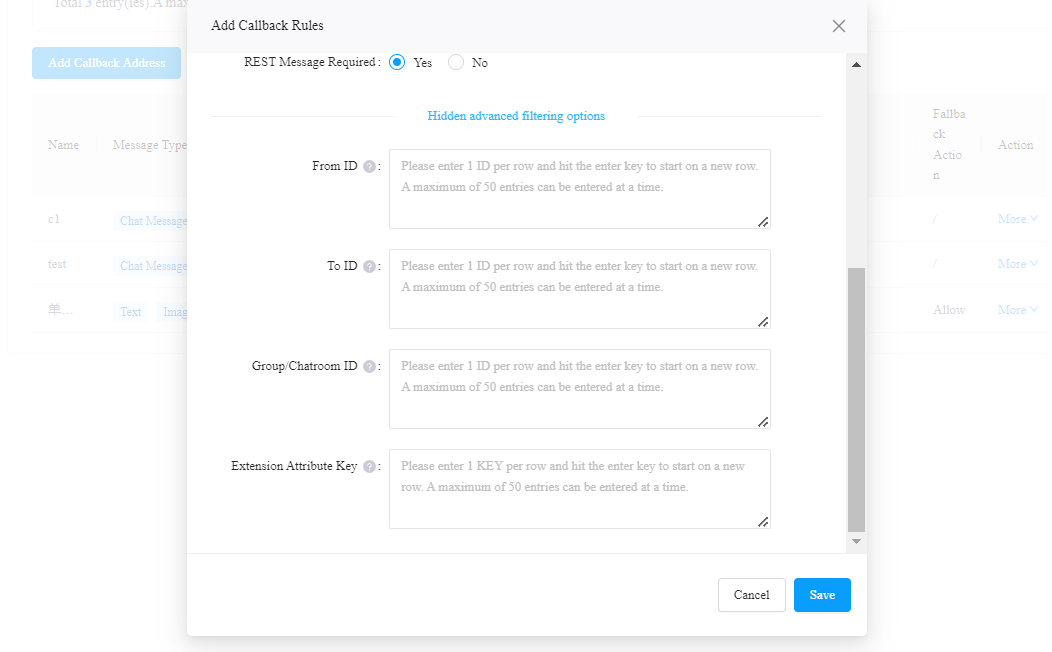
* **Rule Name**: Enter a name for the rule. Under one project, each rule must have a unique name.
* **Callback URL**: Enter the URL of your app server for receiving the post-delivery callbacks. Both HTTP and HTTPS URLs are allowed.
* **Status**: Set whether to enable this rule. The default value is **Disabled**.
* **Callback Type**: Select the type of events that you want to received callback for.
* **Message Type**: To synchronize the chat history on your own server, select chat messages. All messages sent by the users are chat messages, regardless of the online status of the message receiver. To push message notifications, select offline messages. Messages sent to an offline user are counted as offline messages.
* **REST Message Required**: Set whether the callback should cover messages sent via RESTful API.
* **From ID** (Optional): The sender UID.
* **To ID** (Optional): The recipient UID.
* **Group/Chatroom ID** (Optional): The ID of the relevant chat room or chat group. If you set this parameter, the server will only make callbacks for messages or events in this group or room.
* **Extension Attribute Key** (Optional): The attribute key in the message extension field. If you set this parameter, the server will only make callbacks for messages containing this attribute key.
If the sender, receiver, and group/room ID are set at the same time, the sender will not receive a callback when sending a single chat or group chat message to the receiver.
\:::
The rules take effect immediately.
Note the following for the rule configurations:
* By default, you can add four rules for the pre- and post-delivery callbacks in total. To extend the limit, contact [support@agora.io](mailto\:support@agora.io).
* To receive notifications for other events, configure callbacks under **Chat > Features > Callbacks** for your project in [Agora Console](https://console.agora.io/). See [Callbacks and events](/en/realtime-media/im/build/notifications-and-event-handling/callbacks-events) for details.
## Pre-delivery callbacks [#pre-delivery-callbacks]
The following figure shows how the pre-delivery callbacks work.
Pre-delivery callback
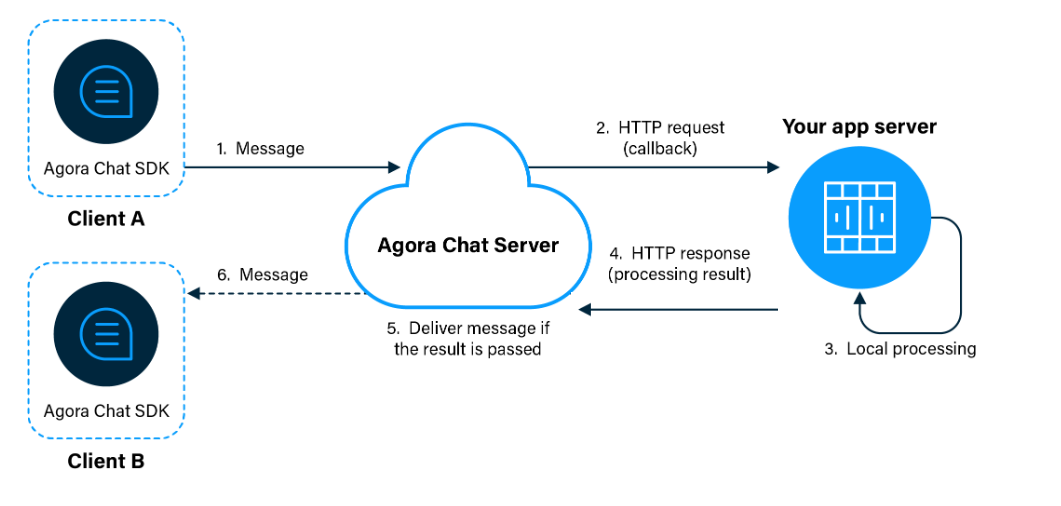
As shown in the figure, the workflow of pre-delivery callbacks is as follows:
1. The Chat server receives a message from Client A.
2. The Chat server sends an HTTP request that contains the information of the message to your app server.
3. Your app server processes the received data and sends the processing result in the form of HTTP response to the Chat server.
4. The Chat server receives the HTTP response and decides if the message delivery is passed.
5. If the message delivery is passed, the Chat server delivers the message to Client B.
The Chat server determines whether to send the message according to the HTTP response received from your app server. If the HTTP status code is 200 in the response, the Chat server handles the message as specified in the matching pre-delivery callback rule. If a response error occurs, including the required field `valid` being absent or fields being of an incorrect type, the Chat server handles the message as specified by **Fallback Action** in the matching pre-delivery callback rule and `custom internal error` is reported on the client (only when **Report Error** on the **Pre Send tab** page is set to **Yes** on the Agora Console).
For pre-delivery callbacks, if your app server does not return the HTTP code 200 and the valid status, the Chat server does not resend the callback and takes the fallback action specified by the applicable rule.
### HTTP request and response [#http-request-and-response]
#### Request header [#request-header]
| Field | Description |
| :------------- | :--------------------------------------------------- |
| `Content-Type` | The parameter type. The value is `application/json`. |
#### Request body [#request-body]
| Field | Type | Description |
| :---------------- | :----- | :------------------------------------------------------------------------------------------------------------------------------------------------------------------------------------------------------------------------------------------------------------------------------------------------------------------------------------------------------------------------ |
| `callId` | String | The callback ID which is the unique identifier assigned to each callback. The callback ID is in the format of `{appKey}_{uuid}`, where the value of `uuid` is randomly generated. |
| `timestamp` | Number | The Unix timestamp when the Chat server receives the message, in milliseconds. |
| `chat_type` | String | The chat type: `chat`: One-to-one chats. `group`: Chat groups. `chatroom`: Chat room chats. |
| `group_id` | String | The group or chat room where the message included in the request is to be sent. This parameter is valid only for group and room chats. |
| `from` | String | The user ID of the message sender. |
| `to` | String | The message recipient.:One-to-one chat: The user ID of the message recipient.Group chat: The group ID. Chat room chat: The chat room ID. |
| `msg_id` | String | The ID of the message for which the callback request is sent. This ID is the same as the `msg_id` generated by the Chat server when the message is sent to the recipient. |
| `payload` | JSON | The message content which matches the [content of the `payload` parameter in historical messages retrieved with the REST API](/en/api-reference/api-ref/im/message-management#content-of-historical-messages). |
| `securityVersion` | String | The security check version which is 1.0.0. |
| `security` | String | The signature used to identify whether the HTTP callback request is from the Chat server. The signature is an MD5 hash in the format of `{callId}+{secret}+{timestamp}`, where `secret` is generated by the Chat server to produce the signature and is displayed on the callback rule list on the **Callback** page on the [Agora Console](https://console.agora.io/v2). |
#### Response body [#response-body]
The HTTP responses cannot exceed 1,000 characters; otherwise, the callbacks fail as the Chat server deems the responses as attack packets.
| Field | Type | Required | Description |
| :-------- | :------ | :------- | :------------------------------------------------------------------------------------------------------------------------------------------------------------------------------------------------------------------------------------------------------------------------------------------------------------------------------------------------------------------------------------------------------------------------------------------------------------------------------------------------------------------------------------------------------------------------------------------------------------------------------------------------------------------------------------------------------------------------------------------------------------------------------------------------------------------------------------------------ |
| `valid` | Boolean | Yes | Controls whether the message is appropriate according to the rules specified on your app server: `true`: The message is valid and the Chat server should deliver the message; `false`: The message is invalid and the Chat server should reject the message. |
| `code` | String | No | Custom pre-delivery callback error description on the client. The value of the `code` field is displayed as the error on the client only when **Report Error** on the **Pre Send** tab page is set to **Yes** on the Agora Console. Callback errors are displayed as follows on the client: If `code` contains the content of the string type, the content is reported as the error; If `code` is not included in the response, `custom logic denied` is displayed. If `code` is returned as an empty string, `Message blocked by external logic` is displayed on a mobile client; If no response is received within the specified period, the default error `custom internal error` is reported. If a response error occurs, including the `valid` field being absent or fields being of an incorrect type, `custom internal error` is reported. |
| `payload` | Object | No | The modified message content. Currently, only the text content is allowed. The modified content must be in the same format as the original message and cannot exceed 1 KB. If it is unnecessary to modify the message, ignore this field. |
#### Request example [#request-example]
```bash
{
"callId":"easemob-demo#test_XXXX-dp01-6c50-XXXX-cf3b48b20e7e",
"timestamp":1600060847294,
"chat_type":"groupchat",
"group_id":"16934809238921545",
"from":"user1",
"to":"user2",
"msg_id":"8924312242322",
"payload":{
// Message content
},
"securityVersion":"1.0.0",
"security":"2ca02c394bef9e7abc83958bcc3156d3"
}
```
#### Response example [#response-example]
```json
{
"valid": true,
"code": "HX:10000",
"payload": {
// Modified message content.
// Only text contents are allowed.
}
}
```
## Post-delivery callbacks [#post-delivery-callbacks]
The workflow of post-delivery callbacks is as follows:
Post-delivery callback
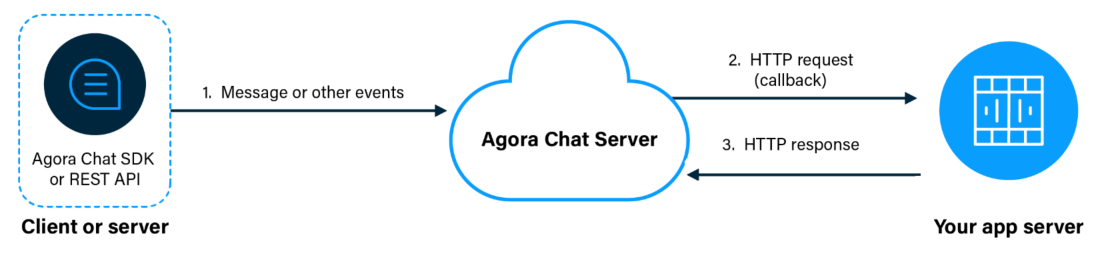
As shown in the figure, the workflow of post-delivery callbacks is as follows:
1. The Chat server receives a message or other event from a client or server.
2. The Chat server sends an HTTP request that contains the information of the message or event to your app server.
3. Your app server sends an HTTP response to the Chat server to indicate that the callback is received.
If you have set both pre- and post-delivery callbacks, and a message is rejected after the pre-delivery callback returns, the post-delivery callbacks are not triggered.If you want to use strong encryption, you can encrypt the data yourself and enable your app server to decrypt the data included in the post-delivery callback requests received from the Chat server.
The Chat server places full trust in callback responses received from your app server without verifying them. As long as the returned HTTP status code is 200, the Chat server regards that the callback succeeds.
Responses to the requests cannot exceed 1,000 characters; otherwise, the callbacks fail as the Chat server deems the responses as attack packets.
**Retry logic**
For post-delivery callbacks, the Chat server records a notification failure and tries resending the callback once again. If the second attempt fails, the Chat server stops trying.
If 90 notification failures occur in 30 seconds, the callback rules involving the app server will be temporarily disabled for 5 minutes.
* [Query the callback data stored on the Chat server](#query-the-callback-data-stored-on-the-chat-server)
* [Resend the callback data stored on the Chat server](#resend-the-callback-data-stored-on-the-chat-server)
### Query the callback data stored on the Chat server [#query-the-callback-data-stored-on-the-chat-server]
In the case of post-delivery callback failures (due to link timeout, response timeout, and disabled callback rules), the messages and events generated within 10 minutes will be stored as a date key on the Chat server. You can query the callback data stored on the Chat server.
The callback data can be stored on the Chat server for up to 3 days by default. You need to consider to resend callback requests for such data before they are cleared from the server.
#### Authorization [#authorization]
Agora Chat RESTful APIs require Bearer HTTP authentication. Every time an HTTP request is sent, the following `Authorization` field must be filled in the request header:
```bash
Authorization: Bearer ${YourAppToken}
```
In order to improve the security of the project, Agora uses a token (dynamic key) to authenticate users before they log into the chat system. The Agora Chat RESTful API only supports authenticating users using app tokens. For details, see [Secure authentication with tokens](../secure-access-and-authentication/authentication).
#### HTTP request [#http-request]
```bash
GET https://{host}/app-id/{app_id}/callbacks/storage/info
```
#### Path parameter [#path-parameter]
| Parameter | Type | Description | Required |
| :-------- | :----- | :---------------------------------------------------------------------------------------------------------------------------------------------------------------------------------------------- | :------- |
| `host` | String | The domain name assigned by the Chat service to access RESTful APIs. For how to get the domain name, see [Get Chat project information](../../get-started/enable#get-chat-project-information). | Yes |
| `app_id` | String | The unique identifier automatically assigned to each project by Agora | Yes |
#### Request header [#request-header-1]
| Parameter | Type | Description | Required |
| :-------------- | :----- | :------------------------------------------------------------------------------------------------------------------------------------------------------------------------------------------------- | :------- |
| `Authorization` | String | The authentication token of the app administrator, in the format of `Bearer ${YourAppToken}`, where `Bearer` is a fixed character, followed by an English space and then the obtained token value. | Yes |
#### Response body [#response-body-1]
| Parameter | Type | Description |
| :---------------- | :----- | :----------------------------------------------------------------------------------------------------------------------------------------------------------------------------------------- |
| `path` | String | The request path, which is part of the request URL. |
| `uri` | String | The request URI. |
| `timestamp` | Number | The Unix timestamp (ms) of the HTTP response. |
| `organization` | String | The unique identifier assigned to each company (organization) by the Chat service. It is the same as `org_name` in the request. |
| `application` | String | A unique internal ID assigned to each app by the Chat service. You can safely ignore this parameter. |
| `action` | String | The request method. |
| `duration` | Number | The duration (ms) from when the HTTP request is sent to the time the response is received. |
| `applicationName` | String | The unique identifier assigned to each app by the Chat service. It is the same as `app_name` in the request. |
| `data` | Object | The data in the response that includes the `date`, `size`, and `retry` parameters. |
| - `date` | String | The date key that can be resent. Messages and events generated within 10 minutes will be stored as a date key. The key in the date key indicates the starting time spot of the 10 minutes. |
| - `size` | Number | The number of messages in the date key. |
| - `retry` | Number | The number of times the data in the date key is resent. The value is `0` before the first resending attempt is made. |
#### Request example [#request-example-1]
```bash
curl -X GET 'https://a1.easemob.com/easemob-demo/easeim/callbacks/storage/info' \
-H 'Authorization: Bearer '
```
#### Response example [#response-example-1]
```json
{
"path": "/callbacks",
"uri": "https://XXXX/app-id/XXXX/callbacks",
"timestamp": 1631193031254,
"organization": "XXXX",
"application": "8dfb1641-XXXX-XXXX-bbe9-d8d45a3be39f",
"action": "post",
"data": [
{
"date": "202109091440",
"size": 15,
"retry": 0
},
{
"date": "202109091450",
"size": 103,
"retry": 1
}
],
"duration": 153,
"applicationName": "XXXX"
}
```
### Resend the callback data stored on the Chat server [#resend-the-callback-data-stored-on-the-chat-server]
You can resend the callback data stored on the Chat server by date key. It is recommended that the callback data be resent for up to 10 times.
#### HTTP request [#http-request-1]
```bash
POST https://{host}/app-id/{app_id}/callbacks/storage/retry
```
#### Path parameter [#path-parameter-1]
| Parameter | Type | Description | Required |
| :-------- | :----- | :---------------------------------------------------------------------------------------------------------------------------------------------------------------------------------------------------- | :------- |
| `host` | String | The domain name assigned by the Agora Chat service to access RESTful APIs. For how to get the domain name, see [Get Chat project information](../../get-started/enable#get-chat-project-information). | Yes |
| `app_id` | String | The unique identifier automatically assigned to each project by Agora | Yes |
#### Request header [#request-header-2]
| Parameter | Type | Description | Required |
| :-------------- | :----- | :---------------------------------------------------------------------------------------------------------------------------------------------------------------------------------------------- | :------- |
| `Content-Type` | String | The content type. Set it as `application/json`. | Yes |
| `Authorization` | String | The authentication token of app administrator, in the format of `Bearer ${YourAppToken}`, where `Bearer` is a fixed character, followed by an English space, and then the obtained token value. | Yes |
#### Request body [#request-body-1]
| Parameter | Type | Required | Description |
| :---------- | :----- | :------- | :----------------------------------------------------------------------------------------------------------------------------------------------------------------------------------------- |
| `date` | String | Yes | The date key that can be resent. Messages and events generated within 10 minutes will be stored as a date key. The key in the date key indicates the starting time spot of the 10 minutes. |
| `retry` | Number | No | The number of times the data in the date key is resent. The value is `0` before the first resending attempt is made. |
| `targetUrl` | String | No | The address for receiving the callback request that is resent. If this parameter is not specified, the original callback address is used. |
#### Response body [#response-body-2]
| Parameter | Type | Description |
| :------------- | :------ | :------------------------------------------------------------------------------------------------------------------------------------ |
| `path` | String | The request path, which is part of the request URL. |
| `uri` | String | The request URI. |
| `timestamp` | Number | The Unix timestamp (ms) of the HTTP response. |
| `organization` | String | The unique identifier assigned to each company (organization) by the Agora Chat service. It is the same as `org_name` in the request. |
| `application` | String | A unique internal ID assigned to each app by the Agora Chat service. You can safely ignore this parameter. |
| `action` | String | The request method. |
| `data` | Boolean | Whether the callback data is successfully resent: `success`: The data is successfully sent. `failure`: The data fails to be resent. |
| `duration` | Number | The duration (ms) from when the HTTP request is sent to the time the response is received. |
#### Request example [#request-example-2]
```bash
curl -X POST 'https://XXXX/app-id/XXXX/callback/storage/retry' \
-H 'Authorization: Bearer ' \
-H 'Content-Type: application/json' \
-d '{
"date": "202108272230",
"retry": 0,
"targetUrl": "https://localhost:8000/test"
}'
```
#### Response example [#response-example-2]
```json
{
"path": "/callbacks",
"uri": "https://XXXX/app-id/XXXX/callbacks",
"timestamp": 1631194031721,
"organization": "XXXX",
"application": "8dfb1641-XXXX-XXXX-bbe9-d8d45a3be39f",
"action": "post",
"data": "success",
"duration": 225,
"applicationName": "XXXX"
}
```
## Status codes [#status-codes]
For details, see [HTTP Status Codes](../http-status-codes).
## FAQ [#faq]
Q: Why is the message delivered to the intended recipient even though the value of the `valid` field is `false` in the pre-delivery callback response?
A: Maybe your server fails to return the pre-delivery callback response within the period specified with the **Timeout** parameter in the pre-delivery callback rule on the **Pre Send** page on the [Agora Console](https://console.agora.io/v2). In this case, the message is delivered if **Fallback Action** on the **Pre Send** page is set to **Passed**. To avoid this issue, you are advised to increase the value of the **Timeout** parameter (200 milliseconds by default), for example, to 1000 milliseconds.