# Thread management (/en/realtime-media/im/build/build-groups-rooms-and-threads/threading/thread-management/flutter)
> For AI agents: see the complete documentation index at [llms.txt](/llms.txt).
Threads enable users to create a separate conversation from a specific message within a chat group to keep the main chat uncluttered.
The following illustration shows the implementation of creating a thread, a conversation in a thread, and the operations you can perform in a thread.
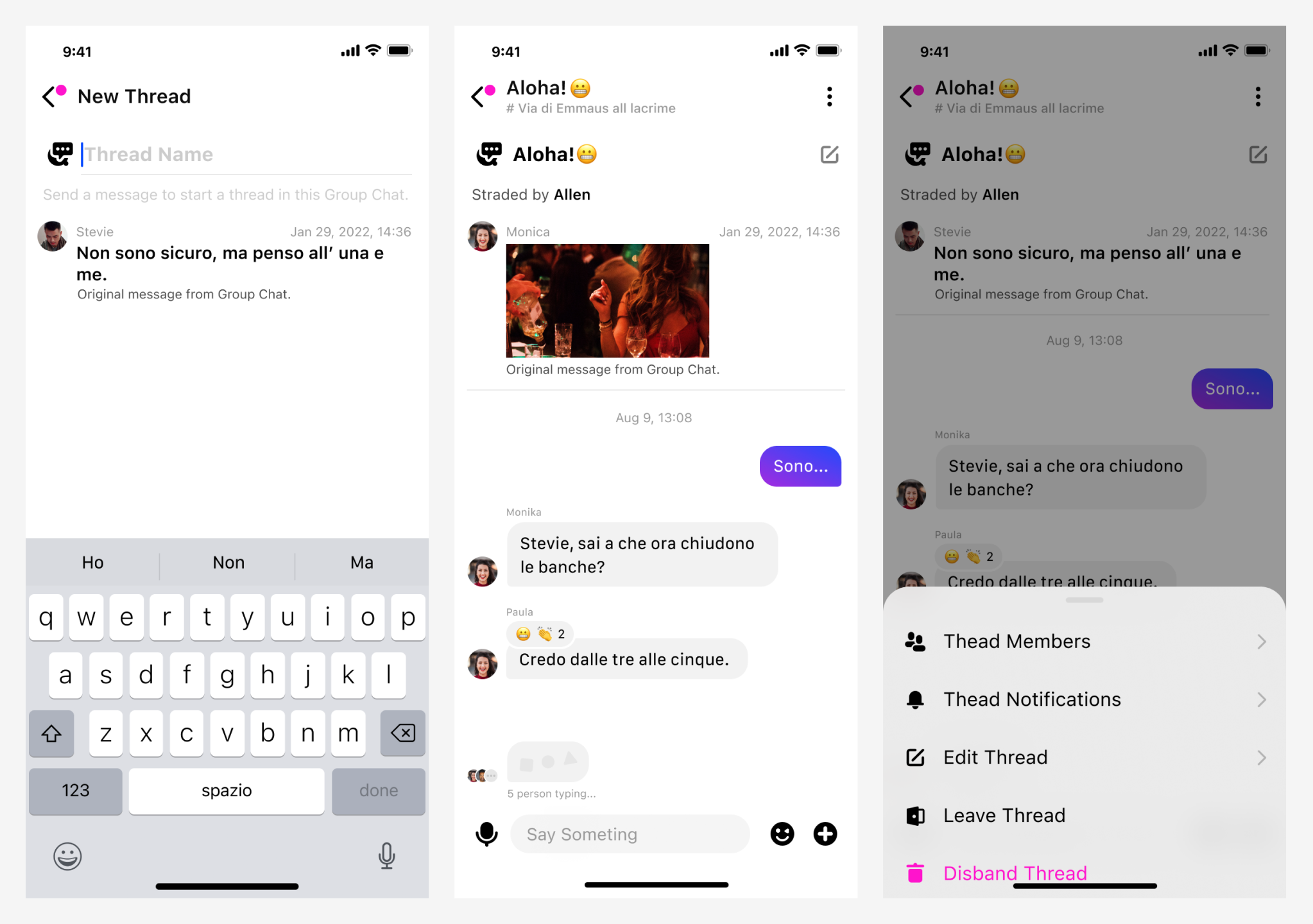
## Understand the tech [#understand-the-tech-2]
The Chat SDK provides the `ChatThreadManager`, `ChatThread`, `ChatThreadEventHandler`, and `ChatThreadEvent` classes for thread management, which allow you to implement the following features:
## Prerequisites [#prerequisites-2]
Before proceeding, ensure that you meet the following requirements:
* You have initialized the Chat SDK. For details, see [SDK quickstart](../../../get-started-sdk).
* You understand the call frequency limit of the Chat APIs supported by different pricing plans as described in [Limitations](../../limitations).
The thread feature is supported by all types of [Pricing Plans](../../../reference/pricing-plan-details) and is enabled by default once you have enabled Chat in [Agora Console](https://console.agora.io/v2).
## Implementation [#implementation-2]
This section describes how to call the APIs provided by the Chat SDK to implement thread features.
### Create a thread [#create-a-thread-2]
All chat group members can call `createChatThread` to create a thread from a specific message in a chat group.
Once a thread is created in a chat group, all chat group members receive the `ChatThreadEventHandler#onChatThreadCreate` callback. In a multi-device use-case, all the other devices receive the `ChatMultiDeviceListener#onChatThreadEvent` callback triggered by the `ChatMultiDevicesEvent#CHAT_THREAD_CREATE` event.
The following sample code shows how to create a thread in a chat group:
```dart
// name: The name of a thread. The maximum length of a thread name is 64 characters.
// messageId: The ID of a message, from which a thread is created.
// parentId: The ID of a chat group where a thread resides.
try {
ChatThread chatThread =
await ChatClient.getInstance.chatThreadManager.createChatThread(
name: name,
messageId: messageId,
parentId: parentId,
);
} on ChatError catch (e) {
}
```
### Destroy a thread [#destroy-a-thread-2]
Only the chat group owner and admins can call `destroyChatThread` to disband a thread in a chat group.
Once a thread is disbanded, all chat group members receive the `ChatThreadEventHandler#onChatThreadDestroy` callback. In a multi-device use-case, all the other devices receive the `ChatMultiDeviceListener#onChatThreadEvent` callback triggered by the `ChatMultiDevicesEvent#CHAT_THREAD_DESTROY` event.
Once a thread is destroyed or the chat group where a thread resides is destroyed, all data of the thread is deleted from the local database and memory.
The following sample code shows how to destroy a thread:
```dart
// chatThreadID: The ID of a thread.
try {
await ChatClient.getInstance.chatThreadManager.destroyChatThread(
chatThreadId: chatThreadId,
);
} on ChatError catch (e) {
}
```
### Join a thread [#join-a-thread-2]
All chat group members can refer to the following steps to join a thread:
1. Use either of the following two approaches to retrieve the thread ID:
* Retrieve the thread list in a chat group by calling [`fetchChatThreadsWithParentId`](#fetch), and locate the ID of the thread that you want to join.
* Retrieve the thread ID within the `ChatThreadEventHandler#onChatThreadCreate` and `ChatThreadEventHandler#onChatThreadUpdate` callbacks that you receive.
2. Call `joinChatThread` to pass in the thread ID and join the specified thread.
In a multi-device use-case, all the other devices receive the `ChatMultiDeviceListener#onChatThreadEvent` callback triggered by the `ChatMultiDevicesEvent#CHAT_THREAD_JOIN` event.
The following sample code shows how to join a thread:
```dart
// chatThreadId: The ID of a thread.
try {
ChatThread chatThead =
await ChatClient.getInstance.chatThreadManager.joinChatThread(
chatThreadId: chatThreadId,
);
} on ChatError catch (e) {
}
```
### Leave a thread [#leave-a-thread-2]
All thread members can call `leaveChatThread` to leave a thread. Once a member leaves a thread, they can no longer receive the thread messages.
In a multi-device use-case, all the other devices receive the `ChatMultiDeviceListener#onThreadEvent` callback triggered by the `ChatMultiDevicesEvent#CHAT_THREAD_LEAVE` event.
The following sample code shows how to leave a thread:
```dart
// chatThreadId: The ID of a thread.
try {
await ChatClient.getInstance.chatThreadManager.leaveChatThread(
chatThreadId: chatThreadId,
);
} on ChatError catch (e) {
}
```
### Remove a member from a thread [#remove-a-member-from-a-thread-2]
Only the chat group owner and admins can call `removeMemberFromChatThread` to remove the specified member from a thread.
Once a member is removed from a thread, they receive the `ChatThreadEventHandler#onUserKickOutOfChatThread` callback and can no longer receive the thread messages. In a multi-device use-case, all the other devices receive the `ChatMultiDeviceListener#onChatThreadEvent` callback triggered by the `ChatMultiDevicesEvent#CHAT_THREAD_KICK` event.
The following sample code shows how to remove a member from a thread:
```dart
// chatThreadId: The ID of a thread.
// memberId: The ID of the user to be removed from a thread.
try {
await ChatClient.getInstance.chatThreadManager.removeMemberFromChatThread(
memberId: memberId,
chatThreadId: chatThreadId,
);
} on ChatError catch (e) {
}
```
### Update the name of a thread [#update-the-name-of-a-thread-2]
Only the chat group owner, chat group admins, and thread creator can call `updateChatThreadName` to update a thread name.
Once a thread name is updated, all chat group members receive the `ChatThreadEventHandler#onChatThreadUpdate` callback. In a multi-device use-case, all the other devices receive the `ChatMultiDeviceListener#onThreadEvent` callback triggered by the `ChatMultiDevicesEvent#CHAT_THREAD_UPDATE` event.
The following sample code shows how to update a thread name:
```dart
// chatThreadId: The ID of a thread.
// name: The updated thread name. The maximum length of a thread name is 64 characters.
try {
await ChatClient.getInstance.chatThreadManager.updateChatThreadName(
newName: name,
chatThreadId: chatThreadId,
);
} on ChatError catch (e) {
}
```
### Retrieve the attributes of a thread [#retrieve-the-attributes-of-a-thread-2]
All chat group members can call `fetchChatThread` to retrieve the thread attributes from the server.
The following sample code shows how to retrieve the thread attributes:
```dart
// chatThreadId: The ID of a thread.
try {
ChatThread? chatThread =
await ChatClient.getInstance.chatThreadManager.fetchChatThread(
chatThreadId: chatThreadId,
);
} on ChatError catch (e) {
}
```
### Retrieve the member list of a thread [#retrieve-the-member-list-of-a-thread-2]
All chat group members can call `fetchChatThreadMember` to retrieve a paginated member list of a thread from the server, as shown in the following sample code:
```dart
// chatThreadId: The thread ID.
// limit: The maximum number of members to retrieve per page. The range is [1, 50].
// cursor: The position from which to start getting data. Pass in `null` or an empty string at the first call.
try {
List members =
await ChatClient.getInstance.chatThreadManager.fetchChatThreadMember(
chatThreadId: chatThreadId,
limit: limit,
cursor: cursor,
);
} on ChatError catch (e) {
}
```
### Retrieve a thread list [#retrieve-a-thread-list-2]
Users can call `fetchJoinedChatThreads` to retrieve a paginated list from the server of all the threads they have joined, as shown in the following sample code:
```dart
// limit: The maximum number of threads to retrieve per page. The range is [1, 50].
// cursor: The position from which to start getting data. Pass in `null` or an empty string at the first call.
try {
ChatCursorResult chatThreads =
await ChatClient.getInstance.chatThreadManager.fetchJoinedChatThreads(
limit: limit,
cursor: cursor,
);
} on ChatError catch (e) {
}
```
Users can call `fetchJoinedChatThreadsWithParentId` to retrieve a paginated list from the server of all the threads they have joined in a specified chat group, as shown in the following sample code:
```dart
// parentId: The chat group ID.
// limit: The maximum number of threads to retrieve per page. The range is [1, 50].
// cursor: The position from which to start getting data. Pass in `null` or an empty string at the first call.
try {
ChatCursorResult chatThreads = await ChatClient
.getInstance.chatThreadManager
.fetchJoinedChatThreadsWithParentId(
parentId: parentId,
limit: limit,
cursor: cursor,
);
} on ChatError catch (e) {
}
```
Users can also call `fetchChatThreadsWithParentId` to retrieve a paginated list from the server of all the threads in a specified chat group, as shown in the following sample code:
```dart
// parentId: The chat group ID.
// limit: The maximum number of threads to retrieve per page. The range is [1, 50].
// cursor: The position from which to start getting data. Pass in `null` or an empty string at the first call.
try {
ChatCursorResult chatThreads = await ChatClient
.getInstance.chatThreadManager
.fetchChatThreadsWithParentId(
parentId: parentId,
limit: limit,
cursor: cursor,
);
} on ChatError catch (e) {
}
```
### Retrieve the latest message from multiple threads [#retrieve-the-latest-message-from-multiple-threads-2]
Users can call `fetchLatestMessageWithChatThreads` to retrieve the latest message from multiple threads.
The following sample code shows how to retrieve the latest message from multiple threads:
```dart
// chatThreadIds: The thread IDs. You can pass in a maximum of 20 thread IDs at each call.
try {
Map map = await ChatClient.getInstance.chatThreadManager
.fetchLatestMessageWithChatThreads(
chatThreadIds: chatThreadIds,
);
} on ChatError catch (e) {
}
```
### Listen for thread events [#listen-for-thread-events-2]
To monitor thread events, users can listen for the callbacks in the `ChatThreadManager` class and add app logics accordingly. If a user wants to stop listening for the callbacks, make sure that the user removes the listener to prevent memory leakage.
Refer to the following sample code to listen for thread events:
```dart
// Inherits and implements ChatThreadEventHandler.
class _ChatPageState extends State
implements ChatThreadEventHandler {
// Adds the thread listener.
@override
void initState() {
super.initState();
ChatClient.getInstance.chatThreadManager.addChatThreadEventHandler(this);
}
// Removes the thread listener.
@override
void dispose() {
ChatClient.getInstance.chatThreadManager
.removeChatThreadEventHandler(this);
super.dispose();
}
@override
Widget build(BuildContext context) {
return Container();
}
// Occurs when a thread is created.
@override
void onChatThreadCreate(ChatThreadEvent event) {}
// Occurs when a thread is destroyed.
@override
void onChatThreadDestroy(ChatThreadEvent event) {}
// Occurs when a thread has a new message, a thread name is updated, or a thread message is recalled.
@override
void onChatThreadUpdate(ChatThreadEvent event) {}
// Occurs when a member is removed from a thread.
@override
void onUserKickOutOfChatThread(ChatThreadEvent event) {}
}
```