# Manage chat groups (/en/realtime-media/im/build/build-groups-rooms-and-threads/chat-group/manage-chat-groups/windows)
> For AI agents: see the complete documentation index at [llms.txt](/llms.txt).
Chat groups enable real-time messaging among multiple users.
This page shows how to use the Chat SDK to create and manage a chat group in your app.
## Understand the tech [#understand-the-tech-4]
The Chat SDK provides the `Group`, `IGroupManager`, and `IGroupManagerDelegate` classes for chat group management, which allows you to implement the following features:
* Create and destroy a chat group
* Join and leave a chat group
* Retrieve the chat group attributes
* Retrieve the chat group member list
* Retrieve the chat group list
* Block and unblock a chat group
* Listen for chat group events
## Prerequisites [#prerequisites-4]
Before proceeding, ensure that you meet the following requirements:
* You have initialized the Chat SDK. For details, see [SDK quickstart](../../../get-started-sdk).
* You understand the call frequency limits of the Chat APIs supported by different pricing plans as described in [Limitations](../../limitations).
* You understand the number of chat groups and chat group members supported by different pricing plans as described in [Pricing Plan Details](../../../reference/pricing-plan-details).
## Implementation [#implementation-4]
This section describes how to call the APIs provided by the Chat SDK to implement features.
### Create a chat group [#create-a-chat-group-2]
Set `GroupStyle` and `inviteNeedConfirm` before creating a chat group.
1. Is the group public or private, and who can invite members (`GroupStyle`):
* `PrivateOnlyOwnerInvite`: A private group. Only the inviter and admins can add users to the chat group.
* `PrivateMemberCanInvite`: A private group. All chat group members can add users to the chat group.
* `PublicJoinNeedApproval`: A public group. The inviter and admins can add users, and users can send join requests to the chat group.
* `PublicOpenJoin`: A public group. All users can join the chat group automatically without any need for approval from the inviter and admins.
2. Does a group invitation require consent from an invitee to add them to the group (`inviteNeedConfirm`):
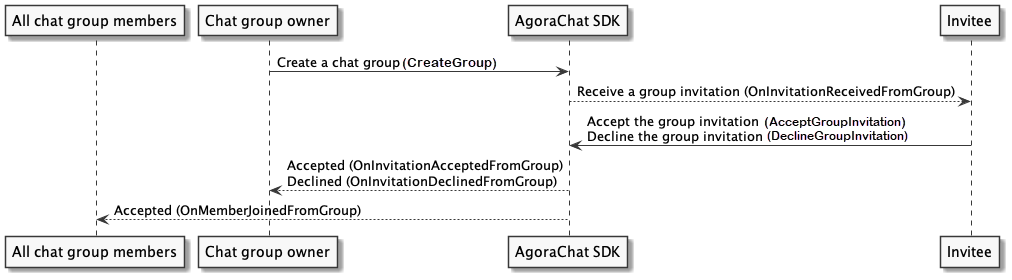
* Yes (`option.InviteNeedConfirm` is set to `true`). After creating a group and sending group invitations, the subsequent logic varies based on whether an invitee automatically consents to the group invitation (`AutoAcceptGroupInvitation`):
* Yes (`AutoAcceptGroupInvitation` is set to `true`). The invitee automatically joins the chat group and receives the `IGroupManagerDelegate#OnAutoAcceptInvitationFromGroup` callback, the inviter receives the `IGroupManagerDelegate#OnInvitationAcceptedFromGroup` and `IGroupManagerDelegate#OnMembersJoinedFromGroup` callbacks, and all chat group members receive the `IGroupManagerDelegate#OnMembersJoinedFromGroup` callback.
* No (`AutoAcceptGroupInvitation` is set to `false`). The invitee receives the `IGroupManagerDelegate#OnInvitationReceivedFromGroup` callback and chooses whether to join the chat group:
* If the invitee accepts the group invitation, the inviter receives the `IGroupManagerDelegate#OnInvitationAcceptedFromGroup` and `IGroupManagerDelegate#OnMembersJoinedFromGroup` callbacks and all chat group members receive the `IGroupManagerDelegate#OnMembersJoinedFromGroup` callback;
* If the invitee declines the group invitation, the inviter receives the`IGroupManagerDelegate#OnInvitationDeclinedFromGroup` callback.
* No (`option.InviteNeedConfirm` is set to `false`). After creating a chat group and sending group invitations, an invitee is added to the chat group regardless of their `IsAutoAcceptGroupInvitation` setting. The invitee receives the `IGroupManagerDelegate#OnAutoAcceptInvitationFromGroup` callback, the inviter receives the `IGroupManagerDelegate#OnInvitationAcceptedFromGroup` and `IGroupManagerDelegate#OnMembersJoinedFromGroup` callbacks, and all chat group members receive the `IGroupManagerDelegate#OnMembersJoinedFromGroup` callback.
Users can call `CreateGroup` to create a chat group and set the chat group attributes such as the chat group name, description, maximum number of members, and reason for creating the group, by specifying `GroupOptions`.
The following code sample shows how to create a chat group:
```csharp
GroupOptions option = new GroupOptions(GroupStyle.PrivateMemberCanInvite);
option.MaxCount = 100;
SDKClient.Instance.GroupManager.CreateGroup(groupname, option, desc, members, callback:new ValueCallBack(
onSuccess: (group) => {
},
onError:(code, error) => {
}
));
```
### Destroy a chat group [#destroy-a-chat-group-2]
Only the inviter can call `DestroyGroup` to disband a chat group. Once a chat group is disbanded, all chat group members receive the `OnDestroyedFromGroup` callback and are immediately removed from the chat group.
Once a chat group is destroyed, all chat group data is deleted from the local database and memory.
The following code sample shows how to destroy a chat group:
```csharp
SDKClient.Instance.GroupManager.DestroyGroup(groupId, new CallBack(
onSuccess: () =>
{
},
onError: (code, desc) =>
{
}
));
```
### Join a chat group [#join-a-chat-group-2]
The logic of joining a chat group varies according to the `GroupStyle` setting you choose when [creating the chat group](./group-overview#create-and-destroy-a-chat-group):
* If the `GroupStyle` is set to `PublicOpenJoin`, all users can join the chat group without the consent from the inviter and admins. Once a user joins a chat group, all chat group members receive the `IGroupManagerDelegate#OnMembersJoinedFromGroup` callback;
* If the `GroupStyle` is set to `PublicJoinNeedApproval`, users can send join requests to the chat group. The inviter and chat group admins receive the `IGroupManagerDelegate#OnRequestToJoinReceivedFromGroup` callback and choose whether to approve the join request:
* If the request is accepted, the user joins the chat group and receives the `IGroupManagerDelegate#OnRequestToJoinAcceptedFromGroup` callback, while all chat group members receive the `IGroupManagerDelegate#OnMembersJoinedFromGroup` callback.
* If the request is declined, the user receives the `IGroupManagerDelegate#OnRequestToJoinDeclinedFromGroup` callback.
Users can only request to join public groups; private groups do not allow join requests.
Users can refer to the following steps to join a chat group:
1. Call `FetchPublicGroupsFromServer` to retrieve the list of public groups from the server, and locate the ID of the chat group that you want to join.
2. Call `JoinPublicGroup` to pass in the chat group ID and request to join the specified chat group.
The following code sample shows how to join a chat group:
```csharp
// Retrieve the list of public groups from the server
SDKClient.Instance.GroupManager.FetchPublicGroupsFromServer(callback: new ValueCallBack>(
// `result` is of CursorResult type
onSuccess: (result) => {
},
onError: (code, desc) =>
{
}
));
// Request to join the specified chat group
SDKClient.Instance.GroupManager.JoinPublicGroup(groupId, new CallBack(
onSuccess: () =>
{
},
onError:(code, desc) =>
{
}
));
```
### Leave a chat group [#leave-a-chat-group-2]
Chat group members can call `LeaveGroup` to leave the specified chat group, whereas the inviter cannot perform this operation. Once a member leaves a chat group, all chat group members receive the `IGroupManagerDelegate#OnMembersExitedFromGroup` callback.
The following code sample shows how to leave a chat group:
```csharp
SDKClient.Instance.GroupManager.LeaveGroup(groupId, new CallBack(
onSuccess: () =>
{
},
onError:(code, desc) =>
{
}
));
```
### Retrieve the attributes of a chat group [#retrieve-the-attributes-of-a-chat-group-2]
All chat group members can call `GetGroupWithId` to retrieve the chat group attributes from memory, including the chat group ID, name, description, owner, and admin list.
All chat group members can also call `GetGroupSpecificationFromServer` to retrieve the chat group attributes from the server, including the chat group ID, name, description, owner, admin list, and member list.
The following code sample shows how to retrieve the chat group attributes:
```csharp
// Retrieve the chat group attributes from memory
Group group = SDKClient.Instance.GroupManager.GetGroupWithId(groupId);
// Retrieve the chat group attributes from the server
SDKClient.Instance.GroupManager.GetGroupSpecificationFromServer(groupId, new ValueCallBack(
onSuccess: (group) => {
},
onError: (code, desc) =>
{
}
));
```
### Retrieve the chat group member list [#retrieve-the-chat-group-member-list-2]
All chat group members can call `GetGroupMemberListFromServer` to retrieve the chat group member list from the server.
The following code sample shows how to retrieve the chat group member list:
```csharp
SDKClient.Instance.GroupManager.GetGroupMemberListFromServer(groupId, pageSize, cursor, callback: new ValueCallBack>(
onSuccess: (result) =>
{
},
onError: (code, desc) =>
{
}
));
```
Since SDK v1.4.0, you can call `FetchGroupMemberInfoFromServer` to retrieve a member list in which each entry includes the member's user ID, role, and the time they joined the group:
```csharp
SDKClient.Instance.GroupManager.FetchGroupMemberInfoFromServer(currentGroupId, cursor, pageSize, new ValueCallBack>(
onSuccess: (result) => { },
onError: (code, error) => { }
));
```
### Retrieve the chat group list [#retrieve-the-chat-group-list-4]
Users can call `FetchJoinedGroupsFromServer` to retrieve the joined chat group list from the server, as shown in the following code sample:
```csharp
SDKClient.Instance.GroupManager.FetchJoinedGroupsFromServer(callback: new ValueCallBack>(
onSuccess: (groupList) => {
},
onError: (code, desc) =>
{
}
));
```
Users can call `GetJoinedGroups` to retrieve the joined chat group list from the local database. To ensure the accuracy of results, retrieve the joined chat group list from the server first. The code sample is as follows:
```csharp
List groupList = SDKClient.Instance.GroupManager.GetJoinedGroups();
```
Users can also call `FetchPublicGroupsFromServer` to retrieve public chat group list from the server with pagination, as shown in the following code sample:
```csharp
SDKClient.Instance.GroupManager.FetchPublicGroupsFromServer(pageSize, cursor, callback: new ValueCallBack>(
onSuccess: (result) =>
{
},
onError: (code, desc) =>
{
}
));
```
### Retrieve the number of groups joined by the current user [#retrieve-the-number-of-groups-joined-by-the-current-user-4]
Users can call the `FetchMyGroupsCount` to retrieve the number of groups they have joined directly from the server. The limit on the number of groups a user can join is determined by the pricing package. For more details, please refer to the [product pricing](../../../reference/pricing-plan-details#group).
```csharp
SDKClient.Instance.GroupManager.FetchMyGroupsCount(new ValueCallBack(
onSuccess: (count) =>
{
},
onError: (code, desc) =>
{
}
));
```
### Block and unblock a chat group [#block-and-unblock-a-chat-group-4]
#### Block a chat group [#block-a-chat-group-2]
All chat group members can call `BlockGroup` to block a chat group. Once a member blocks a chat group, this member can no longer receive messages from the chat group.
The following code sample shows how to block a chat group:
```csharp
SDKClient.Instance.GroupManager.BlockGroup(groupId, new CallBack(
onSuccess: () =>
{
},
onError: (code, desc) =>
{
}
));
```
#### Unblock a chat group [#unblock-a-chat-group-2]
All chat group members can call `UnBlockGroup` to unblock a chat group.
The following code sample shows how to unblock a chat group:
```csharp
SDKClient.Instance.GroupManager.UnBlockGroup(groupId, new CallBack(
onSuccess: () =>
{
},
onError: (code, desc) =>
{
}
));
```
#### Check whether a user blocks a chat group [#check-whether-a-user-blocks-a-chat-group-1]
All chat group members can call `GetGroupSpecificationFromServer` to check whether they block a chat group according to the `Group#MessageBlocked` field.
The following code sample shows how to check whether a user blocks a chat group:
```csharp
SDKClient.Instance.GroupManager.GetGroupSpecificationFromServer(currentGroupId, new ValueCallBack(
onSuccess: (group) => {
// Check whether a user blocks a chat group
if(group.MessageBlocked == true) {
}
},
onError: (code, desc) =>
{
}
));
```
### Listen for chat group events [#listen-for-chat-group-events-4]
To monitor the chat group events, users can listen for the callbacks in the `IGroupManagerDelegate` class and add app logics accordingly. If a user wants to stop listening for the callbacks, make sure that the user removes the listener to prevent memory leakage.
Refer to the following code sample to listen for chat group events:
```csharp
// Inherit and implement the IGroupManagerDelegate class.
public class GroupManagerDelegate : IGroupManagerDelegate {
// Occurs when a user receives a group invitation.
public void OnInvitationReceivedFromGroup(string groupId, string groupName, string inviter, string reason)
{
}
// Occurs when the inviter and chat group admins receive a join request.
public void OnRequestToJoinReceivedFromGroup(string groupId, string groupName, string applicant, string reason)
{
}
// Occurs when the inviter and chat group admins approve a join request.
public void OnRequestToJoinAcceptedFromGroup(string groupId, string groupName, string accepter)
{
}
// Occurs when the inviter and chat group admins decline a join request.
public void OnRequestToJoinDeclinedFromGroup(string groupId, string reason, string decliner, string applicant)
{
}
// Occurs when a user accepts a group invitation.
public void OnInvitationAcceptedFromGroup(string groupId, string invitee, string reason)
{
}
// Occurs when a user declines a group invitation.
public void OnInvitationDeclinedFromGroup(string groupId, string invitee, string reason)
{
}
// Occurs when a member is removed from a chat group.
public void OnUserRemovedFromGroup(string groupId, string groupName)
{
}
// Occurs when a chat group is destroyed.
public void OnDestroyedFromGroup(string groupId, string groupName)
{
}
// Occurs when a user automatically accepts a chat group invitation.
public void OnAutoAcceptInvitationFromGroup(string groupId, string inviter, string inviteMessage)
{
}
// Occurs when a member is added to the chat group mute list.
public void OnMuteListAddedFromGroup(string groupId, List mutes, int muteExpire)
{
}
// Occurs when a member is removed from the chat group mute list.
public void OnMuteListRemovedFromGroup(string groupId, List mutes)
{
}
// Occurs when a chat group member is promoted to an admin.
public void OnAdminAddedFromGroup(string groupId, string administrator)
{
}
// Occurs when a chat group admin is demoted to a regular member.
public void OnAdminRemovedFromGroup(string groupId, string administrator)
{
}
// Occurs when the inviter is changed.
public void OnOwnerChangedFromGroup(string groupId, string newOwner, string oldOwner)
{
}
// Occurs when one or more members join a chat group. All group members except the new members receive this callback.
// Available since SDK v1.4.0.
public void OnMembersJoinedFromGroup(string groupId, List members)
{
}
// Occurs when a user joins a chat group.
// Deprecated since SDK v1.4.0. Use OnMembersJoinedFromGroup instead.
public void OnMemberJoinedFromGroup(string groupId, string member)
{
}
// Occurs when one or more members leave a chat group. All group members except those who left receive this callback.
// Available since SDK v1.4.0.
public void OnMembersExitedFromGroup(string groupId, List members)
{
}
// Occurs when a member leaves a chat group.
// Deprecated since SDK v1.4.0. Use OnMembersExitedFromGroup instead.
public void OnMemberExitedFromGroup(string groupId, string member)
{
}
// Occurs when the chat group announcements are updated.
public void OnAnnouncementChangedFromGroup(string groupId, string announcement)
{
}
// Occurs when the chat group details, such as the name, description, or avatar, change.
public void OnSpecificationChangedFromGroup(Group group)
{
}
// Occurs when a shared file is uploaded to a chat group.
public void OnSharedFileAddedFromGroup(string groupId, GroupSharedFile sharedFile)
{
}
// Occurs when a shared file is deleted in a chat group.
public void OnSharedFileDeletedFromGroup(string groupId, string fileId)
{
}
// Occurs when a member is added to the chat group allow list.
public void OnAddWhiteListMembersFromGroup(string groupId, List whiteList)
{
}
// Occurs when a member is removed from the chat group allow list.
public void OnRemoveWhiteListMembersFromGroup(string groupId, List whiteList)
{
}
// Occurs when all chat group members are muted or unmuted.
public void OnAllMemberMuteChangedFromGroup(string groupId, bool isAllMuted)
{
}
}
// Add the chat group listener.
GroupManagerDelegate adelegate = new GroupManagerDelegate();
SDKClient.Instance.GroupManager.AddGroupManagerDelegate(adelegate);
// Remove the chat group listener.
SDKClient.Instance.GroupManager.RemoveGroupManagerDelegate(adelegate);
```