# Secure channel encryption (/en/realtime-media/broadcast-streaming/build/secure-and-protect-channels/media-stream-encryption/flutter)
> For AI agents: see the complete documentation index at [llms.txt](/llms.txt).
Media stream encryption encrypts audio and video streams with a unique [key](https://en.wikipedia.org/wiki/Public_key_certificate) and [salt](https://en.wikipedia.org/wiki/Salt_%28cryptography%29) controlled by your app server. Encryption ensures that only authorized users in a channel can see and hear each other. RTC SDK provides built-in encryption methods that you can use to guarantee data confidentiality during transmission.
This article describes how to integrate Agora built-in media stream encryption into your app.
## Understand the tech
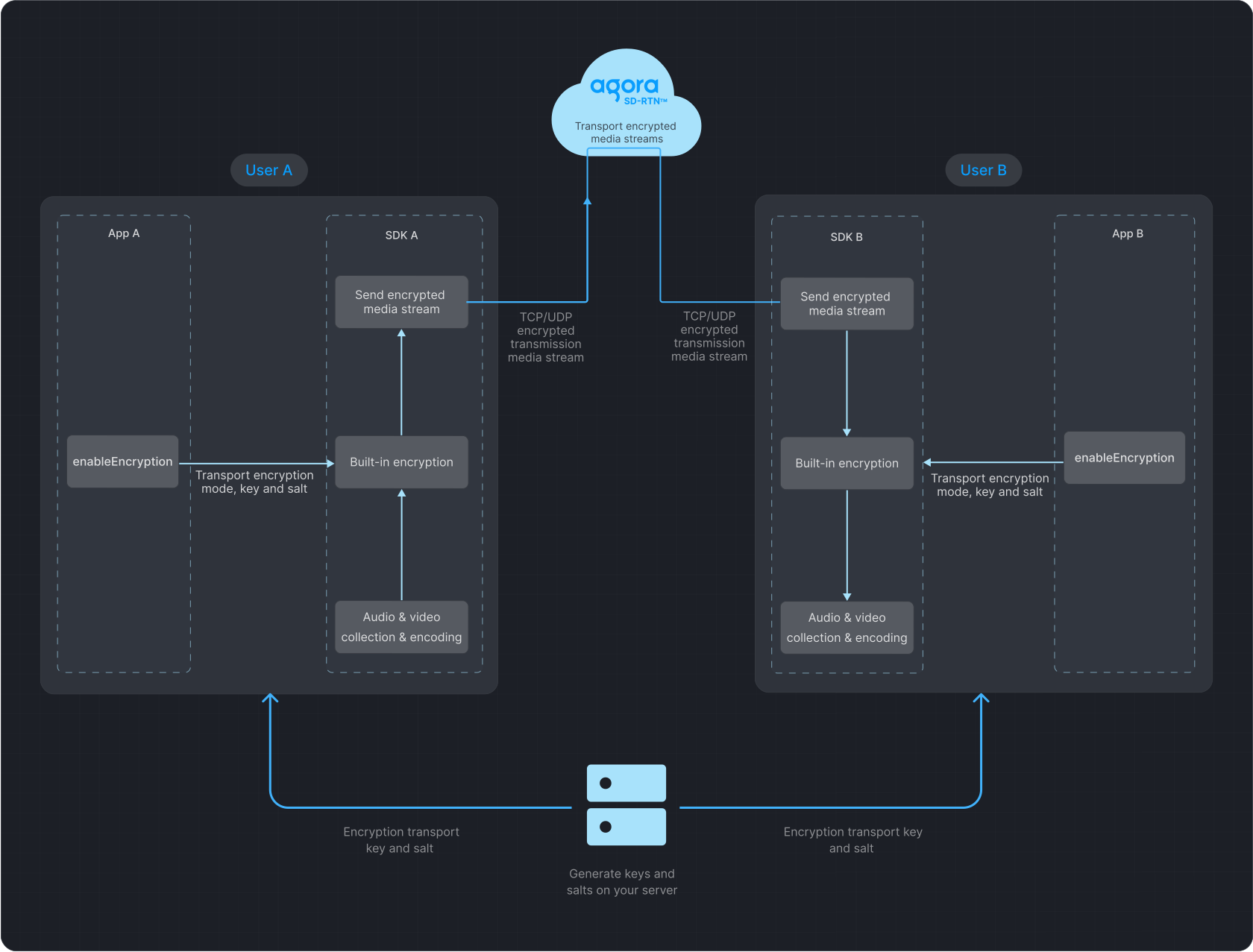
The following figure illustrates data transfer with media stream encryption enabled.
**Data transfer process**
## Prerequisites
Ensure that you have implemented the [SDK quickstart](../../index) in your project.
## Implement media stream encryption
To add built-in media stream encryption to your app, refer to the following steps.
1. Generate a key and salt on your server.
To generate a random 32-byte hexadecimal key on your server as a string, run:
```bash
openssl rand -hex 32
```
To generate a random Base64-encoded, 32-byte salt on your server, run:
```bash
openssl rand -base64 32
```
2. Implement client-side logic.
All users in a channel must use the same encryption mode, key, and salt. Discrepancies may lead to unexpected behavior, such as black screens or audio loss.
To ensure security, use a new key and salt each time you enable media stream encryption.
Obtain the string key and Base64-encoded salt from your server, convert the salt from Base64 to `Uint8List`, and call `enableEncryption` before joining a channel. Set the encryption mode to `aes128Gcm2` or `aes256Gcm2` and pass the key and salt to the SDK.
```dart
import 'dart:convert';
import 'dart:typed_data';
import 'package:agora_rtc_engine/agora_rtc_engine.dart';
Future enableEncryption(RtcEngine rtcEngine) async {
final String encryptionKdfSaltBase64 =
await Server.getEncryptionKdfSaltBase64();
final String encryptionSecret = await Server.getEncryptionSecret();
final Uint8List encryptionKdfSalt = base64Decode(encryptionKdfSaltBase64);
final config = EncryptionConfig(
encryptionMode: EncryptionMode.aes128Gcm2,
encryptionKey: encryptionSecret,
encryptionKdfSalt: encryptionKdfSalt,
);
await rtcEngine.enableEncryption(enabled: true, config: config);
}
```
## Reference
### API reference
* [`enableEncryption`](https://api-ref.agora.io/en/video-sdk/flutter/6.x/API/class_irtcengine.html#api_irtcengine_enableencryption)
* [`EncryptionConfig`](https://api-ref.agora.io/en/video-sdk/flutter/6.x/API/class_encryptionconfig.html)
* [`EncryptionMode`](https://api-ref.agora.io/en/video-sdk/flutter/6.x/API/enum_encryptionmode.html)